Chippy Merin Mathew
Akash Krishna T
IMROKRAFT
crafting the future
Cascading Style Sheet 3
Cascading Style Sheet
Introduction
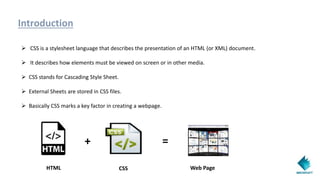
 CSS is a stylesheet language that describes the presentation of an HTML (or XML) document.
 It describes how elements must be viewed on screen or in other media.
 CSS stands for Cascading Style Sheet.
 External Sheets are stored in CSS files.
 Basically CSS marks a key factor in creating a webpage.
+ =
HTML CSS Web Page
CSS Syntax
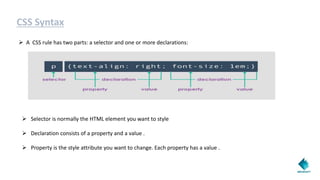
 A CSS rule has two parts: a selector and one or more declarations:
 Selector is normally the HTML element you want to style
 Declaration consists of a property and a value .
 Property is the style attribute you want to change. Each property has a value .
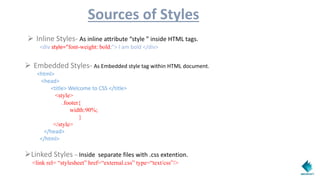
Sources of Styles
 Inline Styles- As inline attribute “style ” inside HTML tags.
<div style=“font-weight: bold;”> I am bold </div>
 Embedded Styles- As Embedded style tag within HTML document.
<html>
<head>
<title> Welcome to CSS </title>
<style>
.footer{
width:90%;
}
</style>
</head>
</html>
Linked Styles – Inside separate files with .css extention.
<link rel= “stylesheet” href=“external.css” type=“text/css”/>
CSS3
Introduction
• CSS3 is the latest standard for CSS.
• CSS3 is completely backwards-compatible with earlier versions of CSS.
• CSS3 has been divided into “modules “ which helps the user to have animations and other features.
• It comes by the Collaboration of CSS2 thus marked the collaboration as modules.
CSS3 Modules
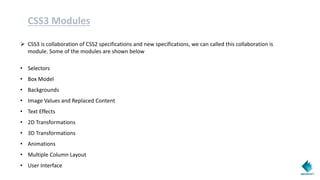
 CSS3 is collaboration of CSS2 specifications and new specifications, we can called this collaboration is
module. Some of the modules are shown below
• Selectors
• Box Model
• Backgrounds
• Image Values and Replaced Content
• Text Effects
• 2D Transformations
• 3D Transformations
• Animations
• Multiple Column Layout
• User Interface
Some of the Important Properties of CSS3
Border-Radius
• Probably the property with the highest level of awareness and maybe the synonym for CSS3 for
some.
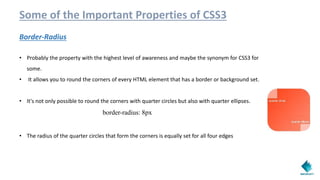
• It allows you to round the corners of every HTML element that has a border or background set.
• It's not only possible to round the corners with quarter circles but also with quarter ellipses.
border-radius: 8px
• The radius of the quarter circles that form the corners is equally set for all four edges
Border-Image
• Presumably the CSS3 property that is most difficult to understand.
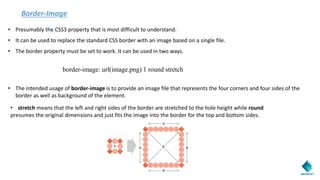
• It can be used to replace the standard CSS border with an image based on a single file.
• The border property must be set to work. It can be used in two ways.
border-image: url(image.png) 1 round stretch
• The intended usage of border-image is to provide an image file that represents the four corners and four sides of the
border as well as background of the element.
• stretch means that the left and right sides of the border are stretched to the hole height while round
presumes the original dimensions and just fits the image into the border for the top and bottom sides.
Background (multiple background images)
• Earlier it was only possible to set a single image file for the background of an element.
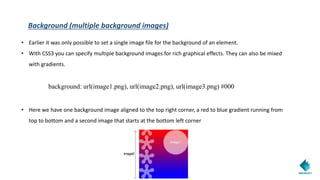
• With CSS3 you can specify multiple background images for rich graphical effects. They can also be mixed
with gradients.
background: url(image1.png), url(image2.png), url(image3.png) #000
• Here we have one background image aligned to the top right corner, a red to blue gradient running from
top to bottom and a second image that starts at the bottom left corner
Transition
• Transitions ensure that websites get a bit more dynamic. Instead of a value’s normal behavior to
change immediately it is faded smoothly. Many available CSS properties can be transitioned.
transition: background-color 1s
• In this case the background-color of the element is transitioned over a period of 1 second. If there is no
property set the transition defaults to all, that is, that all of the properties of the element are
transition: width 3s, opacity 2s 3s ease-in
• Transitions for different properties can also be combined within a single notation. In this case the
width is animated over a period of 3 seconds, though the opacity lasts 2 seconds, only starts after 3 seconds
and has ease-in set as the timing-function resulting in a smooth acceleration.
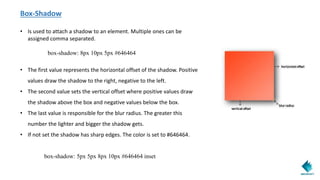
Box-Shadow
• Is used to attach a shadow to an element. Multiple ones can be
assigned comma separated.
box-shadow: 8px 10px 5px #646464
• The first value represents the horizontal offset of the shadow. Positive
values draw the shadow to the right, negative to the left.
• The second value sets the vertical offset where positive values draw
the shadow above the box and negative values below the box.
• The last value is responsible for the blur radius. The greater this
number the lighter and bigger the shadow gets.
• If not set the shadow has sharp edges. The color is set to #646464.
box-shadow: 5px 5px 8px 10px #646464 inset
Conclusion
We’ve covered a lot of wonderful ways to use CSS3 right now in your daily work. My hope
is that by demonstrating how these techniques can enhance the experience layer in
browsers that support them, while gracefully degrading in browsers that don’t, you’ll be
inspired to use them every day, regardless of the project you’re working on.
CSS3 basics for beginners - Imrokraft

CSS3 basics for beginners - Imrokraft

  • 1.
    Chippy Merin Mathew AkashKrishna T IMROKRAFT crafting the future Cascading Style Sheet 3
  • 2.
  • 3.
    Introduction  CSS isa stylesheet language that describes the presentation of an HTML (or XML) document.  It describes how elements must be viewed on screen or in other media.  CSS stands for Cascading Style Sheet.  External Sheets are stored in CSS files.  Basically CSS marks a key factor in creating a webpage. + = HTML CSS Web Page
  • 4.
    CSS Syntax  ACSS rule has two parts: a selector and one or more declarations:  Selector is normally the HTML element you want to style  Declaration consists of a property and a value .  Property is the style attribute you want to change. Each property has a value .
  • 5.
    Sources of Styles Inline Styles- As inline attribute “style ” inside HTML tags. <div style=“font-weight: bold;”> I am bold </div>  Embedded Styles- As Embedded style tag within HTML document. <html> <head> <title> Welcome to CSS </title> <style> .footer{ width:90%; } </style> </head> </html> Linked Styles – Inside separate files with .css extention. <link rel= “stylesheet” href=“external.css” type=“text/css”/>
  • 6.
    CSS3 Introduction • CSS3 isthe latest standard for CSS. • CSS3 is completely backwards-compatible with earlier versions of CSS. • CSS3 has been divided into “modules “ which helps the user to have animations and other features. • It comes by the Collaboration of CSS2 thus marked the collaboration as modules.
  • 7.
    CSS3 Modules  CSS3is collaboration of CSS2 specifications and new specifications, we can called this collaboration is module. Some of the modules are shown below • Selectors • Box Model • Backgrounds • Image Values and Replaced Content • Text Effects • 2D Transformations • 3D Transformations • Animations • Multiple Column Layout • User Interface
  • 8.
    Some of theImportant Properties of CSS3 Border-Radius • Probably the property with the highest level of awareness and maybe the synonym for CSS3 for some. • It allows you to round the corners of every HTML element that has a border or background set. • It's not only possible to round the corners with quarter circles but also with quarter ellipses. border-radius: 8px • The radius of the quarter circles that form the corners is equally set for all four edges
  • 9.
    Border-Image • Presumably theCSS3 property that is most difficult to understand. • It can be used to replace the standard CSS border with an image based on a single file. • The border property must be set to work. It can be used in two ways. border-image: url(image.png) 1 round stretch • The intended usage of border-image is to provide an image file that represents the four corners and four sides of the border as well as background of the element. • stretch means that the left and right sides of the border are stretched to the hole height while round presumes the original dimensions and just fits the image into the border for the top and bottom sides.
  • 10.
    Background (multiple backgroundimages) • Earlier it was only possible to set a single image file for the background of an element. • With CSS3 you can specify multiple background images for rich graphical effects. They can also be mixed with gradients. background: url(image1.png), url(image2.png), url(image3.png) #000 • Here we have one background image aligned to the top right corner, a red to blue gradient running from top to bottom and a second image that starts at the bottom left corner
  • 11.
    Transition • Transitions ensurethat websites get a bit more dynamic. Instead of a value’s normal behavior to change immediately it is faded smoothly. Many available CSS properties can be transitioned. transition: background-color 1s • In this case the background-color of the element is transitioned over a period of 1 second. If there is no property set the transition defaults to all, that is, that all of the properties of the element are transition: width 3s, opacity 2s 3s ease-in • Transitions for different properties can also be combined within a single notation. In this case the width is animated over a period of 3 seconds, though the opacity lasts 2 seconds, only starts after 3 seconds and has ease-in set as the timing-function resulting in a smooth acceleration.
  • 12.
    Box-Shadow • Is usedto attach a shadow to an element. Multiple ones can be assigned comma separated. box-shadow: 8px 10px 5px #646464 • The first value represents the horizontal offset of the shadow. Positive values draw the shadow to the right, negative to the left. • The second value sets the vertical offset where positive values draw the shadow above the box and negative values below the box. • The last value is responsible for the blur radius. The greater this number the lighter and bigger the shadow gets. • If not set the shadow has sharp edges. The color is set to #646464. box-shadow: 5px 5px 8px 10px #646464 inset
  • 13.
    Conclusion We’ve covered alot of wonderful ways to use CSS3 right now in your daily work. My hope is that by demonstrating how these techniques can enhance the experience layer in browsers that support them, while gracefully degrading in browsers that don’t, you’ll be inspired to use them every day, regardless of the project you’re working on.