HTML Tags Chart
To use any of the following HTML tags, simply select the HTML code you'd like and copy and paste
it into your web page.
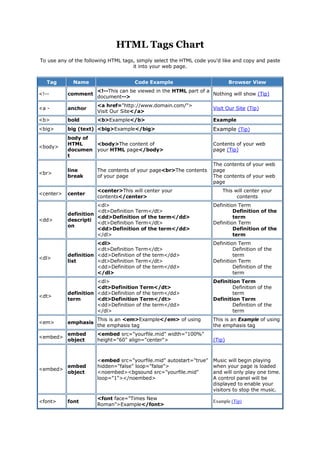
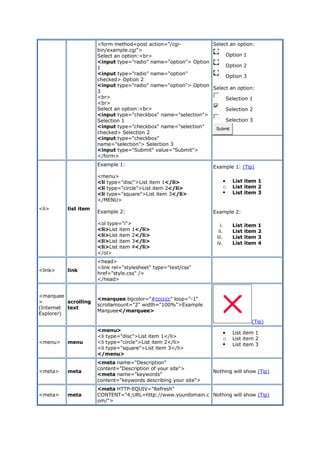
Tag Name Code Example Browser View
<!-- comment
<!--This can be viewed in the HTML part of a
document-->
Nothing will show (Tip)
<a - anchor
<a href="http://www.domain.com/">
Visit Our Site</a>
Visit Our Site (Tip)
<b> bold <b>Example</b> Example
<big> big (text) <big>Example</big> Example (Tip)
<body>
body of
HTML
documen
t
<body>The content of
your HTML page</body>
Contents of your web
page (Tip)
<br>
line
break
The contents of your page<br>The contents
of your page
The contents of your web
page
The contents of your web
page
<center> center
<center>This will center your
contents</center>
This will center your
contents
<dd>
definition
descripti
on
<dl>
<dt>Definition Term</dt>
<dd>Definition of the term</dd>
<dt>Definition Term</dt>
<dd>Definition of the term</dd>
</dl>
Definition Term
Definition of the
term
Definition Term
Definition of the
term
<dl>
definition
list
<dl>
<dt>Definition Term</dt>
<dd>Definition of the term</dd>
<dt>Definition Term</dt>
<dd>Definition of the term</dd>
</dl>
Definition Term
Definition of the
term
Definition Term
Definition of the
term
<dt>
definition
term
<dl>
<dt>Definition Term</dt>
<dd>Definition of the term</dd>
<dt>Definition Term</dt>
<dd>Definition of the term</dd>
</dl>
Definition Term
Definition of the
term
Definition Term
Definition of the
term
<em> emphasis
This is an <em>Example</em> of using
the emphasis tag
This is an Example of using
the emphasis tag
<embed>
embed
object
<embed src="yourfile.mid" width="100%"
height="60" align="center"> (Tip)
<embed>
embed
object
<embed src="yourfile.mid" autostart="true"
hidden="false" loop="false">
<noembed><bgsound src="yourfile.mid"
loop="1"></noembed>
Music will begin playing
when your page is loaded
and will only play one time.
A control panel will be
displayed to enable your
visitors to stop the music.
<font> font
<font face="Times New
Roman">Example</font>
Example (Tip)
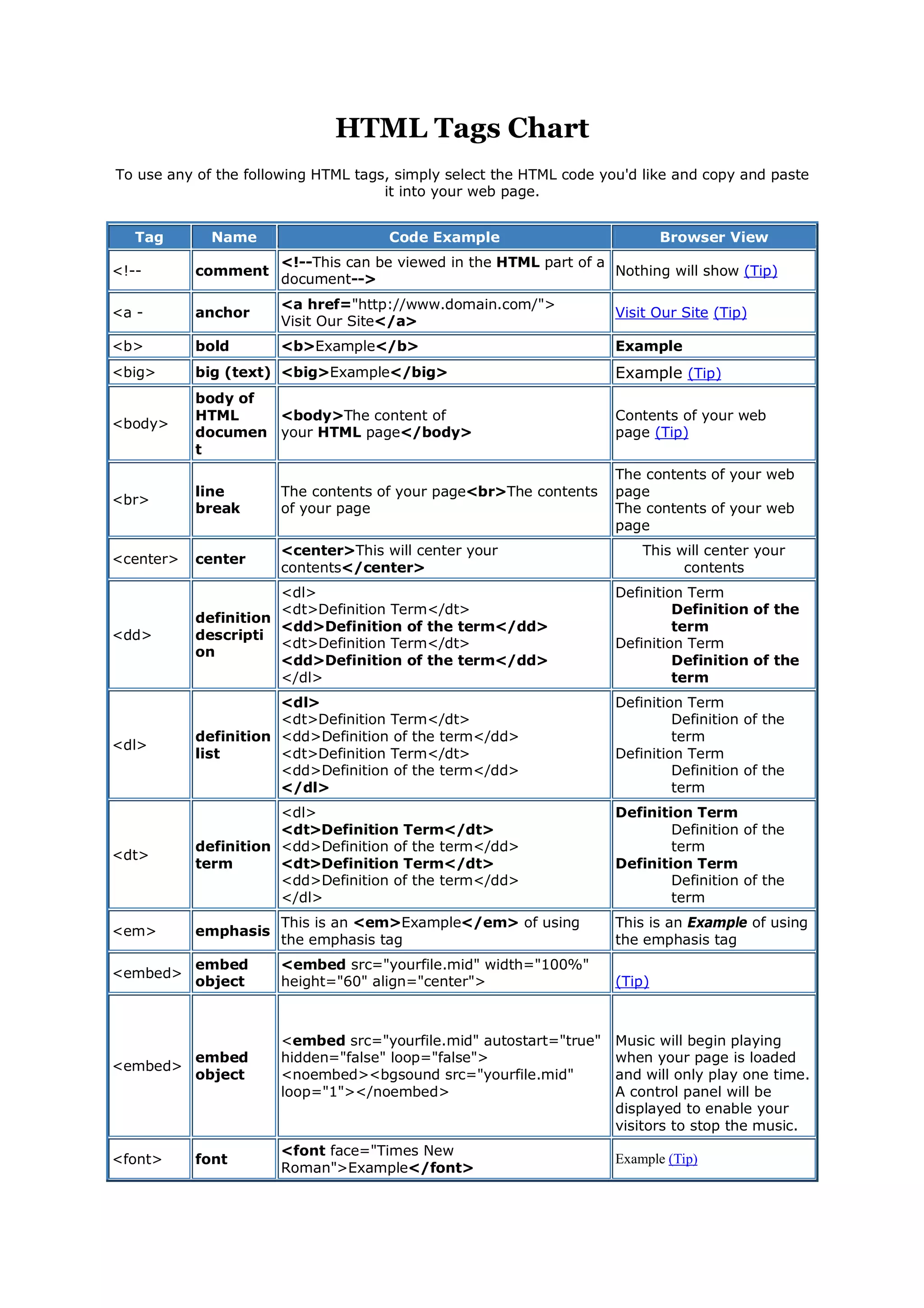
<font> font
<font face="Times New Roman"
size="4">Example</font>
Example (Tip)
<font> font
<font face="Times New Roman" size="+3"
color="#ff0000">Example</font> Example(Tip)
<form> form
<form action="mailto:you@yourdomain.com
">
Name: <input name="Name" value=""
size="10"><br>
Email: <input name="Email" value=""
size="10"><br>
<center><input type="submit"></center>
</form>
Name: (Tip)
Email:
Submit
<h1>
<h2>
<h3>
<h4>
<h5>
<h6>
heading 1
heading 2
heading 3
heading 4
heading 5
heading 6
<h1>Heading 1 Example</h1>
<h2>Heading 2 Example</h2>
<h3>Heading 3 Example</h3>
<h4>Heading 4 Example</h4>
<h5>Heading 5 Example</h5>
<h6>Heading 6 Example</h6>
<head>
heading
of HTML
documen
t
<head>Contains elements describing the
document</head>
Nothing will show
<hr>
horizonta
l rule
<hr />
Contents of your web
page (Tip)
Contents of your web page
<hr>
horizonta
l rule
<hr width="50%" size="3" />
Contents of your web page
<hr>
horizonta
l rule
<hr width="50%" size="3" noshade />
Contents of your web page
<hr>
(Internet
Explorer)
horizonta
l rule
<hr width="75%" color="#ff0000" size="4"
/>
Contents of your web page
<hr>
(Internet
Explorer)
horizonta
l rule
<hr width="25%" color="#6699ff" size="6"
/>
Contents of your web page
<html>
hypertext
markup
language
<html>
<head>
<meta>
<title>Title of your web page</title>
</head>
<body>HTML web page contents
</body>
</html>
Contents of your web page
<i> italic <i>Example</i> Example
<img> image
<img src="Earth.gif" width="41"
height="41" border="0" alt="text describing
the image" /> (Tip)
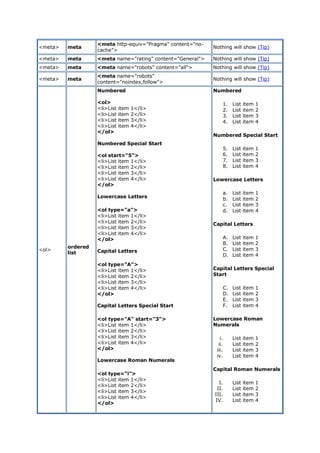
<input>
input
field
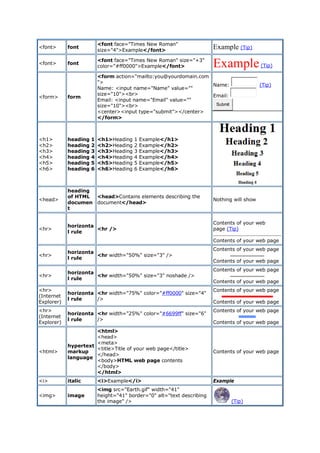
Example 1:
<form method=post action="/cgi-
bin/example.cgi">
<input type="text" size="10"
maxlength="30">
<input type="Submit" value="Submit">
</form>
Example 1: (Tip)
Submit
<input>
(Internet
Explorer)
input
field
Example 2:
<form method=post action="/cgi-
bin/example.cgi">
<input type="text" style="color: #ffffff;
font-family: Verdana; font-weight: bold; font-
size: 12px; background-color: #72a4d2;"
size="10" maxlength="30">
<input type="Submit" value="Submit">
</form>
Example 2: (Tip)
Submit
<input>
input
field
Example 3:
<form method=post action="/cgi-
bin/example.cgi">
<table border="0" cellspacing="0"
cellpadding="2"><tr><td
bgcolor="#8463ff"><input type="text"
size="10" maxlength="30"></td><td
bgcolor="#8463ff" valign="Middle"> <input
type="image" name="submit"
src="yourimage.gif"></td></tr> </table>
</form>
Example 3: (Tip)
<input>
input
field
Example 4:
<form method=post action="/cgi-
bin/example.cgi">
Enter Your Comments:<br>
<textarea wrap="virtual" name="Comments"
rows=3 cols=20
maxlength=100></textarea><br>
<input type="Submit" value="Submit">
<input type="Reset" value="Clear">
</form>
Example 4: (Tip)
Submit Clear
<input>
input
field
Example 5:
<form method=post action="/cgi-
bin/example.cgi">
<center>
Select an option:
<select>
<option >option 1</option>
<option selected>option 2</option>
<option>option 3</option>
<option>option 4</option>
<option>option 5</option>
<option>option 6</option>
</select><br>
<input type="Submit"
value="Submit"></center>
</form>
Example 5: Tip)
Select an
option:
option 2
Submit
<input>
input
field
Example 6: Example 6: (Tip)
<form method=post action="/cgi-
bin/example.cgi">
Select an option:<br>
<input type="radio" name="option"> Option
1
<input type="radio" name="option"
checked> Option 2
<input type="radio" name="option"> Option
3
<br>
<br>
Select an option:<br>
<input type="checkbox" name="selection">
Selection 1
<input type="checkbox" name="selection"
checked> Selection 2
<input type="checkbox"
name="selection"> Selection 3
<input type="Submit" value="Submit">
</form>
Select an option:
Option 1
Option 2
Option 3
Select an option:
Selection 1
Selection 2
Selection 3
Submit
<li> list item
Example 1:
<menu>
<li type="disc">List item 1</li>
<li type="circle">List item 2</li>
<li type="square">List item 3</li>
</MENU>
Example 2:
<ol type="i">
<li>List item 1</li>
<li>List item 2</li>
<li>List item 3</li>
<li>List item 4</li>
</ol>
Example 1: (Tip)
 List item 1
o List item 2
 List item 3
Example 2:
i. List item 1
ii. List item 2
iii. List item 3
iv. List item 4
<link> link
<head>
<link rel="stylesheet" type="text/css"
href="style.css" />
</head>
<marquee
>
(Internet
Explorer)
scrolling
text
<marquee bgcolor="#cccccc" loop="-1"
scrollamount="2" width="100%">Example
Marquee</marquee>
(Tip)
<menu> menu
<menu>
<li type="disc">List item 1</li>
<li type="circle">List item 2</li>
<li type="square">List item 3</li>
</menu>
 List item 1
o List item 2
 List item 3
<meta> meta
<meta name="Description"
content="Description of your site">
<meta name="keywords"
content="keywords describing your site">
Nothing will show (Tip)
<meta> meta
<meta HTTP-EQUIV="Refresh"
CONTENT="4;URL=http://www.yourdomain.c
om/">
Nothing will show (Tip)
<meta> meta
<meta http-equiv="Pragma" content="no-
cache">
Nothing will show (Tip)
<meta> meta <meta name="rating" content="General"> Nothing will show (Tip)
<meta> meta <meta name="robots" content="all"> Nothing will show (Tip)
<meta> meta
<meta name="robots"
content="noindex,follow">
Nothing will show (Tip)
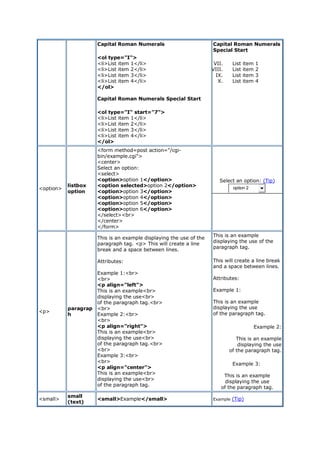
<ol>
ordered
list
Numbered
<ol>
<li>List item 1</li>
<li>List item 2</li>
<li>List item 3</li>
<li>List item 4</li>
</ol>
Numbered Special Start
<ol start="5">
<li>List item 1</li>
<li>List item 2</li>
<li>List item 3</li>
<li>List item 4</li>
</ol>
Lowercase Letters
<ol type="a">
<li>List item 1</li>
<li>List item 2</li>
<li>List item 3</li>
<li>List item 4</li>
</ol>
Capital Letters
<ol type="A">
<li>List item 1</li>
<li>List item 2</li>
<li>List item 3</li>
<li>List item 4</li>
</ol>
Capital Letters Special Start
<ol type="A" start="3">
<li>List item 1</li>
<li>List item 2</li>
<li>List item 3</li>
<li>List item 4</li>
</ol>
Lowercase Roman Numerals
<ol type="i">
<li>List item 1</li>
<li>List item 2</li>
<li>List item 3</li>
<li>List item 4</li>
</ol>
Numbered
1. List item 1
2. List item 2
3. List item 3
4. List item 4
Numbered Special Start
5. List item 1
6. List item 2
7. List item 3
8. List item 4
Lowercase Letters
a. List item 1
b. List item 2
c. List item 3
d. List item 4
Capital Letters
A. List item 1
B. List item 2
C. List item 3
D. List item 4
Capital Letters Special
Start
C. List item 1
D. List item 2
E. List item 3
F. List item 4
Lowercase Roman
Numerals
i. List item 1
ii. List item 2
iii. List item 3
iv. List item 4
Capital Roman Numerals
I. List item 1
II. List item 2
III. List item 3
IV. List item 4
Capital Roman Numerals
<ol type="I">
<li>List item 1</li>
<li>List item 2</li>
<li>List item 3</li>
<li>List item 4</li>
</ol>
Capital Roman Numerals Special Start
<ol type="I" start="7">
<li>List item 1</li>
<li>List item 2</li>
<li>List item 3</li>
<li>List item 4</li>
</ol>
Capital Roman Numerals
Special Start
VII. List item 1
VIII. List item 2
IX. List item 3
X. List item 4
<option>
listbox
option
<form method=post action="/cgi-
bin/example.cgi">
<center>
Select an option:
<select>
<option>option 1</option>
<option selected>option 2</option>
<option>option 3</option>
<option>option 4</option>
<option>option 5</option>
<option>option 6</option>
</select><br>
</center>
</form>
Select an option: (Tip)
option 2
<p>
paragrap
h
This is an example displaying the use of the
paragraph tag. <p> This will create a line
break and a space between lines.
Attributes:
Example 1:<br>
<br>
<p align="left">
This is an example<br>
displaying the use<br>
of the paragraph tag.<br>
<br>
Example 2:<br>
<br>
<p align="right">
This is an example<br>
displaying the use<br>
of the paragraph tag.<br>
<br>
Example 3:<br>
<br>
<p align="center">
This is an example<br>
displaying the use<br>
of the paragraph tag.
This is an example
displaying the use of the
paragraph tag.
This will create a line break
and a space between lines.
Attributes:
Example 1:
This is an example
displaying the use
of the paragraph tag.
Example 2:
This is an example
displaying the use
of the paragraph tag.
Example 3:
This is an example
displaying the use
of the paragraph tag.
<small>
small
(text)
<small>Example</small> Example (Tip)
<strike>
deleted
text
<strike>Example</strike> Example
<strong>
strong
emphasis
<strong>Example</strong> Example
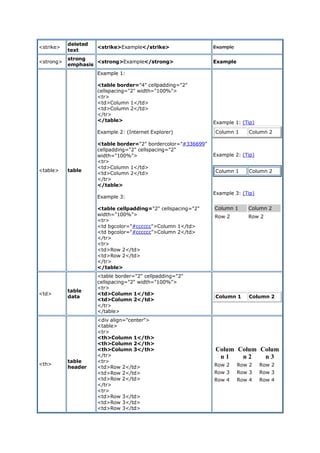
<table> table
Example 1:
<table border="4" cellpadding="2"
cellspacing="2" width="100%">
<tr>
<td>Column 1</td>
<td>Column 2</td>
</tr>
</table>
Example 2: (Internet Explorer)
<table border="2" bordercolor="#336699"
cellpadding="2" cellspacing="2"
width="100%">
<tr>
<td>Column 1</td>
<td>Column 2</td>
</tr>
</table>
Example 3:
<table cellpadding="2" cellspacing="2"
width="100%">
<tr>
<td bgcolor="#cccccc">Column 1</td>
<td bgcolor="#cccccc">Column 2</td>
</tr>
<tr>
<td>Row 2</td>
<td>Row 2</td>
</tr>
</table>
Example 1: (Tip)
Column 1 Column 2
Example 2: (Tip)
Column 1 Column 2
Example 3: (Tip)
Column 1 Column 2
Row 2 Row 2
<td>
table
data
<table border="2" cellpadding="2"
cellspacing="2" width="100%">
<tr>
<td>Column 1</td>
<td>Column 2</td>
</tr>
</table>
Column 1 Column 2
<th>
table
header
<div align="center">
<table>
<tr>
<th>Column 1</th>
<th>Column 2</th>
<th>Column 3</th>
</tr>
<tr>
<td>Row 2</td>
<td>Row 2</td>
<td>Row 2</td>
</tr>
<tr>
<td>Row 3</td>
<td>Row 3</td>
<td>Row 3</td>
Colum
n 1
Colum
n 2
Colum
n 3
Row 2 Row 2 Row 2
Row 3 Row 3 Row 3
Row 4 Row 4 Row 4
</tr>
<tr>
<td>Row 4</td>
<td>Row 4</td>
<td>Row 4</td>
</tr>
</table>
</div>
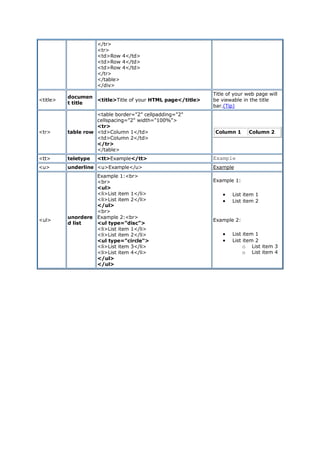
<title>
documen
t title
<title>Title of your HTML page</title>
Title of your web page will
be viewable in the title
bar.(Tip)
<tr> table row
<table border="2" cellpadding="2"
cellspacing="2" width="100%">
<tr>
<td>Column 1</td>
<td>Column 2</td>
</tr>
</table>
Column 1 Column 2
<tt> teletype <tt>Example</tt> Example
<u> underline <u>Example</u> Example
<ul>
unordere
d list
Example 1:<br>
<br>
<ul>
<li>List item 1</li>
<li>List item 2</li>
</ul>
<br>
Example 2:<br>
<ul type="disc">
<li>List item 1</li>
<li>List item 2</li>
<ul type="circle">
<li>List item 3</li>
<li>List item 4</li>
</ul>
</ul>
Example 1:
 List item 1
 List item 2
Example 2:
 List item 1
 List item 2
o List item 3
o List item 4

Html tags-chart

  • 1.
    HTML Tags Chart Touse any of the following HTML tags, simply select the HTML code you'd like and copy and paste it into your web page. Tag Name Code Example Browser View <!-- comment <!--This can be viewed in the HTML part of a document--> Nothing will show (Tip) <a - anchor <a href="http://www.domain.com/"> Visit Our Site</a> Visit Our Site (Tip) <b> bold <b>Example</b> Example <big> big (text) <big>Example</big> Example (Tip) <body> body of HTML documen t <body>The content of your HTML page</body> Contents of your web page (Tip) <br> line break The contents of your page<br>The contents of your page The contents of your web page The contents of your web page <center> center <center>This will center your contents</center> This will center your contents <dd> definition descripti on <dl> <dt>Definition Term</dt> <dd>Definition of the term</dd> <dt>Definition Term</dt> <dd>Definition of the term</dd> </dl> Definition Term Definition of the term Definition Term Definition of the term <dl> definition list <dl> <dt>Definition Term</dt> <dd>Definition of the term</dd> <dt>Definition Term</dt> <dd>Definition of the term</dd> </dl> Definition Term Definition of the term Definition Term Definition of the term <dt> definition term <dl> <dt>Definition Term</dt> <dd>Definition of the term</dd> <dt>Definition Term</dt> <dd>Definition of the term</dd> </dl> Definition Term Definition of the term Definition Term Definition of the term <em> emphasis This is an <em>Example</em> of using the emphasis tag This is an Example of using the emphasis tag <embed> embed object <embed src="yourfile.mid" width="100%" height="60" align="center"> (Tip) <embed> embed object <embed src="yourfile.mid" autostart="true" hidden="false" loop="false"> <noembed><bgsound src="yourfile.mid" loop="1"></noembed> Music will begin playing when your page is loaded and will only play one time. A control panel will be displayed to enable your visitors to stop the music. <font> font <font face="Times New Roman">Example</font> Example (Tip)
  • 2.
    <font> font <font face="TimesNew Roman" size="4">Example</font> Example (Tip) <font> font <font face="Times New Roman" size="+3" color="#ff0000">Example</font> Example(Tip) <form> form <form action="mailto:you@yourdomain.com "> Name: <input name="Name" value="" size="10"><br> Email: <input name="Email" value="" size="10"><br> <center><input type="submit"></center> </form> Name: (Tip) Email: Submit <h1> <h2> <h3> <h4> <h5> <h6> heading 1 heading 2 heading 3 heading 4 heading 5 heading 6 <h1>Heading 1 Example</h1> <h2>Heading 2 Example</h2> <h3>Heading 3 Example</h3> <h4>Heading 4 Example</h4> <h5>Heading 5 Example</h5> <h6>Heading 6 Example</h6> <head> heading of HTML documen t <head>Contains elements describing the document</head> Nothing will show <hr> horizonta l rule <hr /> Contents of your web page (Tip) Contents of your web page <hr> horizonta l rule <hr width="50%" size="3" /> Contents of your web page Contents of your web page <hr> horizonta l rule <hr width="50%" size="3" noshade /> Contents of your web page Contents of your web page <hr> (Internet Explorer) horizonta l rule <hr width="75%" color="#ff0000" size="4" /> Contents of your web page Contents of your web page <hr> (Internet Explorer) horizonta l rule <hr width="25%" color="#6699ff" size="6" /> Contents of your web page Contents of your web page <html> hypertext markup language <html> <head> <meta> <title>Title of your web page</title> </head> <body>HTML web page contents </body> </html> Contents of your web page <i> italic <i>Example</i> Example <img> image <img src="Earth.gif" width="41" height="41" border="0" alt="text describing the image" /> (Tip)
  • 3.
    <input> input field Example 1: <form method=postaction="/cgi- bin/example.cgi"> <input type="text" size="10" maxlength="30"> <input type="Submit" value="Submit"> </form> Example 1: (Tip) Submit <input> (Internet Explorer) input field Example 2: <form method=post action="/cgi- bin/example.cgi"> <input type="text" style="color: #ffffff; font-family: Verdana; font-weight: bold; font- size: 12px; background-color: #72a4d2;" size="10" maxlength="30"> <input type="Submit" value="Submit"> </form> Example 2: (Tip) Submit <input> input field Example 3: <form method=post action="/cgi- bin/example.cgi"> <table border="0" cellspacing="0" cellpadding="2"><tr><td bgcolor="#8463ff"><input type="text" size="10" maxlength="30"></td><td bgcolor="#8463ff" valign="Middle"> <input type="image" name="submit" src="yourimage.gif"></td></tr> </table> </form> Example 3: (Tip) <input> input field Example 4: <form method=post action="/cgi- bin/example.cgi"> Enter Your Comments:<br> <textarea wrap="virtual" name="Comments" rows=3 cols=20 maxlength=100></textarea><br> <input type="Submit" value="Submit"> <input type="Reset" value="Clear"> </form> Example 4: (Tip) Submit Clear <input> input field Example 5: <form method=post action="/cgi- bin/example.cgi"> <center> Select an option: <select> <option >option 1</option> <option selected>option 2</option> <option>option 3</option> <option>option 4</option> <option>option 5</option> <option>option 6</option> </select><br> <input type="Submit" value="Submit"></center> </form> Example 5: Tip) Select an option: option 2 Submit <input> input field Example 6: Example 6: (Tip)
  • 4.
    <form method=post action="/cgi- bin/example.cgi"> Selectan option:<br> <input type="radio" name="option"> Option 1 <input type="radio" name="option" checked> Option 2 <input type="radio" name="option"> Option 3 <br> <br> Select an option:<br> <input type="checkbox" name="selection"> Selection 1 <input type="checkbox" name="selection" checked> Selection 2 <input type="checkbox" name="selection"> Selection 3 <input type="Submit" value="Submit"> </form> Select an option: Option 1 Option 2 Option 3 Select an option: Selection 1 Selection 2 Selection 3 Submit <li> list item Example 1: <menu> <li type="disc">List item 1</li> <li type="circle">List item 2</li> <li type="square">List item 3</li> </MENU> Example 2: <ol type="i"> <li>List item 1</li> <li>List item 2</li> <li>List item 3</li> <li>List item 4</li> </ol> Example 1: (Tip)  List item 1 o List item 2  List item 3 Example 2: i. List item 1 ii. List item 2 iii. List item 3 iv. List item 4 <link> link <head> <link rel="stylesheet" type="text/css" href="style.css" /> </head> <marquee > (Internet Explorer) scrolling text <marquee bgcolor="#cccccc" loop="-1" scrollamount="2" width="100%">Example Marquee</marquee> (Tip) <menu> menu <menu> <li type="disc">List item 1</li> <li type="circle">List item 2</li> <li type="square">List item 3</li> </menu>  List item 1 o List item 2  List item 3 <meta> meta <meta name="Description" content="Description of your site"> <meta name="keywords" content="keywords describing your site"> Nothing will show (Tip) <meta> meta <meta HTTP-EQUIV="Refresh" CONTENT="4;URL=http://www.yourdomain.c om/"> Nothing will show (Tip)
  • 5.
    <meta> meta <meta http-equiv="Pragma"content="no- cache"> Nothing will show (Tip) <meta> meta <meta name="rating" content="General"> Nothing will show (Tip) <meta> meta <meta name="robots" content="all"> Nothing will show (Tip) <meta> meta <meta name="robots" content="noindex,follow"> Nothing will show (Tip) <ol> ordered list Numbered <ol> <li>List item 1</li> <li>List item 2</li> <li>List item 3</li> <li>List item 4</li> </ol> Numbered Special Start <ol start="5"> <li>List item 1</li> <li>List item 2</li> <li>List item 3</li> <li>List item 4</li> </ol> Lowercase Letters <ol type="a"> <li>List item 1</li> <li>List item 2</li> <li>List item 3</li> <li>List item 4</li> </ol> Capital Letters <ol type="A"> <li>List item 1</li> <li>List item 2</li> <li>List item 3</li> <li>List item 4</li> </ol> Capital Letters Special Start <ol type="A" start="3"> <li>List item 1</li> <li>List item 2</li> <li>List item 3</li> <li>List item 4</li> </ol> Lowercase Roman Numerals <ol type="i"> <li>List item 1</li> <li>List item 2</li> <li>List item 3</li> <li>List item 4</li> </ol> Numbered 1. List item 1 2. List item 2 3. List item 3 4. List item 4 Numbered Special Start 5. List item 1 6. List item 2 7. List item 3 8. List item 4 Lowercase Letters a. List item 1 b. List item 2 c. List item 3 d. List item 4 Capital Letters A. List item 1 B. List item 2 C. List item 3 D. List item 4 Capital Letters Special Start C. List item 1 D. List item 2 E. List item 3 F. List item 4 Lowercase Roman Numerals i. List item 1 ii. List item 2 iii. List item 3 iv. List item 4 Capital Roman Numerals I. List item 1 II. List item 2 III. List item 3 IV. List item 4
  • 6.
    Capital Roman Numerals <oltype="I"> <li>List item 1</li> <li>List item 2</li> <li>List item 3</li> <li>List item 4</li> </ol> Capital Roman Numerals Special Start <ol type="I" start="7"> <li>List item 1</li> <li>List item 2</li> <li>List item 3</li> <li>List item 4</li> </ol> Capital Roman Numerals Special Start VII. List item 1 VIII. List item 2 IX. List item 3 X. List item 4 <option> listbox option <form method=post action="/cgi- bin/example.cgi"> <center> Select an option: <select> <option>option 1</option> <option selected>option 2</option> <option>option 3</option> <option>option 4</option> <option>option 5</option> <option>option 6</option> </select><br> </center> </form> Select an option: (Tip) option 2 <p> paragrap h This is an example displaying the use of the paragraph tag. <p> This will create a line break and a space between lines. Attributes: Example 1:<br> <br> <p align="left"> This is an example<br> displaying the use<br> of the paragraph tag.<br> <br> Example 2:<br> <br> <p align="right"> This is an example<br> displaying the use<br> of the paragraph tag.<br> <br> Example 3:<br> <br> <p align="center"> This is an example<br> displaying the use<br> of the paragraph tag. This is an example displaying the use of the paragraph tag. This will create a line break and a space between lines. Attributes: Example 1: This is an example displaying the use of the paragraph tag. Example 2: This is an example displaying the use of the paragraph tag. Example 3: This is an example displaying the use of the paragraph tag. <small> small (text) <small>Example</small> Example (Tip)
  • 7.
    <strike> deleted text <strike>Example</strike> Example <strong> strong emphasis <strong>Example</strong> Example <table>table Example 1: <table border="4" cellpadding="2" cellspacing="2" width="100%"> <tr> <td>Column 1</td> <td>Column 2</td> </tr> </table> Example 2: (Internet Explorer) <table border="2" bordercolor="#336699" cellpadding="2" cellspacing="2" width="100%"> <tr> <td>Column 1</td> <td>Column 2</td> </tr> </table> Example 3: <table cellpadding="2" cellspacing="2" width="100%"> <tr> <td bgcolor="#cccccc">Column 1</td> <td bgcolor="#cccccc">Column 2</td> </tr> <tr> <td>Row 2</td> <td>Row 2</td> </tr> </table> Example 1: (Tip) Column 1 Column 2 Example 2: (Tip) Column 1 Column 2 Example 3: (Tip) Column 1 Column 2 Row 2 Row 2 <td> table data <table border="2" cellpadding="2" cellspacing="2" width="100%"> <tr> <td>Column 1</td> <td>Column 2</td> </tr> </table> Column 1 Column 2 <th> table header <div align="center"> <table> <tr> <th>Column 1</th> <th>Column 2</th> <th>Column 3</th> </tr> <tr> <td>Row 2</td> <td>Row 2</td> <td>Row 2</td> </tr> <tr> <td>Row 3</td> <td>Row 3</td> <td>Row 3</td> Colum n 1 Colum n 2 Colum n 3 Row 2 Row 2 Row 2 Row 3 Row 3 Row 3 Row 4 Row 4 Row 4
  • 8.
    </tr> <tr> <td>Row 4</td> <td>Row 4</td> <td>Row4</td> </tr> </table> </div> <title> documen t title <title>Title of your HTML page</title> Title of your web page will be viewable in the title bar.(Tip) <tr> table row <table border="2" cellpadding="2" cellspacing="2" width="100%"> <tr> <td>Column 1</td> <td>Column 2</td> </tr> </table> Column 1 Column 2 <tt> teletype <tt>Example</tt> Example <u> underline <u>Example</u> Example <ul> unordere d list Example 1:<br> <br> <ul> <li>List item 1</li> <li>List item 2</li> </ul> <br> Example 2:<br> <ul type="disc"> <li>List item 1</li> <li>List item 2</li> <ul type="circle"> <li>List item 3</li> <li>List item 4</li> </ul> </ul> Example 1:  List item 1  List item 2 Example 2:  List item 1  List item 2 o List item 3 o List item 4