Niamh Foley
HTML
 What is HTML ?
 Hyper Text Mark-up Language

 Where is it Used?
 Language used to communicate WebPages between
computers on the internet
Terminology
 Syntax –Tech Speak for the code written
 HTML – Hyper Text Mark-up Language
 CSS – Cascading style sheets
 Debugging – Fixing errors within syntax

 Hierarchy – Layout and plan of web pages some times

called a Map
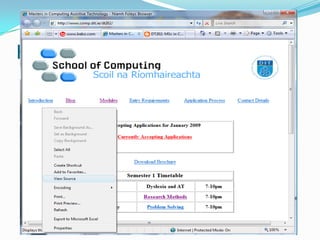
How to View HTML
 Internet Explorer >>Right Click >> View Source
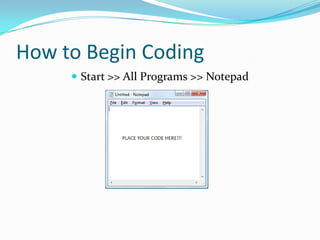
How to Begin Coding
 Start >> All Programs >> Notepad
To View your work
 Save the file as YourName.HTML
 E.G. NiamhFoley.HTML

 Find this File and open it
What we are going to do
1) Create our own individual WebPages
 Using as many pages as you want
2) Create a Transition Year Webpage
 This will be done as part of a group
 One page per person
 Linked in a hierarchy

HTML an introduction

  • 1.
  • 2.
    HTML  What isHTML ?  Hyper Text Mark-up Language  Where is it Used?  Language used to communicate WebPages between computers on the internet
  • 3.
    Terminology  Syntax –TechSpeak for the code written  HTML – Hyper Text Mark-up Language  CSS – Cascading style sheets  Debugging – Fixing errors within syntax  Hierarchy – Layout and plan of web pages some times called a Map
  • 4.
    How to ViewHTML  Internet Explorer >>Right Click >> View Source
  • 5.
    How to BeginCoding  Start >> All Programs >> Notepad
  • 6.
    To View yourwork  Save the file as YourName.HTML  E.G. NiamhFoley.HTML  Find this File and open it
  • 7.
    What we aregoing to do 1) Create our own individual WebPages  Using as many pages as you want 2) Create a Transition Year Webpage  This will be done as part of a group  One page per person  Linked in a hierarchy