




CHRISTMAS TREES
WITH HTML, CSS & JS
NIAMH FOLEY
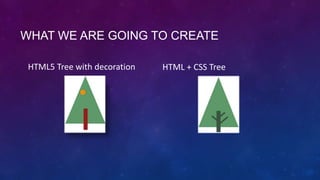
WHAT WE ARE GOING TO CREATE
HTML5 Tree with decoration

HTML + CSS Tree
HYPER TEXT MARK UP LANGUAGE
Pros

Cons

• Provides a basic structure for data to be
displayed

• HTML is not dynamic – meaning it has no logic
to it

• Very easy to pick up and learn

• No one structure to it

• Mistakes are easily found and fixed
• There are many development environments
CASCADING STYLE SHEETS
Pros
• Easy to learn
• Used by 99.999% of websites
• Tidy's up HTML makes it “Cleaner”
• Provides the skin to HMTL

Cons
• None Its that Good
JAVASCRIPT
Pros
• As close as you can get to coding with out all the
“Messy Stuff” of code
• Safe !! You cannot damage your system as its
self contained

• Extremely powerful tool for creating web apps
• Very easy to pick up and learn

Cons
• Only works in a browser
• No Development environment
• Debugging is a pain
• Each browser reacts to code differently
• Imagination is your only limit with JS
HOUSE KEEPING
1. Create a Directory called “Christmas Tree”
2. Create a subdirectory called “css”
3. Create a file called “styles.css” and save into css
4. Create a file called “index.htm” and save into the root directory (Christmas Tree)
Keyboard Short cuts
Copy : Ctrl + C
Paste : Ctrl + V
Cut :

Ctrl + X
HTML BOILER PLATE
Use this boiler plate code to begin

<!doctype html>
<html lang="en">
<head>
<meta charset="utf-8">
<title>The HTML, CSS & JS Christmass Trees</title>
<link rel="stylesheet" href="css/tree.css">
<!--[if lt IE 9]>
<script src="http://html5shiv.googlecode.com/svn/trunk/html5.js"></script>
<![endif]-->
</head>
<body>
<canvas id="canvas" width="300" height="300" style="border-style:solid;" ></canvas>
</body>
</html>
HTTP://BIT.LY/CHRISTMASTREE
HTTP://BIT.LY/TREECSS
HTTP://BIT.LY/JSTREE
FEAR NOT !!!
HTML5 + JAVASCRIPT TREE
<body onload="draw();">
<script type="text/javascript">

FUNCTIONALITY

// JS goes in here

Setup

</script>
function draw() {
var canvas = document.getElementById('canvas');

FUNCTIONALITY
Step 1 - Beginning Code

if (canvas.getContext){
var ctx = canvas.getContext('2d');
// more code goes here !!

}
}
ctx.beginPath();
ctx.moveTo(150, 10); // starting point

FUNCTIONALITY
Step 2 – The Triangle

ctx.lineTo(x, y);

ctx.lineTo(x, y);
ctx.fillStyle = “USE HEX CODE” ;
ctx.fill();
FUNCTIONALITY
Step 3 – The base

ctx.fillStyle = “USE HEX CODE”;
ctx.fillRect (x,y,w,h); // (x,y,width,height)
ctx.beginPath();
ctx.arc(140, 75, 10, 0, Math.PI*2, true);

FUNCTIONALITY
Step 4 - Decorations

// Uses trig to create circle

ctx.closePath();
ctx.fillStyle = " USE HEX CODE ";
ctx.fill();
TEST IT !!
Fingers Crossed it Worked
HTML + CSS TREE
SETUP

1. Use HTML Boiler Plate
2. Create a styles.css file in the css directory
HTML BOILER PLATE
<!doctype html>
<html lang="en">
<head>
<meta charset="utf-8">
<title>The HTML, CSS & JS Christmass Trees</title>
<link rel="stylesheet" href="css/tree.css">
<!--[if lt IE 9]>
<script src="http://html5shiv.googlecode.com/svn/trunk/html5.js"></script>
<![endif]-->
</head>
<body>
<canvas id="canvas" width="300" height="300" style="border-style:dotted solid;" ></canvas>
</body>
</html>
<div class="logo">
<div id="tree"></div>
<div id="trunk">

FUNCTIONALITY
Adding the HTML scaffolding

<div id="left-branch"></div>
<div id="right-bottom-branch"></div>
<div id="right-top-branch"></div>
</div>
</div>
.logo{

height: 200px; width: 160px;

FUNCTIONALITY

margin: 150px auto;

Logo Class

position: relative;
}
#tree {

border-bottom: 200px solid #//Putt Colour in here;
border-left: 80px solid transparent;

FUNCTIONALITY

border-right: 80px solid transparent;

Tree Identifier

position: absolute; top: 0; left: 0;
height: 0; width: 0;
}
#trunk{

height: 85px; width: 16px;

FUNCTIONALITY

background: #3b543f;

Trunk Identifier

position: absolute; left: 72px; bottom: -20px;
}
#left-branch{
background: #//Put Colour in here;
height: 30px; width: 6px;

position: absolute; left: -10px; top: 15px;

FUNCTIONALITY

transform: rotate(-50deg);

Branch Identifiers

-webkit-transform: rotate(-50deg);

Left

-moz-transform: rotate(-50deg);
-ms-transform: rotate(-50deg);
-o-transform: rotate(-50deg);
}
#right-bottom-branch{
background: #//Put Colour in here;
height: 50px; width: 6px;
position: absolute; top: 15px; left: 23px;

FUNCTIONALITY

transform: rotate(50deg);

Branch Identifier

-webkit-transform: rotate(50deg);

Right bottom

-moz-transform: rotate(50deg);

-ms-transform: rotate(50deg);
-o-transform: rotate(50deg);
}
#right-top-branch{
background: #//Put Colour in here;
height: 27px; width: 6px;
position: absolute; top: 2px; left: 20px;

FUNCTIONALITY

transform: rotate(50deg);

Branch Identifier

-webkit-transform: rotate(50deg);

Right Top

-moz-transform: rotate(50deg);

-ms-transform: rotate(50deg);
-o-transform: rotate(50deg);
}
TEST IT !!
Fingers Crossed it Worked
Christmas Trees Made with HTML CSS and JS

Christmas Trees Made with HTML CSS and JS

  • 1.
    CHRISTMAS TREES WITH HTML,CSS & JS NIAMH FOLEY
  • 2.
    WHAT WE AREGOING TO CREATE HTML5 Tree with decoration HTML + CSS Tree
  • 3.
    HYPER TEXT MARKUP LANGUAGE Pros Cons • Provides a basic structure for data to be displayed • HTML is not dynamic – meaning it has no logic to it • Very easy to pick up and learn • No one structure to it • Mistakes are easily found and fixed • There are many development environments
  • 4.
    CASCADING STYLE SHEETS Pros •Easy to learn • Used by 99.999% of websites • Tidy's up HTML makes it “Cleaner” • Provides the skin to HMTL Cons • None Its that Good
  • 5.
    JAVASCRIPT Pros • As closeas you can get to coding with out all the “Messy Stuff” of code • Safe !! You cannot damage your system as its self contained • Extremely powerful tool for creating web apps • Very easy to pick up and learn Cons • Only works in a browser • No Development environment • Debugging is a pain • Each browser reacts to code differently • Imagination is your only limit with JS
  • 6.
    HOUSE KEEPING 1. Createa Directory called “Christmas Tree” 2. Create a subdirectory called “css” 3. Create a file called “styles.css” and save into css 4. Create a file called “index.htm” and save into the root directory (Christmas Tree) Keyboard Short cuts Copy : Ctrl + C Paste : Ctrl + V Cut : Ctrl + X
  • 7.
    HTML BOILER PLATE Usethis boiler plate code to begin <!doctype html> <html lang="en"> <head> <meta charset="utf-8"> <title>The HTML, CSS & JS Christmass Trees</title> <link rel="stylesheet" href="css/tree.css"> <!--[if lt IE 9]> <script src="http://html5shiv.googlecode.com/svn/trunk/html5.js"></script> <![endif]--> </head> <body> <canvas id="canvas" width="300" height="300" style="border-style:solid;" ></canvas> </body> </html>
  • 8.
  • 9.
  • 10.
  • 11.
    function draw() { varcanvas = document.getElementById('canvas'); FUNCTIONALITY Step 1 - Beginning Code if (canvas.getContext){ var ctx = canvas.getContext('2d'); // more code goes here !! } }
  • 12.
    ctx.beginPath(); ctx.moveTo(150, 10); //starting point FUNCTIONALITY Step 2 – The Triangle ctx.lineTo(x, y); ctx.lineTo(x, y); ctx.fillStyle = “USE HEX CODE” ; ctx.fill();
  • 13.
    FUNCTIONALITY Step 3 –The base ctx.fillStyle = “USE HEX CODE”; ctx.fillRect (x,y,w,h); // (x,y,width,height)
  • 14.
    ctx.beginPath(); ctx.arc(140, 75, 10,0, Math.PI*2, true); FUNCTIONALITY Step 4 - Decorations // Uses trig to create circle ctx.closePath(); ctx.fillStyle = " USE HEX CODE "; ctx.fill();
  • 15.
    TEST IT !! FingersCrossed it Worked
  • 16.
  • 17.
    SETUP 1. Use HTMLBoiler Plate 2. Create a styles.css file in the css directory
  • 18.
    HTML BOILER PLATE <!doctypehtml> <html lang="en"> <head> <meta charset="utf-8"> <title>The HTML, CSS & JS Christmass Trees</title> <link rel="stylesheet" href="css/tree.css"> <!--[if lt IE 9]> <script src="http://html5shiv.googlecode.com/svn/trunk/html5.js"></script> <![endif]--> </head> <body> <canvas id="canvas" width="300" height="300" style="border-style:dotted solid;" ></canvas> </body> </html>
  • 19.
    <div class="logo"> <div id="tree"></div> <divid="trunk"> FUNCTIONALITY Adding the HTML scaffolding <div id="left-branch"></div> <div id="right-bottom-branch"></div> <div id="right-top-branch"></div> </div> </div>
  • 20.
    .logo{ height: 200px; width:160px; FUNCTIONALITY margin: 150px auto; Logo Class position: relative; }
  • 21.
    #tree { border-bottom: 200pxsolid #//Putt Colour in here; border-left: 80px solid transparent; FUNCTIONALITY border-right: 80px solid transparent; Tree Identifier position: absolute; top: 0; left: 0; height: 0; width: 0; }
  • 22.
    #trunk{ height: 85px; width:16px; FUNCTIONALITY background: #3b543f; Trunk Identifier position: absolute; left: 72px; bottom: -20px; }
  • 23.
    #left-branch{ background: #//Put Colourin here; height: 30px; width: 6px; position: absolute; left: -10px; top: 15px; FUNCTIONALITY transform: rotate(-50deg); Branch Identifiers -webkit-transform: rotate(-50deg); Left -moz-transform: rotate(-50deg); -ms-transform: rotate(-50deg); -o-transform: rotate(-50deg); }
  • 24.
    #right-bottom-branch{ background: #//Put Colourin here; height: 50px; width: 6px; position: absolute; top: 15px; left: 23px; FUNCTIONALITY transform: rotate(50deg); Branch Identifier -webkit-transform: rotate(50deg); Right bottom -moz-transform: rotate(50deg); -ms-transform: rotate(50deg); -o-transform: rotate(50deg); }
  • 25.
    #right-top-branch{ background: #//Put Colourin here; height: 27px; width: 6px; position: absolute; top: 2px; left: 20px; FUNCTIONALITY transform: rotate(50deg); Branch Identifier -webkit-transform: rotate(50deg); Right Top -moz-transform: rotate(50deg); -ms-transform: rotate(50deg); -o-transform: rotate(50deg); }
  • 26.
    TEST IT !! FingersCrossed it Worked