Human Resource Management System
From HIRE TO RETIRE
Modules
• Attendance and leave Management
• Payroll Management
• Recruitment
• Statutory Rules
• Self Service
• Rule Configuration
• Training
• Appraisal
Attendance and Leave Management
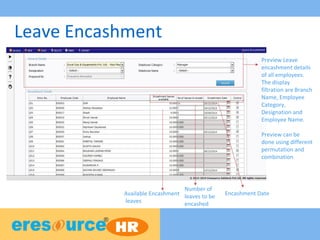
Leave Encashment
Preview Leave
encashment details
of all employees.
The display
filtration are Branch
Name, Employee
Category,
Designation and
Employee Name.
Preview can be
done using different
permutation and
combination
Available Encashment
leaves
Number of
leaves to be
encashed
Encashment Date
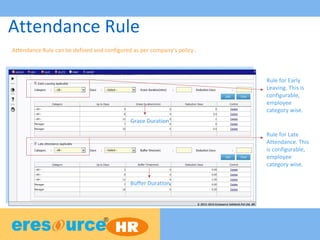
Attendance Rule
Rule for Early
Leaving. This is
configurable,
employee
category wise.
Rule for Late
Attendance. This
is configurable,
employee
category wise.
Grace Duration
Buffer Duration
Attendance Rule can be defined and configured as per company’s policy..
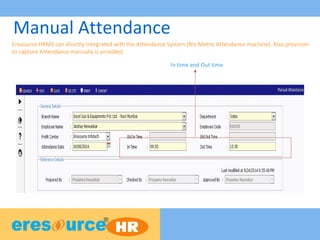
Manual Attendance
Eresource HRMS can directly integrated with the Attendance System (Bio Metric Attendance machine). Also provision
to capture Attendance manually is provided.
In time and Out time
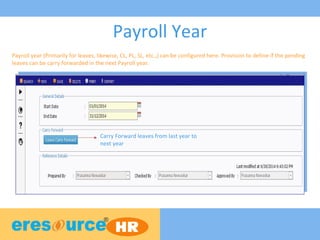
Payroll Year
Payroll year (Primarily for leaves, likewise, CL, PL, SL, etc.,) can be configured here. Provision to define if the pending
leaves can be carry forwarded in the next Payroll year.
Carry Forward leaves from last year to
next year
Payroll Management
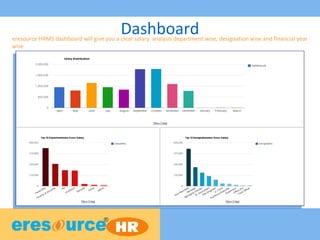
Dashboarderesource HRMS dashboard will give you a clear salary analysis department wise, designation wise and financial year
wise
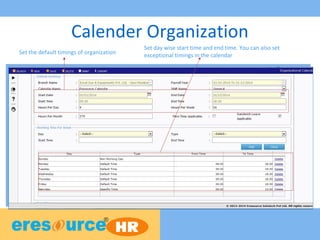
Calender Organization
Set the default timings of organization
Set day wise start time and end time. You can also set
exceptional timings in the calendar
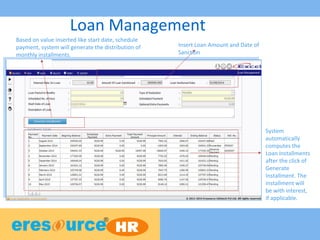
Loan Management
Insert Loan Amount and Date of
Sanction
Based on value inserted like start date, schedule
payment, system will generate the distribution of
monthly installments.
System
automatically
computes the
Loan Installments
after the click of
Generate
Installment. The

installment will
be with interest,
if applicable.
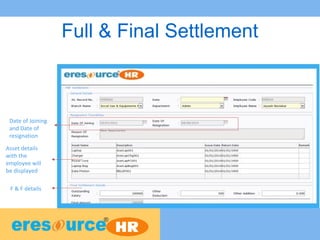
Full & Final Settlement
Asset details
with the
employee will
be displayed
F & F details
Date of Joining
and Date of
resignation
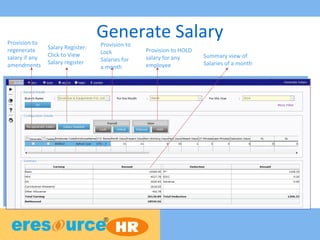
Generate SalaryProvision to
regenerate
salary if any
amendments
Salary Register:
Click to View
Salary register
Provision to
Lock
Salaries for
a month
Provision to HOLD
salary for any
employee
Summary view of
Salaries of a month
Recruitment
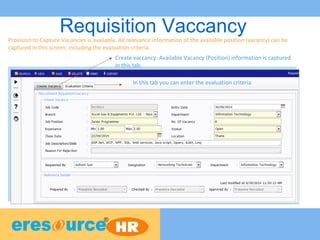
Requisition VaccancyProvision to Capture Vacancies is available. All relevance information of the available position (vacancy) can be
captured in this screen, including the evaluation criteria.
Create vaccancy: Available Vacancy (Position) information is captured
in this tab.
In this tab you can enter the evaluation criteria
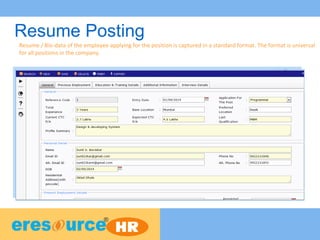
Resume Posting
Resume / Bio-data of the employee applying for the position is captured in a standard format. The format is universal
for all positions in the company.
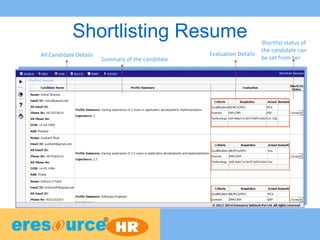
Shortlisting Resume
All Candidate Details Evaluation Details
Shortlist status of
the candidate can
be set from herSummary of the candidate
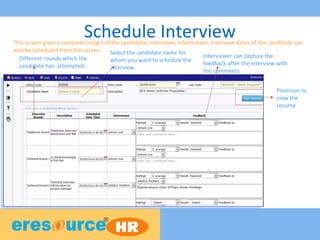
Schedule Interview
Provision to
view the
resume
Different rounds which the
candidate has attempted
Select the candidate name for
whom you want to schedule the
interview.
Interviewer can capture the
feedback after the interview with
the comments.
This screen gives a complete insight of the candidates interviews information. Interview dates of the candidate can
also be scheduled from this screen.
Employee Self Service
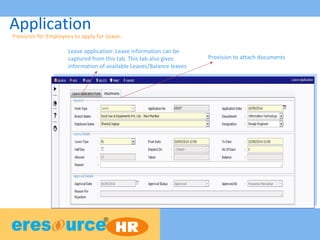
Application
Leave application: Leave information can be
captured from this tab. This tab also gives
information of available Leaves/Balance leaves
Provision for Employees to apply for Leave..
Provision to attach documents
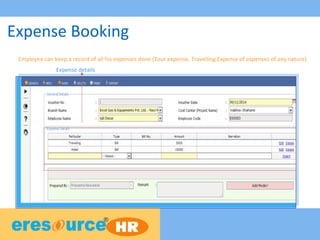
Expense Booking
Expense details
Employee can keep a record of all his expenses done (Tour expense, Travelling Expense of expenses of any nature)
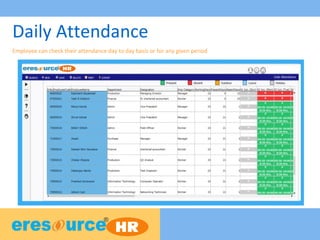
Daily Attendance
Employee can check their attendance day to day basis or for any given period
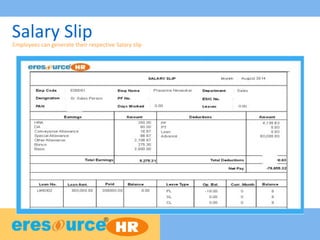
Salary SlipEmployees can generate their respective Salary slip
Statutory Rules
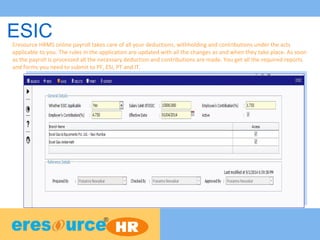
ESICEresource HRMS online payroll takes care of all your deductions, withholding and contributions under the acts
applicable to you. The rules in the application are updated with all the changes as and when they take place. As soon
as the payroll is processed all the necessary deduction and contributions are made. You get all the required reports
and forms you need to submit to PF, ESI, PT and IT.
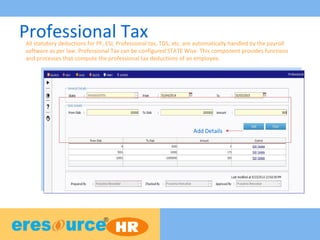
Professional Tax
Add Details
All statutory deductions for PF, ESI, Professional tax, TDS, etc. are automatically handled by the payroll
software as per law. Professional Tax can be configured STATE Wise. This component provides functions
and processes that compute the professional tax deductions of an employee.
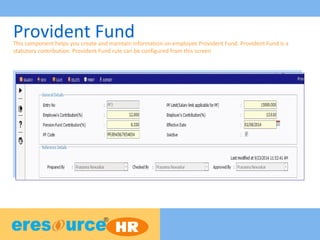
Provident FundThis component helps you create and maintain information on employee Provident Fund. Provident Fund is a
statutory contribution. Provident Fund rule can be configured from this screen
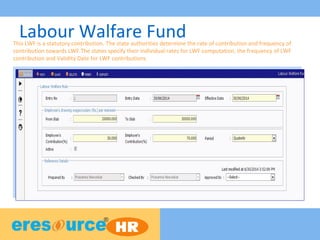
Labour Walfare FundThis LWF is a statutory contribution. The state authorities determine the rate of contribution and frequency of
contribution towards LWF.The states specify their individual rates for LWF computation, the frequency of LWF
contribution and Validity Date for LWF contributions.
Appraisal
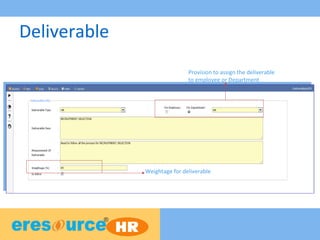
Deliverable
Provision to assign the deliverable
to employee or Department
Weightage for deliverable
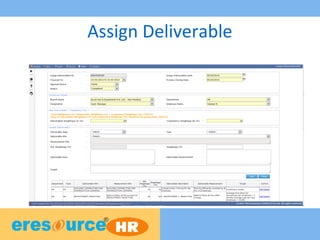
Assign Deliverable
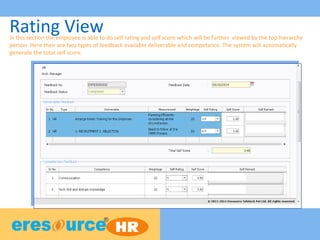
Rating ViewIn this section the employee is able to do self rating and self score which will be further viewed by the top hierarchy
person. Here their are two types of feedback available deliverable and competance. The system will automatically
generate the total self score.
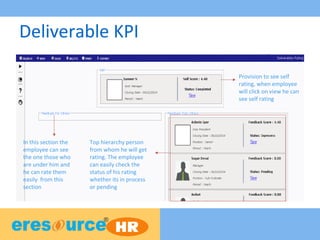
Deliverable KPI
Provision to see self
rating, when employee
will click on view he can
see self rating
Top hierarchy person
from whom he will get
rating. The employee
can easily check the
status of his rating
whether its in process
or pending
In this section the
employee can see
the one those who
are under him and
he can rate them
easily from this
section
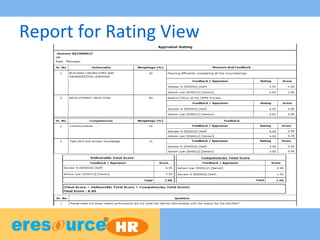
Report for Rating View
Training
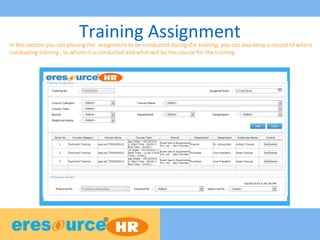
Training AssignmentIn this section you can planing the assignment to be conducted during the training, you can also keep a record of who is
conduating training , to whom it is conducted and what will be the course for the training
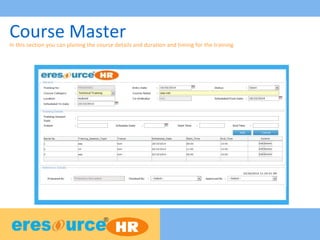
Course MasterIn this section you can planing the course details and duration and timing for the training
Address
TMA House, 1st Floor, Road No:16
Plot No. 6, Wagle Industrial Estate
Thane (West) 400 604, Maharashtra
+91 22 41118000/8049(50 lines)
www.eresourceerp.com

Hr module

  • 1.
    Human Resource ManagementSystem From HIRE TO RETIRE
  • 2.
    Modules • Attendance andleave Management • Payroll Management • Recruitment • Statutory Rules • Self Service • Rule Configuration • Training • Appraisal
  • 3.
  • 4.
    Leave Encashment Preview Leave encashmentdetails of all employees. The display filtration are Branch Name, Employee Category, Designation and Employee Name. Preview can be done using different permutation and combination Available Encashment leaves Number of leaves to be encashed Encashment Date
  • 5.
    Attendance Rule Rule forEarly Leaving. This is configurable, employee category wise. Rule for Late Attendance. This is configurable, employee category wise. Grace Duration Buffer Duration Attendance Rule can be defined and configured as per company’s policy..
  • 6.
    Manual Attendance Eresource HRMScan directly integrated with the Attendance System (Bio Metric Attendance machine). Also provision to capture Attendance manually is provided. In time and Out time
  • 7.
    Payroll Year Payroll year(Primarily for leaves, likewise, CL, PL, SL, etc.,) can be configured here. Provision to define if the pending leaves can be carry forwarded in the next Payroll year. Carry Forward leaves from last year to next year
  • 8.
  • 9.
    Dashboarderesource HRMS dashboardwill give you a clear salary analysis department wise, designation wise and financial year wise
  • 10.
    Calender Organization Set thedefault timings of organization Set day wise start time and end time. You can also set exceptional timings in the calendar
  • 11.
    Loan Management Insert LoanAmount and Date of Sanction Based on value inserted like start date, schedule payment, system will generate the distribution of monthly installments. System automatically computes the Loan Installments after the click of Generate Installment. The installment will be with interest, if applicable.
  • 12.
    Full & FinalSettlement Asset details with the employee will be displayed F & F details Date of Joining and Date of resignation
  • 13.
    Generate SalaryProvision to regenerate salaryif any amendments Salary Register: Click to View Salary register Provision to Lock Salaries for a month Provision to HOLD salary for any employee Summary view of Salaries of a month
  • 14.
  • 15.
    Requisition VaccancyProvision toCapture Vacancies is available. All relevance information of the available position (vacancy) can be captured in this screen, including the evaluation criteria. Create vaccancy: Available Vacancy (Position) information is captured in this tab. In this tab you can enter the evaluation criteria
  • 16.
    Resume Posting Resume /Bio-data of the employee applying for the position is captured in a standard format. The format is universal for all positions in the company.
  • 17.
    Shortlisting Resume All CandidateDetails Evaluation Details Shortlist status of the candidate can be set from herSummary of the candidate
  • 18.
    Schedule Interview Provision to viewthe resume Different rounds which the candidate has attempted Select the candidate name for whom you want to schedule the interview. Interviewer can capture the feedback after the interview with the comments. This screen gives a complete insight of the candidates interviews information. Interview dates of the candidate can also be scheduled from this screen.
  • 19.
  • 20.
    Application Leave application: Leaveinformation can be captured from this tab. This tab also gives information of available Leaves/Balance leaves Provision for Employees to apply for Leave.. Provision to attach documents
  • 21.
    Expense Booking Expense details Employeecan keep a record of all his expenses done (Tour expense, Travelling Expense of expenses of any nature)
  • 22.
    Daily Attendance Employee cancheck their attendance day to day basis or for any given period
  • 23.
    Salary SlipEmployees cangenerate their respective Salary slip
  • 24.
  • 25.
    ESICEresource HRMS onlinepayroll takes care of all your deductions, withholding and contributions under the acts applicable to you. The rules in the application are updated with all the changes as and when they take place. As soon as the payroll is processed all the necessary deduction and contributions are made. You get all the required reports and forms you need to submit to PF, ESI, PT and IT.
  • 26.
    Professional Tax Add Details Allstatutory deductions for PF, ESI, Professional tax, TDS, etc. are automatically handled by the payroll software as per law. Professional Tax can be configured STATE Wise. This component provides functions and processes that compute the professional tax deductions of an employee.
  • 27.
    Provident FundThis componenthelps you create and maintain information on employee Provident Fund. Provident Fund is a statutory contribution. Provident Fund rule can be configured from this screen
  • 28.
    Labour Walfare FundThisLWF is a statutory contribution. The state authorities determine the rate of contribution and frequency of contribution towards LWF.The states specify their individual rates for LWF computation, the frequency of LWF contribution and Validity Date for LWF contributions.
  • 29.
  • 30.
    Deliverable Provision to assignthe deliverable to employee or Department Weightage for deliverable
  • 31.
  • 32.
    Rating ViewIn thissection the employee is able to do self rating and self score which will be further viewed by the top hierarchy person. Here their are two types of feedback available deliverable and competance. The system will automatically generate the total self score.
  • 33.
    Deliverable KPI Provision tosee self rating, when employee will click on view he can see self rating Top hierarchy person from whom he will get rating. The employee can easily check the status of his rating whether its in process or pending In this section the employee can see the one those who are under him and he can rate them easily from this section
  • 34.
  • 35.
  • 36.
    Training AssignmentIn thissection you can planing the assignment to be conducted during the training, you can also keep a record of who is conduating training , to whom it is conducted and what will be the course for the training
  • 37.
    Course MasterIn thissection you can planing the course details and duration and timing for the training
  • 38.
    Address TMA House, 1stFloor, Road No:16 Plot No. 6, Wagle Industrial Estate Thane (West) 400 604, Maharashtra +91 22 41118000/8049(50 lines) www.eresourceerp.com