How to use eTwinning Live internal mail system
eTwinning Live Tutorials
How to use eTwinning Live internal mail system
eTwinning Live has got its own internal mail system. Via this system each registered teacher can easily send
messages to his contacts. The send procedure characterized by simplicity and, of course, security.
Step Image Description
Step
1
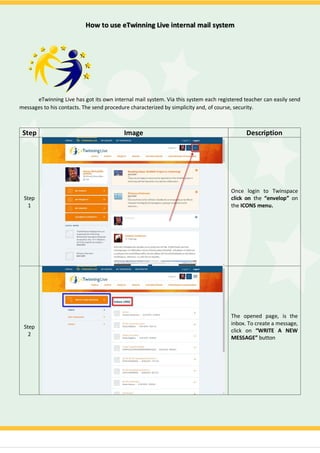
Once login to Twinspace
click on the “envelop” on
the ICONS menu.
Step
2
Τhe opened page, is the
inbox. To create a message,
click on “WRITE A NEW
MESSAGE” button
Step
3
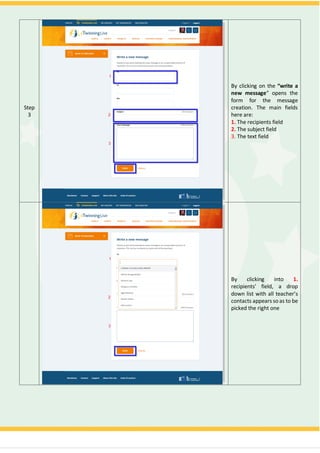
By clicking on the “write a
new message” opens the
form for the message
creation. The main fields
here are:
1. The recipients field
2. The subject field
3. The text field
By clicking into 1.
recipients' field, a drop
down list with all teacher’s
contacts appears soas to be
picked the right one
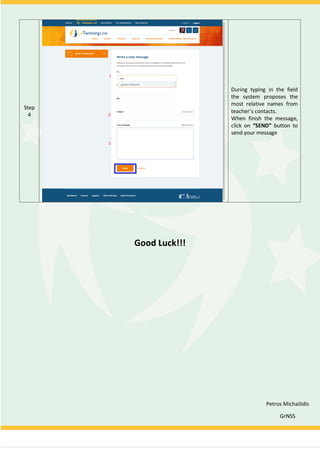
Step
4
During typing in the field
the system proposes the
most relative names from
teacher’s contacts.
When finish the message,
click on “SEND” button to
send your message
Good Luck!!!
Petros Michailidis
GrNSS

How to use eTwinning Live internal mail system.

  • 1.
    How to useeTwinning Live internal mail system eTwinning Live Tutorials
  • 2.
    How to useeTwinning Live internal mail system eTwinning Live has got its own internal mail system. Via this system each registered teacher can easily send messages to his contacts. The send procedure characterized by simplicity and, of course, security. Step Image Description Step 1 Once login to Twinspace click on the “envelop” on the ICONS menu. Step 2 Τhe opened page, is the inbox. To create a message, click on “WRITE A NEW MESSAGE” button
  • 3.
    Step 3 By clicking onthe “write a new message” opens the form for the message creation. The main fields here are: 1. The recipients field 2. The subject field 3. The text field By clicking into 1. recipients' field, a drop down list with all teacher’s contacts appears soas to be picked the right one
  • 4.
    Step 4 During typing inthe field the system proposes the most relative names from teacher’s contacts. When finish the message, click on “SEND” button to send your message Good Luck!!! Petros Michailidis GrNSS