12 WAYS TO MANAGE CLOUD COSTS
AND OPTIMIZE CLOUD SPEND
Panelists
• Kim Weins
• VP Marketing, RightScale
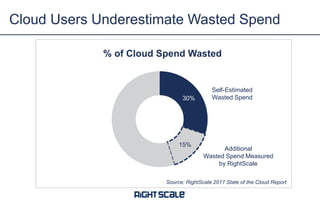
30%
15%
% of Cloud Spend Wasted
Cloud Users Underestimate Wasted Spend
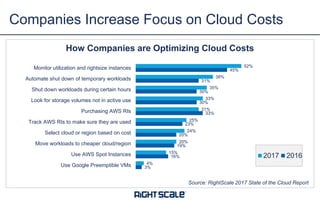
Source: RightScale 2017 State of the Cloud Report
Self-Estimated
Wasted Spend
Additional
Wasted Spend Measured
by RightScale
3%
16%
19%
20%
23%
33%
30%
30%
31%
45%
4%
15%
20%
24%
25%
31%
33%
35%
38%
52%
Use Google Preemptible VMs
Use AWS Spot Instances
Move workloads to cheaper cloud/region
Select cloud or region based on cost
Track AWS RIs to make sure they are used
Purchasing AWS RIs
Look for storage volumes not in active use
Shut down workloads during certain hours
Automate shut down of temporary workloads
Monitor utilization and rightsize instances
How Companies are Optimizing Cloud Costs
2017 2016
Companies Increase Focus on Cloud Costs
Source: RightScale 2017 State of the Cloud Report
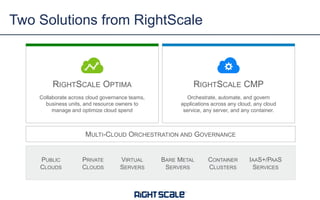
Two Solutions from RightScale
VIRTUAL
SERVERS
PUBLIC
CLOUDS
IAAS+/PAAS
SERVICES
PRIVATE
CLOUDS
BARE METAL
SERVERS
CONTAINER
CLUSTERS
MULTI-CLOUD ORCHESTRATION AND GOVERNANCE
RIGHTSCALE OPTIMA
Collaborate across cloud governance teams,
business units, and resource owners to
manage and optimize cloud spend
RIGHTSCALE CMP
Orchestrate, automate, and govern
applications across any cloud, any cloud
service, any server, and any container.
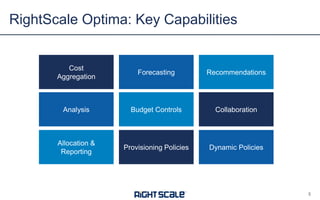
RightScale Optima: Key Capabilities
5
Cost
Aggregation
Analysis
Allocation &
Reporting
Forecasting
Budget Controls
Provisioning Policies
Recommendations
Collaboration
Dynamic Policies
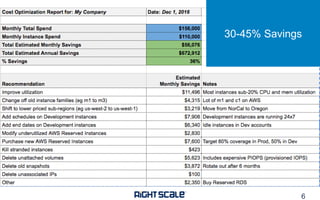
Cost Review Example
30-45% Savings
6
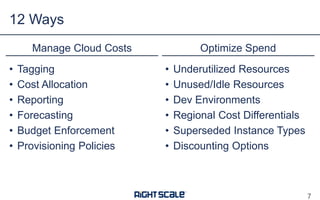
• Tagging
• Cost Allocation
• Reporting
• Forecasting
• Budget Enforcement
• Provisioning Policies
Manage Cloud Costs Optimize Spend
• Underutilized Resources
• Unused/Idle Resources
• Dev Environments
• Regional Cost Differentials
• Superseded Instance Types
• Discounting Options
12 Ways
7
MANAGING CLOUD COSTS
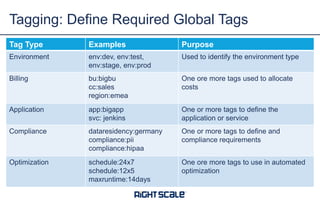
Tagging: Define Required Global Tags
Tag Type Examples Purpose
Environment env:dev, env:test,
env:stage, env:prod
Used to identify the environment type
Billing bu:bigbu
cc:sales
region:emea
One ore more tags used to allocate
costs
Application app:bigapp
svc: jenkins
One or more tags to define the
application or service
Compliance dataresidency:germany
compliance:pii
compliance:hipaa
One or more tags to define and
compliance requirements
Optimization schedule:24x7
schedule:12x5
maxruntime:14days
One ore more tags to use in automated
optimization
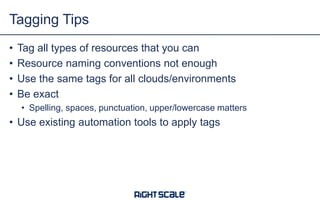
• Tag all types of resources that you can
• Resource naming conventions not enough
• Use the same tags for all clouds/environments
• Be exact
• Spelling, spaces, punctuation, upper/lowercase matters
• Use existing automation tools to apply tags
Tagging Tips
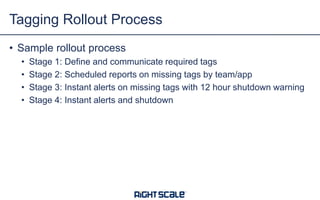
• Sample rollout process
• Stage 1: Define and communicate required tags
• Stage 2: Scheduled reports on missing tags by team/app
• Stage 3: Instant alerts on missing tags with 12 hour shutdown warning
• Stage 4: Instant alerts and shutdown
Tagging Rollout Process
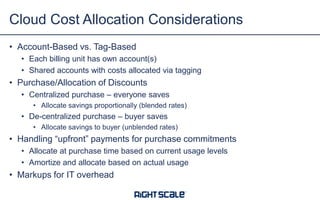
• Account-Based vs. Tag-Based
• Each billing unit has own account(s)
• Shared accounts with costs allocated via tagging
• Purchase/Allocation of Discounts
• Centralized purchase – everyone saves
• Allocate savings proportionally (blended rates)
• De-centralized purchase – buyer saves
• Allocate savings to buyer (unblended rates)
• Handling “upfront” payments for purchase commitments
• Allocate at purchase time based on current usage levels
• Amortize and allocate based on actual usage
• Markups for IT overhead
Cloud Cost Allocation Considerations
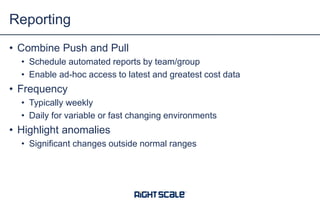
• Combine Push and Pull
• Schedule automated reports by team/group
• Enable ad-hoc access to latest and greatest cost data
• Frequency
• Typically weekly
• Daily for variable or fast changing environments
• Highlight anomalies
• Significant changes outside normal ranges
Reporting
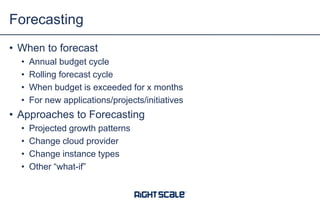
• When to forecast
• Annual budget cycle
• Rolling forecast cycle
• When budget is exceeded for x months
• For new applications/projects/initiatives
• Approaches to Forecasting
• Projected growth patterns
• Change cloud provider
• Change instance types
• Other “what-if”
Forecasting
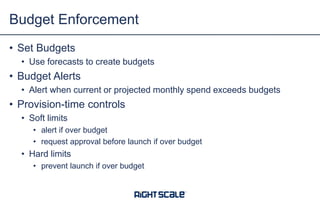
• Set Budgets
• Use forecasts to create budgets
• Budget Alerts
• Alert when current or projected monthly spend exceeds budgets
• Provision-time controls
• Soft limits
• alert if over budget
• request approval before launch if over budget
• Hard limits
• prevent launch if over budget
Budget Enforcement
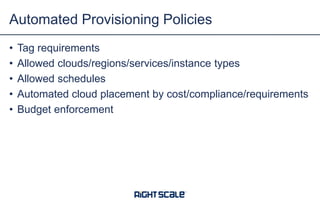
• Tag requirements
• Allowed clouds/regions/services/instance types
• Allowed schedules
• Automated cloud placement by cost/compliance/requirements
• Budget enforcement
Automated Provisioning Policies
OPTIMIZE CLOUD SPEND
RIGHTSIZING
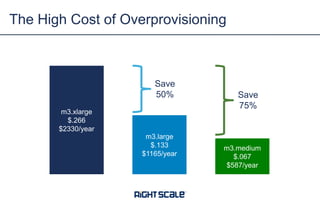
The High Cost of Overprovisioning
m3.xlarge
$.266
$2330/year
m3.large
$.133
$1165/year
m3.medium
$.067
$587/year
Save
50% Save
75%
0
10
20
30
40
50
60
70
80
90
100
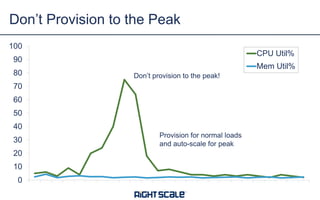
CPU Util%
Mem Util%
Don’t Provision to the Peak
Don’t provision to the peak!
Provision for normal loads
and auto-scale for peak
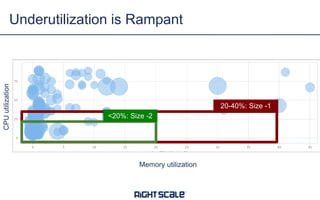
Underutilization is Rampant
Memory utilization
CPUutilization
20-40%: Size -1
<20%: Size -2
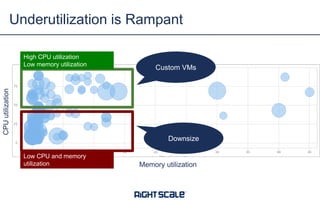
Underutilization is Rampant
Memory utilization
CPUutilization
High CPU utilization
Low memory utilization
Low CPU and memory
utilization
Custom VMs
Downsize
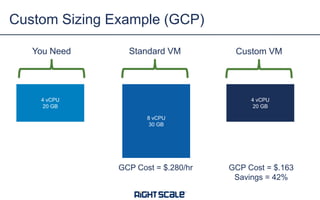
Custom Sizing Example (GCP)
4 vCPU
20 GB
You Need Standard VM Custom VM
GCP Cost = $.280/hr GCP Cost = $.163
Savings = 42%
8 vCPU
30 GB
4 vCPU
20 GB
IDLE RESOURCES
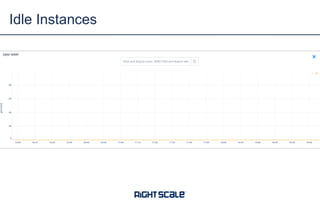
Idle Instances
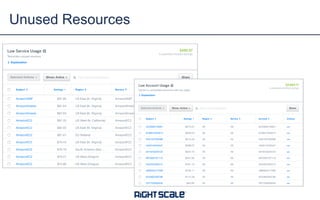
Unused Resources
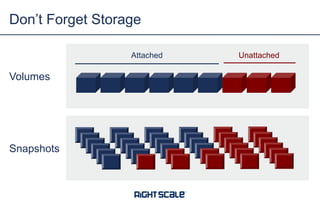
Don’t Forget Storage
Volumes
Snapshots
Attached Unattached
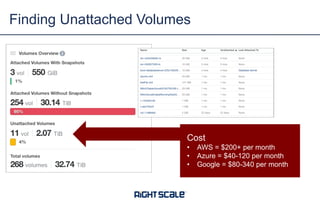
Finding Unattached Volumes
Cost
• AWS = $200+ per month
• Azure = $40-120 per month
• Google = $80-340 per month
DEV ENVIRONMENTS
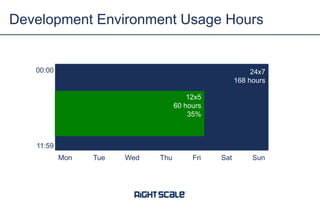
Development Environment Usage Hours
Mon Tue Wed Thu Fri Sat Sun
00:00
11:59
24x7
168 hours
12x5
60 hours
35%
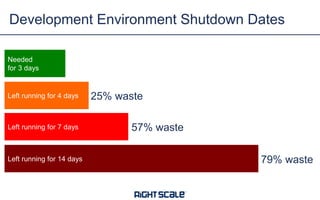
Development Environment Shutdown Dates
Needed
for 3 days
Left running for 4 days
Left running for 7 days
Left running for 14 days
25% waste
57% waste
79% waste
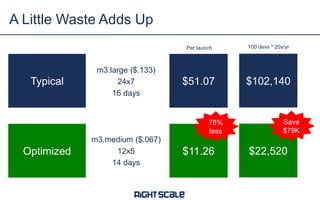
A Little Waste Adds Up
Typical
m3.large ($.133)
24x7
16 days
Optimized
m3.medium ($.067)
12x5
14 days
$51.07
$11.26
78%
less
$102,140
$22,520
Per launch 100 devs * 20x/yr
Save
$79K
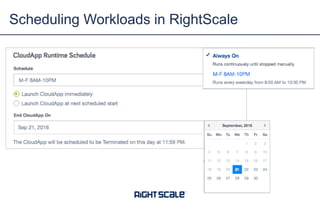
Scheduling Workloads in RightScale
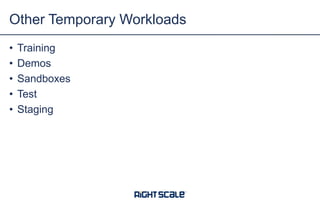
• Training
• Demos
• Sandboxes
• Test
• Staging
Other Temporary Workloads
EXPENSIVE REGIONS
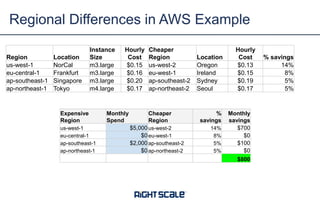
Regional Differences in AWS Example
Region Location
Instance
Size
Hourly
Cost
Cheaper
Region Location
Hourly
Cost % savings
us-west-1 NorCal m3.large $0.15 us-west-2 Oregon $0.13 14%
eu-central-1 Frankfurt m3.large $0.16 eu-west-1 Ireland $0.15 8%
ap-southeast-1 Singapore m3.large $0.20 ap-southeast-2 Sydney $0.19 5%
ap-northeast-1 Tokyo m4.large $0.17 ap-northeast-2 Seoul $0.17 5%
Expensive
Region
Monthly
Spend
Cheaper
Region
%
savings
Monthly
savings
us-west-1 $5,000 us-west-2 14% $700
eu-central-1 $0 eu-west-1 8% $0
ap-southeast-1 $2,000 ap-southeast-2 5% $100
ap-northeast-1 $0 ap-northeast-2 5% $0
$800
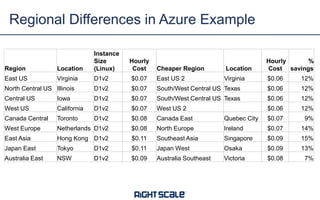
Regional Differences in Azure Example
Region Location
Instance
Size
(Linux)
Hourly
Cost Cheaper Region Location
Hourly
Cost
%
savings
East US Virginia D1v2 $0.07 East US 2 Virginia $0.06 12%
North Central US Illinois D1v2 $0.07 South/West Central US Texas $0.06 12%
Central US Iowa D1v2 $0.07 South/West Central US Texas $0.06 12%
West US California D1v2 $0.07 West US 2 $0.06 12%
Canada Central Toronto D1v2 $0.08 Canada East Quebec City $0.07 9%
West Europe Netherlands D1v2 $0.08 North Europe Ireland $0.07 14%
East Asia Hong Kong D1v2 $0.11 Southeast Asia Singapore $0.09 15%
Japan East Tokyo D1v2 $0.11 Japan West Osaka $0.09 13%
Australia East NSW D1v2 $0.09 Australia Southeast Victoria $0.08 7%
SUPERSEDED INSTANCE
TYPES
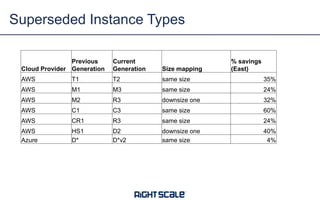
Superseded Instance Types
Cloud Provider
Previous
Generation
Current
Generation Size mapping
% savings
(East)
AWS T1 T2 same size 35%
AWS M1 M3 same size 24%
AWS M2 R3 downsize one 32%
AWS C1 C3 same size 60%
AWS CR1 R3 same size 24%
AWS HS1 D2 downsize one 40%
Azure D* D*v2 same size 4%
DISCOUNTING OPTIONS
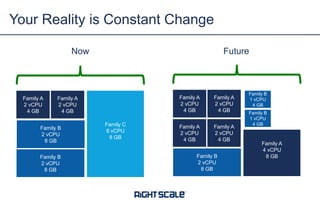
Your Reality is Constant Change
Family A
2 vCPU
4 GB
Family C
8 vCPU
8 GB
Now
Family A
2 vCPU
4 GB
Family B
2 vCPU
8 GB
Family B
2 vCPU
8 GB
Family A
2 vCPU
4 GB
Family A
4 vCPU
8 GB
Future
Family A
2 vCPU
4 GB
Family B
2 vCPU
8 GB
Family B
1 vCPU
4 GB
Family B
1 vCPU
4 GB
Family A
2 vCPU
4 GB
Family A
2 vCPU
4 GB
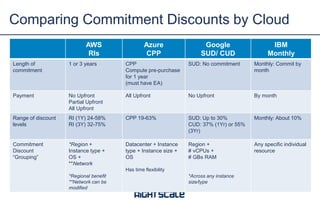
AWS
RIs
Azure
CPP
Google
SUD/ CUD
IBM
Monthly
Length of
commitment
1 or 3 years CPP
Compute pre-purchase
for 1 year
(must have EA)
SUD: No commitment Monthly: Commit by
month
Payment No Upfront
Partial Upfront
All Upfront
All Upfront No Upfront By month
Range of discount
levels
RI (1Y) 24-58%
RI (3Y) 32-75%
CPP 19-63% SUD: Up to 30%
CUD: 37% (1Yr) or 55%
(3Yr)
Monthly: About 10%
Commitment
Discount
“Grouping”
*Region +
Instance type +
OS +
**Network
*Regional benefit
**Network can be
modified
Datacenter + Instance
type + Instance size +
OS
Has time flexibility
Region +
# vCPUs +
# GBs RAM
*Across any instance
size/type
Any specific individual
resource
Comparing Commitment Discounts by Cloud
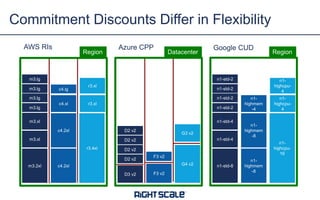
Commitment Discounts Differ in Flexibility
m3.lg
m3.lg
m3.lg
m3.lg
m3.xl
m3.xl
m3.2xl
c4.lg
c4.xl
c4.2xl
c4.2xl
r3.xl
r3.4xl
r3.xl
D2 v2
D2 v2
D3 v2 F3 v2
G4 v2
F3 v2
D2 v2
D2 v2
G3 v2
n1-std-2
n1-std-2
n1-std-2
n1-std-2
n1-std-4
n1-std-4
n1-std-8
n1-
highmem
-4
n1-
highmem
-8
n1-
highmem
-8
n1-
highcpu-
4
n1-
highcpu-
16
n1-
highcpu-
4
Region Datacenter Region
AWS RIs Azure CPP Google CUD
Azure Gives Time Flexibility
D2 v2
D2 v2
D2 v2
D2 v2
D2 v2
D2 v2
D2 v2
D2 v2
D2 v2
D2 v2
D2 v2
D2 v2
D2 v2
D2 v2
D2 v2
D2 v2
D2 v2
D2 v2
D2 v2
D2 v2
D2 v2
D2 v2
D2 v2
D2 v2
D2 v2
D2 v2
D2 v2
D2 v2
D2 v2
D2 v2
D2 v2
D2 v2
D2 v2
D2 v2
D2 v2
D2 v2
Day 1 Day 2 Day 3 Day 1 Day 2 Day 3 Day 1 Day 2 Day 3
Buy blocks of 744 hrs/month
of an instance type/size/OS/region and
use any time in the month
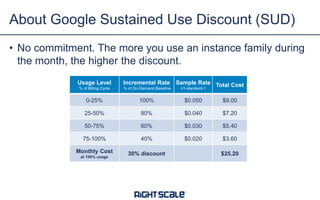
About Google Sustained Use Discount (SUD)
• No commitment. The more you use an instance family during
the month, the higher the discount.
Usage Level
% of Billing Cycle
Incremental Rate
% of On-Demand Baseline
Sample Rate
n1-standard-1
Total Cost
0-25% 100% $0.050 $9.00
25-50% 80% $0.040 $7.20
50-75% 60% $0.030 $5.40
75-100% 40% $0.020 $3.60
Monthly Cost
at 100% usage
30% discount $25.20
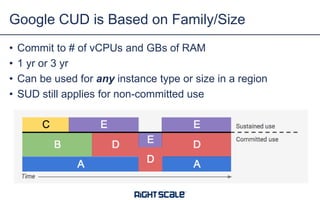
• Commit to # of vCPUs and GBs of RAM
• 1 yr or 3 yr
• Can be used for any instance type or size in a region
• SUD still applies for non-committed use
Google CUD is Based on Family/Size
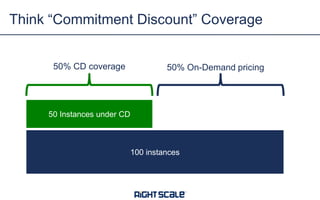
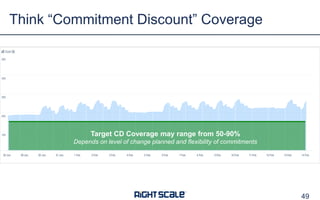
Think “Commitment Discount” Coverage
100 instances
50 Instances under CD
50% CD coverage 50% On-Demand pricing
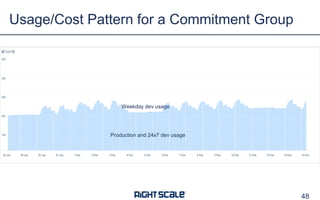
Usage/Cost Pattern for a Commitment Group
48
Production and 24x7 dev usage
Weekday dev usage
Think “Commitment Discount” Coverage
49
Target CD Coverage may range from 50-90%
Depends on level of change planned and flexibility of commitments
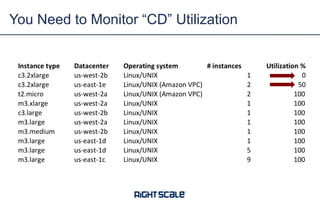
You Need to Monitor “CD” Utilization
• Interested in managing cloud costs and optimizing spend?
• sales@rightscale.com
Q&A

12 Ways to Manage Cloud Costs and Optimize Cloud Spend

  • 1.
    12 WAYS TOMANAGE CLOUD COSTS AND OPTIMIZE CLOUD SPEND
  • 2.
    Panelists • Kim Weins •VP Marketing, RightScale
  • 3.
    30% 15% % of CloudSpend Wasted Cloud Users Underestimate Wasted Spend Source: RightScale 2017 State of the Cloud Report Self-Estimated Wasted Spend Additional Wasted Spend Measured by RightScale
  • 4.
    3% 16% 19% 20% 23% 33% 30% 30% 31% 45% 4% 15% 20% 24% 25% 31% 33% 35% 38% 52% Use Google PreemptibleVMs Use AWS Spot Instances Move workloads to cheaper cloud/region Select cloud or region based on cost Track AWS RIs to make sure they are used Purchasing AWS RIs Look for storage volumes not in active use Shut down workloads during certain hours Automate shut down of temporary workloads Monitor utilization and rightsize instances How Companies are Optimizing Cloud Costs 2017 2016 Companies Increase Focus on Cloud Costs Source: RightScale 2017 State of the Cloud Report
  • 5.
    Two Solutions fromRightScale VIRTUAL SERVERS PUBLIC CLOUDS IAAS+/PAAS SERVICES PRIVATE CLOUDS BARE METAL SERVERS CONTAINER CLUSTERS MULTI-CLOUD ORCHESTRATION AND GOVERNANCE RIGHTSCALE OPTIMA Collaborate across cloud governance teams, business units, and resource owners to manage and optimize cloud spend RIGHTSCALE CMP Orchestrate, automate, and govern applications across any cloud, any cloud service, any server, and any container.
  • 6.
    RightScale Optima: KeyCapabilities 5 Cost Aggregation Analysis Allocation & Reporting Forecasting Budget Controls Provisioning Policies Recommendations Collaboration Dynamic Policies
  • 7.
  • 8.
    • Tagging • CostAllocation • Reporting • Forecasting • Budget Enforcement • Provisioning Policies Manage Cloud Costs Optimize Spend • Underutilized Resources • Unused/Idle Resources • Dev Environments • Regional Cost Differentials • Superseded Instance Types • Discounting Options 12 Ways 7
  • 9.
  • 10.
    Tagging: Define RequiredGlobal Tags Tag Type Examples Purpose Environment env:dev, env:test, env:stage, env:prod Used to identify the environment type Billing bu:bigbu cc:sales region:emea One ore more tags used to allocate costs Application app:bigapp svc: jenkins One or more tags to define the application or service Compliance dataresidency:germany compliance:pii compliance:hipaa One or more tags to define and compliance requirements Optimization schedule:24x7 schedule:12x5 maxruntime:14days One ore more tags to use in automated optimization
  • 11.
    • Tag alltypes of resources that you can • Resource naming conventions not enough • Use the same tags for all clouds/environments • Be exact • Spelling, spaces, punctuation, upper/lowercase matters • Use existing automation tools to apply tags Tagging Tips
  • 12.
    • Sample rolloutprocess • Stage 1: Define and communicate required tags • Stage 2: Scheduled reports on missing tags by team/app • Stage 3: Instant alerts on missing tags with 12 hour shutdown warning • Stage 4: Instant alerts and shutdown Tagging Rollout Process
  • 13.
    • Account-Based vs.Tag-Based • Each billing unit has own account(s) • Shared accounts with costs allocated via tagging • Purchase/Allocation of Discounts • Centralized purchase – everyone saves • Allocate savings proportionally (blended rates) • De-centralized purchase – buyer saves • Allocate savings to buyer (unblended rates) • Handling “upfront” payments for purchase commitments • Allocate at purchase time based on current usage levels • Amortize and allocate based on actual usage • Markups for IT overhead Cloud Cost Allocation Considerations
  • 14.
    • Combine Pushand Pull • Schedule automated reports by team/group • Enable ad-hoc access to latest and greatest cost data • Frequency • Typically weekly • Daily for variable or fast changing environments • Highlight anomalies • Significant changes outside normal ranges Reporting
  • 15.
    • When toforecast • Annual budget cycle • Rolling forecast cycle • When budget is exceeded for x months • For new applications/projects/initiatives • Approaches to Forecasting • Projected growth patterns • Change cloud provider • Change instance types • Other “what-if” Forecasting
  • 16.
    • Set Budgets •Use forecasts to create budgets • Budget Alerts • Alert when current or projected monthly spend exceeds budgets • Provision-time controls • Soft limits • alert if over budget • request approval before launch if over budget • Hard limits • prevent launch if over budget Budget Enforcement
  • 17.
    • Tag requirements •Allowed clouds/regions/services/instance types • Allowed schedules • Automated cloud placement by cost/compliance/requirements • Budget enforcement Automated Provisioning Policies
  • 18.
  • 19.
  • 20.
    The High Costof Overprovisioning m3.xlarge $.266 $2330/year m3.large $.133 $1165/year m3.medium $.067 $587/year Save 50% Save 75%
  • 21.
    0 10 20 30 40 50 60 70 80 90 100 CPU Util% Mem Util% Don’tProvision to the Peak Don’t provision to the peak! Provision for normal loads and auto-scale for peak
  • 22.
    Underutilization is Rampant Memoryutilization CPUutilization 20-40%: Size -1 <20%: Size -2
  • 23.
    Underutilization is Rampant Memoryutilization CPUutilization High CPU utilization Low memory utilization Low CPU and memory utilization Custom VMs Downsize
  • 24.
    Custom Sizing Example(GCP) 4 vCPU 20 GB You Need Standard VM Custom VM GCP Cost = $.280/hr GCP Cost = $.163 Savings = 42% 8 vCPU 30 GB 4 vCPU 20 GB
  • 25.
  • 26.
  • 27.
  • 28.
  • 29.
    Finding Unattached Volumes Cost •AWS = $200+ per month • Azure = $40-120 per month • Google = $80-340 per month
  • 30.
  • 31.
    Development Environment UsageHours Mon Tue Wed Thu Fri Sat Sun 00:00 11:59 24x7 168 hours 12x5 60 hours 35%
  • 32.
    Development Environment ShutdownDates Needed for 3 days Left running for 4 days Left running for 7 days Left running for 14 days 25% waste 57% waste 79% waste
  • 33.
    A Little WasteAdds Up Typical m3.large ($.133) 24x7 16 days Optimized m3.medium ($.067) 12x5 14 days $51.07 $11.26 78% less $102,140 $22,520 Per launch 100 devs * 20x/yr Save $79K
  • 34.
  • 35.
    • Training • Demos •Sandboxes • Test • Staging Other Temporary Workloads
  • 36.
  • 37.
    Regional Differences inAWS Example Region Location Instance Size Hourly Cost Cheaper Region Location Hourly Cost % savings us-west-1 NorCal m3.large $0.15 us-west-2 Oregon $0.13 14% eu-central-1 Frankfurt m3.large $0.16 eu-west-1 Ireland $0.15 8% ap-southeast-1 Singapore m3.large $0.20 ap-southeast-2 Sydney $0.19 5% ap-northeast-1 Tokyo m4.large $0.17 ap-northeast-2 Seoul $0.17 5% Expensive Region Monthly Spend Cheaper Region % savings Monthly savings us-west-1 $5,000 us-west-2 14% $700 eu-central-1 $0 eu-west-1 8% $0 ap-southeast-1 $2,000 ap-southeast-2 5% $100 ap-northeast-1 $0 ap-northeast-2 5% $0 $800
  • 38.
    Regional Differences inAzure Example Region Location Instance Size (Linux) Hourly Cost Cheaper Region Location Hourly Cost % savings East US Virginia D1v2 $0.07 East US 2 Virginia $0.06 12% North Central US Illinois D1v2 $0.07 South/West Central US Texas $0.06 12% Central US Iowa D1v2 $0.07 South/West Central US Texas $0.06 12% West US California D1v2 $0.07 West US 2 $0.06 12% Canada Central Toronto D1v2 $0.08 Canada East Quebec City $0.07 9% West Europe Netherlands D1v2 $0.08 North Europe Ireland $0.07 14% East Asia Hong Kong D1v2 $0.11 Southeast Asia Singapore $0.09 15% Japan East Tokyo D1v2 $0.11 Japan West Osaka $0.09 13% Australia East NSW D1v2 $0.09 Australia Southeast Victoria $0.08 7%
  • 39.
  • 40.
    Superseded Instance Types CloudProvider Previous Generation Current Generation Size mapping % savings (East) AWS T1 T2 same size 35% AWS M1 M3 same size 24% AWS M2 R3 downsize one 32% AWS C1 C3 same size 60% AWS CR1 R3 same size 24% AWS HS1 D2 downsize one 40% Azure D* D*v2 same size 4%
  • 41.
  • 42.
    Your Reality isConstant Change Family A 2 vCPU 4 GB Family C 8 vCPU 8 GB Now Family A 2 vCPU 4 GB Family B 2 vCPU 8 GB Family B 2 vCPU 8 GB Family A 2 vCPU 4 GB Family A 4 vCPU 8 GB Future Family A 2 vCPU 4 GB Family B 2 vCPU 8 GB Family B 1 vCPU 4 GB Family B 1 vCPU 4 GB Family A 2 vCPU 4 GB Family A 2 vCPU 4 GB
  • 43.
    AWS RIs Azure CPP Google SUD/ CUD IBM Monthly Length of commitment 1or 3 years CPP Compute pre-purchase for 1 year (must have EA) SUD: No commitment Monthly: Commit by month Payment No Upfront Partial Upfront All Upfront All Upfront No Upfront By month Range of discount levels RI (1Y) 24-58% RI (3Y) 32-75% CPP 19-63% SUD: Up to 30% CUD: 37% (1Yr) or 55% (3Yr) Monthly: About 10% Commitment Discount “Grouping” *Region + Instance type + OS + **Network *Regional benefit **Network can be modified Datacenter + Instance type + Instance size + OS Has time flexibility Region + # vCPUs + # GBs RAM *Across any instance size/type Any specific individual resource Comparing Commitment Discounts by Cloud
  • 44.
    Commitment Discounts Differin Flexibility m3.lg m3.lg m3.lg m3.lg m3.xl m3.xl m3.2xl c4.lg c4.xl c4.2xl c4.2xl r3.xl r3.4xl r3.xl D2 v2 D2 v2 D3 v2 F3 v2 G4 v2 F3 v2 D2 v2 D2 v2 G3 v2 n1-std-2 n1-std-2 n1-std-2 n1-std-2 n1-std-4 n1-std-4 n1-std-8 n1- highmem -4 n1- highmem -8 n1- highmem -8 n1- highcpu- 4 n1- highcpu- 16 n1- highcpu- 4 Region Datacenter Region AWS RIs Azure CPP Google CUD
  • 45.
    Azure Gives TimeFlexibility D2 v2 D2 v2 D2 v2 D2 v2 D2 v2 D2 v2 D2 v2 D2 v2 D2 v2 D2 v2 D2 v2 D2 v2 D2 v2 D2 v2 D2 v2 D2 v2 D2 v2 D2 v2 D2 v2 D2 v2 D2 v2 D2 v2 D2 v2 D2 v2 D2 v2 D2 v2 D2 v2 D2 v2 D2 v2 D2 v2 D2 v2 D2 v2 D2 v2 D2 v2 D2 v2 D2 v2 Day 1 Day 2 Day 3 Day 1 Day 2 Day 3 Day 1 Day 2 Day 3 Buy blocks of 744 hrs/month of an instance type/size/OS/region and use any time in the month
  • 46.
    About Google SustainedUse Discount (SUD) • No commitment. The more you use an instance family during the month, the higher the discount. Usage Level % of Billing Cycle Incremental Rate % of On-Demand Baseline Sample Rate n1-standard-1 Total Cost 0-25% 100% $0.050 $9.00 25-50% 80% $0.040 $7.20 50-75% 60% $0.030 $5.40 75-100% 40% $0.020 $3.60 Monthly Cost at 100% usage 30% discount $25.20
  • 47.
    • Commit to# of vCPUs and GBs of RAM • 1 yr or 3 yr • Can be used for any instance type or size in a region • SUD still applies for non-committed use Google CUD is Based on Family/Size
  • 48.
    Think “Commitment Discount”Coverage 100 instances 50 Instances under CD 50% CD coverage 50% On-Demand pricing
  • 49.
    Usage/Cost Pattern fora Commitment Group 48 Production and 24x7 dev usage Weekday dev usage
  • 50.
    Think “Commitment Discount”Coverage 49 Target CD Coverage may range from 50-90% Depends on level of change planned and flexibility of commitments
  • 51.
    You Need toMonitor “CD” Utilization
  • 52.
    • Interested inmanaging cloud costs and optimizing spend? • sales@rightscale.com Q&A