Cost Management in the Cloud for
Enterprises
Faisal Mushtaq, GlobalLogic
About the speaker
• 20+years of experience in building global organizations
and innovativeproducts
• VP Technology & Head of Global Cloud Practice,,
GlobalLogic
• Key role in 3 startups with $200+Million exit
• VP Engineering PLUMgrid (Acquired by VMware)
• VP Mobile Video ProductLine (Allot Communications)
• VP Engineering Ortiva Wireless (Acquired by Allot
Communications)
• Founding Member Wichorus (Acquired by Tellabs)
• 10+years at Cisco Systems
• Extensive experience in Cloud technologies OpenStack,
Containers, SDN, GCP, AWS, Networking
Agenda
• Cost Management Challenges
• A Cost Management Framework
• Automation Tools Landscape
• Case Study
• Q&A
Cost Management Challenges
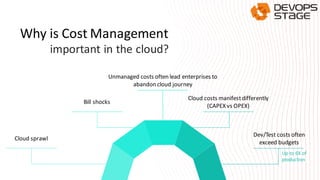
Why is Cost Management
Cloud sprawl
important in the cloud?
Bill shocks
Unmanaged costs often lead enterprises to
abandon cloud journey
Dev/Test costs often
exceed budgets
Cloud costs manifestdifferently
(CAPEX vs OPEX)
Up to 6X of
production
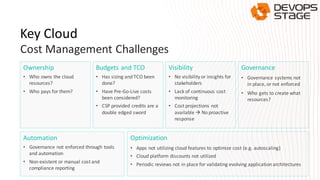
Optimization
• Apps not utilizing cloud features to optimize cost (e.g. autoscaling)
• Cloud platform discounts not utilized
• Periodic reviews not in place for validating evolving application architectures
Ownership
• Who owns the cloud
resources?
• Who pays for them?
Budgets and TCO
• Has sizing and TCO been
done?
• Have Pre-Go-Live costs
been considered?
• CSP provided credits are a
double edged sword
Visibility
• No visibility or insights for
stakeholders
• Lack of continuous cost
monitoring
• Cost projections not
available → No proactive
response
Governance
• Governance systems not
in place, or not enforced
• Who gets to create what
resources?
Key Cloud
Cost Management Challenges
Automation
• Governance not enforced through tools
and automation
• Non-existent or manual cost and
compliance reporting
A Cost Management Framework
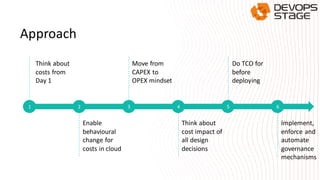
Approach
Think about
costs from
Day 1
2 3 4 5 6
Enable
behavioural
change for
costs in cloud
Move from
CAPEX to
OPEX mindset
Think about
cost impact of
all design
decisions
Implement,
enforce and
automate
governance
mechanisms
Do TCO for
before
deploying
1
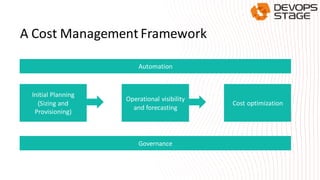
A Cost Management Framework
Automation
Governance
Initial Planning
(Sizing and
Provisioning)
Operational visibility
and forecasting
Cost optimization
Governance
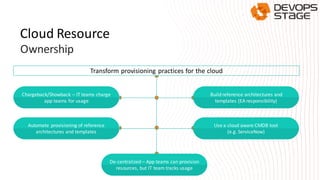
Transform provisioning practices for the cloud
De-centralized – App teams can provision
resources, but IT team tracks usage
Chargeback/Showback – IT teams charge
app teams for usage
Build reference architectures and
templates (EA responsibility)
Automate provisioning of reference
architectures and templates
Use a cloud aware CMDB tool
(e.g. ServiceNow)
Cloud Resource
Ownership
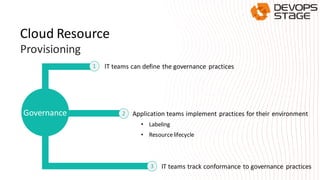
lT teams can define the governance practices
Governance Application teams implement practices for their environment
IT teams track conformance to governance practices
• Labeling
• Resourcelifecycle
1
2
3
Cloud Resource
Provisioning
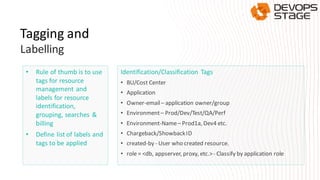
• Rule of thumb is to use
tags for resource
management and
labels for resource
identification,
grouping, searches &
billing
• Define list of labels and
tags to be applied
Identification/Classification Tags
• BU/Cost Center
• Application
• Owner-email– application owner/group
• Environment– Prod/Dev/Test/QA/Perf
• Environment-Name– Prod1a, Dev4 etc.
• Chargeback/ShowbackID
• created-by - User who created resource.
• role = <db, appserver, proxy, etc.>- Classify by application role
Tagging and
Labelling
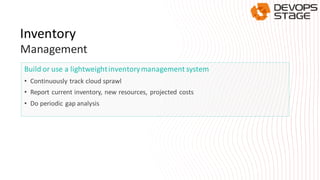
Build or use a lightweightinventorymanagement system
• Continuously track cloud sprawl
• Report current inventory, new resources, projected costs
• Do periodic gap analysis
Inventory
Management
Initial Planning
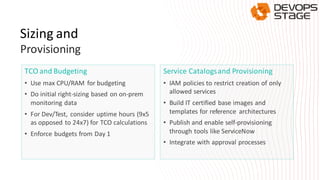
TCO and Budgeting
• Use max CPU/RAM for budgeting
• Do initial right-sizing based on on-prem
monitoring data
• For Dev/Test, consider uptime hours (9x5
as opposed to 24x7) for TCO calculations
• Enforce budgets from Day 1
Service Catalogsand Provisioning
• IAM policies to restrict creation of only
allowed services
• Build IT certified base images and
templates for reference architectures
• Publish and enable self-provisioning
through tools like ServiceNow
• Integrate with approval processes
Sizing and
Provisioning
Operational Visibility and Forecasting
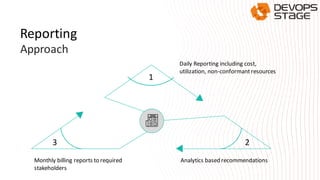
1
23
Daily Reporting including cost,
utilization, non-conformantresources
Analytics based recommendationsMonthly billing reports to required
stakeholders
Reporting
Approach
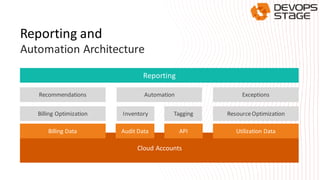
Reporting
Recommendations Automation Exceptions
Billing Optimization Inventory ResourceOptimizationTagging
Cloud Accounts
Billing Data Audit Data API Utilization Data
Reporting and
Automation Architecture
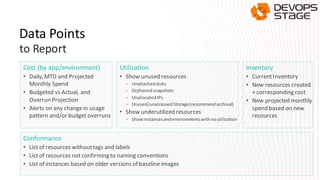
Data Points
Cost (by app/environment)
• Daily, MTD and Projected
Monthly Spend
• Budgeted vs Actual, and
Overrun Projection
• Alerts on any changein usage
pattern and/or budget overruns
Utilization
• Show unused resources
- Unattacheddisks
- Orphanedsnapshots
- UnallocatedIPs
- Unused/unaccessed Storage(recommendarchival)
• Show underutilized resources
- Showinstancesandenvironmentswithnoutilization
Inventory
• CurrentInventory
• New resources created
+ corresponding cost
• New projected monthly
spend based on new
resources
Conformance
• List of resources withouttags and labels
• List of resources notconfirming to naming conventions
• List of instances based on older versions of baseline images
to Report
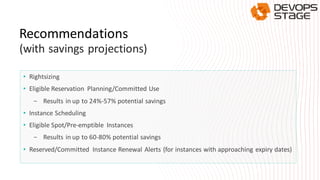
• Rightsizing
• Eligible Reservation Planning/Committed Use
- Results in up to 24%-57% potential savings
• Instance Scheduling
• Eligible Spot/Pre-emptible Instances
- Results in up to 60-80% potential savings
• Reserved/Committed Instance Renewal Alerts (for instances with approaching expiry dates)
Recommendations
(with savings projections)
Cost Optimization and Automation
• Effective Cost Optimization is a combination of two approaches:
- In-depth operational visibility for action by app teams
- Automatic resource cleanup (as a fall-back)
• Approach
- Stakeholders given opportunities to take action, or register exceptions
- No action from stakeholders recommendations are automatically actioned
- The two approaches, used in combination will lead to better awareness and
accountability
Cost Optimization
Approach
Automation
Approach
• If automation not available in tools, build in-house.
• Start small and grow the automation catalog.
• No one tool will solve all cost management problems. Build and integrate tools as services
(see Reporting and Automation Architecture)
Infrastructure
Optimization
• Instance Rightsizing
- Right-size individual instances based on
utilization
• Cleanup of unused resources
- As per utilization reports
• Cleanup of underutilized resources
- Minimal or No CPU utilization
- Minimal or No Disk activity
- Minimal or No IO activity
• Instance scheduling
- Based on spikes in usages patterns
- Instance scheduling for dev/test servers
that don't need to be run 24/7
• Instance modernization
- Based on new instance families released
by the cloud providers (often cheaper)
• Cleanup of other Cloud Services
- Based on Cloud based metrics
Billing
Optimization
• Production - Use reserved/committed use
discounts
- Start with – 30%-40% servers (before
stabilization = immediate cost savings)
- End with – 100% servers (after app
stabilizes in cloud)
- Use Cloud Services to get TCO of
reference architectures before
deployment
• Dev/Test - Enable committed use &
spot/preemptible instances
- Start with – 10% servers (Eg., Toolchains
– Gerrit/Jenkins etc.)
- End with – 100% (after app stabilizes in
cloud)
- Spot/Preemptible instances for
environments that can be torn down and
recreated
- Integrate use of spot/preemptible
instances with DevOps build processes
• Restrict number of Dev/Test environments
- Review DevOps pipelines
- Evaluate alternate and efficient ways for developers to unit test their code
- Right-size Dev/Test environments
• For Consultants/Vendors
- Customer doesn’t mind spending  NOT AN EXCUSE
- Think about cost impacts for all design decisions
DevOps
Optimization
• Enforcing Labels
- Automatically add certain missing tags such as created-by (use to track creators of
orphaned resources)
- Create and maintain virtual tags for Cloud services that don't support tags yet, in the
inventory management system
Other Automation
Opportunities
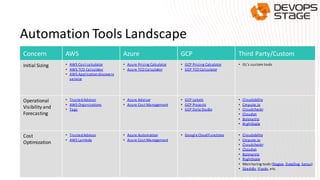
Automation Tools Landscape
Concern AWS Azure GCP Third Party/Custom
Initial Sizing • AWS Cost calculator
• AWS TCO Calculator
• AWS Applicationdiscovery
service
• Azure Pricing Calculator
• Azure TCO Calculator
• GCP Pricing Calculator
• GCP TCO Calculator
• GL’s custom tools
Operational
Visibility and
Forecasting
• TrustedAdvisor
• AWS Organizations
• Tags
• Azure Advisor
• Azure Cost Management
• GCP Labels
• GCP Projects
• GCP Data Studio
• Cloudability
• Cmpute.io
• Cloudcheckr
• Cloudyn
• Botmetric
• RightScale
Cost
Optimization
• TrustedAdvisor
• AWS Lambda
• Azure Automation
• Azure Cost Management
• Google CloudFunctions • Cloudability
• Cmpute.io
• Cloudcheckr
• Cloudyn
• Botmetric
• RightScale
• Monitoring tools (Nagios, DataDog, Sensu)
• Skeddly, Ylastic, etc.
Case Study
A Retail Customer Migrating to GCP
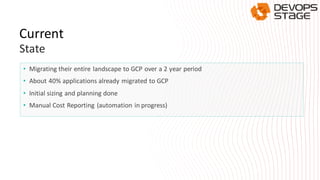
• Migrating their entire landscape to GCP over a 2 year period
• About 40% applications already migrated to GCP
• Initial sizing and planning done
• Manual Cost Reporting (automation in progress)
Current
State
Challenges
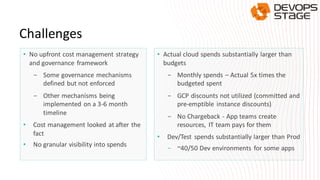
• No upfront cost management strategy
and governance framework
- Some governance mechanisms
defined but not enforced
- Other mechanisms being
implemented on a 3-6 month
timeline
• Cost management looked at after the
fact
• No granular visibility into spends
• Actual cloud spends substantially larger than
budgets
- Monthly spends – Actual 5x times the
budgeted spent
- GCP discounts not utilized (committed and
pre-emptible instance discounts)
- No Chargeback - App teams create
resources, IT team pays for them
• Dev/Test spends substantially larger than Prod
- ~40/50 Dev environments for some apps
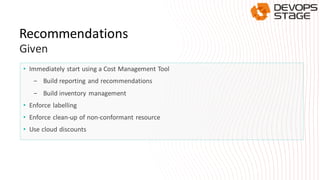
• Immediately start using a Cost Management Tool
- Build reporting and recommendations
- Build inventory management
• Enforce labelling
• Enforce clean-up of non-conformant resource
• Use cloud discounts
Recommendations
Given

faisal mushtaq - an enterprise cloud cost management framework

  • 1.
    Cost Management inthe Cloud for Enterprises Faisal Mushtaq, GlobalLogic
  • 2.
    About the speaker •20+years of experience in building global organizations and innovativeproducts • VP Technology & Head of Global Cloud Practice,, GlobalLogic • Key role in 3 startups with $200+Million exit • VP Engineering PLUMgrid (Acquired by VMware) • VP Mobile Video ProductLine (Allot Communications) • VP Engineering Ortiva Wireless (Acquired by Allot Communications) • Founding Member Wichorus (Acquired by Tellabs) • 10+years at Cisco Systems • Extensive experience in Cloud technologies OpenStack, Containers, SDN, GCP, AWS, Networking
  • 3.
    Agenda • Cost ManagementChallenges • A Cost Management Framework • Automation Tools Landscape • Case Study • Q&A
  • 4.
  • 5.
    Why is CostManagement Cloud sprawl important in the cloud? Bill shocks Unmanaged costs often lead enterprises to abandon cloud journey Dev/Test costs often exceed budgets Cloud costs manifestdifferently (CAPEX vs OPEX) Up to 6X of production
  • 6.
    Optimization • Apps notutilizing cloud features to optimize cost (e.g. autoscaling) • Cloud platform discounts not utilized • Periodic reviews not in place for validating evolving application architectures Ownership • Who owns the cloud resources? • Who pays for them? Budgets and TCO • Has sizing and TCO been done? • Have Pre-Go-Live costs been considered? • CSP provided credits are a double edged sword Visibility • No visibility or insights for stakeholders • Lack of continuous cost monitoring • Cost projections not available → No proactive response Governance • Governance systems not in place, or not enforced • Who gets to create what resources? Key Cloud Cost Management Challenges Automation • Governance not enforced through tools and automation • Non-existent or manual cost and compliance reporting
  • 7.
  • 8.
    Approach Think about costs from Day1 2 3 4 5 6 Enable behavioural change for costs in cloud Move from CAPEX to OPEX mindset Think about cost impact of all design decisions Implement, enforce and automate governance mechanisms Do TCO for before deploying 1
  • 9.
    A Cost ManagementFramework Automation Governance Initial Planning (Sizing and Provisioning) Operational visibility and forecasting Cost optimization
  • 10.
  • 11.
    Transform provisioning practicesfor the cloud De-centralized – App teams can provision resources, but IT team tracks usage Chargeback/Showback – IT teams charge app teams for usage Build reference architectures and templates (EA responsibility) Automate provisioning of reference architectures and templates Use a cloud aware CMDB tool (e.g. ServiceNow) Cloud Resource Ownership
  • 12.
    lT teams candefine the governance practices Governance Application teams implement practices for their environment IT teams track conformance to governance practices • Labeling • Resourcelifecycle 1 2 3 Cloud Resource Provisioning
  • 13.
    • Rule ofthumb is to use tags for resource management and labels for resource identification, grouping, searches & billing • Define list of labels and tags to be applied Identification/Classification Tags • BU/Cost Center • Application • Owner-email– application owner/group • Environment– Prod/Dev/Test/QA/Perf • Environment-Name– Prod1a, Dev4 etc. • Chargeback/ShowbackID • created-by - User who created resource. • role = <db, appserver, proxy, etc.>- Classify by application role Tagging and Labelling
  • 14.
    Build or usea lightweightinventorymanagement system • Continuously track cloud sprawl • Report current inventory, new resources, projected costs • Do periodic gap analysis Inventory Management
  • 15.
  • 16.
    TCO and Budgeting •Use max CPU/RAM for budgeting • Do initial right-sizing based on on-prem monitoring data • For Dev/Test, consider uptime hours (9x5 as opposed to 24x7) for TCO calculations • Enforce budgets from Day 1 Service Catalogsand Provisioning • IAM policies to restrict creation of only allowed services • Build IT certified base images and templates for reference architectures • Publish and enable self-provisioning through tools like ServiceNow • Integrate with approval processes Sizing and Provisioning
  • 17.
  • 18.
    1 23 Daily Reporting includingcost, utilization, non-conformantresources Analytics based recommendationsMonthly billing reports to required stakeholders Reporting Approach
  • 19.
    Reporting Recommendations Automation Exceptions BillingOptimization Inventory ResourceOptimizationTagging Cloud Accounts Billing Data Audit Data API Utilization Data Reporting and Automation Architecture
  • 20.
    Data Points Cost (byapp/environment) • Daily, MTD and Projected Monthly Spend • Budgeted vs Actual, and Overrun Projection • Alerts on any changein usage pattern and/or budget overruns Utilization • Show unused resources - Unattacheddisks - Orphanedsnapshots - UnallocatedIPs - Unused/unaccessed Storage(recommendarchival) • Show underutilized resources - Showinstancesandenvironmentswithnoutilization Inventory • CurrentInventory • New resources created + corresponding cost • New projected monthly spend based on new resources Conformance • List of resources withouttags and labels • List of resources notconfirming to naming conventions • List of instances based on older versions of baseline images to Report
  • 21.
    • Rightsizing • EligibleReservation Planning/Committed Use - Results in up to 24%-57% potential savings • Instance Scheduling • Eligible Spot/Pre-emptible Instances - Results in up to 60-80% potential savings • Reserved/Committed Instance Renewal Alerts (for instances with approaching expiry dates) Recommendations (with savings projections)
  • 22.
  • 23.
    • Effective CostOptimization is a combination of two approaches: - In-depth operational visibility for action by app teams - Automatic resource cleanup (as a fall-back) • Approach - Stakeholders given opportunities to take action, or register exceptions - No action from stakeholders recommendations are automatically actioned - The two approaches, used in combination will lead to better awareness and accountability Cost Optimization Approach
  • 24.
    Automation Approach • If automationnot available in tools, build in-house. • Start small and grow the automation catalog. • No one tool will solve all cost management problems. Build and integrate tools as services (see Reporting and Automation Architecture)
  • 25.
    Infrastructure Optimization • Instance Rightsizing -Right-size individual instances based on utilization • Cleanup of unused resources - As per utilization reports • Cleanup of underutilized resources - Minimal or No CPU utilization - Minimal or No Disk activity - Minimal or No IO activity • Instance scheduling - Based on spikes in usages patterns - Instance scheduling for dev/test servers that don't need to be run 24/7 • Instance modernization - Based on new instance families released by the cloud providers (often cheaper) • Cleanup of other Cloud Services - Based on Cloud based metrics
  • 26.
    Billing Optimization • Production -Use reserved/committed use discounts - Start with – 30%-40% servers (before stabilization = immediate cost savings) - End with – 100% servers (after app stabilizes in cloud) - Use Cloud Services to get TCO of reference architectures before deployment • Dev/Test - Enable committed use & spot/preemptible instances - Start with – 10% servers (Eg., Toolchains – Gerrit/Jenkins etc.) - End with – 100% (after app stabilizes in cloud) - Spot/Preemptible instances for environments that can be torn down and recreated - Integrate use of spot/preemptible instances with DevOps build processes
  • 27.
    • Restrict numberof Dev/Test environments - Review DevOps pipelines - Evaluate alternate and efficient ways for developers to unit test their code - Right-size Dev/Test environments • For Consultants/Vendors - Customer doesn’t mind spending  NOT AN EXCUSE - Think about cost impacts for all design decisions DevOps Optimization
  • 28.
    • Enforcing Labels -Automatically add certain missing tags such as created-by (use to track creators of orphaned resources) - Create and maintain virtual tags for Cloud services that don't support tags yet, in the inventory management system Other Automation Opportunities
  • 29.
  • 30.
    Automation Tools Landscape ConcernAWS Azure GCP Third Party/Custom Initial Sizing • AWS Cost calculator • AWS TCO Calculator • AWS Applicationdiscovery service • Azure Pricing Calculator • Azure TCO Calculator • GCP Pricing Calculator • GCP TCO Calculator • GL’s custom tools Operational Visibility and Forecasting • TrustedAdvisor • AWS Organizations • Tags • Azure Advisor • Azure Cost Management • GCP Labels • GCP Projects • GCP Data Studio • Cloudability • Cmpute.io • Cloudcheckr • Cloudyn • Botmetric • RightScale Cost Optimization • TrustedAdvisor • AWS Lambda • Azure Automation • Azure Cost Management • Google CloudFunctions • Cloudability • Cmpute.io • Cloudcheckr • Cloudyn • Botmetric • RightScale • Monitoring tools (Nagios, DataDog, Sensu) • Skeddly, Ylastic, etc.
  • 31.
    Case Study A RetailCustomer Migrating to GCP
  • 32.
    • Migrating theirentire landscape to GCP over a 2 year period • About 40% applications already migrated to GCP • Initial sizing and planning done • Manual Cost Reporting (automation in progress) Current State
  • 33.
    Challenges • No upfrontcost management strategy and governance framework - Some governance mechanisms defined but not enforced - Other mechanisms being implemented on a 3-6 month timeline • Cost management looked at after the fact • No granular visibility into spends • Actual cloud spends substantially larger than budgets - Monthly spends – Actual 5x times the budgeted spent - GCP discounts not utilized (committed and pre-emptible instance discounts) - No Chargeback - App teams create resources, IT team pays for them • Dev/Test spends substantially larger than Prod - ~40/50 Dev environments for some apps
  • 34.
    • Immediately startusing a Cost Management Tool - Build reporting and recommendations - Build inventory management • Enforce labelling • Enforce clean-up of non-conformant resource • Use cloud discounts Recommendations Given