
P SOCIAL MEDIA - HOW TO DO IT May 2011 Jez Jowett, Global  Social & Digital Director,  Havas Sports & Entertainment #Jezmond.
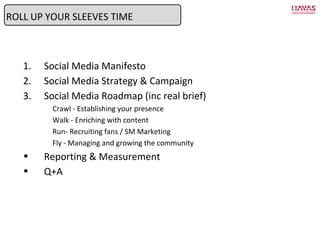
Social Media Manifesto Social Media Strategy & Campaign Social Media Roadmap (inc real brief) Crawl - Establishing your presence Walk - Enriching with content Run- Recruiting fans / SM Marketing Fly - Managing and growing the community Reporting & Measurement Q+A ROLL UP YOUR SLEEVES TIME
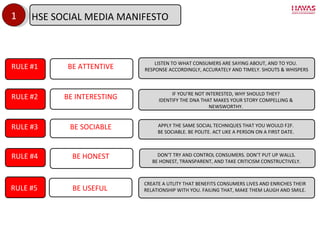
1 RULE #1 BE ATTENTIVE LISTEN TO WHAT CONSUMERS ARE SAYING ABOUT, AND TO YOU. RESPONSE ACCORDINGLY, ACCURATELY AND TIMELY. SHOUTS & WHISPERS RULE #2 BE INTERESTING IF YOU ’RE NOT INTERESTED, WHY SHOULD THEY? IDENTIFY THE DNA THAT MAKES YOUR STORY COMPELLING & NEWSWORTHY. RULE #3 BE SOCIABLE APPLY THE SAME SOCIAL TECHNIQUES THAT YOU WOULD F2F. BE SOCIABLE. BE POLITE. ACT LIKE A PERSON ON A FIRST DATE. RULE #4 BE HONEST DON ’T TRY AND CONTROL CONSUMERS. DON’T PUT UP WALLS. BE HONEST, TRANSPARENT, AND TAKE CRITICISM CONSTRUCTIVELY. RULE #5 BE USEFUL CREATE A UTLITY THAT BENEFITS CONSUMERS LIVES AND ENRICHES THEIR RELATIONSHIP WITH YOU. FAILING THAT, MAKE THEM LAUGH AND SMILE. HSE SOCIAL MEDIA MANIFESTO
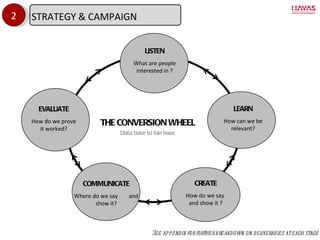
LISTEN What are people interested in ? CREATE How do we say  and show it ? COMMUNICATE Where do we say  and show it? EVALUATE How do we prove it worked? LEARN How can we be relevant? 2 See appendix for further breakdown on deliverables at each stage THE CONVERSION WHEEL Data base to fan base STRATEGY & CAMPAIGN
Now let ’s plan it….
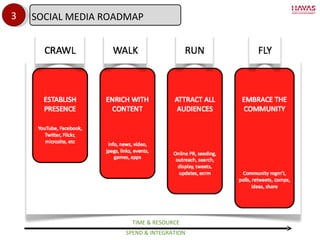
3 TIME & RESOURCE SPEND & INTEGRATION SOCIAL MEDIA ROADMAP
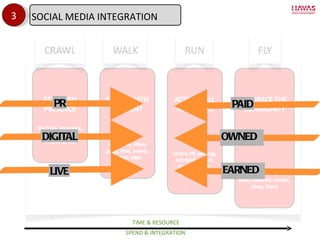
3 TIME & RESOURCE SPEND & INTEGRATION PR LIVE DIGITAL PAID EARNED OWNED SOCIAL MEDIA INTEGRATION
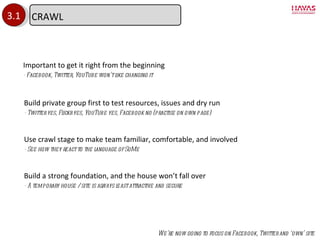
3.1 Important to get it right from the beginning - Facebook, Twitter, YouTube won ’t like changing it Build a strong foundation, and the house won ’t fall over - A temporary house / site is always least attractive and secure Build private group first to test resources, issues and dry run - Twitter yes, Flickr yes, YouTube yes, Facebook no (practise on own page) Use crawl stage to make team familiar, comfortable, and involved - See how they react to the language of SoMe We ’re now going to focus on Facebook, Twitter and ‘own’ site CRAWL
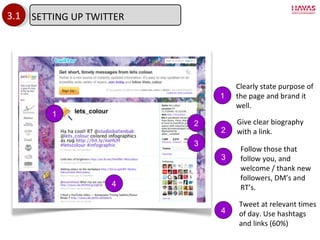
3.1 1 1 Clearly state purpose of the page and brand it well. 2 Give clear biography with a link. 2 3 3 Follow those that follow you, and welcome / thank new followers, DM ’s and RT’s. 4 Tweet at relevant times of day. Use hashtags and links (60%) 4 SETTING UP TWITTER
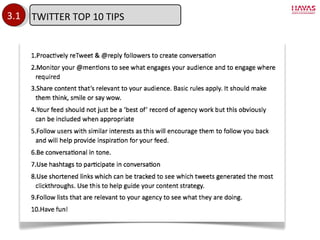
3.1 TWITTER TOP 10 TIPS
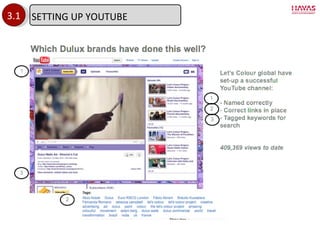
3.1 SETTING UP YOUTUBE
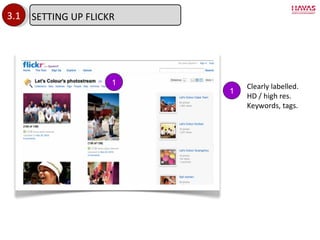
3.1 1 1 Clearly labelled.  HD / high res. Keywords, tags.  SETTING UP FLICKR
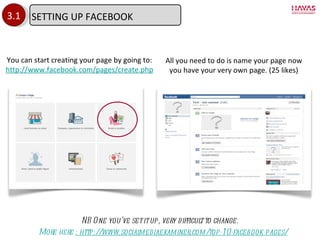
3.1 You can start creating your page by going to: http://www.facebook.com/pages/create.php All you need to do is name your page now you have your very own page. (25 likes) NB One you ’ve set it up, very difficult to change. More here  : http://www.socialmediaexaminer.com/top-10-facebook-pages/ SETTING UP FACEBOOK
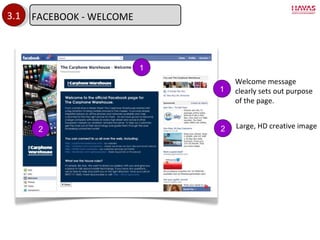
3.1 Welcome message clearly sets out purpose of the page. Large, HD creative image 1 1 2 2 FACEBOOK - WELCOME
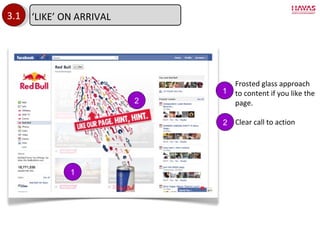
3.1 Frosted glass approach to content if you like the page. Clear call to action 1 1 2 2 ‘ LIKE’ ON ARRIVAL
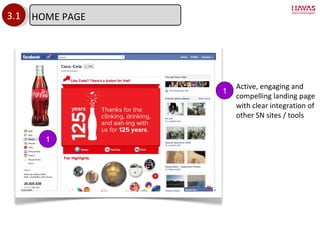
3.1 1 1 Active, engaging and compelling landing page with clear integration of other SN sites / tools HOME PAGE
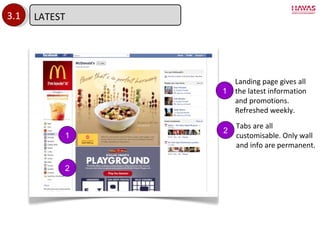
3.1 2 1 Landing page gives all the latest information and promotions. Refreshed weekly. Tabs are all customisable. Only wall and info are permanent. 1 2 LATEST
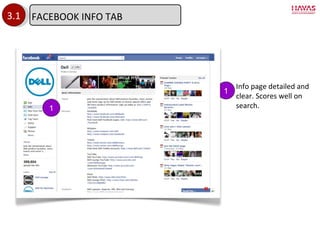
3.1 Info page detailed and clear. Scores well on search. 1 1 FACEBOOK INFO TAB
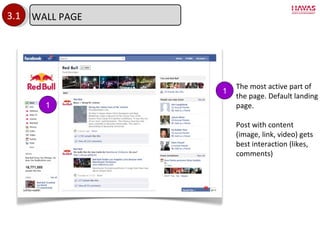
3.1 1 1 The most active part of the page. Default landing page. Post with content (image, link, video) gets best interaction (likes, comments) WALL PAGE
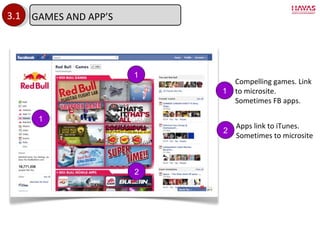
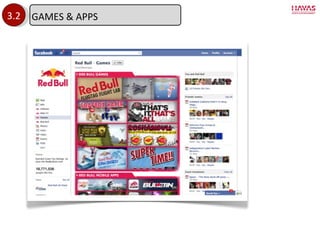
3.1 1 2 1 Compelling games. Link to microsite. Sometimes FB apps. Apps link to iTunes. Sometimes to microsite 1 2 GAMES AND APP ’S
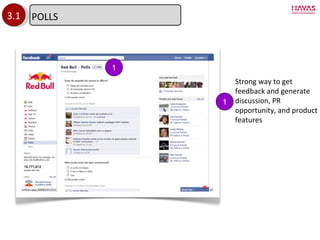
3.1 Strong way to get feedback and generate discussion, PR opportunity, and product features 1 1 POLLS
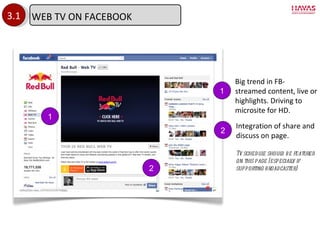
3.1 2 1 Big trend in FB- streamed content, live or highlights. Driving to microsite for HD. Integration of share and discuss on page. Tv schedule should be featured on this page (especially if supporting broadcaster) 1 2 WEB TV ON FACEBOOK
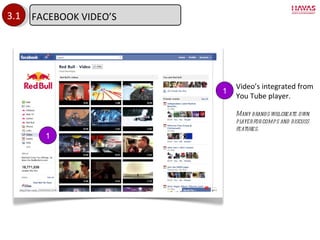
3.1 1 Video ’s integrated from You Tube player. Many brands will create own player for comps and discuss features. 1 FACEBOOK VIDEO ’S
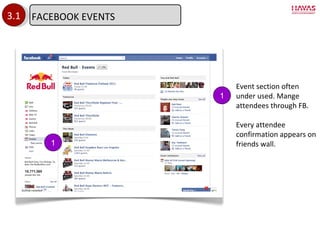
3.1 1 Event section often under used. Mange attendees through FB. Every attendee confirmation appears on friends wall. 1 FACEBOOK EVENTS
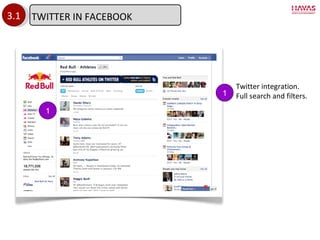
3.1 1 Twitter integration. Full search and filters. 1 TWITTER IN FACEBOOK
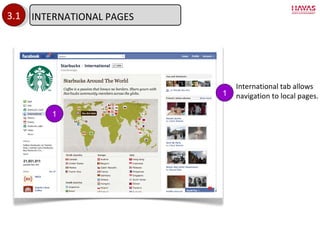
3.1 1 1 International tab allows navigation to local pages. INTERNATIONAL PAGES
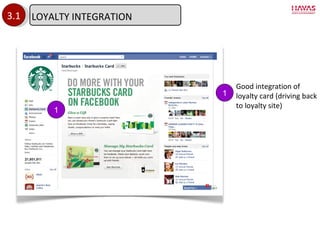
3.1 1 1 Good integration of loyalty card (driving back to loyalty site) LOYALTY INTEGRATION
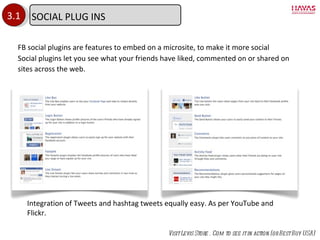
3.1 FB social plugins are features to embed on a microsite, to make it more social Social plugins let you see what your friends have liked, commented on or shared on sites across the web. Visit Levis Store . Com to see it in action (or Best Buy USA) Integration of Tweets and hashtag tweets equally easy. As per YouTube and Flickr. SOCIAL PLUG INS
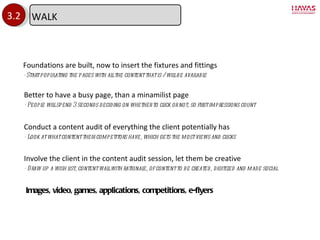
3.2 Foundations are built, now to insert the fixtures and fittings - Start populating the pages with all the content that is / will be available Involve the client in the content audit session, let them be creative - Draw up a wish list, content wall with rationale, of content to be created, digitized and made social Better to have a busy page, than a minamilist page - People will spend 3 seconds deciding on whether to click or not, so first impressions count  Conduct a content audit of everything the client potentially has - Look at what content their competitors have, which gets the most views and clicks Images, video, games, applications, competitions, e-flyers WALK
3.2 GAMES & APPS
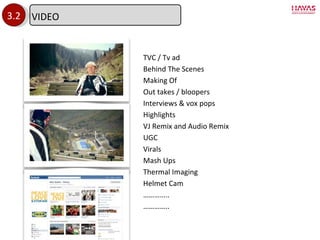
3.2 TVC / Tv ad Behind The Scenes Making Of Out takes / bloopers Interviews & vox pops Highlights VJ Remix and Audio Remix UGC Virals Mash Ups Thermal Imaging Helmet Cam ………… .. ………… .. VIDEO
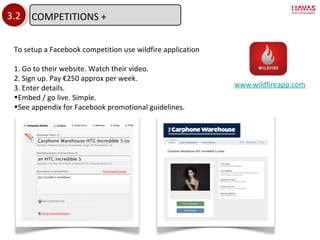
www.wildfireapp.com 3.2 To setup a Facebook competition use wildfire application 1. Go to their website. Watch their video. 2. Sign up. Pay €250 approx per week. 3. Enter details. Embed / go live. Simple. See appendix for Facebook promotional guidelines. COMPETITIONS +
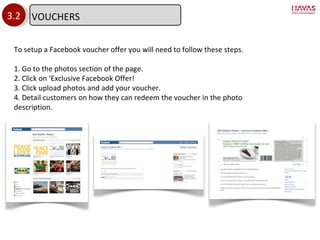
3.2 To setup a Facebook voucher offer you will need to follow these steps. 1. Go to the photos section of the page. 2. Click on  ‘Exclusive Facebook Offer! 3. Click upload photos and add your voucher. 4. Detail customers on how they can redeem the voucher in the photo description. VOUCHERS
3.3 Owned Media  :  Email database Internal comms & OOH signage Links Earned Media  :  Cyber PR Blogger outreach & influencer marketing Content seeding & micropublishing Paid Media  :  Promotions & partnerships Display & engagement ads Search You are now ready to announce and attract people to your site - Tell the most important people first, give them an  ‘exclusive’ RUN
3.3 E-mail database - include campaign image in newsletter. Featured members get better open rates Internal comms & OOH - Utilise intranet, newsletter, magazine, and in the canteen - Signage in shop windows, at till, on receipts, packaging  “LIKE us on Facebook, FOLLOW on Twitter” Links - Links from other SN profiles, sites and microsites - Brand name in link increases open rate OWNED MEDIA
3.3 Cyber PR Use Sysomos or other to identify key online news sites Research what they write about and custom the message and pitch for them Blogger Outreach & Influencer Marketing - Use tools and blog links / blog roll to find influencers If new contact, ask his permission to send something first, and how you got his details Then send custom message, no more than 2 paragraphs: - Why we ’re contacting them (relevance) - What the story is (hook) What the opportunity and assets are available to them Be nice, and keep at it. If they don ’t wnat ot feature this one, they might the next. Content seeding & micropublishing Create accounts for HSE and upload content to key content networks Send links and information from HSE social media accounts Tweet from client and HSE accounts asking for people to re-tweet and  ‘like’ it. EARNED MEDIA
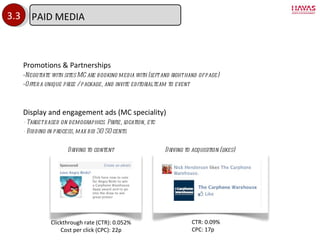
3.3 Promotions & Partnerships Negotiate with sites MC are booking media with (left and right hand of page) Offer a unique prize / package, and invite editorial team to event Display and engagement ads (MC speciality) - Target based on demographics. Prifle, location, etc - Bidding in process, max bid 30-50 cents. Driving to content Driving to acquisition (likes) Clickthrough rate (CTR): 0.052% Cost per click (CPC): 22p CTR: 0.09% CPC: 17p PAID MEDIA
3.4 Community Management - listen first, speak second, with a human voice, and with structure Community Rewards - Give them challenges, rewards, opportunities to be the ultimate fan / ambassador / advocate Community Participation / call to actions - Ask them to share, retweet, comment, like Community Involvement - involve them in your campaigns, ask for their suggestions & ideas Managing a social media community requires ongoing evolution to find the types of content that will engage your fans. Something that worked three months ago may seem tired today. Don ’t be afraid to experiment with ideas to see what will work.  As your community grows, its interests and way of communicating with the brand will change. FLY
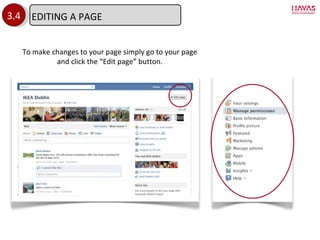
3.4 To make changes to your page simply go to your page and click the  “Edit page” button. EDITING A PAGE
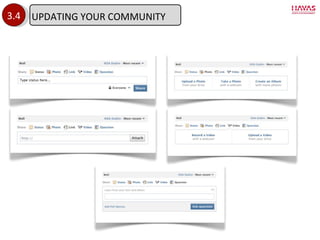
3.4 UPDATING YOUR COMMUNITY
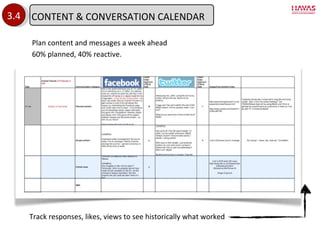
3.4 Plan content and messages a week ahead 60% planned, 40% reactive. Track responses, likes, views to see historically what worked CONTENT & CONVERSATION CALENDAR
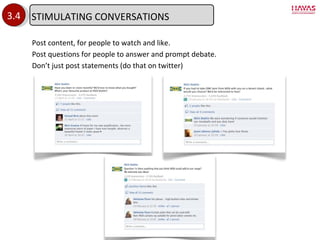
3.4 Post content, for people to watch and like. Post questions for people to answer and prompt debate. Don ’t just post statements (do that on twitter) STIMULATING CONVERSATIONS
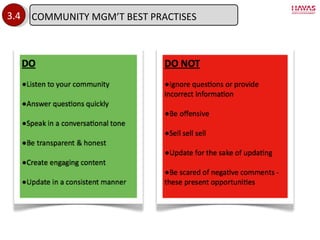
3.4 COMMUNITY MGM ’T BEST PRACTISES
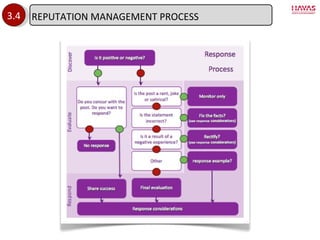
3.4 REPUTATION MANAGEMENT PROCESS
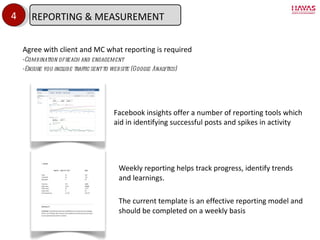
Weekly reporting helps track progress, identify trends and learnings.  The current template is an effective reporting model and should be completed on a weekly basis 4 Facebook insights offer a number of reporting tools which aid in identifying successful posts and spikes in activity Agree with client and MC what reporting is required Combination of reach and engagement Ensure you include traffic sent to website (Google Analytics) REPORTING & MEASUREMENT
4 SAMPLE WEEKLY REPORT- SUMMARY REMOVED DUE TO PRIVACY (SORRY)
THANK YOU. Q+A ?
APPENDIX
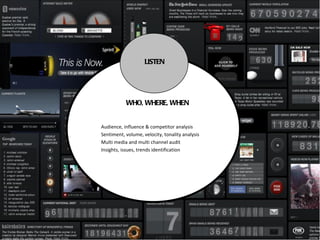
LISTEN WHO, WHERE, WHEN Audience, influence & competitor analysis Sentiment, volume, velocity, tonality analysis Multi media and multi channel audit Insights, issues, trends identification
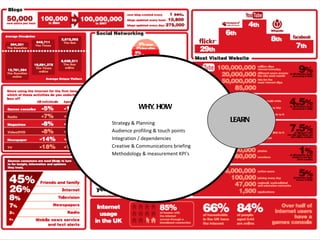
LEARN WHY, HOW Strategy & Planning Audience profiling & touch points Integration / dependencies Creative & Communications briefing Methodology & measurement KPI ’s
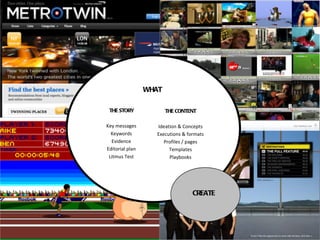
THE CONTENT Ideation & Concepts Executions & formats Profiles / pages Templates Playbooks CREATE THE STORY Key messages Keywords Evidence Editorial plan Litmus Test WHAT
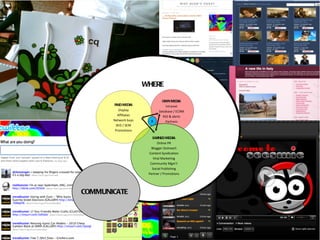
COMMUNICATE OWN MEDIA Intranet Database / ECRM RSS & alerts Partners EARNED MEDIA Online PR Blogger Outreach Content Syndication Viral Marketing Community Mgm ’t Social Publishing Partner / Promotions PAID MEDIA Display Affiliates Network buys SEO / SEM Promotions X WHERE
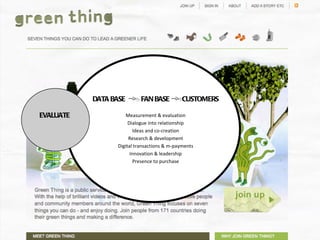
EVALUATE  DATA BASE  FAN BASE  CUSTOMERS Measurement & evaluation Dialogue into relationship Ideas and co-creation Research & development Digital transactions & m-payments Innovation & leadership Presence to purchase
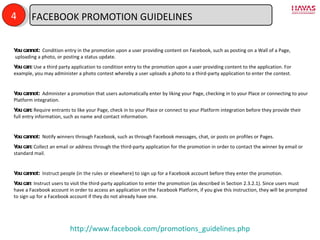
4 You cannot:   Condition entry in the promotion upon a user providing content on Facebook, such as posting on a Wall of a Page,  uploading a photo, or posting a status update. You can:  Use a third party application to condition entry to the promotion upon a user providing content to the application. For example, you may administer a photo contest whereby a user uploads a photo to a third-party application to enter the contest. You cannot:   Administer a promotion that users automatically enter by liking your Page, checking in to your Place or connecting to your Platform integration. You can:  Require entrants to like your Page, check in to your Place or connect to your Platform integration before they provide their full entry information, such as name and contact information. You cannot:   Notify winners through Facebook, such as through Facebook messages, chat, or posts on profiles or Pages. You can:  Collect an email or address through the third-party application for the promotion in order to contact the winner by email or standard mail. You cannot:   Instruct people (in the rules or elsewhere) to sign up for a Facebook account before they enter the promotion. You can : Instruct users to visit the third-party application to enter the promotion (as described in Section 2.3.2.1). Since users must have a Facebook account in order to access an application on the Facebook Platform, if you give this instruction, they will be prompted to sign up for a Facebook account if they do not already have one. http://www.facebook.com/promotions_guidelines.php FACEBOOK PROMOTION GUIDELINES

How to do Social Media May 2011

  • 1.
    P SOCIAL MEDIA- HOW TO DO IT May 2011 Jez Jowett, Global Social & Digital Director, Havas Sports & Entertainment #Jezmond.
  • 2.
    Social Media ManifestoSocial Media Strategy & Campaign Social Media Roadmap (inc real brief) Crawl - Establishing your presence Walk - Enriching with content Run- Recruiting fans / SM Marketing Fly - Managing and growing the community Reporting & Measurement Q+A ROLL UP YOUR SLEEVES TIME
  • 3.
    1 RULE #1BE ATTENTIVE LISTEN TO WHAT CONSUMERS ARE SAYING ABOUT, AND TO YOU. RESPONSE ACCORDINGLY, ACCURATELY AND TIMELY. SHOUTS & WHISPERS RULE #2 BE INTERESTING IF YOU ’RE NOT INTERESTED, WHY SHOULD THEY? IDENTIFY THE DNA THAT MAKES YOUR STORY COMPELLING & NEWSWORTHY. RULE #3 BE SOCIABLE APPLY THE SAME SOCIAL TECHNIQUES THAT YOU WOULD F2F. BE SOCIABLE. BE POLITE. ACT LIKE A PERSON ON A FIRST DATE. RULE #4 BE HONEST DON ’T TRY AND CONTROL CONSUMERS. DON’T PUT UP WALLS. BE HONEST, TRANSPARENT, AND TAKE CRITICISM CONSTRUCTIVELY. RULE #5 BE USEFUL CREATE A UTLITY THAT BENEFITS CONSUMERS LIVES AND ENRICHES THEIR RELATIONSHIP WITH YOU. FAILING THAT, MAKE THEM LAUGH AND SMILE. HSE SOCIAL MEDIA MANIFESTO
  • 4.
    LISTEN What arepeople interested in ? CREATE How do we say and show it ? COMMUNICATE Where do we say and show it? EVALUATE How do we prove it worked? LEARN How can we be relevant? 2 See appendix for further breakdown on deliverables at each stage THE CONVERSION WHEEL Data base to fan base STRATEGY & CAMPAIGN
  • 5.
    Now let ’splan it….
  • 6.
    3 TIME &RESOURCE SPEND & INTEGRATION SOCIAL MEDIA ROADMAP
  • 7.
    3 TIME &RESOURCE SPEND & INTEGRATION PR LIVE DIGITAL PAID EARNED OWNED SOCIAL MEDIA INTEGRATION
  • 8.
    3.1 Important toget it right from the beginning - Facebook, Twitter, YouTube won ’t like changing it Build a strong foundation, and the house won ’t fall over - A temporary house / site is always least attractive and secure Build private group first to test resources, issues and dry run - Twitter yes, Flickr yes, YouTube yes, Facebook no (practise on own page) Use crawl stage to make team familiar, comfortable, and involved - See how they react to the language of SoMe We ’re now going to focus on Facebook, Twitter and ‘own’ site CRAWL
  • 9.
    3.1 1 1Clearly state purpose of the page and brand it well. 2 Give clear biography with a link. 2 3 3 Follow those that follow you, and welcome / thank new followers, DM ’s and RT’s. 4 Tweet at relevant times of day. Use hashtags and links (60%) 4 SETTING UP TWITTER
  • 10.
  • 11.
  • 12.
    3.1 1 1Clearly labelled. HD / high res. Keywords, tags. SETTING UP FLICKR
  • 13.
    3.1 You canstart creating your page by going to: http://www.facebook.com/pages/create.php All you need to do is name your page now you have your very own page. (25 likes) NB One you ’ve set it up, very difficult to change. More here : http://www.socialmediaexaminer.com/top-10-facebook-pages/ SETTING UP FACEBOOK
  • 14.
    3.1 Welcome messageclearly sets out purpose of the page. Large, HD creative image 1 1 2 2 FACEBOOK - WELCOME
  • 15.
    3.1 Frosted glassapproach to content if you like the page. Clear call to action 1 1 2 2 ‘ LIKE’ ON ARRIVAL
  • 16.
    3.1 1 1Active, engaging and compelling landing page with clear integration of other SN sites / tools HOME PAGE
  • 17.
    3.1 2 1Landing page gives all the latest information and promotions. Refreshed weekly. Tabs are all customisable. Only wall and info are permanent. 1 2 LATEST
  • 18.
    3.1 Info pagedetailed and clear. Scores well on search. 1 1 FACEBOOK INFO TAB
  • 19.
    3.1 1 1The most active part of the page. Default landing page. Post with content (image, link, video) gets best interaction (likes, comments) WALL PAGE
  • 20.
    3.1 1 21 Compelling games. Link to microsite. Sometimes FB apps. Apps link to iTunes. Sometimes to microsite 1 2 GAMES AND APP ’S
  • 21.
    3.1 Strong wayto get feedback and generate discussion, PR opportunity, and product features 1 1 POLLS
  • 22.
    3.1 2 1Big trend in FB- streamed content, live or highlights. Driving to microsite for HD. Integration of share and discuss on page. Tv schedule should be featured on this page (especially if supporting broadcaster) 1 2 WEB TV ON FACEBOOK
  • 23.
    3.1 1 Video’s integrated from You Tube player. Many brands will create own player for comps and discuss features. 1 FACEBOOK VIDEO ’S
  • 24.
    3.1 1 Eventsection often under used. Mange attendees through FB. Every attendee confirmation appears on friends wall. 1 FACEBOOK EVENTS
  • 25.
    3.1 1 Twitterintegration. Full search and filters. 1 TWITTER IN FACEBOOK
  • 26.
    3.1 1 1International tab allows navigation to local pages. INTERNATIONAL PAGES
  • 27.
    3.1 1 1Good integration of loyalty card (driving back to loyalty site) LOYALTY INTEGRATION
  • 28.
    3.1 FB socialplugins are features to embed on a microsite, to make it more social Social plugins let you see what your friends have liked, commented on or shared on sites across the web. Visit Levis Store . Com to see it in action (or Best Buy USA) Integration of Tweets and hashtag tweets equally easy. As per YouTube and Flickr. SOCIAL PLUG INS
  • 29.
    3.2 Foundations arebuilt, now to insert the fixtures and fittings - Start populating the pages with all the content that is / will be available Involve the client in the content audit session, let them be creative - Draw up a wish list, content wall with rationale, of content to be created, digitized and made social Better to have a busy page, than a minamilist page - People will spend 3 seconds deciding on whether to click or not, so first impressions count Conduct a content audit of everything the client potentially has - Look at what content their competitors have, which gets the most views and clicks Images, video, games, applications, competitions, e-flyers WALK
  • 30.
  • 31.
    3.2 TVC /Tv ad Behind The Scenes Making Of Out takes / bloopers Interviews & vox pops Highlights VJ Remix and Audio Remix UGC Virals Mash Ups Thermal Imaging Helmet Cam ………… .. ………… .. VIDEO
  • 32.
    www.wildfireapp.com 3.2 Tosetup a Facebook competition use wildfire application 1. Go to their website. Watch their video. 2. Sign up. Pay €250 approx per week. 3. Enter details. Embed / go live. Simple. See appendix for Facebook promotional guidelines. COMPETITIONS +
  • 33.
    3.2 To setupa Facebook voucher offer you will need to follow these steps. 1. Go to the photos section of the page. 2. Click on ‘Exclusive Facebook Offer! 3. Click upload photos and add your voucher. 4. Detail customers on how they can redeem the voucher in the photo description. VOUCHERS
  • 34.
    3.3 Owned Media : Email database Internal comms & OOH signage Links Earned Media : Cyber PR Blogger outreach & influencer marketing Content seeding & micropublishing Paid Media : Promotions & partnerships Display & engagement ads Search You are now ready to announce and attract people to your site - Tell the most important people first, give them an ‘exclusive’ RUN
  • 35.
    3.3 E-mail database- include campaign image in newsletter. Featured members get better open rates Internal comms & OOH - Utilise intranet, newsletter, magazine, and in the canteen - Signage in shop windows, at till, on receipts, packaging “LIKE us on Facebook, FOLLOW on Twitter” Links - Links from other SN profiles, sites and microsites - Brand name in link increases open rate OWNED MEDIA
  • 36.
    3.3 Cyber PRUse Sysomos or other to identify key online news sites Research what they write about and custom the message and pitch for them Blogger Outreach & Influencer Marketing - Use tools and blog links / blog roll to find influencers If new contact, ask his permission to send something first, and how you got his details Then send custom message, no more than 2 paragraphs: - Why we ’re contacting them (relevance) - What the story is (hook) What the opportunity and assets are available to them Be nice, and keep at it. If they don ’t wnat ot feature this one, they might the next. Content seeding & micropublishing Create accounts for HSE and upload content to key content networks Send links and information from HSE social media accounts Tweet from client and HSE accounts asking for people to re-tweet and ‘like’ it. EARNED MEDIA
  • 37.
    3.3 Promotions &Partnerships Negotiate with sites MC are booking media with (left and right hand of page) Offer a unique prize / package, and invite editorial team to event Display and engagement ads (MC speciality) - Target based on demographics. Prifle, location, etc - Bidding in process, max bid 30-50 cents. Driving to content Driving to acquisition (likes) Clickthrough rate (CTR): 0.052% Cost per click (CPC): 22p CTR: 0.09% CPC: 17p PAID MEDIA
  • 38.
    3.4 Community Management- listen first, speak second, with a human voice, and with structure Community Rewards - Give them challenges, rewards, opportunities to be the ultimate fan / ambassador / advocate Community Participation / call to actions - Ask them to share, retweet, comment, like Community Involvement - involve them in your campaigns, ask for their suggestions & ideas Managing a social media community requires ongoing evolution to find the types of content that will engage your fans. Something that worked three months ago may seem tired today. Don ’t be afraid to experiment with ideas to see what will work. As your community grows, its interests and way of communicating with the brand will change. FLY
  • 39.
    3.4 To makechanges to your page simply go to your page and click the “Edit page” button. EDITING A PAGE
  • 40.
  • 41.
    3.4 Plan contentand messages a week ahead 60% planned, 40% reactive. Track responses, likes, views to see historically what worked CONTENT & CONVERSATION CALENDAR
  • 42.
    3.4 Post content,for people to watch and like. Post questions for people to answer and prompt debate. Don ’t just post statements (do that on twitter) STIMULATING CONVERSATIONS
  • 43.
    3.4 COMMUNITY MGM’T BEST PRACTISES
  • 44.
  • 45.
    Weekly reporting helpstrack progress, identify trends and learnings. The current template is an effective reporting model and should be completed on a weekly basis 4 Facebook insights offer a number of reporting tools which aid in identifying successful posts and spikes in activity Agree with client and MC what reporting is required Combination of reach and engagement Ensure you include traffic sent to website (Google Analytics) REPORTING & MEASUREMENT
  • 46.
    4 SAMPLE WEEKLYREPORT- SUMMARY REMOVED DUE TO PRIVACY (SORRY)
  • 47.
  • 48.
  • 49.
    LISTEN WHO, WHERE,WHEN Audience, influence & competitor analysis Sentiment, volume, velocity, tonality analysis Multi media and multi channel audit Insights, issues, trends identification
  • 50.
    LEARN WHY, HOWStrategy & Planning Audience profiling & touch points Integration / dependencies Creative & Communications briefing Methodology & measurement KPI ’s
  • 51.
    THE CONTENT Ideation& Concepts Executions & formats Profiles / pages Templates Playbooks CREATE THE STORY Key messages Keywords Evidence Editorial plan Litmus Test WHAT
  • 52.
    COMMUNICATE OWN MEDIAIntranet Database / ECRM RSS & alerts Partners EARNED MEDIA Online PR Blogger Outreach Content Syndication Viral Marketing Community Mgm ’t Social Publishing Partner / Promotions PAID MEDIA Display Affiliates Network buys SEO / SEM Promotions X WHERE
  • 53.
    EVALUATE DATABASE FAN BASE CUSTOMERS Measurement & evaluation Dialogue into relationship Ideas and co-creation Research & development Digital transactions & m-payments Innovation & leadership Presence to purchase
  • 54.
    4 You cannot:  Condition entry in the promotion upon a user providing content on Facebook, such as posting on a Wall of a Page,  uploading a photo, or posting a status update. You can: Use a third party application to condition entry to the promotion upon a user providing content to the application. For example, you may administer a photo contest whereby a user uploads a photo to a third-party application to enter the contest. You cannot:  Administer a promotion that users automatically enter by liking your Page, checking in to your Place or connecting to your Platform integration. You can: Require entrants to like your Page, check in to your Place or connect to your Platform integration before they provide their full entry information, such as name and contact information. You cannot:   Notify winners through Facebook, such as through Facebook messages, chat, or posts on profiles or Pages. You can: Collect an email or address through the third-party application for the promotion in order to contact the winner by email or standard mail. You cannot:  Instruct people (in the rules or elsewhere) to sign up for a Facebook account before they enter the promotion. You can : Instruct users to visit the third-party application to enter the promotion (as described in Section 2.3.2.1). Since users must have a Facebook account in order to access an application on the Facebook Platform, if you give this instruction, they will be prompted to sign up for a Facebook account if they do not already have one. http://www.facebook.com/promotions_guidelines.php FACEBOOK PROMOTION GUIDELINES

Editor's Notes