How to create your slideshow!
   Follow the steps in this presentation to help you
              complete this assignment!


Your slideshow must be uploaded onto slideshare.com
    and posted on your blog by midnight, June 1st
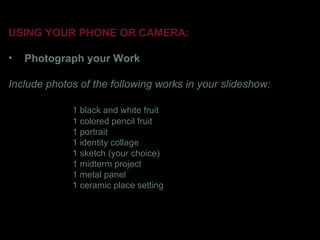
USING YOUR PHONE OR CAMERA:

•   Photograph your Work

Include photos of the following works in your slideshow:

             1 black and white fruit
             1 colored pencil fruit
             1 portrait
             1 identity collage
             1 sketch (your choice)
             1 midterm project
             1 metal panel
             1 ceramic place setting
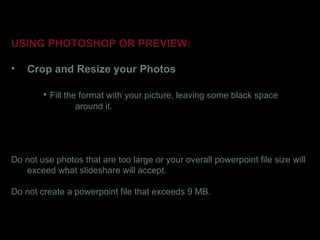
USING PHOTOSHOP OR PREVIEW:

•   Crop and Resize your Photos

        • Fill the format with your picture, leaving some black space
                around it.


Do not use photos that are too large or your overall powerpoint file size will
   exceed what slideshare will accept.

Do not create a powerpoint file that exceeds 9 MB.
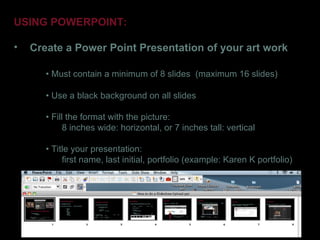
USING POWERPOINT:

•   Create a Power Point Presentation of your art work

       • Must contain a minimum of 8 slides (maximum 16 slides)

       • Use a black background on all slides

       • Fill the format with the picture:
             8 inches wide: horizontal, or 7 inches tall: vertical

       • Title your presentation:
            first name, last initial, portfolio (example: Karen K portfolio)
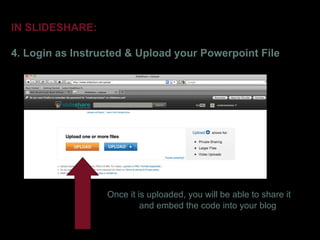
IN SLIDESHARE:

4. Login as Instructed & Upload your Powerpoint File


                  Once it is uploaded, you will be able to share it
                           and embed the code into your blog
IN SLIDESHARE:

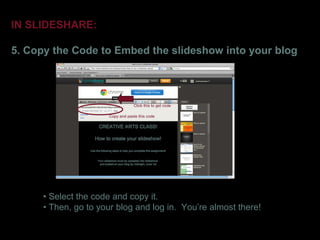
5. Copy the Code to Embed the slideshow into your blog


                                  Click this to get code

                      Copy and paste this code


      • Select the code and copy it.
      • Then, go to your blog and log in. You’re almost there!
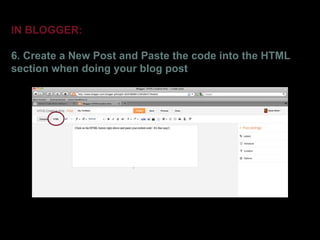
IN BLOGGER:

6. Create a New Post and Paste the code into the HTML
section when doing your blog post
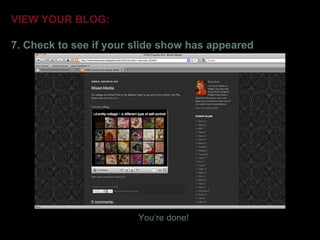
VIEW YOUR BLOG:

7. Check to see if your slide show has appeared


                        You’re done!

How to do a slideshow upload

  • 1.
    How to createyour slideshow! Follow the steps in this presentation to help you complete this assignment! Your slideshow must be uploaded onto slideshare.com and posted on your blog by midnight, June 1st
  • 2.
    USING YOUR PHONEOR CAMERA: • Photograph your Work Include photos of the following works in your slideshow: 1 black and white fruit 1 colored pencil fruit 1 portrait 1 identity collage 1 sketch (your choice) 1 midterm project 1 metal panel 1 ceramic place setting
  • 3.
    USING PHOTOSHOP ORPREVIEW: • Crop and Resize your Photos • Fill the format with your picture, leaving some black space around it. Do not use photos that are too large or your overall powerpoint file size will exceed what slideshare will accept. Do not create a powerpoint file that exceeds 9 MB.
  • 4.
    USING POWERPOINT: • Create a Power Point Presentation of your art work • Must contain a minimum of 8 slides (maximum 16 slides) • Use a black background on all slides • Fill the format with the picture: 8 inches wide: horizontal, or 7 inches tall: vertical • Title your presentation: first name, last initial, portfolio (example: Karen K portfolio)
  • 5.
    IN SLIDESHARE: 4. Loginas Instructed & Upload your Powerpoint File Once it is uploaded, you will be able to share it and embed the code into your blog
  • 6.
    IN SLIDESHARE: 5. Copythe Code to Embed the slideshow into your blog Click this to get code Copy and paste this code • Select the code and copy it. • Then, go to your blog and log in. You’re almost there!
  • 7.
    IN BLOGGER: 6. Createa New Post and Paste the code into the HTML section when doing your blog post
  • 8.
    VIEW YOUR BLOG: 7.Check to see if your slide show has appeared You’re done!