© 2017 Unitrends 1#1 All-in-One Enterprise
Backup and Continuity
How Do You Choose a Cloud for
Enterprise-level Continuity?
Mark Jordan, VP Technology
© 2017 Unitrends 2
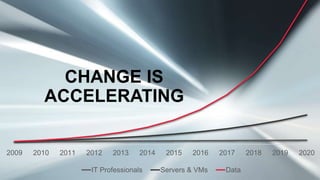
2009 2010 2011 2012 2013 2014 2015 2016 2017 2018 2019 2020
IT Professionals Servers & VMs Data
CHANGE IS
ACCELERATING
© 2017 Unitrends 3
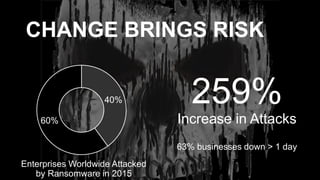
CHANGE BRINGS RISK
40%
60%
Enterprises Worldwide Attacked
by Ransomware in 2015
259%
Increase in Attacks
63% businesses down > 1 day
© 2017 Unitrends 4
Cloud Adopters Are Ahead of The Game
Important triggers for cloud continuity
• No second site or offsite plan, whatsoever
• Significant pain with managing a secondary site
• Significant pain with managing storage
• Using traditional strategies – tape or rotating disk
© 2017 Unitrends 5
Wrong choices can be costly!
30% of cloud spending is
wasted.
© 2017 Unitrends 6
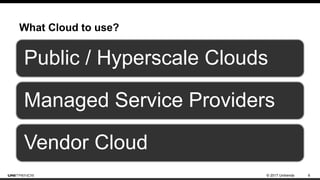
What Cloud to use?
Public / Hyperscale Clouds
Managed Service Providers
Vendor Cloud
© 2017 Unitrends 7
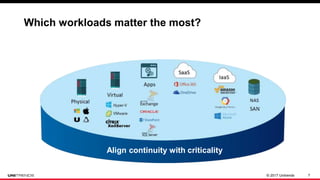
Protect your ideas/business
Align continuity with criticality
Protect Everything You Have
Which workloads matter the most?
© 2017 Unitrends 8
 Focus on individual backup tasks, not business requirements
 Leave IT blind about recovery compliance
 No confidence in achieving or communicating SLAs
 Act only as a cost (insurance policy) rather than a value driver:
 Increase productivity
 Reduced infrastructure costs
 Proactive analytics
Challenge: Most solutions are not business focused
© 2017 Unitrends 9
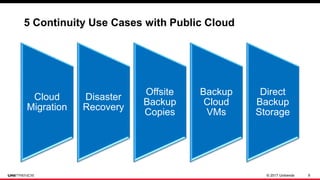
Cloud
Migration
Disaster
Recovery
Offsite
Backup
Copies
Backup
Cloud
VMs
Direct
Backup
Storage
5 Continuity Use Cases with Public Cloud
Updates Coming Soon
© 2017 Unitrends 10
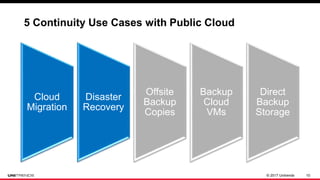
Cloud
Migration
Disaster
Recovery
Offsite
Backup
Copies
Backup
Cloud
VMs
Direct
Backup
Storage
5 Continuity Use Cases with Public Cloud
Updates Coming Soon
© 2017 Unitrends 11
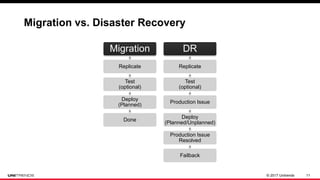
Migration
Replicate
Test
(optional)
Deploy
(Planned)
Done
DR
Replicate
Test
(optional)
Production Issue
Deploy
(Planned/Unplanned)
Production Issue
Resolved
Failback
Migration vs. Disaster Recovery
© 2017 Unitrends 12
Benefits To You
Simple, affordable (if done right)
Self-managed
Highly dynamic
© 2017 Unitrends 13
Benefits To You (with Caution)
Offsite compliance
Infinite retention
Pay for what you use
© 2017 Unitrends 14
What about a Managed Service Provider?
• Typically a white glove service
• Focus on specific applications
• Aggressive recovery objectives
• Test and prove recovery SLAs
• You will pay more!
© 2017 Unitrends 15
Benefits To You
Experts at specific application
continuity
Will agree to aggressive recovery SLAs
© 2017 Unitrends 16
Should I use a vendor cloud?
• Compliance and DRaaS solutions
• Focus on specific OS platforms
• Fully manage cloud infrastructure
• Can they test and prove recovery SLAs?
• Often moderately priced
© 2017 Unitrends 17
Benefits To You
One vendor for backup and cloud continuity
Experts at recovery from their software
Pay for what you protect
© 2017 Unitrends 18
5 Critical Success Factors
© 2017 Unitrends 19
5 Critical Success Factors
1. Understand your needs
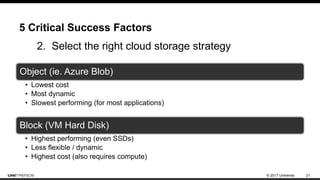
2. Select the right cloud storage strategy
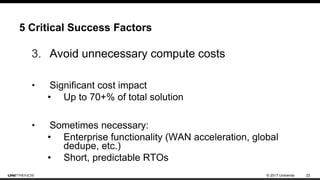
3. Avoid unnecessary compute costs
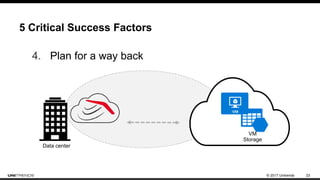
4. Plan for a way back
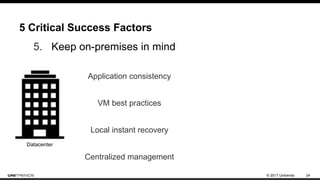
5. Keep on-premises in mind
© 2017 Unitrends 20
5 Critical Success Factors
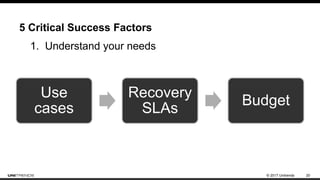
Use
cases
Recovery
SLAs
Budget
1. Understand your needs
© 2017 Unitrends 21
5 Critical Success Factors
Object (ie. Azure Blob)
• Lowest cost
• Most dynamic
• Slowest performing (for most applications)
Block (VM Hard Disk)
• Highest performing (even SSDs)
• Less flexible / dynamic
• Highest cost (also requires compute)
2. Select the right cloud storage strategy
© 2017 Unitrends 22
5 Critical Success Factors
3. Avoid unnecessary compute costs
• Significant cost impact
• Up to 70+% of total solution
• Sometimes necessary:
• Enterprise functionality (WAN acceleration, global
dedupe, etc.)
• Short, predictable RTOs
© 2017 Unitrends 23
5 Critical Success Factors
4. Plan for a way back
Data center
VM
Storage
© 2017 Unitrends 24
5 Critical Success Factors
5. Keep on-premises in mind
Datacenter
Application consistency
VM best practices
Local instant recovery
Centralized management
© 2017 Unitrends 25
How Can Unitrends Help
© 2017 Unitrends 26
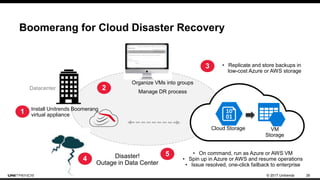
Boomerang for Cloud Disaster Recovery
Datacenter
• On command, run as Azure or AWS VM
• Spin up in Azure or AWS and resume operations
• Issue resolved, one-click failback to enterprise
Organize VMs into groups
Manage DR process
Install Unitrends Boomerang
virtual appliance
2
5
1
Cloud Storage VM
Storage
3 • Replicate and store backups in
low-cost Azure or AWS storage
4 Disaster!
Outage in Data Center
© 2017 Unitrends 27
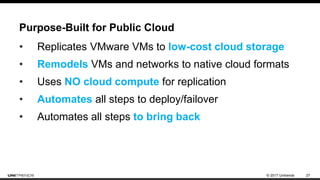
Purpose-Built for Public Cloud
• Replicates VMware VMs to low-cost cloud storage
• Remodels VMs and networks to native cloud formats
• Uses NO cloud compute for replication
• Automates all steps to deploy/failover
• Automates all steps to bring back
© 2017 Unitrends 28
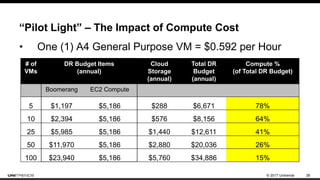
“Pilot Light” – The Impact of Compute Cost
• One (1) A4 General Purpose VM = $0.592 per Hour
# of
VMs
DR Budget Items
(annual)
Cloud
Storage
(annual)
Total DR
Budget
(annual)
Compute %
(of Total DR Budget)
Boomerang EC2 Compute
5 $1,197 $5,186 $288 $6,671 78%
10 $2,394 $5,186 $576 $8,156 64%
25 $5,985 $5,186 $1,440 $12,611 41%
50 $11,970 $5,186 $2,880 $20,036 26%
100 $23,940 $5,186 $5,760 $34,886 15%
© 2017 Unitrends 29
Boomerang requires NO
compute for replication!
© 2017 Unitrends 30
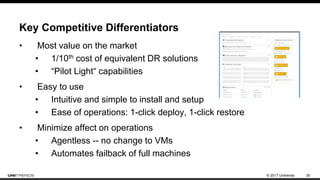
Key Competitive Differentiators
• Most value on the market
• 1/10th cost of equivalent DR solutions
• “Pilot Light“ capabilities
• Easy to use
• Intuitive and simple to install and setup
• Ease of operations: 1-click deploy, 1-click restore
• Minimize affect on operations
• Agentless -- no change to VMs
• Automates failback of full machines
© 2017 Unitrends 31
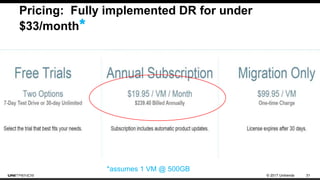
Pricing: Fully implemented DR for under
$33/month*
*assumes 1 VM @ 500GB
© 2017 Unitrends 32
When Boomerang Might Not Be Ideal
• Customer requires VMs with VMDKs >1TB
• Customer must use operating systems that are not
supported in Azure or AWS
• Customer requires a solution that works with VMs that
cannot take snapshots
• iSCSI pass through disks
• Physical RDM disks
• Independent persistent disks
• Customer requires consistent, predictable recovery SLAs
© 2017 Unitrends 33
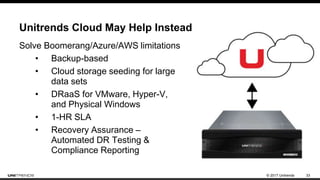
Unitrends Cloud May Help Instead
Solve Boomerang/Azure/AWS limitations
• Backup-based
• Cloud storage seeding for large
data sets
• DRaaS for VMware, Hyper-V,
and Physical Windows
• 1-HR SLA
• Recovery Assurance –
Automated DR Testing &
Compliance Reporting
© 2017 Unitrends 34
Data loss can occur
with Office 365
• Office 365 data lives in the Microsoft cloud, not on a company’s own server
• Deleted email is gone after 14-30 days—totally unrecoverable
• Deleted SharePoint & OneDrive files are gone after 186 days
• Most lost data is due to user error
• Users can choose to permanently delete files & email
© 2017 Unitrends 35
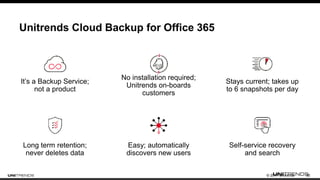
Unitrends Cloud Backup for Office 365
It’s a Backup Service;
not a product
Long term retention;
never deletes data
Easy; automatically
discovers new users
No installation required;
Unitrends on-boards
customers
Self-service recovery
and search
Stays current; takes up
to 6 snapshots per day
© 2017 Unitrends 36
What should you do next?
© 2017 Unitrends 37
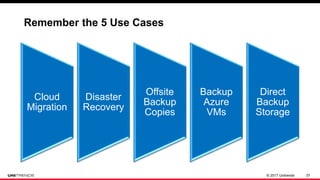
Cloud
Migration
Disaster
Recovery
Offsite
Backup
Copies
Backup
Azure
VMs
Direct
Backup
Storage
Remember the 5 Use Cases
Updates Coming Soon
© 2017 Unitrends 38
Remember the 5 Critical Success Factors
1. Understand your needs
2. Select the right cloud storage strategy
3. Avoid unnecessary compute costs
4. Plan for a way back
5. Keep on-premises in mind
© 2017 Unitrends 39
Visit: www.Unitrends.com
Unitrends Backup, Office 365, Boomerang
Backup: https://www.unitrends.com/products/software/unitrends-enterprise-backup
Boomerang: https://www.unitrends.com/products/cloud/boomerang-for-vmware
Office 365: https://www.unitrends.com/products/cloud/cloud-backup-for-office-365
Watch a Live Demo
Register at: http://www.unitrends.com/company/events/live-demos
Talk With One of Our Continuity Experts
Get immediate assistance
© 2017 Unitrends 40
Thank You!

How to Choose the Right Cloud for Continuity

  • 1.
    © 2017 Unitrends1#1 All-in-One Enterprise Backup and Continuity How Do You Choose a Cloud for Enterprise-level Continuity? Mark Jordan, VP Technology
  • 2.
    © 2017 Unitrends2 2009 2010 2011 2012 2013 2014 2015 2016 2017 2018 2019 2020 IT Professionals Servers & VMs Data CHANGE IS ACCELERATING
  • 3.
    © 2017 Unitrends3 CHANGE BRINGS RISK 40% 60% Enterprises Worldwide Attacked by Ransomware in 2015 259% Increase in Attacks 63% businesses down > 1 day
  • 4.
    © 2017 Unitrends4 Cloud Adopters Are Ahead of The Game Important triggers for cloud continuity • No second site or offsite plan, whatsoever • Significant pain with managing a secondary site • Significant pain with managing storage • Using traditional strategies – tape or rotating disk
  • 5.
    © 2017 Unitrends5 Wrong choices can be costly! 30% of cloud spending is wasted.
  • 6.
    © 2017 Unitrends6 What Cloud to use? Public / Hyperscale Clouds Managed Service Providers Vendor Cloud
  • 7.
    © 2017 Unitrends7 Protect your ideas/business Align continuity with criticality Protect Everything You Have Which workloads matter the most?
  • 8.
    © 2017 Unitrends8  Focus on individual backup tasks, not business requirements  Leave IT blind about recovery compliance  No confidence in achieving or communicating SLAs  Act only as a cost (insurance policy) rather than a value driver:  Increase productivity  Reduced infrastructure costs  Proactive analytics Challenge: Most solutions are not business focused
  • 9.
    © 2017 Unitrends9 Cloud Migration Disaster Recovery Offsite Backup Copies Backup Cloud VMs Direct Backup Storage 5 Continuity Use Cases with Public Cloud Updates Coming Soon
  • 10.
    © 2017 Unitrends10 Cloud Migration Disaster Recovery Offsite Backup Copies Backup Cloud VMs Direct Backup Storage 5 Continuity Use Cases with Public Cloud Updates Coming Soon
  • 11.
    © 2017 Unitrends11 Migration Replicate Test (optional) Deploy (Planned) Done DR Replicate Test (optional) Production Issue Deploy (Planned/Unplanned) Production Issue Resolved Failback Migration vs. Disaster Recovery
  • 12.
    © 2017 Unitrends12 Benefits To You Simple, affordable (if done right) Self-managed Highly dynamic
  • 13.
    © 2017 Unitrends13 Benefits To You (with Caution) Offsite compliance Infinite retention Pay for what you use
  • 14.
    © 2017 Unitrends14 What about a Managed Service Provider? • Typically a white glove service • Focus on specific applications • Aggressive recovery objectives • Test and prove recovery SLAs • You will pay more!
  • 15.
    © 2017 Unitrends15 Benefits To You Experts at specific application continuity Will agree to aggressive recovery SLAs
  • 16.
    © 2017 Unitrends16 Should I use a vendor cloud? • Compliance and DRaaS solutions • Focus on specific OS platforms • Fully manage cloud infrastructure • Can they test and prove recovery SLAs? • Often moderately priced
  • 17.
    © 2017 Unitrends17 Benefits To You One vendor for backup and cloud continuity Experts at recovery from their software Pay for what you protect
  • 18.
    © 2017 Unitrends18 5 Critical Success Factors
  • 19.
    © 2017 Unitrends19 5 Critical Success Factors 1. Understand your needs 2. Select the right cloud storage strategy 3. Avoid unnecessary compute costs 4. Plan for a way back 5. Keep on-premises in mind
  • 20.
    © 2017 Unitrends20 5 Critical Success Factors Use cases Recovery SLAs Budget 1. Understand your needs
  • 21.
    © 2017 Unitrends21 5 Critical Success Factors Object (ie. Azure Blob) • Lowest cost • Most dynamic • Slowest performing (for most applications) Block (VM Hard Disk) • Highest performing (even SSDs) • Less flexible / dynamic • Highest cost (also requires compute) 2. Select the right cloud storage strategy
  • 22.
    © 2017 Unitrends22 5 Critical Success Factors 3. Avoid unnecessary compute costs • Significant cost impact • Up to 70+% of total solution • Sometimes necessary: • Enterprise functionality (WAN acceleration, global dedupe, etc.) • Short, predictable RTOs
  • 23.
    © 2017 Unitrends23 5 Critical Success Factors 4. Plan for a way back Data center VM Storage
  • 24.
    © 2017 Unitrends24 5 Critical Success Factors 5. Keep on-premises in mind Datacenter Application consistency VM best practices Local instant recovery Centralized management
  • 25.
    © 2017 Unitrends25 How Can Unitrends Help
  • 26.
    © 2017 Unitrends26 Boomerang for Cloud Disaster Recovery Datacenter • On command, run as Azure or AWS VM • Spin up in Azure or AWS and resume operations • Issue resolved, one-click failback to enterprise Organize VMs into groups Manage DR process Install Unitrends Boomerang virtual appliance 2 5 1 Cloud Storage VM Storage 3 • Replicate and store backups in low-cost Azure or AWS storage 4 Disaster! Outage in Data Center
  • 27.
    © 2017 Unitrends27 Purpose-Built for Public Cloud • Replicates VMware VMs to low-cost cloud storage • Remodels VMs and networks to native cloud formats • Uses NO cloud compute for replication • Automates all steps to deploy/failover • Automates all steps to bring back
  • 28.
    © 2017 Unitrends28 “Pilot Light” – The Impact of Compute Cost • One (1) A4 General Purpose VM = $0.592 per Hour # of VMs DR Budget Items (annual) Cloud Storage (annual) Total DR Budget (annual) Compute % (of Total DR Budget) Boomerang EC2 Compute 5 $1,197 $5,186 $288 $6,671 78% 10 $2,394 $5,186 $576 $8,156 64% 25 $5,985 $5,186 $1,440 $12,611 41% 50 $11,970 $5,186 $2,880 $20,036 26% 100 $23,940 $5,186 $5,760 $34,886 15%
  • 29.
    © 2017 Unitrends29 Boomerang requires NO compute for replication!
  • 30.
    © 2017 Unitrends30 Key Competitive Differentiators • Most value on the market • 1/10th cost of equivalent DR solutions • “Pilot Light“ capabilities • Easy to use • Intuitive and simple to install and setup • Ease of operations: 1-click deploy, 1-click restore • Minimize affect on operations • Agentless -- no change to VMs • Automates failback of full machines
  • 31.
    © 2017 Unitrends31 Pricing: Fully implemented DR for under $33/month* *assumes 1 VM @ 500GB
  • 32.
    © 2017 Unitrends32 When Boomerang Might Not Be Ideal • Customer requires VMs with VMDKs >1TB • Customer must use operating systems that are not supported in Azure or AWS • Customer requires a solution that works with VMs that cannot take snapshots • iSCSI pass through disks • Physical RDM disks • Independent persistent disks • Customer requires consistent, predictable recovery SLAs
  • 33.
    © 2017 Unitrends33 Unitrends Cloud May Help Instead Solve Boomerang/Azure/AWS limitations • Backup-based • Cloud storage seeding for large data sets • DRaaS for VMware, Hyper-V, and Physical Windows • 1-HR SLA • Recovery Assurance – Automated DR Testing & Compliance Reporting
  • 34.
    © 2017 Unitrends34 Data loss can occur with Office 365 • Office 365 data lives in the Microsoft cloud, not on a company’s own server • Deleted email is gone after 14-30 days—totally unrecoverable • Deleted SharePoint & OneDrive files are gone after 186 days • Most lost data is due to user error • Users can choose to permanently delete files & email
  • 35.
    © 2017 Unitrends35 Unitrends Cloud Backup for Office 365 It’s a Backup Service; not a product Long term retention; never deletes data Easy; automatically discovers new users No installation required; Unitrends on-boards customers Self-service recovery and search Stays current; takes up to 6 snapshots per day
  • 36.
    © 2017 Unitrends36 What should you do next?
  • 37.
    © 2017 Unitrends37 Cloud Migration Disaster Recovery Offsite Backup Copies Backup Azure VMs Direct Backup Storage Remember the 5 Use Cases Updates Coming Soon
  • 38.
    © 2017 Unitrends38 Remember the 5 Critical Success Factors 1. Understand your needs 2. Select the right cloud storage strategy 3. Avoid unnecessary compute costs 4. Plan for a way back 5. Keep on-premises in mind
  • 39.
    © 2017 Unitrends39 Visit: www.Unitrends.com Unitrends Backup, Office 365, Boomerang Backup: https://www.unitrends.com/products/software/unitrends-enterprise-backup Boomerang: https://www.unitrends.com/products/cloud/boomerang-for-vmware Office 365: https://www.unitrends.com/products/cloud/cloud-backup-for-office-365 Watch a Live Demo Register at: http://www.unitrends.com/company/events/live-demos Talk With One of Our Continuity Experts Get immediate assistance
  • 40.
    © 2017 Unitrends40 Thank You!

Editor's Notes

  • #2 Thanks I appreciate you joining today Hope not to take too much of your time And if we’re lucky, I’ll have helped you learned some interesting things for organization’s backup and continuity needs
  • #3 Key message: Technology is constantly changing – from physical to virtual to cloud and in a million other ways And it creates growth that far outpaces the people that implement and manage it The gray line that’s flat…that’s you
  • #4 Key message: Ransomware is just one example (CBT) of how this rapid change brings significant risk to an organization It’s affecting more than half of enterprises And more than 60% of businesses have been down more than a day from it
  • #5 Key message: This is where I think cloud adopters are really ahead of the game. Leveraging cloud helps to alleviate these pain points BUT ONLY IF DONE IN THE RIGHT WAY
  • #6 The biggest monster of all Not just about ransomware Can put us out of business, or at least out of a job
  • #7 What is not mentioned is private cloud!
  • #10 When it comes to Backup and Continuity there are 5 key use cases we’ll talk about today These are ways we see the most people using Azure today in our space
  • #11 Key messages: Let’s start with these two
  • #12 Key message: Operations are pretty similar… Just slight differences
  • #15 Run through the examples Be caution of bandwidth and recovery needs Not always a huge fan of online backup at any type of scale, but it provides a great target for SaaS backup (cloud-to-cloud)
  • #17 Run through the examples Be caution of bandwidth and recovery needs Not always a huge fan of online backup at any type of scale, but it provides a great target for SaaS backup (cloud-to-cloud)
  • #21 These have an impact on the other success factors and decisions.
  • #22 The storage strategy used can be important to cost. The solution you use can force one or the other.
  • #23 Usually a bad thing to use compute, but there are some good reasons.
  • #24 Regardless of your use case, make sure you can get the data back For backups, recovery should be flexible and granular to ensure fastest recovery back on-premises For full machines and DR, you always want to be sure getting machines back is not an afterthought. Build this into your core decision-making strategy Additionally, this story might actually be related to inter-cloud use cases, specifically when talking about protecting Azure VMs So it’s not about coming backup, but having a secondary cloud location so there’s redundancy
  • #25 Regardless of your use case, make sure you can get the data back For backups, recovery should be flexible and granular to ensure fastest recovery back on-premises For full machines and DR, you always want to be sure getting machines back is not an afterthought. Build this into your core decision-making strategy
  • #27 Azure Example Organize VMs store backups in low cost Blob storage Declare disaster & spin-up as Azure VMs using VM storage Resume operations in the cloud Failback to enterprise when ready
  • #28 Key message: Summary of what it does and what it means to be purpose built for cloud DR and migration
  • #29 Key message: This is how important it is to avoid compute costs at all times for basic replication. Our competitors don’t do this
  • #31 Key differentiation: Purpose built for low-cost, insanely simple DRaaS and migration. Review points Operational efficiencies Intuitive GUI Auto discover, group and display VMs Agent-free; takes a snapshot of VMs without shutting down servers Optimize frequency, timing of backups Secure via military-grade encryption Minimize downtime and impact Industry’s fastest time download to replication (< 1 hr.) Rapid recovery with fast rehydration of up to date backups
  • #32 Key message: We talked about how important meeting a budget was… The pricing here is very aggressive to ensure that not just those with large IT budgets can help their organizations stay afloat when downtime strikes
  • #33 Key message: Important to be honest
  • #34 Key message: Purpose-built, enterprise cloud solutions can help in those cases
  • #36 Key message: The details of how it works. Value of 6 snapshots vs MS protection?? Rapid set-up—nothing to install Automatic, hands-off backup In your control—Self-service recovery Business continuity—recovery in just seconds Continuity—Lost email restored in just a few clicks Business protection—Unlimited retention Secure—encryption Priced simply—per user per month
  • #38 Key messages: How we’re helping folks solve these problems with Azure Primary focus on DR We’ll leave the last two as teasers for a future discussion