www.sti-innsbruck.at© Copyright 2008 STI INNSBRUCK www.sti-innsbruck.at
How to annotate content in
wordpress
Tools and usage
Martin Kammerlander STI
www.sti-innsbruck.at
Outline
• Annotations?
• Some tools, their capabilities and their usability
• Conclusions
2
www.sti-innsbruck.at
Annotations?
3
• What is meant by annotations?
– Very generic it means enriching content with information without
modifying the content.
• Example: comment for a text in PPT
– In terms of Web-pages (Web 2.0) annotations can have different
purposes:
• Rate/comment a resource, image or an article
• Tags and Hashtags for various resources
• Enrich a page with information for social networks (i.e. open
graph)
• Up to a certain extend also website SEO optimation for search
engines. SEO in parts is also annotation in some sense!
– In Terms of Web-pages (Web 3.0 and above)
• Give the text a real meaning, make it machine readable
(schema.org, RDF(a))
• One of the best ways nowadays. Will replace the others very
likely
www.sti-innsbruck.at
Tools for wordpress
• Some have very advanced automated features and full automated
Annotation options for the whole Web-page
– Lots of auto tagging and auto annotating
– Lots of include/ship with other SEO stuff.
• SEO might cold fill a bachelor study :P
– Many many different manual and semi-automated annotation
techniques.
• Is more and many automatically better?
• Some are in between. Do offer many options and the most important
ones
– One mostly can choose which annotation techniques he wants to
use
• Some that provide schema.org annotations only, only allow manual
annotations for example for a wp article
4
www.sti-innsbruck.at
Tools for wordpress - 'SEO Ultimate'
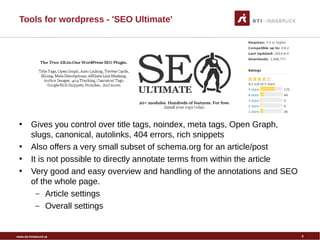
• Gives you control over title tags, noindex, meta tags, Open Graph,
slugs, canonical, autolinks, 404 errors, rich snippets
• Also offers a very small subset of schema.org for an article/post
• It is not possible to directly annotate terms from within the article
• Very good and easy overview and handling of the annotations and SEO
of the whole page.
– Article settings
– Overall settings
5
www.sti-innsbruck.at
Tools for wordpress - 'All In One Schema.org
Rich Snippets'
• Currently used by TVB Innsbruck
• Auto-magically, somehow does enrich a post or an article with
schema.org annotations
– Very likely uses internal Wordpress rules for to auto generate a
certain schema.org subset
• Does also allow manual interaction from within an article
– Set the type of the article i.e. Person, Review, Event, Video...
• Does not offer to directly annotate items in the article
6
www.sti-innsbruck.at
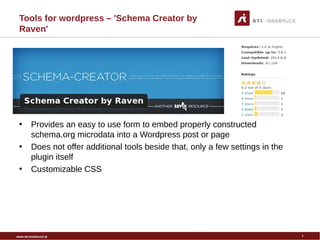
Tools for wordpress – 'Schema Creator by
Raven'
•
• Provides an easy to use form to embed properly constructed
schema.org microdata into a Wordpress post or page
• Does not offer additional tools beside that, only a few settings in the
plugin itself
• Customizable CSS
7
www.sti-innsbruck.at
Conclusion
• It is very important nowadays to use at least open-graph for annotations
– Needed for the correct representation within social networks
– Can also be parsed by search engines and crawler tools
• We need however schema.org to be more expressive. And to be
understood by search engines syntactically & semantically
– Examples: type of article/resource, ratings, organizations...
• Mixing plugins can be tricky and may lead to side effects
– One needs to be careful with this
• There is no solution that can handle everything yet. But SEO Ultimate
seems to be very close to it
– Needs to improve schema.org capabilites
– Needs to add possibility to directly annotate text
• Would be nice to have a presentation also about DBpedia/LOD
wordpress plugins. Hint: „PoolParty Thesaurus“
8
www.sti-innsbruck.at
Sources and Links
• SEO Ultimate: https://wordpress.org/plugins/seo-ultimate/
• All in one schema.org:
https://wordpress.org/plugins/all-in-one-schemaorg-rich-snippets
• Schema creator by Raven:
https://wordpress.org/support/view/plugin-reviews/schema-creator
• PoolParty Thesaurus:
https://wordpress.org/plugins/poolparty-thesaurus/
9
www.sti-innsbruck.at
Thank you for your attention!
Questions?
10

How to annotate_with_wordpress

  • 1.
    www.sti-innsbruck.at© Copyright 2008STI INNSBRUCK www.sti-innsbruck.at How to annotate content in wordpress Tools and usage Martin Kammerlander STI
  • 2.
    www.sti-innsbruck.at Outline • Annotations? • Sometools, their capabilities and their usability • Conclusions 2
  • 3.
    www.sti-innsbruck.at Annotations? 3 • What ismeant by annotations? – Very generic it means enriching content with information without modifying the content. • Example: comment for a text in PPT – In terms of Web-pages (Web 2.0) annotations can have different purposes: • Rate/comment a resource, image or an article • Tags and Hashtags for various resources • Enrich a page with information for social networks (i.e. open graph) • Up to a certain extend also website SEO optimation for search engines. SEO in parts is also annotation in some sense! – In Terms of Web-pages (Web 3.0 and above) • Give the text a real meaning, make it machine readable (schema.org, RDF(a)) • One of the best ways nowadays. Will replace the others very likely
  • 4.
    www.sti-innsbruck.at Tools for wordpress •Some have very advanced automated features and full automated Annotation options for the whole Web-page – Lots of auto tagging and auto annotating – Lots of include/ship with other SEO stuff. • SEO might cold fill a bachelor study :P – Many many different manual and semi-automated annotation techniques. • Is more and many automatically better? • Some are in between. Do offer many options and the most important ones – One mostly can choose which annotation techniques he wants to use • Some that provide schema.org annotations only, only allow manual annotations for example for a wp article 4
  • 5.
    www.sti-innsbruck.at Tools for wordpress- 'SEO Ultimate' • Gives you control over title tags, noindex, meta tags, Open Graph, slugs, canonical, autolinks, 404 errors, rich snippets • Also offers a very small subset of schema.org for an article/post • It is not possible to directly annotate terms from within the article • Very good and easy overview and handling of the annotations and SEO of the whole page. – Article settings – Overall settings 5
  • 6.
    www.sti-innsbruck.at Tools for wordpress- 'All In One Schema.org Rich Snippets' • Currently used by TVB Innsbruck • Auto-magically, somehow does enrich a post or an article with schema.org annotations – Very likely uses internal Wordpress rules for to auto generate a certain schema.org subset • Does also allow manual interaction from within an article – Set the type of the article i.e. Person, Review, Event, Video... • Does not offer to directly annotate items in the article 6
  • 7.
    www.sti-innsbruck.at Tools for wordpress– 'Schema Creator by Raven' • • Provides an easy to use form to embed properly constructed schema.org microdata into a Wordpress post or page • Does not offer additional tools beside that, only a few settings in the plugin itself • Customizable CSS 7
  • 8.
    www.sti-innsbruck.at Conclusion • It isvery important nowadays to use at least open-graph for annotations – Needed for the correct representation within social networks – Can also be parsed by search engines and crawler tools • We need however schema.org to be more expressive. And to be understood by search engines syntactically & semantically – Examples: type of article/resource, ratings, organizations... • Mixing plugins can be tricky and may lead to side effects – One needs to be careful with this • There is no solution that can handle everything yet. But SEO Ultimate seems to be very close to it – Needs to improve schema.org capabilites – Needs to add possibility to directly annotate text • Would be nice to have a presentation also about DBpedia/LOD wordpress plugins. Hint: „PoolParty Thesaurus“ 8
  • 9.
    www.sti-innsbruck.at Sources and Links •SEO Ultimate: https://wordpress.org/plugins/seo-ultimate/ • All in one schema.org: https://wordpress.org/plugins/all-in-one-schemaorg-rich-snippets • Schema creator by Raven: https://wordpress.org/support/view/plugin-reviews/schema-creator • PoolParty Thesaurus: https://wordpress.org/plugins/poolparty-thesaurus/ 9
  • 10.
    www.sti-innsbruck.at Thank you foryour attention! Questions? 10