ADEMCO VISTA-10P
                         ADEMCO VISTA-10PSIA
                                   Security Systems


                                 Programming Guide


K0735PRV4 10/08 Rev. B
COMPATIBILITY: This Programming Guide is intended for VISTA-10P/VISTA-10PSIA controls with firmware revision 4.0 or
higher.
IMPORTANT: The Real-Time Clock must be set before the end of the installation. See procedure in the Setting the Real-
Time Clock section of this manual.

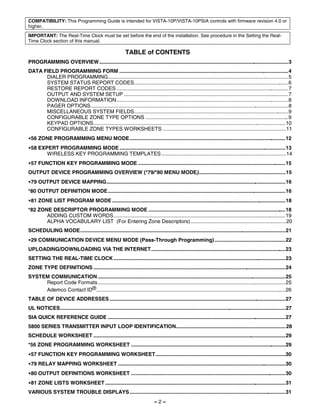
                                                             TABLE of CONTENTS
PROGRAMMING OVERVIEW ...................................................................................................................................3
DATA FIELD PROGRAMMING FORM .....................................................................................................................4
      DIALER PROGRAMMING.............................................................................................................................5
      SYSTEM STATUS REPORT CODES...........................................................................................................6
      RESTORE REPORT CODES .......................................................................................................................7
      OUTPUT AND SYSTEM SETUP ..................................................................................................................7
      DOWNLOAD INFORMATION.......................................................................................................................8
      PAGER OPTIONS.........................................................................................................................................8
      MISCELLANEOUS SYSTEM FIELDS...........................................................................................................9
      CONFIGURABLE ZONE TYPE OPTIONS ...................................................................................................9
      KEYPAD OPTIONS.....................................................................................................................................10
      CONFIGURABLE ZONE TYPES WORKSHEETS .....................................................................................11
∗56 ZONE PROGRAMMING MENU MODE............................................................................................................12
∗58 EXPERT PROGRAMMING MODE ...................................................................................................................13
       WIRELESS KEY PROGRAMMING TEMPLATES ......................................................................................14
∗57 FUNCTION KEY PROGRAMMING MODE ......................................................................................................15
OUTPUT DEVICE PROGRAMMING OVERVIEW (*79/*80 MENU MODE) ............................................................15
∗79 OUTPUT DEVICE MAPPING............................................................................................................................16
*80 OUTPUT DEFINITION MODE...........................................................................................................................16
∗81 ZONE LIST PROGRAM MODE ........................................................................................................................18
*82 ZONE DESCRIPTOR PROGRAMMING MODE ...............................................................................................18
       ADDING CUSTOM WORDS.......................................................................................................................19
       ALPHA VOCABULARY LIST (For Entering Zone Descriptors)..................................................................20
SCHEDULING MODE..............................................................................................................................................21
∗29 COMMUNICATION DEVICE MENU MODE (Pass-Through Programming) .................................................22
UPLOADING/DOWNLOADING VIA THE INTERNET.............................................................................................23
SETTING THE REAL-TIME CLOCK .......................................................................................................................23
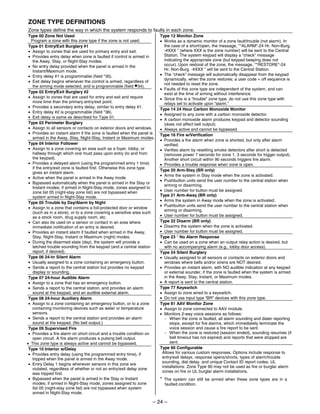
ZONE TYPE DEFINITIONS .....................................................................................................................................24
SYSTEM COMMUNICATION ..................................................................................................................................25
     Report Code Formats..................................................................................................................................25
     Ademco Contact ID®...................................................................................................................................26
TABLE OF DEVICE ADDRESSES ..........................................................................................................................27
UL NOTICES............................................................................................................................................................27
SIA QUICK REFERENCE GUIDE ...........................................................................................................................27
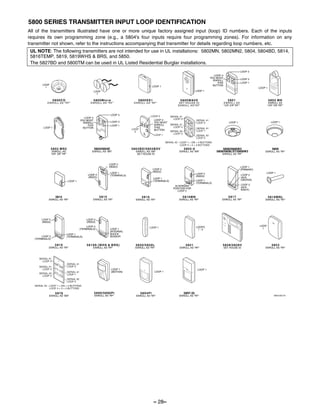
5800 SERIES TRANSMITTER INPUT LOOP IDENTIFICATION............................................................................28
SCHEDULE WORKSHEET .....................................................................................................................................29
*56 ZONE PROGRAMMING WORKSHEET ...........................................................................................................29
∗57 FUNCTION KEY PROGRAMMING WORKSHEET..........................................................................................30
∗79 RELAY MAPPING WORKSHEET ....................................................................................................................30
∗80 OUTPUT DEFINITIONS WORKSHEET ...........................................................................................................30
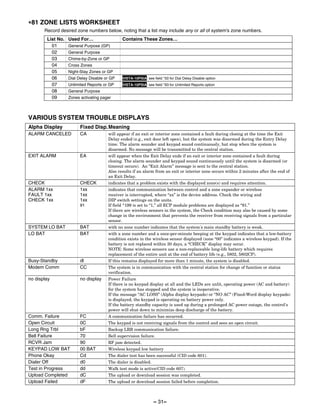
∗81 ZONE LISTS WORKSHEET .............................................................................................................................31
VARIOUS SYSTEM TROUBLE DISPLAYS ............................................................................................................31
                                                                                –2–
PROGRAMMING OVERVIEW
You can program the system at any time, even at the installer's premises prior to the actual installation. Programming can
also be performed remotely from the installer’s office/home, using an IBM personal computer, a modem, and Compass
downloading software.
TO ENTER PROGRAMMING MODE:
Local programming requires the use of an alpha keypad connected to the keypad terminals on the control.
A. POWER UP, then depress [,] and [#] both at once, within 50 seconds of powering up (if ,98 was used to exit previously,
   this method must be used to reenter program mode). OR
B. Initially, key: Installer Code (4 + 1 + 1 + 2) plus 8 + 0 + 0.
Data Field Programming Procedures
Task                Procedure
Go to a Data Field      Press [∗] + [Field Number], followed by the required entry.
Entering Data           When the desired field number appears, simply make the required entry. When the last entry for a
                        field is entered, the keypad beeps three times and automatically displays the next data field in
                        sequence. If the number of digits that you need to enter in a data field is less than the maximum digits
                        available (for example, the phone number fields *41, *42), enter the desired data, then press [∗ ] to
                        end the entry. The next data field is displayed.
Review a Data Field     Press [#] + [Field Number].
                        Data will be displayed for that field number. No changes will be accepted in this mode.
Deleting an Entry       Press [∗] + [Field Number] + [∗]. (Applies only to fields ∗40–*44, *94, and pager programming fields)
Interactive Menu Mode Programming (∗29, ∗56, ∗57, ∗58, ∗79, ∗80, ∗81, ∗82)
                                     ∗
See respective sections in this document for programming procedures.
Press [,] + [Menu Mode No.] (for example, ,56). The alpha display keypad will display the first of a series of prompts.
The following is a list of the various Programming modes used to program this system:
Programming Mode…                        Used to …
Data Field Programming                   Program basic data fields used for setting the various system options.
                                         Most of the data fields in this system have been programmed for specific default
                                         values. However, some fields must be programmed for each particular
                                         installation to establish its specific alarm and reporting features.
∗29 IP/GSM Programming                   Program the IP and/or GSM options from a keypad.
∗56 Zone Programming                     Assign zone characteristics, report codes, alpha descriptors, and serial numbers
                                         for 5800 RF transmitters.
∗57 Function Key Programming             Program each of the four alphabet function keys to perform one of several
                                         system operations.
∗58 Zone Programming                     Assign zone attributes similar to ∗56 mode, but provides a faster programming
(Expert Mode)                            procedure and is intended for those more experienced in programming controls
                                         of this type.
∗79 Output Device Mapping                Assign device address of the 4204 Relay module and map the specific relays
∗80 Output Definitions                   Define up to 12 output definitions which can control the output relays mapped
                                         using *79 Output Device Mapping mode.
∗81 Zone List Programming                Create Zone Lists for relay zones, chime, night-stay, cross zones, and pager
                                         zones.
∗82 Alpha Programming                    Create alpha descriptors for easy zone identification.
Scheduling Mode (code + [#] +64) Create schedules to automate various system functions.
Site-Initiated Download                  Installer code + [#] + 1 (perform while system is disarmed and in normal mode)
INITIALIZE DOWNLOAD and RESET DEFAULTS
  ,96 Press ∗96 while in Program Mode. This initializes the system for downloading and resets all the subscriber account
       numbers and CSID.
  ,97 Press ∗97 while in Program Mode. This resets all data fields to the default values shown on the Program Form. Use
       ∗97 only if you wish to return to the original factory-programmed defaults. Do not press ∗97 to load defaults if any
       programming has been done previously—data already programmed into the system will be changed!
TO EXIT PROGRAMMING MODE:
  ,98 Exits programming mode and prevents re-entry by: Installer Code + 8 + 0 + 0. If ,98 is used to exit programming
      mode, system must be powered down, and method A above used to enter the programming mode.
      See field *88 for other *98 Program mode lockout options.
  ,99 Exits programming mode and allows re-entry by: Installer Code + 8 + 0 + 0 or method A above.
SPECIAL MESSAGES
 OC = OPEN CIRCUIT (no communication between Keypad and Control).
 EE or ENTRY ERROR = ERROR (invalid field number entered; re-enter valid field number).
 After powering up, AC, dI (disabled) or Busy Standby and NOT READY will be displayed after approximately 4 seconds.
 This will revert to a “Ready” message in approximately 1 minute, which allows PIRS, etc. to stabilize. You can bypass this
 delay by pressing [#] + [0].
 If E4 or E8 appears, more zones than the expansion units can handle have been programmed. The display will clear after
 you correct the programming.
                                                             –3–
DATA FIELD PROGRAMMING FORM
Where noted, certain fields have special settings when used with the VISTA-10PSIA (indicated by heavy borders and reverse type throughout
for easy identification).
SIA Guidelines: Notes in certain data fields give instructions for programming the VISTA-10P for False Alarm Reduction.
NOTE: Entry of a number other than one specified will give unpredictable results. Values shown in brackets are factory defaults.

∗20    Installer Code                           [4112]      |    |    |         ∗32    Fire Alarm Sounder Timeout                             [0]
       4 digits, 0–9. Can perform all system functions except                          0 = sounder stops at timeout programmed in field ∗33
       cannot disarm unless it is used to arm system.                                  1 = no sounder timeout UL: must be “1” for fire install.
                                                                                       Select whether or not alarm sounding continues until
∗21    Quick Arm Enable                                         [0]
                                                                                       manually turned off (ignores sounder timeout). If not
       0 = no quick arm; 1 = allow quick arm (with [#] key)                            selected, sounding stops at timeout programmed in ∗33.
       Select whether or not users can press the [#] key in place of                   This control complies with NFPA requirements for temporal
       entering a security code when arming the system (e.g., to                       pulse sounding of fire notification appliances. Temporal
       arm AWAY, press [#] + AWAY). If not selected, users must                        pulse sounding for a fire alarm consists of the following:
       enter a security code to arm the system. In either case, the                    3 pulses – pause – 3 pulses – pause – 3 pulses.
       user code is always needed to disarm the system.
∗22    RF Jam Option                                            [0]
                                                                                ∗33    Alarm Sounder (Bell) Timeout                           [1]
                                                                                       0 = none; 1 = 4 min; 2 = 8 min; 3 = 12 min; 4 = 16 min
       0 = no RF Jam detection
       1 = send RF Jam report upon detection of RF jamming signal                      UL: For residential fire alarm installation, must be set for a
       Select whether or not the system sends an RF jam report if                      minimum of 4 min (option 1); for UL Commercial Burglary
       an RF jamming signal is detected.                                               installations, must be minimum 16 min (option 4)
        UL: must be 1 if wireless devices are used                                     Enter the desired alarm sounding time. Entering “0” lets
                                                                                       sounding continue until manually turned off.
∗23    Quick (Forced) Bypass                                    [0]
                                                                                ∗34    Exit Delay                                         [60]      |
       0 = no quick bypass UL: must be “0”
                                                                                       00 - 96 = 0 - 96 secs; 97 = 120 secs
       1 = allow quick bypass (code + [6] + [#] )
                                                                                       SIA Guidelines: minimum exit delay is 45 seconds
       Select whether or not the Quick Bypass command (code
       +[6] + [#]) is active. Zones bypassed by this function will be
       displayed after the bypass is initiated.                                        VISTA-10PSIA: 45 - 96 = 45 - 96 secs; 97 = 120 secs
                                                                                       NOTE: Entries less than 45 will result in a 45-second delay.
∗24    RF House ID Code                                   [00]            |
                                                                                       Enter the desired time the system waits before arming
       00 = disable all wireless keypad usage                                          entry/exit zones. If the entry/exit door is left open after this
       01–31 = house ID for 5827, 5827BD or 5804BD keypad                              time expires, an alarm will occur.
       Enter the RF House ID, which identifies receivers and                           UL installations: For UL Commercial Burglar Alarm and UL
       wireless keypads. If a 5827 or 5827BD Wireless Keypad or                        Residential Burglar Alarm installations with line security,
       5804BD Transmitter is being used, a House ID code must                          total exit time must not exceed 60 seconds.
       be entered, and the keypad set to the same House ID.
∗26    Chime By Zone                                            [0]
                                                                                ∗35    Entry Delay #1 (zone type 01)                      [30]      |
                                                                                       00 - 96 = 0 - 96 secs; 97 = 120 secs; 98 = 180 secs;
       0 = no (chimes on fault of any entry/exit or perimeter zone
                                                                                       99 = 240 secs
            when chime mode on);
                                                                                       SIA Guidelines: minimum entry delay is30 seconds
       1 = use zone list (chimes on fault of specific zones
            programmed in chime zone list 3 when Chime mode on;                        VISTA-10PSIA:
            use *81 Menu mode to select zones)                                         30-96 = 30 - 96 secs; 97 = 120 secs; 98 = 180 secs;
       Select if you want a list of specific zones to chime when                       99 = 240 secs
       faulted while the system is in Chime mode (use zone list 3 to                   NOTE: Entries less than 30 will result in a 30-second delay.
       assign these zones; see ∗81 Zone List Programming section
       for details). If not selected, all entry/exit and perimeter zones               For UL Residential Burglary Alarm installations, must be
       will chime when faulted and system is in Chime mode.                            set for a maximum of 30 seconds; entry delay plus dial
                                                                                       delay should not exceed 1 min. For UL Commercial
∗28    Access Code For Phone Module                       [00]            |
                                                                                       Burglar Alarm, total entry delay may not exceed 45
       00 = disable; UL: must be “00” for UL Commercial Burg. inst.                    seconds.
       1st digit: enter 1–9; 2nd digit: enter # + 11 for ",",                          Enter the desired time within which the system must be
       or # + 12 for "#".                                                              disarmed after opening an entry door. If this time expires
       Enter a 2-digit access code for the 4286 Phone Module, if                       without disarming, an alarm occurs.
       used. Example: If desired access code is 7∗ , 7 is the first
       entry, and [#] + 11 (for ∗) is the second entry.                         ∗36    Entry Delay #2 (zone type 02)                      [30]      |
       NOTE: A “0” in either digit disables the phone module.                          See *35 Entry Delay 1 above for entries.
                                                                                       Use this entry for a secondary entry door. See *35 above for
∗29    Enable IP/GSM – Communication Device Menu                                       explanation.
       Mode (pass-through programming)
       This is a Menu Mode command, not a data field.                           ∗37    Audible Exit Warning                                   [1]
       See ∗29 Menu Mode section later in this document.
                                                                                       0 = no; 1 = yes; SIA Guidelines: must be enabled (enter 1)
∗31    One Audible Alarm Per Zone                               [0]                   VISTA-10PSIA: Feature always enabled; field does not exist.
       0 = unlimited sounding                                                          Select whether or not you want exit warning sounds, which
       1 = one alarm sounding on bell output per zone                                  consist of slow continuous beeps until the last 10 seconds,
                                                                                       then it changes to fast beeps. Sound ends when exit time
       VISTA-10PSIA: If “0” selected, “alarm sounding per zone”
                                                                                       expires.
       will be the same as the “number of reports in armed period”
       set in field *93 (1 if one report, 2 if 2 reports, unlimited for
       zones in zone list 7).
       Select whether or not the system limits alarm sounding to
       once per arming period for a given zone.
                                                                              –4–
∗38    Confirmation Of Arming Ding                             [0]            ∗43   Primary Subs. Acct. No.
       0 = no ding                                                                     | | | /    | | | | |      [FFFF/FFFFFF]
       1 = confirmation ding after arming system                                    Enter 4 or 10 digits, depending on selection in *48 Report
       2 = ding after arming from RF button or RF keypad only                       Format. See box above for entries. To clear, press *43*.
            (except 5827/5827BD)                                                    Enter the primary subscriber account number.
       UL: must be “1” for UL Commercial Burglar Alarm inst.
       Select whether and when you want a confirmation of arming
                                                                              ∗44   Secondary Subs. Acct. No.
       “ding” (1/2 second external sounder “ding”).                                    | | | /    | | | | |      [FFFF/FFFFFF]
       If “1” selected, ding occurs when closing report is sent, or at
                                                                                    See *43. To clear, press *44*.
       the end of Exit Delay.
                                                                                    Enter the secondary subscriber account number
       If “2” selected, ding occurs upon reception of the wireless
       arming command.                                                        ∗47   Phone System Select                                   [1]
∗39    Power Up In Previous State                              [1]                  DIALING      NOT On WATS LINE         USING WATS LINE
                                                                                    Pulse Dial        0                        2
       0 = always power-up in a disarmed state
                                                                                    Tone Dial         1                        3
       1 = assume the system status prior to power down
                                                                                    Select whether the system will be using pulse or tone
       UL: must be “1” SIA Guidelines: must be enabled (enter 1)
                                                                                    dialing, and whether it is on a WATS line.
       VISTA-10PSIA: Feature must be enabled (enter 1).                       ∗48   Report Format                                 [77]
       Select whether or not the system powers up in its previous                   0 = 3+1, 4+1 ADEMCO L/S STANDARD               Primary Second
       state (if the system powers up armed and a zone is faulted,                  1 = 3+1, 4+1 RADIONICS STANDARD
       an alarm will occur 1 minute after power up). Note that if the               2 = 4+2 ADEMCO L/S STANDARD
       previous state was armed Away or Stay, the system ignores                    3 = 4+2 RADIONICS STANDARD
       sensor changes for 1 minute, which allows time for sensors                   5 = 10-digit ADEMCO CONTACT ID® REPORTING
       such as PIRs to stabilize.                                                   6 = 4+2 ADEMCO EXPRESS
                                                                                    7 = 4-digit ADEMCO CONTACT ID® REPORTING
DIALER PROGRAMMING                                                                  8 = 3+1, 4+1 ADEMCO L/S EXPANDED
Enter the number of digits shown. Do not fill unused spaces. Enter                  9 = 3+1, 4+1 RADIONICS EXPANDED
0–9; #+11 for ','; #+12 for '#'; #+13 for a 2-second pause. If fewer                Select the desired type of reports to be sent to the
than the maximum digits entered, exit the field by pressing [∗]. The                primary/secondary numbers. Make selection from the table
next field number is displayed.                                                     in the Programming Guide. If “0” selected, all reports go only
∗40    PABX Access Code                            |   |   |     |   |              to the primary number unless unsuccessful, then control will
                                                                                    attempt to dial secondary number.
       Enter up to 6 digits. To clear entries, press ,40,. If call
       waiting used, enter its cancel digits “∗ (#+11) 70” plus “# +          ∗49   Split/Dual Reporting                                  [0]
       13” (pause).                                                                 0 = Standard/Backup reporting only (all to primary unless fail)
       NOTES:                                                                       See Backup Reporting note below.
       1. The call waiting disable feature cannot be used on a PABX
                                                                                    Primary Phone No.                 Secondary Phone No.
          line.
                                                                                    1 = Alarms, Restore, Cancel       Others
       2. Using call waiting cancel on a non-call waiting line will prevent
                                                                                    2 = All except Open/Close, Test Open/Close, Test
          successful communication to the central station.
                                                                                    3 = Alarms, Restore, Cancel       All
       VISTA-10PSIA: If call waiting is used, enter call waiting                    4 = All except Open/Close, Test All
       disable digits as described above, and also set Call Waiting                 5 = All                           All
       Disable option in field *91.                                                 Backup Reporting: All reports are sent only to the primary
                                                                                    number unless unsussessful after 8 attempts. If unsuccessful,
       Enter the PABX code, if used. If fewer than 6 digits, exit by                the system makes up to 8 attempts to send all reports to the
       pressing [∗], which advances to the next field.                              secondary number. If still unsuccessful after 16 attempts, the
       Call Waiting: If the subscriber’s phone service has “call                    system displays “COMM FAILURE” message (FC for fixed-
       waiting” (and is not using PABX), enter “*70” (“# + 11”) plus “#             word keypads). Backup reporting is automatic only if there is
       + 13” (pause) as the PABX entry to disable “call waiting”                    a secondary phone number (field ∗42)
       during control panel calls. If the subscriber does not have “call
       waiting” and is not using PABX, make no entry in this field.           ∗50   Burglary Dialer Delay               [2, 0]
       Important: 1. The call waiting disable feature cannot be                     Delay Time:                        Delay Time VISTA-10PSIA
       used on a PABX line. 2. Using Call Waiting Disable on a                      0 = no delay UL: must be “0”                  Delay Disable
       non-call waiting line will prevent successful communication                  1 = 15 seconds; 2 = 30 seconds; 3 = 45 seconds
       to the central station.                                                      SIA Guidelines: delay must be minimum of 15 seconds
∗41    Primary Phone No.                                                            VISTA-10PSIA:
          | | | | | | | | | | | | | | | | | | |                                     Delay Time: 1 = 15 secs; 2 = 30 secs; 3 = 45 secs
                                                                                    Delay Disable:
∗42    Secondary Phone No.                                                              0 = use delay set in entry 1
          | | | | | | | | | | | | | | | | | | |                                         1 = dial delay disabled for zones listed in zone list 6 (use
                                                                                            zone list 6 to enter those zones that require dial delay
       Enter up to 20 digits. To clear entries, press ,41, or ,42,
                                                                                            to be disabled; these zones ignore the setting in entry
       respectively.
                                                                                            1)
       Enter the primary phone and secondary phone numbers. If
       you enter fewer than 20 digits, exit by pressing [∗]. To clear               UL: Dial delay plus entry delay must not exceed one minute;
                                                                                    use zone list 6 to disable dial delay from appropriate zones,
       entries from field, press ∗41∗.
                                                                                    if necessary.
NOTE: Entry of a number other than one specified will give
unpredictable results.                                                              Enter the desired delay time (none, 15, 30, or 45 seconds)
                                                                                    before a “BURGLARY ALARM” report is sent to the central
For fields *43- *44: Enter 0–9; #+11 for B; #+12 for C; #+13 for D;
                                                                                    station. This delay allows time for the subscriber to avoid
#+14 for E; #+15 for F. Enter [,] as the fourth digit if a 3-digit                  sending a false alarm if the alarm was inadvertently caused.
account number (for 3+1 dialer reporting format) is used. Enter 0 as                This delay does not apply to zone type 24 alarms (silent
the first digit of a 4-digit account number for Nos. 0000-0999. Exit                burglary) or to 24-hour zone types 6, 7, and 8 (silent panic,
field by pressing , (and press next field number) if only 3 digits are              audible alarm, auxiliary alarm), which are always sent as
used. E.g., For Acct. B234, enter: #+11, 2, 3, 4                                    soon as they occur.


                                                                         –5–
∗53     SESCOA/Radionics Select                               [0]          ∗59   Exit Error Report Code (continued)
                                                                                 If the system is not disarmed before entry delay expires, an
        0 = Radionics (0-9, B-F), and all formats other than SESCOA              “EXIT ALARM” message (VISTA-10PSIA: also zone alarm
        1 = SESCOA (0-9 only reporting)                                          message) will be sent to the central station if Exit Error
        Select whether SESCOA format is used.                                    Report Code is enabled. The keypad will display “EA” (fixed-
                                                                                 word ) or “EXIT ALARM” (alpha display), and alarm
∗54     Dynamic Signaling Delay                               [0]                sounding continues until the system is disarmed (or timeout
        Delay selectable from 0 to 225 secs in 15-sec increments.                occurs).
        0 = no delay (both signals sent); 1 = 15 secs; 2 = 30 secs, etc          An Exit Alarm condition will also result if a fault occurs in an
        UL: If using line security, must be 0.                                   exit or interior zone within 2 minutes following the end of the
        Intended for use with communication device on ECP (ex.                   exit delay, and an “EXIT ALARM” message will be sent to
        LRR) reporting. Enter the desired time the panel should wait,            the central station (except for VISTA-10PSIA, see field *69
        per message, for acknowledgment from the first reporting                 Recent Closing report).
        destination (see ∗55) before it attempts to send a message
        to the second destination. Entering ”0” sends redundant
                                                                           ∗60   Trouble Report Code                               [10]     |
        reports to both Primary Dialer and the communication                     Sent if a zone has a trouble condition.
        device.                                                                  UL: Required for UL commercial burglar alarm installations
                                                                                 and for residential fire alarm installations
∗55     Dynamic Signaling Priority                            [0]          ∗61   Bypass Report Code                                [00]     |
        0 = Primary Dialer first; 1 = Communication Device first.                Sent when a zone is manually bypassed.
        For UL Commercial Burglary installations that use a DACT                 UL: Required for UL commercial burglar alarm installations.
        and LRR, this field must be “0”.
                                                                           ∗62   AC Loss Report Code                               [10]     |
        Intended for use with communication device reporting (field              Enter the appropriate report code. Timing of this report is
        ∗29 must be enabled).                                                    random with up to a 4-hour delay. If AC restores before the
        Select the initial reporting destination for messages as                 report goes out, there is no “AC LOSS” report.
        follows:                                                                 UL: Required for UL commercial burglar alarm installations
        Primary Dialer First selected (0):                                       and for residential fire alarm installations
        • If acknowledged before delay expires (see ∗54), then             ∗63   Low Bat Report Code                               [10]     |
           message will not be sent via communication device.
                                                                                 Sent when a low-battery condition exists in the system’s
        • If not acknowledged before delay expires, message is
                                                                                 battery.
           sent to both the Primary Phone No. and communication
                                                                                 UL: Required for UL commercial burglar alarm installations
           device.
                                                                                 and for residential fire alarm installations
        Communication Device (LRR) First selected (1):
        • If acknowledged before delay expires, then message will          ∗64   Test Report Code                                  [00]     |
           not be sent to the primary dialer.                                    Sent periodically to test that the communicator and phone
        • If not acknowledged before delay expires, then message                 lines are operational
           is sent to both Primary Phone No. and communication                   Use Scheduling mode to set periodic test reports or use the
           device.                                                               following key commands to set schedule 2 to the stated
                                                                                 repeat option (first test report sent 12 hours after command):
∗56 -*58 Menu Modes                                                              installer code +[#] + [0] + 0 = test report sent every 24 hours
             These are Menu Mode commands, not data fields.                      installer code +[#] + [0] + 1 = test report sent once per week
             See Menu Mode sections later in this document.                      installer code +[#] + [0] + 2 = test report sent every 28 days
                                                                                 Each mode sets schedule 2 to the selected repeat option;
PROGRAMMING SYSTEM STATUS, & RESTORE REPORT                                      first test report sent 12 hours after command.
CODES (∗59 - ∗68, ∗70 - ∗76, and ∗89):
           ∗                                                                     NOTE: Make sure the Real-Time Clock is set to the proper
For 3+1 or 4+1 Standard Format: Enter a code in the first box: 1–                time before entering the test report schedule command to
9, #+10 for 0, #+11 for B, #+12 for C, #+13 for D, #+14 for E, #+15              ensure that test reports are sent when expected. (see
for F.                                                                           Setting the Real-Time Clock section).
A 0 (not #+10) in the first box will disable a report. A 0 (not #+10) in         UL: Required for UL commercial burglar alarm installations
the second box will result in automatic advance to the next field.               and for residential fire alarm installations
For Expanded or 4+2 Format: Enter codes in both boxes (1st and             ∗65   Open Report Code                                   [0]
2nd digits) for 1–9, 0, or B–F, as described above.
A 0 (not #+10) in the second box will eliminate the expanded                     Enter the appropriate report code, which is sent upon
message for that report. A 0 (not #+10) in both boxes will disable               disarming of the system.
the report.                                                                      UL: Required for UL commercial burglar alarm installations
For Ademco Contact ID® Reporting: Enter any digit (other than 0)           ∗66   Arm Away/Stay Rpt Code                        [0,0]
in the first box, to enable zone to report (entries in the second boxes
are ignored).                                                                    Enter appropriate report code.                  Away Stay
A 0 (not #+10) in the first box disables the report.                             NOTE: “OPEN” reports not sent if associated closing report
UL installations: Program fields *59 - *76 as required by applicable             is not enabled
UL Standards shown in each field.                                          ∗67   RF Trans. Low Bat Report Code                     [00]     |
SYSTEM STATUS REPORT CODES                                                       Sent when a wireless transmitter low-battery condition
                                                                                 exists.
∗59     Exit Error Report Code                                [0]                UL: must be enabled if wireless devices are used.
        See box above for entries.                                         ∗68   Cancel Report Code                                [00]     |
          VISTA-10PSIA: [1] Always enabled.
                                                                                  VISTA-10PSIA: [10] Report enabled.
        After arming the system, entry/exit and interior zones
                                                                                 Sent upon disarming of the system after an alarm was
        remaining open after exit delay expires cause an alarm
                                                                                 reported.
        sound at the keypad and external sounder (keypad also
        displays “EXIT ALARM”), and entry delay begins. Disarming
        before the end of the entry delay stops alarm sounding and
        no message is sent to the central station. The keypad
        displays “CA” (fixed-word) or “ALARM CANCELED” (alpha
        display).
        ∗59 continued in next column

                                                                       –6–
∗69    Recent Closing Report Code                      [11]         |     ∗84   Auto Stay Arm                                        [1]
                                                                                0 = no, 1 = yes, auto stay arm enabled
      VISTA-10PSIA: Always enabled. Field does not apply to other
                                                                                If enabled, the system will automatically change AWAY
      controls.
                                                                                mode to STAY mode if the entry/exit door is not opened and
      Similar to the Exit Error condition described in field *59, but           closed within the exit delay time after a user arms in AWAY
      occurs if any burglary zone is faulted within two minutes after           mode from a wired keypad (non-RF device). An Opening
      the initial exit delay expires. Disarming the system within the           report followed by an Armed Stay report is sent to the
      two minutes stops the alarm sound and displays " ALARM                    Central Station.
      CANCELED " or "CA" and the faulted zone number. No                        If the door is opened and closed within the exit delay period,
      message is sent to the Central Monitoring Station.                        the system remains in AWAY mode.
      If the system is not disarmed within two minutes, the alarm               Any RF device that arms the system AWAY overrides this
      sound continues and a “recent closing” and a “zone alarm”                 feature and the system remains armed AWAY
      message are sent to the Central Monitoring Station (after dial
      delay expires).                                                     ∗85   Cross Zone Timer                                     [0]
                                                                                This option not for use in UL installations.
                                                                                0 = 15 seconds           6 = 2-1/2 min        #+12 = 8 min
RESTORE REPORT CODES                                                            1 = 30 seconds           7 = 3 min            #+13 = 10 min
∗70    Alarm Restore Rpt Code                                 [0]               2 = 45 seconds           8 = 4 min            #+14 = 12 min
                                                                                3 = 60 seconds           9 = 5 min            #+15 = 15 min
       Sent when an alarm zone is restored to its non-faulted                   4 = 90 seconds           #+10 = 6 min
       condition.                                                               5 = 2 minutes            #+11 = 7 min
       UL: Required for UL commercial burglar alarm installations               Assign cross zones on zone list 4, with *81 Menu mode.
       and for residential fire alarm installations                             NOTE: Cross zoning takes effect only after Exit Delay expires.
∗71    Trouble Restore Rpt Code                        [00]         |           Select the maximum amount of time in which two cross
                                                                                zones must be tripped in an armed system to send an alarm
       Sent when a trouble in a zone is restored and code + OFF                 message to the Central Station. If only one cross zone is
       performed.                                                               tripped during this time, a trouble message (CID code 380)
       UL: Required for UL commercial burglar alarm installations.              for that zone is sent to the Central Station.
∗72    Bypass Restore Rpt Code                         [00]         |     ∗86   Cancel Verify Keypad Display                         [1]
       Sent when a zone that has been bypassed is unbypassed.                   0 = no, 1 = yes
       UL: Required for UL commercial burglar alarm installations               Select whether “ ALARM CANCELED” is displayed on the
∗73    AC Restore Rpt Code                             [00]         |           LCD keypad under the following conditions:
                                                                                • After the kissoff of the cancel message to the Central
       Sent after AC power has been restored after an AC power                    Station, indicating a successful transmission.
       outage.
       UL: Required for UL commercial burglar alarm installations               • When an alarm is successfully canceled before the
       and for residential fire alarm installation                                Central Station received the Alarm message. E.g., if an
                                                                                  alarm is incorrectly triggered and the user presses code +
∗74    Low Bat Restore Rpt Code                        [00]         |             OFF before the dial delay time has expired, the message
                                                                                  will never go out to the CS.
       Sent after a system low-battery condition is restored to
       normal.                                                                  • When the Cancel report is not enabled and the system is
       UL: Required for UL commercial burglar alarm installations                 disarmed:
       and for residential fire alarm installations                               a. before dialer delay expires (alarm report not sent)
                                                                                       message “Alarm Canceled” is displayed.
∗75    RF Trans. Lo Bat Rst Rpt Code                   [00]         |             b. after dialer delay expires message “Alarm Canceled”
                                                                                       is not displayed.
       Sent when a trans. low battery is restored (new battery
       installed).                                                        ∗87   Misc. Fault Delay Time                              [0]
       UL installations: must be enabled if wireless devices are                (used with Configurable Zone Type “digit 6”)
       used. Required for UL commercial burglar alarm                           0 = 15 seconds        6 = 2-1/2 min          #+12 = 8 min
       installations and required for residential fire alarm                    1 = 30 seconds        7 = 3 min              #+13 = 10 min
       installations.                                                           2 = 45 seconds        8 = 4 min              #+14 = 12 min
∗76    Test Restore Rpt Code                           [00]         |           3 = 60 seconds        9 = 5 min              #+15 = 15 min
       Sent when the Test mode is exited or upon timeout (4 hrs).               4 = 90 seconds        #+10 = 6 min
       UL: Required for UL commercial burglar alarm installations               5 = 2 minutes         #+11 = 7 min
       and for residential fire alarm installations                             UL: may only be used on non-burglar alarm/ non-fire alarm
                                                                                zones when used in fire and/or UL burglar alarm
OUTPUT AND SYSTEM SETUP                                                         installation
∗77 Daylight Savings Time                           [3][11]         |           Enter the desired fault delay time. Used with zones assigned
                                                                                to a configurable zone type with fault delay on (configurable
       Start/End Month                                                          zone type digit “6”), and sets a zone response time of 15
       0 = Disabled; 1-9 = January-September (1 = Jan, 2 = Feb, etc)            seconds to 15 min. It can be assigned to zones with sensors
       #+10 = October; #+11 = November; #+12 = December                         that provide a trouble indication when an oil tank is low, or
       Enter the start and end month for daylight savings time, if              similar applications for critical condition monitoring where a
       applicable to the region.                                                non-alarm response is desired.
∗78    Daylight Savings Time                         [2][1]         |     ∗88   Program Mode Lockout Options                         [0]
       Start/End Weekend                                                        0 = standard *98 installer code lockout
       0 = disabled, 1 = first, 2 = second, 3 = third                               (reentry only by [∗] + [#] within 50 seconds after power up)
       4 = fourth, 5 = last, 6 = next to last, 7 = third to last                1 = lockout [∗] + [#] reentry after *98 exit
       Enter the start and end weekend for daylight savings time, if            2 = not used
       applicable to the region.                                                3 = lockout local programming after *98 exit (reentry by
                                                                                    downloader only)
∗79 -*82 Menu Modes
            These are Menu Mode commands, not data fields.
            See Menu Mode sections later in this document.


                                                                        –7–
∗89   Event Log Full Report Code                          [00]           |         DOWNLOAD INFORMATION
      See box above *59 for report code entries.                                   ∗94 Download Phone No.
      Sent when the event log is 80% full (if an event log enable is                           | | | | | | | | | | | | | | | | | | |
      made in field ∗90). If the log becomes full, new messages
      overwrite the oldest messages in the log.                                            Enter up to 20 digits, 0–9; #+11 for ','; #+12 for '#'; #+13 for a
                                                                                           2-second pause. Do not fill unused spaces. If fewer than 20
∗90   Event Log Enables                                       [3]                          digits, exit field by pressing ,. To clear entries, press ,94,.
      NOTE:System messages are logged when any non-zero                                    UL: downloading may be performed only if a technician is at
      entry is made.                                                                       the site.
      0 = None                                                                             Enter the downloading computer phone number.
      1 = Alarm/Alarm Restore
      2 = Trouble/Trouble Restore                                                  ∗95     Ring Count For Downloading                                  [15]
      4 = Bypass/Bypass Restore; 8 = Open/Close.                                           NOTE: Do not enter “0” if using 4286 Phone Module.
      Example: To select “Alarm/Alarm Restore”, and                                        0 = Disable Station Initiated Download;
      “Open/Close”, enter 9 (1 + 8); to select all, enter #15.                             1–14 = number of rings (1–9, # +10 =10, # +11 =11,
      Select the types of events (up to 32 events) the system                              # +12 =12, # +13 =13, # +14 =14);
      should log. The downloader operator can then upload the                              15 = answering machine defeat (# +15 =15).
      log and view or print out all or selected categories of the log.                     Refer to the chart below and program this field accordingly.
      The downloader operator can also clear the log. The Event                     phone        answer         down-
      log can also be viewed at an alpha keypad. The                                module       machine        loading      Set field ∗95 to…
      display/printout at the central station will show the date,                   yes          no             no           1-14 (not 0)
      time, event, and description of occurrences                                   yes          yes            no           higher than number of rings set on
                                                                                                                             answer machine (e.g., if ans.
∗91   Option Selection                  [8, 0]                                                                               machine is 4 rings, set this field to
                                                                                                                             5). This allows access to the phone
      Options: 0 = None                     Options    VISTA-10PSIA                                                          module if the answer machine is
      1 = Bell Supervision Processing                Call Wait Disable                                                       turned off.
          NOTE: If Bell Supervision is selected, you must also cut                  yes          no             yes          1-14 (not 0)
          the red PCB Bell Supervision jumper.                                      yes          yes             yes         15 (bypasses answer machine†)
      4 = AAV UL: must use ADEMCO UVCM module                                       no           no              no          0
      8 = Exit Delay Restart/Reset UL: must be disabled                             no           yes             no          0
      #+12 = AAV and Exit Delay Restart/Reset                                       no           no              yes         1-14
      SIA Guidelines: Exit Delay should be enabled.                                 no           yes             yes         15
                                                                                   † NOTE: If “15” is entered to bypass an answering machine, and a 4286 Phone
                                                                                   Module is included in the system, note the following: When calling in from an
      VISTA-10PSIA: Options: Same as listed above.                                 off-premises phone, the user should make the initial call, allow 1 or 2 rings
      Call Waiting Disable:                                                        only, then hang up, then call again. The phone module will now seize the line,
        0 = call waiting not used                                                  and 2 long tones sound, followed by the usual voice prompt for the access
        1 = call waiting disable digits (*70) entered in field *40;                code. If this procedure is not followed, phone module operation will not be
                                                                                   possible.
            (when selected, the system dials the entry in field
            *40 only on alternate dial attempts; this allows proper                ∗96, *97 Initialize/Reset Defaults
            dialing in the event call waiting service is later
                                                                                                 (These are commands, not data fields.)
            canceled by the user).
      Select the desired options by adding the values of each                      ∗98, *99 Exit Commands
      desired option.                                                                            (These are commands, not data fields.)
      “Exit Delay Restart/reset” option allows use of the [∗] key to               PAGER OPTIONS
      restart the exit delay at any time when the system is armed                  The system can send various reports to a pager.
      STAY or INSTANT. This feature also enables automatic exit                    To program pager reporting, do the following:
      delay reset, which resets exit delay if the entry/exit door is               1. Enter the appropriate information in the Pager data fields that
      re-opened and closed before exit delay time expires after                        follow.
      arming AWAY. Automatic Exit Delay Reset occurs only                          2. Enable Pager Delay, if desired, in field *172
      once during an armed AWAY period.                                            3. Make sure appropriate user open/close pager reports are
      IMPORTANT: AAV should not be used when Paging or                                 enabled using the user attribute command.
      Alarm Reports are sent to a secondary number unless the                      4. If using latchkey pager report, define the latchkey report
      monitoring zone option is used (which pauses calls).                             schedule using Scheduling mode (master code + [#] [6] [4] then
      Otherwise, the call to the secondary number by the                               select event type “03”). System must be armed for the Latchkey
      communicator after the alarm report will prevent the AAV                         report to be sent.
      from taking control of the telephone line, and the AAV                       5. If using a function key to manually send a message to a pager,
      “Listen in” session cannot take place.                                           see Function Keys section to program the appropriate function.
                                                                                   6. If reporting zone alarms and troubles to a pager, use *81 Zone
∗93   Reports In Armed Period                    [1,0]                                 List menu mode to assign the zones associated with each pager
      Per Zone (Swinger Suppression)               Restrict         VISTA-10PSIA
                                                                                       (zone lists 9).
      Restrict Report Pairs:               Report Pairs   Unlimited                ∗160 Pager 1 Phone No.
      0 = Unlimited Reports                             Reports Enable
                                                                                                | | | | | | | | | | | | | | | | | | |
      1 = 1 report pair
      2 = 2 report pairs SIA Guidelines: Must be set for 1 or 2.                             Enter up to 20 digits. 0–9; #+11 = ','; #+12 = '#'; #+13 = 2-
                                                                                             sec pause.
      VISTA-10PSIA:                                                                          Enter the pager phone number. If you enter fewer than 20
      Restrict Report Pairs: 1 = 1 report pair; 2 = 2 report pairs                           digits, exit by pressing [∗] and next field number. To clear
      Unlimited Reports Enable:                                                              entries from this field, press ∗160∗
        0 = restrict reports to the setting in entry 1
        1 = unlimited reports for zones listed in zone list 7; (use
             zone list 7 to enter those zones that require unlimited
             reporting; these zones ignore the setting in entry 1)
      Select the number (0, 1, or 2) of alarm/alarm restore
      message pairs per zone allowed to be sent to the central
      station in an armed period. Applies to burglary zones only.


                                                                              –8–
∗161 Pager 1 Characters                                                       CONFIGURABLE ZONE TYPE OPTIONS
          |   |   |   |   |   |   |   |   |   |   |   |   |   |   |           The system allows you to define a custom zone type, based on the
                                                                              options described below. This configurable zone types can be
       Enter the optional prefix characters, up to 16 digits.                 programmed via the downloader or from a keypad using data fields
       0–9; #+11 = ','; #+12 = '#'; #+13 = 2-second pause.                    *182-*183 described below.
     Enter up to 16 optional characters, which may be sent as a
                                                                                  Configurable Zone Type Options
     prefix to the 7-digit system status code sent to Pager 1 (if
     used). Phone number in field *160 must be entered. If fewer                  Auto Restore (entry 2)    Faults on zones set for this option are
     than 16 characters, exit by pressing [∗] and next field                                                cleared; restore messages sent upon
     number. To clear entries from this field, press ∗161∗.                                                 restoral of faults.
     For example, these optional 16 characters may be                             Vent Zone (entry 2)       Zones set for this option are ignored
     composed of the following:                                                                             if faulted when arming the system,
     • paging company PIN number, subscriber account                                                        but are protected if the zone is later
        number, ∗ (enter # + 11 to send ∗), # (enter # + 12 to send                                         restored (e.g., an open window can
        #), pause (enter # + 13 to allow a 2-second pause; some                                             be ignored when arming, but if the
        paging systems require pause)                                                                       window is later closed, it will be
                                                                                                            protected; opening the window again
     • Any special character(s) the end user may decide to                                                  causes an alarm.)
        transmit
     The format for the 7-digit system status code is defined as                  Bypass Disarmed (entry 4) Zones set for this option can be
     follows:                                                                                               bypassed only while the system is
     Pager Format: XXX-YYYY where:                                                                          disarmed.
        XXX = 3-digit event code: 911 = Alarm                                     Bypass Armed (entry 4)    Zones set for this option can be
                  811 = Trouble                                                                             bypassed when the system is armed.
                  101 = Opening (disarm)                                          Dial Delay (entry 6)      Alarms on zones set for this option
                  102 = Closing (arm AWAY)                                                                  participate in dial delay central station
        YYYY = 4-digit user or zone number (depending on type                                               reporting, if system dial delay enabled
                   of event).                                                                               in field *50.
     The first digit is “1,” followed by the 3-digit user or zone
                                                                                  Fault Delay (entry 6)     Faults on zones set for this option are
     number, or “0,” followed by a 3-digit device address number.
                                                                                                            delayed by the time set in field *87.
     Example 1. Pager displays: 9 1 1 – 1 0 0 4 : an alarm
                                                                                                            Do not use this option if using
     (911) caused by a fault in zone 4 (1004).
                                                                                                            entry/exit delay for this zone type.
     Example 2. Pager displays: 1 0 2 – 1 0 0 5 : a closing–
     system arming (102) by User 5 (1005).                                        Faults Display (entry 7)  Selects how faults on zones set for
                                                                                                            this zone type are displayed.
∗162 Pager 1 Report Options                                           [0]
                                                                                  Power Reset/Verification Selects whether the system resets
      0 = no reports sent                                                         (entry 7)                 power (when user enters code +
      1 = Opens/closes all users                                                                            OFF), and whether the system
      4 = All alarms and troubles                                                                           performs alarm verification when a
      5 = All alarms / troubles, and opens/closes for all users                                             fault occurs on these zones.
      12 = Alarms / troubles for zones entered in zone list 9                     Use Entry Delay (entry 8) Selects whether to use the system’s
      13 = Alarms / troubles for zones entered in zone list 9, and                                          entry delay times.
           opens/closes for all users
     Enter the types of reports to be sent to the pager.                          Use Exit Delay (entry 8)  Selects whether to use the system’s
     Open/close reports go to pager only when arming                                                        exit delay time.
     (close)/disarming (open) from a keypad using a security                      Interior Type (entry 8)   Zones set for this option are treated
     code; auto-arming/disarming, arming with assigned button,                                              same as standard zone type 4
     and keyswitch arming do not send pager messages.                                                       (bypasses when armed STAY, faults
                                                                                                            displayed).
∗172 Pager Delay Option For Alarms                                    [3]
                                                                                  Alarm Sounds (entry 9)    Selects the type of alarms sound for
      0 = none, 1 = 1 minute, 2 = 2 minutes, 3 = 3 minutes                                                  zones set for this zone type.
     Enter the desired pager delay for alarms.
                                                                                  Bell Timeout (entry 9)    Alarm sounding on zones set for this
                                                                                                            option remain for the duration set in
MISCELLANEOUS SYSTEM FIELDS                                                                                 fields *32/*33.
∗177 Device Duration 1, 2   [0] [0]                                               Fire Zone (entry 9)       Zones set for this option respond in
                                                                                                            the same manner as if programmed
     (used in *80 Menu mode-Device Actions 5/6) 1            2
                                                                                                            for zone type 9. Do not set fire zones
     0 = 15 seconds         6 = 2-1/2 min           #+11 = 7 min                                            to respond as a “fault” in entries 1-6.
     1 = 30 seconds         7 = 3 min               #+12 = 8 min
     2 = 45 seconds         8 = 4 min               #+13 = 10 min                 Trouble Sounds (entry 10) Selects the type of trouble sounds for
     3 = 60 seconds         9 = 5 min               #+14 = 12 min                                           zones set for this zone type (periodic
     4 = 90 seconds         #+10 = 6 min            #+15 = 15 min                                           beeps = once every 30 seconds;
     5 = 2 minutes                                                                                          trouble beeps = rapid beeping).
     Enter the desired duration for output action options 5                       Chime Enable (entry 10)   Zones set for this option cause a
     (duration 1) and 6 (duration 2) programmed in ∗80 Output                                               chime when Chime mode is on.
     Function Programming.

∗181 60 Hertz AC Operation                                            [0]
      0 = 60 Hz; 1 = 50 Hz
     Select the type of AC power applied to the control (option is
     used for Real-Time Clock synchronization).


                                                                            –9–
∗182 Configurable Zone Type 90                                           KEYPAD OPTIONS
                                                                         To enable keypads:
                                                                         1. Set desired address at keypad (refer to keypad’s instructions for
1    2         3      4      5       6      7       8      9        10      setting the address). Keypads are identified by predefined
     (0-9, #+10=10, #+11=11, #+12=12, #+13=13, #+14=14,                     addresses (starting at address 16). Options for keypad 1,
     #+15=15).                                                              address 16, are set by the factory and cannot be changed.
     UL: Do not configure zones as a fire alarm or UL burglar            2. Use data field program mode to enable keypad addresses and
     alarm zone.                                                            enable sound options in fields *190-*196 as shown in the table
                                                                            above.
     Enter the appropriate value for each entry, 1-10, based on
                                                                         3. Set the following keypad-related data fields as required by the
     the charts provided on the next page. Each entry is the
                                                                            installation: *21 Quick Arm Enable
     sum of the values of its selected options
                                                                                          *23 Forced Bypass
     To calculate the value for each entry, add the values of the                         *84 Auto STAY Arm
     selected options in each of the entry’s columns shown in            NOTE: Each keypad must be assigned a unique address.
     the respective chart (one option per column). For example,                   Keypads programmed with the same address will give
     to program entry 2 for “alarm response to short,” “auto                      unpredictable results.
     restore on,” but not a “vent zone,” enter 5 (“1” for alarm
     short + “4” for auto restore-yes + “0” for vent zone-no).           ∗190 Keypad 2 Device Address 17 [0] [0]
     IMPORTANT: Be careful when selecting combinations of                         Enable: 0 = disabled; 1 = enabled             Enable Sound
     options for configurable zone types. Contradictory options                   Sound: 0 = no suppression
     can cause unpredictable results.                                                      1 = suppress arm/disarm and E/E beeps
                                                                                           2 = Suppress chime beeps only
                                                                                           3 = suppress arm/disarm, E/E, and chime beeps
∗183 Zone Type 90 Report Codes                                                    Select whether or not a keypad is used, and enter the
         IMPORTANT: Use existing Contact ID® codes, if                            desired sound option for the keypad.
         appropriate, or define unique codes in CID code range                                                                         Enable Sound
         750-789. See note in installation instructions.                 ∗191 Keypad 3 Device Address 18 [0] [0]
     90 ALARM ID: XXX
      TROUBLE ID: XXX                                                    ∗192 Keypad 4 Device Address 19 [0] [0]
     Enter the desired 3-digit Contact ID® report codes for
     alarms and troubles occurring on zones assigned to this             ∗193 Keypad 5 Device Address 20                     [0] [0]
     zone type. Enter the codes sequentially (all 6 digits). When
     entering digits, [#] moves cursor back, [∗] moves forward.          ∗194 Keypad 6 Device Address 21 [0] [0]
     Press [∗] when done to continue.
     NOTE: Zone alarm report codes and trouble report code               ∗195 Keypad 7 Device Address 22 [0] [0]
     (∗60) and relevant restore codes must be enabled in order
     to report configurable zone type codes.                             ∗196 Keypad 8 Device Address 23 [0] [0]
                                                                         ∗197 Exit Time Display Interval                                 [0]
                                                                                  0 = no display; 1-5 = seconds between display refresh
                                                                                  Select whether or not keypads display the exit time
                                                                                  remaining after arming the system, with display updates at
                                                                                  the interval selected (i.e. if the exit delay is 30 seconds and
                                                                                  “2” is selected in this field, the keypad display refreshes
                                                                                  every 2 seconds, displaying 30, 28, 26, 24, etc.).
                                                                                  An interval greater than “1” may be necessary for some
                                                                                  older keypads to allow users time to enter key presses
                                                                                  between display updates.
                                                                                  FIXED-WORD KEYPAD NOTE: If using 2-digit display
                                                                                  keypads (e.g. 6150RF), do not use exit times greater than
                                                                                  the 96-second delay option. Using a longer delay time may
                                                                                  cause end-user confusion because 2-digit display keypads
                                                                                  cannot display times greater than “99.” If longer exit time is
                                                                                  required by the installation, it is recommended that the Exit
                                                                                  Time Display option be disabled (“0”).
                                                                         ∗199 ECP Fail Display                                           [0]
                                                                                  0 = 3-digit display (“1” + device address)
                                                                                  1 = 2-digit fixed-display as “91”
                                                                                  Select the 2-digit or 3-digit ECP Fail display, based on the
                                                                                  type of keypads being used. The 3-digit display option
                                                                                  displays ECP faults as “1” plus the device address (00-30) of
                                                                                  the device causing the fault (e.g., faults on device 07 display
                                                                                  as “107”), and is intended for Alpha keypads and/or 3-digit
                                                                                  Fixed-Word Display keypads.
                                                                                  The 2-digit Fixed-Word Display displays ECP faults for all
                                                                                  devices as “91” on 2-digit displays, and “191” on 3-digit or
                                                                                  Alpha keypads. It is intended for 2-digit display keypads
                                                                                  (e.g., certain 6128 series keypads)


                                                                 – 10 –
CONFIGURABLE ZONE TYPES WORKSHEETS

Configurable zone type 90 can be programmed via downloader software or from a keypad using data fields*182-*183.
Programming Configurable Zone Type options involves making 10 entries in data field *182, where each entry represents the
sum of the values of the various options shown in the tables below. Use field *183 to program a Contact ID report code for
this zone type.

 ENTRY 1    (See note 4 for RF zones)   ENTRY 2    (See note 4 for RF zones)                                 Entries for Fields *182
 Response when system disarmed and zone is:                    Auto                                Entry        Zone Type 90 (field *182)
   Intact EOL       Open         Shorted                      Restore             Vent Zone         1
  RF zone normal     RF zone N/A        RF zn off-normal                                            2
 0 = normal      0 = normal             0 = normal       0 = no            0 = no                   3
 1 = alarm       4 = alarm              1 = alarm        4 = yes           8 = yes                  4
 2 = trouble     8 = trouble            2 = trouble
                                                                                                    5
 3 = fault       12 = fault             3 = fault
 Entry 1 = EOL + Open                   Entry 2 = Short + auto restore + vent zone                  6
                                                                                                    7
 ENTRY 3    (See note 4 for RF zones)   ENTRY 4     (See note 4 for RF zones)                       8
 Response when armed STAY and zone is:                       Byp. when            Byp. when         9
   Intact EOL      Open         Shorted                      disarmed               armed          10
  RF zone normal     RF zone N/A        RF zn off-normal
 0 = normal      0 = normal             0 = normal       0 = no           0 = no                   To calculate the value for each entry:
 1 = alarm       4 = alarm              1 = alarm        4 = yes          8 = yes                  Simply add the values of the selected options
 2 = trouble     8 = trouble            2 = trouble                                                in each of the entry’s columns (one option per
 3 = fault       12 = fault             3 = fault                                                  column). For example, to program Entry 2 for
 Entry 3 = EOL + Open                   Entry 4 = Short + byp. disarmed + byp. armed               “alarm response to short,” “auto restore on,”
                                                                                                   but not a “vent zone,” enter 5 (“1” for alarm
 ENTRY 5    (See note 4 for RF zones)   ENTRY 6     (See note 4 for RF zones)                      short + “4” for auto restore yes + “0” for vent
 Response when armed AWAY and zone is:                       Dial Delay           Fault Delay      zone no).
   Intact EOL      Open         Shorted                    (see field *50)       (see field *87)
  RF zone normal     RF zone N/A        RF zn off-normal
 0 = normal      0 = normal             0 = normal       0 = no              0 = no
 1 = alarm       4 = alarm              1 = alarm        4 = use delay       8 = use delay
 2 = trouble     8 = trouble            2 = trouble
 3 = fault       12 = fault             3 = fault                            see note 1
 Entry 5 = EOL + Open                   Entry 6 = Short + dial delay + fault delay                           INTACT     OPEN     SHORTED
                                                                                                               EOL
 ENTRY 7                                 ENTRY 8
                                                                                                                                     ZONE-003-V0


                                                                                                           Zone Conditions Represented
 Display Faults       Power Reset/         Use Entry           Use Exit            Respond as                     in Entries 1-6
                     Verification          Delay 1/2            Delay             Interior Type
 0 = show alarms 0 = no                 0 = no              0 = no              0 = no             NOTES:
     when armed 4 = power reset         1 = delay 1         4 = use exit        8 = yes            1. Do not use the “fault delay” option with a
     & disarmed         after fault     2 = delay 2            delay                                  configurable zone type if it is set for an
 1 = don’t show         (by code + OFF)                                         see note 2            entry or exit delay, otherwise
     alarms when 12 = verification                                                                    unpredictable results may occur.
     armed (show         (see zone                                                                 2. To create an interior type zone, select
     alarms, trbles,     type 16)                                                                     “respond as interior zone type” (entry 8,
    faults when                                                                                       interior type = yes), and set zone
    disarmed)                                                                                         response to “fault” in entries 3-4 to ensure
 3 = never show                                                                                       fault displays; do not set as “normal,”
     any alarms,                                                                                      “alarm,” or “trouble.”
     trbles, faults                                                                                3. Do not set fire zones to respond as a
 Entry 7 = fault display + power         Entry 8 = entry delay 1/entry delay 2 + exit delay +         “fault” (entries 1-6), otherwise faults will
 reset/verification                      interior zone type                                           not display unless the [∗] key is pressed.
 ENTRY 9                                                   ENTRY 10                                4. RF Zones: The “open” option in entries 1,
                                                                                                      3, and 5 is not applicable for RF zones.
 Alarm Sounds          Use Bell           Respond as           Trouble            Chime when
                                                                                                      Use the “intact EOL” option for normal RF
                       Timeout             Fire Zone           Sounds           Chime Mode On         zone conditions and “shorted” for off-
 0 = none          0 = no               0 = no             0 = none             0 = no                normal RF zone conditions.
 1 = steady        4 = yes              8 = yes            1 = periodic         4 = yes
     keypad                                                  beep
 2 = steady bell see fields *32,    see zone type          2 = trouble
     and keypad *33                 09; see note 4           beeps
 3 = pulsing bell
     and keypad
 Entry 9 = alarm sounds + bell timeout + fire zone         Entry 10 = trouble sounds + chime


                                                                       – 11 –
∗56 ZONE PROGRAMMING MENU MODE
(press *56 while in Program mode)
Use ∗56 Zone Programming to program zones, zone types, report codes, enroll 5800 RF Wireless Transmitter serial
numbers, and identify the type of loop input device(s). This mode can also be used to enter alpha descriptors for programmed
zones; however, we recommend entering descriptors in menu mode ,82 (Alpha Descriptor Programming) after all zone
programming has been completed.
∗58 Expert Programming Mode offers a faster method of zone programming for those who have had previous experience in
programming control panels of this type.
  SET TO CONFIRM?          We recommend that you select “yes” to confirm the programming of every transmitter.
                           If selected, a prompt appears after entering the serial and loop numbers to confirm each transmitter)
  0 = NO 1 = YES

  Enter Zn Num.            Enter the zone number being programmed:
                           01-06 = wired zones; 09-24 = wireless zones; 49-56 = button zones
  (00 = Quit)      10      91 = addr. device report enable (Enter a report code for zone 91 to enable addressable device reporting.
                           92 = duress report enable (Enter a report code for zone 92 to enable duress reporting)
                           95, 96, 99 =emergency zones
                           00 to quit; [∗] to continue
                           Summary Screen for the selected zone is displayed.
  Zn ZT P RC In: L         “IN: L” = input type and loop; “HW: RT” = basic wired zone configuration (EOL, NO, NC) and response time
  10 00 1 10 RF: 1         [∗] to continue
                           Each zone must be assigned to a zone type (list below), which defines the way in which the system
  10 Zone Type             responds to faults in that zone. Enter the desired zone type from the list below. If 00 is entered, Delete Zone
  Perimeter        03      ? is displayed.
                           00 = Not used                       07 = 24-Hr Audible             20 = Arm–STAY*
                           01 = Entry/exit #1                  08 = 24-Hr Aux                 21 = Arm–AWAY*
                           02 = Entry/exit #2                  09 = Fire                      22 = Disarm*
                           03 = Perimeter                      10 = Interior w/Delay          23 = No Alarm Resp*
                           04 = Interior Follower              12 = Monitor Zone              24 = Silent Burglary
                           05 = Trouble Day/Alarm Night        14 = Carbon Monoxide           77 = Keyswitch
                           06 = 24-Hr Silent                   16 = Fire w/Verify             81 = AAV Monitor Zone
                           *5800 button-type transmitters only                                90 = Configurable
                           Enter the report code for this zone, which consists of 2 hexadecimal digits, each in turn consisting of two
  10 Report Code           numerical digits. For example, for a report code of “10,” enter 01 and 00.
  1st 01 2nd 00     10     For Contact ID®, entering any non-zero entry as the first digit enables the report code for this zone.
                           1-9, 10 for 0, 11 for B, 12 for C, 13 for D, 14 for E, 15 for F
                           00 to disable;
                           [∗] to continue
                           This prompt appears only for zone numbers 01-06.
  02 HARDWIRE TYPE         Enter the desired hardwire type:
  EOL            0         0 = EOL; 1 = NC; 2 = NO
                           [∗] to continue
                           This prompt appears only for hard-wired zones 01-06 (zone 02 is used as an example in display).
  02 Response Time         Enter the desired response time for this zone:
                 1         0 = 10mSec; 1 = 350mSec; 2 = 700mSec; 3 = 1.2 seconds
                           [∗] to continue
                           This prompt is skipped for zones 1-6.
  10 INPUT TYPE            All of the RF transmitters have one or more unique factory-assigned input loops (ID codes). Each of the
  RF TRANS      3          input loops requires its own programming zone (e.g., a 5804's four button inputs require four programming
                           zones).Select the desired input type for the transmitter zone being programmed (some transmitters have
                           more than one input loop, each requiring its own zone; e.g., a 5804's four inputs requires four zones).
                           3 = RF (supervised RF transmitter; sends fault, restore, and low-battery signals, and sends periodic check-
                                 in signals; transmitter must stay within receiver's range)
                           4 = UR (unsupervised RF transmitter; sends fault, restore, and low-battery signals, but does not send
                                 periodic check-in signals; transmitter may be carried off-premises)
                           5 = BR (unsupervised button type RF transmitter; sends fault and low battery signals when activated, does
                                 not send restore or check-in signals; transmitter may be carried off-premises)
                           [∗] to continue
                           NOTES:
                           • For basic wired zones, the Input Device type is automatically displayed as HW and cannot be edited.
                           For wireless transmitters, enroll the serial number and loop number.
  10 INPUT S/N:   L        1. a. Transmit two open/close sequences. If using a button-type transmitter, press and release the button
  A022-4064     1                twice, but wait about 4 seconds before pressing the button the second time.
                                 OR
                              b. Manually enter the 7-digit serial number printed on the label of the transmitter.
                                 Press the [∗] key to move to the “L” position, then enter the loop number (see Loop Identification chart
                                 on back cover).
                                 If desired, you can press the [C] key to copy the previously enrolled serial number (used when
                                 programming a transmitter with several input loops). The cursor moves to the loop number position.
                              c. To delete an existing serial number, enter 0 in the loop number field. The serial number will change to
                                 0's. If 0 was entered in error, simply re-enter the loop number or press [#], and the serial number will
                                 return to the display.
                           2. Press [∗] to continue. The system now checks for a duplicate serial/loop number combination.

                                                               – 12 –
If the serial/loop number combination is not a duplicate in the system, a display showing the serial number
  10 INPUT S/N          L     and loop number entry appears.
     A022-4064          1     [∗] to continue

                              This prompt will only appear if you answered “Yes” at the “SET TO CONFIRM” prompt.
  XMIT TO CONFIRM             The system now enters a confirmation mode so that the operation of the actual programmed input can be
  PRESS , TO SKIP             confirmed.
                              Activate the loop input or button that corresponds to this zone.
                              [∗] to continue
                              If the serial number transmitted does not match the serial number entered, a display similar to the one
  Entd A022-4063 1            shown appears. If the loop number does not match, it will also be displayed.
  Rcvd A022-4064 1            If so, activate the loop input or button on the transmitter once again. If a match is not obtained (i.e., summary
                              display does not appear), press the [#] key twice and then enter (or transmit) the correct serial number.
                              [∗] to continue
                              If the serial number transmitted matches the serial number entered, the keypad will beep 3 times
  Zn ZT RC In: L              and a summary display will appear, showing that zone's programming. Note that an “s” indicates
  10 03 10 RF: 1s             that a transmitter’s serial number has been enrolled.
                              [∗] to accept the zone information and continue
                              If you want to program descriptors for the zone now, enter 1 (yes) and refer to the *82 Descriptor
  PROGRAM ALPHA?              Programming section for procedures.
  0 = NO 1 = YES 0            To program descriptors later, enter 0 (no).
                              [∗] to continue
                              If 0 (No) was entered at the Program Alpha prompt, the system will return you to the ZONE NUMBER
  E N TE R Z N N U M.         prompt. Repeat these steps for each zone in the system.
  ( 0 0 = Q U I T) 1 1        When all zones have been programmed, enter 00 as the zone number to quit.
                              [∗] to continue
Completing Zone Programming
When you have finished programming all zones, test each zone using the system’s TEST mode. Do not use the Transmitter
ID Sniffer Mode for checking wireless transmitting devices, as it will only check for transmission of one zone on a
particular transmitter, NOT the zones assigned to each additional loop.
NOTE: Following the successful enrollment of each wireless device, note the device serial number in the appropriate column
on the ENROLLED TRANSMITTERS worksheet in the Programming Form; then enter the other information (zone number,
zone type, loop number, etc.) relevant to that device.

∗58 EXPERT PROGRAMMING MODE
(press ∗58 while in Data Programming mode)
  SET TO CONFIRM?          We recommend that you select “yes” to confirm the programming of every transmitter.
                           If selected, a prompt appears after entering the serial and loop numbers to confirm each transmitter)
  0 = NO 1 = YES
                              A summary screen will appear, showing zone 1’s currently programmed values.
  Zn ZT RC HW: RT
                              Enter the zone number being programmed, then press [∗]. In this example, zone 10 is being entered
  01 09 10 EL 1               (see Zone Number prompt in *56 Menu Mode for zone numbers).
                              [D] = for assigning wireless key programming templates (see Wireless Key Programming Templates section
  Zn ZT      RC IN: L               below); lets you choose from a series of preset templates for easy programming of wireless key zones
                              00 = quit (when all zones have been programmed, press “00” to quit this menu mode)
  10 00      10 RF –          [∗] to continue
                              A summary screen with the selected zone’s current programming appears.
  Zn ZT RC IN: L              Begin programming zone information as follows:
  10 00 10 RF 1               Enter Zone Type (ZT; see Zone Types listed in *56 Menu Mode “Zone Type” prompt), Report Code (RC; 0-9
                              only; use *56 mode to enter hex codes), and Input Device Type (IN)* sequentially (Loop Number (L) is
                              entered at the next prompt).
                              • Use the [A] (Advance) and [B] (Back) keys on the keypad to move the cursor within the screen.
                              • Use the [C] key to copy the previous zones attributes.
                              * If HW (hardwired) or AW (Auxiliary) is entered for Input Device Type, the display will be similar to the
                              prompt shown, except that HW or AW will be under “IN”.
                              Press [∗] to save the programming and continue. If needed, press the [#] key to back up without saving.
                              For wireless devices (input types RF, UR, BR), continue to the serial number/loop number prompt.
                              For wired devices, return to the initial summary screen prompt to begin programming the next zone.
                              Manually enter the serial number (found on the transmitter label), by typing digits in the “X” locations, using
  10 INPUT S/N:        L      the [A] (advance) or [B] (back) keys as required.
     A XXX- XXX        –      OR
                              Transmit two open/close sequences. If using a button-type transmitter, press and release the button twice,
                              but wait about 4 seconds before pressing the button the second time.
                              If you want to copy the previous zone’s serial number, press the [C] key.
  Zn ZT P RC In L
                              Press [∗] to advance to the loop number, then enter loop number.
  10 03 1 10 RF: 1s           Press [∗] to accept the existing serial and loop number and continue to the “Confirm” prompt described in
                              *56 Menu mode above.
                              If necessary, press [#] to back up and re-enter or edit the serial number.
                              If the serial number transmitted matches the serial number entered, the keypad will beep 3 times and a
                              summary display will appear, showing the programmed information for that zone.
                              Press [∗] to begin programming the next zone. See first “Summary Screen” prompt paragraph.


                                                                  – 13 –
WIRELESS KEY PROGRAMMING TEMPLATES
(press the [D] key from *58 Menu mode Summary Screen display)
This procedure programs the wireless keys, but a key is not active for arming/disarming until it is assigned to a user
number (see System Operation section, assigning attributes command in the Installation Instructions).
                                     Enter desired template number 1–6 (see chart on previous page).
  TEMPLATE ?                         Press [#] if you want to return to *58 Menu mode Summary Screen.
  1–6                      1         If necessary, press [#] to back up and re-enter template number.
                                     Press [∗] to continue to template display.
                                     The selected template is displayed.
  L   01     02     03 04            Top line of display represents loop numbers, bottom line represents zone type assigned for each loop.
  T   23     22     21 23            Press [∗] to accept template and continue.

                                     The system will search for the highest available consecutive 4-zone group (the four zones in the case of the
  ENTER START ZONE                   5804 and 5804BD), and display the lowest zone number of the group.
  00 = QUIT               36         If you want to start at a different zone, enter the zone desired, and press [∗]. If that zone number is
                                     displayed, the system has the required number of consecutive zones available, beginning with the zone you
                                     entered. If not, the system will again display a suggested zone that can be used.
                                     If the required number of consecutive zones is not available at all, the system will display “00”.
                                     Press [∗] to accept and continue.
                                     Manually enter the serial number printed on the label for the wireless key or press and release the button to
  INPUT S/N                L         transmit its serial number.
  AXXX-XXXX                –         Press [∗] to accept the serial number. The system will check for duplicate.
                                     If necessary, press the [#] key to back up without saving, and re-enter the serial number.
                                     Use the [A] key to move forward within the screen, and the [B] key to move backward.
                                     If “Yes” was entered at the SET TO CONFIRM? prompt (first prompt following entry into the ∗58 Expert
  XMIT TO CONFIRM                    Programming Mode), this display appears.
  PRESS , TO SKIP                    Confirm serial and loop numbers by activating the wireless key. Refer to the “Confirm” prompt described in
                                     *56 Menu mode above for more information on confirming the serial number.
                                     If the serial number transmitted matches the serial number entered, the keypad will beep 3 times and will
                                     return you to the ENTER START ZONE NUMBER prompt to enter the starting zone for the next wireless key.
                                     IMPORTANT: When confirmed, the key is not active for arming/disarming until it is assigned to a user
                                     number (using the assigning attributes command, attribute “4”). See System Operation section in Installation
                                     Instructions.
                                     [∗] to skip confirm.

      Wireless Key Predefined Default Templates
                                                  LOOP 3                                                      GREEN/YELLOW
                                                                                                                  LED                 LOOP 2

             YOU MUST                  OFF        LOOP 2
             PROGRAM            ON
           THIS BUTTON                                                     Note:                  RED/YELLOW
                 LOOP 4                           LOOP 1                                                                                   LOOP 4
                                                                  These transmitters                      LED                              (YOU MUST
                                                                  are not intended for                                                     PROGRAM
                                                                                                                                           THIS BUTTON)
                                                                  use in UL
                                                                                                       LOOP 3
                                                                  installations.
                                                                                                                                           LOOP 1
                                                                                                                               ••
                                                                                                                         ••
                                                                                                                             • • ••
                                                                                                                             • • ••
                                                                                                                                  •
                                                                                                                          •
                  ENROLL AS "BR"
                                                                                                                         ••    ••
                                                                                                                               •
                                                                                                   ENROLL AS "BR"                              5804BD-007-V0
                                                    5804-001-V1


             5804 Wireless Key Transmitter                                                       5804BD 2-Way Wireless Key Transmitter
      For 5804                 Loop     Function                  Zone Type         For 5804BD         Loop         Function              Zone Type
      TEMPLATE 1                1       No Response                  23             TEMPLATE 4            1         No Response                 23
                                2       Disarm                       22                                   2         No Response                 23
                                3       Arm Away                     21                                   3         Arm Away                    21
                                4       No Response                  23                                   4         Disarm                      22
      TEMPLATE 2                1       No Response                  23             TEMPLATE 5            1         No Response                 23
                                2       Disarm                       22                                   2         Arm Stay                    20
                                3       Arm Away                     21                                   3         Arm Away                    21
                                4       Arm Stay                     20                                   4         Disarm                      22
      TEMPLATE 3                1       24-hour audible              7              TEMPLATE 6            1         24-hour audible             7
                                2       Disarm                       22                                   2         Arm Stay                    20
                                3       Arm Away                     21                                   3         Arm Away                    21
                                4       Arm Stay                     20                                   4         Disarm                      22


                                                                              – 14 –
∗57 FUNCTION KEY PROGRAMMING MODE
(press ∗57 while in Data Programming mode)
The system provides the ability to program each of the four keypad function keys to perform one of 12 system operations. The
end user can then activate the function by simply pressing and holding the programmed key for 2 seconds. Typical functions
(listed below) include single-button arming, turning lights on/off, or single-button paging.
To assign emergency key functions (function key option “00”), first program the respective emergency zone number (95 for
“A” key, 96 for “C” key, 99 for “B” key) with the desired zone type using ∗56 (or ∗58) Zone Programming mode, then use ∗57
Function Key menu mode to assign the desired key.
To use a function key to activate a relay action (∗57 Menu mode key function 07), use ∗79 Menu mode to map the output, and
use ∗80 Menu mode to define the output’s action; select system operation type “66.”
To use a function key for a user macro, use ∗57 menu mode to activate the desired key, then define the actual macro
functions using the user code + [#] + [6] [6] command.
                           Press the desired function key, A-D.                          A             1             2          3
  Press Key to Pgm
                                                                                                           OFF           AWAY       STAY

                           NOTE: A key programmed as a function key is no longer
  0 = Quit         0       available to be used as an end-user macro key or panic key.   B             4   MAX       5   TEST   6   BYPASS


                                                                                                                                             keypad_keys-00-001-V0
                           [∗] to continue
                                                                                         C             7   INSTANT   8   CODE   9   CHECK


                                                                                         D
                                                                                                       *   READY     0          #

                           Enter the desired function for this key:
  Key "A" Func             00 = For the Function key selected, the functions are pre-defined as follows (system default):
  Zone 95           00              If A selected = Zone 95 (emergency key, same as [1] [∗] pair)
                                    If B selected = Zone 99 (emergency key, same as [∗] [#] pair)
                                    If C selected = Zone 96 (emergency key, same as [3] [#] pair)
                                    If D selected = Single-button paging
                           01 = Single-button paging (sends a 999-9999 message to pager)
                           02 = Display time
                           03 = Arm AWAY (reports as User 00 if closing reports are enabled)
                           04 = Arm STAY (reports as User 00 if closing reports are enabled)
                           05 = Arm NIGHT-STAY (reports as User 00 if closing reports enabled)
                           06 = Step Arming (arms STAY, then NIGHT-STAY if enabled by listing zones in Zone List 5, then
                                    AWAY)
                           07 = Output Device Command (for device programmed as system operation type 66 in *80 Menu Mode)
                           08 = Communication Test (sends Contact ID code 601)
                           09=      Macro Key (defined by [#] [6] [6] command)
                           [∗] to continue; returns to key number prompt with the next function key letter displayed.


OUTPUT DEVICE PROGRAMMING OVERVIEW (*79/*80 MENU MODE)
Output Devices:          The system supports up to 4 relays plus 2 built-in trigger outputs. These “output devices” are
                         assigned to system-wide output numbers (01-04, 17, 18). Relays are identified by the relay
                         module’s device address and the relay position on the module (i.e. the physical relay number, 1-4,
                         on the module). Built-in triggers are identified by the output number, 17 for Trigger 1 and/or 18 for
                         Trigger 2.Use *79 Menu Mode to assign output numbers and map them to device addresses.
                         To program a device for manual activation (user code + [#] [7] / [#] [8] + 2-digit device number) or
                         for scheduled automatic activation, simply map the device using *79 Menu mode.
                         To program a device to automatically activate upon a system event (or function key), use *79 Menu
                         mode to map the device, then use *80 Menu mode to define the automated device action.
                         NOTE: You must map output devices using *79 Menu Mode before you can use *80 menu Mode.
Output Functions:        The system also provides up to 12 installer-defined output functions, which can be assigned to any of
                         the physical outputs. Therefore, the action of any one of the outputs can be based on as many of
                         these functions as desired. This lets a single relay perform many functions. Use *80 Menu Mode to
                         define output functions, which control the output devices. If the device action is based on more than
                         one zone, use *81 Zone List menu mode to assign the zones.
                         IMPORTANT: Relays are not recommended for life safety applications.
MENU NAVIGATION NOTE: For *79 and *80 menus, press the [,] key to accept an entry and advance to the next prompt.
Use the [#] key to go back to the last question if needed (to check or change an entry). Press [,] to go forward again.


                                                             – 15 –
∗79 OUTPUT DEVICE MAPPING
(press *79 while in Data Programming Mode)
Use this menu to assign the Relay Module device address and specific relay numbers. The system is based on predefined
module addresses. The address for the 4204 is 12. Refer to the “Module Address” prompt and set the module’s address (via
module DIP switches) accordingly.
                             Enter the logical (or reference) relay number as used in the system.
  ENTER OUTPUT NO.
                             01-04 = relays; 17-18 = on-board triggers (can be programmed for inverted output; see next prompt)
  00 = QUIT     xx
                             [∗] to continue
                             This prompt appears only for triggers 17 and 18.
  17 OUT NORM LOW
                             0 = no (standard default); sets the trigger output level normally high
  0 = NO 1 = YES  0          1 = yes; sets the trigger output normally low (can be used for resetting 4-wire smoke detectors by
                                  connecting trigger wire to the negative power terminal of the smoke detector, selecting 1 at this prompt,
                                  and setting as zone type 54, fire zone reset, in *80 Menu mode)
                             [∗] to return to Output Number prompt
                             Enable or delete this output.
  XX OUTPUT TYPE
                             0 = delete this output number; 1 = enable output
  DELETE?        0
                             [∗] to continue
                             Enter the module’s predefined address “12” (set the module’s DIP switches to “12”).
  XX MODULE ADDR
                             [∗] to continue
  07-15          yy
                             Enter the actual (or physical) relay number, 1-4, with respect to the Relay Module upon which it is located.
  XX REL POSITION
                             [∗] to return to the Output Number prompt for programming the next device
  1-4             zz


*80 OUTPUT DEFINITION MODE
(press ∗80 while in Data Programming mode)
Use this mode to program output function definitions (up to 12 functions) that provide automated control of any of the output
devices, based on events occurring on individual zones or zones with certain zone types. Each output definition is identified
by an output function number, and includes the following components:
Output Definition Components
Component                 Description
Output Function No.       A reference number that defines an output’s characteristics.
Activated By              Determines whether the initiating event occurs on a zone, a zone list, or a zone type.
Event                     Event that triggers the output action. Can be an event occurring on a specific zone number or a zone
                          list, or a specific zone type.
Output Action             Defines the action of the relay when the defined event occurs. Can close for 2 seconds, stay closed
                          until reset, continuously pulse (1-second close-open-close-open, etc.), toggle the device state, or
                          activate for a defined duration (set in data field *177).
Output No.                Assigns this function to a specific output number (defined in *79 Menu Mode). This is the output
                          number that will perform this function upon the triggering event. Note that each defined function is
                          associated with only one output number. This means that if more than one output device needs to
                          perform this particular function, you need to define another output function number with the same
                          attributes, but assign the appropriate output number. (i.e. output devices can be assigned more than
                          one function number, but each function number can only be assigned a single output number.
                             Enter the output function number to be defined
  Output Funct. #            01-12 = output function number
  (00 = Quit)     01         [∗] to continue; 00 = exit

                             This screen displays a summary of the current output programming
  01 A E           Trig      A = Output Action; E = Triggering event; Trig = Trigger type
  ?00 0 0       – ZL=00      Question mark indicates the device shown has not been mapped. Use *79 Menu mode to map the device.
                             [∗] to continue

                             Select where the initiating event for this output definition is to occur.
  01 Activated By:           0 = delete (deletes the output function and any previous programming)
  Zone List                        Delete?                To delete this output definition, press 1.
                                   0 = NO, 1 = YES        If you do not want to delete this output,. press 0.
                             1 = zone list (go to “A” prompt); 2 = zone type (go to “B” prompt); 3 = zone number (go to “C” prompt)
                             [∗] to continue


                                                                 – 16 –
“A”
                         If zone list was selected, this screen appears. Otherwise skip to the next prompt.
  01 Zn List             Enter the desired zone list number associated with this output number:
                     1   01-08 = zone list (Do not use pager zone list 09 in output definitions)
                         Enter the zone list event that will activate this output:
                                Enter Event                   0 = restore; 1 = alarm;
                                Alarm               1         2 = fault; 3= trouble

                         NOTE: For alarm, fault, and trouble, an event on ANY zone in the list activates the output, but ALL zones in
                         the list must be restored before the output is restored.
                         Press [∗] to continue and skip to the “Output Action” prompt.
“B”
                         If zone type was selected, this screen appears. Otherwise skip to the next prompt.
  01 Enter Zn type       Enter the desired zone type for this output number.
  Perimeter        03    CHOICES FOR ZONE TYPES:
                         00 = Not Used            05 = Trouble Day/Alarm Night    12 = Monitor Zone
                         01 = Ent/Exit #1         06 = 24 Hr Silent               14 = Carbon Monoxide
                         02 = Ent/Exit #2         07 = 24 Hr Audible              16 = Fire w/verification
                         03 = Perimeter           08 = 24 Hr Aux                  23 = No Alarm Response
                         04 = Interior Follower   09 = Fire                       24 = Silent Burglary
                                                  10 = Interior w/Delay           77 = Keyswitch Zone
                                                                                  81 = AAV Monitor Zone
                                                                                  90 = Configurable
                         CHOICES FOR SYSTEM OPERATION:
                         20 = Arming–Stay               36 = At Bell Timeout***   52 = Kissoff
                         21 = Arming–Away               38 = Chime                54 = Fire Zone Reset
                         22 = Disarming                 39 = Any Fire Alarm       58 = Duress
                         31 = End of Exit Time          40 = Bypassing            60 = AAV
                         32 = Start of Entry Time       41 = AC Power Failure     66 = Function Key†
                         33 = Any Burglary Alarm        42 = System Battery Low   67 = Bell Fail
                                                        43 = Comm. Failure        68 = Telco line cut
                                                                                  78 = Keyswitch Red LED
                                                                                  79 = Keyswitch Green LED
                         *** Or at Disarming, whichever occurs earlier.
                         † Use *57 Menu Mode to assign the function key (function “07”).

                         Note: In normal operation mode:
                         Code + # + 7 + NN Key Entry starts Device NN.
                         Code + # + 8 + NN Key Entry stops Device NN.
                         Press [∗] to continue and skip to the “Output Action” prompt.
“C”
                         If zone number was selected, this screen appears.
  01 Enter Zn No.        Enter the desired zone number associated with this output number.
                    12   Press [∗] to continue.
                         Enter the zone event that will activate this output.
                                01 Enter Event                0 = restore; 1 = alarm/fault/trouble
                                Restore        0
                         Press [∗] to continue to the “Output Action” prompt
                         Enter the desired device action as listed below.
  01 Output Action       0 = off                           4 = Change Device State
  Close for 2 sec  1     1 = Close for 2 seconds           5 = Duration 1 (see data field *177)
                         2 = Stay Closed                   6 = Duration 2 (see data field *177)
                         3 = Pulse 1 sec ON, 1 sec OFF
                         Press [∗] to continue.
                         Enter the device output number (programmed in *79 Menu Mode) you want associated with this output.
  Enter Output No.       01-04 = output no.
  R02              02    17-18 = on-board triggers
                         Press [∗] to continue.
                         A summary screen appears showing the programmed settings.
  02 A E P TRIG
                         Press [∗] to return to output function number prompt.
  R02 1 1 3 ZL=1


                                                                     – 17 –
∗81 ZONE LIST PROGRAM MODE
(press ∗81 while in Data Programming mode)
Zone lists let you group individual zones for use with certain system actions. The following table shows the available zone lists
and their purposes:
         List No.      Used for…
         1, 2          general purpose
         3             chime-by-zone
         4             cross zones
         5             night stay zones
         6             general purpose
                       VISTA-10PSIA: dial delay disable
         7             general purpose
                       VISTA-10PSIA: unlimited reports
         8             general purpose
         9             zones that activate Pager 1
                             Enter the Zone List Number to program (or 00 to end these entries).
  Zone List No.              01-09 = zone list number
  (00 = Quit)       01       [∗] to continue

                             Enter each zone number followed by [∗] to add each zone to the zone list.
  01 Enter Zn Num.           01-06 = wired zones; 09-24 = wireless zones; 49-56 = button zones
  (00 = Quit)    00          91 = addr. device report enable (Enter a report code for zone 91 to enable addressable device reporting.
                             92 = duress report enable (Enter a report code for zone 92 to enable duress reporting)
                             95, 96, 99 =emergency zones
                             00 to continue
                             IMPORTANT: Do not include fire zones in zone lists that are used to STOP device actions.

                             0 = don’t delete list; current zone list remains saved
  01 Del Zn List?            1 = delete this zone list; All zones in the zone list will be deleted automatically and the system returns to the
  0 = No 1 = Yes     0            Zone List No. prompt.
                             [∗] to continue

                             0 = don’t delete zones; save zone list and return to the Zone List No. prompt.
  01 Delete Zone?            1 = go to next prompt to delete zones
  0 = No 1 = Yes     0       [∗] to continue

                             Enter each zone to be deleted from the list
  01 Zn to Delete?           01-64 = zones to be deleted from list followed by [∗] to accept each zone
  (00 = Quit)      00        00 when done to return to the Zone List No. prompt

NOTES:
• Any list may include any or all of the system's zone numbers.
• A zone list can be assigned to more than one output relay.
• When creating zone list 4 for cross zoning, include only zones assigned to zone types 3, 4, or 5. Do not include zones that
  have delays (entry/exit zones, interior w/delay) or 24-hour zones, as these zone types may produce unpredictable operation
  and may not function as intended. See field *85 for Cross Zone Timer option.
• Zone List 6: VISTA-10PSIA: See field *50 for Dial Delay Disable option.
• Zone List 7: VISTA-10PSIA: See field *93 for Unlimited Reports option.


*82 ZONE DESCRIPTOR PROGRAMMING MODE
 (press *82 while in Data Programming mode)
The system lets you assign zone descriptors for protection zones, keypad panics, and RF receiver supervision faults. Each
description can be composed of a combination of words (up to 3) selected from a vocabulary of 196 words stored in memory
(see a following page). In addition, up to 10 installer-defined words can be added to those already in memory. Thus, when an
alarm or trouble occurs in a zone, an appropriate description for that zone's location can be displayed at the keypad. Zone
descriptors are recommended for systems using Alpha display keypads, and are necessary if a Phone Module is used.
NOTE: You can enter zone descriptors when the zone is being defined in ,56 Menu mode, but we recommend you do it
using ,82 Menu mode.
 If using a 4286VIP Phone Module, select from those words in the Alpha Vocabulary List shown in boldface
 type. The phone module will not provide annunciation of the other words.
 If a 4286 Phone Module is added to an existing system, the Alpha descriptors presently in the system
 should be reprogrammed, selecting from those words shown in boldface type in the Alpha Vocabulary List.
 The phone module will not provide annunciation of any other words.
When defining descriptors:
  • Pressing the [6] key accepts the entered index number and moves the cursor to the next position.
  • Pressing the [8] key saves the entered descriptor and moves to the next descriptor.

                                                                 – 18 –
Press 1 to program descriptors.
  Program Alpha ?          0 = exit this mode
  0 = N o , 1 = Ye s 0
                           To program standard alpha descriptors from the fixed vocabulary, press 0. The system will then
  Custom W ords ?          automatically display the descriptor for zone 1.
  0 = N o , 1 = Ye s 0 0   To define custom words (described below in “Adding Custom Words” section), press 1.

                           Summary screen of zone 1 descriptor (if programmed) is displayed.
  , ZN 01
                           Press [∗] to start blinking cursor at zone number, then enter the zone number for which the descriptor is
                           being programmed.
                           • If a descriptor is programmed for that zone, it is displayed.
                           • To delete or change a previously programmed descriptor, press the same zone number. This will clear that
                            descriptor and move the cursor to the first word position.
                           • If you do not wish to change the existing descriptor, enter the next zone number for which you wish to
                            enter (or check) a descriptor. A summary display for that zone will appear. You must then enter the same
                            zone number again to program a descriptor for that zone.
                           • If no descriptor has been programmed for that zone, the cursor moves to first word position.
                           Select first word of descriptor:
  , ZN 01                  Press [#] plus the 3-digit index number for the first word from the Alpha Vocabulary List. See index for entries.
                           Example: The descriptor that we wish to enter for zone 1 is BACK DOOR. From the list, BACK = 013.
                           Therefore, you would enter #013.
                           NOTE: If you enter the wrong word, simply press [#] plus the correct 3-digit number for the word you want.
                           Save first word of descriptor:
  , ZN 01      BACK        6 = save word and go to next word in this descriptor
                           8 = save word and end descriptor if this is the only word used for the descriptor - go to summary screen


  , ZN 01      BACK        Enter the 3-digit number for the next word. In the example, the word is DOOR, whose number is “057.”
                           See index for entries.
   D OOR                   [∗] to continue

                           Save second word of descriptor:
  , ZN 01      BACK        6 = save word and go to next word in this descriptor
                           8 = save word and end descriptor if this is the only word of the descriptor - go to summary screen
  DOOR
                           The two words in the example have now been entered. Note, however, that up to three words may be
                           entered (provided the number of characters will fit on the screen).
                           Summary Screen
  , ZN 01 BACK             The blinking cursor will disappear, indicating that the word(s) are stored in memory for that zone.
  DOOR                     To enter a descriptor for the next zone, press [∗] plus the desired zone number (e.g., ∗02).
                           The summary display for that zone will appear.
                           Repeat the previous steps to enter the descriptor for the next zone.
                           To exit the Alpha descriptor mode, enter zone “00” at the summary display, which returns you to the
                           Program Alpha prompt. Enter “0” at that prompt to exit.
ADDING CUSTOM WORDS
(will not be annunciated by 4286 Phone Module)
                           The “Program Alpha ?” prompt will appear.
  Program Alpha ?          1 = program zone descriptors, custom message, or reminder words
  0 = N o , 1 = Ye s 0     [∗] to continue; 0 = exit

                           Custom words let you assign custom zone descriptors, a custom message (which replaces the “DISARMED
  Custom W ords ?          READY TO ARM” message), and “reminder” words (for Scheduling mode, event “10”).
  0 = N o , 1 = Ye s 0     NOTE: Do not assign reminder words if using fixed-word keypads.
                           1 = yes, program custom words or reminder words; 0 = no, go to zone descriptors (see above)
                           If “1” selected, enter the 2-digit custom word number (01-10, or 11 for custom message) to be programmed,
                           corresponding to index numbers 245 - 254 respectively (for example, if you are creating the first custom
                           word or word-string, enter 01, for the second, enter 02, etc.). A cursor appears at the beginning of the
                           second line.
                                 Custom?           00     01-07 = custom words; 08-10 = “reminder” words used with scheduling mode
                                                          11 = custom message (replaces “DISARMED READY TO ARM” message)

  Custom?            01    A cursor appears at the beginning of the second line.
                                Special Keys:      [6] = accept character and move cursor to next position to right
                                                   [4] = move cursor to left
                                                   [8] = save custom word
                           1.   Refer to the Character Chart on the next page.
                                Press [#], followed by the two-digit entry for the first letter you want to display (e.g., # 6 5 for “A”).
                                Press [6] to accept the character and move the cursor to the right, in position for the next character.
                           2.   Repeat Step 1 to enter the next characters until the desired custom word is entered. You can use the
                                [4] key to move the cursor to the left, if necessary.
                                Each custom word can be a maximum of 10 characters.
                           3.   When done, press the [8] key to save the custom word and return to the “Custom ?” prompt.
                           4.   Repeat steps 1-3 to enter other custom words. To change a custom word, simply overwrite it.
                                To exit, enter “00,” which returns you to the Program Alpha prompt. Enter “0” at that prompt to exit.


                                                               – 19 –
ALPHA VOCABULARY LIST (For Entering Zone Descriptors)
    000   (Word Space)         • 057   DOOR ∗                       –L–                        –R–                            –V–
          –A–                  • 059   DOWN               • 106     LAUNDRY ∗          155     RADIO                    209   VALVE
• 001     AIR                  • 060   DOWNSTAIRS         • 107     LEFT             • 156     REAR                     210   VAULT
• 002     ALARM ∗                061   DRAWER               108     LEVEL              157     RECREATION               212   VOLTAGE
  004     ALLEY                • 062   DRIVEWAY           • 109     LIBRARY ∗          159     REFRIGERATION                  –W–
  005     AMBUSH               • 064   DUCT               • 110     LIGHT              160     RF                     213     WALL
• 006     AREA                         –E–                  111     LINE             • 161     RIGHT                  214     WAREHOUSE
• 007     APARTMENT            • 065   EAST               • 113     LIVING ∗         • 162     ROOM ∗               • 216     WEST
• 009     ATTIC ∗                066   ELECTRIC           • 114     LOADING            163     ROOF                 • 217     WINDOW ∗
  010     AUDIO                  067   EMERGENCY ∗          115     LOCK                       –S–                  • 219     WING
          –B–                    068   ENTRY                116     LOOP                 164   SAFE                   220     WIRELESS
• 012     BABY ∗               • 069   EQUIPMENT            117     LOW                  165   SCREEN                         –X–
• 013     BACK ∗               • 071   EXIT ∗             • 118     LOWER                166   SENSOR                   222   XMITTER
• 014     BAR                    072   EXTERIOR                     –M–              •   167   SERVICE                        –Y–
• 016     BASEMENT ∗                   –F–                • 119     MACHINE          •   168   SHED ∗                   223   YARD
• 017     BATHROOM ∗           • 073   FACTORY              121     MAIDS                169   SHOCK                          –Z–
• 018     BED                    075   FAMILY               122     MAIN ∗           •   170   SHOP ∗                   224   ZONE (No.)
• 019     BEDROOM ∗            • 076   FATHERS            • 123     MASTER ∗             171   SHORT                •   225   ZONE ∗
  020     BELL                 • 077   FENCE              • 125     MEDICAL ∗        •   173   SIDE ∗               •   226   0
• 021     BLOWER               • 079   FIRE ∗               126     MEDICINE             174   SKYLIGHT             •   227   1
• 022     BOILER               • 080   FLOOR ∗              128     MONEY                175   SLIDING ∗            •   228   1ST ∗
  023     BOTTOM                 081   FLOW                 129     MONITOR          •   176   SMOKE ∗              •   229   2
  025     BREAK                  082   FOIL               • 130     MOTHERS          •   178   SONS                 •   230   2ND ∗
• 026     BUILDING             • 083   FOYER              • 131     MOTION ∗         •   179   SOUTH                •   231   3
          –C–                    084   FREEZER              132     MOTOR                180   SPRINKLER            •   232   3RD ∗
  028     CABINET              • 085   FRONT ∗                      –N–              •   182   STATION              •   233   4
• 029     CALL                         –G–                • 134     NORTH                184   STORE                •   234   4TH
  030     CAMERA               • 089   GARAGE ∗             135     NURSERY          •   185   STORAGE ∗            •   235   5
  031     CAR                  • 090   GAS                          –O–                  186   STORY                •   236   5TH
  033     CASH                   091   GATE               • 136     OFFICE ∗             190   SUPERVISED ∗         •   237   6
  034     CCTV                 • 092   GLASS              • 138     OPEN ∗               191   SUPERVISION          •   238   6TH
  035     CEILING                093   GUEST                139     OPENING              192   SWIMMING             •   239   7
  036     CELLAR                 094   GUN                • 140     OUTSIDE              193   SWITCH               •   240   7TH
• 037     CENTRAL                      –H–                  142     OVERHEAD                   –T–                  •   241   8
  038     CIRCUIT              • 095   HALL ∗                       –P–                194     TAMPER               •   242   8TH
• 040     CLOSED ∗             • 096   HEAT                   143   PAINTING           196     TELCO                •   243   9
• 046     COMPUTER               098   HOLDUP             •   144   PANIC ∗            197     TELEPHONE            •   244   9TH
  047     CONTACT                099   HOUSE ∗                145   PASSIVE          • 199     TEMPERATURE
           –D–                   100   INFRARED           •   146   PATIO ∗            200     THERMOSTAT               245   Custom Word #1
• 048     DAUGHTERS            • 101   INSIDE ∗               147   PERIMETER        • 201     TOOL                     246   Custom Word #2
  049     DELAYED                102   INTERIOR           •   148   PHONE              202     TRANSMITTER              247   Custom Word #3
• 050     DEN ∗                  103   INTRUSION              150   POINT                      –U–                      248   Custom Word #4
  051     DESK                         –J–                    151   POLICE ∗         •   205   UP                       249   Custom Word #5
• 052     DETECTOR ∗             104   JEWELRY                                       •   206   UPPER                    250   Custom Word #6
                                                              152   POOL ∗
• 053     DINING ∗                     –K–                                           •   207   UPSTAIRS ∗               251   Custom Word #7
                                                          •   153   POWER
  054     DISCRIMINATOR        • 105   KITCHEN ∗                                     •   208   UTILITY ∗                252   Custom Word #8
  055     DISPLAY                                                                                                       253   Custom Word #9
                                                                                                                        254   Custom Word #10
NOTE:      Bulleted (•) words in boldface type are those that are also available for use by the 4286 Phone Module. If using a Phone module,
           and words other than these are selected for Alpha descriptors, the module will not provide annunciation of those words.
           Italicized words followed by an asterisk indicate those words supported by the 6160V/6150V Voice Keypads

                                  CHARACTER (ASCII) CHART (For Adding Custom Words)
    32 (space)            41      )            50     2              59      ;            68     D             77        M             86       V
    33     !              42      *            51     3              60      <            69     E             78        N             87       W
    34     "              43      +            52     4              61      =            70     F             79        O             88       X
    35     #              44      ,            53     5              62      >            71     G             80        P             89       Y
    36     $              45      –            54     6              63      ?            72     H             81        Q             90       Z
    37     %              46      .            55     7              64      @            73     I             82        R
    38     &              47      /            56     8              65      A            74     J             83        S
    39     '              48      0            57     9              66      B            75     K             84        T
    40     (              49      1            58     :              67      C            76     L             85        U


                                                                    – 20 –
SCHEDULING MODE
Start Scheduling mode by entering installer code + [#] + [6] [4] while in normal operating mode.
The system provides 2 schedules (one for the installer, one for the end user), which can be used to control 11 types of system
events at pre-defined times.
 NOTES: • The master code can only access schedule 01 and events 00-07.
           • System clock must be set before schedules can take effect.
           • Programmed schedules do not take effect until the next scheduled “start” time. (e.g., if programming a schedule
              time window for 8AM to 5PM, the schedule does not take effect until 8AM after the schedule has been
              programmed.)
                            Enter the desired schedule number.
  ENTER SCHED NO.           01 = end-user schedule; 02 = installer-only schedule; 00 = exit scheduling mode
  00=QUIT     00            [∗] to continue

                            Enter the desired event number for event you want to occur at a specified time.
  ENTER EVENT               Events 10-11 are reserved for the installer only.
  CLEAR EVENT 00            00 = clear event
                            01 = Relay On/Off
                            02 = User Access
  NOTE: Events 07 and 10    03 = Latch Key Report to Pager (sent to all pagers; message sent is 777-7777; user must be enabled for
  cause the keypad to             paging and system must be armed before reporting can occur.)
  beep every 30 seconds     04 = Forced Stay Arming (forced bypass is automatically enabled regardless of setting in field *23)
  when messages are         05 = Forced Away Arming (forced bypass is automatically enabled regardless of setting in field *23)
  displayed. Stop the       06 = Auto Disarm
  beeps by pressing any     07 = Display “Reminder”
  key.                      10 = Display custom words (system displays custom words 8, 9, and 10 at defined time; can be used as
                                  installer’s reminder message to the end user)
                            11 = Periodic Test Report
                            [∗] to continue
                            This prompt appears if event “1” (relay on/off) was selected, otherwise it is skipped.
  DEVICE NUMBER
                            Enter the physical device number as programmed in ∗79 Menu Mode.
             XX             01-04 = device number; 17, 18 = built-in triggers 1 and 2 respectively
                            [∗] to continue to the “Start” prompt
                            This prompt appears if event “2” (user access) was selected. Otherwise it is skipped.
  GROUP NUMBER              1-8 = group number
              X             [∗] to continue to the “Start” prompt

                            Enter the event’s start time and days of the week to occur.
 START   SMTW TFS           01-12 = hour; 00-59 = minute; 0 = AM; 1 = PM
 HH MMAM 0 0 1 0 0 0 0      Days = position the cursor under the desired days using the [∗] key to move forward, then press “1” to select
                                     the desired day(s)
                            [∗] to continue
                            Enter the event’s stop time and days of the week to occur.
 STOP   SMTW TFS            This entry applies only to the following events: 1 (relay on/off); 2 (user access); 3 (latch key report)
 HH MMAM 0 0 1 0 0 0 0      01-12 = hour; 00-59 = minute; 0 = AM; 1 = PM
                            Days = position the cursor under the desired days using the [∗] key to move forward, then press “1” to select
                                     the desired day(s)
                            [∗] to continue
                            Enter the desired repeat option for this schedule.
  REPEAT OPTION             e.g., To make a schedule that happens everyday you would select all days with a repeat count of 1. To
  0-4                  X    make a schedule that runs for one week then stops, select everyday with a repeat count of 0.
                            0 = do not repeat; 1 = repeat schedule weekly; 2 = repeat schedule biweekly (every other week)
                            3 = repeat every 3rd week; 4 = repeat every 4th week (28 days)
                            [∗] to continue
                            Select whether you want this schedule to start and stop at random times.
  RANDOMIZE                 If selected, the scheduled start and stop times will vary within 60 minutes of the “hour” time. For example, if
  0=NO 1=YES       X        a schedule is set to start at 6:15pm, it will do so the first time 6:15pm arrives, but on subsequent days it will
                            start anytime between 6:00 and 6:59 p.m.
                            [∗] to continue
                            NOTE: Do not use the random option if the start and stop times are within the same “hour” setting, otherwise
                            unpredictable results may occur (e.g., the randomized stop time may occur before the start time).


                                                                – 21 –
∗29 COMMUNICATION DEVICE MENU MODE (Pass-Through Programming)
This mode is for programming an IP, GSM, or IP/GSM Communicator Module using an alpha keypad. Alternatively, these
options can be programmed via the AlarmNet Direct website. After programming is complete, the module must be registered
with AlarmNet before reporting via the communication device can occur. Refer to the device’s instructions for registration
procedures.
NOTE: The module must be set to device address 3.
 IMPORTANT: The use of an IP/GSM Communicator Module
 requires an AlarmNet–I account. Please obtain the account
 information from the central station prior to programming this
 module.
Using an Alpha Keypad as a 7720P Programming Tool
When programming with ∗29 menu mode, the alpha
keypad mimics the functions of the 7720P Programming                                                         A             B          C

Tool. See figure to right and table below for 7720P key
                                                                              ARMED      (A)    BS/ESC   1    OFF      2   AWAY   3   STAY

                                                                                                             D             E          F
functions. Each key has two possible functions: a normal                       READY     (B)       /     4   MAX       5   TEST   6   BYPASS
function and a SHIFT function.                                                                               S             T          X

  Normal functions: The numeric values labeled directly                        SHIFT
                                                                                         (C)     N/Y     7   INSTANT   8   CODE   9   CHIME


  on the keys and the left-hand functions shown in                           FUNCTION                    SPACE                    ENTER

  diagram on the ABC keys. To perform a normal key
                                                                             WHEN LIT    (D)     SHIFT       READY     0          #
  function, simply press the desired key.
  SHIFT functions: Those functions shown in diagram                                                                                       6160-7720P-001-V0
  above the numerical keys and the right-hand functions
  shown on the ABC keys. To perform a SHIFT key                              7720P Emulation Template for Alpha Keypads
  function, press SHIFT key (D key), then press the
  desired function key (shift function is indicated by the lit
  READY LED).
∗29 IP/GSM Program Mode
Press ∗29 while in Data Field Programming mode. The following prompts appear.
                               Enable IP/GSM?                     If using a communication device, enter 1 at this prompt and enter 1-Prog
  ENABLE IP/GSM?                                                  at the next prompt to program and register the device. Use the
                               0 = no, not using IP or GSM;
  0=No, 1=Yes                  1 = yes using IP and/or GSM        Installation Guide included with the communication device for details of
                                     module                       the device’s programming prompts and instructions for registration.
                               [∗] to continue
                               [Default = 0 (no IP and/or GSM)]
                               Programming /                      Select whether you want to program the communication device or enter
  1=PROG 2=DIAG                                                   the device’s diagnostic mode.
                               Diagnostics Select
  0=QUIT                       1= Prog (program the IP/GSM
                                    options)                      Diagnostic Mode Note: Diagnostic mode option available only for
                               2 = Diag (enter diagnostic         communicators with firmware version 2.4.16 or higher.
                                    mode)
                               0 = Quit; returns to data field
                                    programming mode

         Normal and SHIFT key Functions While in ∗29 Menu Mode
          Key          Normal Key Function                            SHIFT Key Function
          (A) = BS/ESC [BS]: Press to delete entry                    [ESC]: Press to quit Program Mode
                       Also, can reset EEPROM defaults †
          (B) = ↓/↑    [↓]: Scroll down programming                   [↑]: Scroll up programming
          (C) = N/Y    [N]: Press for "NO" answer                     [Y]: Press SHIFT-Y for "YES" answer
          (D) = SHIFT  Press before pressing a SHIFT key function. Will light READY LED. LED goes out once a
                       key is pressed. Press again for each SHIFT function desired.
          1/A          [1]: For entering the number 1                 [A]: Used for entering C.S. ID number
          2/B          [2]: For entering the number 2                 [B]: Used for entering C.S. ID number
          3/C          [3]: For entering the number 3                 [C]: Used for entering C.S. ID number
          4/D          [4]: For entering the number 4                 [D]: Used for entering C.S. ID number
          5/E          [5]: For entering the number 5                 [E]: Used for entering C.S. ID number
          6/F          [6]: For entering the number 6                 [F]: Used for entering C.S. ID number
          7/S          [7]: For entering the number 7                 [S]: Press to display diagnostic status
          8/T          [8]: For entering the number 8                 [T]: Press to send TEST messages
          9/X          [9]: For entering the number 9                 [X]: Press to reset the IP/GSM
          [∗] / SPACE  [∗]: Used to select programming options        [SPACE]: Not used
          0            [0]: For entering the number 0
          [#] / ENTER  [#] / ENTER: Press to accept entries           No SHIFT function
              † Active only when the "REVIEW?" prompt is displayed


                                                                  – 22 –
UPLOADING/DOWNLOADING VIA THE INTERNET
UL: Up/downloading via the Internet has not been evaluated by UL.
This control, when used with a compatible Internet/Intranet Communication Device, supports upload/download programming
capability via the Internet using the AlarmNet network or, depending on the communication module used, a Private local area
network (Intranet). This allows site maintenance independent of central station monitoring, and modification to sites globally
via the Internet. Depending on the module used, Internet connection from the protected premises is either via high speed
(broadband) cable or phone service, or via the GSM/GPRS digital cellular network (GSM modules).
Refer to the instructions provided with the communication module for information regarding its installation, programming, and
registration. The System Requirements table below lists two sets of system requirements, depending upon whether you
intend to communicate over the Internet or whether you are communicating over a Private LAN (Intranet).
Compatible Communication Modules: The following modules support Internet uploading/downloading, but future modules
may also provide Internet upload/download support; refer to the module’s instructions for compatibility. Compatible Modules:
7845i-ent, 7845i-GSM, 7845GSM
System Requirements
 Internet Communication                                          Intranet (Private LAN) Communication, if applicable*
 At the Installation Site:                                       At the Installation Site:
 • Appropriate Internet Communication Module                     • Internet/Intranet Communication Module
 • 7720P Programmer                                              • 7720P Programmer
 • Broadband Internet Access (for wired modules)                 • Ethernet Network Connection
 • Broadband (Cable/DSL) Modem (for wired modules)               • IP compatible Control Panel
 • Broadband (Cable/DSL) Router (for wired modules if            At the Downloading Office:
   connecting more than one device to the Internet)
                                                                 • 7810iR-ent IP Receiver
 • IP compatible Control Panel
                                                                 • Internal Router
 At the Downloading Office:                                      • Computer(s) running the following software:
 • Broadband Internet Access                                        - Compass Downloading Software version that supports IP
 • Broadband (Cable/DSL) Modem                                         upload/download for this control.
 • Broadband (Cable/DSL) Router (optional, if connecting            - Compass Connect Data Server Application
   more than one device to the Internet)                            - Compass Connect Control Server Application
 • Computer running Compass Downloading Software                 * see module’s instructions for applicability for LAN usage
   version that supports Internet upload/download for this       (ex. 7845i-ent supports LAN)
   control.                                                      NOTE: Compass, the Compass Connect Data Server, and the
                                                                 Compass Connect Control Server applications may all be installed
                                                                 on the same computer if desired. If they are installed on one
                                                                 computer, the computer must have a fixed IP Address.
To set up the control panel, do the following:
1. Connect the module to the control panel’s ECP (keypad) terminals.
2. Internet Users: For wired modules, connect the module to the Internet via a cable/DSL modem and router.
   Intranet Users: Connect the module to the Intranet (LAN) via the appropriate Ethernet connection.
3. Enable the module as a Long Range Radio in the control panel (programming field *29) to enable alarm reporting and
   module supervision.
4. Set the module for address 3.
5. Program the module as required using the module’s programming methods (ex. 7720P programmer).
6. Register the module with AlarmNet. The module must be registered before downloading or alarm reporting can take place.
To perform upload/download functions:
1. Connect the computer to the Internet and start the Compass downloading software.
2. Open the control’s account, then select the Communications function and click the Connect button.
3. At the Connect screen, check that the control’s MAC address is entered and the TCP/IP checkbox is checked.
4. Click Connect. The Internet connection to the control is made automatically via AlarmNet.
5. Once connected, use the Compass downloading software as normal to perform upload/download functions.

SETTING THE REAL-TIME CLOCK
IMPORTANT: The Real-Time Clock must be set before the end of the installation.
NOTE: System must be disarmed before the date/time can be set.
1. Master Code + [#] + [6] [3]
2. Press [∗] when the time/date is displayed.
   A cursor appears under the first digit of the hour.
   To move cursor ahead, press [∗]. To go back, press [#].
   • Enter the 2-digit hour setting.
   • Enter the 2-digit minute setting.
   • Press [1] for PM or [2] for AM.
   • Enter the last two digits of the current year.
   • Enter the 2-digit month setting.
   • Enter the 2-digit day setting.
3. To exit, press [∗] when cursor is at the last digit, or wait 30 seconds.
                                                             – 23 –
ZONE TYPE DEFINITIONS
Zone types define the way in which the system responds to faults in each zone.
 Type 00 Zone Not Used                                                  Type 12 Monitor Zone
  Program a zone with this zone type if the zone is not used.           • Works as a dynamic monitor of a zone fault/trouble (not alarm). In
 Type 01 Entry/Exit Burglary #1                                           the case of a short/open, the message, "*ALARM*-24 Hr. Non-Burg.
 • Assign to zones that are used for primary entry and exit.              -#XXX " (where XXX is the zone number) will be sent to the Central
 • Provides entry delay when zone is faulted if control is armed in       Station. The system keypad will display a “check” message
   the Away, Stay, or Night-Stay modes.                                   indicating the appropriate zone (but keypad beeping does not
 • No entry delay provided when the panel is armed in the                 occur). Upon restoral of the zone, the message, "*RESTORE*-24
   Instant/Maximum mode.                                                  Hr. Non-Burg. -#XXX " will be sent to the Central Station.
 • Entry delay #1 is programmable (field *35).                          • The “check” message will automatically disappear from the keypad
                                                                          dynamically, when the zone restores; a user code + off sequence is
 • Exit delay begins whenever the control is armed, regardless of
                                                                          not needed to reset the zone.
   the arming mode selected, and is programmable (field ,34).
                                                                        • Faults of this zone type are independent of the system, and can
 Type 02 Entry/Exit Burglary #2                                           exist at the time of arming without interference.
 • Assign to zones that are used for entry and exit and require         • Since this is a “trouble” zone type, do not use this zone type with
   more time than the primary entry/exit point.                            relays set to activate upon “alarm.”
 • Provides a secondary entry delay, similar to entry delay #1.
                                                                        Type 14 24 Hour Carbon Monoxide Monitor
 • Entry delay #2 is programmable (field *36).
                                                                        • Assigned to any zone with a carbon monoxide detector.
 • Exit delay is same as described for Type 01.
                                                                        • A carbon monoxide alarm produces keypad and detector sounding
 Type 03 Perimeter Burglary                                               (does not affect bell output).
 • Assign to all sensors or contacts on exterior doors and windows.     • Always active and cannot be bypassed.
 • Provides an instant alarm if the zone is faulted when the panel is   Type 16 Fire w/Verification
   armed in the Away, Stay, Night-Stay, Instant or Maximum modes.
                                                                        • Provides a fire alarm when zone is shorted, but only after alarm
 Type 04 Interior Follower                                                verified.
 • Assign to a zone covering an area such as a foyer, lobby, or         • Verifies alarm by resetting smoke detectors after short is detected
   hallway through which one must pass upon entry (to and from            (removes power 7 seconds for zone 1, 3 seconds for trigger output).
   the keypad).                                                           Another short circuit within 90 seconds triggers fire alarm.
 • Provides a delayed alarm (using the programmed entry 1 time)         • Provides a trouble response when zone is open.
   if the entry/exit zone is faulted first. Otherwise this zone type
                                                                        Type 20 Arm-Stay (BR only)
   gives an instant alarm.
                                                                        • Arms the system in Stay mode when the zone is activated.
 • Active when the panel is armed in the Away mode.
                                                                        • Pushbutton units send the user number to the central station when
 • Bypassed automatically when the panel is armed in the Stay or
                                                                          arming or disarming.
   Instant modes; if armed in Night-Stay mode, zones assigned to
   zone list 05 (night-stay zone list) are not bypassed when            • User number for button must be assigned.
   system armed in Night-Stay mode.                                     Type 21 Arm-Away (BR only)
                                                                        • Arms the system in Away mode when the zone is activated.
 Type 05 Trouble by Day/Alarm by Night
                                                                        • Pushbutton units send the user number to the central station when
 • Assign to a zone that contains a foil-protected door or window
                                                                          arming or disarming.
   (such as in a store), or to a zone covering a sensitive area such
   as a stock room, drug supply room, etc.                              • User number for button must be assigned.
 • Can also be used on a sensor or contact in an area where             Type 22 Disarm (BR only)
   immediate notification of an entry is desired.                       • Disarms the system when the zone is activated.
 • Provides an instant alarm if faulted when armed in the Away,         • User number for button must be assigned.
   Stay, Night-Stay, Instant or Maximum (night) modes.                  Type 23 * No Alarm Response
 • During the disarmed state (day), the system will provide a           • Can be used on a zone when an output relay action is desired, but
   latched trouble sounding from the keypad (and a central station         with no accompanying alarm (e.g., lobby door access).
   report, if desired).                                                 Type 24 Silent Burglary
 Type 06 24-hr Silent Alarm                                             • Usually assigned to all sensors or contacts on exterior doors and
 • Usually assigned to a zone containing an emergency button.              windows where bells and/or sirens are NOT desired.
 • Sends a report to the central station but provides no keypad         • Provides an instant alarm, with NO audible indication at any keypad
   display or sounding.                                                    or external sounder, if the zone is faulted when the system is armed
 Type 07 24-hour Audible Alarm                                             in the Away, Stay, Instant, or Maximum modes.
 • Assign to a zone that has an emergency button.                       • A report is sent to the central station.
 • Sends a report to the central station, and provides an alarm         Type 77 Keyswitch
   sound at the keypad, and an audible external alarm.                  • Assign to zone wired to a keyswitch.
 Type 08 24-hour Auxiliary Alarm                                        • Do not use input type “BR” devices with this zone type.
 • Assign to a zone containing an emergency button, or to a zone        Type 81 AAV Monitor Zone
   containing monitoring devices such as water or temperature           • Assign to zone connected to AAV module.
   sensors.                                                             • Monitors 2-way voice sessions as follows:
 • Sends a report to the central station and provides an alarm             - When the zone is faulted, all alarm sounding and dialer reporting
   sound at the keypad. (No bell output.)                                      stops, except for fire alarms, which immediately terminate the
 Type 09 Supervised Fire                                                       voice session and cause a fire report to be sent.
 • Provides a fire alarm on short circuit and a trouble condition on       - When the zone is restored (session ended), sounding resumes (if
   open circuit. A fire alarm produces a pulsing bell output.                  bell timeout has not expired) and reports that were stopped are
• This zone type is always active and cannot be bypassed.                      sent.
 Type 10 Interior w/Delay                                               Type 90 Configurable
 • Provides entry delay (using the programmed entry time), if            Allows for various custom responses. Options include response to
   tripped when the panel is armed in the Away mode.                     entry/exit delays, response opens/shorts, types of alarm/trouble
                                                                         sounding, dial delay, and unique Contact ID report codes. UL
 • Entry Delay 1 begins whenever sensors in this zone are
                                                                         installations: Zone Type 90 may not be used as fire or burglar alarm
   violated, regardless of whether or not an entry/exit delay zone
                                                                         zones on fire or UL burglar alarm installations.
   was tripped first.
 • Bypassed when the panel is armed in the Stay or Instant              * The system can still be armed when these zone types are in a
   modes; if armed in Night-Stay mode, zones assigned to zone             faulted condition.
   list 05 (night-stay zone list) are not bypassed when system
   armed in Night-Stay mode.

                                                                    – 24 –
SYSTEM COMMUNICATION
This system accommodates several formats for reporting alarms and other system conditions to the Central Station. When the
panel calls the Central Station receiver, it waits to hear a “handshake” frequency from the receiver to confirm that the receiver is
on-line and ready to receive its message. Once the panel hears the handshake it is programmed to listen for, it sends its
message. The panel then waits for a “kissoff” frequency from the receiver acknowledging that the message was received and
understood.
If the handshake frequency is not given or is not understood by the panel, the panel will not send its message. Once the
handshake frequency is received and understood by the panel, the panel sends its message. If there is an error in the
transmission (the receiver does not receive a “valid” message), the kissoff frequency is not given by the Central Station receiver.
The panel makes a total of eight attempts to the primary telephone number and eight attempts to the secondary telephone
number (if programmed) to get a valid message through. If the panel is not successful after its numerous attempts, the keypad
displays COMM. FAILURE (on alpha keypads) or FC (on fixed-word keypads).
Report Code Formats
The following chart indicates the types of (handshake/kissoff) frequencies and formats that the panel supports.
           FORMAT            HANDSHAKE             TRANSMITS DATA          KISSOFF     TRANSMIT TIME
           Low Speed         1400 Hz               1900Hz (10PPS)          1400 Hz     Under 15 secs
           3+1, 4+1, 4+2                                                               (Standard report)
           Sescoa/Rad        2300 Hz               1800Hz (20PPS)          2300 Hz     Under 10 secs
           3+1, 4+1, 4+2                                                               (Standard report)
           Express           1400–2300 Hz          DTMF (10 cps)           1400 Hz     Under 3 secs
           4+2
           Contact ID        1400–2300 Hz          DTMF (10 cps)           1400 Hz     Under 3 secs
         The following table describes each format in greater detail.
           FORMAT TYPE                   DESCRIPTION
           3+1 and 4+1                   Comprises a 3- (or 4-) digit subscriber number and a single-digit report
           Standard Formats              code (e.g., Alarm, Trouble, Restore, Open, Close, etc).
           3+1 and 4+1                   Comprises a 3- (or 4-) digit subscriber number and a two-digit report code.
           Expanded Formats              The first digit is displayed on the first line. On the second line, it is
                                         repeated 3 (or 4) times and is followed by the second, “expanded” digit.
           4+2 Format                    Comprises a 4-digit subscriber number and 2-digit report code.
           ADEMCO Contact ID             Comprises a 4 or 10-digit subscriber number (depending on format
           Reporting Format              selected), 1-digit event qualifier (“new” or “restore”), 3-digit event code,
                                         and 3-digit zone number, user number, or system status number.

         The following table lists codes for reports sent in different formats:
                                                               Code for               Code for
                                     Type of                   3+1/4+1                3+1/4+1                Code for
                                     Report                    Standard               Expanded               4+2
                                     Alarm                     SSS(S) A               SSS(S) A               SSSS AZ
                                                                                      AAA(A) Z
                                     Trouble                   SSS(S) T               SSS(S) T               SSSS Tt
                                                                                      TTT(T) t
                                     Bypass                    SSS(S) B               SSS(S) B               SSSS Bb
                                                                                      BBB(B) b
                                     AC Loss                   SSS(S) E               SSS(S) E               SSSS EAC
                                                                                      EEE(E) AC
                                     Low Batt                  SSS(S) L               SSS(S) L               SSSS LLB
                                                                                      LLL(L) LB
                                     Open                      SSS(S) O               SSS(S) O               SSSS OU
                                                                                      OOO(O) U
                                     Close                     SSS(S) C               SSS(S) C               SSSS CU
                                                                                      CCC(C) U
                                     Test                      SSS(S) G               SSS(S) G               SSSS Gg
                                                                                      GGG(G)g
                                     Restore                   SSS(S) R               SSS(S) R               SSSS RZ
                                     Alarm                                            RRR(R) Z
                                     AC Restore                SSS(S) RA              SSS(S) RA              SSSSRA Ac
                                                                                      RARARA(RA)Ac
                                     LoBat Res.                SSS(S) RL              SSS(S) RL              SSSS RLLB
                                                                                      RLRLRL(RL)LB
                                     Trouble Res.              SSS(S) RT              SSS(S) RT              SSSS RTt
                                                                                      RTRTRT (RT)t
                                     Bypass Res.               SSS(S) RB              SSS(S) RB              SSSS RBb
                                                                                      RBRBRB (RB)b
Where:
                    SSS or SSSS =    Subscriber ID                                 C = Close Code–1st Digit
                              A=     Alarm Code–1st digit                          U = User Number (in hex)
                              Z=     Typically Zone Number*–2nd digit             Gg = Test Code (1st & 2nd digits)
                              Tt =   Trouble Code (1st & 2nd digits)               R = Restore Code (Alarm)
                             Bb =    Bypass Code (1st & 2nd digits)              RTt = Restore Code (Trbl) 1st & 2nd digits
                            EAC =    AC Loss Code (1st & 2nd digits)             RBb = Restore Code (Byps) 1st & 2nd digits
                            LLB =    Low Battery Code (1st & 2nd digits)       RAAC = Restore Code (AC) 1st & 2nd digits
                              O=     Open Code–1st Digit                       RLLB = Restore Code (Bat) 1st & 2nd digits
                                             *Zone numbers for: , & #, or B = 99      1 + ,, or A = 95      Duress = 92
                                                                                      3 + #, or C = 96
Ademco Contact ID®
The Ademco Contact ID® Reporting Format comprises the following:
    4-digit or 10-digit subscriber number (depending on format selected.
    1-digit event qualifier (“new” or “restore”).
    3-digit event code.
    3-digit zone number, user number, or system status number (see the following page).
Ademco Contact ID® Reporting takes the following format: CCCC(CCCCCC) Q EEE GG ZZZ
                where:
                       CCCC(CCCCCC) = Customer (subscriber) ID
                             Q = Event qualifier, where:
                                   E = new event , and R = restore
                          EEE = Event code (3 hexadecimal digits)
                                   Note: For a complete list of event codes, refer to the central office receiver manual.
                           GG = Partition number (always sent as “01” for this control; system messages show “00.”
                           ZZZ = Zone/contact ID number reporting the alarm, or user number for open/close reports.
                                   System status messages (AC Loss, Walk Test, etc.) contain zeroes in the ZZZ location.

                                      TABLE OF CONTACT ID EVENT CODES
           Code     Definition                                                Code    Definition
            110     Fire Alarm                                                 381    RF Sensor Supervision
            121     Duress                                                     382    Supervision Auxiliary Wire Zone
            122     Alarm, 24-hour Silent                                      383    RF Sensor Tamper
            123     Alarm, 24-hour Audible                                     384    RF Sensor Low-battery
            131     Alarm, Perimeter                                           393    Clean Me
            132     Alarm, Interior                                            401    Disarmed, Armed AWAY, Armed
            134     Alarm, Entry/Exit                                                 MAXIMUM
            135     Alarm, Day/Night                                           403    Schedule Arm/Disarm AWAY
            137     Alarm, Tamper                                              406    Cancel by User
            143     Alarm, Expansion Module                                    407    Remote Arm/Disarm (Downloading)
            145     ECP Module cover tamper                                    408    Quick Arm AWAY
            146     Silent Burglary                                            409    Keyswitch Arm/Disarm AWAY
            150     Alarm, 24-Hour Auxiliary/Monitor zone                      441    Disarmed/Armed STAY/INSTANT,
            162     Carbon Monoxide                                                   Quick-Arm STAY/INSTANT
            301     AC Power                                                  442     Keyswitch Arm/Disarm STAY
            302     Low System Battery/Battery Test Fail                      459     Recent Close (restore only)
            305     System Reset (Log only)                                   570     Bypass
            321     Bell/Siren Trouble                                        601     Manually Triggered Dialer Test
            333     Trouble, Expansion Mod. Supervision                       602     Periodic Test
            341     Trouble, ECP Cover Tamper                                 606     AAV to Follow
            344     RF Receiver Jam                                           607     Walk Test Entered/Exited
            351     Telco Line Fault                                          623     Event Log 80% Full
             353    Long Range Radio Trouble                                  625     Real-Time Clock was Changed (log only)
             373    Fire Loop Trouble                                         627     Program Mode Entry (log only)
             374    Exit Error Alarm                                          628     Program Mode Exit (log only)
             380    Global Trouble, Trouble Day/Night                         642     Latch Key (log only)
                                                                              750 -   Reserved for Configurable Zone Type
                                                                              789     report codes (check with central station
                                                                                      when using these codes)


                                                            – 26–
TABLE OF DEVICE ADDRESSES
    This Device                          Uses Address Reports as††              Enabled By…
    RF Receiver                               00          100                   *56 zone programming: input device type entry
    Communication Device (LRR)                03          103                   automatic if communication device enabled in ∗29 Menu mode
    4286 Voice Module                         04          104                   automatic if phone module access code field *28 enabled
    4204 Relay Module                         12          112                   *79 output device programming: entered at device address prompt:
    Keypads:                                                                    data field programming as listed below:
      keypad 1                                  16                 n/a            always enabled, all sounds enabled.
      keypad 2                                  17                 n/a            data field *190
      keypad 3                                  18                 n/a            data field *191
      keypad 4                                  19                 n/a            data field *192
      keypad 5                                  20                 n/a            data field *193
      keypad 6                                  21                 n/a            data field *194
      keypad 7                                  22                 n/a            data field *195
      keypad 8                                  23                 n/a            data field *196
    5800TM Module                               28                 n/a          automatic
       †† Addressable devices are identified by “1” plus the device address when reporting. Enter report code for zone 91 to enable addressable device
          reporting (default = reports enabled). See field *199 for addressable device (ECP) 3-digit/2-digit identification keypad display options.


 UL NOTICES
 1. Entry Delay No. 1 and No. 2 (fields ∗35, ∗36) cannot be greater than 30 seconds for UL Residential Burglar Alarm installations,
     and entry delay plus dial delay should not exceed 1 minute. For UL Commercial Burglar Alarm installations, total entry delay may
     not exceed 45 seconds.
 2. For UL Commercial Burglar Alarm and UL Residential Burglar Alarm installations with line security, total exit delay time must not
     exceed 60 seconds.
 3. The maximum number of reports per armed period (field ∗93) must be set to “0” (unlimited) for UL installations.
 4. Periodic testing (see scheduling mode) must be at least every 24 hours.
 5. Alarm Sounder plus Auxiliary Power currents must not exceed 600mA total for UL installations (Aux power 500mA max.).
 6. If used, the audible alarm device(s) must be placed where it/they can be heard by all users.
 7. For UL commercial burglar alarm installations the control unit must be protected from unauthorized access. The tamper switch
     installed to protect the control unit enclosure door is suitable for this purpose.
 8. Remote downloading without an alarm company technician on-site (unattended downloading) is not permissible for UL
     installations.
 9. Auto-disarming is not a UL Listed feature.
 10. As SIA limits for delay of alarm reporting and sounding can exceed UL limits for commercial and residential applications, the
     following UL requirements per UL681 are provided:
     The maximum time that a control unit shall be programmed to delay the transmission of a signal to a remote monitoring location,
     or to delay the energizing of a local alarm sounding device to permit the alarm system user to enter and disarm the system, or to
     arm the system and exit shall not exceed:
       a) 60 seconds for a system with standard line security or encrypted line security,
       b) 120 seconds for a system without standard line security or encrypted line security, or
       c) 120 seconds for a system that does not transmit an alarm signal to a remote monitoring location.


 SIA QUICK REFERENCE GUIDE
 1. *31 Single Alarm Sounding per Zone: If “0” selected, “alarm sounding per zone” will be the same as the “number of reports in
     armed period” set in field *93 (1 if one report, 2 if 2 reports, unlimited for zones in zone list 7).
 2. *34 Exit Delay: Minimum exit delay is 45 seconds.
 3. *35/*36 Entry Delay 1 and 2: Minimum entry delay is 30 seconds.
 4. *37 Audible Exit Warning: Feature always enabled; field does not exist.
 5. *39 Power Up in Previous State: Must be “1,” power up in previous state.
 6. *40 PABX Access Code or Call Waiting Disable: If call waiting is used, call waiting disable option in field *91 must be set.
 7. *50 Burglary Dial Delay: Delay must be minimum of 30 seconds.
 8. *59 Exit Error Alarm Report Code: Always enabled.
 9 *68 Cancel Report Code: Default is “code enabled.”
 10. *69 Recent Closing Report Code: Always enabled.
 11. *91 Option Selection: Exit Delay option should be enabled. If call waiting is used, Call Waiting Disable must be set to “1”
     (enabled).
 12. *93 No. reports in Armed Period: Must be set for 1 or 2 report pairs.


                                                                         – 27–
5800 SERIES TRANSMITTER INPUT LOOP IDENTIFICATION
All of the transmitters illustrated have one or more unique factory assigned input (loop) ID numbers. Each of the inputs
requires its own programming zone (e.g., a 5804's four inputs require four programming zones). For information on any
transmitter not shown, refer to the instructions accompanying that transmitter for details regarding loop numbers, etc.
 UL NOTE: The following transmitters are not intended for use in UL installations: 5802MN, 5802MN2, 5804, 5804BD, 5814,
 5816TEMP, 5819, 5819WHS & BRS, and 5850.
 The 5827BD and 5800TM can be used in UL Listed Residential Burglar installations.
                                                                                                                                                                                          LOOP 3
                                                                                                                                                                LOOP 4
                                                                                                                                                             YOU MUST
                                                                                                                                                               ENROLL                     LOOP 2
                                                                                                                                                                  THIS                    LOOP 1
        LOOP                                                                                                                                                   BUTTON
          1                                                                                               LOOP 1
                                                                                                                                                                                                      LOOP 1
                                                          LOOP                                                                                   LOOP 1
                                                            1

                  5800CO                                  5800Micra                        5800SS1                              5 8 0 0 WAV E                                5801                              5802 MN
            ENROLL AS "RF"                           ENROLL AS "RF"                    E N RO L L A S " R F "                  SET HOUSE ID                              E N RO L L A S                       ENROLL AS
                                                                                                                              E N RO L L A S " R F "                     "UR OR"RF"                          "UR" OR "RF"


                                                                       LOOP 3
                                                                                                         LOOP 2          SERIAL #1
                                                 LOOP 4                                                                    LOOP 3
                                              YOU MUST      ON                                             LOOP 4                                SERIAL #1
                                                ENROLL
                                                                 OFF
                                                                       LOOP 2                              YOU MUST                   ON
                                                                                                                                           OF    LOOP 2                      LOOP 1                             LOOP 1
                                                                                                                                             F
                                                   THIS                LOOP 1                              ENROLL        SERIAL #1     1
                                                                                                                                            2

         LOOP 1                                 BUTTON                                                     THIS            LOOP 4
                                                                                     LOOP                                                        SERIAL #1
                                                                                                           BUTTON                      3
                                                                                                                                                 LOOP 1
                                                                                       3       ••
                                                                                                 •
                                                                                                                         SERIAL #2          4

                                                                                                •• •
                                                                                                                           LOOP 3
                                                                                                •
                                                                                                •• •••
                                                                                                           LOOP 1
                                                                                               ••• ••
                                                                                                 ••
                                                                                                                                                 SERIAL #2
                                                                                                                                                 LOOP 2
                                                                                                                     SERIAL #2 - LOOP 1 = ON + 4 BUTTONS
                                                                                                                                 LOOP 4 = 3 + 4 BUTTONS
                 5802 MN2                                 5804/5804E                 5 8 0 4 B D / 5 8 0 4 B DV                      5805-6                          5806/5806W3                                5809
                  ENROLL AS                           ENROLL AS "BR"                     ENROLL AS "BR"                        ENROLL AS "BR"                    5808/5808LST/5808W3                      ENROLL AS "RF"
                 "UR" OR "RF"                                                             SET HOUSE ID                                                               ENROLL AS "RF"


                                                                       LOOP 2
                                                                       (REED)                                                                                                             LOOP 1
                                                                                                           LOOP 2                                                                         (PRIMARY)
                                                                       LOOP 1                              (REED)                                                                                            LOOP 1
                                                   LOOP 2                                                                                        LOOP 2                                   LOOP 2
                                                                       (TERMINALS)                                                               (REED)
                                                   (REED)                                                  LOOP 1                                                                         (AUX.
                                                                                                           (TERMINALS)                           LOOP 1                                   CENTER)
                                  LOOP 1
                                                                                                                                                 (TERMINALS)
                                                                                                                            ALTERNATE                                                     LOOP 3
                                                                                                                           POSITION FOR                                                   (AUX.
                                                                                                                              LOOP 2                                                      RIGHT)

                    5814                                     5815                             5816                                   5816MN                                  5817                              5818MNL
             ENROLL AS "RF"                            ENROLL AS "RF"                   ENROLL AS "RF"                         ENROLL AS "RF"                        ENROLL AS "RF"                       ENROLL AS "RF"


        LOOP 2                                    LOOP 2
        (REED)                                    (REED)                                                                                                             AR
                                                                                                                                                                       ME
                                                                                                                                                                         D

                                                                                                                                                                     RE


                                                                                                                                                                                                      LOOP
                                                                                                                                                                       AD
                                                                                                                                                                         Y


                                                   LOOP 3                                                LOOP 1                                  LOOPS
                                              (TERMINALS)              LOOP 1                                                                     1-3                                                   1
                                                                       (INTERNAL
                                  LOOP 1                               SHOCK
        LOOP 3                    (TERMINALS)                          SENSOR
   (TERMINALS)

                    5819                           5819S (WHS & BRS)                    5820/5820L                                    5821                           5828/5828V                                 5853
             ENROLL AS "RF"                            ENROLL AS "RF"                   ENROLL AS "RF"                         ENROLL AS "RF"                            SET HOUSE ID                     ENROLL AS "RF"


      SERIAL #1
        LOOP 3
                    AW
                      AY          SERIAL #1
      SERIAL #1            ST
                             AY   LOOP 2
        LOOP 4       1
                                                                        LOOP 1                                                                    LOOP 1
                            2

                                  SERIAL #1                             (MOTION)                            LOOP 1
      SERIAL #2      3

                                  LOOP 1
        LOOP 3
                            4


                                  SERIAL #2
                                  LOOP 2
   SERIAL #2 - LOOP 1 = ON + 4 BUTTONS
               LOOP 4 = 3 + 4 BUTTONS

                    5878                                  5890/5890PI                        5894PI                                  5897-35
             ENROLL AS "BR"                               ENROLL AS "RF"                 ENROLL AS "RF"                        ENROLL AS "RF"                                                                     5800-003-V0


                                                                                                           – 28–
SCHEDULE WORKSHEET
          (installer code + [#] + [6] [4]; master code can only access schedule 01 and events 00-07)
          No.                Event                       Device No.           Group No.            Start Time/          Stop Time/        Repeat         Random
                             (see list below)            for “01” events:     for “02” events:     Days                 Days              (1-4)          (yes/no)
                                                         enter 01-04          enter 1-8
          01 (user)

          02 (installer)

          Events:   Master/Installer                                                       Installer Only
                    00 = clear event                    04 = forced STAY arm               10 = display custom words 8-10
                    01 = device on/off                  05 = forced AWAY arm               11 = periodic test report
                    02 = user access                    06 = auto disarm
                    03 = latch key report               07 = display “reminder”
          Repeat Options: 0 = none; 1 = repeat weekly; 2 = repeat every other week; 3 = repeat every third week; 4 = repeat every fourth week


          *56 ZONE PROGRAMMING WORKSHEET
          [default shown in brackets]
                               Zone     Zn Type        Report       Hardwire        Rsp. Time                                  Location
                                                                      Type
                                 1              [01]                        [EOL]                [1]
                                 2              [01]                        [EOL]                [1]
                                 3              [03]                        [EOL]                [1]
NOTES:                           4              [03]                        [EOL]                [1]
Zone Type: see chart on
page 7;                          5              [03]                        [EOL]                [1]
                                 6              [03]                        [EOL]                [1]
Hardwire Type (zns 1-6):
 0 = EOL                       Zone     Zn Type        Report      Input Type          Loop                Serial No.                         Location
 1 = NC                          9
 2 = NO
Input Type:                     10
  3 = RF (zones 9-24)
  4 = UR (zones 9-24)           11
  5 = BR (zones 49-56)
                                12
Response Time:                  13
 0 = 10msec
 1 = 350msec                    14
 2 = 700msec
 3 = 1.2 sec
                                15
                                16
Reserved Zones
                                17
91 = addressable device
     report enable/disable      18
     default zone type =
     [05].                      19
92 = Duress report              20
     enable/disable
                                21
                                22
                                23
                                24
                                49                                          [BR]
                                50                                          [BR]
                                51                                          [BR]
                                52                                          [BR]
                                53                                          [BR]
                                54                                          [BR]
                                55                                          [BR]
                                56                                          [BR]
                                95          [00]                             N/A            N/A N/A                            keypad [1] / [∗]
                                96          [00]                             N/A            N/A N/A                            keypad [3] / [#]
                                99          [06]                             N/A            N/A N/A                            keypad [∗] / [#]


                                                                                              – 29–
∗57 FUNCTION KEY PROGRAMMING WORKSHEET
Option     Function                  A             B           C            D           Comments
 01        Paging
  02       Time Display
  03       Arm AWAY
  04       Arm STAY
  05       Arm NIGHT-STAY
  06       Step Arming
  07       Device Activation                                                            Device:
  08       Comm. Test
  09       Macro Key
  00       Emergency Keys:            zone 95      zone 99      zone 96      paging
           Personal Emergency                                                  n/a

           Silent Alarm                                                         n/a

           Audible Alarm                                                        n/a

           Fire                                                                 n/a

           Emergency Keys:        A = paired keys [1] / [∗] (zone 95); B = paired keys [∗] / [#] (zone 99); C = paired keys [3] / [#] (zone 96)


∗79 RELAY MAPPING WORKSHEET
 (Must program before using *80)
                                      Output No. Module Addr. Pos (1-4) Description
                                      01              12
                                      02              12
                                      03              12
                                      04              12
                                      17         On-Board Trigger 1: Norm output =
                                      18         On-Board Trigger 2: Norm output =


∗80 OUTPUT DEFINITIONS WORKSHEET
          Output                Activation Type and Detail                 Event (for zone list/activated by)      Action      Output               Device
         Function    Activated by Zone List Zone Type Zone No.              By Zone List      By Zone No.     0 = off          Number                Type
         Number      0=delete         (ZL)        (ZT)       (ZN)                                             1 = close 2 secs   1-4
           1-12      1=zn list    1-8 = list   (see table 00=none          0 = restore      0 = restore       2 = stay closed   17, 18            R = relay
                     2=zn type                   below) 01-06,             1 = alarm        1 = alrm/flt/trbl 3 = pulse                           T = trigger
                     3=zn no.                             09-24            2 = fault                          4 = toggle
                                                          49-56            3 = trouble                        5 = duration 1††
                                                                                                              6 = duration 2††
             1
             2
             3
             4
             5
             6
             7
             8
             9
            10
            11
            12
 ZONE TYPE/SYSTEM OPERATION – Choices for Zone Types are:
  00 = Not Used            05 = Trouble Day/Alarm Night 10 = Interior w/Delay           24 = Silent Burglary
  01 = Entry/Exit#1        06 = 24 Hr Silent               12 = Monitor Zone            77 = Keyswitch
  02 = Entry/Exit#2        07 = 24 Hr Audible              14 = Carbon Monoxide         81 = AAV Monitor Zone
  03 = Perimeter           08 = 24 Hr Aux                  16 = Fire w/Verification     90 = Configurable
  04 = Interior Follower   09 = Fire                       23 = No Alarm Response
 Choices for System Operation are:                                                                              Note: In normal operation mode:
  20 = Arming–Stay                        38 = Chime                     52 = Kissoff
  21 = Arming–Away                        39 = Any Fire Alarm            54 = Fire Zone Reset                   Code + # + 7 + NN Key Entry starts Device
  22 = Disarming (Code + OFF)             40 = Bypassing                 58 = Duress                            Code + # + 8 + NN Key Entry stops Device
  31 = End of Exit Time                   41 = AC Power Failure          60 = AAV Trigger
  32 = Start of Entry Time                42 = System Battery Low        66 = Function key†
  33 = Any Burglary Alarm                 43 = Communication Failure     67 = Bell Failure                  *** Or at Disarming, whichever occurs earlier.
  36 = **At Bell Timeout***                                              68 = Telco Line Fault              † Use *57 Menu mode to assign the function key.
                                                                         78 = Keyswitch Red LED†††          †† Duration is set in program field *177.
                                                                         79 = Keyswitch Green LED††† ††† Device action not used for these choices.


                                                                              – 30–
∗81 ZONE LISTS WORKSHEET
       Record desired zone numbers below, noting that a list may include any or all of system's zone numbers.
        List No.   Used For…                  Contains These Zones…
          01       General Purpose (GP)
          02       General Purpose
          03       Chime-by-Zone or GP
          04       Cross Zones
          05       Night-Stay Zones or GP
          06       Dial Delay Disable or GP   VISTA-10PSIA: see field *50 for Dial Delay Disable option
          07       Unlimited Reports or GP    VISTA-10PSIA: see field *93 for Unlimited Reports option
          08       General Purpose
          09       Zones activating pager


VARIOUS SYSTEM TROUBLE DISPLAYS
Alpha Display            Fixed Disp. Meaning
ALARM CANCELED           CA            will appear if an exit or interior zone contained a fault during closing at the time the Exit
                                       Delay ended (e.g., exit door left open), but the system was disarmed during the Entry Delay
                                       time. The alarm sounder and keypad sound continuously, but stop when the system is
                                       disarmed. No message will be transmitted to the central station.
EXIT ALARM               EA            will appear when the Exit Delay ends if an exit or interior zone contained a fault during
                                       closing. The alarm sounder and keypad sound continuously until the system is disarmed (or
                                       timeout occurs). An “Exit Alarm” message is sent to the central station.
                                       Also results if an alarm from an exit or interior zone occurs within 2 minutes after the end of
                                       an Exit Delay.
CHECK                    CHECK         indicates that a problem exists with the displayed zone(s) and requires attention.
ALARM 1xx                1xx           indicates that communication between control and a zone expander or wireless
FAULT 1xx                1xx           receiver is interrupted, where “xx” is the device address. Check the wiring and
CHECK 1xx                1xx           DIP switch settings on the units.
                         91            If field *199 is set to “1,” all ECP module problems are displayed as “91.”
                                       If there are wireless sensors in the system, the Check condition may also be caused by some
                                       change in the environment that prevents the receiver from receiving signals from a particular
                                       sensor.
SYSTEM LO BAT            BAT           with no zone number indicates that the system's main standby battery is weak.
LO BAT                   BAT           with a zone number and a once-per-minute beeping at the keypad indicates that a low-battery
                                       condition exists in the wireless sensor displayed (zone “00” indicates a wireless keypad). If the
                                       battery is not replaced within 30 days, a “CHECK” display may occur.
                                       NOTE: Some wireless sensors use a non-replaceable long-life battery which requires
                                       replacement of the entire unit at the end of battery life (e.g., 5802, 5802CP).
Busy-Standby             dl            If this remains displayed for more than 1 minute, the system is disabled.
Modem Comm               CC            The system is in communication with the central station for change of function or status
                                       verification.
no display               no display    Power Failure
                                       If there is no keypad display at all and the LEDs are unlit, operating power (AC and battery)
                                       for the system has stopped and the system is inoperative.
                                       If the message “AC LOSS” (Alpha display keypads) or “NO AC” (Fixed-Word display keypads)
                                       is displayed, the keypad is operating on battery power only.
                                       If the battery standby capacity is used up during a prolonged AC power outage, the control's
                                       power will shut down to minimize deep discharge of the battery.
Comm. Failure            FC            A communication failure has occurred.
Open Circuit             0C            The keypad is not receiving signals from the control and sees an open circuit.
Long Rng Trbl            bF            Backup LRR communication failure.
Bell Failure             70            Bell supervision failure.
RCVR Jam                 90            RF jam detected.
KEYPAD LOW BAT           00 BAT        Wireless keypad low battery
Phone Okay               Cd            The dialer test has been successful (CID code 601).
Dialer Off               d0            The dialer is disabled.
Test in Progress         dd            Walk test mode is active(CID code 607).
Upload Completed         dC            The upload or download session was completed.
Upload Failed            dF            The upload or download session failed before completion.


                                                                 – 31–
2 Corporate Center Drive, Suite 100
                             P.O. Box 9040, Melville, NY 11747
                         Copyright © 2003 Honeywell International Inc.

                               www.honeywell.com/security

ÊK0735PRV4?Š
K0735PRV4 10/08 Rev. B

Honeywell vista-10p-programming-guide

  • 1.
    ADEMCO VISTA-10P ADEMCO VISTA-10PSIA Security Systems Programming Guide K0735PRV4 10/08 Rev. B
  • 2.
    COMPATIBILITY: This ProgrammingGuide is intended for VISTA-10P/VISTA-10PSIA controls with firmware revision 4.0 or higher. IMPORTANT: The Real-Time Clock must be set before the end of the installation. See procedure in the Setting the Real- Time Clock section of this manual. TABLE of CONTENTS PROGRAMMING OVERVIEW ...................................................................................................................................3 DATA FIELD PROGRAMMING FORM .....................................................................................................................4 DIALER PROGRAMMING.............................................................................................................................5 SYSTEM STATUS REPORT CODES...........................................................................................................6 RESTORE REPORT CODES .......................................................................................................................7 OUTPUT AND SYSTEM SETUP ..................................................................................................................7 DOWNLOAD INFORMATION.......................................................................................................................8 PAGER OPTIONS.........................................................................................................................................8 MISCELLANEOUS SYSTEM FIELDS...........................................................................................................9 CONFIGURABLE ZONE TYPE OPTIONS ...................................................................................................9 KEYPAD OPTIONS.....................................................................................................................................10 CONFIGURABLE ZONE TYPES WORKSHEETS .....................................................................................11 ∗56 ZONE PROGRAMMING MENU MODE............................................................................................................12 ∗58 EXPERT PROGRAMMING MODE ...................................................................................................................13 WIRELESS KEY PROGRAMMING TEMPLATES ......................................................................................14 ∗57 FUNCTION KEY PROGRAMMING MODE ......................................................................................................15 OUTPUT DEVICE PROGRAMMING OVERVIEW (*79/*80 MENU MODE) ............................................................15 ∗79 OUTPUT DEVICE MAPPING............................................................................................................................16 *80 OUTPUT DEFINITION MODE...........................................................................................................................16 ∗81 ZONE LIST PROGRAM MODE ........................................................................................................................18 *82 ZONE DESCRIPTOR PROGRAMMING MODE ...............................................................................................18 ADDING CUSTOM WORDS.......................................................................................................................19 ALPHA VOCABULARY LIST (For Entering Zone Descriptors)..................................................................20 SCHEDULING MODE..............................................................................................................................................21 ∗29 COMMUNICATION DEVICE MENU MODE (Pass-Through Programming) .................................................22 UPLOADING/DOWNLOADING VIA THE INTERNET.............................................................................................23 SETTING THE REAL-TIME CLOCK .......................................................................................................................23 ZONE TYPE DEFINITIONS .....................................................................................................................................24 SYSTEM COMMUNICATION ..................................................................................................................................25 Report Code Formats..................................................................................................................................25 Ademco Contact ID®...................................................................................................................................26 TABLE OF DEVICE ADDRESSES ..........................................................................................................................27 UL NOTICES............................................................................................................................................................27 SIA QUICK REFERENCE GUIDE ...........................................................................................................................27 5800 SERIES TRANSMITTER INPUT LOOP IDENTIFICATION............................................................................28 SCHEDULE WORKSHEET .....................................................................................................................................29 *56 ZONE PROGRAMMING WORKSHEET ...........................................................................................................29 ∗57 FUNCTION KEY PROGRAMMING WORKSHEET..........................................................................................30 ∗79 RELAY MAPPING WORKSHEET ....................................................................................................................30 ∗80 OUTPUT DEFINITIONS WORKSHEET ...........................................................................................................30 ∗81 ZONE LISTS WORKSHEET .............................................................................................................................31 VARIOUS SYSTEM TROUBLE DISPLAYS ............................................................................................................31 –2–
  • 3.
    PROGRAMMING OVERVIEW You canprogram the system at any time, even at the installer's premises prior to the actual installation. Programming can also be performed remotely from the installer’s office/home, using an IBM personal computer, a modem, and Compass downloading software. TO ENTER PROGRAMMING MODE: Local programming requires the use of an alpha keypad connected to the keypad terminals on the control. A. POWER UP, then depress [,] and [#] both at once, within 50 seconds of powering up (if ,98 was used to exit previously, this method must be used to reenter program mode). OR B. Initially, key: Installer Code (4 + 1 + 1 + 2) plus 8 + 0 + 0. Data Field Programming Procedures Task Procedure Go to a Data Field Press [∗] + [Field Number], followed by the required entry. Entering Data When the desired field number appears, simply make the required entry. When the last entry for a field is entered, the keypad beeps three times and automatically displays the next data field in sequence. If the number of digits that you need to enter in a data field is less than the maximum digits available (for example, the phone number fields *41, *42), enter the desired data, then press [∗ ] to end the entry. The next data field is displayed. Review a Data Field Press [#] + [Field Number]. Data will be displayed for that field number. No changes will be accepted in this mode. Deleting an Entry Press [∗] + [Field Number] + [∗]. (Applies only to fields ∗40–*44, *94, and pager programming fields) Interactive Menu Mode Programming (∗29, ∗56, ∗57, ∗58, ∗79, ∗80, ∗81, ∗82) ∗ See respective sections in this document for programming procedures. Press [,] + [Menu Mode No.] (for example, ,56). The alpha display keypad will display the first of a series of prompts. The following is a list of the various Programming modes used to program this system: Programming Mode… Used to … Data Field Programming Program basic data fields used for setting the various system options. Most of the data fields in this system have been programmed for specific default values. However, some fields must be programmed for each particular installation to establish its specific alarm and reporting features. ∗29 IP/GSM Programming Program the IP and/or GSM options from a keypad. ∗56 Zone Programming Assign zone characteristics, report codes, alpha descriptors, and serial numbers for 5800 RF transmitters. ∗57 Function Key Programming Program each of the four alphabet function keys to perform one of several system operations. ∗58 Zone Programming Assign zone attributes similar to ∗56 mode, but provides a faster programming (Expert Mode) procedure and is intended for those more experienced in programming controls of this type. ∗79 Output Device Mapping Assign device address of the 4204 Relay module and map the specific relays ∗80 Output Definitions Define up to 12 output definitions which can control the output relays mapped using *79 Output Device Mapping mode. ∗81 Zone List Programming Create Zone Lists for relay zones, chime, night-stay, cross zones, and pager zones. ∗82 Alpha Programming Create alpha descriptors for easy zone identification. Scheduling Mode (code + [#] +64) Create schedules to automate various system functions. Site-Initiated Download Installer code + [#] + 1 (perform while system is disarmed and in normal mode) INITIALIZE DOWNLOAD and RESET DEFAULTS ,96 Press ∗96 while in Program Mode. This initializes the system for downloading and resets all the subscriber account numbers and CSID. ,97 Press ∗97 while in Program Mode. This resets all data fields to the default values shown on the Program Form. Use ∗97 only if you wish to return to the original factory-programmed defaults. Do not press ∗97 to load defaults if any programming has been done previously—data already programmed into the system will be changed! TO EXIT PROGRAMMING MODE: ,98 Exits programming mode and prevents re-entry by: Installer Code + 8 + 0 + 0. If ,98 is used to exit programming mode, system must be powered down, and method A above used to enter the programming mode. See field *88 for other *98 Program mode lockout options. ,99 Exits programming mode and allows re-entry by: Installer Code + 8 + 0 + 0 or method A above. SPECIAL MESSAGES OC = OPEN CIRCUIT (no communication between Keypad and Control). EE or ENTRY ERROR = ERROR (invalid field number entered; re-enter valid field number). After powering up, AC, dI (disabled) or Busy Standby and NOT READY will be displayed after approximately 4 seconds. This will revert to a “Ready” message in approximately 1 minute, which allows PIRS, etc. to stabilize. You can bypass this delay by pressing [#] + [0]. If E4 or E8 appears, more zones than the expansion units can handle have been programmed. The display will clear after you correct the programming. –3–
  • 4.
    DATA FIELD PROGRAMMINGFORM Where noted, certain fields have special settings when used with the VISTA-10PSIA (indicated by heavy borders and reverse type throughout for easy identification). SIA Guidelines: Notes in certain data fields give instructions for programming the VISTA-10P for False Alarm Reduction. NOTE: Entry of a number other than one specified will give unpredictable results. Values shown in brackets are factory defaults. ∗20 Installer Code [4112] | | | ∗32 Fire Alarm Sounder Timeout [0] 4 digits, 0–9. Can perform all system functions except 0 = sounder stops at timeout programmed in field ∗33 cannot disarm unless it is used to arm system. 1 = no sounder timeout UL: must be “1” for fire install. Select whether or not alarm sounding continues until ∗21 Quick Arm Enable [0] manually turned off (ignores sounder timeout). If not 0 = no quick arm; 1 = allow quick arm (with [#] key) selected, sounding stops at timeout programmed in ∗33. Select whether or not users can press the [#] key in place of This control complies with NFPA requirements for temporal entering a security code when arming the system (e.g., to pulse sounding of fire notification appliances. Temporal arm AWAY, press [#] + AWAY). If not selected, users must pulse sounding for a fire alarm consists of the following: enter a security code to arm the system. In either case, the 3 pulses – pause – 3 pulses – pause – 3 pulses. user code is always needed to disarm the system. ∗22 RF Jam Option [0] ∗33 Alarm Sounder (Bell) Timeout [1] 0 = none; 1 = 4 min; 2 = 8 min; 3 = 12 min; 4 = 16 min 0 = no RF Jam detection 1 = send RF Jam report upon detection of RF jamming signal UL: For residential fire alarm installation, must be set for a Select whether or not the system sends an RF jam report if minimum of 4 min (option 1); for UL Commercial Burglary an RF jamming signal is detected. installations, must be minimum 16 min (option 4) UL: must be 1 if wireless devices are used Enter the desired alarm sounding time. Entering “0” lets sounding continue until manually turned off. ∗23 Quick (Forced) Bypass [0] ∗34 Exit Delay [60] | 0 = no quick bypass UL: must be “0” 00 - 96 = 0 - 96 secs; 97 = 120 secs 1 = allow quick bypass (code + [6] + [#] ) SIA Guidelines: minimum exit delay is 45 seconds Select whether or not the Quick Bypass command (code +[6] + [#]) is active. Zones bypassed by this function will be displayed after the bypass is initiated. VISTA-10PSIA: 45 - 96 = 45 - 96 secs; 97 = 120 secs NOTE: Entries less than 45 will result in a 45-second delay. ∗24 RF House ID Code [00] | Enter the desired time the system waits before arming 00 = disable all wireless keypad usage entry/exit zones. If the entry/exit door is left open after this 01–31 = house ID for 5827, 5827BD or 5804BD keypad time expires, an alarm will occur. Enter the RF House ID, which identifies receivers and UL installations: For UL Commercial Burglar Alarm and UL wireless keypads. If a 5827 or 5827BD Wireless Keypad or Residential Burglar Alarm installations with line security, 5804BD Transmitter is being used, a House ID code must total exit time must not exceed 60 seconds. be entered, and the keypad set to the same House ID. ∗26 Chime By Zone [0] ∗35 Entry Delay #1 (zone type 01) [30] | 00 - 96 = 0 - 96 secs; 97 = 120 secs; 98 = 180 secs; 0 = no (chimes on fault of any entry/exit or perimeter zone 99 = 240 secs when chime mode on); SIA Guidelines: minimum entry delay is30 seconds 1 = use zone list (chimes on fault of specific zones programmed in chime zone list 3 when Chime mode on; VISTA-10PSIA: use *81 Menu mode to select zones) 30-96 = 30 - 96 secs; 97 = 120 secs; 98 = 180 secs; Select if you want a list of specific zones to chime when 99 = 240 secs faulted while the system is in Chime mode (use zone list 3 to NOTE: Entries less than 30 will result in a 30-second delay. assign these zones; see ∗81 Zone List Programming section for details). If not selected, all entry/exit and perimeter zones For UL Residential Burglary Alarm installations, must be will chime when faulted and system is in Chime mode. set for a maximum of 30 seconds; entry delay plus dial delay should not exceed 1 min. For UL Commercial ∗28 Access Code For Phone Module [00] | Burglar Alarm, total entry delay may not exceed 45 00 = disable; UL: must be “00” for UL Commercial Burg. inst. seconds. 1st digit: enter 1–9; 2nd digit: enter # + 11 for ",", Enter the desired time within which the system must be or # + 12 for "#". disarmed after opening an entry door. If this time expires Enter a 2-digit access code for the 4286 Phone Module, if without disarming, an alarm occurs. used. Example: If desired access code is 7∗ , 7 is the first entry, and [#] + 11 (for ∗) is the second entry. ∗36 Entry Delay #2 (zone type 02) [30] | NOTE: A “0” in either digit disables the phone module. See *35 Entry Delay 1 above for entries. Use this entry for a secondary entry door. See *35 above for ∗29 Enable IP/GSM – Communication Device Menu explanation. Mode (pass-through programming) This is a Menu Mode command, not a data field. ∗37 Audible Exit Warning [1] See ∗29 Menu Mode section later in this document. 0 = no; 1 = yes; SIA Guidelines: must be enabled (enter 1) ∗31 One Audible Alarm Per Zone [0] VISTA-10PSIA: Feature always enabled; field does not exist. 0 = unlimited sounding Select whether or not you want exit warning sounds, which 1 = one alarm sounding on bell output per zone consist of slow continuous beeps until the last 10 seconds, then it changes to fast beeps. Sound ends when exit time VISTA-10PSIA: If “0” selected, “alarm sounding per zone” expires. will be the same as the “number of reports in armed period” set in field *93 (1 if one report, 2 if 2 reports, unlimited for zones in zone list 7). Select whether or not the system limits alarm sounding to once per arming period for a given zone. –4–
  • 5.
    ∗38 Confirmation Of Arming Ding [0] ∗43 Primary Subs. Acct. No. 0 = no ding | | | / | | | | | [FFFF/FFFFFF] 1 = confirmation ding after arming system Enter 4 or 10 digits, depending on selection in *48 Report 2 = ding after arming from RF button or RF keypad only Format. See box above for entries. To clear, press *43*. (except 5827/5827BD) Enter the primary subscriber account number. UL: must be “1” for UL Commercial Burglar Alarm inst. Select whether and when you want a confirmation of arming ∗44 Secondary Subs. Acct. No. “ding” (1/2 second external sounder “ding”). | | | / | | | | | [FFFF/FFFFFF] If “1” selected, ding occurs when closing report is sent, or at See *43. To clear, press *44*. the end of Exit Delay. Enter the secondary subscriber account number If “2” selected, ding occurs upon reception of the wireless arming command. ∗47 Phone System Select [1] ∗39 Power Up In Previous State [1] DIALING NOT On WATS LINE USING WATS LINE Pulse Dial 0 2 0 = always power-up in a disarmed state Tone Dial 1 3 1 = assume the system status prior to power down Select whether the system will be using pulse or tone UL: must be “1” SIA Guidelines: must be enabled (enter 1) dialing, and whether it is on a WATS line. VISTA-10PSIA: Feature must be enabled (enter 1). ∗48 Report Format [77] Select whether or not the system powers up in its previous 0 = 3+1, 4+1 ADEMCO L/S STANDARD Primary Second state (if the system powers up armed and a zone is faulted, 1 = 3+1, 4+1 RADIONICS STANDARD an alarm will occur 1 minute after power up). Note that if the 2 = 4+2 ADEMCO L/S STANDARD previous state was armed Away or Stay, the system ignores 3 = 4+2 RADIONICS STANDARD sensor changes for 1 minute, which allows time for sensors 5 = 10-digit ADEMCO CONTACT ID® REPORTING such as PIRs to stabilize. 6 = 4+2 ADEMCO EXPRESS 7 = 4-digit ADEMCO CONTACT ID® REPORTING DIALER PROGRAMMING 8 = 3+1, 4+1 ADEMCO L/S EXPANDED Enter the number of digits shown. Do not fill unused spaces. Enter 9 = 3+1, 4+1 RADIONICS EXPANDED 0–9; #+11 for ','; #+12 for '#'; #+13 for a 2-second pause. If fewer Select the desired type of reports to be sent to the than the maximum digits entered, exit the field by pressing [∗]. The primary/secondary numbers. Make selection from the table next field number is displayed. in the Programming Guide. If “0” selected, all reports go only ∗40 PABX Access Code | | | | | to the primary number unless unsuccessful, then control will attempt to dial secondary number. Enter up to 6 digits. To clear entries, press ,40,. If call waiting used, enter its cancel digits “∗ (#+11) 70” plus “# + ∗49 Split/Dual Reporting [0] 13” (pause). 0 = Standard/Backup reporting only (all to primary unless fail) NOTES: See Backup Reporting note below. 1. The call waiting disable feature cannot be used on a PABX Primary Phone No. Secondary Phone No. line. 1 = Alarms, Restore, Cancel Others 2. Using call waiting cancel on a non-call waiting line will prevent 2 = All except Open/Close, Test Open/Close, Test successful communication to the central station. 3 = Alarms, Restore, Cancel All VISTA-10PSIA: If call waiting is used, enter call waiting 4 = All except Open/Close, Test All disable digits as described above, and also set Call Waiting 5 = All All Disable option in field *91. Backup Reporting: All reports are sent only to the primary number unless unsussessful after 8 attempts. If unsuccessful, Enter the PABX code, if used. If fewer than 6 digits, exit by the system makes up to 8 attempts to send all reports to the pressing [∗], which advances to the next field. secondary number. If still unsuccessful after 16 attempts, the Call Waiting: If the subscriber’s phone service has “call system displays “COMM FAILURE” message (FC for fixed- waiting” (and is not using PABX), enter “*70” (“# + 11”) plus “# word keypads). Backup reporting is automatic only if there is + 13” (pause) as the PABX entry to disable “call waiting” a secondary phone number (field ∗42) during control panel calls. If the subscriber does not have “call waiting” and is not using PABX, make no entry in this field. ∗50 Burglary Dialer Delay [2, 0] Important: 1. The call waiting disable feature cannot be Delay Time: Delay Time VISTA-10PSIA used on a PABX line. 2. Using Call Waiting Disable on a 0 = no delay UL: must be “0” Delay Disable non-call waiting line will prevent successful communication 1 = 15 seconds; 2 = 30 seconds; 3 = 45 seconds to the central station. SIA Guidelines: delay must be minimum of 15 seconds ∗41 Primary Phone No. VISTA-10PSIA: | | | | | | | | | | | | | | | | | | | Delay Time: 1 = 15 secs; 2 = 30 secs; 3 = 45 secs Delay Disable: ∗42 Secondary Phone No. 0 = use delay set in entry 1 | | | | | | | | | | | | | | | | | | | 1 = dial delay disabled for zones listed in zone list 6 (use zone list 6 to enter those zones that require dial delay Enter up to 20 digits. To clear entries, press ,41, or ,42, to be disabled; these zones ignore the setting in entry respectively. 1) Enter the primary phone and secondary phone numbers. If you enter fewer than 20 digits, exit by pressing [∗]. To clear UL: Dial delay plus entry delay must not exceed one minute; use zone list 6 to disable dial delay from appropriate zones, entries from field, press ∗41∗. if necessary. NOTE: Entry of a number other than one specified will give unpredictable results. Enter the desired delay time (none, 15, 30, or 45 seconds) before a “BURGLARY ALARM” report is sent to the central For fields *43- *44: Enter 0–9; #+11 for B; #+12 for C; #+13 for D; station. This delay allows time for the subscriber to avoid #+14 for E; #+15 for F. Enter [,] as the fourth digit if a 3-digit sending a false alarm if the alarm was inadvertently caused. account number (for 3+1 dialer reporting format) is used. Enter 0 as This delay does not apply to zone type 24 alarms (silent the first digit of a 4-digit account number for Nos. 0000-0999. Exit burglary) or to 24-hour zone types 6, 7, and 8 (silent panic, field by pressing , (and press next field number) if only 3 digits are audible alarm, auxiliary alarm), which are always sent as used. E.g., For Acct. B234, enter: #+11, 2, 3, 4 soon as they occur. –5–
  • 6.
    ∗53 SESCOA/Radionics Select [0] ∗59 Exit Error Report Code (continued) If the system is not disarmed before entry delay expires, an 0 = Radionics (0-9, B-F), and all formats other than SESCOA “EXIT ALARM” message (VISTA-10PSIA: also zone alarm 1 = SESCOA (0-9 only reporting) message) will be sent to the central station if Exit Error Select whether SESCOA format is used. Report Code is enabled. The keypad will display “EA” (fixed- word ) or “EXIT ALARM” (alpha display), and alarm ∗54 Dynamic Signaling Delay [0] sounding continues until the system is disarmed (or timeout Delay selectable from 0 to 225 secs in 15-sec increments. occurs). 0 = no delay (both signals sent); 1 = 15 secs; 2 = 30 secs, etc An Exit Alarm condition will also result if a fault occurs in an UL: If using line security, must be 0. exit or interior zone within 2 minutes following the end of the Intended for use with communication device on ECP (ex. exit delay, and an “EXIT ALARM” message will be sent to LRR) reporting. Enter the desired time the panel should wait, the central station (except for VISTA-10PSIA, see field *69 per message, for acknowledgment from the first reporting Recent Closing report). destination (see ∗55) before it attempts to send a message to the second destination. Entering ”0” sends redundant ∗60 Trouble Report Code [10] | reports to both Primary Dialer and the communication Sent if a zone has a trouble condition. device. UL: Required for UL commercial burglar alarm installations and for residential fire alarm installations ∗55 Dynamic Signaling Priority [0] ∗61 Bypass Report Code [00] | 0 = Primary Dialer first; 1 = Communication Device first. Sent when a zone is manually bypassed. For UL Commercial Burglary installations that use a DACT UL: Required for UL commercial burglar alarm installations. and LRR, this field must be “0”. ∗62 AC Loss Report Code [10] | Intended for use with communication device reporting (field Enter the appropriate report code. Timing of this report is ∗29 must be enabled). random with up to a 4-hour delay. If AC restores before the Select the initial reporting destination for messages as report goes out, there is no “AC LOSS” report. follows: UL: Required for UL commercial burglar alarm installations Primary Dialer First selected (0): and for residential fire alarm installations • If acknowledged before delay expires (see ∗54), then ∗63 Low Bat Report Code [10] | message will not be sent via communication device. Sent when a low-battery condition exists in the system’s • If not acknowledged before delay expires, message is battery. sent to both the Primary Phone No. and communication UL: Required for UL commercial burglar alarm installations device. and for residential fire alarm installations Communication Device (LRR) First selected (1): • If acknowledged before delay expires, then message will ∗64 Test Report Code [00] | not be sent to the primary dialer. Sent periodically to test that the communicator and phone • If not acknowledged before delay expires, then message lines are operational is sent to both Primary Phone No. and communication Use Scheduling mode to set periodic test reports or use the device. following key commands to set schedule 2 to the stated repeat option (first test report sent 12 hours after command): ∗56 -*58 Menu Modes installer code +[#] + [0] + 0 = test report sent every 24 hours These are Menu Mode commands, not data fields. installer code +[#] + [0] + 1 = test report sent once per week See Menu Mode sections later in this document. installer code +[#] + [0] + 2 = test report sent every 28 days Each mode sets schedule 2 to the selected repeat option; PROGRAMMING SYSTEM STATUS, & RESTORE REPORT first test report sent 12 hours after command. CODES (∗59 - ∗68, ∗70 - ∗76, and ∗89): ∗ NOTE: Make sure the Real-Time Clock is set to the proper For 3+1 or 4+1 Standard Format: Enter a code in the first box: 1– time before entering the test report schedule command to 9, #+10 for 0, #+11 for B, #+12 for C, #+13 for D, #+14 for E, #+15 ensure that test reports are sent when expected. (see for F. Setting the Real-Time Clock section). A 0 (not #+10) in the first box will disable a report. A 0 (not #+10) in UL: Required for UL commercial burglar alarm installations the second box will result in automatic advance to the next field. and for residential fire alarm installations For Expanded or 4+2 Format: Enter codes in both boxes (1st and ∗65 Open Report Code [0] 2nd digits) for 1–9, 0, or B–F, as described above. A 0 (not #+10) in the second box will eliminate the expanded Enter the appropriate report code, which is sent upon message for that report. A 0 (not #+10) in both boxes will disable disarming of the system. the report. UL: Required for UL commercial burglar alarm installations For Ademco Contact ID® Reporting: Enter any digit (other than 0) ∗66 Arm Away/Stay Rpt Code [0,0] in the first box, to enable zone to report (entries in the second boxes are ignored). Enter appropriate report code. Away Stay A 0 (not #+10) in the first box disables the report. NOTE: “OPEN” reports not sent if associated closing report UL installations: Program fields *59 - *76 as required by applicable is not enabled UL Standards shown in each field. ∗67 RF Trans. Low Bat Report Code [00] | SYSTEM STATUS REPORT CODES Sent when a wireless transmitter low-battery condition exists. ∗59 Exit Error Report Code [0] UL: must be enabled if wireless devices are used. See box above for entries. ∗68 Cancel Report Code [00] | VISTA-10PSIA: [1] Always enabled. VISTA-10PSIA: [10] Report enabled. After arming the system, entry/exit and interior zones Sent upon disarming of the system after an alarm was remaining open after exit delay expires cause an alarm reported. sound at the keypad and external sounder (keypad also displays “EXIT ALARM”), and entry delay begins. Disarming before the end of the entry delay stops alarm sounding and no message is sent to the central station. The keypad displays “CA” (fixed-word) or “ALARM CANCELED” (alpha display). ∗59 continued in next column –6–
  • 7.
    ∗69 Recent Closing Report Code [11] | ∗84 Auto Stay Arm [1] 0 = no, 1 = yes, auto stay arm enabled VISTA-10PSIA: Always enabled. Field does not apply to other If enabled, the system will automatically change AWAY controls. mode to STAY mode if the entry/exit door is not opened and Similar to the Exit Error condition described in field *59, but closed within the exit delay time after a user arms in AWAY occurs if any burglary zone is faulted within two minutes after mode from a wired keypad (non-RF device). An Opening the initial exit delay expires. Disarming the system within the report followed by an Armed Stay report is sent to the two minutes stops the alarm sound and displays " ALARM Central Station. CANCELED " or "CA" and the faulted zone number. No If the door is opened and closed within the exit delay period, message is sent to the Central Monitoring Station. the system remains in AWAY mode. If the system is not disarmed within two minutes, the alarm Any RF device that arms the system AWAY overrides this sound continues and a “recent closing” and a “zone alarm” feature and the system remains armed AWAY message are sent to the Central Monitoring Station (after dial delay expires). ∗85 Cross Zone Timer [0] This option not for use in UL installations. 0 = 15 seconds 6 = 2-1/2 min #+12 = 8 min RESTORE REPORT CODES 1 = 30 seconds 7 = 3 min #+13 = 10 min ∗70 Alarm Restore Rpt Code [0] 2 = 45 seconds 8 = 4 min #+14 = 12 min 3 = 60 seconds 9 = 5 min #+15 = 15 min Sent when an alarm zone is restored to its non-faulted 4 = 90 seconds #+10 = 6 min condition. 5 = 2 minutes #+11 = 7 min UL: Required for UL commercial burglar alarm installations Assign cross zones on zone list 4, with *81 Menu mode. and for residential fire alarm installations NOTE: Cross zoning takes effect only after Exit Delay expires. ∗71 Trouble Restore Rpt Code [00] | Select the maximum amount of time in which two cross zones must be tripped in an armed system to send an alarm Sent when a trouble in a zone is restored and code + OFF message to the Central Station. If only one cross zone is performed. tripped during this time, a trouble message (CID code 380) UL: Required for UL commercial burglar alarm installations. for that zone is sent to the Central Station. ∗72 Bypass Restore Rpt Code [00] | ∗86 Cancel Verify Keypad Display [1] Sent when a zone that has been bypassed is unbypassed. 0 = no, 1 = yes UL: Required for UL commercial burglar alarm installations Select whether “ ALARM CANCELED” is displayed on the ∗73 AC Restore Rpt Code [00] | LCD keypad under the following conditions: • After the kissoff of the cancel message to the Central Sent after AC power has been restored after an AC power Station, indicating a successful transmission. outage. UL: Required for UL commercial burglar alarm installations • When an alarm is successfully canceled before the and for residential fire alarm installation Central Station received the Alarm message. E.g., if an alarm is incorrectly triggered and the user presses code + ∗74 Low Bat Restore Rpt Code [00] | OFF before the dial delay time has expired, the message will never go out to the CS. Sent after a system low-battery condition is restored to normal. • When the Cancel report is not enabled and the system is UL: Required for UL commercial burglar alarm installations disarmed: and for residential fire alarm installations a. before dialer delay expires (alarm report not sent) message “Alarm Canceled” is displayed. ∗75 RF Trans. Lo Bat Rst Rpt Code [00] | b. after dialer delay expires message “Alarm Canceled” is not displayed. Sent when a trans. low battery is restored (new battery installed). ∗87 Misc. Fault Delay Time [0] UL installations: must be enabled if wireless devices are (used with Configurable Zone Type “digit 6”) used. Required for UL commercial burglar alarm 0 = 15 seconds 6 = 2-1/2 min #+12 = 8 min installations and required for residential fire alarm 1 = 30 seconds 7 = 3 min #+13 = 10 min installations. 2 = 45 seconds 8 = 4 min #+14 = 12 min ∗76 Test Restore Rpt Code [00] | 3 = 60 seconds 9 = 5 min #+15 = 15 min Sent when the Test mode is exited or upon timeout (4 hrs). 4 = 90 seconds #+10 = 6 min UL: Required for UL commercial burglar alarm installations 5 = 2 minutes #+11 = 7 min and for residential fire alarm installations UL: may only be used on non-burglar alarm/ non-fire alarm zones when used in fire and/or UL burglar alarm OUTPUT AND SYSTEM SETUP installation ∗77 Daylight Savings Time [3][11] | Enter the desired fault delay time. Used with zones assigned to a configurable zone type with fault delay on (configurable Start/End Month zone type digit “6”), and sets a zone response time of 15 0 = Disabled; 1-9 = January-September (1 = Jan, 2 = Feb, etc) seconds to 15 min. It can be assigned to zones with sensors #+10 = October; #+11 = November; #+12 = December that provide a trouble indication when an oil tank is low, or Enter the start and end month for daylight savings time, if similar applications for critical condition monitoring where a applicable to the region. non-alarm response is desired. ∗78 Daylight Savings Time [2][1] | ∗88 Program Mode Lockout Options [0] Start/End Weekend 0 = standard *98 installer code lockout 0 = disabled, 1 = first, 2 = second, 3 = third (reentry only by [∗] + [#] within 50 seconds after power up) 4 = fourth, 5 = last, 6 = next to last, 7 = third to last 1 = lockout [∗] + [#] reentry after *98 exit Enter the start and end weekend for daylight savings time, if 2 = not used applicable to the region. 3 = lockout local programming after *98 exit (reentry by downloader only) ∗79 -*82 Menu Modes These are Menu Mode commands, not data fields. See Menu Mode sections later in this document. –7–
  • 8.
    ∗89 Event Log Full Report Code [00] | DOWNLOAD INFORMATION See box above *59 for report code entries. ∗94 Download Phone No. Sent when the event log is 80% full (if an event log enable is | | | | | | | | | | | | | | | | | | | made in field ∗90). If the log becomes full, new messages overwrite the oldest messages in the log. Enter up to 20 digits, 0–9; #+11 for ','; #+12 for '#'; #+13 for a 2-second pause. Do not fill unused spaces. If fewer than 20 ∗90 Event Log Enables [3] digits, exit field by pressing ,. To clear entries, press ,94,. NOTE:System messages are logged when any non-zero UL: downloading may be performed only if a technician is at entry is made. the site. 0 = None Enter the downloading computer phone number. 1 = Alarm/Alarm Restore 2 = Trouble/Trouble Restore ∗95 Ring Count For Downloading [15] 4 = Bypass/Bypass Restore; 8 = Open/Close. NOTE: Do not enter “0” if using 4286 Phone Module. Example: To select “Alarm/Alarm Restore”, and 0 = Disable Station Initiated Download; “Open/Close”, enter 9 (1 + 8); to select all, enter #15. 1–14 = number of rings (1–9, # +10 =10, # +11 =11, Select the types of events (up to 32 events) the system # +12 =12, # +13 =13, # +14 =14); should log. The downloader operator can then upload the 15 = answering machine defeat (# +15 =15). log and view or print out all or selected categories of the log. Refer to the chart below and program this field accordingly. The downloader operator can also clear the log. The Event phone answer down- log can also be viewed at an alpha keypad. The module machine loading Set field ∗95 to… display/printout at the central station will show the date, yes no no 1-14 (not 0) time, event, and description of occurrences yes yes no higher than number of rings set on answer machine (e.g., if ans. ∗91 Option Selection [8, 0] machine is 4 rings, set this field to 5). This allows access to the phone Options: 0 = None Options VISTA-10PSIA module if the answer machine is 1 = Bell Supervision Processing Call Wait Disable turned off. NOTE: If Bell Supervision is selected, you must also cut yes no yes 1-14 (not 0) the red PCB Bell Supervision jumper. yes yes yes 15 (bypasses answer machine†) 4 = AAV UL: must use ADEMCO UVCM module no no no 0 8 = Exit Delay Restart/Reset UL: must be disabled no yes no 0 #+12 = AAV and Exit Delay Restart/Reset no no yes 1-14 SIA Guidelines: Exit Delay should be enabled. no yes yes 15 † NOTE: If “15” is entered to bypass an answering machine, and a 4286 Phone Module is included in the system, note the following: When calling in from an VISTA-10PSIA: Options: Same as listed above. off-premises phone, the user should make the initial call, allow 1 or 2 rings Call Waiting Disable: only, then hang up, then call again. The phone module will now seize the line, 0 = call waiting not used and 2 long tones sound, followed by the usual voice prompt for the access 1 = call waiting disable digits (*70) entered in field *40; code. If this procedure is not followed, phone module operation will not be possible. (when selected, the system dials the entry in field *40 only on alternate dial attempts; this allows proper ∗96, *97 Initialize/Reset Defaults dialing in the event call waiting service is later (These are commands, not data fields.) canceled by the user). Select the desired options by adding the values of each ∗98, *99 Exit Commands desired option. (These are commands, not data fields.) “Exit Delay Restart/reset” option allows use of the [∗] key to PAGER OPTIONS restart the exit delay at any time when the system is armed The system can send various reports to a pager. STAY or INSTANT. This feature also enables automatic exit To program pager reporting, do the following: delay reset, which resets exit delay if the entry/exit door is 1. Enter the appropriate information in the Pager data fields that re-opened and closed before exit delay time expires after follow. arming AWAY. Automatic Exit Delay Reset occurs only 2. Enable Pager Delay, if desired, in field *172 once during an armed AWAY period. 3. Make sure appropriate user open/close pager reports are IMPORTANT: AAV should not be used when Paging or enabled using the user attribute command. Alarm Reports are sent to a secondary number unless the 4. If using latchkey pager report, define the latchkey report monitoring zone option is used (which pauses calls). schedule using Scheduling mode (master code + [#] [6] [4] then Otherwise, the call to the secondary number by the select event type “03”). System must be armed for the Latchkey communicator after the alarm report will prevent the AAV report to be sent. from taking control of the telephone line, and the AAV 5. If using a function key to manually send a message to a pager, “Listen in” session cannot take place. see Function Keys section to program the appropriate function. 6. If reporting zone alarms and troubles to a pager, use *81 Zone ∗93 Reports In Armed Period [1,0] List menu mode to assign the zones associated with each pager Per Zone (Swinger Suppression) Restrict VISTA-10PSIA (zone lists 9). Restrict Report Pairs: Report Pairs Unlimited ∗160 Pager 1 Phone No. 0 = Unlimited Reports Reports Enable | | | | | | | | | | | | | | | | | | | 1 = 1 report pair 2 = 2 report pairs SIA Guidelines: Must be set for 1 or 2. Enter up to 20 digits. 0–9; #+11 = ','; #+12 = '#'; #+13 = 2- sec pause. VISTA-10PSIA: Enter the pager phone number. If you enter fewer than 20 Restrict Report Pairs: 1 = 1 report pair; 2 = 2 report pairs digits, exit by pressing [∗] and next field number. To clear Unlimited Reports Enable: entries from this field, press ∗160∗ 0 = restrict reports to the setting in entry 1 1 = unlimited reports for zones listed in zone list 7; (use zone list 7 to enter those zones that require unlimited reporting; these zones ignore the setting in entry 1) Select the number (0, 1, or 2) of alarm/alarm restore message pairs per zone allowed to be sent to the central station in an armed period. Applies to burglary zones only. –8–
  • 9.
    ∗161 Pager 1Characters CONFIGURABLE ZONE TYPE OPTIONS | | | | | | | | | | | | | | | The system allows you to define a custom zone type, based on the options described below. This configurable zone types can be Enter the optional prefix characters, up to 16 digits. programmed via the downloader or from a keypad using data fields 0–9; #+11 = ','; #+12 = '#'; #+13 = 2-second pause. *182-*183 described below. Enter up to 16 optional characters, which may be sent as a Configurable Zone Type Options prefix to the 7-digit system status code sent to Pager 1 (if used). Phone number in field *160 must be entered. If fewer Auto Restore (entry 2) Faults on zones set for this option are than 16 characters, exit by pressing [∗] and next field cleared; restore messages sent upon number. To clear entries from this field, press ∗161∗. restoral of faults. For example, these optional 16 characters may be Vent Zone (entry 2) Zones set for this option are ignored composed of the following: if faulted when arming the system, • paging company PIN number, subscriber account but are protected if the zone is later number, ∗ (enter # + 11 to send ∗), # (enter # + 12 to send restored (e.g., an open window can #), pause (enter # + 13 to allow a 2-second pause; some be ignored when arming, but if the paging systems require pause) window is later closed, it will be protected; opening the window again • Any special character(s) the end user may decide to causes an alarm.) transmit The format for the 7-digit system status code is defined as Bypass Disarmed (entry 4) Zones set for this option can be follows: bypassed only while the system is Pager Format: XXX-YYYY where: disarmed. XXX = 3-digit event code: 911 = Alarm Bypass Armed (entry 4) Zones set for this option can be 811 = Trouble bypassed when the system is armed. 101 = Opening (disarm) Dial Delay (entry 6) Alarms on zones set for this option 102 = Closing (arm AWAY) participate in dial delay central station YYYY = 4-digit user or zone number (depending on type reporting, if system dial delay enabled of event). in field *50. The first digit is “1,” followed by the 3-digit user or zone Fault Delay (entry 6) Faults on zones set for this option are number, or “0,” followed by a 3-digit device address number. delayed by the time set in field *87. Example 1. Pager displays: 9 1 1 – 1 0 0 4 : an alarm Do not use this option if using (911) caused by a fault in zone 4 (1004). entry/exit delay for this zone type. Example 2. Pager displays: 1 0 2 – 1 0 0 5 : a closing– system arming (102) by User 5 (1005). Faults Display (entry 7) Selects how faults on zones set for this zone type are displayed. ∗162 Pager 1 Report Options [0] Power Reset/Verification Selects whether the system resets 0 = no reports sent (entry 7) power (when user enters code + 1 = Opens/closes all users OFF), and whether the system 4 = All alarms and troubles performs alarm verification when a 5 = All alarms / troubles, and opens/closes for all users fault occurs on these zones. 12 = Alarms / troubles for zones entered in zone list 9 Use Entry Delay (entry 8) Selects whether to use the system’s 13 = Alarms / troubles for zones entered in zone list 9, and entry delay times. opens/closes for all users Enter the types of reports to be sent to the pager. Use Exit Delay (entry 8) Selects whether to use the system’s Open/close reports go to pager only when arming exit delay time. (close)/disarming (open) from a keypad using a security Interior Type (entry 8) Zones set for this option are treated code; auto-arming/disarming, arming with assigned button, same as standard zone type 4 and keyswitch arming do not send pager messages. (bypasses when armed STAY, faults displayed). ∗172 Pager Delay Option For Alarms [3] Alarm Sounds (entry 9) Selects the type of alarms sound for 0 = none, 1 = 1 minute, 2 = 2 minutes, 3 = 3 minutes zones set for this zone type. Enter the desired pager delay for alarms. Bell Timeout (entry 9) Alarm sounding on zones set for this option remain for the duration set in MISCELLANEOUS SYSTEM FIELDS fields *32/*33. ∗177 Device Duration 1, 2 [0] [0] Fire Zone (entry 9) Zones set for this option respond in the same manner as if programmed (used in *80 Menu mode-Device Actions 5/6) 1 2 for zone type 9. Do not set fire zones 0 = 15 seconds 6 = 2-1/2 min #+11 = 7 min to respond as a “fault” in entries 1-6. 1 = 30 seconds 7 = 3 min #+12 = 8 min 2 = 45 seconds 8 = 4 min #+13 = 10 min Trouble Sounds (entry 10) Selects the type of trouble sounds for 3 = 60 seconds 9 = 5 min #+14 = 12 min zones set for this zone type (periodic 4 = 90 seconds #+10 = 6 min #+15 = 15 min beeps = once every 30 seconds; 5 = 2 minutes trouble beeps = rapid beeping). Enter the desired duration for output action options 5 Chime Enable (entry 10) Zones set for this option cause a (duration 1) and 6 (duration 2) programmed in ∗80 Output chime when Chime mode is on. Function Programming. ∗181 60 Hertz AC Operation [0] 0 = 60 Hz; 1 = 50 Hz Select the type of AC power applied to the control (option is used for Real-Time Clock synchronization). –9–
  • 10.
    ∗182 Configurable ZoneType 90 KEYPAD OPTIONS To enable keypads: 1. Set desired address at keypad (refer to keypad’s instructions for 1 2 3 4 5 6 7 8 9 10 setting the address). Keypads are identified by predefined (0-9, #+10=10, #+11=11, #+12=12, #+13=13, #+14=14, addresses (starting at address 16). Options for keypad 1, #+15=15). address 16, are set by the factory and cannot be changed. UL: Do not configure zones as a fire alarm or UL burglar 2. Use data field program mode to enable keypad addresses and alarm zone. enable sound options in fields *190-*196 as shown in the table above. Enter the appropriate value for each entry, 1-10, based on 3. Set the following keypad-related data fields as required by the the charts provided on the next page. Each entry is the installation: *21 Quick Arm Enable sum of the values of its selected options *23 Forced Bypass To calculate the value for each entry, add the values of the *84 Auto STAY Arm selected options in each of the entry’s columns shown in NOTE: Each keypad must be assigned a unique address. the respective chart (one option per column). For example, Keypads programmed with the same address will give to program entry 2 for “alarm response to short,” “auto unpredictable results. restore on,” but not a “vent zone,” enter 5 (“1” for alarm short + “4” for auto restore-yes + “0” for vent zone-no). ∗190 Keypad 2 Device Address 17 [0] [0] IMPORTANT: Be careful when selecting combinations of Enable: 0 = disabled; 1 = enabled Enable Sound options for configurable zone types. Contradictory options Sound: 0 = no suppression can cause unpredictable results. 1 = suppress arm/disarm and E/E beeps 2 = Suppress chime beeps only 3 = suppress arm/disarm, E/E, and chime beeps ∗183 Zone Type 90 Report Codes Select whether or not a keypad is used, and enter the IMPORTANT: Use existing Contact ID® codes, if desired sound option for the keypad. appropriate, or define unique codes in CID code range Enable Sound 750-789. See note in installation instructions. ∗191 Keypad 3 Device Address 18 [0] [0] 90 ALARM ID: XXX TROUBLE ID: XXX ∗192 Keypad 4 Device Address 19 [0] [0] Enter the desired 3-digit Contact ID® report codes for alarms and troubles occurring on zones assigned to this ∗193 Keypad 5 Device Address 20 [0] [0] zone type. Enter the codes sequentially (all 6 digits). When entering digits, [#] moves cursor back, [∗] moves forward. ∗194 Keypad 6 Device Address 21 [0] [0] Press [∗] when done to continue. NOTE: Zone alarm report codes and trouble report code ∗195 Keypad 7 Device Address 22 [0] [0] (∗60) and relevant restore codes must be enabled in order to report configurable zone type codes. ∗196 Keypad 8 Device Address 23 [0] [0] ∗197 Exit Time Display Interval [0] 0 = no display; 1-5 = seconds between display refresh Select whether or not keypads display the exit time remaining after arming the system, with display updates at the interval selected (i.e. if the exit delay is 30 seconds and “2” is selected in this field, the keypad display refreshes every 2 seconds, displaying 30, 28, 26, 24, etc.). An interval greater than “1” may be necessary for some older keypads to allow users time to enter key presses between display updates. FIXED-WORD KEYPAD NOTE: If using 2-digit display keypads (e.g. 6150RF), do not use exit times greater than the 96-second delay option. Using a longer delay time may cause end-user confusion because 2-digit display keypads cannot display times greater than “99.” If longer exit time is required by the installation, it is recommended that the Exit Time Display option be disabled (“0”). ∗199 ECP Fail Display [0] 0 = 3-digit display (“1” + device address) 1 = 2-digit fixed-display as “91” Select the 2-digit or 3-digit ECP Fail display, based on the type of keypads being used. The 3-digit display option displays ECP faults as “1” plus the device address (00-30) of the device causing the fault (e.g., faults on device 07 display as “107”), and is intended for Alpha keypads and/or 3-digit Fixed-Word Display keypads. The 2-digit Fixed-Word Display displays ECP faults for all devices as “91” on 2-digit displays, and “191” on 3-digit or Alpha keypads. It is intended for 2-digit display keypads (e.g., certain 6128 series keypads) – 10 –
  • 11.
    CONFIGURABLE ZONE TYPESWORKSHEETS Configurable zone type 90 can be programmed via downloader software or from a keypad using data fields*182-*183. Programming Configurable Zone Type options involves making 10 entries in data field *182, where each entry represents the sum of the values of the various options shown in the tables below. Use field *183 to program a Contact ID report code for this zone type. ENTRY 1 (See note 4 for RF zones) ENTRY 2 (See note 4 for RF zones) Entries for Fields *182 Response when system disarmed and zone is: Auto Entry Zone Type 90 (field *182) Intact EOL Open Shorted Restore Vent Zone 1 RF zone normal RF zone N/A RF zn off-normal 2 0 = normal 0 = normal 0 = normal 0 = no 0 = no 3 1 = alarm 4 = alarm 1 = alarm 4 = yes 8 = yes 4 2 = trouble 8 = trouble 2 = trouble 5 3 = fault 12 = fault 3 = fault Entry 1 = EOL + Open Entry 2 = Short + auto restore + vent zone 6 7 ENTRY 3 (See note 4 for RF zones) ENTRY 4 (See note 4 for RF zones) 8 Response when armed STAY and zone is: Byp. when Byp. when 9 Intact EOL Open Shorted disarmed armed 10 RF zone normal RF zone N/A RF zn off-normal 0 = normal 0 = normal 0 = normal 0 = no 0 = no To calculate the value for each entry: 1 = alarm 4 = alarm 1 = alarm 4 = yes 8 = yes Simply add the values of the selected options 2 = trouble 8 = trouble 2 = trouble in each of the entry’s columns (one option per 3 = fault 12 = fault 3 = fault column). For example, to program Entry 2 for Entry 3 = EOL + Open Entry 4 = Short + byp. disarmed + byp. armed “alarm response to short,” “auto restore on,” but not a “vent zone,” enter 5 (“1” for alarm ENTRY 5 (See note 4 for RF zones) ENTRY 6 (See note 4 for RF zones) short + “4” for auto restore yes + “0” for vent Response when armed AWAY and zone is: Dial Delay Fault Delay zone no). Intact EOL Open Shorted (see field *50) (see field *87) RF zone normal RF zone N/A RF zn off-normal 0 = normal 0 = normal 0 = normal 0 = no 0 = no 1 = alarm 4 = alarm 1 = alarm 4 = use delay 8 = use delay 2 = trouble 8 = trouble 2 = trouble 3 = fault 12 = fault 3 = fault see note 1 Entry 5 = EOL + Open Entry 6 = Short + dial delay + fault delay INTACT OPEN SHORTED EOL ENTRY 7 ENTRY 8 ZONE-003-V0 Zone Conditions Represented Display Faults Power Reset/ Use Entry Use Exit Respond as in Entries 1-6 Verification Delay 1/2 Delay Interior Type 0 = show alarms 0 = no 0 = no 0 = no 0 = no NOTES: when armed 4 = power reset 1 = delay 1 4 = use exit 8 = yes 1. Do not use the “fault delay” option with a & disarmed after fault 2 = delay 2 delay configurable zone type if it is set for an 1 = don’t show (by code + OFF) see note 2 entry or exit delay, otherwise alarms when 12 = verification unpredictable results may occur. armed (show (see zone 2. To create an interior type zone, select alarms, trbles, type 16) “respond as interior zone type” (entry 8, faults when interior type = yes), and set zone disarmed) response to “fault” in entries 3-4 to ensure 3 = never show fault displays; do not set as “normal,” any alarms, “alarm,” or “trouble.” trbles, faults 3. Do not set fire zones to respond as a Entry 7 = fault display + power Entry 8 = entry delay 1/entry delay 2 + exit delay + “fault” (entries 1-6), otherwise faults will reset/verification interior zone type not display unless the [∗] key is pressed. ENTRY 9 ENTRY 10 4. RF Zones: The “open” option in entries 1, 3, and 5 is not applicable for RF zones. Alarm Sounds Use Bell Respond as Trouble Chime when Use the “intact EOL” option for normal RF Timeout Fire Zone Sounds Chime Mode On zone conditions and “shorted” for off- 0 = none 0 = no 0 = no 0 = none 0 = no normal RF zone conditions. 1 = steady 4 = yes 8 = yes 1 = periodic 4 = yes keypad beep 2 = steady bell see fields *32, see zone type 2 = trouble and keypad *33 09; see note 4 beeps 3 = pulsing bell and keypad Entry 9 = alarm sounds + bell timeout + fire zone Entry 10 = trouble sounds + chime – 11 –
  • 12.
    ∗56 ZONE PROGRAMMINGMENU MODE (press *56 while in Program mode) Use ∗56 Zone Programming to program zones, zone types, report codes, enroll 5800 RF Wireless Transmitter serial numbers, and identify the type of loop input device(s). This mode can also be used to enter alpha descriptors for programmed zones; however, we recommend entering descriptors in menu mode ,82 (Alpha Descriptor Programming) after all zone programming has been completed. ∗58 Expert Programming Mode offers a faster method of zone programming for those who have had previous experience in programming control panels of this type. SET TO CONFIRM? We recommend that you select “yes” to confirm the programming of every transmitter. If selected, a prompt appears after entering the serial and loop numbers to confirm each transmitter) 0 = NO 1 = YES Enter Zn Num. Enter the zone number being programmed: 01-06 = wired zones; 09-24 = wireless zones; 49-56 = button zones (00 = Quit) 10 91 = addr. device report enable (Enter a report code for zone 91 to enable addressable device reporting. 92 = duress report enable (Enter a report code for zone 92 to enable duress reporting) 95, 96, 99 =emergency zones 00 to quit; [∗] to continue Summary Screen for the selected zone is displayed. Zn ZT P RC In: L “IN: L” = input type and loop; “HW: RT” = basic wired zone configuration (EOL, NO, NC) and response time 10 00 1 10 RF: 1 [∗] to continue Each zone must be assigned to a zone type (list below), which defines the way in which the system 10 Zone Type responds to faults in that zone. Enter the desired zone type from the list below. If 00 is entered, Delete Zone Perimeter 03 ? is displayed. 00 = Not used 07 = 24-Hr Audible 20 = Arm–STAY* 01 = Entry/exit #1 08 = 24-Hr Aux 21 = Arm–AWAY* 02 = Entry/exit #2 09 = Fire 22 = Disarm* 03 = Perimeter 10 = Interior w/Delay 23 = No Alarm Resp* 04 = Interior Follower 12 = Monitor Zone 24 = Silent Burglary 05 = Trouble Day/Alarm Night 14 = Carbon Monoxide 77 = Keyswitch 06 = 24-Hr Silent 16 = Fire w/Verify 81 = AAV Monitor Zone *5800 button-type transmitters only 90 = Configurable Enter the report code for this zone, which consists of 2 hexadecimal digits, each in turn consisting of two 10 Report Code numerical digits. For example, for a report code of “10,” enter 01 and 00. 1st 01 2nd 00 10 For Contact ID®, entering any non-zero entry as the first digit enables the report code for this zone. 1-9, 10 for 0, 11 for B, 12 for C, 13 for D, 14 for E, 15 for F 00 to disable; [∗] to continue This prompt appears only for zone numbers 01-06. 02 HARDWIRE TYPE Enter the desired hardwire type: EOL 0 0 = EOL; 1 = NC; 2 = NO [∗] to continue This prompt appears only for hard-wired zones 01-06 (zone 02 is used as an example in display). 02 Response Time Enter the desired response time for this zone: 1 0 = 10mSec; 1 = 350mSec; 2 = 700mSec; 3 = 1.2 seconds [∗] to continue This prompt is skipped for zones 1-6. 10 INPUT TYPE All of the RF transmitters have one or more unique factory-assigned input loops (ID codes). Each of the RF TRANS 3 input loops requires its own programming zone (e.g., a 5804's four button inputs require four programming zones).Select the desired input type for the transmitter zone being programmed (some transmitters have more than one input loop, each requiring its own zone; e.g., a 5804's four inputs requires four zones). 3 = RF (supervised RF transmitter; sends fault, restore, and low-battery signals, and sends periodic check- in signals; transmitter must stay within receiver's range) 4 = UR (unsupervised RF transmitter; sends fault, restore, and low-battery signals, but does not send periodic check-in signals; transmitter may be carried off-premises) 5 = BR (unsupervised button type RF transmitter; sends fault and low battery signals when activated, does not send restore or check-in signals; transmitter may be carried off-premises) [∗] to continue NOTES: • For basic wired zones, the Input Device type is automatically displayed as HW and cannot be edited. For wireless transmitters, enroll the serial number and loop number. 10 INPUT S/N: L 1. a. Transmit two open/close sequences. If using a button-type transmitter, press and release the button A022-4064 1 twice, but wait about 4 seconds before pressing the button the second time. OR b. Manually enter the 7-digit serial number printed on the label of the transmitter. Press the [∗] key to move to the “L” position, then enter the loop number (see Loop Identification chart on back cover). If desired, you can press the [C] key to copy the previously enrolled serial number (used when programming a transmitter with several input loops). The cursor moves to the loop number position. c. To delete an existing serial number, enter 0 in the loop number field. The serial number will change to 0's. If 0 was entered in error, simply re-enter the loop number or press [#], and the serial number will return to the display. 2. Press [∗] to continue. The system now checks for a duplicate serial/loop number combination. – 12 –
  • 13.
    If the serial/loopnumber combination is not a duplicate in the system, a display showing the serial number 10 INPUT S/N L and loop number entry appears. A022-4064 1 [∗] to continue This prompt will only appear if you answered “Yes” at the “SET TO CONFIRM” prompt. XMIT TO CONFIRM The system now enters a confirmation mode so that the operation of the actual programmed input can be PRESS , TO SKIP confirmed. Activate the loop input or button that corresponds to this zone. [∗] to continue If the serial number transmitted does not match the serial number entered, a display similar to the one Entd A022-4063 1 shown appears. If the loop number does not match, it will also be displayed. Rcvd A022-4064 1 If so, activate the loop input or button on the transmitter once again. If a match is not obtained (i.e., summary display does not appear), press the [#] key twice and then enter (or transmit) the correct serial number. [∗] to continue If the serial number transmitted matches the serial number entered, the keypad will beep 3 times Zn ZT RC In: L and a summary display will appear, showing that zone's programming. Note that an “s” indicates 10 03 10 RF: 1s that a transmitter’s serial number has been enrolled. [∗] to accept the zone information and continue If you want to program descriptors for the zone now, enter 1 (yes) and refer to the *82 Descriptor PROGRAM ALPHA? Programming section for procedures. 0 = NO 1 = YES 0 To program descriptors later, enter 0 (no). [∗] to continue If 0 (No) was entered at the Program Alpha prompt, the system will return you to the ZONE NUMBER E N TE R Z N N U M. prompt. Repeat these steps for each zone in the system. ( 0 0 = Q U I T) 1 1 When all zones have been programmed, enter 00 as the zone number to quit. [∗] to continue Completing Zone Programming When you have finished programming all zones, test each zone using the system’s TEST mode. Do not use the Transmitter ID Sniffer Mode for checking wireless transmitting devices, as it will only check for transmission of one zone on a particular transmitter, NOT the zones assigned to each additional loop. NOTE: Following the successful enrollment of each wireless device, note the device serial number in the appropriate column on the ENROLLED TRANSMITTERS worksheet in the Programming Form; then enter the other information (zone number, zone type, loop number, etc.) relevant to that device. ∗58 EXPERT PROGRAMMING MODE (press ∗58 while in Data Programming mode) SET TO CONFIRM? We recommend that you select “yes” to confirm the programming of every transmitter. If selected, a prompt appears after entering the serial and loop numbers to confirm each transmitter) 0 = NO 1 = YES A summary screen will appear, showing zone 1’s currently programmed values. Zn ZT RC HW: RT Enter the zone number being programmed, then press [∗]. In this example, zone 10 is being entered 01 09 10 EL 1 (see Zone Number prompt in *56 Menu Mode for zone numbers). [D] = for assigning wireless key programming templates (see Wireless Key Programming Templates section Zn ZT RC IN: L below); lets you choose from a series of preset templates for easy programming of wireless key zones 00 = quit (when all zones have been programmed, press “00” to quit this menu mode) 10 00 10 RF – [∗] to continue A summary screen with the selected zone’s current programming appears. Zn ZT RC IN: L Begin programming zone information as follows: 10 00 10 RF 1 Enter Zone Type (ZT; see Zone Types listed in *56 Menu Mode “Zone Type” prompt), Report Code (RC; 0-9 only; use *56 mode to enter hex codes), and Input Device Type (IN)* sequentially (Loop Number (L) is entered at the next prompt). • Use the [A] (Advance) and [B] (Back) keys on the keypad to move the cursor within the screen. • Use the [C] key to copy the previous zones attributes. * If HW (hardwired) or AW (Auxiliary) is entered for Input Device Type, the display will be similar to the prompt shown, except that HW or AW will be under “IN”. Press [∗] to save the programming and continue. If needed, press the [#] key to back up without saving. For wireless devices (input types RF, UR, BR), continue to the serial number/loop number prompt. For wired devices, return to the initial summary screen prompt to begin programming the next zone. Manually enter the serial number (found on the transmitter label), by typing digits in the “X” locations, using 10 INPUT S/N: L the [A] (advance) or [B] (back) keys as required. A XXX- XXX – OR Transmit two open/close sequences. If using a button-type transmitter, press and release the button twice, but wait about 4 seconds before pressing the button the second time. If you want to copy the previous zone’s serial number, press the [C] key. Zn ZT P RC In L Press [∗] to advance to the loop number, then enter loop number. 10 03 1 10 RF: 1s Press [∗] to accept the existing serial and loop number and continue to the “Confirm” prompt described in *56 Menu mode above. If necessary, press [#] to back up and re-enter or edit the serial number. If the serial number transmitted matches the serial number entered, the keypad will beep 3 times and a summary display will appear, showing the programmed information for that zone. Press [∗] to begin programming the next zone. See first “Summary Screen” prompt paragraph. – 13 –
  • 14.
    WIRELESS KEY PROGRAMMINGTEMPLATES (press the [D] key from *58 Menu mode Summary Screen display) This procedure programs the wireless keys, but a key is not active for arming/disarming until it is assigned to a user number (see System Operation section, assigning attributes command in the Installation Instructions). Enter desired template number 1–6 (see chart on previous page). TEMPLATE ? Press [#] if you want to return to *58 Menu mode Summary Screen. 1–6 1 If necessary, press [#] to back up and re-enter template number. Press [∗] to continue to template display. The selected template is displayed. L 01 02 03 04 Top line of display represents loop numbers, bottom line represents zone type assigned for each loop. T 23 22 21 23 Press [∗] to accept template and continue. The system will search for the highest available consecutive 4-zone group (the four zones in the case of the ENTER START ZONE 5804 and 5804BD), and display the lowest zone number of the group. 00 = QUIT 36 If you want to start at a different zone, enter the zone desired, and press [∗]. If that zone number is displayed, the system has the required number of consecutive zones available, beginning with the zone you entered. If not, the system will again display a suggested zone that can be used. If the required number of consecutive zones is not available at all, the system will display “00”. Press [∗] to accept and continue. Manually enter the serial number printed on the label for the wireless key or press and release the button to INPUT S/N L transmit its serial number. AXXX-XXXX – Press [∗] to accept the serial number. The system will check for duplicate. If necessary, press the [#] key to back up without saving, and re-enter the serial number. Use the [A] key to move forward within the screen, and the [B] key to move backward. If “Yes” was entered at the SET TO CONFIRM? prompt (first prompt following entry into the ∗58 Expert XMIT TO CONFIRM Programming Mode), this display appears. PRESS , TO SKIP Confirm serial and loop numbers by activating the wireless key. Refer to the “Confirm” prompt described in *56 Menu mode above for more information on confirming the serial number. If the serial number transmitted matches the serial number entered, the keypad will beep 3 times and will return you to the ENTER START ZONE NUMBER prompt to enter the starting zone for the next wireless key. IMPORTANT: When confirmed, the key is not active for arming/disarming until it is assigned to a user number (using the assigning attributes command, attribute “4”). See System Operation section in Installation Instructions. [∗] to skip confirm. Wireless Key Predefined Default Templates LOOP 3 GREEN/YELLOW LED LOOP 2 YOU MUST OFF LOOP 2 PROGRAM ON THIS BUTTON Note: RED/YELLOW LOOP 4 LOOP 1 LOOP 4 These transmitters LED (YOU MUST are not intended for PROGRAM THIS BUTTON) use in UL LOOP 3 installations. LOOP 1 •• •• • • •• • • •• • • ENROLL AS "BR" •• •• • ENROLL AS "BR" 5804BD-007-V0 5804-001-V1 5804 Wireless Key Transmitter 5804BD 2-Way Wireless Key Transmitter For 5804 Loop Function Zone Type For 5804BD Loop Function Zone Type TEMPLATE 1 1 No Response 23 TEMPLATE 4 1 No Response 23 2 Disarm 22 2 No Response 23 3 Arm Away 21 3 Arm Away 21 4 No Response 23 4 Disarm 22 TEMPLATE 2 1 No Response 23 TEMPLATE 5 1 No Response 23 2 Disarm 22 2 Arm Stay 20 3 Arm Away 21 3 Arm Away 21 4 Arm Stay 20 4 Disarm 22 TEMPLATE 3 1 24-hour audible 7 TEMPLATE 6 1 24-hour audible 7 2 Disarm 22 2 Arm Stay 20 3 Arm Away 21 3 Arm Away 21 4 Arm Stay 20 4 Disarm 22 – 14 –
  • 15.
    ∗57 FUNCTION KEYPROGRAMMING MODE (press ∗57 while in Data Programming mode) The system provides the ability to program each of the four keypad function keys to perform one of 12 system operations. The end user can then activate the function by simply pressing and holding the programmed key for 2 seconds. Typical functions (listed below) include single-button arming, turning lights on/off, or single-button paging. To assign emergency key functions (function key option “00”), first program the respective emergency zone number (95 for “A” key, 96 for “C” key, 99 for “B” key) with the desired zone type using ∗56 (or ∗58) Zone Programming mode, then use ∗57 Function Key menu mode to assign the desired key. To use a function key to activate a relay action (∗57 Menu mode key function 07), use ∗79 Menu mode to map the output, and use ∗80 Menu mode to define the output’s action; select system operation type “66.” To use a function key for a user macro, use ∗57 menu mode to activate the desired key, then define the actual macro functions using the user code + [#] + [6] [6] command. Press the desired function key, A-D. A 1 2 3 Press Key to Pgm OFF AWAY STAY NOTE: A key programmed as a function key is no longer 0 = Quit 0 available to be used as an end-user macro key or panic key. B 4 MAX 5 TEST 6 BYPASS keypad_keys-00-001-V0 [∗] to continue C 7 INSTANT 8 CODE 9 CHECK D * READY 0 # Enter the desired function for this key: Key "A" Func 00 = For the Function key selected, the functions are pre-defined as follows (system default): Zone 95 00 If A selected = Zone 95 (emergency key, same as [1] [∗] pair) If B selected = Zone 99 (emergency key, same as [∗] [#] pair) If C selected = Zone 96 (emergency key, same as [3] [#] pair) If D selected = Single-button paging 01 = Single-button paging (sends a 999-9999 message to pager) 02 = Display time 03 = Arm AWAY (reports as User 00 if closing reports are enabled) 04 = Arm STAY (reports as User 00 if closing reports are enabled) 05 = Arm NIGHT-STAY (reports as User 00 if closing reports enabled) 06 = Step Arming (arms STAY, then NIGHT-STAY if enabled by listing zones in Zone List 5, then AWAY) 07 = Output Device Command (for device programmed as system operation type 66 in *80 Menu Mode) 08 = Communication Test (sends Contact ID code 601) 09= Macro Key (defined by [#] [6] [6] command) [∗] to continue; returns to key number prompt with the next function key letter displayed. OUTPUT DEVICE PROGRAMMING OVERVIEW (*79/*80 MENU MODE) Output Devices: The system supports up to 4 relays plus 2 built-in trigger outputs. These “output devices” are assigned to system-wide output numbers (01-04, 17, 18). Relays are identified by the relay module’s device address and the relay position on the module (i.e. the physical relay number, 1-4, on the module). Built-in triggers are identified by the output number, 17 for Trigger 1 and/or 18 for Trigger 2.Use *79 Menu Mode to assign output numbers and map them to device addresses. To program a device for manual activation (user code + [#] [7] / [#] [8] + 2-digit device number) or for scheduled automatic activation, simply map the device using *79 Menu mode. To program a device to automatically activate upon a system event (or function key), use *79 Menu mode to map the device, then use *80 Menu mode to define the automated device action. NOTE: You must map output devices using *79 Menu Mode before you can use *80 menu Mode. Output Functions: The system also provides up to 12 installer-defined output functions, which can be assigned to any of the physical outputs. Therefore, the action of any one of the outputs can be based on as many of these functions as desired. This lets a single relay perform many functions. Use *80 Menu Mode to define output functions, which control the output devices. If the device action is based on more than one zone, use *81 Zone List menu mode to assign the zones. IMPORTANT: Relays are not recommended for life safety applications. MENU NAVIGATION NOTE: For *79 and *80 menus, press the [,] key to accept an entry and advance to the next prompt. Use the [#] key to go back to the last question if needed (to check or change an entry). Press [,] to go forward again. – 15 –
  • 16.
    ∗79 OUTPUT DEVICEMAPPING (press *79 while in Data Programming Mode) Use this menu to assign the Relay Module device address and specific relay numbers. The system is based on predefined module addresses. The address for the 4204 is 12. Refer to the “Module Address” prompt and set the module’s address (via module DIP switches) accordingly. Enter the logical (or reference) relay number as used in the system. ENTER OUTPUT NO. 01-04 = relays; 17-18 = on-board triggers (can be programmed for inverted output; see next prompt) 00 = QUIT xx [∗] to continue This prompt appears only for triggers 17 and 18. 17 OUT NORM LOW 0 = no (standard default); sets the trigger output level normally high 0 = NO 1 = YES 0 1 = yes; sets the trigger output normally low (can be used for resetting 4-wire smoke detectors by connecting trigger wire to the negative power terminal of the smoke detector, selecting 1 at this prompt, and setting as zone type 54, fire zone reset, in *80 Menu mode) [∗] to return to Output Number prompt Enable or delete this output. XX OUTPUT TYPE 0 = delete this output number; 1 = enable output DELETE? 0 [∗] to continue Enter the module’s predefined address “12” (set the module’s DIP switches to “12”). XX MODULE ADDR [∗] to continue 07-15 yy Enter the actual (or physical) relay number, 1-4, with respect to the Relay Module upon which it is located. XX REL POSITION [∗] to return to the Output Number prompt for programming the next device 1-4 zz *80 OUTPUT DEFINITION MODE (press ∗80 while in Data Programming mode) Use this mode to program output function definitions (up to 12 functions) that provide automated control of any of the output devices, based on events occurring on individual zones or zones with certain zone types. Each output definition is identified by an output function number, and includes the following components: Output Definition Components Component Description Output Function No. A reference number that defines an output’s characteristics. Activated By Determines whether the initiating event occurs on a zone, a zone list, or a zone type. Event Event that triggers the output action. Can be an event occurring on a specific zone number or a zone list, or a specific zone type. Output Action Defines the action of the relay when the defined event occurs. Can close for 2 seconds, stay closed until reset, continuously pulse (1-second close-open-close-open, etc.), toggle the device state, or activate for a defined duration (set in data field *177). Output No. Assigns this function to a specific output number (defined in *79 Menu Mode). This is the output number that will perform this function upon the triggering event. Note that each defined function is associated with only one output number. This means that if more than one output device needs to perform this particular function, you need to define another output function number with the same attributes, but assign the appropriate output number. (i.e. output devices can be assigned more than one function number, but each function number can only be assigned a single output number. Enter the output function number to be defined Output Funct. # 01-12 = output function number (00 = Quit) 01 [∗] to continue; 00 = exit This screen displays a summary of the current output programming 01 A E Trig A = Output Action; E = Triggering event; Trig = Trigger type ?00 0 0 – ZL=00 Question mark indicates the device shown has not been mapped. Use *79 Menu mode to map the device. [∗] to continue Select where the initiating event for this output definition is to occur. 01 Activated By: 0 = delete (deletes the output function and any previous programming) Zone List Delete? To delete this output definition, press 1. 0 = NO, 1 = YES If you do not want to delete this output,. press 0. 1 = zone list (go to “A” prompt); 2 = zone type (go to “B” prompt); 3 = zone number (go to “C” prompt) [∗] to continue – 16 –
  • 17.
    “A” If zone list was selected, this screen appears. Otherwise skip to the next prompt. 01 Zn List Enter the desired zone list number associated with this output number: 1 01-08 = zone list (Do not use pager zone list 09 in output definitions) Enter the zone list event that will activate this output: Enter Event 0 = restore; 1 = alarm; Alarm 1 2 = fault; 3= trouble NOTE: For alarm, fault, and trouble, an event on ANY zone in the list activates the output, but ALL zones in the list must be restored before the output is restored. Press [∗] to continue and skip to the “Output Action” prompt. “B” If zone type was selected, this screen appears. Otherwise skip to the next prompt. 01 Enter Zn type Enter the desired zone type for this output number. Perimeter 03 CHOICES FOR ZONE TYPES: 00 = Not Used 05 = Trouble Day/Alarm Night 12 = Monitor Zone 01 = Ent/Exit #1 06 = 24 Hr Silent 14 = Carbon Monoxide 02 = Ent/Exit #2 07 = 24 Hr Audible 16 = Fire w/verification 03 = Perimeter 08 = 24 Hr Aux 23 = No Alarm Response 04 = Interior Follower 09 = Fire 24 = Silent Burglary 10 = Interior w/Delay 77 = Keyswitch Zone 81 = AAV Monitor Zone 90 = Configurable CHOICES FOR SYSTEM OPERATION: 20 = Arming–Stay 36 = At Bell Timeout*** 52 = Kissoff 21 = Arming–Away 38 = Chime 54 = Fire Zone Reset 22 = Disarming 39 = Any Fire Alarm 58 = Duress 31 = End of Exit Time 40 = Bypassing 60 = AAV 32 = Start of Entry Time 41 = AC Power Failure 66 = Function Key† 33 = Any Burglary Alarm 42 = System Battery Low 67 = Bell Fail 43 = Comm. Failure 68 = Telco line cut 78 = Keyswitch Red LED 79 = Keyswitch Green LED *** Or at Disarming, whichever occurs earlier. † Use *57 Menu Mode to assign the function key (function “07”). Note: In normal operation mode: Code + # + 7 + NN Key Entry starts Device NN. Code + # + 8 + NN Key Entry stops Device NN. Press [∗] to continue and skip to the “Output Action” prompt. “C” If zone number was selected, this screen appears. 01 Enter Zn No. Enter the desired zone number associated with this output number. 12 Press [∗] to continue. Enter the zone event that will activate this output. 01 Enter Event 0 = restore; 1 = alarm/fault/trouble Restore 0 Press [∗] to continue to the “Output Action” prompt Enter the desired device action as listed below. 01 Output Action 0 = off 4 = Change Device State Close for 2 sec 1 1 = Close for 2 seconds 5 = Duration 1 (see data field *177) 2 = Stay Closed 6 = Duration 2 (see data field *177) 3 = Pulse 1 sec ON, 1 sec OFF Press [∗] to continue. Enter the device output number (programmed in *79 Menu Mode) you want associated with this output. Enter Output No. 01-04 = output no. R02 02 17-18 = on-board triggers Press [∗] to continue. A summary screen appears showing the programmed settings. 02 A E P TRIG Press [∗] to return to output function number prompt. R02 1 1 3 ZL=1 – 17 –
  • 18.
    ∗81 ZONE LISTPROGRAM MODE (press ∗81 while in Data Programming mode) Zone lists let you group individual zones for use with certain system actions. The following table shows the available zone lists and their purposes: List No. Used for… 1, 2 general purpose 3 chime-by-zone 4 cross zones 5 night stay zones 6 general purpose VISTA-10PSIA: dial delay disable 7 general purpose VISTA-10PSIA: unlimited reports 8 general purpose 9 zones that activate Pager 1 Enter the Zone List Number to program (or 00 to end these entries). Zone List No. 01-09 = zone list number (00 = Quit) 01 [∗] to continue Enter each zone number followed by [∗] to add each zone to the zone list. 01 Enter Zn Num. 01-06 = wired zones; 09-24 = wireless zones; 49-56 = button zones (00 = Quit) 00 91 = addr. device report enable (Enter a report code for zone 91 to enable addressable device reporting. 92 = duress report enable (Enter a report code for zone 92 to enable duress reporting) 95, 96, 99 =emergency zones 00 to continue IMPORTANT: Do not include fire zones in zone lists that are used to STOP device actions. 0 = don’t delete list; current zone list remains saved 01 Del Zn List? 1 = delete this zone list; All zones in the zone list will be deleted automatically and the system returns to the 0 = No 1 = Yes 0 Zone List No. prompt. [∗] to continue 0 = don’t delete zones; save zone list and return to the Zone List No. prompt. 01 Delete Zone? 1 = go to next prompt to delete zones 0 = No 1 = Yes 0 [∗] to continue Enter each zone to be deleted from the list 01 Zn to Delete? 01-64 = zones to be deleted from list followed by [∗] to accept each zone (00 = Quit) 00 00 when done to return to the Zone List No. prompt NOTES: • Any list may include any or all of the system's zone numbers. • A zone list can be assigned to more than one output relay. • When creating zone list 4 for cross zoning, include only zones assigned to zone types 3, 4, or 5. Do not include zones that have delays (entry/exit zones, interior w/delay) or 24-hour zones, as these zone types may produce unpredictable operation and may not function as intended. See field *85 for Cross Zone Timer option. • Zone List 6: VISTA-10PSIA: See field *50 for Dial Delay Disable option. • Zone List 7: VISTA-10PSIA: See field *93 for Unlimited Reports option. *82 ZONE DESCRIPTOR PROGRAMMING MODE (press *82 while in Data Programming mode) The system lets you assign zone descriptors for protection zones, keypad panics, and RF receiver supervision faults. Each description can be composed of a combination of words (up to 3) selected from a vocabulary of 196 words stored in memory (see a following page). In addition, up to 10 installer-defined words can be added to those already in memory. Thus, when an alarm or trouble occurs in a zone, an appropriate description for that zone's location can be displayed at the keypad. Zone descriptors are recommended for systems using Alpha display keypads, and are necessary if a Phone Module is used. NOTE: You can enter zone descriptors when the zone is being defined in ,56 Menu mode, but we recommend you do it using ,82 Menu mode. If using a 4286VIP Phone Module, select from those words in the Alpha Vocabulary List shown in boldface type. The phone module will not provide annunciation of the other words. If a 4286 Phone Module is added to an existing system, the Alpha descriptors presently in the system should be reprogrammed, selecting from those words shown in boldface type in the Alpha Vocabulary List. The phone module will not provide annunciation of any other words. When defining descriptors: • Pressing the [6] key accepts the entered index number and moves the cursor to the next position. • Pressing the [8] key saves the entered descriptor and moves to the next descriptor. – 18 –
  • 19.
    Press 1 toprogram descriptors. Program Alpha ? 0 = exit this mode 0 = N o , 1 = Ye s 0 To program standard alpha descriptors from the fixed vocabulary, press 0. The system will then Custom W ords ? automatically display the descriptor for zone 1. 0 = N o , 1 = Ye s 0 0 To define custom words (described below in “Adding Custom Words” section), press 1. Summary screen of zone 1 descriptor (if programmed) is displayed. , ZN 01 Press [∗] to start blinking cursor at zone number, then enter the zone number for which the descriptor is being programmed. • If a descriptor is programmed for that zone, it is displayed. • To delete or change a previously programmed descriptor, press the same zone number. This will clear that descriptor and move the cursor to the first word position. • If you do not wish to change the existing descriptor, enter the next zone number for which you wish to enter (or check) a descriptor. A summary display for that zone will appear. You must then enter the same zone number again to program a descriptor for that zone. • If no descriptor has been programmed for that zone, the cursor moves to first word position. Select first word of descriptor: , ZN 01 Press [#] plus the 3-digit index number for the first word from the Alpha Vocabulary List. See index for entries. Example: The descriptor that we wish to enter for zone 1 is BACK DOOR. From the list, BACK = 013. Therefore, you would enter #013. NOTE: If you enter the wrong word, simply press [#] plus the correct 3-digit number for the word you want. Save first word of descriptor: , ZN 01 BACK 6 = save word and go to next word in this descriptor 8 = save word and end descriptor if this is the only word used for the descriptor - go to summary screen , ZN 01 BACK Enter the 3-digit number for the next word. In the example, the word is DOOR, whose number is “057.” See index for entries. D OOR [∗] to continue Save second word of descriptor: , ZN 01 BACK 6 = save word and go to next word in this descriptor 8 = save word and end descriptor if this is the only word of the descriptor - go to summary screen DOOR The two words in the example have now been entered. Note, however, that up to three words may be entered (provided the number of characters will fit on the screen). Summary Screen , ZN 01 BACK The blinking cursor will disappear, indicating that the word(s) are stored in memory for that zone. DOOR To enter a descriptor for the next zone, press [∗] plus the desired zone number (e.g., ∗02). The summary display for that zone will appear. Repeat the previous steps to enter the descriptor for the next zone. To exit the Alpha descriptor mode, enter zone “00” at the summary display, which returns you to the Program Alpha prompt. Enter “0” at that prompt to exit. ADDING CUSTOM WORDS (will not be annunciated by 4286 Phone Module) The “Program Alpha ?” prompt will appear. Program Alpha ? 1 = program zone descriptors, custom message, or reminder words 0 = N o , 1 = Ye s 0 [∗] to continue; 0 = exit Custom words let you assign custom zone descriptors, a custom message (which replaces the “DISARMED Custom W ords ? READY TO ARM” message), and “reminder” words (for Scheduling mode, event “10”). 0 = N o , 1 = Ye s 0 NOTE: Do not assign reminder words if using fixed-word keypads. 1 = yes, program custom words or reminder words; 0 = no, go to zone descriptors (see above) If “1” selected, enter the 2-digit custom word number (01-10, or 11 for custom message) to be programmed, corresponding to index numbers 245 - 254 respectively (for example, if you are creating the first custom word or word-string, enter 01, for the second, enter 02, etc.). A cursor appears at the beginning of the second line. Custom? 00 01-07 = custom words; 08-10 = “reminder” words used with scheduling mode 11 = custom message (replaces “DISARMED READY TO ARM” message) Custom? 01 A cursor appears at the beginning of the second line. Special Keys: [6] = accept character and move cursor to next position to right [4] = move cursor to left [8] = save custom word 1. Refer to the Character Chart on the next page. Press [#], followed by the two-digit entry for the first letter you want to display (e.g., # 6 5 for “A”). Press [6] to accept the character and move the cursor to the right, in position for the next character. 2. Repeat Step 1 to enter the next characters until the desired custom word is entered. You can use the [4] key to move the cursor to the left, if necessary. Each custom word can be a maximum of 10 characters. 3. When done, press the [8] key to save the custom word and return to the “Custom ?” prompt. 4. Repeat steps 1-3 to enter other custom words. To change a custom word, simply overwrite it. To exit, enter “00,” which returns you to the Program Alpha prompt. Enter “0” at that prompt to exit. – 19 –
  • 20.
    ALPHA VOCABULARY LIST(For Entering Zone Descriptors) 000 (Word Space) • 057 DOOR ∗ –L– –R– –V– –A– • 059 DOWN • 106 LAUNDRY ∗ 155 RADIO 209 VALVE • 001 AIR • 060 DOWNSTAIRS • 107 LEFT • 156 REAR 210 VAULT • 002 ALARM ∗ 061 DRAWER 108 LEVEL 157 RECREATION 212 VOLTAGE 004 ALLEY • 062 DRIVEWAY • 109 LIBRARY ∗ 159 REFRIGERATION –W– 005 AMBUSH • 064 DUCT • 110 LIGHT 160 RF 213 WALL • 006 AREA –E– 111 LINE • 161 RIGHT 214 WAREHOUSE • 007 APARTMENT • 065 EAST • 113 LIVING ∗ • 162 ROOM ∗ • 216 WEST • 009 ATTIC ∗ 066 ELECTRIC • 114 LOADING 163 ROOF • 217 WINDOW ∗ 010 AUDIO 067 EMERGENCY ∗ 115 LOCK –S– • 219 WING –B– 068 ENTRY 116 LOOP 164 SAFE 220 WIRELESS • 012 BABY ∗ • 069 EQUIPMENT 117 LOW 165 SCREEN –X– • 013 BACK ∗ • 071 EXIT ∗ • 118 LOWER 166 SENSOR 222 XMITTER • 014 BAR 072 EXTERIOR –M– • 167 SERVICE –Y– • 016 BASEMENT ∗ –F– • 119 MACHINE • 168 SHED ∗ 223 YARD • 017 BATHROOM ∗ • 073 FACTORY 121 MAIDS 169 SHOCK –Z– • 018 BED 075 FAMILY 122 MAIN ∗ • 170 SHOP ∗ 224 ZONE (No.) • 019 BEDROOM ∗ • 076 FATHERS • 123 MASTER ∗ 171 SHORT • 225 ZONE ∗ 020 BELL • 077 FENCE • 125 MEDICAL ∗ • 173 SIDE ∗ • 226 0 • 021 BLOWER • 079 FIRE ∗ 126 MEDICINE 174 SKYLIGHT • 227 1 • 022 BOILER • 080 FLOOR ∗ 128 MONEY 175 SLIDING ∗ • 228 1ST ∗ 023 BOTTOM 081 FLOW 129 MONITOR • 176 SMOKE ∗ • 229 2 025 BREAK 082 FOIL • 130 MOTHERS • 178 SONS • 230 2ND ∗ • 026 BUILDING • 083 FOYER • 131 MOTION ∗ • 179 SOUTH • 231 3 –C– 084 FREEZER 132 MOTOR 180 SPRINKLER • 232 3RD ∗ 028 CABINET • 085 FRONT ∗ –N– • 182 STATION • 233 4 • 029 CALL –G– • 134 NORTH 184 STORE • 234 4TH 030 CAMERA • 089 GARAGE ∗ 135 NURSERY • 185 STORAGE ∗ • 235 5 031 CAR • 090 GAS –O– 186 STORY • 236 5TH 033 CASH 091 GATE • 136 OFFICE ∗ 190 SUPERVISED ∗ • 237 6 034 CCTV • 092 GLASS • 138 OPEN ∗ 191 SUPERVISION • 238 6TH 035 CEILING 093 GUEST 139 OPENING 192 SWIMMING • 239 7 036 CELLAR 094 GUN • 140 OUTSIDE 193 SWITCH • 240 7TH • 037 CENTRAL –H– 142 OVERHEAD –T– • 241 8 038 CIRCUIT • 095 HALL ∗ –P– 194 TAMPER • 242 8TH • 040 CLOSED ∗ • 096 HEAT 143 PAINTING 196 TELCO • 243 9 • 046 COMPUTER 098 HOLDUP • 144 PANIC ∗ 197 TELEPHONE • 244 9TH 047 CONTACT 099 HOUSE ∗ 145 PASSIVE • 199 TEMPERATURE –D– 100 INFRARED • 146 PATIO ∗ 200 THERMOSTAT 245 Custom Word #1 • 048 DAUGHTERS • 101 INSIDE ∗ 147 PERIMETER • 201 TOOL 246 Custom Word #2 049 DELAYED 102 INTERIOR • 148 PHONE 202 TRANSMITTER 247 Custom Word #3 • 050 DEN ∗ 103 INTRUSION 150 POINT –U– 248 Custom Word #4 051 DESK –J– 151 POLICE ∗ • 205 UP 249 Custom Word #5 • 052 DETECTOR ∗ 104 JEWELRY • 206 UPPER 250 Custom Word #6 152 POOL ∗ • 053 DINING ∗ –K– • 207 UPSTAIRS ∗ 251 Custom Word #7 • 153 POWER 054 DISCRIMINATOR • 105 KITCHEN ∗ • 208 UTILITY ∗ 252 Custom Word #8 055 DISPLAY 253 Custom Word #9 254 Custom Word #10 NOTE: Bulleted (•) words in boldface type are those that are also available for use by the 4286 Phone Module. If using a Phone module, and words other than these are selected for Alpha descriptors, the module will not provide annunciation of those words. Italicized words followed by an asterisk indicate those words supported by the 6160V/6150V Voice Keypads CHARACTER (ASCII) CHART (For Adding Custom Words) 32 (space) 41 ) 50 2 59 ; 68 D 77 M 86 V 33 ! 42 * 51 3 60 < 69 E 78 N 87 W 34 " 43 + 52 4 61 = 70 F 79 O 88 X 35 # 44 , 53 5 62 > 71 G 80 P 89 Y 36 $ 45 – 54 6 63 ? 72 H 81 Q 90 Z 37 % 46 . 55 7 64 @ 73 I 82 R 38 & 47 / 56 8 65 A 74 J 83 S 39 ' 48 0 57 9 66 B 75 K 84 T 40 ( 49 1 58 : 67 C 76 L 85 U – 20 –
  • 21.
    SCHEDULING MODE Start Schedulingmode by entering installer code + [#] + [6] [4] while in normal operating mode. The system provides 2 schedules (one for the installer, one for the end user), which can be used to control 11 types of system events at pre-defined times. NOTES: • The master code can only access schedule 01 and events 00-07. • System clock must be set before schedules can take effect. • Programmed schedules do not take effect until the next scheduled “start” time. (e.g., if programming a schedule time window for 8AM to 5PM, the schedule does not take effect until 8AM after the schedule has been programmed.) Enter the desired schedule number. ENTER SCHED NO. 01 = end-user schedule; 02 = installer-only schedule; 00 = exit scheduling mode 00=QUIT 00 [∗] to continue Enter the desired event number for event you want to occur at a specified time. ENTER EVENT Events 10-11 are reserved for the installer only. CLEAR EVENT 00 00 = clear event 01 = Relay On/Off 02 = User Access NOTE: Events 07 and 10 03 = Latch Key Report to Pager (sent to all pagers; message sent is 777-7777; user must be enabled for cause the keypad to paging and system must be armed before reporting can occur.) beep every 30 seconds 04 = Forced Stay Arming (forced bypass is automatically enabled regardless of setting in field *23) when messages are 05 = Forced Away Arming (forced bypass is automatically enabled regardless of setting in field *23) displayed. Stop the 06 = Auto Disarm beeps by pressing any 07 = Display “Reminder” key. 10 = Display custom words (system displays custom words 8, 9, and 10 at defined time; can be used as installer’s reminder message to the end user) 11 = Periodic Test Report [∗] to continue This prompt appears if event “1” (relay on/off) was selected, otherwise it is skipped. DEVICE NUMBER Enter the physical device number as programmed in ∗79 Menu Mode. XX 01-04 = device number; 17, 18 = built-in triggers 1 and 2 respectively [∗] to continue to the “Start” prompt This prompt appears if event “2” (user access) was selected. Otherwise it is skipped. GROUP NUMBER 1-8 = group number X [∗] to continue to the “Start” prompt Enter the event’s start time and days of the week to occur. START SMTW TFS 01-12 = hour; 00-59 = minute; 0 = AM; 1 = PM HH MMAM 0 0 1 0 0 0 0 Days = position the cursor under the desired days using the [∗] key to move forward, then press “1” to select the desired day(s) [∗] to continue Enter the event’s stop time and days of the week to occur. STOP SMTW TFS This entry applies only to the following events: 1 (relay on/off); 2 (user access); 3 (latch key report) HH MMAM 0 0 1 0 0 0 0 01-12 = hour; 00-59 = minute; 0 = AM; 1 = PM Days = position the cursor under the desired days using the [∗] key to move forward, then press “1” to select the desired day(s) [∗] to continue Enter the desired repeat option for this schedule. REPEAT OPTION e.g., To make a schedule that happens everyday you would select all days with a repeat count of 1. To 0-4 X make a schedule that runs for one week then stops, select everyday with a repeat count of 0. 0 = do not repeat; 1 = repeat schedule weekly; 2 = repeat schedule biweekly (every other week) 3 = repeat every 3rd week; 4 = repeat every 4th week (28 days) [∗] to continue Select whether you want this schedule to start and stop at random times. RANDOMIZE If selected, the scheduled start and stop times will vary within 60 minutes of the “hour” time. For example, if 0=NO 1=YES X a schedule is set to start at 6:15pm, it will do so the first time 6:15pm arrives, but on subsequent days it will start anytime between 6:00 and 6:59 p.m. [∗] to continue NOTE: Do not use the random option if the start and stop times are within the same “hour” setting, otherwise unpredictable results may occur (e.g., the randomized stop time may occur before the start time). – 21 –
  • 22.
    ∗29 COMMUNICATION DEVICEMENU MODE (Pass-Through Programming) This mode is for programming an IP, GSM, or IP/GSM Communicator Module using an alpha keypad. Alternatively, these options can be programmed via the AlarmNet Direct website. After programming is complete, the module must be registered with AlarmNet before reporting via the communication device can occur. Refer to the device’s instructions for registration procedures. NOTE: The module must be set to device address 3. IMPORTANT: The use of an IP/GSM Communicator Module requires an AlarmNet–I account. Please obtain the account information from the central station prior to programming this module. Using an Alpha Keypad as a 7720P Programming Tool When programming with ∗29 menu mode, the alpha keypad mimics the functions of the 7720P Programming A B C Tool. See figure to right and table below for 7720P key ARMED (A) BS/ESC 1 OFF 2 AWAY 3 STAY D E F functions. Each key has two possible functions: a normal READY (B) / 4 MAX 5 TEST 6 BYPASS function and a SHIFT function. S T X Normal functions: The numeric values labeled directly SHIFT (C) N/Y 7 INSTANT 8 CODE 9 CHIME on the keys and the left-hand functions shown in FUNCTION SPACE ENTER diagram on the ABC keys. To perform a normal key WHEN LIT (D) SHIFT READY 0 # function, simply press the desired key. SHIFT functions: Those functions shown in diagram 6160-7720P-001-V0 above the numerical keys and the right-hand functions shown on the ABC keys. To perform a SHIFT key 7720P Emulation Template for Alpha Keypads function, press SHIFT key (D key), then press the desired function key (shift function is indicated by the lit READY LED). ∗29 IP/GSM Program Mode Press ∗29 while in Data Field Programming mode. The following prompts appear. Enable IP/GSM? If using a communication device, enter 1 at this prompt and enter 1-Prog ENABLE IP/GSM? at the next prompt to program and register the device. Use the 0 = no, not using IP or GSM; 0=No, 1=Yes 1 = yes using IP and/or GSM Installation Guide included with the communication device for details of module the device’s programming prompts and instructions for registration. [∗] to continue [Default = 0 (no IP and/or GSM)] Programming / Select whether you want to program the communication device or enter 1=PROG 2=DIAG the device’s diagnostic mode. Diagnostics Select 0=QUIT 1= Prog (program the IP/GSM options) Diagnostic Mode Note: Diagnostic mode option available only for 2 = Diag (enter diagnostic communicators with firmware version 2.4.16 or higher. mode) 0 = Quit; returns to data field programming mode Normal and SHIFT key Functions While in ∗29 Menu Mode Key Normal Key Function SHIFT Key Function (A) = BS/ESC [BS]: Press to delete entry [ESC]: Press to quit Program Mode Also, can reset EEPROM defaults † (B) = ↓/↑ [↓]: Scroll down programming [↑]: Scroll up programming (C) = N/Y [N]: Press for "NO" answer [Y]: Press SHIFT-Y for "YES" answer (D) = SHIFT Press before pressing a SHIFT key function. Will light READY LED. LED goes out once a key is pressed. Press again for each SHIFT function desired. 1/A [1]: For entering the number 1 [A]: Used for entering C.S. ID number 2/B [2]: For entering the number 2 [B]: Used for entering C.S. ID number 3/C [3]: For entering the number 3 [C]: Used for entering C.S. ID number 4/D [4]: For entering the number 4 [D]: Used for entering C.S. ID number 5/E [5]: For entering the number 5 [E]: Used for entering C.S. ID number 6/F [6]: For entering the number 6 [F]: Used for entering C.S. ID number 7/S [7]: For entering the number 7 [S]: Press to display diagnostic status 8/T [8]: For entering the number 8 [T]: Press to send TEST messages 9/X [9]: For entering the number 9 [X]: Press to reset the IP/GSM [∗] / SPACE [∗]: Used to select programming options [SPACE]: Not used 0 [0]: For entering the number 0 [#] / ENTER [#] / ENTER: Press to accept entries No SHIFT function † Active only when the "REVIEW?" prompt is displayed – 22 –
  • 23.
    UPLOADING/DOWNLOADING VIA THEINTERNET UL: Up/downloading via the Internet has not been evaluated by UL. This control, when used with a compatible Internet/Intranet Communication Device, supports upload/download programming capability via the Internet using the AlarmNet network or, depending on the communication module used, a Private local area network (Intranet). This allows site maintenance independent of central station monitoring, and modification to sites globally via the Internet. Depending on the module used, Internet connection from the protected premises is either via high speed (broadband) cable or phone service, or via the GSM/GPRS digital cellular network (GSM modules). Refer to the instructions provided with the communication module for information regarding its installation, programming, and registration. The System Requirements table below lists two sets of system requirements, depending upon whether you intend to communicate over the Internet or whether you are communicating over a Private LAN (Intranet). Compatible Communication Modules: The following modules support Internet uploading/downloading, but future modules may also provide Internet upload/download support; refer to the module’s instructions for compatibility. Compatible Modules: 7845i-ent, 7845i-GSM, 7845GSM System Requirements Internet Communication Intranet (Private LAN) Communication, if applicable* At the Installation Site: At the Installation Site: • Appropriate Internet Communication Module • Internet/Intranet Communication Module • 7720P Programmer • 7720P Programmer • Broadband Internet Access (for wired modules) • Ethernet Network Connection • Broadband (Cable/DSL) Modem (for wired modules) • IP compatible Control Panel • Broadband (Cable/DSL) Router (for wired modules if At the Downloading Office: connecting more than one device to the Internet) • 7810iR-ent IP Receiver • IP compatible Control Panel • Internal Router At the Downloading Office: • Computer(s) running the following software: • Broadband Internet Access - Compass Downloading Software version that supports IP • Broadband (Cable/DSL) Modem upload/download for this control. • Broadband (Cable/DSL) Router (optional, if connecting - Compass Connect Data Server Application more than one device to the Internet) - Compass Connect Control Server Application • Computer running Compass Downloading Software * see module’s instructions for applicability for LAN usage version that supports Internet upload/download for this (ex. 7845i-ent supports LAN) control. NOTE: Compass, the Compass Connect Data Server, and the Compass Connect Control Server applications may all be installed on the same computer if desired. If they are installed on one computer, the computer must have a fixed IP Address. To set up the control panel, do the following: 1. Connect the module to the control panel’s ECP (keypad) terminals. 2. Internet Users: For wired modules, connect the module to the Internet via a cable/DSL modem and router. Intranet Users: Connect the module to the Intranet (LAN) via the appropriate Ethernet connection. 3. Enable the module as a Long Range Radio in the control panel (programming field *29) to enable alarm reporting and module supervision. 4. Set the module for address 3. 5. Program the module as required using the module’s programming methods (ex. 7720P programmer). 6. Register the module with AlarmNet. The module must be registered before downloading or alarm reporting can take place. To perform upload/download functions: 1. Connect the computer to the Internet and start the Compass downloading software. 2. Open the control’s account, then select the Communications function and click the Connect button. 3. At the Connect screen, check that the control’s MAC address is entered and the TCP/IP checkbox is checked. 4. Click Connect. The Internet connection to the control is made automatically via AlarmNet. 5. Once connected, use the Compass downloading software as normal to perform upload/download functions. SETTING THE REAL-TIME CLOCK IMPORTANT: The Real-Time Clock must be set before the end of the installation. NOTE: System must be disarmed before the date/time can be set. 1. Master Code + [#] + [6] [3] 2. Press [∗] when the time/date is displayed. A cursor appears under the first digit of the hour. To move cursor ahead, press [∗]. To go back, press [#]. • Enter the 2-digit hour setting. • Enter the 2-digit minute setting. • Press [1] for PM or [2] for AM. • Enter the last two digits of the current year. • Enter the 2-digit month setting. • Enter the 2-digit day setting. 3. To exit, press [∗] when cursor is at the last digit, or wait 30 seconds. – 23 –
  • 24.
    ZONE TYPE DEFINITIONS Zonetypes define the way in which the system responds to faults in each zone. Type 00 Zone Not Used Type 12 Monitor Zone Program a zone with this zone type if the zone is not used. • Works as a dynamic monitor of a zone fault/trouble (not alarm). In Type 01 Entry/Exit Burglary #1 the case of a short/open, the message, "*ALARM*-24 Hr. Non-Burg. • Assign to zones that are used for primary entry and exit. -#XXX " (where XXX is the zone number) will be sent to the Central • Provides entry delay when zone is faulted if control is armed in Station. The system keypad will display a “check” message the Away, Stay, or Night-Stay modes. indicating the appropriate zone (but keypad beeping does not • No entry delay provided when the panel is armed in the occur). Upon restoral of the zone, the message, "*RESTORE*-24 Instant/Maximum mode. Hr. Non-Burg. -#XXX " will be sent to the Central Station. • Entry delay #1 is programmable (field *35). • The “check” message will automatically disappear from the keypad dynamically, when the zone restores; a user code + off sequence is • Exit delay begins whenever the control is armed, regardless of not needed to reset the zone. the arming mode selected, and is programmable (field ,34). • Faults of this zone type are independent of the system, and can Type 02 Entry/Exit Burglary #2 exist at the time of arming without interference. • Assign to zones that are used for entry and exit and require • Since this is a “trouble” zone type, do not use this zone type with more time than the primary entry/exit point. relays set to activate upon “alarm.” • Provides a secondary entry delay, similar to entry delay #1. Type 14 24 Hour Carbon Monoxide Monitor • Entry delay #2 is programmable (field *36). • Assigned to any zone with a carbon monoxide detector. • Exit delay is same as described for Type 01. • A carbon monoxide alarm produces keypad and detector sounding Type 03 Perimeter Burglary (does not affect bell output). • Assign to all sensors or contacts on exterior doors and windows. • Always active and cannot be bypassed. • Provides an instant alarm if the zone is faulted when the panel is Type 16 Fire w/Verification armed in the Away, Stay, Night-Stay, Instant or Maximum modes. • Provides a fire alarm when zone is shorted, but only after alarm Type 04 Interior Follower verified. • Assign to a zone covering an area such as a foyer, lobby, or • Verifies alarm by resetting smoke detectors after short is detected hallway through which one must pass upon entry (to and from (removes power 7 seconds for zone 1, 3 seconds for trigger output). the keypad). Another short circuit within 90 seconds triggers fire alarm. • Provides a delayed alarm (using the programmed entry 1 time) • Provides a trouble response when zone is open. if the entry/exit zone is faulted first. Otherwise this zone type Type 20 Arm-Stay (BR only) gives an instant alarm. • Arms the system in Stay mode when the zone is activated. • Active when the panel is armed in the Away mode. • Pushbutton units send the user number to the central station when • Bypassed automatically when the panel is armed in the Stay or arming or disarming. Instant modes; if armed in Night-Stay mode, zones assigned to zone list 05 (night-stay zone list) are not bypassed when • User number for button must be assigned. system armed in Night-Stay mode. Type 21 Arm-Away (BR only) • Arms the system in Away mode when the zone is activated. Type 05 Trouble by Day/Alarm by Night • Pushbutton units send the user number to the central station when • Assign to a zone that contains a foil-protected door or window arming or disarming. (such as in a store), or to a zone covering a sensitive area such as a stock room, drug supply room, etc. • User number for button must be assigned. • Can also be used on a sensor or contact in an area where Type 22 Disarm (BR only) immediate notification of an entry is desired. • Disarms the system when the zone is activated. • Provides an instant alarm if faulted when armed in the Away, • User number for button must be assigned. Stay, Night-Stay, Instant or Maximum (night) modes. Type 23 * No Alarm Response • During the disarmed state (day), the system will provide a • Can be used on a zone when an output relay action is desired, but latched trouble sounding from the keypad (and a central station with no accompanying alarm (e.g., lobby door access). report, if desired). Type 24 Silent Burglary Type 06 24-hr Silent Alarm • Usually assigned to all sensors or contacts on exterior doors and • Usually assigned to a zone containing an emergency button. windows where bells and/or sirens are NOT desired. • Sends a report to the central station but provides no keypad • Provides an instant alarm, with NO audible indication at any keypad display or sounding. or external sounder, if the zone is faulted when the system is armed Type 07 24-hour Audible Alarm in the Away, Stay, Instant, or Maximum modes. • Assign to a zone that has an emergency button. • A report is sent to the central station. • Sends a report to the central station, and provides an alarm Type 77 Keyswitch sound at the keypad, and an audible external alarm. • Assign to zone wired to a keyswitch. Type 08 24-hour Auxiliary Alarm • Do not use input type “BR” devices with this zone type. • Assign to a zone containing an emergency button, or to a zone Type 81 AAV Monitor Zone containing monitoring devices such as water or temperature • Assign to zone connected to AAV module. sensors. • Monitors 2-way voice sessions as follows: • Sends a report to the central station and provides an alarm - When the zone is faulted, all alarm sounding and dialer reporting sound at the keypad. (No bell output.) stops, except for fire alarms, which immediately terminate the Type 09 Supervised Fire voice session and cause a fire report to be sent. • Provides a fire alarm on short circuit and a trouble condition on - When the zone is restored (session ended), sounding resumes (if open circuit. A fire alarm produces a pulsing bell output. bell timeout has not expired) and reports that were stopped are • This zone type is always active and cannot be bypassed. sent. Type 10 Interior w/Delay Type 90 Configurable • Provides entry delay (using the programmed entry time), if Allows for various custom responses. Options include response to tripped when the panel is armed in the Away mode. entry/exit delays, response opens/shorts, types of alarm/trouble sounding, dial delay, and unique Contact ID report codes. UL • Entry Delay 1 begins whenever sensors in this zone are installations: Zone Type 90 may not be used as fire or burglar alarm violated, regardless of whether or not an entry/exit delay zone zones on fire or UL burglar alarm installations. was tripped first. • Bypassed when the panel is armed in the Stay or Instant * The system can still be armed when these zone types are in a modes; if armed in Night-Stay mode, zones assigned to zone faulted condition. list 05 (night-stay zone list) are not bypassed when system armed in Night-Stay mode. – 24 –
  • 25.
    SYSTEM COMMUNICATION This systemaccommodates several formats for reporting alarms and other system conditions to the Central Station. When the panel calls the Central Station receiver, it waits to hear a “handshake” frequency from the receiver to confirm that the receiver is on-line and ready to receive its message. Once the panel hears the handshake it is programmed to listen for, it sends its message. The panel then waits for a “kissoff” frequency from the receiver acknowledging that the message was received and understood. If the handshake frequency is not given or is not understood by the panel, the panel will not send its message. Once the handshake frequency is received and understood by the panel, the panel sends its message. If there is an error in the transmission (the receiver does not receive a “valid” message), the kissoff frequency is not given by the Central Station receiver. The panel makes a total of eight attempts to the primary telephone number and eight attempts to the secondary telephone number (if programmed) to get a valid message through. If the panel is not successful after its numerous attempts, the keypad displays COMM. FAILURE (on alpha keypads) or FC (on fixed-word keypads). Report Code Formats The following chart indicates the types of (handshake/kissoff) frequencies and formats that the panel supports. FORMAT HANDSHAKE TRANSMITS DATA KISSOFF TRANSMIT TIME Low Speed 1400 Hz 1900Hz (10PPS) 1400 Hz Under 15 secs 3+1, 4+1, 4+2 (Standard report) Sescoa/Rad 2300 Hz 1800Hz (20PPS) 2300 Hz Under 10 secs 3+1, 4+1, 4+2 (Standard report) Express 1400–2300 Hz DTMF (10 cps) 1400 Hz Under 3 secs 4+2 Contact ID 1400–2300 Hz DTMF (10 cps) 1400 Hz Under 3 secs The following table describes each format in greater detail. FORMAT TYPE DESCRIPTION 3+1 and 4+1 Comprises a 3- (or 4-) digit subscriber number and a single-digit report Standard Formats code (e.g., Alarm, Trouble, Restore, Open, Close, etc). 3+1 and 4+1 Comprises a 3- (or 4-) digit subscriber number and a two-digit report code. Expanded Formats The first digit is displayed on the first line. On the second line, it is repeated 3 (or 4) times and is followed by the second, “expanded” digit. 4+2 Format Comprises a 4-digit subscriber number and 2-digit report code. ADEMCO Contact ID Comprises a 4 or 10-digit subscriber number (depending on format Reporting Format selected), 1-digit event qualifier (“new” or “restore”), 3-digit event code, and 3-digit zone number, user number, or system status number. The following table lists codes for reports sent in different formats: Code for Code for Type of 3+1/4+1 3+1/4+1 Code for Report Standard Expanded 4+2 Alarm SSS(S) A SSS(S) A SSSS AZ AAA(A) Z Trouble SSS(S) T SSS(S) T SSSS Tt TTT(T) t Bypass SSS(S) B SSS(S) B SSSS Bb BBB(B) b AC Loss SSS(S) E SSS(S) E SSSS EAC EEE(E) AC Low Batt SSS(S) L SSS(S) L SSSS LLB LLL(L) LB Open SSS(S) O SSS(S) O SSSS OU OOO(O) U Close SSS(S) C SSS(S) C SSSS CU CCC(C) U Test SSS(S) G SSS(S) G SSSS Gg GGG(G)g Restore SSS(S) R SSS(S) R SSSS RZ Alarm RRR(R) Z AC Restore SSS(S) RA SSS(S) RA SSSSRA Ac RARARA(RA)Ac LoBat Res. SSS(S) RL SSS(S) RL SSSS RLLB RLRLRL(RL)LB Trouble Res. SSS(S) RT SSS(S) RT SSSS RTt RTRTRT (RT)t Bypass Res. SSS(S) RB SSS(S) RB SSSS RBb RBRBRB (RB)b
  • 26.
    Where: SSS or SSSS = Subscriber ID C = Close Code–1st Digit A= Alarm Code–1st digit U = User Number (in hex) Z= Typically Zone Number*–2nd digit Gg = Test Code (1st & 2nd digits) Tt = Trouble Code (1st & 2nd digits) R = Restore Code (Alarm) Bb = Bypass Code (1st & 2nd digits) RTt = Restore Code (Trbl) 1st & 2nd digits EAC = AC Loss Code (1st & 2nd digits) RBb = Restore Code (Byps) 1st & 2nd digits LLB = Low Battery Code (1st & 2nd digits) RAAC = Restore Code (AC) 1st & 2nd digits O= Open Code–1st Digit RLLB = Restore Code (Bat) 1st & 2nd digits *Zone numbers for: , & #, or B = 99 1 + ,, or A = 95 Duress = 92 3 + #, or C = 96 Ademco Contact ID® The Ademco Contact ID® Reporting Format comprises the following: 4-digit or 10-digit subscriber number (depending on format selected. 1-digit event qualifier (“new” or “restore”). 3-digit event code. 3-digit zone number, user number, or system status number (see the following page). Ademco Contact ID® Reporting takes the following format: CCCC(CCCCCC) Q EEE GG ZZZ where: CCCC(CCCCCC) = Customer (subscriber) ID Q = Event qualifier, where: E = new event , and R = restore EEE = Event code (3 hexadecimal digits) Note: For a complete list of event codes, refer to the central office receiver manual. GG = Partition number (always sent as “01” for this control; system messages show “00.” ZZZ = Zone/contact ID number reporting the alarm, or user number for open/close reports. System status messages (AC Loss, Walk Test, etc.) contain zeroes in the ZZZ location. TABLE OF CONTACT ID EVENT CODES Code Definition Code Definition 110 Fire Alarm 381 RF Sensor Supervision 121 Duress 382 Supervision Auxiliary Wire Zone 122 Alarm, 24-hour Silent 383 RF Sensor Tamper 123 Alarm, 24-hour Audible 384 RF Sensor Low-battery 131 Alarm, Perimeter 393 Clean Me 132 Alarm, Interior 401 Disarmed, Armed AWAY, Armed 134 Alarm, Entry/Exit MAXIMUM 135 Alarm, Day/Night 403 Schedule Arm/Disarm AWAY 137 Alarm, Tamper 406 Cancel by User 143 Alarm, Expansion Module 407 Remote Arm/Disarm (Downloading) 145 ECP Module cover tamper 408 Quick Arm AWAY 146 Silent Burglary 409 Keyswitch Arm/Disarm AWAY 150 Alarm, 24-Hour Auxiliary/Monitor zone 441 Disarmed/Armed STAY/INSTANT, 162 Carbon Monoxide Quick-Arm STAY/INSTANT 301 AC Power 442 Keyswitch Arm/Disarm STAY 302 Low System Battery/Battery Test Fail 459 Recent Close (restore only) 305 System Reset (Log only) 570 Bypass 321 Bell/Siren Trouble 601 Manually Triggered Dialer Test 333 Trouble, Expansion Mod. Supervision 602 Periodic Test 341 Trouble, ECP Cover Tamper 606 AAV to Follow 344 RF Receiver Jam 607 Walk Test Entered/Exited 351 Telco Line Fault 623 Event Log 80% Full 353 Long Range Radio Trouble 625 Real-Time Clock was Changed (log only) 373 Fire Loop Trouble 627 Program Mode Entry (log only) 374 Exit Error Alarm 628 Program Mode Exit (log only) 380 Global Trouble, Trouble Day/Night 642 Latch Key (log only) 750 - Reserved for Configurable Zone Type 789 report codes (check with central station when using these codes) – 26–
  • 27.
    TABLE OF DEVICEADDRESSES This Device Uses Address Reports as†† Enabled By… RF Receiver 00 100 *56 zone programming: input device type entry Communication Device (LRR) 03 103 automatic if communication device enabled in ∗29 Menu mode 4286 Voice Module 04 104 automatic if phone module access code field *28 enabled 4204 Relay Module 12 112 *79 output device programming: entered at device address prompt: Keypads: data field programming as listed below: keypad 1 16 n/a always enabled, all sounds enabled. keypad 2 17 n/a data field *190 keypad 3 18 n/a data field *191 keypad 4 19 n/a data field *192 keypad 5 20 n/a data field *193 keypad 6 21 n/a data field *194 keypad 7 22 n/a data field *195 keypad 8 23 n/a data field *196 5800TM Module 28 n/a automatic †† Addressable devices are identified by “1” plus the device address when reporting. Enter report code for zone 91 to enable addressable device reporting (default = reports enabled). See field *199 for addressable device (ECP) 3-digit/2-digit identification keypad display options. UL NOTICES 1. Entry Delay No. 1 and No. 2 (fields ∗35, ∗36) cannot be greater than 30 seconds for UL Residential Burglar Alarm installations, and entry delay plus dial delay should not exceed 1 minute. For UL Commercial Burglar Alarm installations, total entry delay may not exceed 45 seconds. 2. For UL Commercial Burglar Alarm and UL Residential Burglar Alarm installations with line security, total exit delay time must not exceed 60 seconds. 3. The maximum number of reports per armed period (field ∗93) must be set to “0” (unlimited) for UL installations. 4. Periodic testing (see scheduling mode) must be at least every 24 hours. 5. Alarm Sounder plus Auxiliary Power currents must not exceed 600mA total for UL installations (Aux power 500mA max.). 6. If used, the audible alarm device(s) must be placed where it/they can be heard by all users. 7. For UL commercial burglar alarm installations the control unit must be protected from unauthorized access. The tamper switch installed to protect the control unit enclosure door is suitable for this purpose. 8. Remote downloading without an alarm company technician on-site (unattended downloading) is not permissible for UL installations. 9. Auto-disarming is not a UL Listed feature. 10. As SIA limits for delay of alarm reporting and sounding can exceed UL limits for commercial and residential applications, the following UL requirements per UL681 are provided: The maximum time that a control unit shall be programmed to delay the transmission of a signal to a remote monitoring location, or to delay the energizing of a local alarm sounding device to permit the alarm system user to enter and disarm the system, or to arm the system and exit shall not exceed: a) 60 seconds for a system with standard line security or encrypted line security, b) 120 seconds for a system without standard line security or encrypted line security, or c) 120 seconds for a system that does not transmit an alarm signal to a remote monitoring location. SIA QUICK REFERENCE GUIDE 1. *31 Single Alarm Sounding per Zone: If “0” selected, “alarm sounding per zone” will be the same as the “number of reports in armed period” set in field *93 (1 if one report, 2 if 2 reports, unlimited for zones in zone list 7). 2. *34 Exit Delay: Minimum exit delay is 45 seconds. 3. *35/*36 Entry Delay 1 and 2: Minimum entry delay is 30 seconds. 4. *37 Audible Exit Warning: Feature always enabled; field does not exist. 5. *39 Power Up in Previous State: Must be “1,” power up in previous state. 6. *40 PABX Access Code or Call Waiting Disable: If call waiting is used, call waiting disable option in field *91 must be set. 7. *50 Burglary Dial Delay: Delay must be minimum of 30 seconds. 8. *59 Exit Error Alarm Report Code: Always enabled. 9 *68 Cancel Report Code: Default is “code enabled.” 10. *69 Recent Closing Report Code: Always enabled. 11. *91 Option Selection: Exit Delay option should be enabled. If call waiting is used, Call Waiting Disable must be set to “1” (enabled). 12. *93 No. reports in Armed Period: Must be set for 1 or 2 report pairs. – 27–
  • 28.
    5800 SERIES TRANSMITTERINPUT LOOP IDENTIFICATION All of the transmitters illustrated have one or more unique factory assigned input (loop) ID numbers. Each of the inputs requires its own programming zone (e.g., a 5804's four inputs require four programming zones). For information on any transmitter not shown, refer to the instructions accompanying that transmitter for details regarding loop numbers, etc. UL NOTE: The following transmitters are not intended for use in UL installations: 5802MN, 5802MN2, 5804, 5804BD, 5814, 5816TEMP, 5819, 5819WHS & BRS, and 5850. The 5827BD and 5800TM can be used in UL Listed Residential Burglar installations. LOOP 3 LOOP 4 YOU MUST ENROLL LOOP 2 THIS LOOP 1 LOOP BUTTON 1 LOOP 1 LOOP 1 LOOP LOOP 1 1 5800CO 5800Micra 5800SS1 5 8 0 0 WAV E 5801 5802 MN ENROLL AS "RF" ENROLL AS "RF" E N RO L L A S " R F " SET HOUSE ID E N RO L L A S ENROLL AS E N RO L L A S " R F " "UR OR"RF" "UR" OR "RF" LOOP 3 LOOP 2 SERIAL #1 LOOP 4 LOOP 3 YOU MUST ON LOOP 4 SERIAL #1 ENROLL OFF LOOP 2 YOU MUST ON OF LOOP 2 LOOP 1 LOOP 1 F THIS LOOP 1 ENROLL SERIAL #1 1 2 LOOP 1 BUTTON THIS LOOP 4 LOOP SERIAL #1 BUTTON 3 LOOP 1 3 •• • SERIAL #2 4 •• • LOOP 3 • •• ••• LOOP 1 ••• •• •• SERIAL #2 LOOP 2 SERIAL #2 - LOOP 1 = ON + 4 BUTTONS LOOP 4 = 3 + 4 BUTTONS 5802 MN2 5804/5804E 5 8 0 4 B D / 5 8 0 4 B DV 5805-6 5806/5806W3 5809 ENROLL AS ENROLL AS "BR" ENROLL AS "BR" ENROLL AS "BR" 5808/5808LST/5808W3 ENROLL AS "RF" "UR" OR "RF" SET HOUSE ID ENROLL AS "RF" LOOP 2 (REED) LOOP 1 LOOP 2 (PRIMARY) LOOP 1 (REED) LOOP 1 LOOP 2 LOOP 2 LOOP 2 (TERMINALS) (REED) (REED) LOOP 1 (AUX. (TERMINALS) LOOP 1 CENTER) LOOP 1 (TERMINALS) ALTERNATE LOOP 3 POSITION FOR (AUX. LOOP 2 RIGHT) 5814 5815 5816 5816MN 5817 5818MNL ENROLL AS "RF" ENROLL AS "RF" ENROLL AS "RF" ENROLL AS "RF" ENROLL AS "RF" ENROLL AS "RF" LOOP 2 LOOP 2 (REED) (REED) AR ME D RE LOOP AD Y LOOP 3 LOOP 1 LOOPS (TERMINALS) LOOP 1 1-3 1 (INTERNAL LOOP 1 SHOCK LOOP 3 (TERMINALS) SENSOR (TERMINALS) 5819 5819S (WHS & BRS) 5820/5820L 5821 5828/5828V 5853 ENROLL AS "RF" ENROLL AS "RF" ENROLL AS "RF" ENROLL AS "RF" SET HOUSE ID ENROLL AS "RF" SERIAL #1 LOOP 3 AW AY SERIAL #1 SERIAL #1 ST AY LOOP 2 LOOP 4 1 LOOP 1 LOOP 1 2 SERIAL #1 (MOTION) LOOP 1 SERIAL #2 3 LOOP 1 LOOP 3 4 SERIAL #2 LOOP 2 SERIAL #2 - LOOP 1 = ON + 4 BUTTONS LOOP 4 = 3 + 4 BUTTONS 5878 5890/5890PI 5894PI 5897-35 ENROLL AS "BR" ENROLL AS "RF" ENROLL AS "RF" ENROLL AS "RF" 5800-003-V0 – 28–
  • 29.
    SCHEDULE WORKSHEET (installer code + [#] + [6] [4]; master code can only access schedule 01 and events 00-07) No. Event Device No. Group No. Start Time/ Stop Time/ Repeat Random (see list below) for “01” events: for “02” events: Days Days (1-4) (yes/no) enter 01-04 enter 1-8 01 (user) 02 (installer) Events: Master/Installer Installer Only 00 = clear event 04 = forced STAY arm 10 = display custom words 8-10 01 = device on/off 05 = forced AWAY arm 11 = periodic test report 02 = user access 06 = auto disarm 03 = latch key report 07 = display “reminder” Repeat Options: 0 = none; 1 = repeat weekly; 2 = repeat every other week; 3 = repeat every third week; 4 = repeat every fourth week *56 ZONE PROGRAMMING WORKSHEET [default shown in brackets] Zone Zn Type Report Hardwire Rsp. Time Location Type 1 [01] [EOL] [1] 2 [01] [EOL] [1] 3 [03] [EOL] [1] NOTES: 4 [03] [EOL] [1] Zone Type: see chart on page 7; 5 [03] [EOL] [1] 6 [03] [EOL] [1] Hardwire Type (zns 1-6): 0 = EOL Zone Zn Type Report Input Type Loop Serial No. Location 1 = NC 9 2 = NO Input Type: 10 3 = RF (zones 9-24) 4 = UR (zones 9-24) 11 5 = BR (zones 49-56) 12 Response Time: 13 0 = 10msec 1 = 350msec 14 2 = 700msec 3 = 1.2 sec 15 16 Reserved Zones 17 91 = addressable device report enable/disable 18 default zone type = [05]. 19 92 = Duress report 20 enable/disable 21 22 23 24 49 [BR] 50 [BR] 51 [BR] 52 [BR] 53 [BR] 54 [BR] 55 [BR] 56 [BR] 95 [00] N/A N/A N/A keypad [1] / [∗] 96 [00] N/A N/A N/A keypad [3] / [#] 99 [06] N/A N/A N/A keypad [∗] / [#] – 29–
  • 30.
    ∗57 FUNCTION KEYPROGRAMMING WORKSHEET Option Function A B C D Comments 01 Paging 02 Time Display 03 Arm AWAY 04 Arm STAY 05 Arm NIGHT-STAY 06 Step Arming 07 Device Activation Device: 08 Comm. Test 09 Macro Key 00 Emergency Keys: zone 95 zone 99 zone 96 paging Personal Emergency n/a Silent Alarm n/a Audible Alarm n/a Fire n/a Emergency Keys: A = paired keys [1] / [∗] (zone 95); B = paired keys [∗] / [#] (zone 99); C = paired keys [3] / [#] (zone 96) ∗79 RELAY MAPPING WORKSHEET (Must program before using *80) Output No. Module Addr. Pos (1-4) Description 01 12 02 12 03 12 04 12 17 On-Board Trigger 1: Norm output = 18 On-Board Trigger 2: Norm output = ∗80 OUTPUT DEFINITIONS WORKSHEET Output Activation Type and Detail Event (for zone list/activated by) Action Output Device Function Activated by Zone List Zone Type Zone No. By Zone List By Zone No. 0 = off Number Type Number 0=delete (ZL) (ZT) (ZN) 1 = close 2 secs 1-4 1-12 1=zn list 1-8 = list (see table 00=none 0 = restore 0 = restore 2 = stay closed 17, 18 R = relay 2=zn type below) 01-06, 1 = alarm 1 = alrm/flt/trbl 3 = pulse T = trigger 3=zn no. 09-24 2 = fault 4 = toggle 49-56 3 = trouble 5 = duration 1†† 6 = duration 2†† 1 2 3 4 5 6 7 8 9 10 11 12 ZONE TYPE/SYSTEM OPERATION – Choices for Zone Types are: 00 = Not Used 05 = Trouble Day/Alarm Night 10 = Interior w/Delay 24 = Silent Burglary 01 = Entry/Exit#1 06 = 24 Hr Silent 12 = Monitor Zone 77 = Keyswitch 02 = Entry/Exit#2 07 = 24 Hr Audible 14 = Carbon Monoxide 81 = AAV Monitor Zone 03 = Perimeter 08 = 24 Hr Aux 16 = Fire w/Verification 90 = Configurable 04 = Interior Follower 09 = Fire 23 = No Alarm Response Choices for System Operation are: Note: In normal operation mode: 20 = Arming–Stay 38 = Chime 52 = Kissoff 21 = Arming–Away 39 = Any Fire Alarm 54 = Fire Zone Reset Code + # + 7 + NN Key Entry starts Device 22 = Disarming (Code + OFF) 40 = Bypassing 58 = Duress Code + # + 8 + NN Key Entry stops Device 31 = End of Exit Time 41 = AC Power Failure 60 = AAV Trigger 32 = Start of Entry Time 42 = System Battery Low 66 = Function key† 33 = Any Burglary Alarm 43 = Communication Failure 67 = Bell Failure *** Or at Disarming, whichever occurs earlier. 36 = **At Bell Timeout*** 68 = Telco Line Fault † Use *57 Menu mode to assign the function key. 78 = Keyswitch Red LED††† †† Duration is set in program field *177. 79 = Keyswitch Green LED††† ††† Device action not used for these choices. – 30–
  • 31.
    ∗81 ZONE LISTSWORKSHEET Record desired zone numbers below, noting that a list may include any or all of system's zone numbers. List No. Used For… Contains These Zones… 01 General Purpose (GP) 02 General Purpose 03 Chime-by-Zone or GP 04 Cross Zones 05 Night-Stay Zones or GP 06 Dial Delay Disable or GP VISTA-10PSIA: see field *50 for Dial Delay Disable option 07 Unlimited Reports or GP VISTA-10PSIA: see field *93 for Unlimited Reports option 08 General Purpose 09 Zones activating pager VARIOUS SYSTEM TROUBLE DISPLAYS Alpha Display Fixed Disp. Meaning ALARM CANCELED CA will appear if an exit or interior zone contained a fault during closing at the time the Exit Delay ended (e.g., exit door left open), but the system was disarmed during the Entry Delay time. The alarm sounder and keypad sound continuously, but stop when the system is disarmed. No message will be transmitted to the central station. EXIT ALARM EA will appear when the Exit Delay ends if an exit or interior zone contained a fault during closing. The alarm sounder and keypad sound continuously until the system is disarmed (or timeout occurs). An “Exit Alarm” message is sent to the central station. Also results if an alarm from an exit or interior zone occurs within 2 minutes after the end of an Exit Delay. CHECK CHECK indicates that a problem exists with the displayed zone(s) and requires attention. ALARM 1xx 1xx indicates that communication between control and a zone expander or wireless FAULT 1xx 1xx receiver is interrupted, where “xx” is the device address. Check the wiring and CHECK 1xx 1xx DIP switch settings on the units. 91 If field *199 is set to “1,” all ECP module problems are displayed as “91.” If there are wireless sensors in the system, the Check condition may also be caused by some change in the environment that prevents the receiver from receiving signals from a particular sensor. SYSTEM LO BAT BAT with no zone number indicates that the system's main standby battery is weak. LO BAT BAT with a zone number and a once-per-minute beeping at the keypad indicates that a low-battery condition exists in the wireless sensor displayed (zone “00” indicates a wireless keypad). If the battery is not replaced within 30 days, a “CHECK” display may occur. NOTE: Some wireless sensors use a non-replaceable long-life battery which requires replacement of the entire unit at the end of battery life (e.g., 5802, 5802CP). Busy-Standby dl If this remains displayed for more than 1 minute, the system is disabled. Modem Comm CC The system is in communication with the central station for change of function or status verification. no display no display Power Failure If there is no keypad display at all and the LEDs are unlit, operating power (AC and battery) for the system has stopped and the system is inoperative. If the message “AC LOSS” (Alpha display keypads) or “NO AC” (Fixed-Word display keypads) is displayed, the keypad is operating on battery power only. If the battery standby capacity is used up during a prolonged AC power outage, the control's power will shut down to minimize deep discharge of the battery. Comm. Failure FC A communication failure has occurred. Open Circuit 0C The keypad is not receiving signals from the control and sees an open circuit. Long Rng Trbl bF Backup LRR communication failure. Bell Failure 70 Bell supervision failure. RCVR Jam 90 RF jam detected. KEYPAD LOW BAT 00 BAT Wireless keypad low battery Phone Okay Cd The dialer test has been successful (CID code 601). Dialer Off d0 The dialer is disabled. Test in Progress dd Walk test mode is active(CID code 607). Upload Completed dC The upload or download session was completed. Upload Failed dF The upload or download session failed before completion. – 31–
  • 32.
    2 Corporate CenterDrive, Suite 100 P.O. Box 9040, Melville, NY 11747 Copyright © 2003 Honeywell International Inc. www.honeywell.com/security ÊK0735PRV4?Š K0735PRV4 10/08 Rev. B