© 2012 IBM Corporation
Healthcare Connectivity Pack
HL7 DFDL
Ant Phillips
antphill@uk.ibm.com
© 2012 IBM Corporation
Use Restrictions
The Program is capable of being used as a medical device data system to transfer, store, and convert data from one
format to another. The Program may occasionally transmit data to bedside medical devices (e.g., for polling and telemetry).
However, the Program itself is not a medical device.
The following uses of the Program are prohibited:
a. use to control any bedside medical device for clinical, therapeutic or treatment purposes (for example, but without
limitation, the administration of medication, anaesthetics, saline solutions and the like);
b. use for active patient monitoring (i.e., where the Program is used as the sole means of monitoring life-critical patient data
, e.g. heart rates);
c. use for decision support (i.e., where the Program is used as the main basis to determine patient-specific treatment or
immediate clinical action); or
d. use in any active monitoring that depends on the timeliness of data transmission.
Indemnity to IBM
Licensee will indemnify International Business Machines Corporation and its affiliated companies against any and all third
party claims and liability arising directly or indirectly from any use of the Program by or for Licensee for a use or purpose
that is prohibited by the provisions of the foregoing section, "Use Restrictions".
As of December 11th
2012, WebSphere Message Broker Connectivity Pack for Healthcare is currently available for purchase
through the Passport Advantage program only for use in the following specific countries :
Australia; Austria; Canada; Chile; China; Colombia; Denmark, Finland; Germany; Italy; Malaysia, Mexico; Netherlands; New Zealand; Norway; Poland;
Portugal, Singapore; Spain, Switzerland; Sweden, United Kingdom; United States of America
For the current list of licensed geographies please see the following URL:
http://www-01.ibm.com/software/integration/wbimessagebroker/healthcare/license/index.html
Important Disclaimer and Availability Information
WebSphere Message Broker Connectivity Pack for Healthcare
© 2012 IBM Corporation
Where Does It Fit?
3
© 2012 IBM Corporation
Easy Data Modelling with DFDL
 Simple and powerful standard for data modelling
– New standard for binary, text and industry data formats
• Logical structure with physical annotations
• e.g. endian, ASCII/EBCDIC, padding, justify…
– Data Format Description Language (DFDL)
• For use in IBM and non-IBM products
• forge.gridforum.org/projects/dfdl-wg
 Built-in facilities to model data easily
– Quick wizards for CSV, record oriented data etc
– Auto-model importers, COBOL copybooks etc
– DFDL editor for power users
• Create logical model and physical refinements
 Test parsing and test data generation
– Test whether sample data fits with DFDL definition
– Parse trace provide success and error explanation
– Auto-generate test data for test and debug scenarios

4
© 2012 IBM Corporation
HL7 DFDL
5
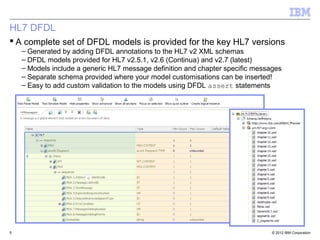
 A complete set of DFDL models is provided for the key HL7 versions
– Generated by adding DFDL annotations to the HL7 v2 XML schemas
– DFDL models provided for HL7 v2.5.1, v2.6 (Continua) and v2.7 (latest)
– Models include a generic HL7 message definition and chapter specific messages
– Separate schema provided where your model customisations can be inserted!
– Easy to add custom validation to the models using DFDL assert statements
© 2012 IBM Corporation
Chapter Messages
6
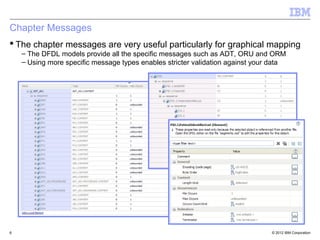
 The chapter messages are very useful particularly for graphical mapping
– The DFDL models provide all the specific messages such as ADT, ORU and ORM
– Using more specific message types enables stricter validation against your data
© 2012 IBM Corporation
Test Parse
7
 Test parse is one of the most compelling features in the DFDL editor
– Simply load an HL7 message into the editor and it will be parsed against the model
– No need to package and deploy the model to test your customisations out!
– Detailed feedback information is provided to explain why a message doesn’t parse
© 2012 IBM Corporation
Transformation
© 2012 IBM Corporation
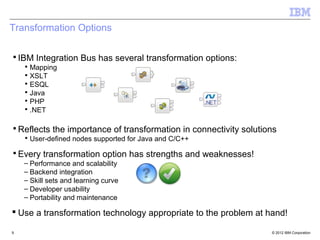
▪IBM Integration Bus has several transformation options:
▪ Mapping
▪ XSLT
▪ ESQL
▪ Java
▪ PHP
▪ .NET
▪Reflects the importance of transformation in connectivity solutions
▪ User-defined nodes supported for Java and C/C++
▪Every transformation option has strengths and weaknesses!
– Performance and scalability
– Backend integration
– Skill sets and learning curve
– Developer usability
– Portability and maintenance
 Use a transformation technology appropriate to the problem at hand!
9
Transformation Options
© 2012 IBM Corporation
JAXB and DFDL
10
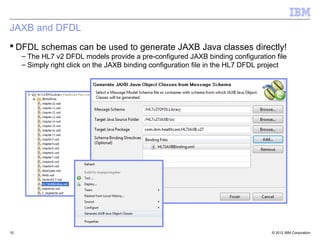
 DFDL schemas can be used to generate JAXB Java classes directly!
– The HL7 v2 DFDL models provide a pre-configured JAXB binding configuration file
– Simply right click on the JAXB binding configuration file in the HL7 DFDL project
© 2012 IBM Corporation
Create Java Compute Node
11
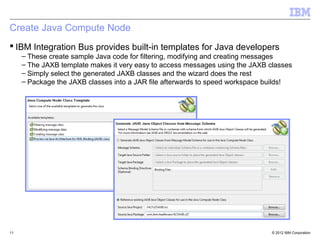
 IBM Integration Bus provides built-in templates for Java developers
– These create sample Java code for filtering, modifying and creating messages
– The JAXB template makes it very easy to access messages using the JAXB classes
– Simply select the generated JAXB classes and the wizard does the rest
– Package the JAXB classes into a JAR file afterwards to speed workspace builds!
© 2012 IBM Corporation
Transformation Code
12
 The inbound HL7 message can be cast to an HL7 message type
– Eclipse has outstanding context sensitive auto completion (CTRL-SPACE)
– Each segment shows you the possible fields which can be accessed in Java
– Strong typing in Java makes the code much less fragile than the alternatives
© 2012 IBM Corporation
Debugger
© 2012 IBM Corporation
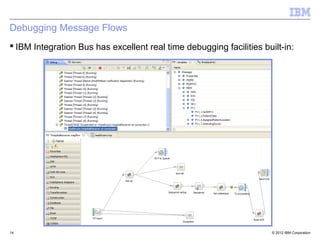
Debugging Message Flows
 IBM Integration Bus has excellent real time debugging facilities built-in:
14
© 2012 IBM Corporation
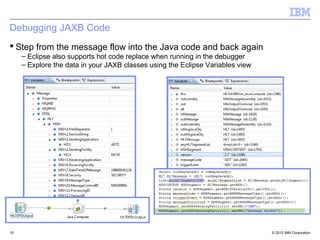
Debugging JAXB Code
15
 Step from the message flow into the Java code and back again
– Eclipse also supports hot code replace when running in the debugger
– Explore the data in your JAXB classes using the Eclipse Variables view
© 2012 IBM Corporation
Healthcare Connectivity Pack
16

HL7 DFDL with WebSphere Message Broker

  • 1.
    © 2012 IBMCorporation Healthcare Connectivity Pack HL7 DFDL Ant Phillips antphill@uk.ibm.com
  • 2.
    © 2012 IBMCorporation Use Restrictions The Program is capable of being used as a medical device data system to transfer, store, and convert data from one format to another. The Program may occasionally transmit data to bedside medical devices (e.g., for polling and telemetry). However, the Program itself is not a medical device. The following uses of the Program are prohibited: a. use to control any bedside medical device for clinical, therapeutic or treatment purposes (for example, but without limitation, the administration of medication, anaesthetics, saline solutions and the like); b. use for active patient monitoring (i.e., where the Program is used as the sole means of monitoring life-critical patient data , e.g. heart rates); c. use for decision support (i.e., where the Program is used as the main basis to determine patient-specific treatment or immediate clinical action); or d. use in any active monitoring that depends on the timeliness of data transmission. Indemnity to IBM Licensee will indemnify International Business Machines Corporation and its affiliated companies against any and all third party claims and liability arising directly or indirectly from any use of the Program by or for Licensee for a use or purpose that is prohibited by the provisions of the foregoing section, "Use Restrictions". As of December 11th 2012, WebSphere Message Broker Connectivity Pack for Healthcare is currently available for purchase through the Passport Advantage program only for use in the following specific countries : Australia; Austria; Canada; Chile; China; Colombia; Denmark, Finland; Germany; Italy; Malaysia, Mexico; Netherlands; New Zealand; Norway; Poland; Portugal, Singapore; Spain, Switzerland; Sweden, United Kingdom; United States of America For the current list of licensed geographies please see the following URL: http://www-01.ibm.com/software/integration/wbimessagebroker/healthcare/license/index.html Important Disclaimer and Availability Information WebSphere Message Broker Connectivity Pack for Healthcare
  • 3.
    © 2012 IBMCorporation Where Does It Fit? 3
  • 4.
    © 2012 IBMCorporation Easy Data Modelling with DFDL  Simple and powerful standard for data modelling – New standard for binary, text and industry data formats • Logical structure with physical annotations • e.g. endian, ASCII/EBCDIC, padding, justify… – Data Format Description Language (DFDL) • For use in IBM and non-IBM products • forge.gridforum.org/projects/dfdl-wg  Built-in facilities to model data easily – Quick wizards for CSV, record oriented data etc – Auto-model importers, COBOL copybooks etc – DFDL editor for power users • Create logical model and physical refinements  Test parsing and test data generation – Test whether sample data fits with DFDL definition – Parse trace provide success and error explanation – Auto-generate test data for test and debug scenarios  4
  • 5.
    © 2012 IBMCorporation HL7 DFDL 5  A complete set of DFDL models is provided for the key HL7 versions – Generated by adding DFDL annotations to the HL7 v2 XML schemas – DFDL models provided for HL7 v2.5.1, v2.6 (Continua) and v2.7 (latest) – Models include a generic HL7 message definition and chapter specific messages – Separate schema provided where your model customisations can be inserted! – Easy to add custom validation to the models using DFDL assert statements
  • 6.
    © 2012 IBMCorporation Chapter Messages 6  The chapter messages are very useful particularly for graphical mapping – The DFDL models provide all the specific messages such as ADT, ORU and ORM – Using more specific message types enables stricter validation against your data
  • 7.
    © 2012 IBMCorporation Test Parse 7  Test parse is one of the most compelling features in the DFDL editor – Simply load an HL7 message into the editor and it will be parsed against the model – No need to package and deploy the model to test your customisations out! – Detailed feedback information is provided to explain why a message doesn’t parse
  • 8.
    © 2012 IBMCorporation Transformation
  • 9.
    © 2012 IBMCorporation ▪IBM Integration Bus has several transformation options: ▪ Mapping ▪ XSLT ▪ ESQL ▪ Java ▪ PHP ▪ .NET ▪Reflects the importance of transformation in connectivity solutions ▪ User-defined nodes supported for Java and C/C++ ▪Every transformation option has strengths and weaknesses! – Performance and scalability – Backend integration – Skill sets and learning curve – Developer usability – Portability and maintenance  Use a transformation technology appropriate to the problem at hand! 9 Transformation Options
  • 10.
    © 2012 IBMCorporation JAXB and DFDL 10  DFDL schemas can be used to generate JAXB Java classes directly! – The HL7 v2 DFDL models provide a pre-configured JAXB binding configuration file – Simply right click on the JAXB binding configuration file in the HL7 DFDL project
  • 11.
    © 2012 IBMCorporation Create Java Compute Node 11  IBM Integration Bus provides built-in templates for Java developers – These create sample Java code for filtering, modifying and creating messages – The JAXB template makes it very easy to access messages using the JAXB classes – Simply select the generated JAXB classes and the wizard does the rest – Package the JAXB classes into a JAR file afterwards to speed workspace builds!
  • 12.
    © 2012 IBMCorporation Transformation Code 12  The inbound HL7 message can be cast to an HL7 message type – Eclipse has outstanding context sensitive auto completion (CTRL-SPACE) – Each segment shows you the possible fields which can be accessed in Java – Strong typing in Java makes the code much less fragile than the alternatives
  • 13.
    © 2012 IBMCorporation Debugger
  • 14.
    © 2012 IBMCorporation Debugging Message Flows  IBM Integration Bus has excellent real time debugging facilities built-in: 14
  • 15.
    © 2012 IBMCorporation Debugging JAXB Code 15  Step from the message flow into the Java code and back again – Eclipse also supports hot code replace when running in the debugger – Explore the data in your JAXB classes using the Eclipse Variables view
  • 16.
    © 2012 IBMCorporation Healthcare Connectivity Pack 16