© 2014 IBM Corporation
1691, How to Become a
Rational Developer for the i
Power User
Kenny Smith, Strongback Consulting
Edmund Reinhardt, IBM
Alan Boxall, IBM
About Us: Strongback Consulting
• IBM Advanced Business Partner
– SVP certified
– Strongly focused on DevOps, enterprise modernization and application lifecycle
management
– Key Industries Served: Finance, Insurance, Healthcare, Manufacturing, Government
– Rational Design Partner
Discover us at:
http://www.strongback.us
Subscribe to us at
http://feeds.feedburner.com/StrongbackConsulting
Socialize with us on Facebook & LinkedIn
http://www.facebook.com/StrongbackConsulting
http://www.linkedin.com/company/290754
Please note
IBM’s statements regarding its plans, directions, and intent are subject to change
or withdrawal without notice at IBM’s sole discretion.
Information regarding potential future products is intended to outline our general
product direction and it should not be relied on in making a purchasing decision.
The information mentioned regarding potential future products is not a commitment,
promise, or legal obligation to deliver any material, code or functionality.
Information about potential future products may not be incorporated into any
contract. The development, release, and timing of any future features or
functionality described for our products remains at our sole discretion.
Performance is based on measurements and projections using standard IBM
benchmarks in a controlled environment. The actual throughput or performance
that any user will experience will vary depending upon many factors, including
considerations such as the amount of multiprogramming in the user’s job stream,
the I/O configuration, the storage configuration, and the workload processed.
Therefore, no assurance can be given that an individual user will achieve results
similar to those stated here.
3
• First, learn to crawl – know how to navigate around, and use the skills
you have from SEU/PDM
• Then walk – get proficient with the RSE, jobs, filters, and remote
compilation
• Next run – basic debugging, master the LPEX editor
• Finally, FLY! – master refactoring, software archaeology tools in RDi,
code templates, snippets, advanced debugging, application viewer
Overview
• Workbench basics
– Views, perspectives
– Workspace preferences
– editors
• Set your LPEX editor to SEU profile
• Find the information to help you learn more about the tool
– Help system
– InfoCenter
– RPG Hub
– Various other links
Learn to Crawl
• Views
• Perspectives
• The Workspace
• Workspace Preferences
• The LPEX Editor
• Remote System Explorer Perspective
• iProjects Perspective
• Connecting to the i
RDi Basics
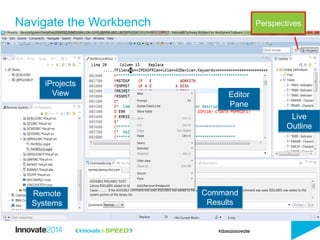
Navigate the Workbench
Editor
Pane
Live
Outline
iProjects
View
Remote
Systems
Command
Results
Perspectives
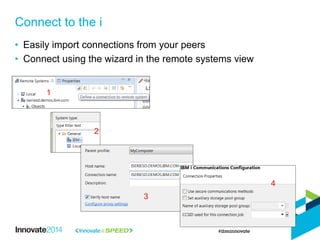
• Easily import connections from your peers
• Connect using the wizard in the remote systems view
Connect to the i
1
2
3
4
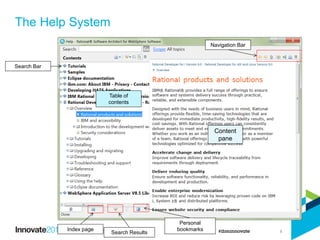
The Help System
8
Search Bar
Table of
contents
Index page
Search Results
Navigation Bar
Content
pane
Personal
bookmarks
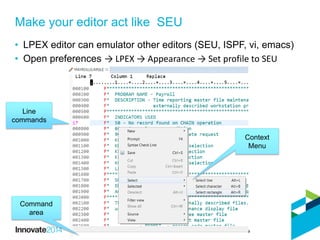
• LPEX editor can emulator other editors (SEU, ISPF, vi, emacs)
• Open preferences → LPEX → Appearance → Set profile to SEU
Make your editor act like SEU
Line
commands
Command
area
Context
Menu
• Remote system explorer
• Creating filters
• Manage jobs
• Discover the editors
• Remote compilation
Learn to Walk
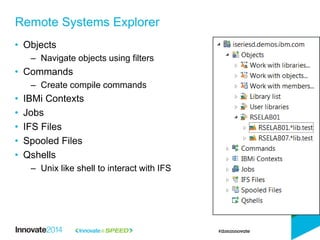
• Objects
– Navigate objects using filters
• Commands
– Create compile commands
• IBMi Contexts
• Jobs
• IFS Files
• Spooled Files
• Qshells
– Unix like shell to interact with IFS
Remote Systems Explorer
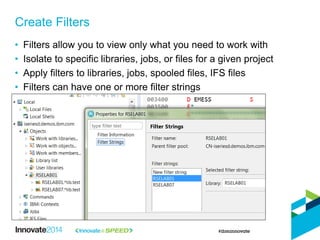
• Filters allow you to view only what you need to work with
• Isolate to specific libraries, jobs, or files for a given project
• Apply filters to libraries, jobs, spooled files, IFS files
• Filters can have one or more filter strings
Create Filters
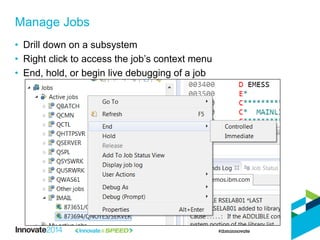
• Drill down on a subsystem
• Right click to access the job’s context menu
• End, hold, or begin live debugging of a job
Manage Jobs
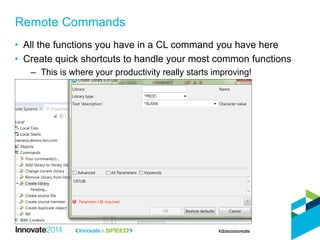
• All the functions you have in a CL command you have here
• Create quick shortcuts to handle your most common functions
– This is where your productivity really starts improving!
Remote Commands
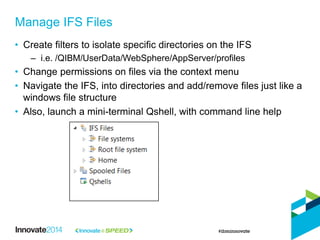
• Create filters to isolate specific directories on the IFS
– i.e. /QIBM/UserData/WebSphere/AppServer/profiles
• Change permissions on files via the context menu
• Navigate the IFS, into directories and add/remove files just like a
windows file structure
• Also, launch a mini-terminal Qshell, with command line help
Manage IFS Files
• Screen Designer
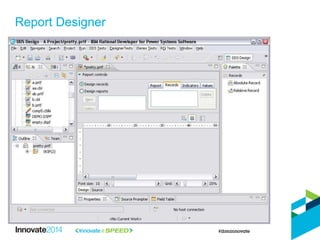
• Report Designer
• Master the LPEX editor
• Debugging
Learn to Run
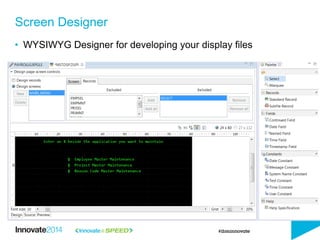
• WYSIWYG Designer for developing your display files
Screen Designer
18
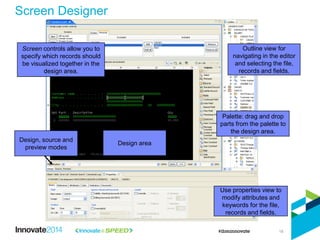
Use properties view to
modify attributes and
keywords for the file,
records and fields.
Outline view for
navigating in the editor
and selecting the file,
records and fields.
Design area
Design, source and
preview modes
Screen controls allow you to
specify which records should
be visualized together in the
design area.
Palette: drag and drop
parts from the palette to
the design area.
Screen Designer
Report Designer
• Convert your code to Free Form RPG
• Filter your code
• Use the Selection tools
• Hex Edit a line
• Master Keyboard shortcuts
• Use the LPEX source prompter
Master the LPEX Editor
LPEX Demo
• Use SCM / CLM
• iProjects
• Application Diagram Viewer
• Create Web Services
Learn to Fly
• Most vendors have plugins to RDi to manage your source
– Team Concert (of course!)
– Arcad
– Turnover
– MKS Implementer
– Aldon
• SCM Should be planned as part of your RDi rollout
– Begin using the tool with SCM and your life will be much easier
– Using different libraries for different versions is NOT SCM
– Using save files for historical capture, is NOT SCM
SCM = Source Code Management
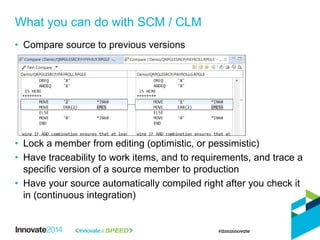
• Compare source to previous versions
• Lock a member from editing (optimistic, or pessimistic)
• Have traceability to work items, and to requirements, and trace a
specific version of a source member to production
• Have your source automatically compiled right after you check it
in (continuous integration)
What you can do with SCM / CLM
• The core of any SCM tooling
• Your source is pulled down to the local workstation
• You edit code, and check it back in
• The SCM server puts in the correct target libraries
• SCM will store a history of all of your edits
• iProjects allow for remote/disconnected development
iProjects
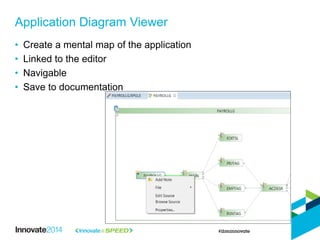
• Create a mental map of the application
• Linked to the editor
• Navigable
• Save to documentation
Application Diagram Viewer
27
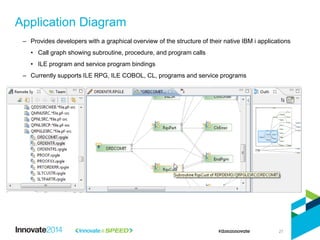
– Provides developers with a graphical overview of the structure of their native IBM i applications
• Call graph showing subroutine, procedure, and program calls
• ILE program and service program bindings
– Currently supports ILE RPG, ILE COBOL, CL, programs and service programs
Application Diagram
28
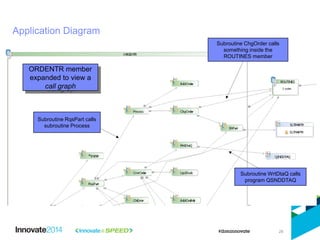
Application Diagram
ORDENTR member
expanded to view a
call graph
Subroutine WrtDtaQ calls
program QSNDDTAQ
Subroutine ChgOrder calls
something inside the
ROUTINES member
Subroutine RqsPart calls
subroutine Process
29
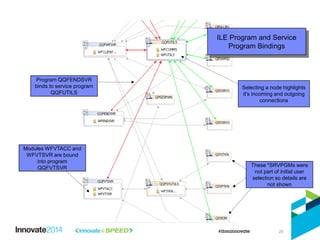
ILE Program and Service
Program Bindings
Program QQFENDSVR
binds to service program
QQFUTILS
Modules WFVTACC and
WFVTSVR are bound
into program
QQFVTSVR These *SRVPGMs were
not part of initial user
selection so details are
not shown
Selecting a node highlights
it’s incoming and outgoing
connections
© 2014 IBM Corporation
Alan Boxall
30
IBM Debug Architect
- Debugging using Rational Developer for i
- Analyzing Code Coverage of your testing
• Rational products use a common debug technology for compiled
languages
– Products Include Java debug
• Multi-platform, multi-language debugger
– Common user experience
– Adapts to the capabilities of the debug engine running on the host
– Multiple debug sessions on multiple hosts
• Integrates into product to deliver a seamless Edit/Compile/Debug
experience
Technology Overview
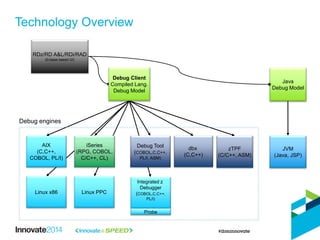
Technology Overview
AIX
(C,C++,
COBOL, PL/I)
zTPF
(C/C++, ASM)
JVM
(Java, JSP)
Java
Debug Model
Debug Tool
(COBOL,C,C++,
PL/I, ASM)
dbx
(C,C++)
Linux x86 Linux PPC
iSeries
(RPG, COBOL,
C/C++, CL)
Debug Client
Compiled Lang.
Debug Model
RDz/RD A&L/RDi/RAD
(Eclipse based UI)
Integrated z
Debugger
(COBOL,C,C++,
PL/I)
Probe
Debug engines
• Key features of the RDi debugger
– Supports debugging in multiple environments
• Batch
• Interactive
• Multi-threaded
• Attach to a running job
– Service Entry Point
• Debug program without knowing how it got started
• Set and debug session starts when the program is called
– Full integration with source editor
• Use source navigation features e.g. outline view
Debugging Your Application
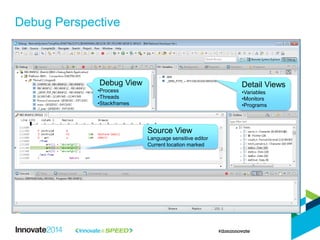
Debug Perspective
Debug View
•Process
•Threads
•Stackframes
Detail Views
•Variables
•Monitors
•Programs
Source View
Language sensitive editor
Current location marked
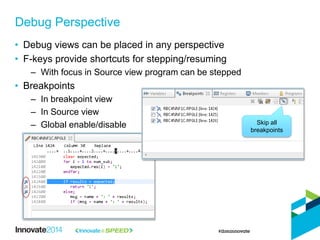
• Debug views can be placed in any perspective
• F-keys provide shortcuts for stepping/resuming
– With focus in Source view program can be stepped
• Breakpoints
– In breakpoint view
– In Source view
– Global enable/disable
Debug Perspective
Skip all
breakpoints
• Types
– Line – stop on a specific line
– Watch – stop when a variable or memory location changes
• An expression is converted to an address
• Conditional
– Stop when an expression is true
– Use language of program
• Thread and loop specific
– From/every/to
• User label
– Why did I set this breakpoint?
– Saved and restored with breakpoint
Breakpoints
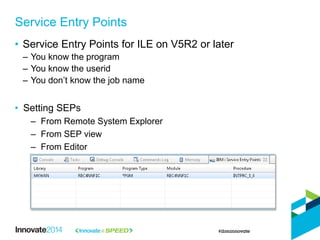
• Service Entry Points for ILE on V5R2 or later
– You know the program
– You know the userid
– You don’t know the job name
• Setting SEPs
– From Remote System Explorer
– From SEP view
– From Editor
Service Entry Points
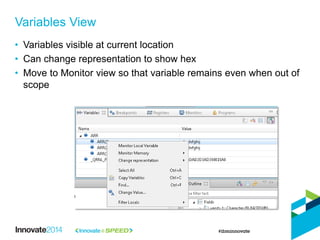
Variables View
• Variables visible at current location
• Can change representation to show hex
• Move to Monitor view so that variable remains even when out of
scope
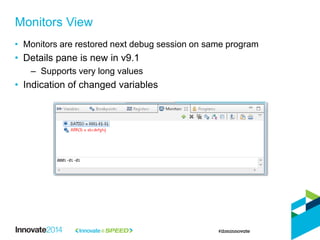
• Monitors are restored next debug session on same program
• Details pane is new in v9.1
– Supports very long values
• Indication of changed variables
Monitors View
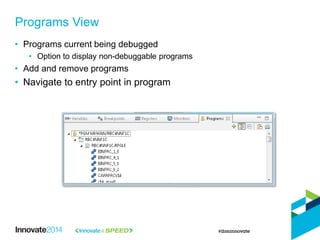
• Programs current being debugged
• Option to display non-debuggable programs
• Add and remove programs
• Navigate to entry point in program
Programs View
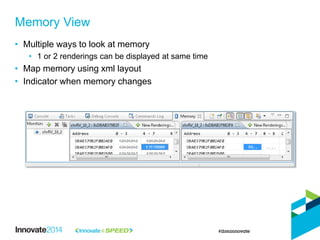
• Multiple ways to look at memory
• 1 or 2 renderings can be displayed at same time
• Map memory using xml layout
• Indicator when memory changes
Memory View
Code Coverage
42
Code Coverage Technology
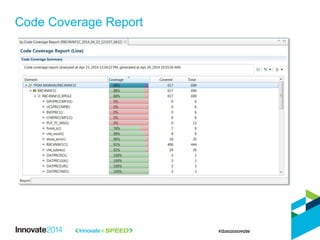
• Determine the effectiveness of automated or manual tests
– Make best use of test effort
• See coverage at the line level
• Help focus additional testing on code paths that have not been
executed
• Determine if testcases are unnecessary
• Detect dead code
Code Coverage Technology
• iSeries support added in v9.1
• Built using Debug technology
• “If you can debug it, you can capture CC results”
– No additional build steps.. Just ensure it is debuggable
• Multiple levels of CC
– Program/Procedure/Line
• Several report types
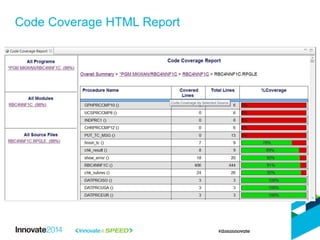
– RDi
– HTML
– PDF (new in v9.1)
• Tag results with testcase ID
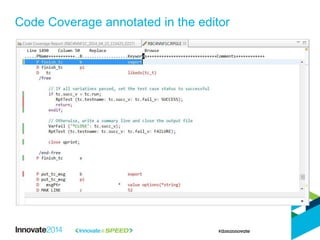
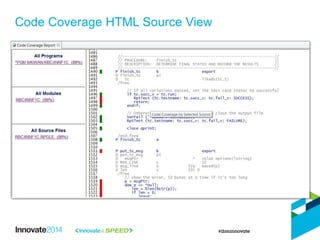
• Source is annotated with results
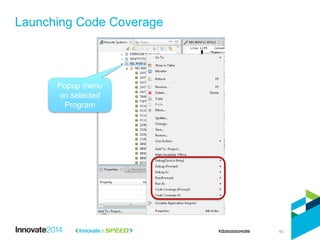
Launching Code Coverage
45
Popup menu
on selected
Program
Code Coverage Report
Code Coverage annotated in the editor
Code Coverage HTML Report
Code Coverage HTML Source View
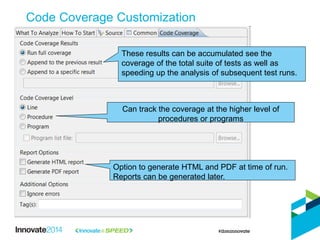
Code Coverage Customization
These results can be accumulated see the
coverage of the total suite of tests as well as
speeding up the analysis of subsequent test runs.
Can track the coverage at the higher level of
procedures or programs
Option to generate HTML and PDF at time of run.
Reports can be generated later.
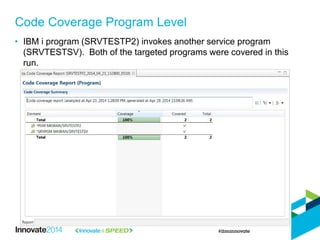
Code Coverage Program Level
• IBM i program (SRVTESTP2) invokes another service program
(SRVTESTSV). Both of the targeted programs were covered in this
run.
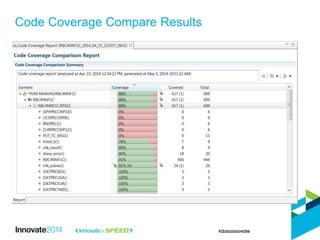
Code Coverage Compare Results
About Us: Strongback Consulting
• IBM Advanced Business Partner
– SVP certified
– Strongly focused on DevOps, enterprise modernization and application lifecycle
management
– Key Industries Served: Finance, Insurance, Healthcare, Manufacturing, Government
– Rational Design Partner
Discover us at:
http://www.strongback.us
Subscribe to us at
http://feeds.feedburner.com/StrongbackConsulting
Socialize with us on Facebook & LinkedIn
http://www.facebook.com/StrongbackConsulting
http://www.linkedin.com/company/290754

How to become a Rational Developer for IBM i Power User

  • 1.
    © 2014 IBMCorporation 1691, How to Become a Rational Developer for the i Power User Kenny Smith, Strongback Consulting Edmund Reinhardt, IBM Alan Boxall, IBM
  • 2.
    About Us: StrongbackConsulting • IBM Advanced Business Partner – SVP certified – Strongly focused on DevOps, enterprise modernization and application lifecycle management – Key Industries Served: Finance, Insurance, Healthcare, Manufacturing, Government – Rational Design Partner Discover us at: http://www.strongback.us Subscribe to us at http://feeds.feedburner.com/StrongbackConsulting Socialize with us on Facebook & LinkedIn http://www.facebook.com/StrongbackConsulting http://www.linkedin.com/company/290754
  • 3.
    Please note IBM’s statementsregarding its plans, directions, and intent are subject to change or withdrawal without notice at IBM’s sole discretion. Information regarding potential future products is intended to outline our general product direction and it should not be relied on in making a purchasing decision. The information mentioned regarding potential future products is not a commitment, promise, or legal obligation to deliver any material, code or functionality. Information about potential future products may not be incorporated into any contract. The development, release, and timing of any future features or functionality described for our products remains at our sole discretion. Performance is based on measurements and projections using standard IBM benchmarks in a controlled environment. The actual throughput or performance that any user will experience will vary depending upon many factors, including considerations such as the amount of multiprogramming in the user’s job stream, the I/O configuration, the storage configuration, and the workload processed. Therefore, no assurance can be given that an individual user will achieve results similar to those stated here.
  • 4.
    3 • First, learnto crawl – know how to navigate around, and use the skills you have from SEU/PDM • Then walk – get proficient with the RSE, jobs, filters, and remote compilation • Next run – basic debugging, master the LPEX editor • Finally, FLY! – master refactoring, software archaeology tools in RDi, code templates, snippets, advanced debugging, application viewer Overview
  • 5.
    • Workbench basics –Views, perspectives – Workspace preferences – editors • Set your LPEX editor to SEU profile • Find the information to help you learn more about the tool – Help system – InfoCenter – RPG Hub – Various other links Learn to Crawl
  • 6.
    • Views • Perspectives •The Workspace • Workspace Preferences • The LPEX Editor • Remote System Explorer Perspective • iProjects Perspective • Connecting to the i RDi Basics
  • 7.
  • 8.
    • Easily importconnections from your peers • Connect using the wizard in the remote systems view Connect to the i 1 2 3 4
  • 9.
    The Help System 8 SearchBar Table of contents Index page Search Results Navigation Bar Content pane Personal bookmarks
  • 10.
    • LPEX editorcan emulator other editors (SEU, ISPF, vi, emacs) • Open preferences → LPEX → Appearance → Set profile to SEU Make your editor act like SEU Line commands Command area Context Menu
  • 11.
    • Remote systemexplorer • Creating filters • Manage jobs • Discover the editors • Remote compilation Learn to Walk
  • 12.
    • Objects – Navigateobjects using filters • Commands – Create compile commands • IBMi Contexts • Jobs • IFS Files • Spooled Files • Qshells – Unix like shell to interact with IFS Remote Systems Explorer
  • 13.
    • Filters allowyou to view only what you need to work with • Isolate to specific libraries, jobs, or files for a given project • Apply filters to libraries, jobs, spooled files, IFS files • Filters can have one or more filter strings Create Filters
  • 14.
    • Drill downon a subsystem • Right click to access the job’s context menu • End, hold, or begin live debugging of a job Manage Jobs
  • 15.
    • All thefunctions you have in a CL command you have here • Create quick shortcuts to handle your most common functions – This is where your productivity really starts improving! Remote Commands
  • 16.
    • Create filtersto isolate specific directories on the IFS – i.e. /QIBM/UserData/WebSphere/AppServer/profiles • Change permissions on files via the context menu • Navigate the IFS, into directories and add/remove files just like a windows file structure • Also, launch a mini-terminal Qshell, with command line help Manage IFS Files
  • 17.
    • Screen Designer •Report Designer • Master the LPEX editor • Debugging Learn to Run
  • 18.
    • WYSIWYG Designerfor developing your display files Screen Designer
  • 19.
    18 Use properties viewto modify attributes and keywords for the file, records and fields. Outline view for navigating in the editor and selecting the file, records and fields. Design area Design, source and preview modes Screen controls allow you to specify which records should be visualized together in the design area. Palette: drag and drop parts from the palette to the design area. Screen Designer
  • 20.
  • 21.
    • Convert yourcode to Free Form RPG • Filter your code • Use the Selection tools • Hex Edit a line • Master Keyboard shortcuts • Use the LPEX source prompter Master the LPEX Editor
  • 22.
  • 23.
    • Use SCM/ CLM • iProjects • Application Diagram Viewer • Create Web Services Learn to Fly
  • 24.
    • Most vendorshave plugins to RDi to manage your source – Team Concert (of course!) – Arcad – Turnover – MKS Implementer – Aldon • SCM Should be planned as part of your RDi rollout – Begin using the tool with SCM and your life will be much easier – Using different libraries for different versions is NOT SCM – Using save files for historical capture, is NOT SCM SCM = Source Code Management
  • 25.
    • Compare sourceto previous versions • Lock a member from editing (optimistic, or pessimistic) • Have traceability to work items, and to requirements, and trace a specific version of a source member to production • Have your source automatically compiled right after you check it in (continuous integration) What you can do with SCM / CLM
  • 26.
    • The coreof any SCM tooling • Your source is pulled down to the local workstation • You edit code, and check it back in • The SCM server puts in the correct target libraries • SCM will store a history of all of your edits • iProjects allow for remote/disconnected development iProjects
  • 27.
    • Create amental map of the application • Linked to the editor • Navigable • Save to documentation Application Diagram Viewer
  • 28.
    27 – Provides developerswith a graphical overview of the structure of their native IBM i applications • Call graph showing subroutine, procedure, and program calls • ILE program and service program bindings – Currently supports ILE RPG, ILE COBOL, CL, programs and service programs Application Diagram
  • 29.
    28 Application Diagram ORDENTR member expandedto view a call graph Subroutine WrtDtaQ calls program QSNDDTAQ Subroutine ChgOrder calls something inside the ROUTINES member Subroutine RqsPart calls subroutine Process
  • 30.
    29 ILE Program andService Program Bindings Program QQFENDSVR binds to service program QQFUTILS Modules WFVTACC and WFVTSVR are bound into program QQFVTSVR These *SRVPGMs were not part of initial user selection so details are not shown Selecting a node highlights it’s incoming and outgoing connections
  • 31.
    © 2014 IBMCorporation Alan Boxall 30 IBM Debug Architect - Debugging using Rational Developer for i - Analyzing Code Coverage of your testing
  • 32.
    • Rational productsuse a common debug technology for compiled languages – Products Include Java debug • Multi-platform, multi-language debugger – Common user experience – Adapts to the capabilities of the debug engine running on the host – Multiple debug sessions on multiple hosts • Integrates into product to deliver a seamless Edit/Compile/Debug experience Technology Overview
  • 33.
    Technology Overview AIX (C,C++, COBOL, PL/I) zTPF (C/C++,ASM) JVM (Java, JSP) Java Debug Model Debug Tool (COBOL,C,C++, PL/I, ASM) dbx (C,C++) Linux x86 Linux PPC iSeries (RPG, COBOL, C/C++, CL) Debug Client Compiled Lang. Debug Model RDz/RD A&L/RDi/RAD (Eclipse based UI) Integrated z Debugger (COBOL,C,C++, PL/I) Probe Debug engines
  • 34.
    • Key featuresof the RDi debugger – Supports debugging in multiple environments • Batch • Interactive • Multi-threaded • Attach to a running job – Service Entry Point • Debug program without knowing how it got started • Set and debug session starts when the program is called – Full integration with source editor • Use source navigation features e.g. outline view Debugging Your Application
  • 35.
    Debug Perspective Debug View •Process •Threads •Stackframes DetailViews •Variables •Monitors •Programs Source View Language sensitive editor Current location marked
  • 36.
    • Debug viewscan be placed in any perspective • F-keys provide shortcuts for stepping/resuming – With focus in Source view program can be stepped • Breakpoints – In breakpoint view – In Source view – Global enable/disable Debug Perspective Skip all breakpoints
  • 37.
    • Types – Line– stop on a specific line – Watch – stop when a variable or memory location changes • An expression is converted to an address • Conditional – Stop when an expression is true – Use language of program • Thread and loop specific – From/every/to • User label – Why did I set this breakpoint? – Saved and restored with breakpoint Breakpoints
  • 38.
    • Service EntryPoints for ILE on V5R2 or later – You know the program – You know the userid – You don’t know the job name • Setting SEPs – From Remote System Explorer – From SEP view – From Editor Service Entry Points
  • 39.
    Variables View • Variablesvisible at current location • Can change representation to show hex • Move to Monitor view so that variable remains even when out of scope
  • 40.
    • Monitors arerestored next debug session on same program • Details pane is new in v9.1 – Supports very long values • Indication of changed variables Monitors View
  • 41.
    • Programs currentbeing debugged • Option to display non-debuggable programs • Add and remove programs • Navigate to entry point in program Programs View
  • 42.
    • Multiple waysto look at memory • 1 or 2 renderings can be displayed at same time • Map memory using xml layout • Indicator when memory changes Memory View
  • 43.
  • 44.
    Code Coverage Technology •Determine the effectiveness of automated or manual tests – Make best use of test effort • See coverage at the line level • Help focus additional testing on code paths that have not been executed • Determine if testcases are unnecessary • Detect dead code
  • 45.
    Code Coverage Technology •iSeries support added in v9.1 • Built using Debug technology • “If you can debug it, you can capture CC results” – No additional build steps.. Just ensure it is debuggable • Multiple levels of CC – Program/Procedure/Line • Several report types – RDi – HTML – PDF (new in v9.1) • Tag results with testcase ID • Source is annotated with results
  • 46.
    Launching Code Coverage 45 Popupmenu on selected Program
  • 47.
  • 48.
  • 49.
  • 50.
    Code Coverage HTMLSource View
  • 51.
    Code Coverage Customization Theseresults can be accumulated see the coverage of the total suite of tests as well as speeding up the analysis of subsequent test runs. Can track the coverage at the higher level of procedures or programs Option to generate HTML and PDF at time of run. Reports can be generated later.
  • 52.
    Code Coverage ProgramLevel • IBM i program (SRVTESTP2) invokes another service program (SRVTESTSV). Both of the targeted programs were covered in this run.
  • 53.
  • 54.
    About Us: StrongbackConsulting • IBM Advanced Business Partner – SVP certified – Strongly focused on DevOps, enterprise modernization and application lifecycle management – Key Industries Served: Finance, Insurance, Healthcare, Manufacturing, Government – Rational Design Partner Discover us at: http://www.strongback.us Subscribe to us at http://feeds.feedburner.com/StrongbackConsulting Socialize with us on Facebook & LinkedIn http://www.facebook.com/StrongbackConsulting http://www.linkedin.com/company/290754