Hide,UnFollow, Remove or Block on
LinkedIn
By Teddy Burriss
LinkedIn Coach & Trainer
Teddy Burriss
LinkedIn Coach & Trainer
My Purpose: to help people get the greatest business
value from their use of LinkedIn as a business tool.
I listen to what my Network asks me and often I
produce a video, blog post or article on the issues
they bring to my attention.
Today - I’m going to share ideas/tactics regarding
Hiding, Unfollowing, Removing and/or Blocking you
LinkedIn Network and their content.
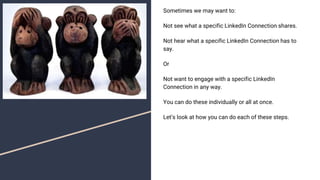
Sometimes we may want to:
Not see what a specific LinkedIn Connection shares.
Not hear what a specific LinkedIn Connection has to
say.
Or
Not want to engage with a specific LinkedIn
Connection in any way.
You can do these individually or all at once.
Let’s look at how you can do each of these steps.
Hiding a specific Post is one way to hide what a LinkedIn
Member shares, if a single post is the only ‘issue’. Sometimes
this is all you want to do, while keeping the LinkedIn Connection.
They’ll never know you did this.
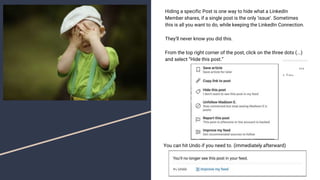
From the top right corner of the post, click on the three dots (...)
and select “Hide this post.”
You can hit Undo if you need to. (immediately afterward)
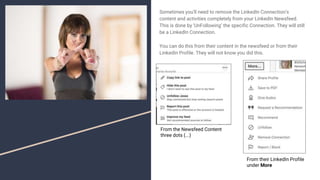
Sometimes you’ll need to remove the LinkedIn Connection’s
content and activities completely from your LinkedIn Newsfeed.
This is done by ‘UnFollowing’ the specific Connection. They will still
be a LinkedIn Connection.
You can do this from their content in the newsfeed or from their
LinkedIn Profile. They will not know you did this.
From the Newsfeed Content
three dots (...)
From their LinkedIn Profile
under More
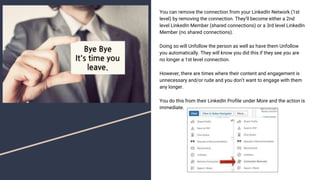
You can remove the connection from your LinkedIn Network (1st
level) by removing the connection. They’ll become either a 2nd
level LinkedIn Member (shared connections) or a 3rd level LinkedIn
Member (no shared connections).
Doing so will Unfollow the person as well as have them Unfollow
you automatically. They will know you did this if they see you are
no longer a 1st level connection.
However, there are times where their content and engagement is
unnecessary and/or rude and you don’t want to engage with them
any longer.
You do this from their LinkedIn Profile under More and the action is
immediate.
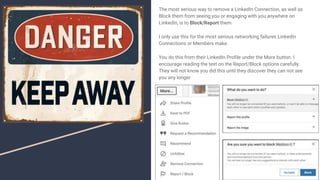
The most serious way to remove a LinkedIn Connection, as well as
Block them from seeing you or engaging with you anywhere on
LinkedIn, is to Block/Report them.
I only use this for the most serious networking failures LinkedIn
Connections or Members make.
You do this from their LinkedIn Profile under the More button. I
encourage reading the text on the Report/Block options carefully.
They will not know you did this until they discover they can not see
you any longer
LinkedIn Network should be for Mutual Benefit.
I recommend connecting with people you can help as well as
with people who can help you in your business.
Connecting on LinkedIn is just one step in the process.
Connect, Engage, look for ways to get into conversations, where
relevant and possible.
Treat your network with respect and hopefully they will do the
same.
For those who don’t, you get to Hide them, Unfollow them,
Remove and/or Block them.
Keep your network relevant and meaningful.
If I can help you and/or your business
development or sales team in any way, lets
talk.
Teddy Burriss
Burriss Consulting, Inc.
LinkedIn Coach & Trainer
skype: tlburriss
336-283-6121
tlburriss@burrissconsulting.com
http://www.linkedin.com/in/tlburriss

Hide, Unfollow, Remove or Block on Linkedin

  • 1.
    Hide,UnFollow, Remove orBlock on LinkedIn By Teddy Burriss LinkedIn Coach & Trainer
  • 2.
    Teddy Burriss LinkedIn Coach& Trainer My Purpose: to help people get the greatest business value from their use of LinkedIn as a business tool. I listen to what my Network asks me and often I produce a video, blog post or article on the issues they bring to my attention. Today - I’m going to share ideas/tactics regarding Hiding, Unfollowing, Removing and/or Blocking you LinkedIn Network and their content.
  • 3.
    Sometimes we maywant to: Not see what a specific LinkedIn Connection shares. Not hear what a specific LinkedIn Connection has to say. Or Not want to engage with a specific LinkedIn Connection in any way. You can do these individually or all at once. Let’s look at how you can do each of these steps.
  • 4.
    Hiding a specificPost is one way to hide what a LinkedIn Member shares, if a single post is the only ‘issue’. Sometimes this is all you want to do, while keeping the LinkedIn Connection. They’ll never know you did this. From the top right corner of the post, click on the three dots (...) and select “Hide this post.” You can hit Undo if you need to. (immediately afterward)
  • 5.
    Sometimes you’ll needto remove the LinkedIn Connection’s content and activities completely from your LinkedIn Newsfeed. This is done by ‘UnFollowing’ the specific Connection. They will still be a LinkedIn Connection. You can do this from their content in the newsfeed or from their LinkedIn Profile. They will not know you did this. From the Newsfeed Content three dots (...) From their LinkedIn Profile under More
  • 6.
    You can removethe connection from your LinkedIn Network (1st level) by removing the connection. They’ll become either a 2nd level LinkedIn Member (shared connections) or a 3rd level LinkedIn Member (no shared connections). Doing so will Unfollow the person as well as have them Unfollow you automatically. They will know you did this if they see you are no longer a 1st level connection. However, there are times where their content and engagement is unnecessary and/or rude and you don’t want to engage with them any longer. You do this from their LinkedIn Profile under More and the action is immediate.
  • 7.
    The most seriousway to remove a LinkedIn Connection, as well as Block them from seeing you or engaging with you anywhere on LinkedIn, is to Block/Report them. I only use this for the most serious networking failures LinkedIn Connections or Members make. You do this from their LinkedIn Profile under the More button. I encourage reading the text on the Report/Block options carefully. They will not know you did this until they discover they can not see you any longer
  • 8.
    LinkedIn Network shouldbe for Mutual Benefit. I recommend connecting with people you can help as well as with people who can help you in your business. Connecting on LinkedIn is just one step in the process. Connect, Engage, look for ways to get into conversations, where relevant and possible. Treat your network with respect and hopefully they will do the same. For those who don’t, you get to Hide them, Unfollow them, Remove and/or Block them. Keep your network relevant and meaningful.
  • 9.
    If I canhelp you and/or your business development or sales team in any way, lets talk. Teddy Burriss Burriss Consulting, Inc. LinkedIn Coach & Trainer skype: tlburriss 336-283-6121 tlburriss@burrissconsulting.com http://www.linkedin.com/in/tlburriss