HealthKit
Busra Deniz
SWE-551, Fall 2015
HealthKit Overview
● HealthKit allows apps that provide health and fitness
services to share their data with the new Health app
and with each other.
● A user’s health information is stored in a centralized
and secure location and the user decides which data
should be shared with your app
● HealthKit is designed to manage data from a wide
range of sources, automatically merging data from all
different sources based on users’ preferences.
● Works with directly health and fitness devices.
HealthKit Overview
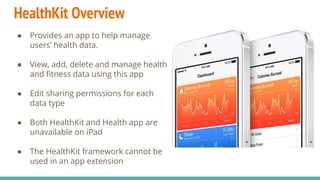
● Provides an app to help manage
users’ health data.
● View, add, delete and manage health
and fitness data using this app
● Edit sharing permissions for each
data type
● Both HealthKit and Health app are
unavailable on iPad
● The HealthKit framework cannot be
used in an app extension
HealthKit and Privacy
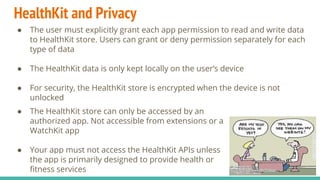
● The user must explicitly grant each app permission to read and write data
to HealthKit store. Users can grant or deny permission separately for each
type of data
● The HealthKit data is only kept locally on the user’s device
● For security, the HealthKit store is encrypted when the device is not
unlocked
● The HealthKit store can only be accessed by an
authorized app. Not accessible from extensions or a
WatchKit app
● Your app must not access the HealthKit APIs unless
the app is primarily designed to provide health or
fitness services
HealthKit Benefits
● Separating data collection, data processing, and
socialization
● Reduces friction in sharing between apps
● Providing a richer set of data and a greater sense of
context
● Lets apps participate in a greater ecosystem
HealthKit’s Design Philosophy
● The framework constrains the types of data and units to a predefined
list. Developers cannot create custom data types or units
● All objects in the HealthKit store are subclasses of the HKObject class
○ UUID
○ Source
○ Metadata
● HealthKit objects can be divided into two main groups :
○ Characteristics
○ Samples
HealthKit’s Design Philosophy
● Characteristic objects represent data that typically does not change. This
data includes the user’s birthdate, blood type, and biological sex
● Sample objects represent data at a particular point in time. Subclasses of
HKSample class
○ Type
○ Start date
○ End date
● Samples can be further partitioned into four sample types :
○ Category samples
○ Quantity samples
○ Correlations
○ Workouts
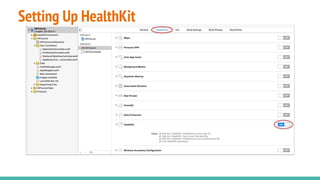
Setting Up HealthKit
● Check to see whether HealthKit is available by calling the
isHealthDataAvailable method
● Instantiate an HKHealthStore object for your app. You need only one
HealthKit store per app.
● Request authorization to access HealthKit data using the
requestAuthorizationToShareTypes:readTypes:completion: method.
HealthKit requires fine-grained authorization. You must request
permission to share and read each type of data.
Sample Code
import HealthKit
let healthKitStore:HKHealthStore = HKHealthStore()
func authorizeHealthKit(completion: ((success:Bool, error:NSError!) -> Void)!)
{
// 1. Set the types you want to read from HK Store
let healthKitTypesToRead = Set(arrayLiteral:[
HKObjectType.characteristicTypeForIdentifier(HKCharacteristicTypeIdentifierDateOfBirth),
HKObjectType.characteristicTypeForIdentifier(HKCharacteristicTypeIdentifierBloodType),
HKObjectType.workoutType()
])
// 2. Set the types you want to write to HK Store
let healthKitTypesToWrite = Set(arrayLiteral:[
HKObjectType.quantityTypeForIdentifier(HKQuantityTypeIdentifierActiveEnergyBurned),
HKObjectType.quantityTypeForIdentifier(HKQuantityTypeIdentifierDistanceWalkingRunning),
HKQuantityType.workoutType()
])
// Continue
Sample Code Continue
// 3. If the store is not available (for instance, iPad) return an error and don't go on.
if !HKHealthStore.isHealthDataAvailable()
{
let error = NSError(domain: "com.example.healthkit", code: 2, userInfo: [NSLocalizedDescriptionKey:"
HealthKit is not available in this Device"])
if( completion != nil )
{
completion(success:false, error:error)
}
return;
}
// 4. Request HealthKit authorization
healthKitStore.requestAuthorizationToShareTypes(healthKitTypesToWrite, readTypes: healthKitTypesToRead)
{ (success, error) -> Void in
if( completion != nil )
{
completion(success:success,error:error)
}
}
}
Sample Code Continue
healthManager.authorizeHealthKit { (authorized, error) -> Void in
if authorized {
println("HealthKit authorization received.")
} else {
println("HealthKit authorization denied!")
if error != nil {
println("(error)")
}
}
}
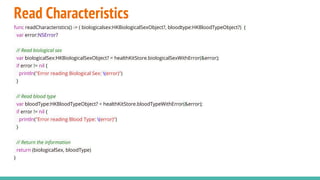
Read Characteristics
func readCharacteristics() -> ( biologicalsex:HKBiologicalSexObject?, bloodtype:HKBloodTypeObject?) {
var error:NSError?
// Read biological sex
var biologicalSex:HKBiologicalSexObject? = healthKitStore.biologicalSexWithError(&error);
if error != nil {
println("Error reading Biological Sex: (error)")
}
// Read blood type
var bloodType:HKBloodTypeObject? = healthKitStore.bloodTypeWithError(&error);
if error != nil {
println("Error reading Blood Type: (error)")
}
// Return the information
return (biologicalSex, bloodType)
}
Samples Query
func readMostRecentSample(sampleType:HKSampleType , completion: ((HKSample!, NSError!) -> Void)!)
{
// 1. Build the Predicate
let past = NSDate.distantPast() as! NSDate
let now = NSDate()
let mostRecentPredicate = HKQuery.predicateForSamplesWithStartDate(past, endDate:now, options: .None)
// 2. Build the sort descriptor to return the samples in descending order
let sortDescriptor = NSSortDescriptor(key:HKSampleSortIdentifierStartDate, ascending: false)
// 3. we want to limit the number of samples returned by the query to just 1 (the most recent)
let limit = 1
// 4. Build samples query
let sampleQuery = HKSampleQuery(sampleType: sampleType, predicate: mostRecentPredicate, limit: limit, sortDescriptors: [sortDescriptor])
{ (sampleQuery, results, error ) -> Void in
if let queryError = error {
completion(nil,error)
return;
}
// Get the first sample
let mostRecentSample = results.first as? HKQuantitySample
// Execute the completion closure
if completion != nil {
completion(mostRecentSample,nil)
}
}
// 5. Execute the Query
self.healthKitStore.executeQuery(sampleQuery)
}
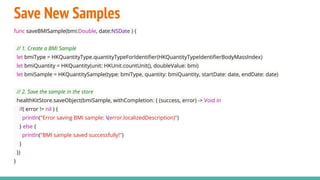
Save New Samples
func saveBMISample(bmi:Double, date:NSDate ) {
// 1. Create a BMI Sample
let bmiType = HKQuantityType.quantityTypeForIdentifier(HKQuantityTypeIdentifierBodyMassIndex)
let bmiQuantity = HKQuantity(unit: HKUnit.countUnit(), doubleValue: bmi)
let bmiSample = HKQuantitySample(type: bmiType, quantity: bmiQuantity, startDate: date, endDate: date)
// 2. Save the sample in the store
healthKitStore.saveObject(bmiSample, withCompletion: { (success, error) -> Void in
if( error != nil ) {
println("Error saving BMI sample: (error.localizedDescription)")
} else {
println("BMI sample saved successfully!")
}
})
}
Classes
https://developer.apple.
com/library/ios/documentation/HealthKit/Reference/HealthKit_Framework/
References
● https://developer.apple.
com/library/ios/documentation/HealthKit/Reference/HealthKit_Framewor
k/
● http://www.raywenderlich.com/86336/ios-8-healthkit-swift-getting-started
● http://code.tutsplus.com/tutorials/getting-started-with-healthkit-part-1--
cms-24477
● http://www.raywenderlich.com/89733/healthkit-tutorial-with-swift-
workouts

HealthKit

  • 1.
  • 2.
    HealthKit Overview ● HealthKitallows apps that provide health and fitness services to share their data with the new Health app and with each other. ● A user’s health information is stored in a centralized and secure location and the user decides which data should be shared with your app ● HealthKit is designed to manage data from a wide range of sources, automatically merging data from all different sources based on users’ preferences. ● Works with directly health and fitness devices.
  • 3.
    HealthKit Overview ● Providesan app to help manage users’ health data. ● View, add, delete and manage health and fitness data using this app ● Edit sharing permissions for each data type ● Both HealthKit and Health app are unavailable on iPad ● The HealthKit framework cannot be used in an app extension
  • 4.
    HealthKit and Privacy ●The user must explicitly grant each app permission to read and write data to HealthKit store. Users can grant or deny permission separately for each type of data ● The HealthKit data is only kept locally on the user’s device ● For security, the HealthKit store is encrypted when the device is not unlocked ● The HealthKit store can only be accessed by an authorized app. Not accessible from extensions or a WatchKit app ● Your app must not access the HealthKit APIs unless the app is primarily designed to provide health or fitness services
  • 5.
    HealthKit Benefits ● Separatingdata collection, data processing, and socialization ● Reduces friction in sharing between apps ● Providing a richer set of data and a greater sense of context ● Lets apps participate in a greater ecosystem
  • 6.
    HealthKit’s Design Philosophy ●The framework constrains the types of data and units to a predefined list. Developers cannot create custom data types or units ● All objects in the HealthKit store are subclasses of the HKObject class ○ UUID ○ Source ○ Metadata ● HealthKit objects can be divided into two main groups : ○ Characteristics ○ Samples
  • 7.
    HealthKit’s Design Philosophy ●Characteristic objects represent data that typically does not change. This data includes the user’s birthdate, blood type, and biological sex ● Sample objects represent data at a particular point in time. Subclasses of HKSample class ○ Type ○ Start date ○ End date ● Samples can be further partitioned into four sample types : ○ Category samples ○ Quantity samples ○ Correlations ○ Workouts
  • 8.
  • 9.
    Setting Up HealthKit ●Check to see whether HealthKit is available by calling the isHealthDataAvailable method ● Instantiate an HKHealthStore object for your app. You need only one HealthKit store per app. ● Request authorization to access HealthKit data using the requestAuthorizationToShareTypes:readTypes:completion: method. HealthKit requires fine-grained authorization. You must request permission to share and read each type of data.
  • 10.
    Sample Code import HealthKit lethealthKitStore:HKHealthStore = HKHealthStore() func authorizeHealthKit(completion: ((success:Bool, error:NSError!) -> Void)!) { // 1. Set the types you want to read from HK Store let healthKitTypesToRead = Set(arrayLiteral:[ HKObjectType.characteristicTypeForIdentifier(HKCharacteristicTypeIdentifierDateOfBirth), HKObjectType.characteristicTypeForIdentifier(HKCharacteristicTypeIdentifierBloodType), HKObjectType.workoutType() ]) // 2. Set the types you want to write to HK Store let healthKitTypesToWrite = Set(arrayLiteral:[ HKObjectType.quantityTypeForIdentifier(HKQuantityTypeIdentifierActiveEnergyBurned), HKObjectType.quantityTypeForIdentifier(HKQuantityTypeIdentifierDistanceWalkingRunning), HKQuantityType.workoutType() ]) // Continue
  • 11.
    Sample Code Continue //3. If the store is not available (for instance, iPad) return an error and don't go on. if !HKHealthStore.isHealthDataAvailable() { let error = NSError(domain: "com.example.healthkit", code: 2, userInfo: [NSLocalizedDescriptionKey:" HealthKit is not available in this Device"]) if( completion != nil ) { completion(success:false, error:error) } return; } // 4. Request HealthKit authorization healthKitStore.requestAuthorizationToShareTypes(healthKitTypesToWrite, readTypes: healthKitTypesToRead) { (success, error) -> Void in if( completion != nil ) { completion(success:success,error:error) } } }
  • 12.
    Sample Code Continue healthManager.authorizeHealthKit{ (authorized, error) -> Void in if authorized { println("HealthKit authorization received.") } else { println("HealthKit authorization denied!") if error != nil { println("(error)") } } }
  • 13.
    Read Characteristics func readCharacteristics()-> ( biologicalsex:HKBiologicalSexObject?, bloodtype:HKBloodTypeObject?) { var error:NSError? // Read biological sex var biologicalSex:HKBiologicalSexObject? = healthKitStore.biologicalSexWithError(&error); if error != nil { println("Error reading Biological Sex: (error)") } // Read blood type var bloodType:HKBloodTypeObject? = healthKitStore.bloodTypeWithError(&error); if error != nil { println("Error reading Blood Type: (error)") } // Return the information return (biologicalSex, bloodType) }
  • 14.
    Samples Query func readMostRecentSample(sampleType:HKSampleType, completion: ((HKSample!, NSError!) -> Void)!) { // 1. Build the Predicate let past = NSDate.distantPast() as! NSDate let now = NSDate() let mostRecentPredicate = HKQuery.predicateForSamplesWithStartDate(past, endDate:now, options: .None) // 2. Build the sort descriptor to return the samples in descending order let sortDescriptor = NSSortDescriptor(key:HKSampleSortIdentifierStartDate, ascending: false) // 3. we want to limit the number of samples returned by the query to just 1 (the most recent) let limit = 1 // 4. Build samples query let sampleQuery = HKSampleQuery(sampleType: sampleType, predicate: mostRecentPredicate, limit: limit, sortDescriptors: [sortDescriptor]) { (sampleQuery, results, error ) -> Void in if let queryError = error { completion(nil,error) return; } // Get the first sample let mostRecentSample = results.first as? HKQuantitySample // Execute the completion closure if completion != nil { completion(mostRecentSample,nil) } } // 5. Execute the Query self.healthKitStore.executeQuery(sampleQuery) }
  • 15.
    Save New Samples funcsaveBMISample(bmi:Double, date:NSDate ) { // 1. Create a BMI Sample let bmiType = HKQuantityType.quantityTypeForIdentifier(HKQuantityTypeIdentifierBodyMassIndex) let bmiQuantity = HKQuantity(unit: HKUnit.countUnit(), doubleValue: bmi) let bmiSample = HKQuantitySample(type: bmiType, quantity: bmiQuantity, startDate: date, endDate: date) // 2. Save the sample in the store healthKitStore.saveObject(bmiSample, withCompletion: { (success, error) -> Void in if( error != nil ) { println("Error saving BMI sample: (error.localizedDescription)") } else { println("BMI sample saved successfully!") } }) }
  • 16.
  • 17.
    References ● https://developer.apple. com/library/ios/documentation/HealthKit/Reference/HealthKit_Framewor k/ ● http://www.raywenderlich.com/86336/ios-8-healthkit-swift-getting-started ●http://code.tutsplus.com/tutorials/getting-started-with-healthkit-part-1-- cms-24477 ● http://www.raywenderlich.com/89733/healthkit-tutorial-with-swift- workouts