INTRODUCING CARDIOMERCARI INC.
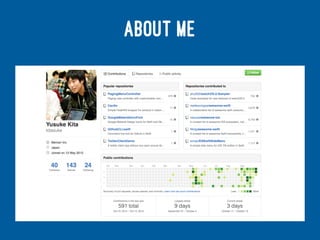
@KITASUKE
ABOUT ME
MY FUTURE TALKS
> Search APIs and Universal Links in practice
@iOS9 bootcamp
> Introducing new features for watchOS 2
@MOSA software meeting
HEALTHKIT
HealthKit allows apps that provide health
and fitness services
— HealthKit Framework Reference
CLASSES
> HKDevice
> HKSample
> HKObjectType
> HKQuantity
> HKUnit
> HKQuery
HKQUERY
> HKSampleQuery
> HKObserverQuery
> HKAnchoredObjectQuery
> HKStatisticsQuery
> HKStatisticsCollectionQuery
> HKCorrelation
> HKSourceQuery
HEART RATE IN WATCHOS-2-SAMPLER
class HeartRateInterfaceController: WKInterfaceController {
let healthStore = HKHealthStore()
let heartRateType = HKQuantityType.quantityTypeForIdentifier(HKQuantityTypeIdentifierHeartRate)!
let heartRateUnit = HKUnit(fromString: "count/min")
var heartRateQuery: HKQuery?
override func willActivate() {
super.willActivate()
guard HKHealthStore.isHealthDataAvailable() else { return }
let dataTypes = Set([heartRateType])
healthStore.requestAuthorizationToShareTypes(nil, readTypes: dataTypes) { (success, error) -> Void in
guard success else { return }
}
}
@IBAction func fetchBtnTapped() {
guard self.heartRateQuery == nil else { return }
if self.heartRateQuery == nil {
self.heartRateQuery = self.createStreamingQuery()
self.healthStore.executeQuery(self.heartRateQuery!)
} else {
self.healthStore.stopQuery(self.heartRateQuery!)
self.heartRateQuery = nil
}
}
private func createStreamingQuery() -> HKQuery {
let predicate = HKQuery.predicateForSamplesWithStartDate(NSDate(), endDate: nil, options: .None)
let query = HKAnchoredObjectQuery(type: heartRateType, predicate: predicate, anchor: nil, limit: Int(HKObjectQueryNoLimit)) { (query, samples, deletedObjects, anchor, error) -> Void in
self.addSamples(samples)
}
query.updateHandler = { (query, samples, deletedObjects, anchor, error) -> Void in
self.addSamples(samples)
}
return query
}
private func addSamples(samples: [HKSample]?) {
guard let samples = samples as? [HKQuantitySample] else { return }
guard let quantity = samples.last?.quantity else { return }
let heartRate = quantity.doubleValueForUnit(heartRateUnit)
}
}
!
CARDIO!HTTPS://GITHUB.COM/KITASUKE/CARDIO
HEALTHKIT WRAPPER
SPECIALIZED FOR
WORKOUT
FEATURES
> Super simple to access HealthKit
> Cuztomizable preferences
> Well-designed for workout app
> Easy way to save workout data in HealthKit
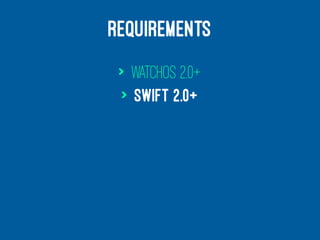
REQUIREMENTS
> watchOS 2.0+
> Swift 2.0+
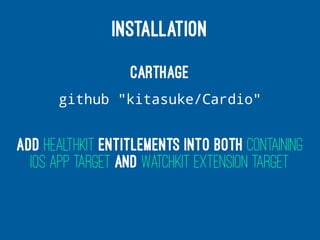
INSTALLATION
Carthage
github "kitasuke/Cardio"
Add HealthKit entitlements into both containing
iOS app target and WatchKit Extension target
CONTEXT PROTOCOL
public protocol Context {
var activityType: HKWorkoutActivityType { get }
var locationType: HKWorkoutSessionLocationType { get }
var distanceUnit: HKUnit { get }
var activeEnergyUnit: HKUnit { get }
var heartRateUnit: HKUnit { get }
var distanceType: HKQuantityType { get }
var activeEnergyType: HKQuantityType { get }
var heartRateType: HKQuantityType { get }
var shareIdentifiers: [String] { get }
var readIdentifiers: [String] { get }
}
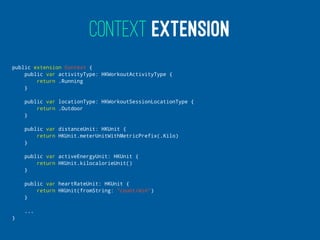
CONTEXT EXTENSION
public extension Context {
public var activityType: HKWorkoutActivityType {
return .Running
}
public var locationType: HKWorkoutSessionLocationType {
return .Outdoor
}
public var distanceUnit: HKUnit {
return HKUnit.meterUnitWithMetricPrefix(.Kilo)
}
public var activeEnergyUnit: HKUnit {
return HKUnit.kilocalorieUnit()
}
public var heartRateUnit: HKUnit {
return HKUnit(fromString: "count/min")
}
...
}
STRUCT CONFORMED CONTEXT
struct CardioContext: Context {
var locationType: HKWorkoutSessionLocationType {
return .Indoor
}
var distanceUnit: HKUnit {
return HKUnit.mileUnit()
}
var shareIdentifiers: [String] {
return []
}
}
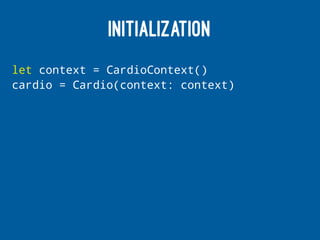
INITIALIZATION
let context = CardioContext()
cardio = Cardio(context: context)
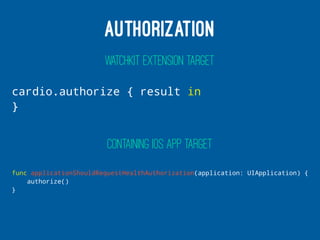
AUTHORIZATION
WATCHKIT EXTENSION TARGET
cardio.authorize { result in
}
CONTAINING IOS APP TARGET
func applicationShouldRequestHealthAuthorization(application: UIApplication) {
authorize()
}
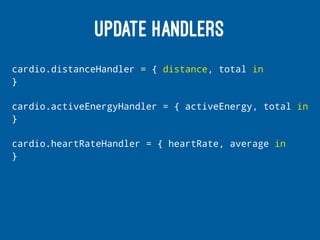
UPDATE HANDLERS
cardio.distanceHandler = { distance, total in
}
cardio.activeEnergyHandler = { activeEnergy, total in
}
cardio.heartRateHandler = { heartRate, average in
}
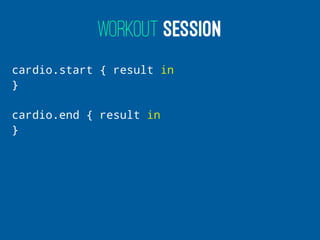
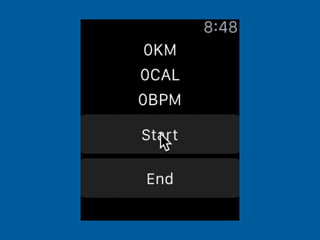
WORKOUT SESSION
cardio.start { result in
}
cardio.end { result in
}
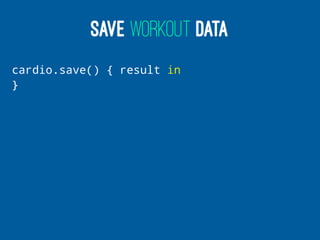
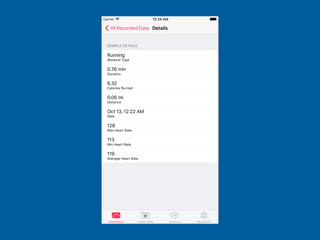
SAVE WORKOUT DATA
cardio.save() { result in
}
FUTURE WORK
> Add more features
> Fully support HealthKit
> Make wrapper for iOS app target
WELCOME YOUR
FEEDBACK &
THOUGHTS !
ANY QUESTIONS?

Introducing Cardio

  • 1.
  • 2.
  • 3.
    MY FUTURE TALKS >Search APIs and Universal Links in practice @iOS9 bootcamp > Introducing new features for watchOS 2 @MOSA software meeting
  • 4.
    HEALTHKIT HealthKit allows appsthat provide health and fitness services — HealthKit Framework Reference
  • 5.
    CLASSES > HKDevice > HKSample >HKObjectType > HKQuantity > HKUnit > HKQuery
  • 6.
    HKQUERY > HKSampleQuery > HKObserverQuery >HKAnchoredObjectQuery > HKStatisticsQuery > HKStatisticsCollectionQuery > HKCorrelation > HKSourceQuery
  • 7.
    HEART RATE INWATCHOS-2-SAMPLER class HeartRateInterfaceController: WKInterfaceController { let healthStore = HKHealthStore() let heartRateType = HKQuantityType.quantityTypeForIdentifier(HKQuantityTypeIdentifierHeartRate)! let heartRateUnit = HKUnit(fromString: "count/min") var heartRateQuery: HKQuery? override func willActivate() { super.willActivate() guard HKHealthStore.isHealthDataAvailable() else { return } let dataTypes = Set([heartRateType]) healthStore.requestAuthorizationToShareTypes(nil, readTypes: dataTypes) { (success, error) -> Void in guard success else { return } } } @IBAction func fetchBtnTapped() { guard self.heartRateQuery == nil else { return } if self.heartRateQuery == nil { self.heartRateQuery = self.createStreamingQuery() self.healthStore.executeQuery(self.heartRateQuery!) } else { self.healthStore.stopQuery(self.heartRateQuery!) self.heartRateQuery = nil } } private func createStreamingQuery() -> HKQuery { let predicate = HKQuery.predicateForSamplesWithStartDate(NSDate(), endDate: nil, options: .None) let query = HKAnchoredObjectQuery(type: heartRateType, predicate: predicate, anchor: nil, limit: Int(HKObjectQueryNoLimit)) { (query, samples, deletedObjects, anchor, error) -> Void in self.addSamples(samples) } query.updateHandler = { (query, samples, deletedObjects, anchor, error) -> Void in self.addSamples(samples) } return query } private func addSamples(samples: [HKSample]?) { guard let samples = samples as? [HKQuantitySample] else { return } guard let quantity = samples.last?.quantity else { return } let heartRate = quantity.doubleValueForUnit(heartRateUnit) } }
  • 8.
  • 9.
  • 10.
  • 11.
    FEATURES > Super simpleto access HealthKit > Cuztomizable preferences > Well-designed for workout app > Easy way to save workout data in HealthKit
  • 12.
  • 13.
    INSTALLATION Carthage github "kitasuke/Cardio" Add HealthKitentitlements into both containing iOS app target and WatchKit Extension target
  • 14.
    CONTEXT PROTOCOL public protocolContext { var activityType: HKWorkoutActivityType { get } var locationType: HKWorkoutSessionLocationType { get } var distanceUnit: HKUnit { get } var activeEnergyUnit: HKUnit { get } var heartRateUnit: HKUnit { get } var distanceType: HKQuantityType { get } var activeEnergyType: HKQuantityType { get } var heartRateType: HKQuantityType { get } var shareIdentifiers: [String] { get } var readIdentifiers: [String] { get } }
  • 15.
    CONTEXT EXTENSION public extensionContext { public var activityType: HKWorkoutActivityType { return .Running } public var locationType: HKWorkoutSessionLocationType { return .Outdoor } public var distanceUnit: HKUnit { return HKUnit.meterUnitWithMetricPrefix(.Kilo) } public var activeEnergyUnit: HKUnit { return HKUnit.kilocalorieUnit() } public var heartRateUnit: HKUnit { return HKUnit(fromString: "count/min") } ... }
  • 16.
    STRUCT CONFORMED CONTEXT structCardioContext: Context { var locationType: HKWorkoutSessionLocationType { return .Indoor } var distanceUnit: HKUnit { return HKUnit.mileUnit() } var shareIdentifiers: [String] { return [] } }
  • 17.
    INITIALIZATION let context =CardioContext() cardio = Cardio(context: context)
  • 18.
    AUTHORIZATION WATCHKIT EXTENSION TARGET cardio.authorize{ result in } CONTAINING IOS APP TARGET func applicationShouldRequestHealthAuthorization(application: UIApplication) { authorize() }
  • 19.
    UPDATE HANDLERS cardio.distanceHandler ={ distance, total in } cardio.activeEnergyHandler = { activeEnergy, total in } cardio.heartRateHandler = { heartRate, average in }
  • 20.
    WORKOUT SESSION cardio.start {result in } cardio.end { result in }
  • 21.
  • 24.
    FUTURE WORK > Addmore features > Fully support HealthKit > Make wrapper for iOS app target
  • 25.
  • 26.