Unit Testing on Mobile
Apps
Buşra Deniz
busradeniz89@gmail.com
@busradeniz
Agenda
● Unit Test
● Why test your code?
● How to unit test ?
● When test your code ?
● Tools for iOS Unit Testing
● Tools for Android Unit Testing
● Demo
● Questions
Unit Test
Testing a single unit of code.
Why test your code ?
● Fix bug early
Why test your code ?
● Fix bug early
● Refine design
Why test your code ?
● Fix bug early
● Refine design
● Easier to make changes
Why test your code ?
● Fix bug early
● Refine design
● Easier to make changes
● Useful documentation
Why test your code ?
● Fix bug early
● Refine design
● Easier to make changes
● Useful documentation
● Reduce testing time
How to Unit Test ?
“Never test the depth of the water
with both feet”
When test your code ?
● After writing code
When test your code ?
● After writing code
● Before writing code
When test your code ?
● After writing code
● Before writing code
● After fixing a bug
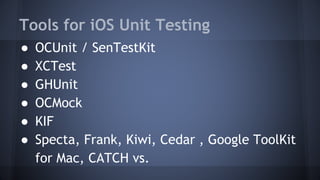
Tools for iOS Unit Testing
● OCUnit / SenTestKit
● XCTest
● GHUnit
● OCMock
● KIF
● Specta, Frank, Kiwi, Cedar , Google ToolKit
for Mac, CATCH vs.
Test Suite
- (void) setUp {
[super setUp];
// Put setup code here. This method is called before the invocation of each test method in the class.
}
- (void) tearDown {
// Put teardown code here. This method is called after the invocation of each test method in the class.
[super tearDown];
}
- (void) testExample {
// write your test code
XCTFail(@"No implementation for "%s"", __PRETTY_FUNCTION__);
}
XCTest Code Sample
- (void)test_PostRequestCreationWithoutHeaders
{
RestBody *restBody = [[RestBody alloc] init];
[restBody addHeaderItem:@"demoBodyKey" andValue:@"demoBodyValue"];
[restBody addHeaderItem:@"demoBodyKey2" andValue:@"demoBodyValue2"];
restPostRequest = [[RestPostRequest alloc] init:restBody andServiceUrlSuffix:serviceUrlSuffix];
XCTAssertNotNil(restPostRequest.serviceUrlSuffix, @"Service URL suffix cannot be nil");
XCTAssertNotNil(restPostRequest.messageHeader, @"Headers cannot be nil");
XCTAssertNotNil(restPostRequest.messageBody, @"Body cannot be nil");
XCTAssertEqual(serviceUrlSuffix, restPostRequest.serviceUrlSuffix, @"Service URL suffix must equal to %@" ,serviceUrlSuffix
);
XCTAssertEqual( (NSUInteger)7 , restPostRequest.messageHeader.messageHeader.allKeys.count , @"Header size is wrong");
XCTAssertEqual( (NSUInteger)2 , restPostRequest.messageBody.messageBody.allKeys.count , @"Body size is wrong");
XCTAssertTrue([restPostRequest.messageBody.messageBody objectForKey:@"demoBodyKey"], @"RestRequest body must
contain %@" , @"demoBodyKey");
}
OCMock with XCTest Code Sample
-(void) test_Connect {
id notificationComponent = [OCMockObject mockForClass:[NotificationComponent
class] ];
id notificationEngine = [OCMockObject mockForClass:[NotificationEngine class]];
[notificationEngine setNotificationComponent:notificationEngine];
[[notificationComponent expect] connect:@""];
[notificationEngine connect:@""];
[notificationEngine verify];
}
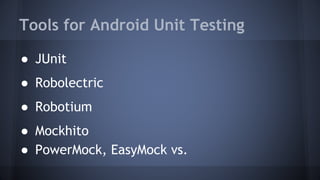
Tools for Android Unit Testing
● JUnit
● Robolectric
● Robotium
● Mockhito
● PowerMock, EasyMock vs.
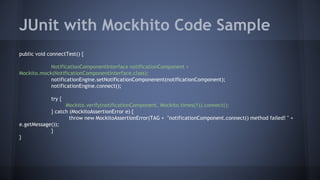
JUnit with Mockhito Code Sample
public void connectTest() {
NotificationComponentInterface notificationComponent =
Mockito.mock(NotificationComponentInterface.class);
notificationEngine.setNotificationComponenent(notificationComponent);
notificationEngine.connect();
try {
Mockito.verify(notificationComponent, Mockito.times(1)).connect();
} catch (MockitoAssertionError e) {
throw new MockitoAssertionError(TAG + "notificationComponent.connect() method failed! " +
e.getMessage());
}
}
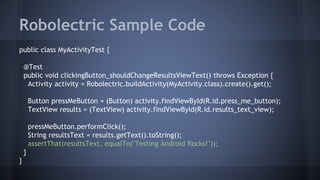
Robolectric Sample Code
public class MyActivityTest {
@Test
public void clickingButton_shouldChangeResultsViewText() throws Exception {
Activity activity = Robolectric.buildActivity(MyActivity.class).create().get();
Button pressMeButton = (Button) activity.findViewById(R.id.press_me_button);
TextView results = (TextView) activity.findViewById(R.id.results_text_view);
pressMeButton.performClick();
String resultsText = results.getText().toString();
assertThat(resultsText, equalTo("Testing Android Rocks!"));
}
}
Demo
Demo with KIF (Keep It Functional)
Questions
Resources
● Test Driven Development on iOS / Graham Lee
● www.raywenderlich.com
● http://developer.android.com
● http://developer.apple.com
Thanks ...

Unit testing on mobile apps

  • 1.
    Unit Testing onMobile Apps Buşra Deniz busradeniz89@gmail.com @busradeniz
  • 2.
    Agenda ● Unit Test ●Why test your code? ● How to unit test ? ● When test your code ? ● Tools for iOS Unit Testing ● Tools for Android Unit Testing ● Demo ● Questions
  • 3.
    Unit Test Testing asingle unit of code.
  • 4.
    Why test yourcode ? ● Fix bug early
  • 5.
    Why test yourcode ? ● Fix bug early ● Refine design
  • 6.
    Why test yourcode ? ● Fix bug early ● Refine design ● Easier to make changes
  • 7.
    Why test yourcode ? ● Fix bug early ● Refine design ● Easier to make changes ● Useful documentation
  • 8.
    Why test yourcode ? ● Fix bug early ● Refine design ● Easier to make changes ● Useful documentation ● Reduce testing time
  • 9.
    How to UnitTest ? “Never test the depth of the water with both feet”
  • 10.
    When test yourcode ? ● After writing code
  • 11.
    When test yourcode ? ● After writing code ● Before writing code
  • 12.
    When test yourcode ? ● After writing code ● Before writing code ● After fixing a bug
  • 13.
    Tools for iOSUnit Testing ● OCUnit / SenTestKit ● XCTest ● GHUnit ● OCMock ● KIF ● Specta, Frank, Kiwi, Cedar , Google ToolKit for Mac, CATCH vs.
  • 14.
    Test Suite - (void)setUp { [super setUp]; // Put setup code here. This method is called before the invocation of each test method in the class. } - (void) tearDown { // Put teardown code here. This method is called after the invocation of each test method in the class. [super tearDown]; } - (void) testExample { // write your test code XCTFail(@"No implementation for "%s"", __PRETTY_FUNCTION__); }
  • 15.
    XCTest Code Sample -(void)test_PostRequestCreationWithoutHeaders { RestBody *restBody = [[RestBody alloc] init]; [restBody addHeaderItem:@"demoBodyKey" andValue:@"demoBodyValue"]; [restBody addHeaderItem:@"demoBodyKey2" andValue:@"demoBodyValue2"]; restPostRequest = [[RestPostRequest alloc] init:restBody andServiceUrlSuffix:serviceUrlSuffix]; XCTAssertNotNil(restPostRequest.serviceUrlSuffix, @"Service URL suffix cannot be nil"); XCTAssertNotNil(restPostRequest.messageHeader, @"Headers cannot be nil"); XCTAssertNotNil(restPostRequest.messageBody, @"Body cannot be nil"); XCTAssertEqual(serviceUrlSuffix, restPostRequest.serviceUrlSuffix, @"Service URL suffix must equal to %@" ,serviceUrlSuffix ); XCTAssertEqual( (NSUInteger)7 , restPostRequest.messageHeader.messageHeader.allKeys.count , @"Header size is wrong"); XCTAssertEqual( (NSUInteger)2 , restPostRequest.messageBody.messageBody.allKeys.count , @"Body size is wrong"); XCTAssertTrue([restPostRequest.messageBody.messageBody objectForKey:@"demoBodyKey"], @"RestRequest body must contain %@" , @"demoBodyKey"); }
  • 16.
    OCMock with XCTestCode Sample -(void) test_Connect { id notificationComponent = [OCMockObject mockForClass:[NotificationComponent class] ]; id notificationEngine = [OCMockObject mockForClass:[NotificationEngine class]]; [notificationEngine setNotificationComponent:notificationEngine]; [[notificationComponent expect] connect:@""]; [notificationEngine connect:@""]; [notificationEngine verify]; }
  • 17.
    Tools for AndroidUnit Testing ● JUnit ● Robolectric ● Robotium ● Mockhito ● PowerMock, EasyMock vs.
  • 18.
    JUnit with MockhitoCode Sample public void connectTest() { NotificationComponentInterface notificationComponent = Mockito.mock(NotificationComponentInterface.class); notificationEngine.setNotificationComponenent(notificationComponent); notificationEngine.connect(); try { Mockito.verify(notificationComponent, Mockito.times(1)).connect(); } catch (MockitoAssertionError e) { throw new MockitoAssertionError(TAG + "notificationComponent.connect() method failed! " + e.getMessage()); } }
  • 19.
    Robolectric Sample Code publicclass MyActivityTest { @Test public void clickingButton_shouldChangeResultsViewText() throws Exception { Activity activity = Robolectric.buildActivity(MyActivity.class).create().get(); Button pressMeButton = (Button) activity.findViewById(R.id.press_me_button); TextView results = (TextView) activity.findViewById(R.id.results_text_view); pressMeButton.performClick(); String resultsText = results.getText().toString(); assertThat(resultsText, equalTo("Testing Android Rocks!")); } }
  • 20.
    Demo Demo with KIF(Keep It Functional)
  • 21.
  • 22.
    Resources ● Test DrivenDevelopment on iOS / Graham Lee ● www.raywenderlich.com ● http://developer.android.com ● http://developer.apple.com Thanks ...