HC-03/05 Embedded Bluetooth Serial Communication Module
AT command set
Last revised: April, 2011
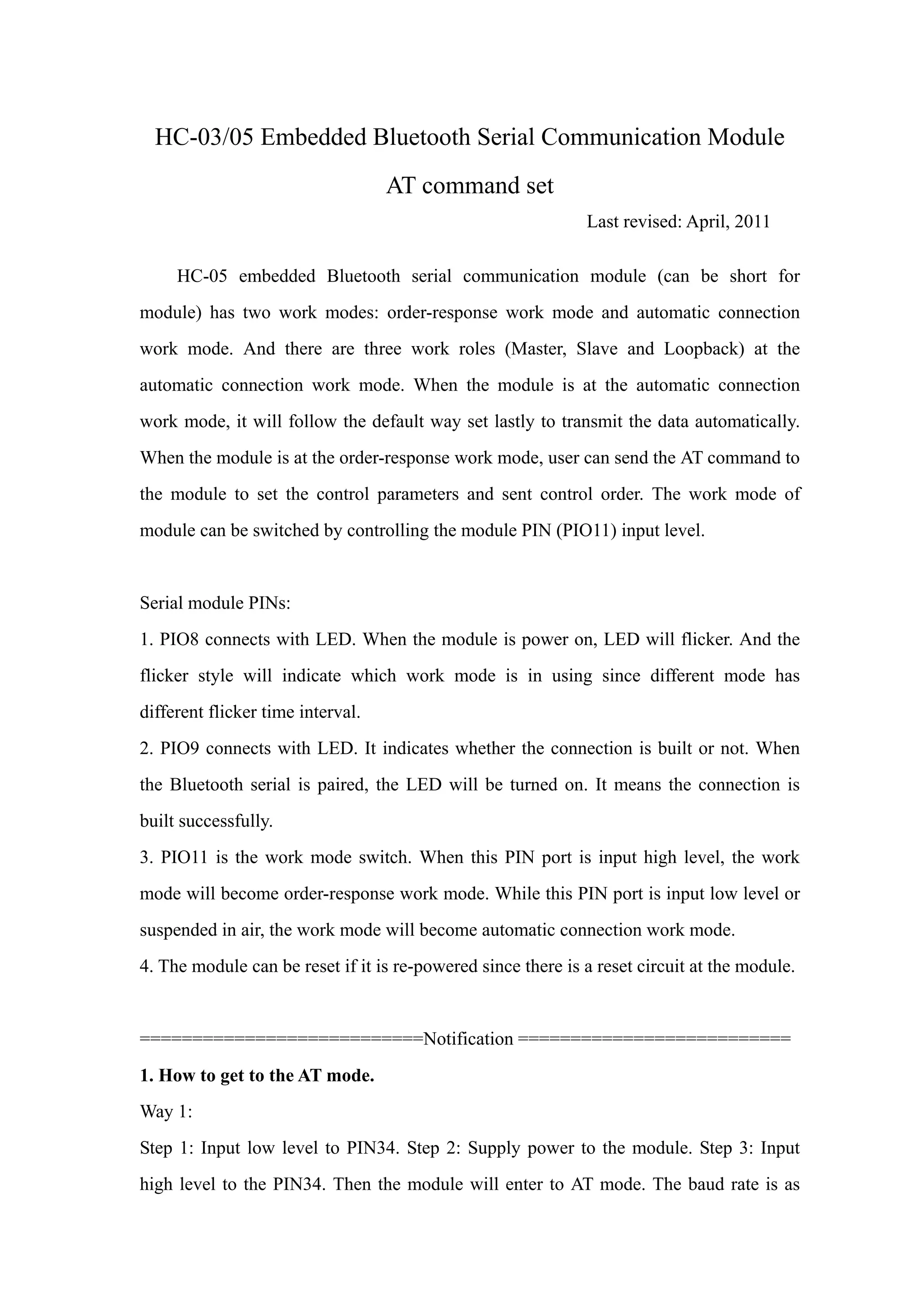
HC-05 embedded Bluetooth serial communication module (can be short for
module) has two work modes: order-response work mode and automatic connection
work mode. And there are three work roles (Master, Slave and Loopback) at the
automatic connection work mode. When the module is at the automatic connection
work mode, it will follow the default way set lastly to transmit the data automatically.
When the module is at the order-response work mode, user can send the AT command to
the module to set the control parameters and sent control order. The work mode of
module can be switched by controlling the module PIN (PIO11) input level.
Serial module PINs:
1. PIO8 connects with LED. When the module is power on, LED will flicker. And the
flicker style will indicate which work mode is in using since different mode has
different flicker time interval.
2. PIO9 connects with LED. It indicates whether the connection is built or not. When
the Bluetooth serial is paired, the LED will be turned on. It means the connection is
built successfully.
3. PIO11 is the work mode switch. When this PIN port is input high level, the work
mode will become order-response work mode. While this PIN port is input low level or
suspended in air, the work mode will become automatic connection work mode.
4. The module can be reset if it is re-powered since there is a reset circuit at the module.
===========================Notification ==========================
1. How to get to the AT mode.
Way 1:
Step 1: Input low level to PIN34. Step 2: Supply power to the module. Step 3: Input
high level to the PIN34. Then the module will enter to AT mode. The baud rate is as
same as the communication time, such as 9600 etc.
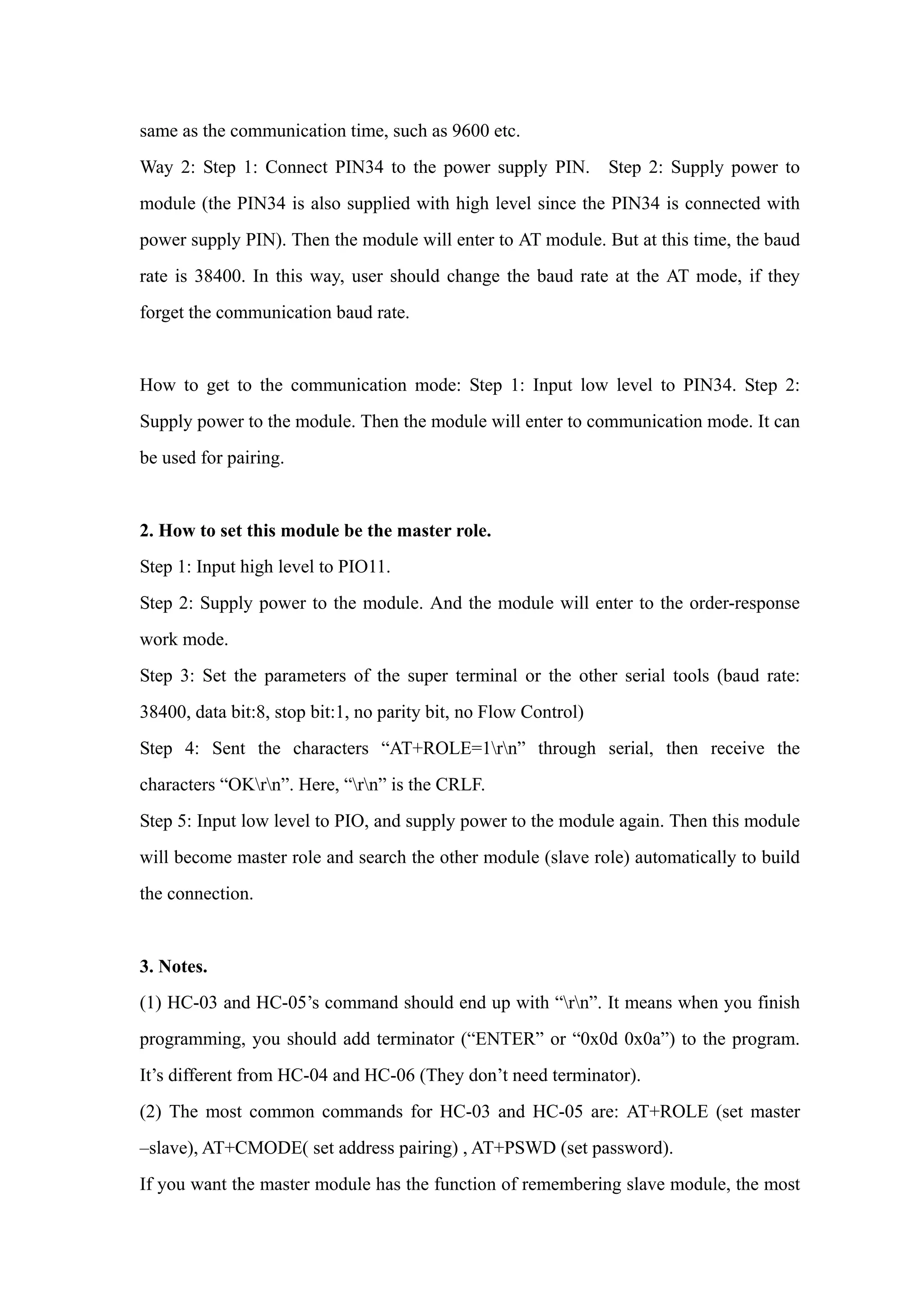
Way 2: Step 1: Connect PIN34 to the power supply PIN. Step 2: Supply power to
module (the PIN34 is also supplied with high level since the PIN34 is connected with
power supply PIN). Then the module will enter to AT module. But at this time, the baud
rate is 38400. In this way, user should change the baud rate at the AT mode, if they
forget the communication baud rate.
How to get to the communication mode: Step 1: Input low level to PIN34. Step 2:
Supply power to the module. Then the module will enter to communication mode. It can
be used for pairing.
2. How to set this module be the master role.
Step 1: Input high level to PIO11.
Step 2: Supply power to the module. And the module will enter to the order-response
work mode.
Step 3: Set the parameters of the super terminal or the other serial tools (baud rate:
38400, data bit:8, stop bit:1, no parity bit, no Flow Control)
Step 4: Sent the characters “AT+ROLE=1rn” through serial, then receive the
characters “OKrn”. Here, “rn” is the CRLF.
Step 5: Input low level to PIO, and supply power to the module again. Then this module
will become master role and search the other module (slave role) automatically to build
the connection.
3. Notes.
(1) HC-03 and HC-05’s command should end up with “rn”. It means when you finish
programming, you should add terminator (“ENTER” or “0x0d 0x0a”) to the program.
It’s different from HC-04 and HC-06 (They don’t need terminator).
(2) The most common commands for HC-03 and HC-05 are: AT+ROLE (set master
–slave), AT+CMODE( set address pairing) , AT+PSWD (set password).
If you want the master module has the function of remembering slave module, the most
simply way is: First, set AT+CMODE=1. Make the master module pair with the slave
module. Second, set AT+CMODE=0. Then the master module just can make pair with
that specified slave module.
(3) When PIN34 keeps high level, all commands can be used. Otherwise, only some of
them can be used.
==============================================================
Detailed description of Command
(AT command is case- sensitive, should end up with terminator (“enter” or “rn”).)
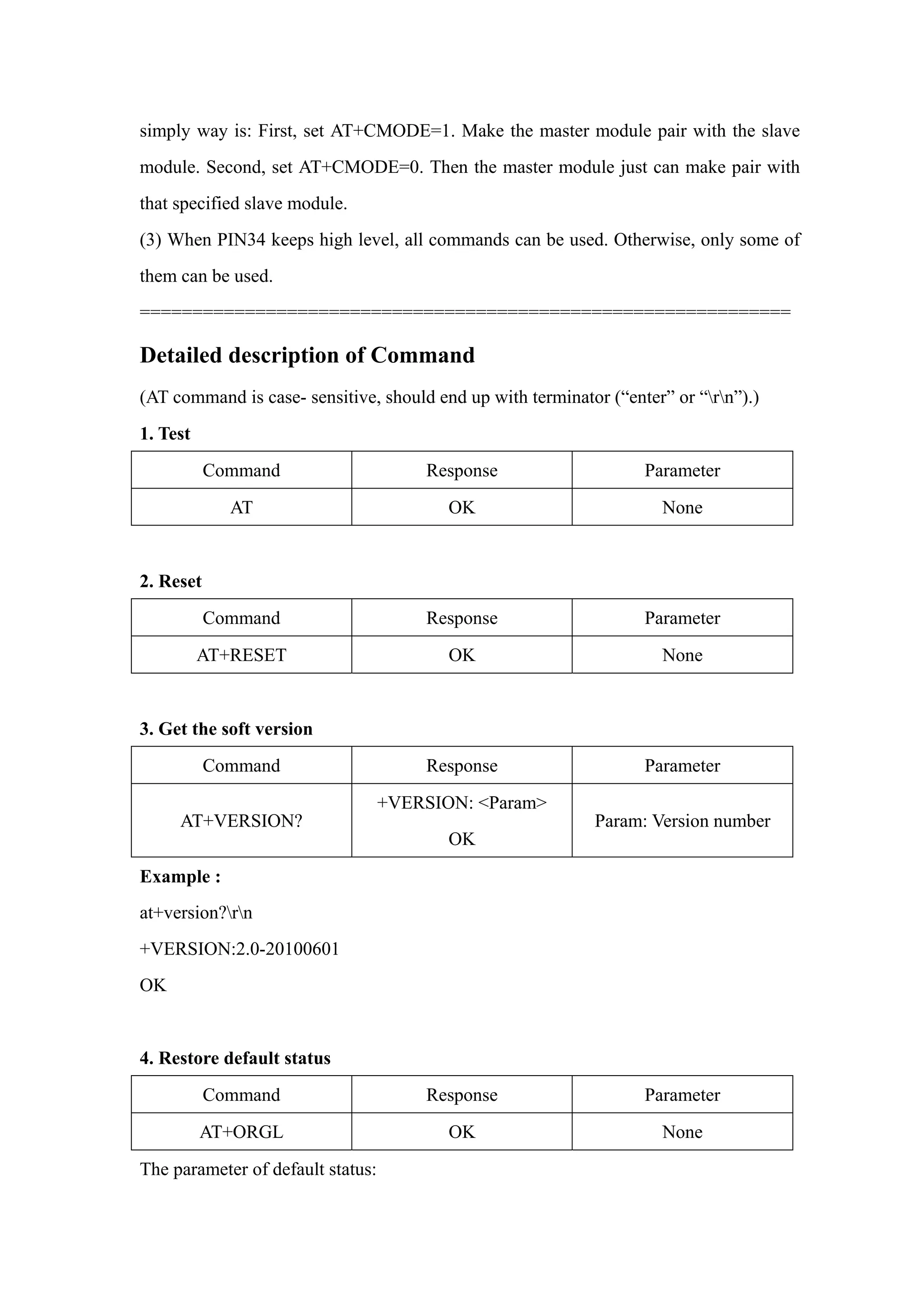
1. Test
Command Response Parameter
AT OK None
2. Reset
Command Response Parameter
AT+RESET OK None
3. Get the soft version
Command Response Parameter
AT+VERSION?
+VERSION: <Param>
OK
Param: Version number
Example :
at+version?rn
+VERSION:2.0-20100601
OK
4. Restore default status
Command Response Parameter
AT+ORGL OK None
The parameter of default status:
①.Device type: 0
②.Inquire code: 0x009e8b33
③.Module work mode: Slave Mode
④.Connection mode: Connect to the Bluetooth device specified
⑤.Serial parameter: Baud rate: 38400 bits/s; Stop bit: 1 bit; Parity bit: None.
⑥.Passkey: “1234”
⑦.Device name: “H-C-2010-06-01”
………..
5. Get module Bluetooth address
Command Response Parameter
AT+ADDR?
+ADDR: <Param>
OK
Param: Bluetooth address
Bluetooth address will show as this way: NAP: UAP: LAP(Hexadecimal)
Example:
Module Bluetooth address: 12: 34: 56: ab: cd: ef
at+addr?rn
+ADDR:1234:56:abcdef
OK
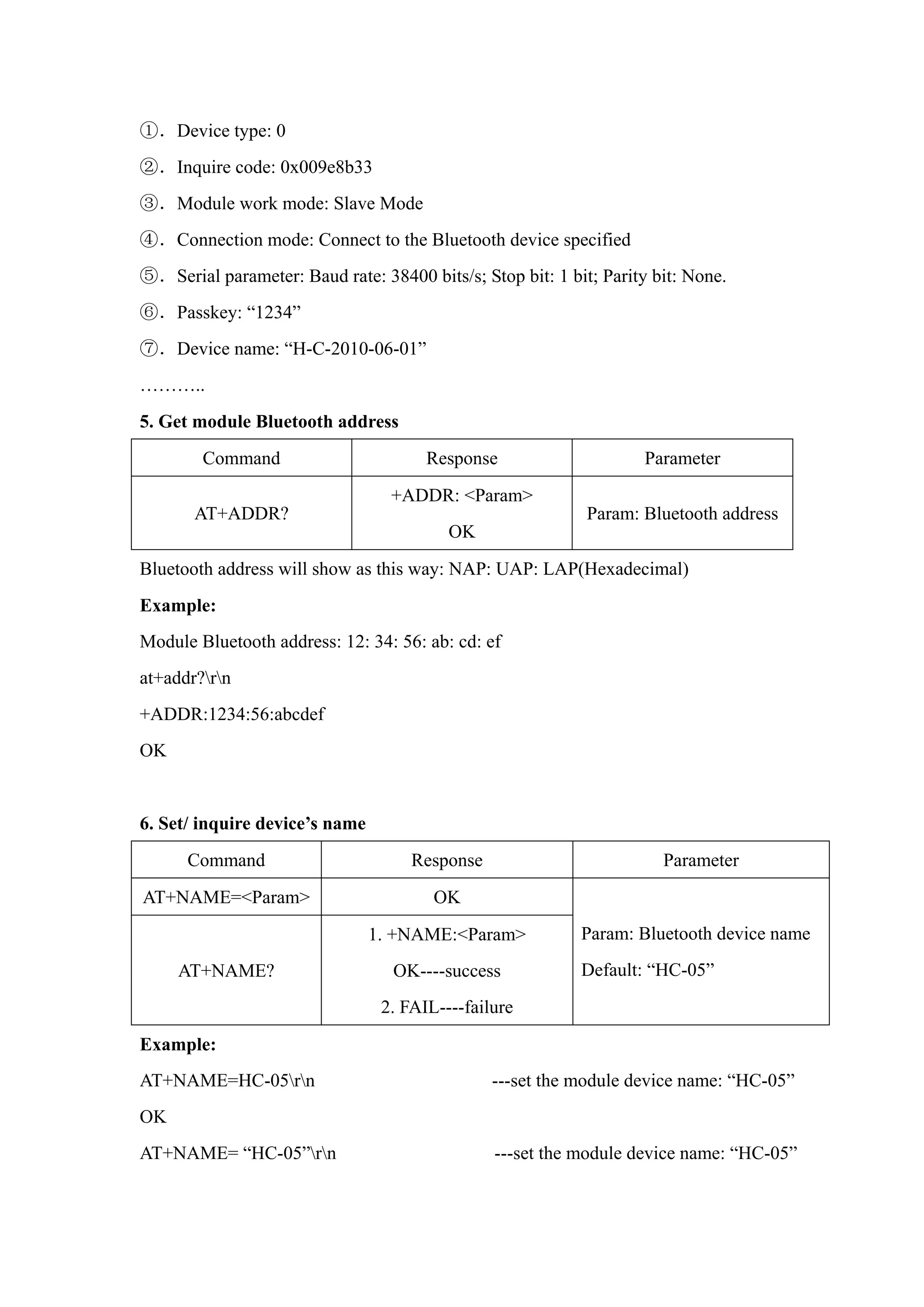
6. Set/ inquire device’s name
Command Response Parameter
AT+NAME=<Param> OK
AT+NAME?
1. +NAME:<Param>
OK----success
2. FAIL----failure
Param: Bluetooth device name
Default: “HC-05”
Example:
AT+NAME=HC-05rn ---set the module device name: “HC-05”
OK
AT+NAME= “HC-05”rn ---set the module device name: “HC-05”
OK
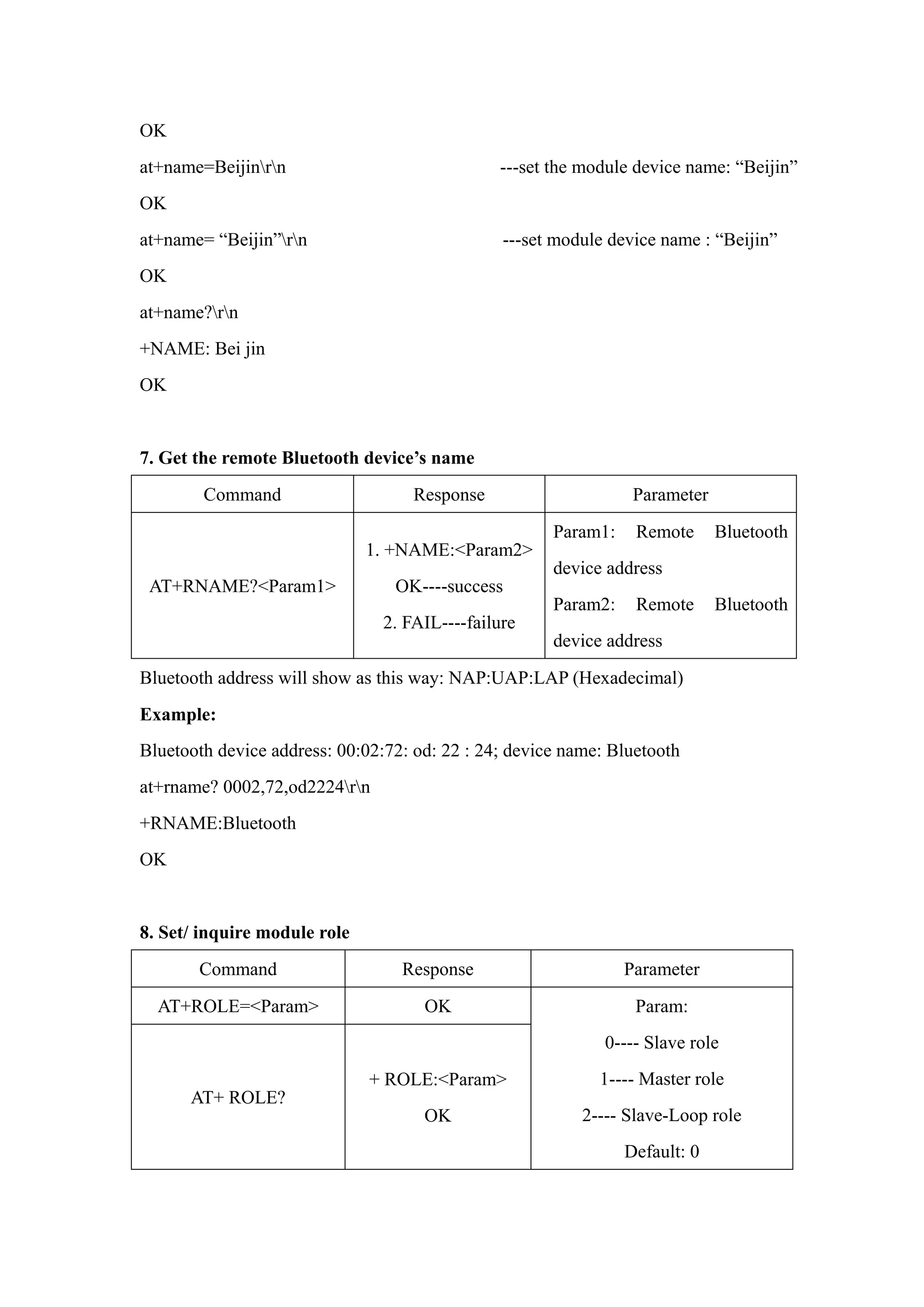
at+name=Beijinrn ---set the module device name: “Beijin”
OK
at+name= “Beijin”rn ---set module device name : “Beijin”
OK
at+name?rn
+NAME: Bei jin
OK
7. Get the remote Bluetooth device’s name
Command Response Parameter
AT+RNAME?<Param1>
1. +NAME:<Param2>
OK----success
2. FAIL----failure
Param1: Remote Bluetooth
device address
Param2: Remote Bluetooth
device address
Bluetooth address will show as this way: NAP:UAP:LAP (Hexadecimal)
Example:
Bluetooth device address: 00:02:72: od: 22 : 24; device name: Bluetooth
at+rname? 0002,72,od2224rn
+RNAME:Bluetooth
OK
8. Set/ inquire module role
Command Response Parameter
AT+ROLE=<Param> OK
AT+ ROLE?
+ ROLE:<Param>
OK
Param:
0---- Slave role
1---- Master role
2---- Slave-Loop role
Default: 0
Role introduction:
Slave (slave role)----Passive connection;
Slave-Loop----Passive connection, receive the remote Bluetooth master device data and
send it back to the master device;
Master (master role)----Inquire the near SPP Bluetooth slave device, build connection
with it positively, and build up the transparent data transmission between master and
slave device.
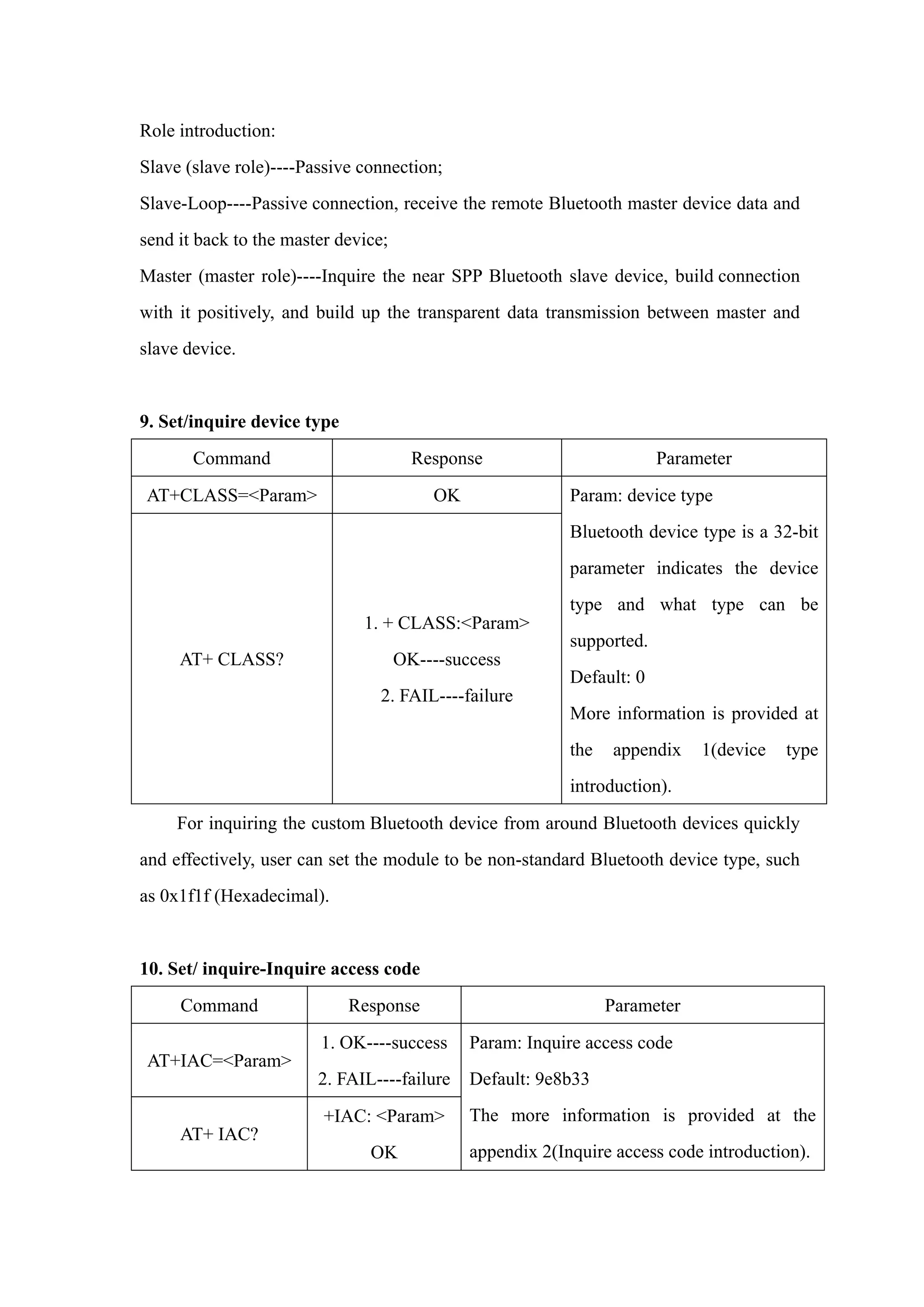
9. Set/inquire device type
Command Response Parameter
AT+CLASS=<Param> OK
AT+ CLASS?
1. + CLASS:<Param>
OK----success
2. FAIL----failure
Param: device type
Bluetooth device type is a 32-bit
parameter indicates the device
type and what type can be
supported.
Default: 0
More information is provided at
the appendix 1(device type
introduction).
For inquiring the custom Bluetooth device from around Bluetooth devices quickly
and effectively, user can set the module to be non-standard Bluetooth device type, such
as 0x1f1f (Hexadecimal).
10. Set/ inquire-Inquire access code
Command Response Parameter
AT+IAC=<Param>
1. OK----success
2. FAIL----failure
AT+ IAC?
+IAC: <Param>
OK
Param: Inquire access code
Default: 9e8b33
The more information is provided at the
appendix 2(Inquire access code introduction).
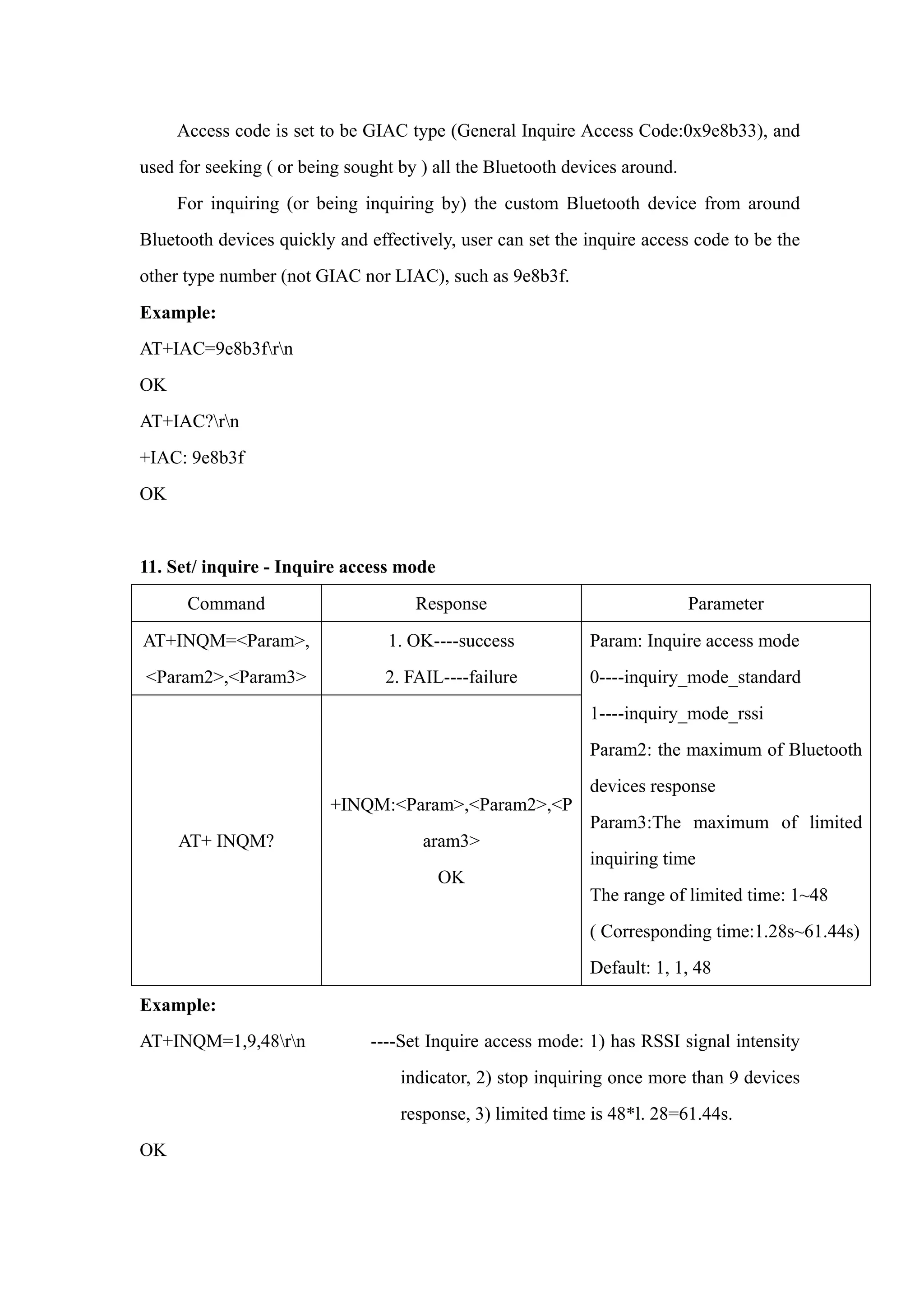
Access code is set to be GIAC type (General Inquire Access Code:0x9e8b33), and
used for seeking ( or being sought by ) all the Bluetooth devices around.
For inquiring (or being inquiring by) the custom Bluetooth device from around
Bluetooth devices quickly and effectively, user can set the inquire access code to be the
other type number (not GIAC nor LIAC), such as 9e8b3f.
Example:
AT+IAC=9e8b3frn
OK
AT+IAC?rn
+IAC: 9e8b3f
OK
11. Set/ inquire - Inquire access mode
Command Response Parameter
AT+INQM=<Param>,
<Param2>,<Param3>
1. OK----success
2. FAIL----failure
AT+ INQM?
+INQM:<Param>,<Param2>,<P
aram3>
OK
Param: Inquire access mode
0----inquiry_mode_standard
1----inquiry_mode_rssi
Param2: the maximum of Bluetooth
devices response
Param3:The maximum of limited
inquiring time
The range of limited time: 1~48
( Corresponding time:1.28s~61.44s)
Default: 1, 1, 48
Example:
AT+INQM=1,9,48rn ----Set Inquire access mode: 1) has RSSI signal intensity
indicator, 2) stop inquiring once more than 9 devices
response, 3) limited time is 48*l. 28=61.44s.
OK
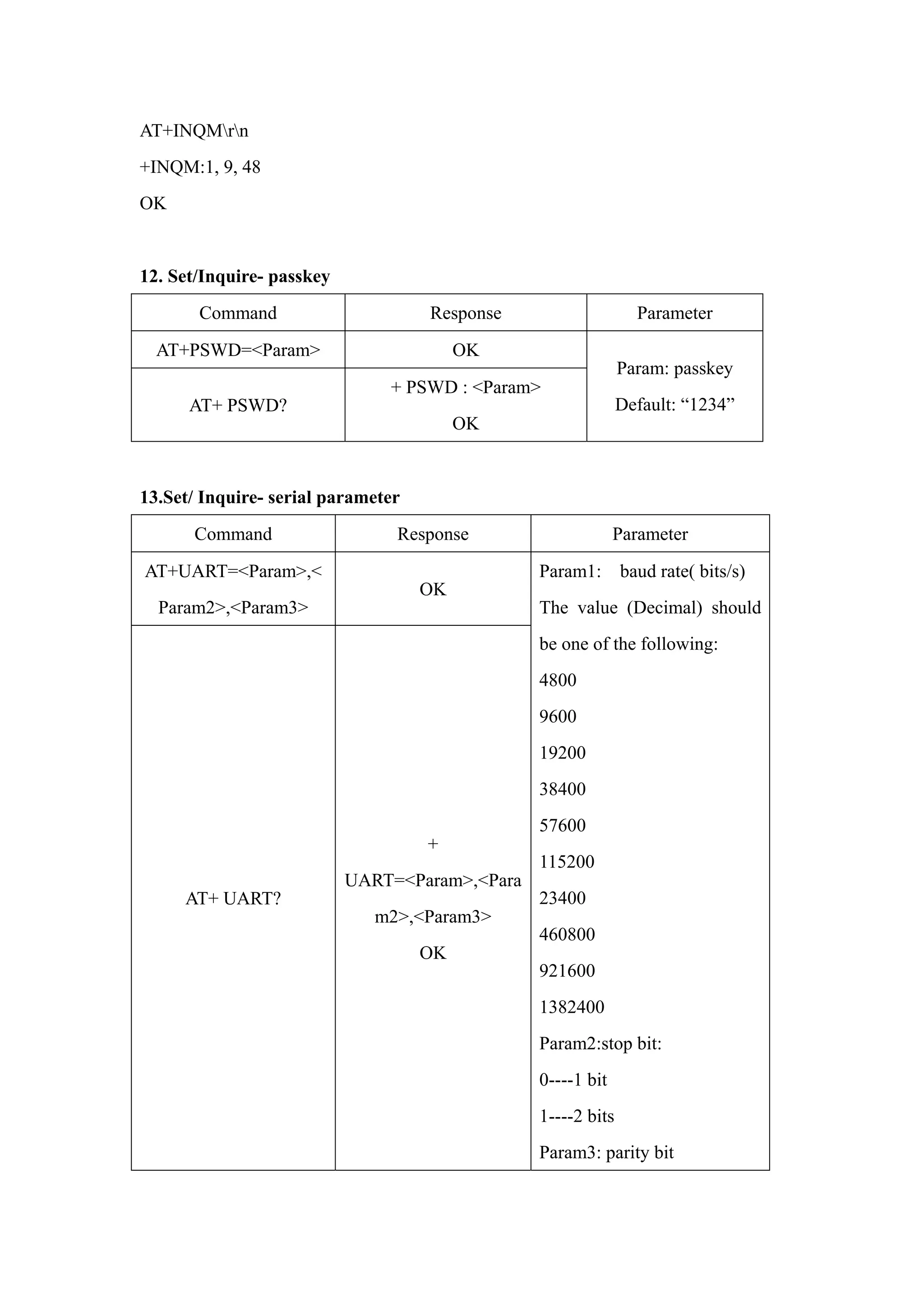
AT+INQMrn
+INQM:1, 9, 48
OK
12. Set/Inquire- passkey
Command Response Parameter
AT+PSWD=<Param> OK
AT+ PSWD?
+ PSWD : <Param>
OK
Param: passkey
Default: “1234”
13.Set/ Inquire- serial parameter
Command Response Parameter
AT+UART=<Param>,<
Param2>,<Param3>
OK
AT+ UART?
+
UART=<Param>,<Para
m2>,<Param3>
OK
Param1: baud rate( bits/s)
The value (Decimal) should
be one of the following:
4800
9600
19200
38400
57600
115200
23400
460800
921600
1382400
Param2:stop bit:
0----1 bit
1----2 bits
Param3: parity bit
0----None
1----Odd parity
2----Even parity
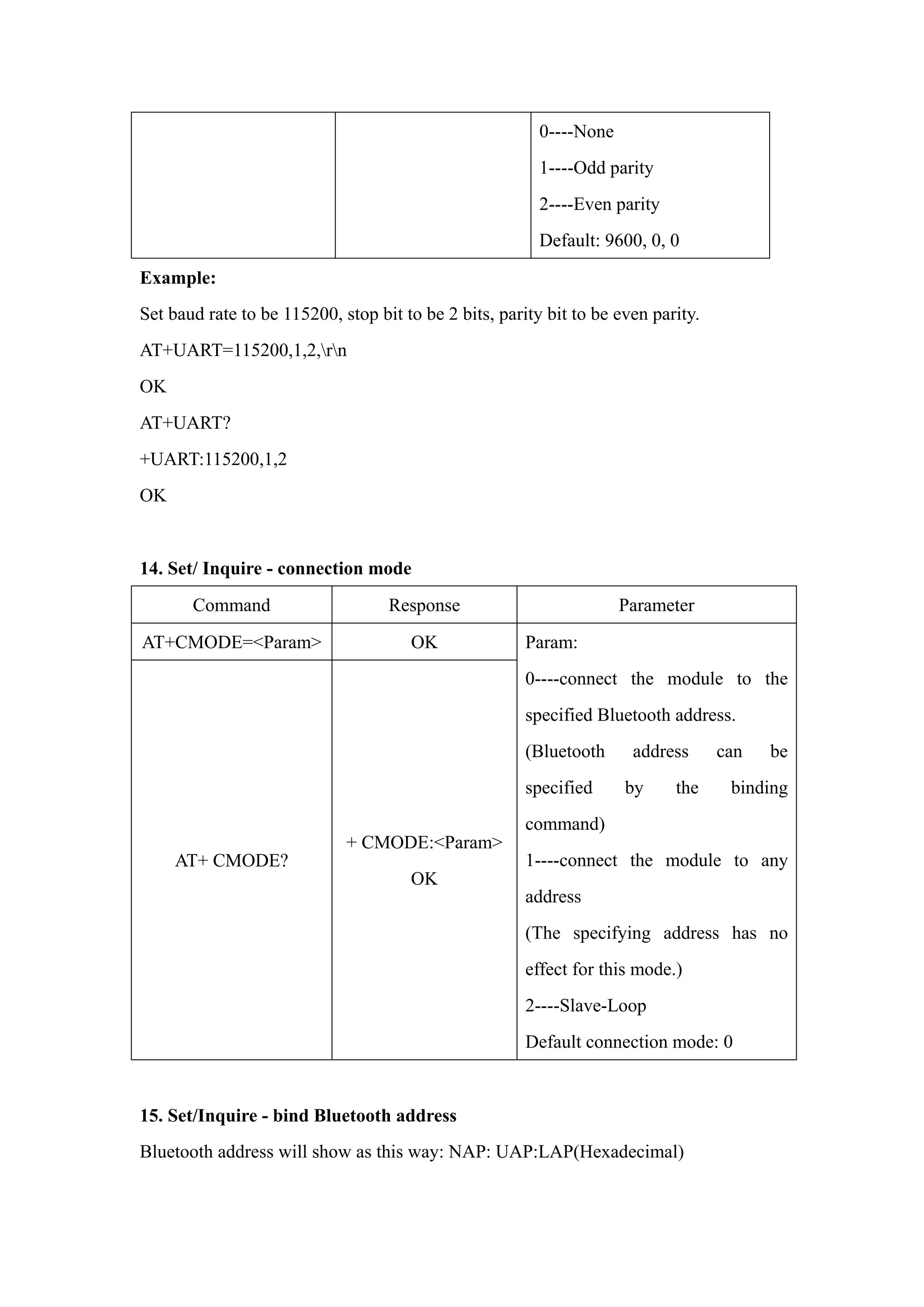
Default: 9600, 0, 0
Example:
Set baud rate to be 115200, stop bit to be 2 bits, parity bit to be even parity.
AT+UART=115200,1,2,rn
OK
AT+UART?
+UART:115200,1,2
OK
14. Set/ Inquire - connection mode
Command Response Parameter
AT+CMODE=<Param> OK
AT+ CMODE?
+ CMODE:<Param>
OK
Param:
0----connect the module to the
specified Bluetooth address.
(Bluetooth address can be
specified by the binding
command)
1----connect the module to any
address
(The specifying address has no
effect for this mode.)
2----Slave-Loop
Default connection mode: 0
15. Set/Inquire - bind Bluetooth address
Bluetooth address will show as this way: NAP: UAP:LAP(Hexadecimal)
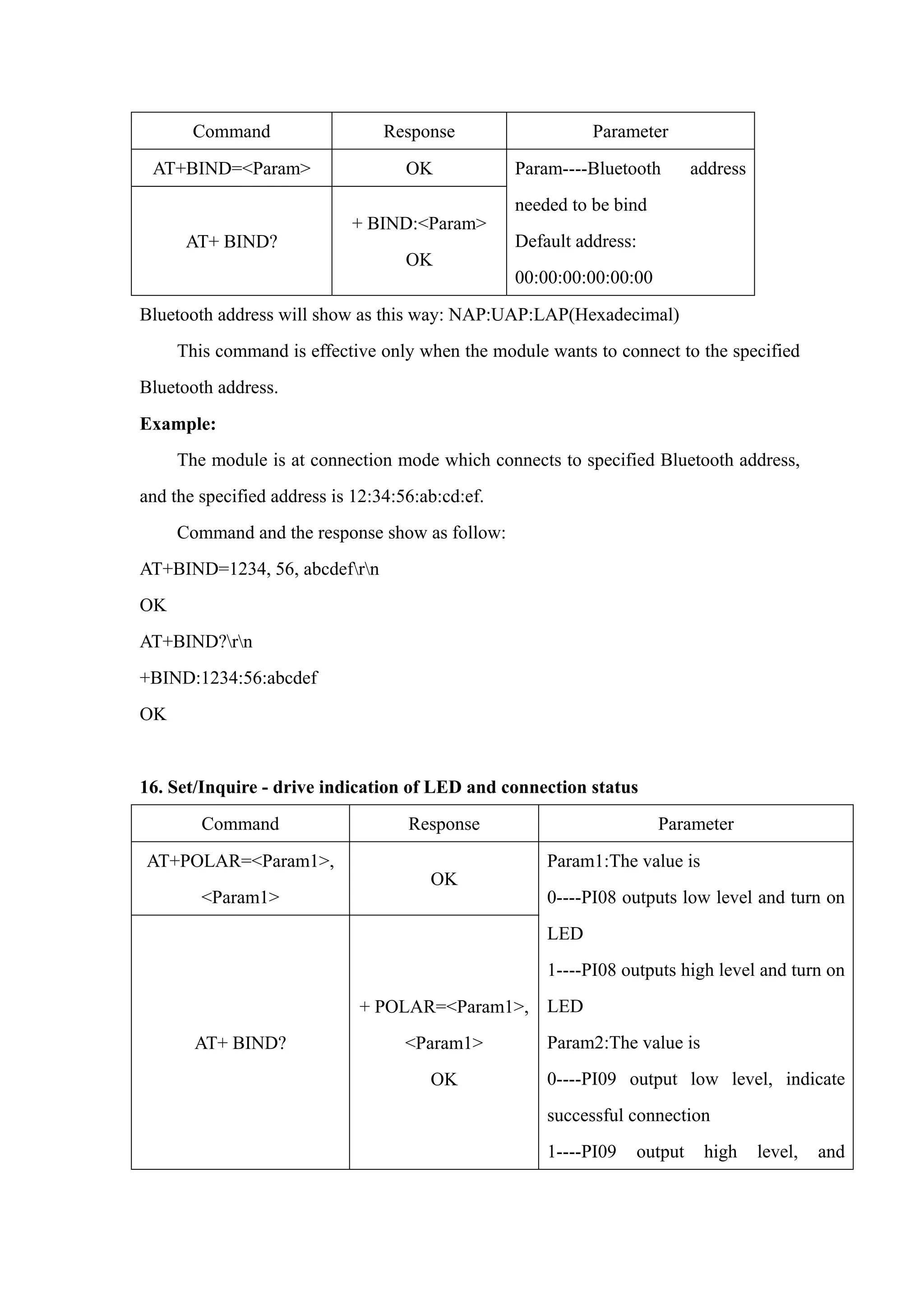
Command Response Parameter
AT+BIND=<Param> OK
AT+ BIND?
+ BIND:<Param>
OK
Param----Bluetooth address
needed to be bind
Default address:
00:00:00:00:00:00
Bluetooth address will show as this way: NAP:UAP:LAP(Hexadecimal)
This command is effective only when the module wants to connect to the specified
Bluetooth address.
Example:
The module is at connection mode which connects to specified Bluetooth address,
and the specified address is 12:34:56:ab:cd:ef.
Command and the response show as follow:
AT+BIND=1234, 56, abcdefrn
OK
AT+BIND?rn
+BIND:1234:56:abcdef
OK
16. Set/Inquire - drive indication of LED and connection status
Command Response Parameter
AT+POLAR=<Param1>,
<Param1>
OK
AT+ BIND?
+ POLAR=<Param1>,
<Param1>
OK
Param1:The value is
0----PI08 outputs low level and turn on
LED
1----PI08 outputs high level and turn on
LED
Param2:The value is
0----PI09 output low level, indicate
successful connection
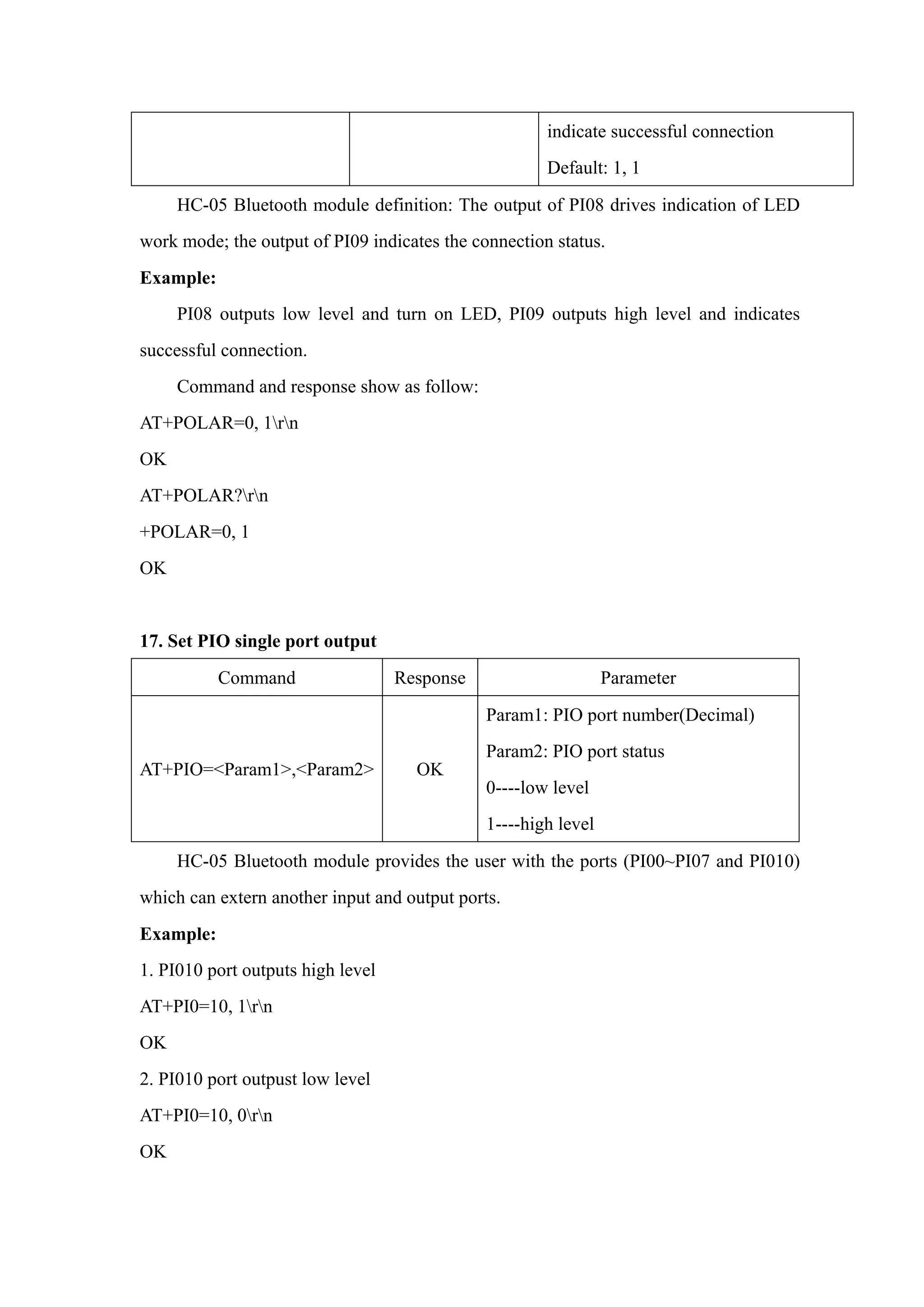
1----PI09 output high level, and
indicate successful connection
Default: 1, 1
HC-05 Bluetooth module definition: The output of PI08 drives indication of LED
work mode; the output of PI09 indicates the connection status.
Example:
PI08 outputs low level and turn on LED, PI09 outputs high level and indicates
successful connection.
Command and response show as follow:
AT+POLAR=0, 1rn
OK
AT+POLAR?rn
+POLAR=0, 1
OK
17. Set PIO single port output
Command Response Parameter
AT+PIO=<Param1>,<Param2> OK
Param1: PIO port number(Decimal)
Param2: PIO port status
0----low level
1----high level
HC-05 Bluetooth module provides the user with the ports (PI00~PI07 and PI010)
which can extern another input and output ports.
Example:
1. PI010 port outputs high level
AT+PI0=10, 1rn
OK
2. PI010 port outpust low level
AT+PI0=10, 0rn
OK
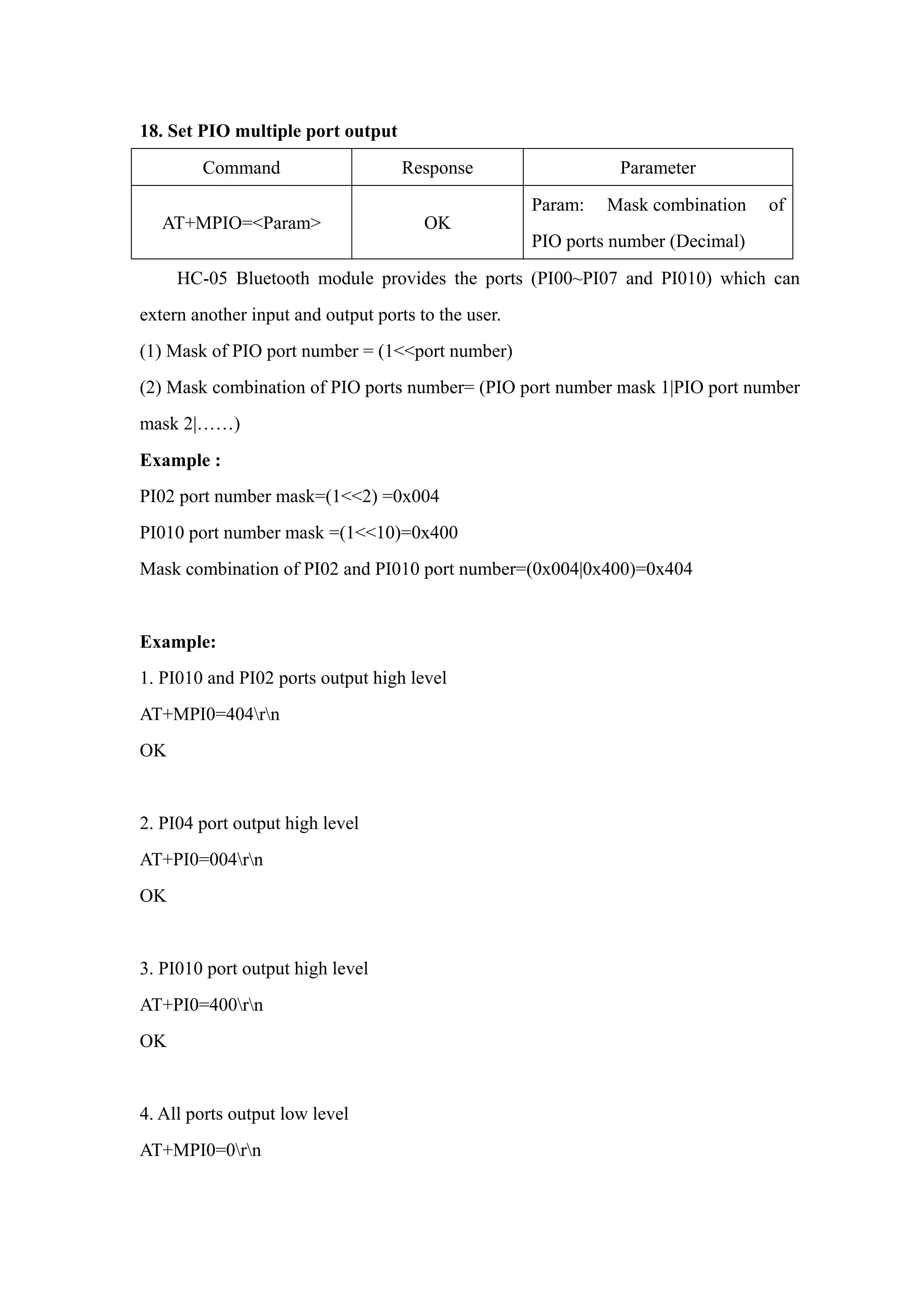
18. Set PIO multiple port output
Command Response Parameter
AT+MPIO=<Param> OK
Param: Mask combination of
PIO ports number (Decimal)
HC-05 Bluetooth module provides the ports (PI00~PI07 and PI010) which can
extern another input and output ports to the user.
(1) Mask of PIO port number = (1<<port number)
(2) Mask combination of PIO ports number= (PIO port number mask 1|PIO port number
mask 2|……)
Example :
PI02 port number mask=(1<<2) =0x004
PI010 port number mask =(1<<10)=0x400
Mask combination of PI02 and PI010 port number=(0x004|0x400)=0x404
Example:
1. PI010 and PI02 ports output high level
AT+MPI0=404rn
OK
2. PI04 port output high level
AT+PI0=004rn
OK
3. PI010 port output high level
AT+PI0=400rn
OK
4. All ports output low level
AT+MPI0=0rn
OK
19. Inquire PIO port input
Command Response Parameter
AT+MPIO?
+MPIO: <Param>
OK
Param----PIO port value (16bits)
Param[0]=PI00
Param[1]=PI01
Param[2]=PI02
……
Param[10]=PI010
Param[11]=PI011
HC-05 Bluetooth module provides the user with the ports (PI00~PI07 and PI010)
which can extern another input and output ports.
20. Set/ Inquire page scan and inquire scan parameter
Command Response Parameter
AT+IPSCAN=<Param1>,
<Param2>,
<Param3>,<Param4>AT+I
PSCAN?
OK
+IPSCAN:
<Param1>,<Param2>,
<Param3>,<Param4>
OK
Param1:time interval of
inquiring
Param2: duration in inquiring
Param3: time interval of paging
Param4: duration in paging
The above parameters are
decimal.
Default:1024,512,1024,512
Example:
at+ipscan=1234,500,1200,250rn
OK
at+ipscan?
+IPSCAN:1234,500,1200,250
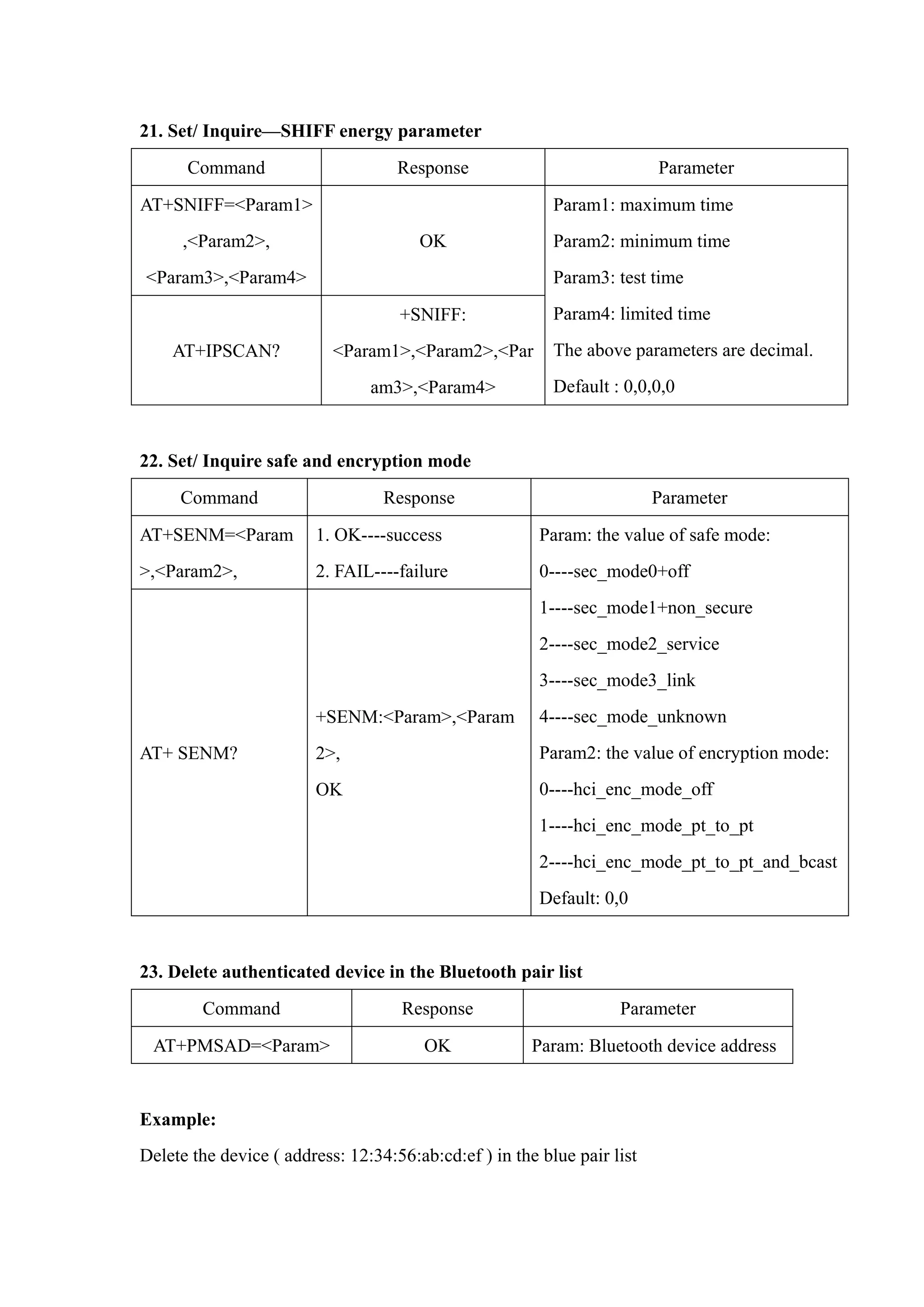
21. Set/ Inquire—SHIFF energy parameter
Command Response Parameter
AT+SNIFF=<Param1>
,<Param2>,
<Param3>,<Param4>
OK
AT+IPSCAN?
+SNIFF:
<Param1>,<Param2>,<Par
am3>,<Param4>
Param1: maximum time
Param2: minimum time
Param3: test time
Param4: limited time
The above parameters are decimal.
Default : 0,0,0,0
22. Set/ Inquire safe and encryption mode
Command Response Parameter
AT+SENM=<Param
>,<Param2>,
1. OK----success
2. FAIL----failure
AT+ SENM?
+SENM:<Param>,<Param
2>,
OK
Param: the value of safe mode:
0----sec_mode0+off
1----sec_mode1+non_secure
2----sec_mode2_service
3----sec_mode3_link
4----sec_mode_unknown
Param2: the value of encryption mode:
0----hci_enc_mode_off
1----hci_enc_mode_pt_to_pt
2----hci_enc_mode_pt_to_pt_and_bcast
Default: 0,0
23. Delete authenticated device in the Bluetooth pair list
Command Response Parameter
AT+PMSAD=<Param> OK Param: Bluetooth device address
Example:
Delete the device ( address: 12:34:56:ab:cd:ef ) in the blue pair list
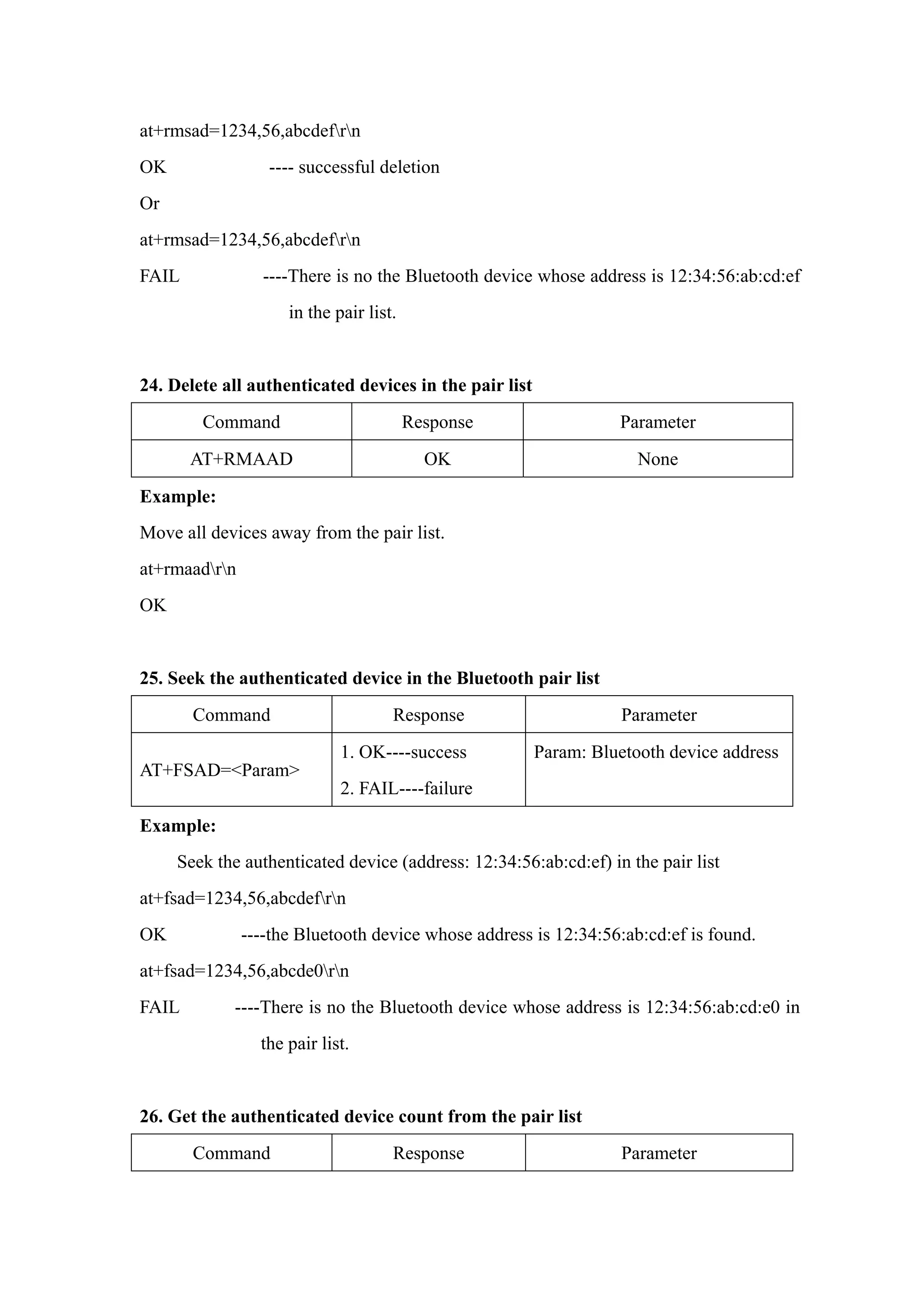
at+rmsad=1234,56,abcdefrn
OK ---- successful deletion
Or
at+rmsad=1234,56,abcdefrn
FAIL ----There is no the Bluetooth device whose address is 12:34:56:ab:cd:ef
in the pair list.
24. Delete all authenticated devices in the pair list
Command Response Parameter
AT+RMAAD OK None
Example:
Move all devices away from the pair list.
at+rmaadrn
OK
25. Seek the authenticated device in the Bluetooth pair list
Command Response Parameter
AT+FSAD=<Param>
1. OK----success
2. FAIL----failure
Param: Bluetooth device address
Example:
Seek the authenticated device (address: 12:34:56:ab:cd:ef) in the pair list
at+fsad=1234,56,abcdefrn
OK ----the Bluetooth device whose address is 12:34:56:ab:cd:ef is found.
at+fsad=1234,56,abcde0rn
FAIL ----There is no the Bluetooth device whose address is 12:34:56:ab:cd:e0 in
the pair list.
26. Get the authenticated device count from the pair list
Command Response Parameter
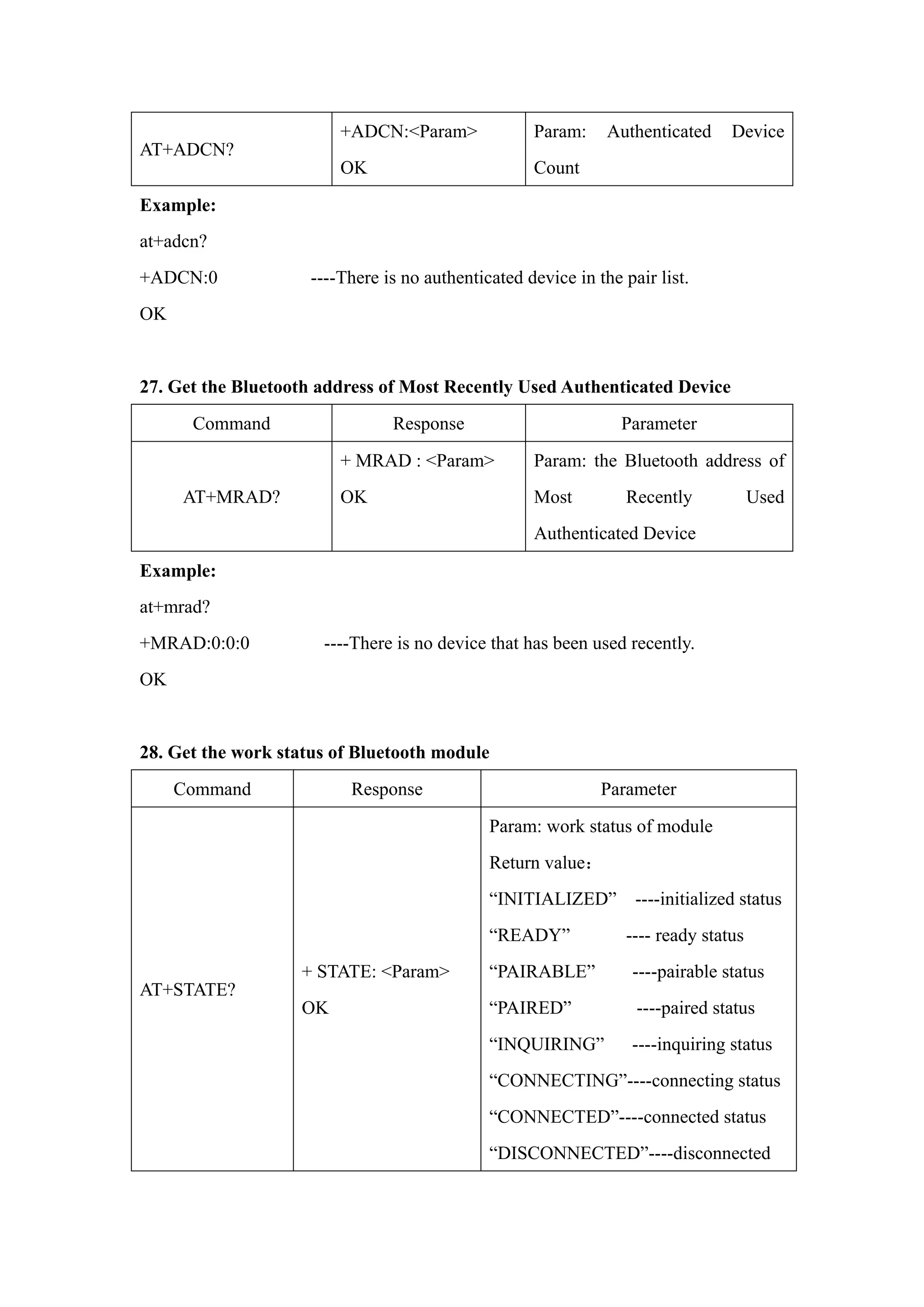
AT+ADCN?
+ADCN:<Param>
OK
Param: Authenticated Device
Count
Example:
at+adcn?
+ADCN:0 ----There is no authenticated device in the pair list.
OK
27. Get the Bluetooth address of Most Recently Used Authenticated Device
Command Response Parameter
AT+MRAD?
+ MRAD : <Param>
OK
Param: the Bluetooth address of
Most Recently Used
Authenticated Device
Example:
at+mrad?
+MRAD:0:0:0 ----There is no device that has been used recently.
OK
28. Get the work status of Bluetooth module
Command Response Parameter
AT+STATE?
+ STATE: <Param>
OK
Param: work status of module
Return value:
“INITIALIZED” ----initialized status
“READY” ---- ready status
“PAIRABLE” ----pairable status
“PAIRED” ----paired status
“INQUIRING” ----inquiring status
“CONNECTING”----connecting status
“CONNECTED”----connected status
“DISCONNECTED”----disconnected
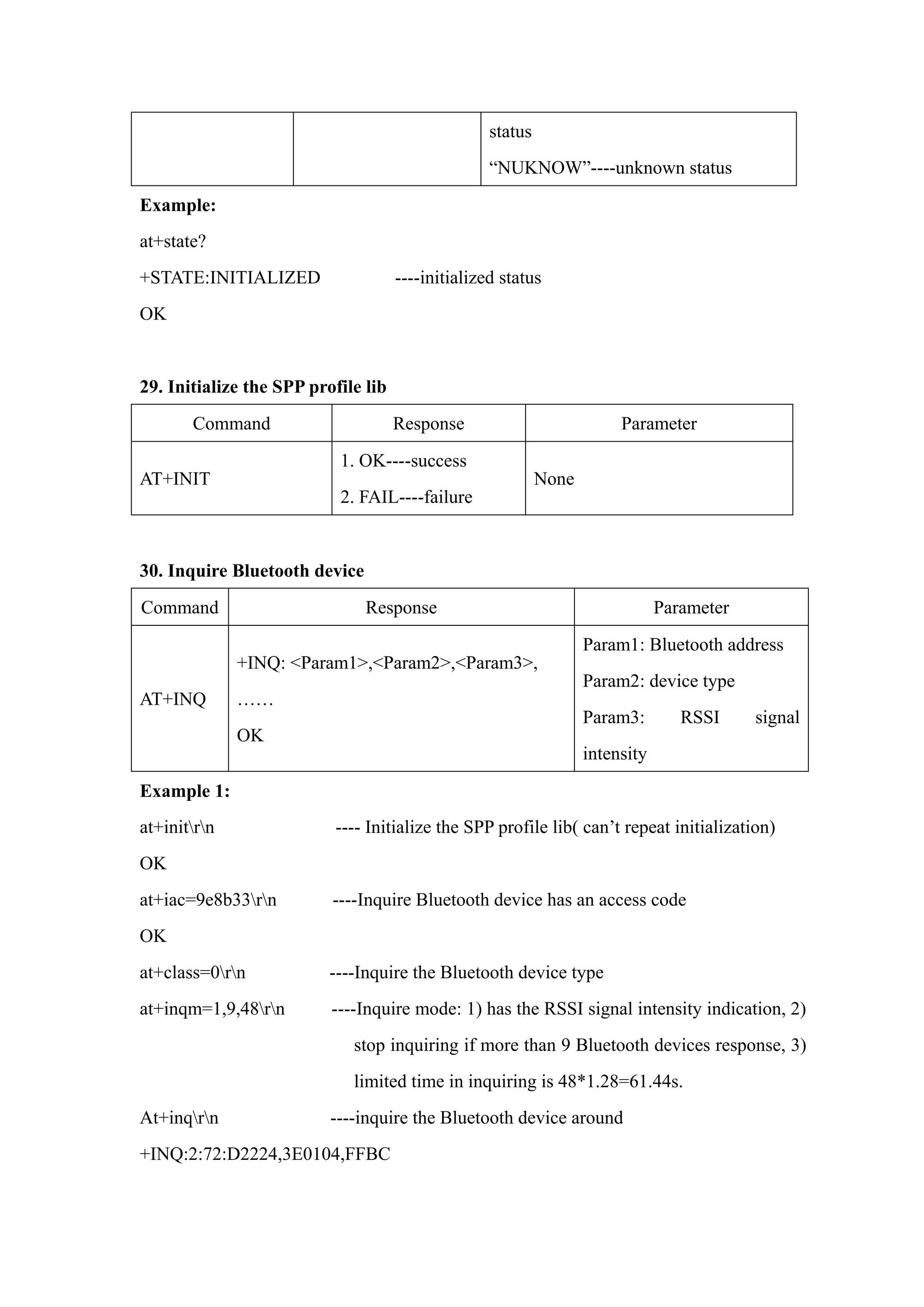
status
“NUKNOW”----unknown status
Example:
at+state?
+STATE:INITIALIZED ----initialized status
OK
29. Initialize the SPP profile lib
Command Response Parameter
AT+INIT
1. OK----success
2. FAIL----failure
None
30. Inquire Bluetooth device
Command Response Parameter
AT+INQ
+INQ: <Param1>,<Param2>,<Param3>,
……
OK
Param1: Bluetooth address
Param2: device type
Param3: RSSI signal
intensity
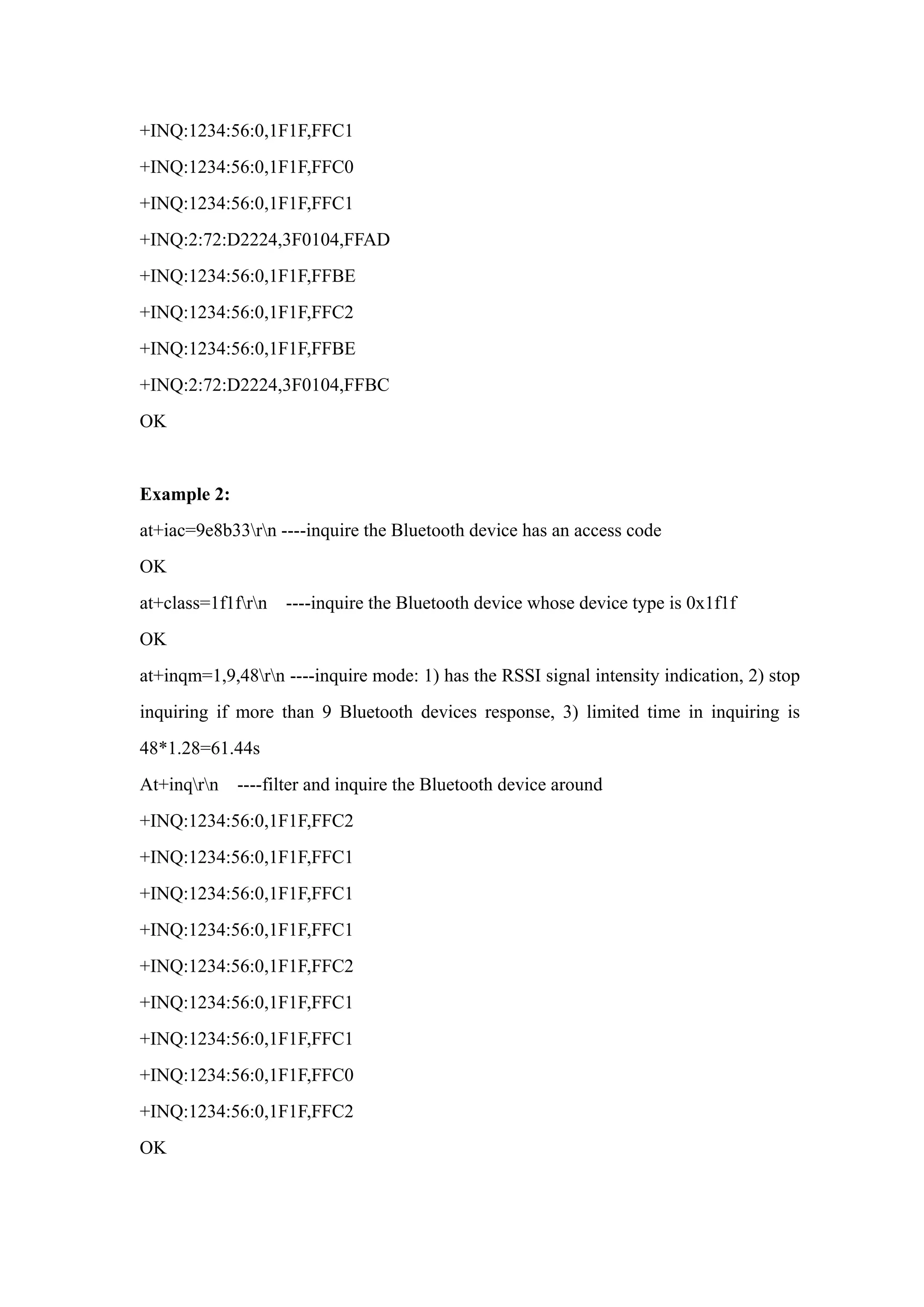
Example 1:
at+initrn ---- Initialize the SPP profile lib( can’t repeat initialization)
OK
at+iac=9e8b33rn ----Inquire Bluetooth device has an access code
OK
at+class=0rn ----Inquire the Bluetooth device type
at+inqm=1,9,48rn ----Inquire mode: 1) has the RSSI signal intensity indication, 2)
stop inquiring if more than 9 Bluetooth devices response, 3)
limited time in inquiring is 48*1.28=61.44s.
At+inqrn ----inquire the Bluetooth device around
+INQ:2:72:D2224,3E0104,FFBC
+INQ:1234:56:0,1F1F,FFC1
+INQ:1234:56:0,1F1F,FFC0
+INQ:1234:56:0,1F1F,FFC1
+INQ:2:72:D2224,3F0104,FFAD
+INQ:1234:56:0,1F1F,FFBE
+INQ:1234:56:0,1F1F,FFC2
+INQ:1234:56:0,1F1F,FFBE
+INQ:2:72:D2224,3F0104,FFBC
OK
Example 2:
at+iac=9e8b33rn ----inquire the Bluetooth device has an access code
OK
at+class=1f1frn ----inquire the Bluetooth device whose device type is 0x1f1f
OK
at+inqm=1,9,48rn ----inquire mode: 1) has the RSSI signal intensity indication, 2) stop
inquiring if more than 9 Bluetooth devices response, 3) limited time in inquiring is
48*1.28=61.44s
At+inqrn ----filter and inquire the Bluetooth device around
+INQ:1234:56:0,1F1F,FFC2
+INQ:1234:56:0,1F1F,FFC1
+INQ:1234:56:0,1F1F,FFC2
+INQ:1234:56:0,1F1F,FFC1
+INQ:1234:56:0,1F1F,FFC0
+INQ:1234:56:0,1F1F,FFC2
OK
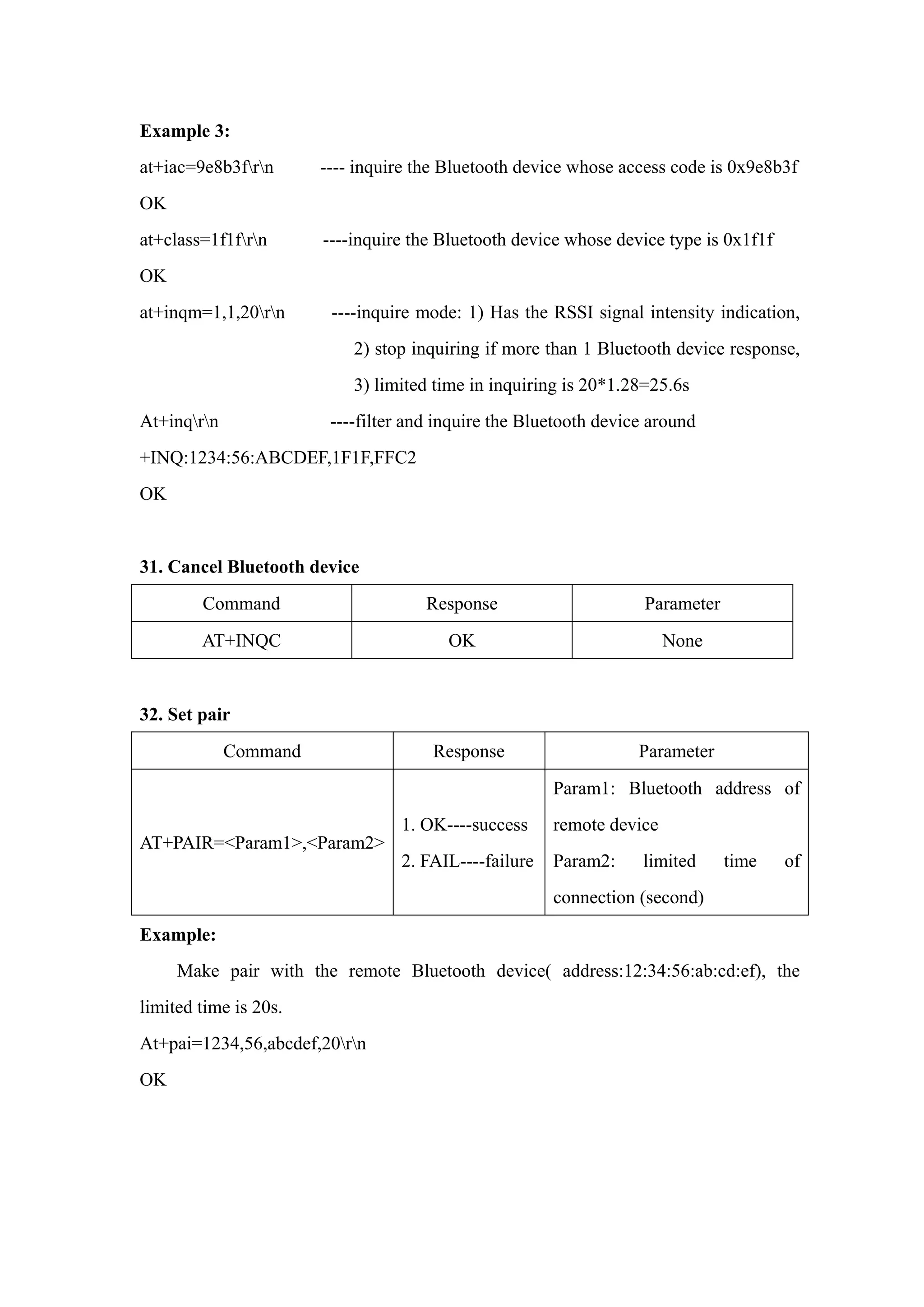
Example 3:
at+iac=9e8b3frn ---- inquire the Bluetooth device whose access code is 0x9e8b3f
OK
at+class=1f1frn ----inquire the Bluetooth device whose device type is 0x1f1f
OK
at+inqm=1,1,20rn ----inquire mode: 1) Has the RSSI signal intensity indication,
2) stop inquiring if more than 1 Bluetooth device response,
3) limited time in inquiring is 20*1.28=25.6s
At+inqrn ----filter and inquire the Bluetooth device around
+INQ:1234:56:ABCDEF,1F1F,FFC2
OK
31. Cancel Bluetooth device
Command Response Parameter
AT+INQC OK None
32. Set pair
Command Response Parameter
AT+PAIR=<Param1>,<Param2>
1. OK----success
2. FAIL----failure
Param1: Bluetooth address of
remote device
Param2: limited time of
connection (second)
Example:
Make pair with the remote Bluetooth device( address:12:34:56:ab:cd:ef), the
limited time is 20s.
At+pai=1234,56,abcdef,20rn
OK
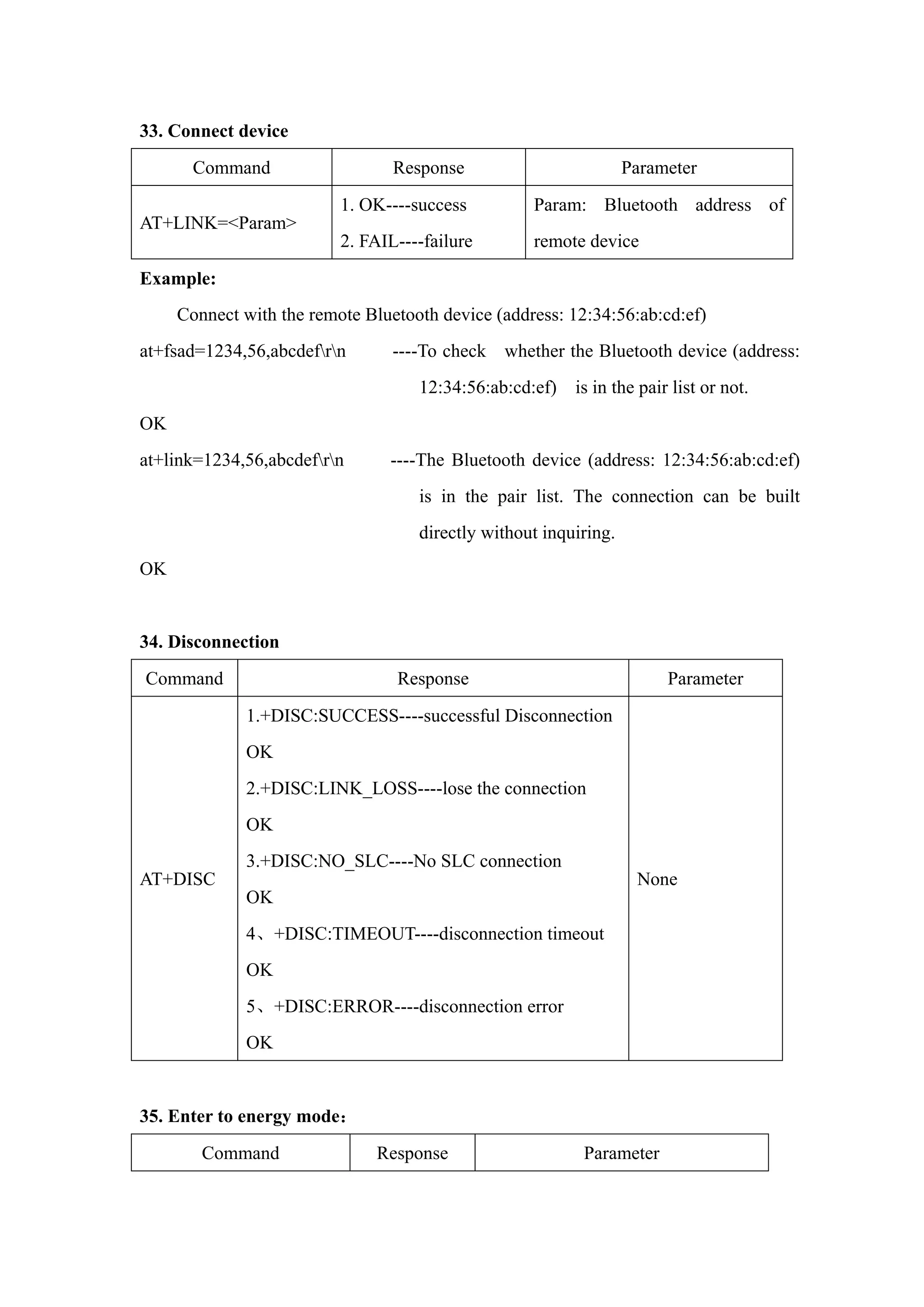
33. Connect device
Command Response Parameter
AT+LINK=<Param>
1. OK----success
2. FAIL----failure
Param: Bluetooth address of
remote device
Example:
Connect with the remote Bluetooth device (address: 12:34:56:ab:cd:ef)
at+fsad=1234,56,abcdefrn ----To check whether the Bluetooth device (address:
12:34:56:ab:cd:ef) is in the pair list or not.
OK
at+link=1234,56,abcdefrn ----The Bluetooth device (address: 12:34:56:ab:cd:ef)
is in the pair list. The connection can be built
directly without inquiring.
OK
34. Disconnection
Command Response Parameter
AT+DISC
1.+DISC:SUCCESS----successful Disconnection
OK
2.+DISC:LINK_LOSS----lose the connection
OK
3.+DISC:NO_SLC----No SLC connection
OK
4、+DISC:TIMEOUT----disconnection timeout
OK
5、+DISC:ERROR----disconnection error
OK
None
35. Enter to energy mode:
Command Response Parameter
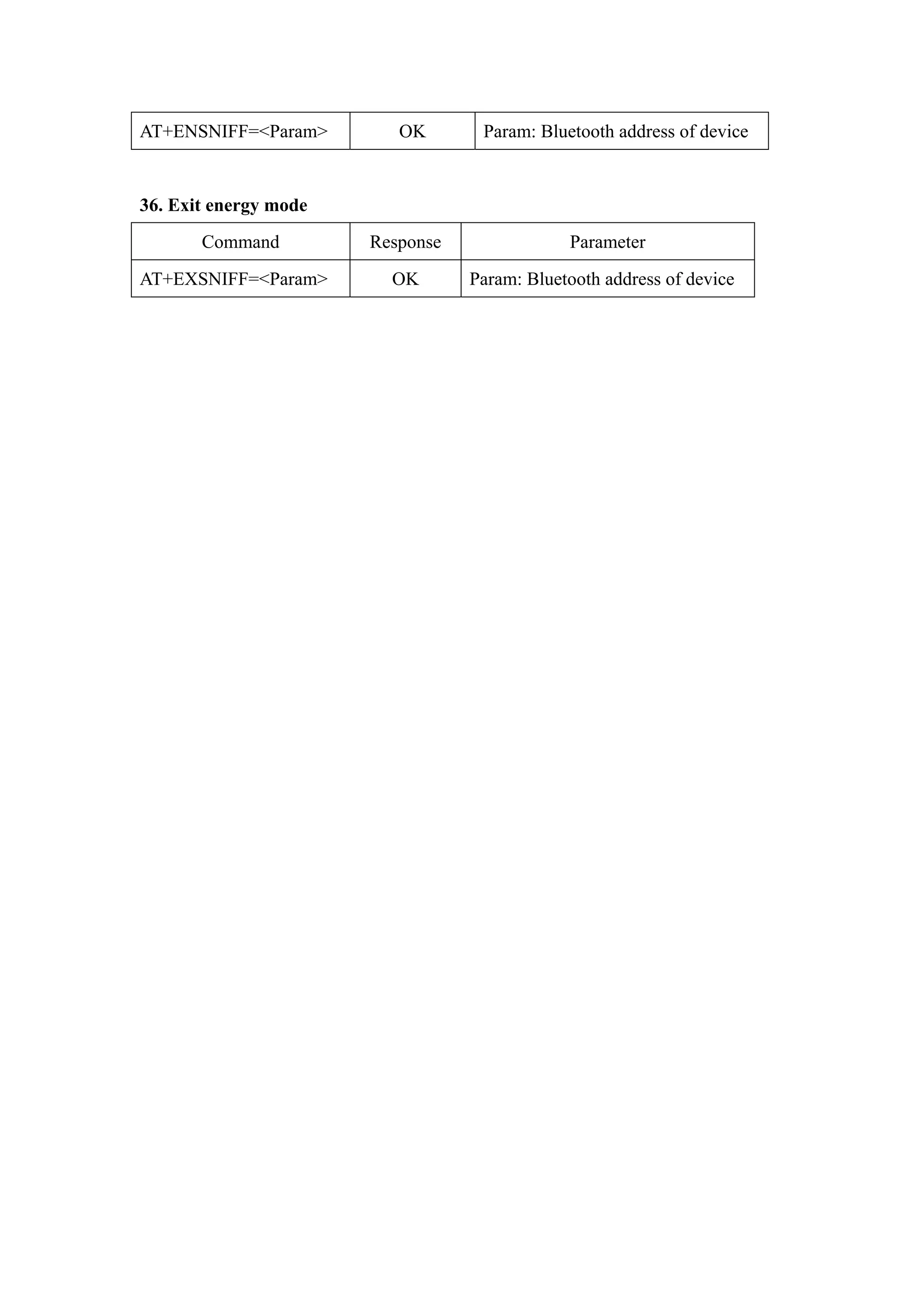
AT+ENSNIFF=<Param> OK Param: Bluetooth address of device
36. Exit energy mode
Command Response Parameter
AT+EXSNIFF=<Param> OK Param: Bluetooth address of device
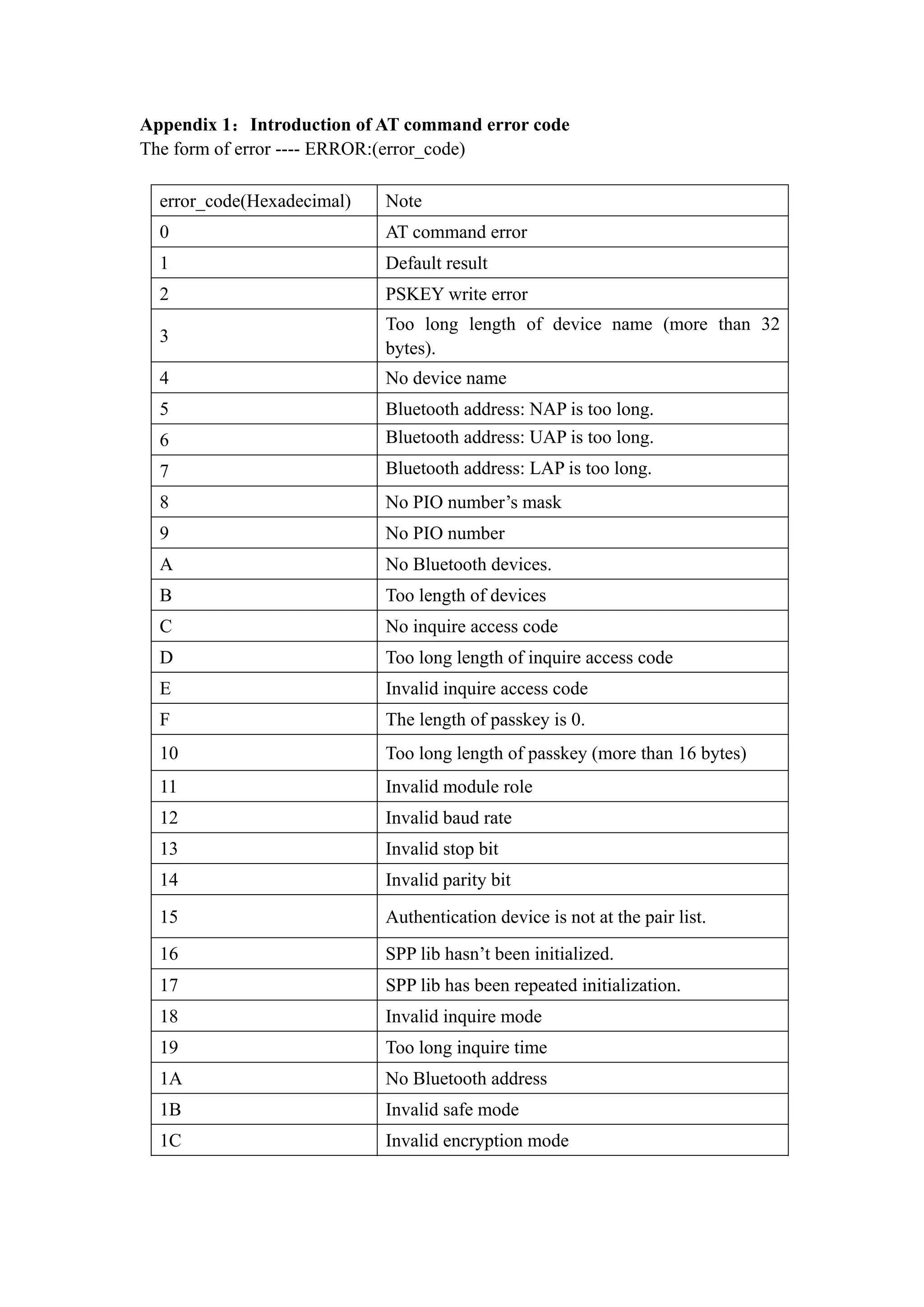
Appendix 1:Introduction of AT command error code
The form of error ---- ERROR:(error_code)
error_code(Hexadecimal) Note
0 AT command error
1 Default result
2 PSKEY write error
3
Too long length of device name (more than 32
bytes).
4 No device name
5 Bluetooth address: NAP is too long.
6 Bluetooth address: UAP is too long.
7 Bluetooth address: LAP is too long.
8 No PIO number’s mask
9 No PIO number
A No Bluetooth devices.
B Too length of devices
C No inquire access code
D Too long length of inquire access code
E Invalid inquire access code
F The length of passkey is 0.
10 Too long length of passkey (more than 16 bytes)
11 Invalid module role
12 Invalid baud rate
13 Invalid stop bit
14 Invalid parity bit
15 Authentication device is not at the pair list.
16 SPP lib hasn’t been initialized.
17 SPP lib has been repeated initialization.
18 Invalid inquire mode
19 Too long inquire time
1A No Bluetooth address
1B Invalid safe mode
1C Invalid encryption mode
Appendix 2: The introduction of devices
The Class of Device/Service(CoD) is a 32 bits number that of 3 field specifies the
service supported by the device. Another field specifies the minor device class, which
describes the device type in more detail
The Class of Device /Service (CoD) field has a variable format. The format is
indicated using the ’within the CoD .The length of the Format Type field is variable and
ends with two bits different from’11’.The version field starts at the least significant bit
of the CoD and may extend upwards. In the ’format#1’ of the CoD (format Type field
=00), 11 bits are assigned as a bit –mask (multiple bits can be set) each bit
corresponding to a high level generic category of service class. Currently 7 categories
are defined. These are primarily of a’ public service’ nature. The remaining 11 bits are
used for indicating device type category and other device-specific characteristics. Any
reserved but otherwise unassigned bits, such as in the Major Service Class field, should
be to 0.
Figure 1.2: The Class of Device/Service field (format type). Please note the krder in
which the octets are sent on the air and stored in memory. Bit number 0 is sent first on
the air .
1. MAJOR SERVICE CLASSES
Bit no Major Service Class
13 Limited Discoverable Mode [Ref #1]
14 (reserved)
15 (reserved)
16 Positioning(Location identification)
17 Networking (LAN, Ad hoc, … )
18 Rendering (Printing ,Speaker,…)
19 Capturing (Scanner, Microphone,…)
20 0bject Transfer (v-Inbox, v-Folder,…)
21 Audio (Speaker, Microphone, Headset service,…)
22 Telephony (Cordless telephony, Modem, Headset service,…)
23 Information (WEB-server, WAP- server,…)
TABLE 1.2:MAJOR SERVICE CLASSES
[Ref #1 As defined in See Generic Access Profile, Bluetooth SIG]
2. MAJOR DEVICE CLASSES
The Major Class segment is the highest level of granularity for defining a
Bluetooth Device. The main function of a device is used for determining the major
Class grouping. There are 32 different possible major classes. The assignment of this
Major Class field is defined in Table1.3.
1 2 1 1 1 0 9 8 Major Device Class
0 0 0 0 0 Miscel laneous [Ref #2]
0 0 0 0 1 Computer (desktop, notebook, PDA, organizers,…)
0 0 0 1 0 Phone (cellular ,cordless ,payphone, modem,…)
0 0 0 1 1 LAN/Network Access point
0 0 1 0 0 Audio/Video (headset, speaker, stereo, video display, vcr …)
0 0 1 0 1 Periphereal (mouse, joystick, keyboards.…)
0 0 1 1 0 Imaging (printing, scanner, camera, display,…)
1 1 1 1 1 Uncategorized, specific device code not specified
X X X X All other values reserved
TABLE 1.3: MAJOE DEVICE CLASSES
[Ref #2:Used where a more specific Major Device Class is not suited (but only as
specified as in this document) .Devices that do not have a major class assigned can use
the all-1 code until’ classified’]
3. THE MINOR DEVICE CLASS FIELD
The’ Minor Device Class field’ (bits 7 to 2 in the CoD ), are to be interpreted only
in the context of the Major Device Class (but interpreted of the Service Class field).
Thus the meaning of the bits may change, depending on the value of the ’ Major Device
Class field’. When the Minor Device Class field indicates a device class ,then the
primary decvice class should be reported, e. g . a cellular phone that can work as a
cordless handset should
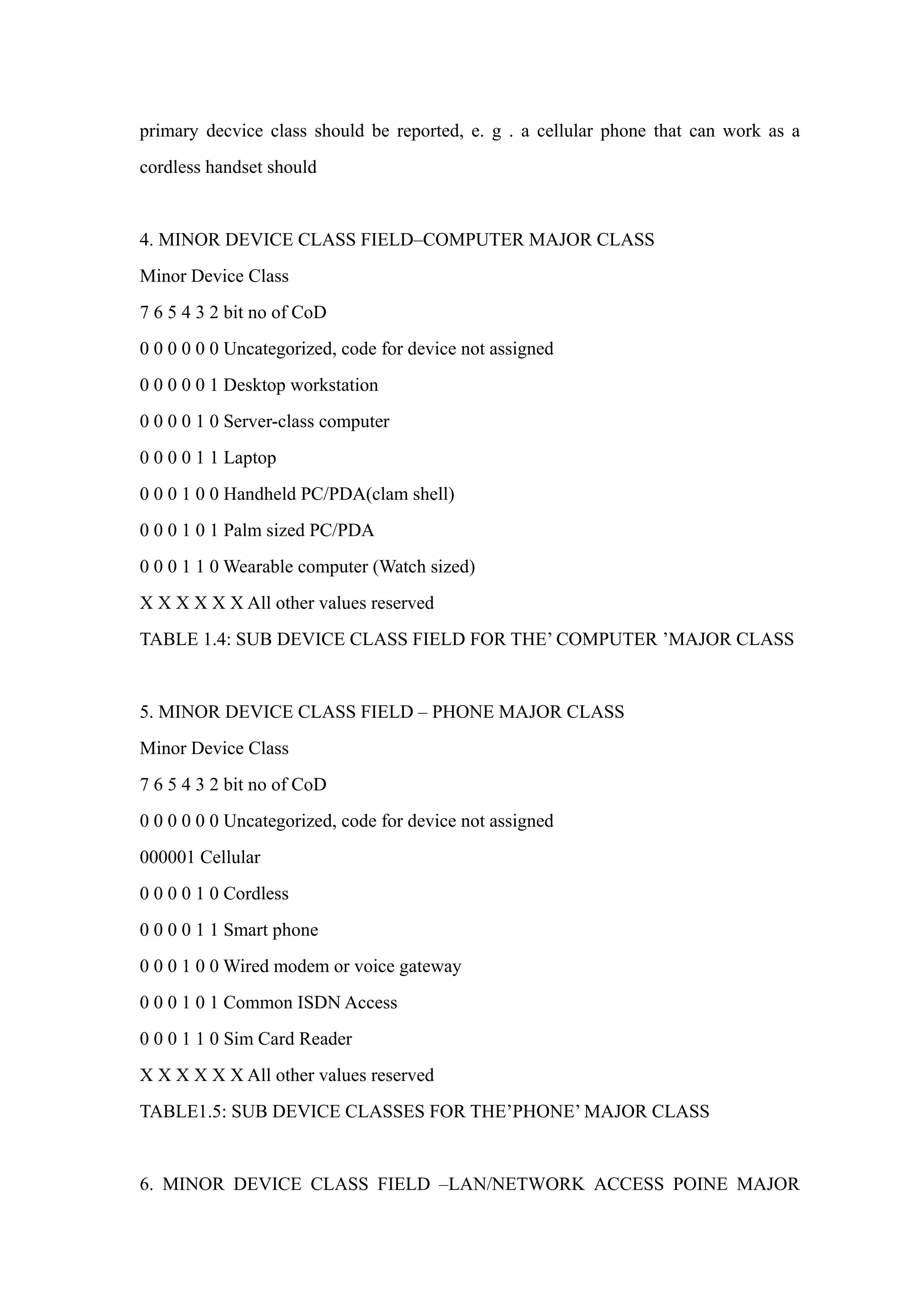
4. MINOR DEVICE CLASS FIELD–COMPUTER MAJOR CLASS
Minor Device Class
7 6 5 4 3 2 bit no of CoD
0 0 0 0 0 0 Uncategorized, code for device not assigned
0 0 0 0 0 1 Desktop workstation
0 0 0 0 1 0 Server-class computer
0 0 0 0 1 1 Laptop
0 0 0 1 0 0 Handheld PC/PDA(clam shell)
0 0 0 1 0 1 Palm sized PC/PDA
0 0 0 1 1 0 Wearable computer (Watch sized)
X X X X X X All other values reserved
TABLE 1.4: SUB DEVICE CLASS FIELD FOR THE’ COMPUTER ’MAJOR CLASS
5. MINOR DEVICE CLASS FIELD – PHONE MAJOR CLASS
Minor Device Class
7 6 5 4 3 2 bit no of CoD
0 0 0 0 0 0 Uncategorized, code for device not assigned
000001 Cellular
0 0 0 0 1 0 Cordless
0 0 0 0 1 1 Smart phone
0 0 0 1 0 0 Wired modem or voice gateway
0 0 0 1 0 1 Common ISDN Access
0 0 0 1 1 0 Sim Card Reader
X X X X X X All other values reserved
TABLE1.5: SUB DEVICE CLASSES FOR THE’PHONE’ MAJOR CLASS
6. MINOR DEVICE CLASS FIELD –LAN/NETWORK ACCESS POINE MAJOR
CLASS
Minor Device Class
7 6 5 bit no of CoD
0 0 0 Fully available
0 0 1 1 – 17% utilized
0 1 0 1 7 - 33% utilized
0 1 1 3 3 – 50% utilized
1 0 0 5 0 – 67% utilized
1 0 1 6 7 – 83% utilized
1 1 0 8 3 – 99% utilized
1 1 1 No service available [REF #3]
XXX All other values reserved
TABLE1.6: THE LAN/NETWORK ACCESS POINE LOAD FACTOR FIELD
[Ref #3:“Device is fully utilized and cannot accept additional connections at this time,
please retry later”]
The exact loading formula is not standardized. It is up to each LAN/Network
Access Point implementation to determine what internal conditions to report as a
utilization of communication requirement is that the box .As a recommendation, a client
that locates multiple LAN/Network Access Points should attempt to connect to the one
reporting the lowest load.
Minor Device Class
4 3 2 bit no of CoD
0 0 0 Uncategorized (use this value if no other apply )
XXX All other values reserved
TABLE1.7:RESERVED SUB-FIELD FOR THE LAN/NETWORK ACCESS POINE
7. MINOR DEVICE CLASS FIELD – AUDIO/VIDEO MAJOR CLASS
Minor Device Class
7 6 5 4 3 2 bit no of CoD
0 0 0 0 0 0 Uncategorized, code not assigned
0 0 0 0 0 1 Device conforms to the Headset profile
000010 Hands-free
0 0 0 0 1 1 (Reserved )
0 0 0 1 0 0 Microphone
0 0 0 1 0 1 Loudspeaker
0 0 0 1 1 0 Headphones
0 0 0 1 1 1 Portable Audio
0 0 1 0 0 0 Car audio
0 0 1 0 0 1 Set-top box
0 0 1 0 1 0 HiFi Audio Device
001011 VCR
0 0 1 1 0 1 Camcorder
0 0 1 1 1 0 Video Monitor
0 0 1 1 1 1 Video Display and Loudspeaker
0 1 0 0 0 0 Video Conferencing
0 1 0 0 0 1 (Reserved)
0 1 0 0 1 0 Gaming/Toy [Ref #4]
X X X X X X All other values reserved
[Ret #4: Only to be used with a Gaming/Toy device that makes audio/video capabilities
available via Bluetooth]
TABLE 1.8: SUB DEVICES FOR THE ’AUDIO/VIOEO’MAJOR CLASS
8. MINOR DEVICE CLASS FIELD – PERIPHERAL MAJOR CLASS
Minor Device Class
7 6 bit no of CoD
0 1 Keyboard
1 0 Pointing device
1 1 Combo keyboard /pointing device
X X X All other values reserved
TABLE1.9: THE PERIPHERAL MAJOR CLASS KEYBOARD/POINTING DEVICE
FIELD
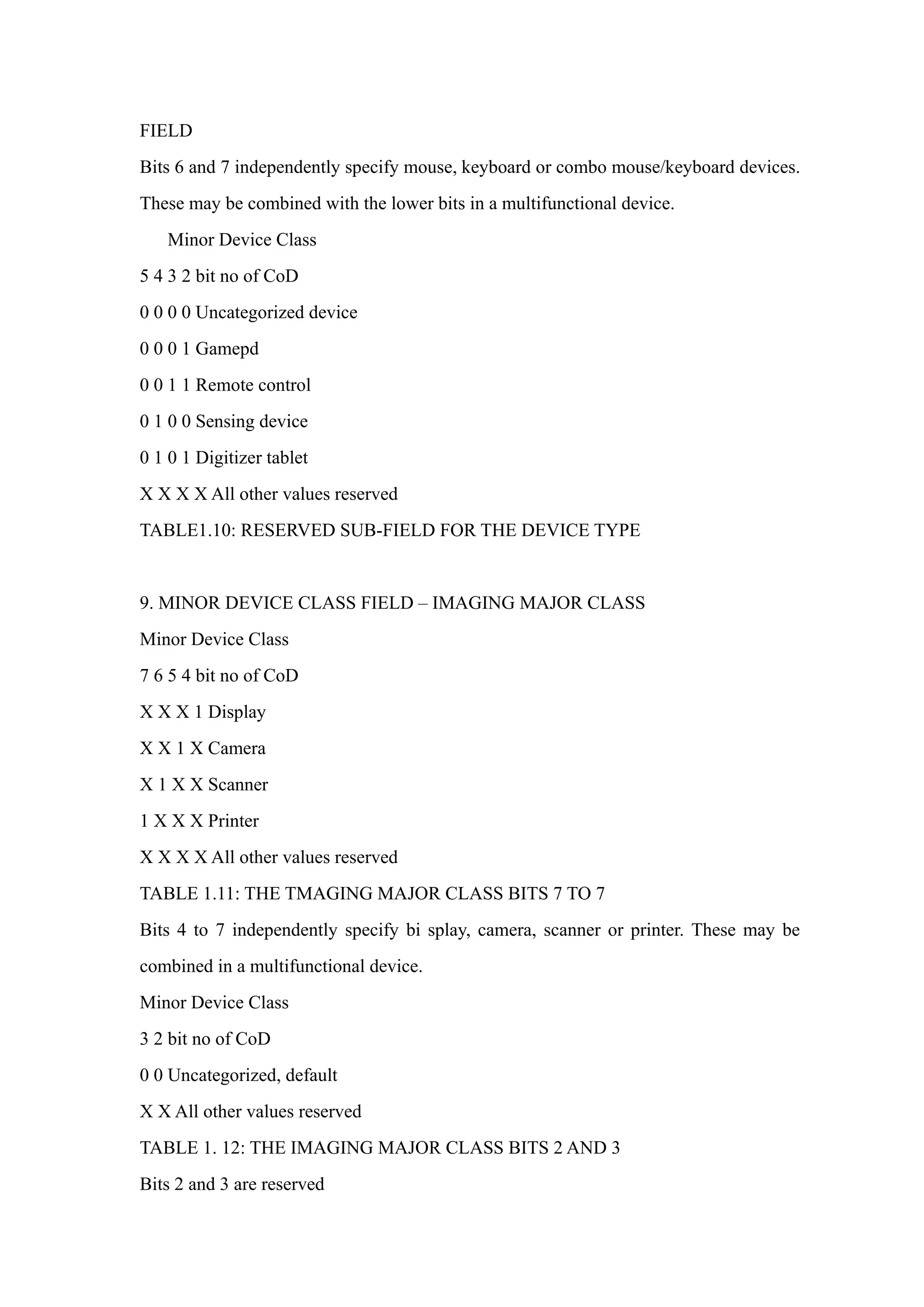
Bits 6 and 7 independently specify mouse, keyboard or combo mouse/keyboard devices.
These may be combined with the lower bits in a multifunctional device.
Minor Device Class
5 4 3 2 bit no of CoD
0 0 0 0 Uncategorized device
0 0 0 1 Gamepd
0 0 1 1 Remote control
0 1 0 0 Sensing device
0 1 0 1 Digitizer tablet
X X X X All other values reserved
TABLE1.10: RESERVED SUB-FIELD FOR THE DEVICE TYPE
9. MINOR DEVICE CLASS FIELD – IMAGING MAJOR CLASS
Minor Device Class
7 6 5 4 bit no of CoD
X X X 1 Display
X X 1 X Camera
X 1 X X Scanner
1 X X X Printer
X X X X All other values reserved
TABLE 1.11: THE TMAGING MAJOR CLASS BITS 7 TO 7
Bits 4 to 7 independently specify bi splay, camera, scanner or printer. These may be
combined in a multifunctional device.
Minor Device Class
3 2 bit no of CoD
0 0 Uncategorized, default
X X All other values reserved
TABLE 1. 12: THE IMAGING MAJOR CLASS BITS 2 AND 3
Bits 2 and 3 are reserved
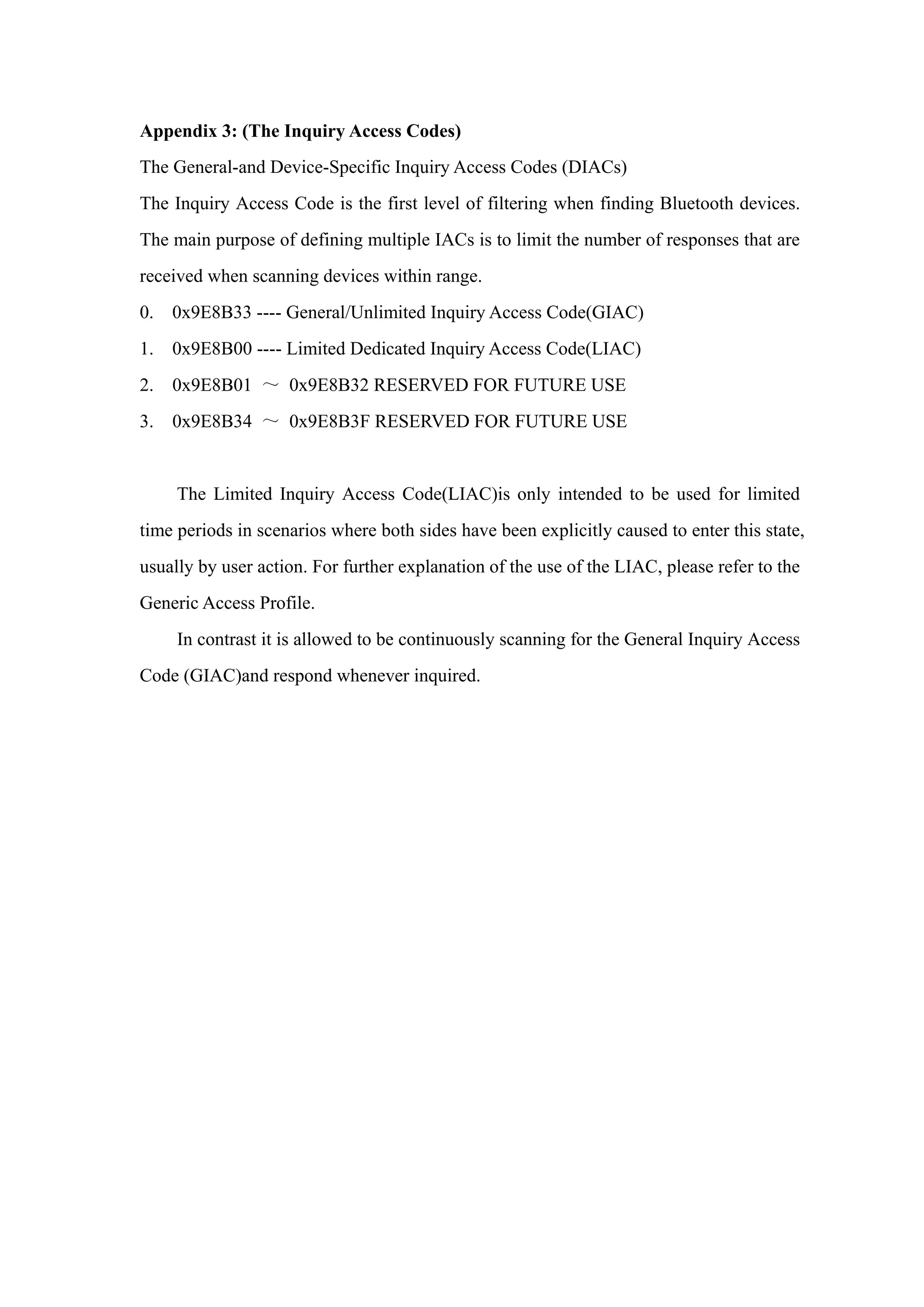
Appendix 3: (The Inquiry Access Codes)
The General-and Device-Specific Inquiry Access Codes (DIACs)
The Inquiry Access Code is the first level of filtering when finding Bluetooth devices.
The main purpose of defining multiple IACs is to limit the number of responses that are
received when scanning devices within range.
0. 0x9E8B33 ---- General/Unlimited Inquiry Access Code(GIAC)
1. 0x9E8B00 ---- Limited Dedicated Inquiry Access Code(LIAC)
2. 0x9E8B01 ~ 0x9E8B32 RESERVED FOR FUTURE USE
3. 0x9E8B34 ~ 0x9E8B3F RESERVED FOR FUTURE USE
The Limited Inquiry Access Code(LIAC)is only intended to be used for limited
time periods in scenarios where both sides have been explicitly caused to enter this state,
usually by user action. For further explanation of the use of the LIAC, please refer to the
Generic Access Profile.
In contrast it is allowed to be continuously scanning for the General Inquiry Access
Code (GIAC)and respond whenever inquired.

Hc 05-at command-set

  • 1.
    HC-03/05 Embedded BluetoothSerial Communication Module AT command set Last revised: April, 2011 HC-05 embedded Bluetooth serial communication module (can be short for module) has two work modes: order-response work mode and automatic connection work mode. And there are three work roles (Master, Slave and Loopback) at the automatic connection work mode. When the module is at the automatic connection work mode, it will follow the default way set lastly to transmit the data automatically. When the module is at the order-response work mode, user can send the AT command to the module to set the control parameters and sent control order. The work mode of module can be switched by controlling the module PIN (PIO11) input level. Serial module PINs: 1. PIO8 connects with LED. When the module is power on, LED will flicker. And the flicker style will indicate which work mode is in using since different mode has different flicker time interval. 2. PIO9 connects with LED. It indicates whether the connection is built or not. When the Bluetooth serial is paired, the LED will be turned on. It means the connection is built successfully. 3. PIO11 is the work mode switch. When this PIN port is input high level, the work mode will become order-response work mode. While this PIN port is input low level or suspended in air, the work mode will become automatic connection work mode. 4. The module can be reset if it is re-powered since there is a reset circuit at the module. ===========================Notification ========================== 1. How to get to the AT mode. Way 1: Step 1: Input low level to PIN34. Step 2: Supply power to the module. Step 3: Input high level to the PIN34. Then the module will enter to AT mode. The baud rate is as
  • 2.
    same as thecommunication time, such as 9600 etc. Way 2: Step 1: Connect PIN34 to the power supply PIN. Step 2: Supply power to module (the PIN34 is also supplied with high level since the PIN34 is connected with power supply PIN). Then the module will enter to AT module. But at this time, the baud rate is 38400. In this way, user should change the baud rate at the AT mode, if they forget the communication baud rate. How to get to the communication mode: Step 1: Input low level to PIN34. Step 2: Supply power to the module. Then the module will enter to communication mode. It can be used for pairing. 2. How to set this module be the master role. Step 1: Input high level to PIO11. Step 2: Supply power to the module. And the module will enter to the order-response work mode. Step 3: Set the parameters of the super terminal or the other serial tools (baud rate: 38400, data bit:8, stop bit:1, no parity bit, no Flow Control) Step 4: Sent the characters “AT+ROLE=1rn” through serial, then receive the characters “OKrn”. Here, “rn” is the CRLF. Step 5: Input low level to PIO, and supply power to the module again. Then this module will become master role and search the other module (slave role) automatically to build the connection. 3. Notes. (1) HC-03 and HC-05’s command should end up with “rn”. It means when you finish programming, you should add terminator (“ENTER” or “0x0d 0x0a”) to the program. It’s different from HC-04 and HC-06 (They don’t need terminator). (2) The most common commands for HC-03 and HC-05 are: AT+ROLE (set master –slave), AT+CMODE( set address pairing) , AT+PSWD (set password). If you want the master module has the function of remembering slave module, the most
  • 3.
    simply way is:First, set AT+CMODE=1. Make the master module pair with the slave module. Second, set AT+CMODE=0. Then the master module just can make pair with that specified slave module. (3) When PIN34 keeps high level, all commands can be used. Otherwise, only some of them can be used. ============================================================== Detailed description of Command (AT command is case- sensitive, should end up with terminator (“enter” or “rn”).) 1. Test Command Response Parameter AT OK None 2. Reset Command Response Parameter AT+RESET OK None 3. Get the soft version Command Response Parameter AT+VERSION? +VERSION: <Param> OK Param: Version number Example : at+version?rn +VERSION:2.0-20100601 OK 4. Restore default status Command Response Parameter AT+ORGL OK None The parameter of default status:
  • 4.
    ①.Device type: 0 ②.Inquirecode: 0x009e8b33 ③.Module work mode: Slave Mode ④.Connection mode: Connect to the Bluetooth device specified ⑤.Serial parameter: Baud rate: 38400 bits/s; Stop bit: 1 bit; Parity bit: None. ⑥.Passkey: “1234” ⑦.Device name: “H-C-2010-06-01” ……….. 5. Get module Bluetooth address Command Response Parameter AT+ADDR? +ADDR: <Param> OK Param: Bluetooth address Bluetooth address will show as this way: NAP: UAP: LAP(Hexadecimal) Example: Module Bluetooth address: 12: 34: 56: ab: cd: ef at+addr?rn +ADDR:1234:56:abcdef OK 6. Set/ inquire device’s name Command Response Parameter AT+NAME=<Param> OK AT+NAME? 1. +NAME:<Param> OK----success 2. FAIL----failure Param: Bluetooth device name Default: “HC-05” Example: AT+NAME=HC-05rn ---set the module device name: “HC-05” OK AT+NAME= “HC-05”rn ---set the module device name: “HC-05”
  • 5.
    OK at+name=Beijinrn ---set themodule device name: “Beijin” OK at+name= “Beijin”rn ---set module device name : “Beijin” OK at+name?rn +NAME: Bei jin OK 7. Get the remote Bluetooth device’s name Command Response Parameter AT+RNAME?<Param1> 1. +NAME:<Param2> OK----success 2. FAIL----failure Param1: Remote Bluetooth device address Param2: Remote Bluetooth device address Bluetooth address will show as this way: NAP:UAP:LAP (Hexadecimal) Example: Bluetooth device address: 00:02:72: od: 22 : 24; device name: Bluetooth at+rname? 0002,72,od2224rn +RNAME:Bluetooth OK 8. Set/ inquire module role Command Response Parameter AT+ROLE=<Param> OK AT+ ROLE? + ROLE:<Param> OK Param: 0---- Slave role 1---- Master role 2---- Slave-Loop role Default: 0
  • 6.
    Role introduction: Slave (slaverole)----Passive connection; Slave-Loop----Passive connection, receive the remote Bluetooth master device data and send it back to the master device; Master (master role)----Inquire the near SPP Bluetooth slave device, build connection with it positively, and build up the transparent data transmission between master and slave device. 9. Set/inquire device type Command Response Parameter AT+CLASS=<Param> OK AT+ CLASS? 1. + CLASS:<Param> OK----success 2. FAIL----failure Param: device type Bluetooth device type is a 32-bit parameter indicates the device type and what type can be supported. Default: 0 More information is provided at the appendix 1(device type introduction). For inquiring the custom Bluetooth device from around Bluetooth devices quickly and effectively, user can set the module to be non-standard Bluetooth device type, such as 0x1f1f (Hexadecimal). 10. Set/ inquire-Inquire access code Command Response Parameter AT+IAC=<Param> 1. OK----success 2. FAIL----failure AT+ IAC? +IAC: <Param> OK Param: Inquire access code Default: 9e8b33 The more information is provided at the appendix 2(Inquire access code introduction).
  • 7.
    Access code isset to be GIAC type (General Inquire Access Code:0x9e8b33), and used for seeking ( or being sought by ) all the Bluetooth devices around. For inquiring (or being inquiring by) the custom Bluetooth device from around Bluetooth devices quickly and effectively, user can set the inquire access code to be the other type number (not GIAC nor LIAC), such as 9e8b3f. Example: AT+IAC=9e8b3frn OK AT+IAC?rn +IAC: 9e8b3f OK 11. Set/ inquire - Inquire access mode Command Response Parameter AT+INQM=<Param>, <Param2>,<Param3> 1. OK----success 2. FAIL----failure AT+ INQM? +INQM:<Param>,<Param2>,<P aram3> OK Param: Inquire access mode 0----inquiry_mode_standard 1----inquiry_mode_rssi Param2: the maximum of Bluetooth devices response Param3:The maximum of limited inquiring time The range of limited time: 1~48 ( Corresponding time:1.28s~61.44s) Default: 1, 1, 48 Example: AT+INQM=1,9,48rn ----Set Inquire access mode: 1) has RSSI signal intensity indicator, 2) stop inquiring once more than 9 devices response, 3) limited time is 48*l. 28=61.44s. OK
  • 8.
    AT+INQMrn +INQM:1, 9, 48 OK 12.Set/Inquire- passkey Command Response Parameter AT+PSWD=<Param> OK AT+ PSWD? + PSWD : <Param> OK Param: passkey Default: “1234” 13.Set/ Inquire- serial parameter Command Response Parameter AT+UART=<Param>,< Param2>,<Param3> OK AT+ UART? + UART=<Param>,<Para m2>,<Param3> OK Param1: baud rate( bits/s) The value (Decimal) should be one of the following: 4800 9600 19200 38400 57600 115200 23400 460800 921600 1382400 Param2:stop bit: 0----1 bit 1----2 bits Param3: parity bit
  • 9.
    0----None 1----Odd parity 2----Even parity Default:9600, 0, 0 Example: Set baud rate to be 115200, stop bit to be 2 bits, parity bit to be even parity. AT+UART=115200,1,2,rn OK AT+UART? +UART:115200,1,2 OK 14. Set/ Inquire - connection mode Command Response Parameter AT+CMODE=<Param> OK AT+ CMODE? + CMODE:<Param> OK Param: 0----connect the module to the specified Bluetooth address. (Bluetooth address can be specified by the binding command) 1----connect the module to any address (The specifying address has no effect for this mode.) 2----Slave-Loop Default connection mode: 0 15. Set/Inquire - bind Bluetooth address Bluetooth address will show as this way: NAP: UAP:LAP(Hexadecimal)
  • 10.
    Command Response Parameter AT+BIND=<Param>OK AT+ BIND? + BIND:<Param> OK Param----Bluetooth address needed to be bind Default address: 00:00:00:00:00:00 Bluetooth address will show as this way: NAP:UAP:LAP(Hexadecimal) This command is effective only when the module wants to connect to the specified Bluetooth address. Example: The module is at connection mode which connects to specified Bluetooth address, and the specified address is 12:34:56:ab:cd:ef. Command and the response show as follow: AT+BIND=1234, 56, abcdefrn OK AT+BIND?rn +BIND:1234:56:abcdef OK 16. Set/Inquire - drive indication of LED and connection status Command Response Parameter AT+POLAR=<Param1>, <Param1> OK AT+ BIND? + POLAR=<Param1>, <Param1> OK Param1:The value is 0----PI08 outputs low level and turn on LED 1----PI08 outputs high level and turn on LED Param2:The value is 0----PI09 output low level, indicate successful connection 1----PI09 output high level, and
  • 11.
    indicate successful connection Default:1, 1 HC-05 Bluetooth module definition: The output of PI08 drives indication of LED work mode; the output of PI09 indicates the connection status. Example: PI08 outputs low level and turn on LED, PI09 outputs high level and indicates successful connection. Command and response show as follow: AT+POLAR=0, 1rn OK AT+POLAR?rn +POLAR=0, 1 OK 17. Set PIO single port output Command Response Parameter AT+PIO=<Param1>,<Param2> OK Param1: PIO port number(Decimal) Param2: PIO port status 0----low level 1----high level HC-05 Bluetooth module provides the user with the ports (PI00~PI07 and PI010) which can extern another input and output ports. Example: 1. PI010 port outputs high level AT+PI0=10, 1rn OK 2. PI010 port outpust low level AT+PI0=10, 0rn OK
  • 12.
    18. Set PIOmultiple port output Command Response Parameter AT+MPIO=<Param> OK Param: Mask combination of PIO ports number (Decimal) HC-05 Bluetooth module provides the ports (PI00~PI07 and PI010) which can extern another input and output ports to the user. (1) Mask of PIO port number = (1<<port number) (2) Mask combination of PIO ports number= (PIO port number mask 1|PIO port number mask 2|……) Example : PI02 port number mask=(1<<2) =0x004 PI010 port number mask =(1<<10)=0x400 Mask combination of PI02 and PI010 port number=(0x004|0x400)=0x404 Example: 1. PI010 and PI02 ports output high level AT+MPI0=404rn OK 2. PI04 port output high level AT+PI0=004rn OK 3. PI010 port output high level AT+PI0=400rn OK 4. All ports output low level AT+MPI0=0rn
  • 13.
    OK 19. Inquire PIOport input Command Response Parameter AT+MPIO? +MPIO: <Param> OK Param----PIO port value (16bits) Param[0]=PI00 Param[1]=PI01 Param[2]=PI02 …… Param[10]=PI010 Param[11]=PI011 HC-05 Bluetooth module provides the user with the ports (PI00~PI07 and PI010) which can extern another input and output ports. 20. Set/ Inquire page scan and inquire scan parameter Command Response Parameter AT+IPSCAN=<Param1>, <Param2>, <Param3>,<Param4>AT+I PSCAN? OK +IPSCAN: <Param1>,<Param2>, <Param3>,<Param4> OK Param1:time interval of inquiring Param2: duration in inquiring Param3: time interval of paging Param4: duration in paging The above parameters are decimal. Default:1024,512,1024,512 Example: at+ipscan=1234,500,1200,250rn OK at+ipscan? +IPSCAN:1234,500,1200,250
  • 14.
    21. Set/ Inquire—SHIFFenergy parameter Command Response Parameter AT+SNIFF=<Param1> ,<Param2>, <Param3>,<Param4> OK AT+IPSCAN? +SNIFF: <Param1>,<Param2>,<Par am3>,<Param4> Param1: maximum time Param2: minimum time Param3: test time Param4: limited time The above parameters are decimal. Default : 0,0,0,0 22. Set/ Inquire safe and encryption mode Command Response Parameter AT+SENM=<Param >,<Param2>, 1. OK----success 2. FAIL----failure AT+ SENM? +SENM:<Param>,<Param 2>, OK Param: the value of safe mode: 0----sec_mode0+off 1----sec_mode1+non_secure 2----sec_mode2_service 3----sec_mode3_link 4----sec_mode_unknown Param2: the value of encryption mode: 0----hci_enc_mode_off 1----hci_enc_mode_pt_to_pt 2----hci_enc_mode_pt_to_pt_and_bcast Default: 0,0 23. Delete authenticated device in the Bluetooth pair list Command Response Parameter AT+PMSAD=<Param> OK Param: Bluetooth device address Example: Delete the device ( address: 12:34:56:ab:cd:ef ) in the blue pair list
  • 15.
    at+rmsad=1234,56,abcdefrn OK ---- successfuldeletion Or at+rmsad=1234,56,abcdefrn FAIL ----There is no the Bluetooth device whose address is 12:34:56:ab:cd:ef in the pair list. 24. Delete all authenticated devices in the pair list Command Response Parameter AT+RMAAD OK None Example: Move all devices away from the pair list. at+rmaadrn OK 25. Seek the authenticated device in the Bluetooth pair list Command Response Parameter AT+FSAD=<Param> 1. OK----success 2. FAIL----failure Param: Bluetooth device address Example: Seek the authenticated device (address: 12:34:56:ab:cd:ef) in the pair list at+fsad=1234,56,abcdefrn OK ----the Bluetooth device whose address is 12:34:56:ab:cd:ef is found. at+fsad=1234,56,abcde0rn FAIL ----There is no the Bluetooth device whose address is 12:34:56:ab:cd:e0 in the pair list. 26. Get the authenticated device count from the pair list Command Response Parameter
  • 16.
    AT+ADCN? +ADCN:<Param> OK Param: Authenticated Device Count Example: at+adcn? +ADCN:0----There is no authenticated device in the pair list. OK 27. Get the Bluetooth address of Most Recently Used Authenticated Device Command Response Parameter AT+MRAD? + MRAD : <Param> OK Param: the Bluetooth address of Most Recently Used Authenticated Device Example: at+mrad? +MRAD:0:0:0 ----There is no device that has been used recently. OK 28. Get the work status of Bluetooth module Command Response Parameter AT+STATE? + STATE: <Param> OK Param: work status of module Return value: “INITIALIZED” ----initialized status “READY” ---- ready status “PAIRABLE” ----pairable status “PAIRED” ----paired status “INQUIRING” ----inquiring status “CONNECTING”----connecting status “CONNECTED”----connected status “DISCONNECTED”----disconnected
  • 17.
    status “NUKNOW”----unknown status Example: at+state? +STATE:INITIALIZED ----initializedstatus OK 29. Initialize the SPP profile lib Command Response Parameter AT+INIT 1. OK----success 2. FAIL----failure None 30. Inquire Bluetooth device Command Response Parameter AT+INQ +INQ: <Param1>,<Param2>,<Param3>, …… OK Param1: Bluetooth address Param2: device type Param3: RSSI signal intensity Example 1: at+initrn ---- Initialize the SPP profile lib( can’t repeat initialization) OK at+iac=9e8b33rn ----Inquire Bluetooth device has an access code OK at+class=0rn ----Inquire the Bluetooth device type at+inqm=1,9,48rn ----Inquire mode: 1) has the RSSI signal intensity indication, 2) stop inquiring if more than 9 Bluetooth devices response, 3) limited time in inquiring is 48*1.28=61.44s. At+inqrn ----inquire the Bluetooth device around +INQ:2:72:D2224,3E0104,FFBC
  • 18.
    +INQ:1234:56:0,1F1F,FFC1 +INQ:1234:56:0,1F1F,FFC0 +INQ:1234:56:0,1F1F,FFC1 +INQ:2:72:D2224,3F0104,FFAD +INQ:1234:56:0,1F1F,FFBE +INQ:1234:56:0,1F1F,FFC2 +INQ:1234:56:0,1F1F,FFBE +INQ:2:72:D2224,3F0104,FFBC OK Example 2: at+iac=9e8b33rn ----inquirethe Bluetooth device has an access code OK at+class=1f1frn ----inquire the Bluetooth device whose device type is 0x1f1f OK at+inqm=1,9,48rn ----inquire mode: 1) has the RSSI signal intensity indication, 2) stop inquiring if more than 9 Bluetooth devices response, 3) limited time in inquiring is 48*1.28=61.44s At+inqrn ----filter and inquire the Bluetooth device around +INQ:1234:56:0,1F1F,FFC2 +INQ:1234:56:0,1F1F,FFC1 +INQ:1234:56:0,1F1F,FFC1 +INQ:1234:56:0,1F1F,FFC1 +INQ:1234:56:0,1F1F,FFC2 +INQ:1234:56:0,1F1F,FFC1 +INQ:1234:56:0,1F1F,FFC1 +INQ:1234:56:0,1F1F,FFC0 +INQ:1234:56:0,1F1F,FFC2 OK
  • 19.
    Example 3: at+iac=9e8b3frn ----inquire the Bluetooth device whose access code is 0x9e8b3f OK at+class=1f1frn ----inquire the Bluetooth device whose device type is 0x1f1f OK at+inqm=1,1,20rn ----inquire mode: 1) Has the RSSI signal intensity indication, 2) stop inquiring if more than 1 Bluetooth device response, 3) limited time in inquiring is 20*1.28=25.6s At+inqrn ----filter and inquire the Bluetooth device around +INQ:1234:56:ABCDEF,1F1F,FFC2 OK 31. Cancel Bluetooth device Command Response Parameter AT+INQC OK None 32. Set pair Command Response Parameter AT+PAIR=<Param1>,<Param2> 1. OK----success 2. FAIL----failure Param1: Bluetooth address of remote device Param2: limited time of connection (second) Example: Make pair with the remote Bluetooth device( address:12:34:56:ab:cd:ef), the limited time is 20s. At+pai=1234,56,abcdef,20rn OK
  • 20.
    33. Connect device CommandResponse Parameter AT+LINK=<Param> 1. OK----success 2. FAIL----failure Param: Bluetooth address of remote device Example: Connect with the remote Bluetooth device (address: 12:34:56:ab:cd:ef) at+fsad=1234,56,abcdefrn ----To check whether the Bluetooth device (address: 12:34:56:ab:cd:ef) is in the pair list or not. OK at+link=1234,56,abcdefrn ----The Bluetooth device (address: 12:34:56:ab:cd:ef) is in the pair list. The connection can be built directly without inquiring. OK 34. Disconnection Command Response Parameter AT+DISC 1.+DISC:SUCCESS----successful Disconnection OK 2.+DISC:LINK_LOSS----lose the connection OK 3.+DISC:NO_SLC----No SLC connection OK 4、+DISC:TIMEOUT----disconnection timeout OK 5、+DISC:ERROR----disconnection error OK None 35. Enter to energy mode: Command Response Parameter
  • 21.
    AT+ENSNIFF=<Param> OK Param:Bluetooth address of device 36. Exit energy mode Command Response Parameter AT+EXSNIFF=<Param> OK Param: Bluetooth address of device
  • 22.
    Appendix 1:Introduction ofAT command error code The form of error ---- ERROR:(error_code) error_code(Hexadecimal) Note 0 AT command error 1 Default result 2 PSKEY write error 3 Too long length of device name (more than 32 bytes). 4 No device name 5 Bluetooth address: NAP is too long. 6 Bluetooth address: UAP is too long. 7 Bluetooth address: LAP is too long. 8 No PIO number’s mask 9 No PIO number A No Bluetooth devices. B Too length of devices C No inquire access code D Too long length of inquire access code E Invalid inquire access code F The length of passkey is 0. 10 Too long length of passkey (more than 16 bytes) 11 Invalid module role 12 Invalid baud rate 13 Invalid stop bit 14 Invalid parity bit 15 Authentication device is not at the pair list. 16 SPP lib hasn’t been initialized. 17 SPP lib has been repeated initialization. 18 Invalid inquire mode 19 Too long inquire time 1A No Bluetooth address 1B Invalid safe mode 1C Invalid encryption mode
  • 23.
    Appendix 2: Theintroduction of devices The Class of Device/Service(CoD) is a 32 bits number that of 3 field specifies the service supported by the device. Another field specifies the minor device class, which describes the device type in more detail The Class of Device /Service (CoD) field has a variable format. The format is indicated using the ’within the CoD .The length of the Format Type field is variable and ends with two bits different from’11’.The version field starts at the least significant bit of the CoD and may extend upwards. In the ’format#1’ of the CoD (format Type field =00), 11 bits are assigned as a bit –mask (multiple bits can be set) each bit corresponding to a high level generic category of service class. Currently 7 categories are defined. These are primarily of a’ public service’ nature. The remaining 11 bits are used for indicating device type category and other device-specific characteristics. Any reserved but otherwise unassigned bits, such as in the Major Service Class field, should be to 0. Figure 1.2: The Class of Device/Service field (format type). Please note the krder in which the octets are sent on the air and stored in memory. Bit number 0 is sent first on the air . 1. MAJOR SERVICE CLASSES Bit no Major Service Class 13 Limited Discoverable Mode [Ref #1] 14 (reserved) 15 (reserved) 16 Positioning(Location identification) 17 Networking (LAN, Ad hoc, … ) 18 Rendering (Printing ,Speaker,…) 19 Capturing (Scanner, Microphone,…) 20 0bject Transfer (v-Inbox, v-Folder,…) 21 Audio (Speaker, Microphone, Headset service,…)
  • 24.
    22 Telephony (Cordlesstelephony, Modem, Headset service,…) 23 Information (WEB-server, WAP- server,…) TABLE 1.2:MAJOR SERVICE CLASSES [Ref #1 As defined in See Generic Access Profile, Bluetooth SIG] 2. MAJOR DEVICE CLASSES The Major Class segment is the highest level of granularity for defining a Bluetooth Device. The main function of a device is used for determining the major Class grouping. There are 32 different possible major classes. The assignment of this Major Class field is defined in Table1.3. 1 2 1 1 1 0 9 8 Major Device Class 0 0 0 0 0 Miscel laneous [Ref #2] 0 0 0 0 1 Computer (desktop, notebook, PDA, organizers,…) 0 0 0 1 0 Phone (cellular ,cordless ,payphone, modem,…) 0 0 0 1 1 LAN/Network Access point 0 0 1 0 0 Audio/Video (headset, speaker, stereo, video display, vcr …) 0 0 1 0 1 Periphereal (mouse, joystick, keyboards.…) 0 0 1 1 0 Imaging (printing, scanner, camera, display,…) 1 1 1 1 1 Uncategorized, specific device code not specified X X X X All other values reserved TABLE 1.3: MAJOE DEVICE CLASSES [Ref #2:Used where a more specific Major Device Class is not suited (but only as specified as in this document) .Devices that do not have a major class assigned can use the all-1 code until’ classified’] 3. THE MINOR DEVICE CLASS FIELD The’ Minor Device Class field’ (bits 7 to 2 in the CoD ), are to be interpreted only in the context of the Major Device Class (but interpreted of the Service Class field). Thus the meaning of the bits may change, depending on the value of the ’ Major Device Class field’. When the Minor Device Class field indicates a device class ,then the
  • 25.
    primary decvice classshould be reported, e. g . a cellular phone that can work as a cordless handset should 4. MINOR DEVICE CLASS FIELD–COMPUTER MAJOR CLASS Minor Device Class 7 6 5 4 3 2 bit no of CoD 0 0 0 0 0 0 Uncategorized, code for device not assigned 0 0 0 0 0 1 Desktop workstation 0 0 0 0 1 0 Server-class computer 0 0 0 0 1 1 Laptop 0 0 0 1 0 0 Handheld PC/PDA(clam shell) 0 0 0 1 0 1 Palm sized PC/PDA 0 0 0 1 1 0 Wearable computer (Watch sized) X X X X X X All other values reserved TABLE 1.4: SUB DEVICE CLASS FIELD FOR THE’ COMPUTER ’MAJOR CLASS 5. MINOR DEVICE CLASS FIELD – PHONE MAJOR CLASS Minor Device Class 7 6 5 4 3 2 bit no of CoD 0 0 0 0 0 0 Uncategorized, code for device not assigned 000001 Cellular 0 0 0 0 1 0 Cordless 0 0 0 0 1 1 Smart phone 0 0 0 1 0 0 Wired modem or voice gateway 0 0 0 1 0 1 Common ISDN Access 0 0 0 1 1 0 Sim Card Reader X X X X X X All other values reserved TABLE1.5: SUB DEVICE CLASSES FOR THE’PHONE’ MAJOR CLASS 6. MINOR DEVICE CLASS FIELD –LAN/NETWORK ACCESS POINE MAJOR
  • 26.
    CLASS Minor Device Class 76 5 bit no of CoD 0 0 0 Fully available 0 0 1 1 – 17% utilized 0 1 0 1 7 - 33% utilized 0 1 1 3 3 – 50% utilized 1 0 0 5 0 – 67% utilized 1 0 1 6 7 – 83% utilized 1 1 0 8 3 – 99% utilized 1 1 1 No service available [REF #3] XXX All other values reserved TABLE1.6: THE LAN/NETWORK ACCESS POINE LOAD FACTOR FIELD [Ref #3:“Device is fully utilized and cannot accept additional connections at this time, please retry later”] The exact loading formula is not standardized. It is up to each LAN/Network Access Point implementation to determine what internal conditions to report as a utilization of communication requirement is that the box .As a recommendation, a client that locates multiple LAN/Network Access Points should attempt to connect to the one reporting the lowest load. Minor Device Class 4 3 2 bit no of CoD 0 0 0 Uncategorized (use this value if no other apply ) XXX All other values reserved TABLE1.7:RESERVED SUB-FIELD FOR THE LAN/NETWORK ACCESS POINE 7. MINOR DEVICE CLASS FIELD – AUDIO/VIDEO MAJOR CLASS Minor Device Class 7 6 5 4 3 2 bit no of CoD 0 0 0 0 0 0 Uncategorized, code not assigned
  • 27.
    0 0 00 0 1 Device conforms to the Headset profile 000010 Hands-free 0 0 0 0 1 1 (Reserved ) 0 0 0 1 0 0 Microphone 0 0 0 1 0 1 Loudspeaker 0 0 0 1 1 0 Headphones 0 0 0 1 1 1 Portable Audio 0 0 1 0 0 0 Car audio 0 0 1 0 0 1 Set-top box 0 0 1 0 1 0 HiFi Audio Device 001011 VCR 0 0 1 1 0 1 Camcorder 0 0 1 1 1 0 Video Monitor 0 0 1 1 1 1 Video Display and Loudspeaker 0 1 0 0 0 0 Video Conferencing 0 1 0 0 0 1 (Reserved) 0 1 0 0 1 0 Gaming/Toy [Ref #4] X X X X X X All other values reserved [Ret #4: Only to be used with a Gaming/Toy device that makes audio/video capabilities available via Bluetooth] TABLE 1.8: SUB DEVICES FOR THE ’AUDIO/VIOEO’MAJOR CLASS 8. MINOR DEVICE CLASS FIELD – PERIPHERAL MAJOR CLASS Minor Device Class 7 6 bit no of CoD 0 1 Keyboard 1 0 Pointing device 1 1 Combo keyboard /pointing device X X X All other values reserved TABLE1.9: THE PERIPHERAL MAJOR CLASS KEYBOARD/POINTING DEVICE
  • 28.
    FIELD Bits 6 and7 independently specify mouse, keyboard or combo mouse/keyboard devices. These may be combined with the lower bits in a multifunctional device. Minor Device Class 5 4 3 2 bit no of CoD 0 0 0 0 Uncategorized device 0 0 0 1 Gamepd 0 0 1 1 Remote control 0 1 0 0 Sensing device 0 1 0 1 Digitizer tablet X X X X All other values reserved TABLE1.10: RESERVED SUB-FIELD FOR THE DEVICE TYPE 9. MINOR DEVICE CLASS FIELD – IMAGING MAJOR CLASS Minor Device Class 7 6 5 4 bit no of CoD X X X 1 Display X X 1 X Camera X 1 X X Scanner 1 X X X Printer X X X X All other values reserved TABLE 1.11: THE TMAGING MAJOR CLASS BITS 7 TO 7 Bits 4 to 7 independently specify bi splay, camera, scanner or printer. These may be combined in a multifunctional device. Minor Device Class 3 2 bit no of CoD 0 0 Uncategorized, default X X All other values reserved TABLE 1. 12: THE IMAGING MAJOR CLASS BITS 2 AND 3 Bits 2 and 3 are reserved
  • 29.
    Appendix 3: (TheInquiry Access Codes) The General-and Device-Specific Inquiry Access Codes (DIACs) The Inquiry Access Code is the first level of filtering when finding Bluetooth devices. The main purpose of defining multiple IACs is to limit the number of responses that are received when scanning devices within range. 0. 0x9E8B33 ---- General/Unlimited Inquiry Access Code(GIAC) 1. 0x9E8B00 ---- Limited Dedicated Inquiry Access Code(LIAC) 2. 0x9E8B01 ~ 0x9E8B32 RESERVED FOR FUTURE USE 3. 0x9E8B34 ~ 0x9E8B3F RESERVED FOR FUTURE USE The Limited Inquiry Access Code(LIAC)is only intended to be used for limited time periods in scenarios where both sides have been explicitly caused to enter this state, usually by user action. For further explanation of the use of the LIAC, please refer to the Generic Access Profile. In contrast it is allowed to be continuously scanning for the General Inquiry Access Code (GIAC)and respond whenever inquired.