Bridging Technology Gap Netxillon Technologies
Hadoop Administration
By Gurmukh Singh
Module 7: Data Ingestion and Storage
Hadoop Netxillon Technologies
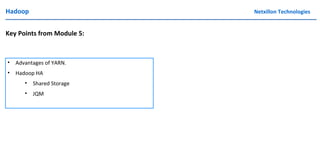
Key Points from Module 5:
• Advantages of YARN.
• Hadoop HA
• Shared Storage
• JQM
Hadoop Netxillon Technologies
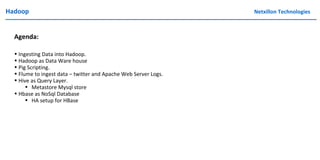
Agenda:
• Ingesting Data into Hadoop.
• Hadoop as Data Ware house
• Pig Scripting.
• Flume to ingest data – twitter and Apache Web Server Logs.
• Hive as Query Layer.
• Metastore Mysql store
• Hbase as NoSql Database
• HA setup for HBase
Hadoop Netxillon
Technologies
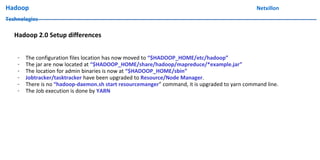
Hadoop 2.0 Setup differences
- The configuration files location has now moved to “$HADOOP_HOME/etc/hadoop”
- The jar are now located at “$HADOOP_HOME/share/hadoop/mapreduce/*example.jar”
- The location for admin binaries is now at “$HADOOP_HOME/sbin”
- Jobtracker/tasktracker have been upgraded to Resource/Node Manager.
- There is no “hadoop-daemon.sh start resourcemanger” command, it is upgraded to yarn command line.
- The Job execution is done by YARN
Hadoop Netxillon
Technologies
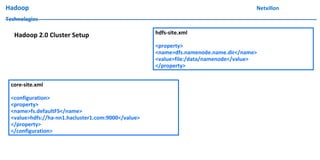
Hadoop 2.0 Cluster Setup hdfs-site.xml
<property>
<name>dfs.namenode.name.dir</name>
<value>file:/data/namenode</value>
</property>
core-site.xml
<configuration>
<property>
<name>fs.defaultFS</name>
<value>hdfs://ha-nn1.hacluster1.com:9000</value>
</property>
</configuration>
Hadoop Netxillon
Technologies
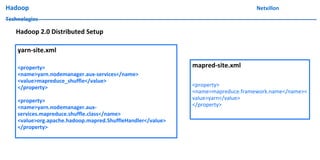
yarn-site.xml
<property>
<name>yarn.nodemanager.aux-services</name>
<value>mapreduce_shuffle</value>
</property>
<property>
<name>yarn.nodemanager.aux-
services.mapreduce.shuffle.class</name>
<value>org.apache.hadoop.mapred.ShuffleHandler</value>
</property>
Hadoop 2.0 Distributed Setup
mapred-site.xml
<property>
<name>mapreduce.framework.name</name><
value>yarn</value>
</property>
Hadoop Netxillon
Technologies
Hadoop 2.0 Distributed Setup
DEMO
Hadoop Netxillon
Technologies
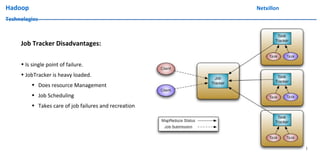
Job Tracker Disadvantages:
• Is single point of failure.
• JobTracker is heavy loaded.
• Does resource Management
• Job Scheduling
• Takes care of job failures and recreation
Hadoop Netxillon
Technologies
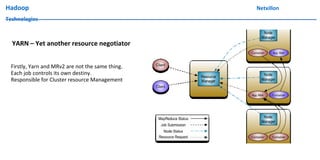
YARN – Yet another resource negotiator
Firstly, Yarn and MRv2 are not the same thing.
Each job controls its own destiny.
Responsible for Cluster resource Management
Hadoop Netxillon
Technologies
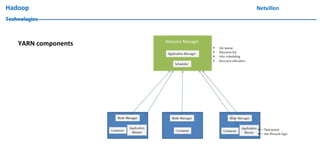
YARN components
Hadoop Netxillon
Technologies
YARN Flow
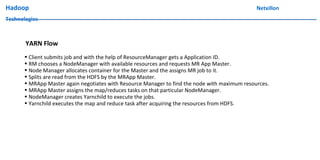
• Client submits job and with the help of ResourceManager gets a Application ID.
• RM chooses a NodeManager with available resources and requests MR App Master.
• Node Manager allocates container for the Master and the assigns MR job to it.
• Splits are read from the HDFS by the MRApp Master.
• MRApp Master again negotiates with Resource Manager to find the node with maximum resources.
• MRApp Master assigns the map/reduces tasks on that particular NodeManager.
• NodeManager creates Yarnchild to execute the jobs.
• Yarnchild executes the map and reduce task after acquiring the resources from HDFS.
Hadoop Netxillon
Technologies
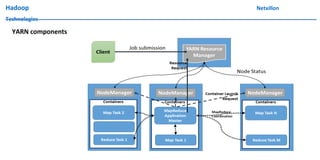
YARN components
Hadoop Netxillon
Technologies
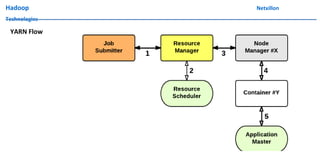
YARN Flow
Hadoop Netxillon
Technologies
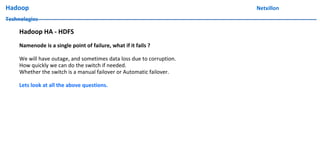
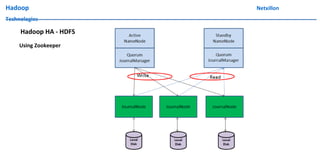
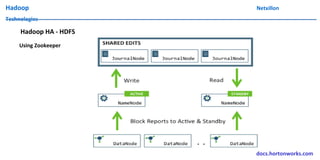
Hadoop HA - HDFS
Namenode is a single point of failure, what if it fails ?
We will have outage, and sometimes data loss due to corruption.
How quickly we can do the switch if needed.
Whether the switch is a manual failover or Automatic failover.
Lets look at all the above questions.
Hadoop Netxillon
Technologies
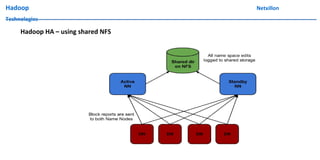
Hadoop HA – using shared NFS
Hadoop Netxillon
Technologies
Hadoop HA – using shared NFS
DEMO
Hadoop Netxillon
Technologies
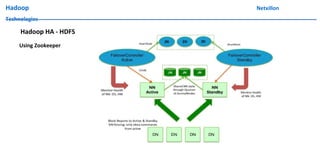
Hadoop HA - HDFS
Using Zookeeper
Hadoop Netxillon
Technologies
Hadoop HA - HDFS
Using Zookeeper
Hadoop Netxillon
Technologies
Hadoop HA - HDFS
Using Zookeeper
docs.hortonworks.com
Hadoop Netxillon
Technologies
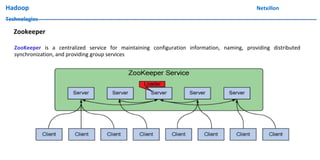
Zookeeper
ZooKeeper is a centralized service for maintaining configuration information, naming, providing distributed
synchronization, and providing group services
Hadoop Netxillon
Technologies
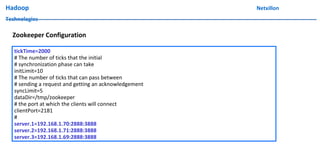
Zookeeper Configuration
tickTime=2000
# The number of ticks that the initial
# synchronization phase can take
initLimit=10
# The number of ticks that can pass between
# sending a request and getting an acknowledgement
syncLimit=5
dataDir=/tmp/zookeeper
# the port at which the clients will connect
clientPort=2181
#
server.1=192.168.1.70:2888:3888
server.2=192.168.1.71:2888:3888
server.3=192.168.1.69:2888:3888
Hadoop Netxillon
Technologies
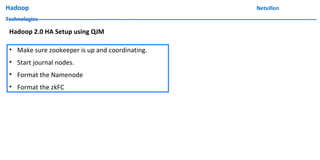
• Make sure zookeeper is up and coordinating.
• Start journal nodes.
• Format the Namenode
• Format the zkFC
Hadoop 2.0 HA Setup using QJM
Hadoop Netxillon
Technologies
DEMO
Hadoop 2.0 HA Setup using QJM
Hadoop Netxillon
Technologies
Hadoop 2.0 Setup
DEMO
Hadoop Netxillon
Technologies
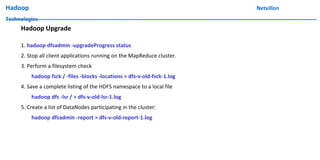
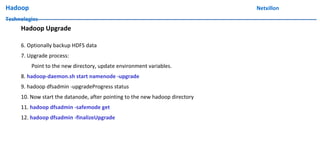
Hadoop Upgrade
1. hadoop dfsadmin -upgradeProgress status
2. Stop all client applications running on the MapReduce cluster.
3. Perform a filesystem check
hadoop fsck / -files -blocks -locations > dfs-v-old-fsck-1.log
4. Save a complete listing of the HDFS namespace to a local file
hadoop dfs -lsr / > dfs-v-old-lsr-1.log
5. Create a list of DataNodes participating in the cluster:
hadoop dfsadmin -report > dfs-v-old-report-1.log
Hadoop Netxillon
Technologies
Hadoop Upgrade
6. Optionally backup HDFS data
7. Upgrade process:
Point to the new directory, update environment variables.
8. hadoop-daemon.sh start namenode -upgrade
9. hadoop dfsadmin -upgradeProgress status
10. Now start the datanode, after pointing to the new hadoop directory
11. hadoop dfsadmin -safemode get
12. hadoop dfsadmin -finalizeUpgrade
Hadoop Netxillon Technologies
Further Readings:
-http://hadoop.apache.org/docs/r2.7.0/hadoop-project-dist/hadoop-hdfs/HDFSHighAvailabilityWithQJM.html
-https://hadoop.apache.org/docs/stable/hadoop-project-dist/hadoop-hdfs/HDFSHighAvailabilityWithNFS.html
GitHub: https://github.com/netxillon/hadoop/tree/master/HA_QJM
Hadoop Netxillon Technologies
Further Reading:
• https://hadoop.apache.org/docs/r1.2.1/hdfs_design.html
• http://www.aosabook.org/en/hdfs.html
Hadoop Netxillon Technologies
Topics for Next Class:
• Hive, HBASE, PIG
• Sqoop, Flume
Hadoop Netxillon Technologies
Pre-Readings before the next class:
• https://hbase.apache.org/
• http://hortonworks.com/hadoop/hive/
• https://hive.apache.org/
• https://pig.apache.org/
Netxillon Technologies
Any Questions ?
Netxillon Technologies
GitHub: https://github.com/netxillon/hadoop
Thanks !
trainings@netxillon.com

ha_module5