Unit 03 –
Hardware
 Issues
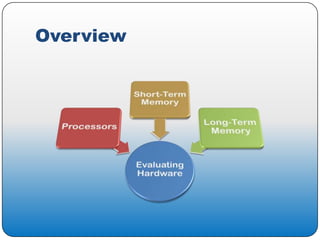
Overview
The Central Processing Unit

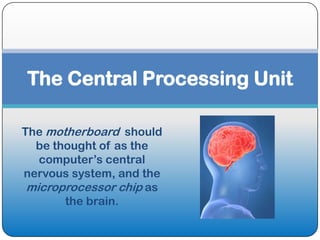
The motherboard should
  be thought of as the
   computer’s central
nervous system, and the
 microprocessor chip as
       the brain.
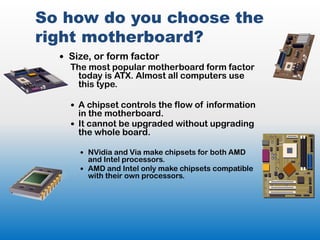
So how do you choose the
right motherboard?
   Size, or form factor
    The most popular motherboard form factor
     today is ATX. Almost all computers use
     this type.

     A chipset controls the flow of information
      in the motherboard.
     It cannot be upgraded without upgrading
      the whole board.

       NVidia and Via make chipsets for both AMD
        and Intel processors.
       AMD and Intel only make chipsets compatible
        with their own processors.
What are Microprocessors?
   Microprocessors consist of a system of
    transistors, which act as on/off switches (or 1/0 in
    binary language) to represent different kinds of data.

     The size of your processor is measured in 0s or
      1s, called bits.

      8 bits = 1 byte
      1,000 bytes = 1 kilobyte (KB)
      1,000,000 bytes = 1 megabyte (MB)
                  …and so on.
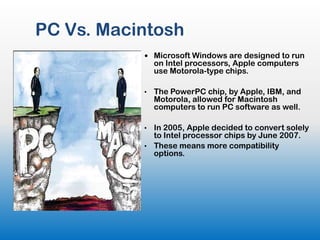
PC Vs. Macintosh
            Microsoft Windows are designed to run
               on Intel processors, Apple computers
               use Motorola-type chips.

           •   The PowerPC chip, by Apple, IBM, and
               Motorola, allowed for Macintosh
               computers to run PC software as well.

           • In 2005, Apple decided to convert solely
             to Intel processor chips by June 2007.
           • These means more compatibility
             options.
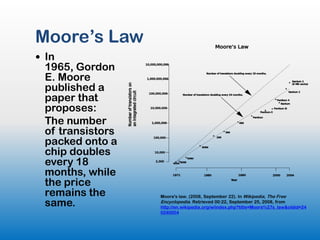
Moore’s Law
 In
 1965, Gordon
 E. Moore
 published a
 paper that
 proposes:
 The number
 of transistors
 packed onto a
 chip doubles
 every 18
 months, while
 the price
 remains the      Moore's law. (2008, September 22). In Wikipedia, The Free
 same.            Encyclopedia. Retrieved 00:22, September 25, 2008, from
                  http://en.wikipedia.org/w/index.php?title=Moore%27s_law&oldid=24
                  0240004
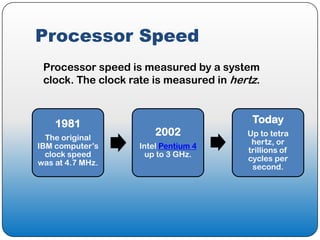
Processor Speed
 Processor speed is measured by a system
 clock. The clock rate is measured in hertz.


    1981                                  Today
  The original
                        2002             Up to tetra
                                          hertz, or
IBM computer’s      Intel Pentium 4
                                         trillions of
  clock speed         up to 3 GHz.
                                         cycles per
was at 4.7 MHz.
                                          second.
Thermal Design Power (TDP)

 Because of these high speeds,
 systems often become overheated.
 • Fans and modes of heat transfer
   have helped.
 • But much of today’s software
   require a high number of processes
   to occur rapidly, such as in large
   networks or in games.
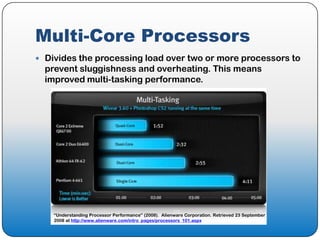
Multi-Core Processors
 Divides the processing load over two or more processors to
  prevent sluggishness and overheating. This means
  improved multi-tasking performance.


    “Understanding Processor Performance” (2008). Alienware Corporation. Retrieved 23 September
    2008 at http://www.alienware.com/intro_pages/processors_101.aspx
Short-Term Memory


What is it and why is it important to
consider when buying a computer?
What amount of RAM is
recommended for a new system?
 Holds the data before and after processing
 Critical for a system to run smoothly and its
  software to work well
 RAM size is usually measured in megabytes
  or gigabytes
B.K. Williams & S.C.
Sawyer, (2007). Using
information Technology
 128 megabytes for students
 At least 256 megabytes or
  possibly 512 megabytes if you
  want to handle graphics files
 As memory size required for
  additional software continues
  to grow, the library might want
  to buy for future
 DDR-SDRAM is a more recent development
 and most often found in personal computers
 so the staff would probably want to make
 sure they bought a system with this type of
 memory
Michael J. Miller, (Nov.
11, 2004) “Your Next PC.” PC
Magazine
 Recommends 512 MB of RAM as an inexpensive
  item that will do more to improve how a
  computer works than a more powerful
  processor
 For games, 1 gigabyte of RAM
Kristopher Kubicki, . (March 19,
2006) “Vista and the Quest for
More Memory.” Daily Tech.


 Noticed a drop in price for more RAM every time
  a new Windows operating system is launched
 Expects to see 2 gigabytes as the norm for new
  computer systems
Jason Cross, (Sept. 13, 2006)
“The Best PC for the Money.”
PC Magazine.


 Recommends 2 gigabytes of memory with newer
  operating systems, especially Vista
 You could get by with 1 but price makes this too
  good a bargain to pass up, especially with
  whatever technology comes next
Russell Hitchcock. (July
17, 2007) "Memory and
Storage: Part 2.“
WindowsNetworking.com
 Discuss newer type of chip called Magneto-
  resistive Random Access Memory , or MRAM,
  which uses magnetic storage
 Expensive and not readily available
Schenone, Ron. (March
29, 2007) “Vista – How Much
Ram Is Really Enough?” The
Blade by Ron Schenone, MVP.

 Microsoft always low-balls the amount of RAM
  needed
 Found Microsoft XP ran fine with 1 gigabyte of
  RAM
 Vista ran faster and smoother with 2 gigabytes.
  No noticeable difference with 4 gigabytes
Jeff Tyson and Dave
Coustan, (2008). “How RAM
Works,” How Stuff Works.


 RAM needs depend on system you are running
 Microsoft recommends 128 megabytes with
 Windows XP, 256 megabytes for optimal
 performance
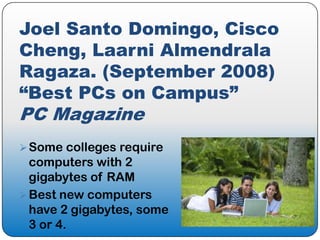
Joel Santo Domingo, Cisco
Cheng, Laarni Almendrala
Ragaza. (September 2008)
“Best PCs on Campus”
PC Magazine
 Some colleges require
  computers with 2
  gigabytes of RAM
 Best new computers
  have 2 gigabytes, some
  3 or 4.
Summary
 While books may provide a good
  introduction to what you might need for
  purchasing, technology changing so
  rapidly that information quickly obsolete
 Online articles and blogs and even print
  magazines seem a better source for the
  latest recommendations
 Standard now seems to be at least 1or 2
  gigabytes, but probably won’t be long
  before 3 or 4 is the norm
Long-Term Memory

Long-term memory is traditionally
  known as Secondary Storage.
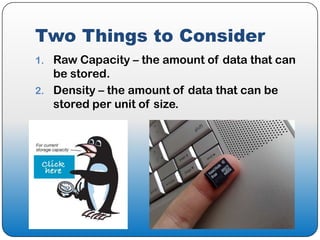
Two Things to Consider
1. Raw Capacity – the amount of data that can
   be stored.
2. Density – the amount of data that can be
   stored per unit of size.
Secondary Storage Methods
 Hard Disk Drive (HDD)
 Floppy Disk
 Zip Disk
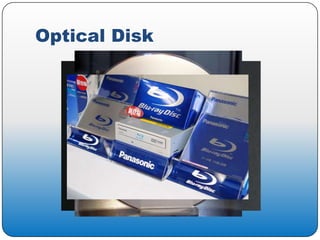
 Optical Disk
   Compact Disk (CD)
   Digital Versatile Disc (DVD)
   Blu-Ray Disc
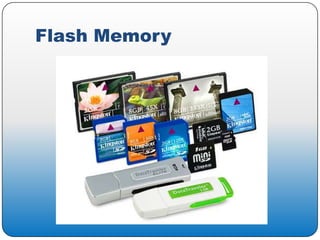
 Flash Memory
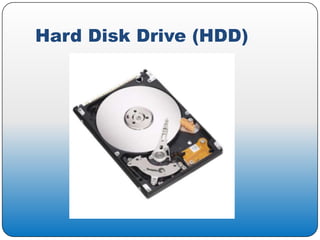
Hard Disk Drive (HDD)
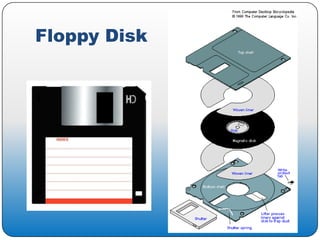
Floppy Disk
Optical Disk
Flash Memory
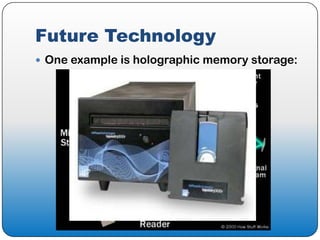
Future Technology
 One example is holographic memory storage:
Conclusion

  In magazines or online, you will find
 the latest information about different
technologies. The books may give you
an overview but change comes rapidly.
Questions and
Possible Answers?

HARDWARE ISSUES

  • 1.
  • 2.
  • 3.
    The Central ProcessingUnit The motherboard should be thought of as the computer’s central nervous system, and the microprocessor chip as the brain.
  • 4.
    So how doyou choose the right motherboard?  Size, or form factor The most popular motherboard form factor today is ATX. Almost all computers use this type.  A chipset controls the flow of information in the motherboard.  It cannot be upgraded without upgrading the whole board.  NVidia and Via make chipsets for both AMD and Intel processors.  AMD and Intel only make chipsets compatible with their own processors.
  • 5.
    What are Microprocessors?  Microprocessors consist of a system of transistors, which act as on/off switches (or 1/0 in binary language) to represent different kinds of data.  The size of your processor is measured in 0s or 1s, called bits. 8 bits = 1 byte 1,000 bytes = 1 kilobyte (KB) 1,000,000 bytes = 1 megabyte (MB) …and so on.
  • 6.
    PC Vs. Macintosh  Microsoft Windows are designed to run on Intel processors, Apple computers use Motorola-type chips. • The PowerPC chip, by Apple, IBM, and Motorola, allowed for Macintosh computers to run PC software as well. • In 2005, Apple decided to convert solely to Intel processor chips by June 2007. • These means more compatibility options.
  • 7.
    Moore’s Law  In 1965, Gordon E. Moore published a paper that proposes: The number of transistors packed onto a chip doubles every 18 months, while the price remains the Moore's law. (2008, September 22). In Wikipedia, The Free same. Encyclopedia. Retrieved 00:22, September 25, 2008, from http://en.wikipedia.org/w/index.php?title=Moore%27s_law&oldid=24 0240004
  • 8.
    Processor Speed Processorspeed is measured by a system clock. The clock rate is measured in hertz. 1981 Today The original 2002 Up to tetra hertz, or IBM computer’s Intel Pentium 4 trillions of clock speed up to 3 GHz. cycles per was at 4.7 MHz. second.
  • 9.
    Thermal Design Power(TDP)  Because of these high speeds, systems often become overheated. • Fans and modes of heat transfer have helped. • But much of today’s software require a high number of processes to occur rapidly, such as in large networks or in games.
  • 10.
    Multi-Core Processors  Dividesthe processing load over two or more processors to prevent sluggishness and overheating. This means improved multi-tasking performance. “Understanding Processor Performance” (2008). Alienware Corporation. Retrieved 23 September 2008 at http://www.alienware.com/intro_pages/processors_101.aspx
  • 11.
    Short-Term Memory What isit and why is it important to consider when buying a computer? What amount of RAM is recommended for a new system?
  • 12.
     Holds thedata before and after processing  Critical for a system to run smoothly and its software to work well  RAM size is usually measured in megabytes or gigabytes
  • 13.
    B.K. Williams &S.C. Sawyer, (2007). Using information Technology  128 megabytes for students  At least 256 megabytes or possibly 512 megabytes if you want to handle graphics files  As memory size required for additional software continues to grow, the library might want to buy for future
  • 14.
     DDR-SDRAM isa more recent development and most often found in personal computers so the staff would probably want to make sure they bought a system with this type of memory
  • 15.
    Michael J. Miller,(Nov. 11, 2004) “Your Next PC.” PC Magazine  Recommends 512 MB of RAM as an inexpensive item that will do more to improve how a computer works than a more powerful processor  For games, 1 gigabyte of RAM
  • 16.
    Kristopher Kubicki, .(March 19, 2006) “Vista and the Quest for More Memory.” Daily Tech.  Noticed a drop in price for more RAM every time a new Windows operating system is launched  Expects to see 2 gigabytes as the norm for new computer systems
  • 17.
    Jason Cross, (Sept.13, 2006) “The Best PC for the Money.” PC Magazine.  Recommends 2 gigabytes of memory with newer operating systems, especially Vista  You could get by with 1 but price makes this too good a bargain to pass up, especially with whatever technology comes next
  • 18.
    Russell Hitchcock. (July 17,2007) "Memory and Storage: Part 2.“ WindowsNetworking.com  Discuss newer type of chip called Magneto- resistive Random Access Memory , or MRAM, which uses magnetic storage  Expensive and not readily available
  • 19.
    Schenone, Ron. (March 29,2007) “Vista – How Much Ram Is Really Enough?” The Blade by Ron Schenone, MVP.  Microsoft always low-balls the amount of RAM needed  Found Microsoft XP ran fine with 1 gigabyte of RAM  Vista ran faster and smoother with 2 gigabytes. No noticeable difference with 4 gigabytes
  • 20.
    Jeff Tyson andDave Coustan, (2008). “How RAM Works,” How Stuff Works.  RAM needs depend on system you are running  Microsoft recommends 128 megabytes with Windows XP, 256 megabytes for optimal performance
  • 21.
    Joel Santo Domingo,Cisco Cheng, Laarni Almendrala Ragaza. (September 2008) “Best PCs on Campus” PC Magazine  Some colleges require computers with 2 gigabytes of RAM  Best new computers have 2 gigabytes, some 3 or 4.
  • 22.
    Summary  While booksmay provide a good introduction to what you might need for purchasing, technology changing so rapidly that information quickly obsolete  Online articles and blogs and even print magazines seem a better source for the latest recommendations  Standard now seems to be at least 1or 2 gigabytes, but probably won’t be long before 3 or 4 is the norm
  • 23.
    Long-Term Memory Long-term memoryis traditionally known as Secondary Storage.
  • 24.
    Two Things toConsider 1. Raw Capacity – the amount of data that can be stored. 2. Density – the amount of data that can be stored per unit of size.
  • 25.
    Secondary Storage Methods Hard Disk Drive (HDD)  Floppy Disk  Zip Disk  Optical Disk  Compact Disk (CD)  Digital Versatile Disc (DVD)  Blu-Ray Disc  Flash Memory
  • 26.
  • 27.
  • 28.
  • 29.
  • 30.
    Future Technology  Oneexample is holographic memory storage:
  • 31.
    Conclusion Inmagazines or online, you will find the latest information about different technologies. The books may give you an overview but change comes rapidly.
  • 32.