Types and components of computer systems
1.1 Hardware and software
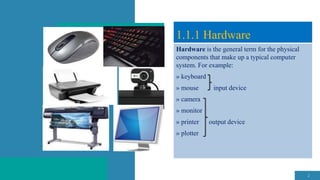
Hardware is the general term for the physical
components that make up a typical computer
system. For example:
» keyboard
» mouse input device
» camera
» monitor
» printer output device
» plotter
2
1.1.1 Hardware
Hardware falls into two categories:
internal and external.
The list above are examples of external hardware,
which is discussed in detail in Chapter 2.
Figure 1.1 considers the following internal
hardware devices:
 motherboard
 central processing unit (CPU)/processor
 random access memory (RAM)
3
1.1.1 Hardware
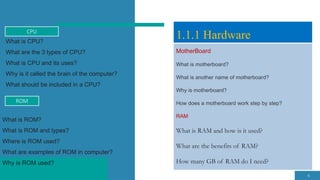
Motherboard
RAM
 read-only memory (ROM)
 graphics card
 sound card
 network interface card (NIC)
 internal storage devices (hard disk drive and
solid-state drive).
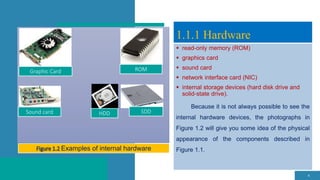
Because it is not always possible to see the
internal hardware devices, the photographs in
Figure 1.2 will give you some idea of the physical
appearance of the components described in
Figure 1.1.
4
1.1.1 Hardware
Graphic Card ROM
HDD SDD
Sound card
Examples of internal hardware
5
Motherboard
INTERNAL
COMPUTE
R
HARDWA
RE
Random access memory (RAM) Read-only memory (ROM)
Central processing unit (CPU)/
processor Network interface card (NIC)
Graphics card Sound card
Internal hard disk drive/
solid-state drive
(HDD/SSD)
Figure 1.1 Internal computer hardware
MotherBoard
What is motherboard?
What is another name of motherboard?
Why is motherboard?
How does a motherboard work step by step?
RAM
What is RAM and how is it used?
What are the benefits of RAM?
How many GB of RAM do I need?
6
1.1.1 Hardware
CPU
What is CPU?
What are the 3 types of CPU?
What is CPU and its uses?
Why is it called the brain of the computer?
What should be included in a CPU?
ROM
What is ROM?
What is ROM and types?
Where is ROM used?
What are examples of ROM in computer?
Why is ROM used?
Graphic Card
what is Graphic card?
What is a graphics card used for?
What is a graphics card and how does it work?
why to use Graphic card?
Sound Card
What is a sound card and how does it work?
Where is sound card in PC?
Why should we use sound card?
7
1.1.1 Hardware
Network Interface Card(NIC)
What is Network Interface Card?
Where is network interface card?
What are the two types of network card?
Internal Harddisk Drive
What is Internal Harddisk Drive?
Where is internal hard drive used?
What is an example of an internal hard drive?
Which is best internal hard disk?
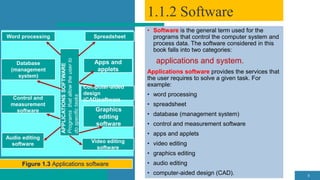
• Software is the general term used for the
programs that control the computer system and
process data. The software considered in this
book falls into two categories:
applications and system.
Applications software provides the services that
the user requires to solve a given task. For
example:
• word processing
• spreadsheet
• database (management system)
• control and measurement software
• apps and applets
• video editing
• graphics editing
• audio editing
• computer-aided design (CAD). 8
1.1.2 Software
Word processing Spreadsheet
Control and
measurement
software
Audio editing
software
Database
(management
system)
Figure 1.3 Applications software
Apps and
applets
Video editing
software
Graphics
editing
software
Computer-aided
design
(CAD)software
APPLICATIONS
SOFTWARE
Programs
that
allow
the
user
to
do
specific
tasks
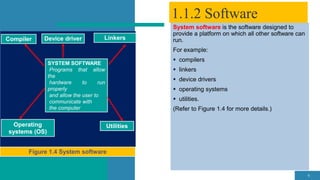
System software is the software designed to
provide a platform on which all other software can
run.
For example:
 compilers
 linkers
 device drivers
 operating systems
 utilities.
(Refer to Figure 1.4 for more details.)
9
1.1.2 Software
Compiler Linkers
Operating
systems (OS)
Utilities
Device driver
SYSTEM SOFTWARE
Programs that allow
the
hardware to run
properly
and allow the user to
communicate with
the computer
1.1.3 Analogue and digital data
10
11
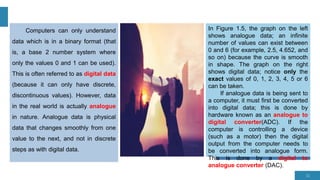
Computers can only understand
data which is in a binary format (that
is, a base 2 number system where
only the values 0 and 1 can be used).
This is often referred to as digital data
(because it can only have discrete,
discontinuous values). However, data
in the real world is actually analogue
in nature. Analogue data is physical
data that changes smoothly from one
value to the next, and not in discrete
steps as with digital data.
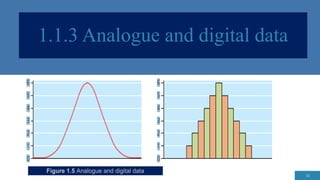
In Figure 1.5, the graph on the left
shows analogue data; an infinite
number of values can exist between
0 and 6 (for example, 2.5, 4.652, and
so on) because the curve is smooth
in shape. The graph on the right
shows digital data; notice only the
exact values of 0, 1, 2, 3, 4, 5 or 6
can be taken.
If analogue data is being sent to
a computer, it must first be converted
into digital data; this is done by
hardware known as an analogue to
digital converter(ADC). If the
computer is controlling a device
(such as a motor) then the digital
output from the computer needs to
be converted into analogue form.
This is done by a digital to
analogue converter (DAC).
1.2 Main components of computer systems
12
Table 1.1 Examples of input, output and secondary storage
devices
Device Examples
Input Devices keyboard, mouse, camera,
microphone, sensor, scanner
Output Devices monitor, printer, speakers,
projector, (graph) plotter
Secondary Storage Device hard disk drive, solid-state drive,
pen drive
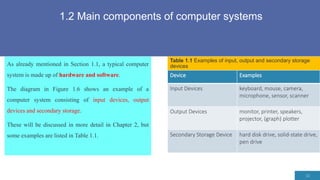
As already mentioned in Section 1.1, a typical computer
system is made up of hardware and software.
The diagram in Figure 1.6 shows an example of a
computer system consisting of input devices, output
devices and secondary storage.
These will be discussed in more detail in Chapter 2, but
some examples are listed in Table 1.1.
Figure 1.6 A typical computer system
13
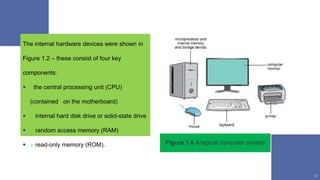
The internal hardware devices were shown in
Figure 1.2 – these consist of four key
components:
 »the central processing unit (CPU)
(contained on the motherboard)
 » internal hard disk drive or solid-state drive
 » random access memory (RAM)
 » read-only memory (ROM).
1.2.1 CPU
14
The central processing unit (CPU) is the part of the
computer that interprets and executes the commands from
the computer hardware and software. It is normally part of
the computer motherboard.
CPUs used to be made up of discrete components and
numerous small integrated circuits; these were combined
together on one or more circuit board(s). However, due to
modern manufacturing techniques, the CPU is now
referred to as a microprocessor.
This is a single integrated circuit which is at the heart of most PCs
and is also found in many household devices and equipment
where some control or monitoring is needed (for example, the
engine management system in a car).
The CPU/microprocessor is made up of a control unit, which
controls the input and output devices; an arithmetic and logic
unit (ALU), which carries out calculations and makes logical
decisions, and small memory locations called registers.
1.2.2 Internal memory
15
Random access memory (RAM) is an internal chip where data
is temporarily stored when running applications. This memory
can be written to and read from. Because its contents are lost
when power to the computer is turned off, it is often referred to
as a volatile or temporary memory. This was fully described in
Figure 1.1.
Read-only memory (ROM) is a memory used to store
information that needs to be permanent. It is often used to
contain, for example, configuration data for a computer system.
Chips used for ROM cannot be altered and can only be read
from (hence their name). One of the main advantages is that
the information stored on the ROM chip is not lost, even when
power is turned off to the computer. They are often referred to
as non-volatile memories. This was fully described in Figure
It is worth noting that ROM also contains some
coding known as the boot file. This code tells the
computer what to do when it first starts up; it is
often referred to as the BIOS (basic input/output
system).
When the computer is turned on, the BIOS carries
out a hardware check to find out if all the devices
are present and whether they are functional. Then
it loads the operating system into the RAM.
The BIOS stores the date, time and system
configuration in a non-volatile chip called a CMOS
(complementary metal oxide semiconductor) –
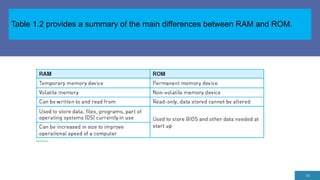
Table 1.2 provides a summary of the main differences between RAM and ROM.
16

Hardware& Software for IGCSE Information and Communication Technology

  • 1.
    Types and componentsof computer systems 1.1 Hardware and software
  • 2.
    Hardware is thegeneral term for the physical components that make up a typical computer system. For example: » keyboard » mouse input device » camera » monitor » printer output device » plotter 2 1.1.1 Hardware
  • 3.
    Hardware falls intotwo categories: internal and external. The list above are examples of external hardware, which is discussed in detail in Chapter 2. Figure 1.1 considers the following internal hardware devices:  motherboard  central processing unit (CPU)/processor  random access memory (RAM) 3 1.1.1 Hardware Motherboard RAM
  • 4.
     read-only memory(ROM)  graphics card  sound card  network interface card (NIC)  internal storage devices (hard disk drive and solid-state drive). Because it is not always possible to see the internal hardware devices, the photographs in Figure 1.2 will give you some idea of the physical appearance of the components described in Figure 1.1. 4 1.1.1 Hardware Graphic Card ROM HDD SDD Sound card Examples of internal hardware
  • 5.
    5 Motherboard INTERNAL COMPUTE R HARDWA RE Random access memory(RAM) Read-only memory (ROM) Central processing unit (CPU)/ processor Network interface card (NIC) Graphics card Sound card Internal hard disk drive/ solid-state drive (HDD/SSD) Figure 1.1 Internal computer hardware
  • 6.
    MotherBoard What is motherboard? Whatis another name of motherboard? Why is motherboard? How does a motherboard work step by step? RAM What is RAM and how is it used? What are the benefits of RAM? How many GB of RAM do I need? 6 1.1.1 Hardware CPU What is CPU? What are the 3 types of CPU? What is CPU and its uses? Why is it called the brain of the computer? What should be included in a CPU? ROM What is ROM? What is ROM and types? Where is ROM used? What are examples of ROM in computer? Why is ROM used?
  • 7.
    Graphic Card what isGraphic card? What is a graphics card used for? What is a graphics card and how does it work? why to use Graphic card? Sound Card What is a sound card and how does it work? Where is sound card in PC? Why should we use sound card? 7 1.1.1 Hardware Network Interface Card(NIC) What is Network Interface Card? Where is network interface card? What are the two types of network card? Internal Harddisk Drive What is Internal Harddisk Drive? Where is internal hard drive used? What is an example of an internal hard drive? Which is best internal hard disk?
  • 8.
    • Software isthe general term used for the programs that control the computer system and process data. The software considered in this book falls into two categories: applications and system. Applications software provides the services that the user requires to solve a given task. For example: • word processing • spreadsheet • database (management system) • control and measurement software • apps and applets • video editing • graphics editing • audio editing • computer-aided design (CAD). 8 1.1.2 Software Word processing Spreadsheet Control and measurement software Audio editing software Database (management system) Figure 1.3 Applications software Apps and applets Video editing software Graphics editing software Computer-aided design (CAD)software APPLICATIONS SOFTWARE Programs that allow the user to do specific tasks
  • 9.
    System software isthe software designed to provide a platform on which all other software can run. For example:  compilers  linkers  device drivers  operating systems  utilities. (Refer to Figure 1.4 for more details.) 9 1.1.2 Software Compiler Linkers Operating systems (OS) Utilities Device driver SYSTEM SOFTWARE Programs that allow the hardware to run properly and allow the user to communicate with the computer
  • 10.
    1.1.3 Analogue anddigital data 10
  • 11.
    11 Computers can onlyunderstand data which is in a binary format (that is, a base 2 number system where only the values 0 and 1 can be used). This is often referred to as digital data (because it can only have discrete, discontinuous values). However, data in the real world is actually analogue in nature. Analogue data is physical data that changes smoothly from one value to the next, and not in discrete steps as with digital data. In Figure 1.5, the graph on the left shows analogue data; an infinite number of values can exist between 0 and 6 (for example, 2.5, 4.652, and so on) because the curve is smooth in shape. The graph on the right shows digital data; notice only the exact values of 0, 1, 2, 3, 4, 5 or 6 can be taken. If analogue data is being sent to a computer, it must first be converted into digital data; this is done by hardware known as an analogue to digital converter(ADC). If the computer is controlling a device (such as a motor) then the digital output from the computer needs to be converted into analogue form. This is done by a digital to analogue converter (DAC).
  • 12.
    1.2 Main componentsof computer systems 12 Table 1.1 Examples of input, output and secondary storage devices Device Examples Input Devices keyboard, mouse, camera, microphone, sensor, scanner Output Devices monitor, printer, speakers, projector, (graph) plotter Secondary Storage Device hard disk drive, solid-state drive, pen drive As already mentioned in Section 1.1, a typical computer system is made up of hardware and software. The diagram in Figure 1.6 shows an example of a computer system consisting of input devices, output devices and secondary storage. These will be discussed in more detail in Chapter 2, but some examples are listed in Table 1.1.
  • 13.
    Figure 1.6 Atypical computer system 13 The internal hardware devices were shown in Figure 1.2 – these consist of four key components:  »the central processing unit (CPU) (contained on the motherboard)  » internal hard disk drive or solid-state drive  » random access memory (RAM)  » read-only memory (ROM).
  • 14.
    1.2.1 CPU 14 The centralprocessing unit (CPU) is the part of the computer that interprets and executes the commands from the computer hardware and software. It is normally part of the computer motherboard. CPUs used to be made up of discrete components and numerous small integrated circuits; these were combined together on one or more circuit board(s). However, due to modern manufacturing techniques, the CPU is now referred to as a microprocessor. This is a single integrated circuit which is at the heart of most PCs and is also found in many household devices and equipment where some control or monitoring is needed (for example, the engine management system in a car). The CPU/microprocessor is made up of a control unit, which controls the input and output devices; an arithmetic and logic unit (ALU), which carries out calculations and makes logical decisions, and small memory locations called registers.
  • 15.
    1.2.2 Internal memory 15 Randomaccess memory (RAM) is an internal chip where data is temporarily stored when running applications. This memory can be written to and read from. Because its contents are lost when power to the computer is turned off, it is often referred to as a volatile or temporary memory. This was fully described in Figure 1.1. Read-only memory (ROM) is a memory used to store information that needs to be permanent. It is often used to contain, for example, configuration data for a computer system. Chips used for ROM cannot be altered and can only be read from (hence their name). One of the main advantages is that the information stored on the ROM chip is not lost, even when power is turned off to the computer. They are often referred to as non-volatile memories. This was fully described in Figure It is worth noting that ROM also contains some coding known as the boot file. This code tells the computer what to do when it first starts up; it is often referred to as the BIOS (basic input/output system). When the computer is turned on, the BIOS carries out a hardware check to find out if all the devices are present and whether they are functional. Then it loads the operating system into the RAM. The BIOS stores the date, time and system configuration in a non-volatile chip called a CMOS (complementary metal oxide semiconductor) –
  • 16.
    Table 1.2 providesa summary of the main differences between RAM and ROM. 16