Crayford Academy
Revision Guide
Creative
Imedia
R081
Student Name
-----------------------------------------------------------------------------
Creative R081 revision Guide
Overview of the unit
You must be able to describe the process of creating pre-production documents and
the role they play in the development of your ideas. You should be able to describe
how you would analyse a client’s requirements and how they might provide their
requirements to you. I.e. client brief, meetings, scripts.
You should be able to analyse your client brief to ascertain your clients target
audience and provide examples of how your proposed product will meet their
specification.
You should be able to show that you can complete primary (questionnaires,
sampling, surveys) and secondary (books, internet, television) research to develop
your ideas.
You will be able to discuss the time scales for a set a project and describe steps you
may have to take to plan for the whole project including contingencies.
You will be able to create a range of well annotated pre-production documents such
as storyboards, spider diagrams, mood boards, work plans and visualisation
diagrams.
1. Story boards
What is a storyboard?
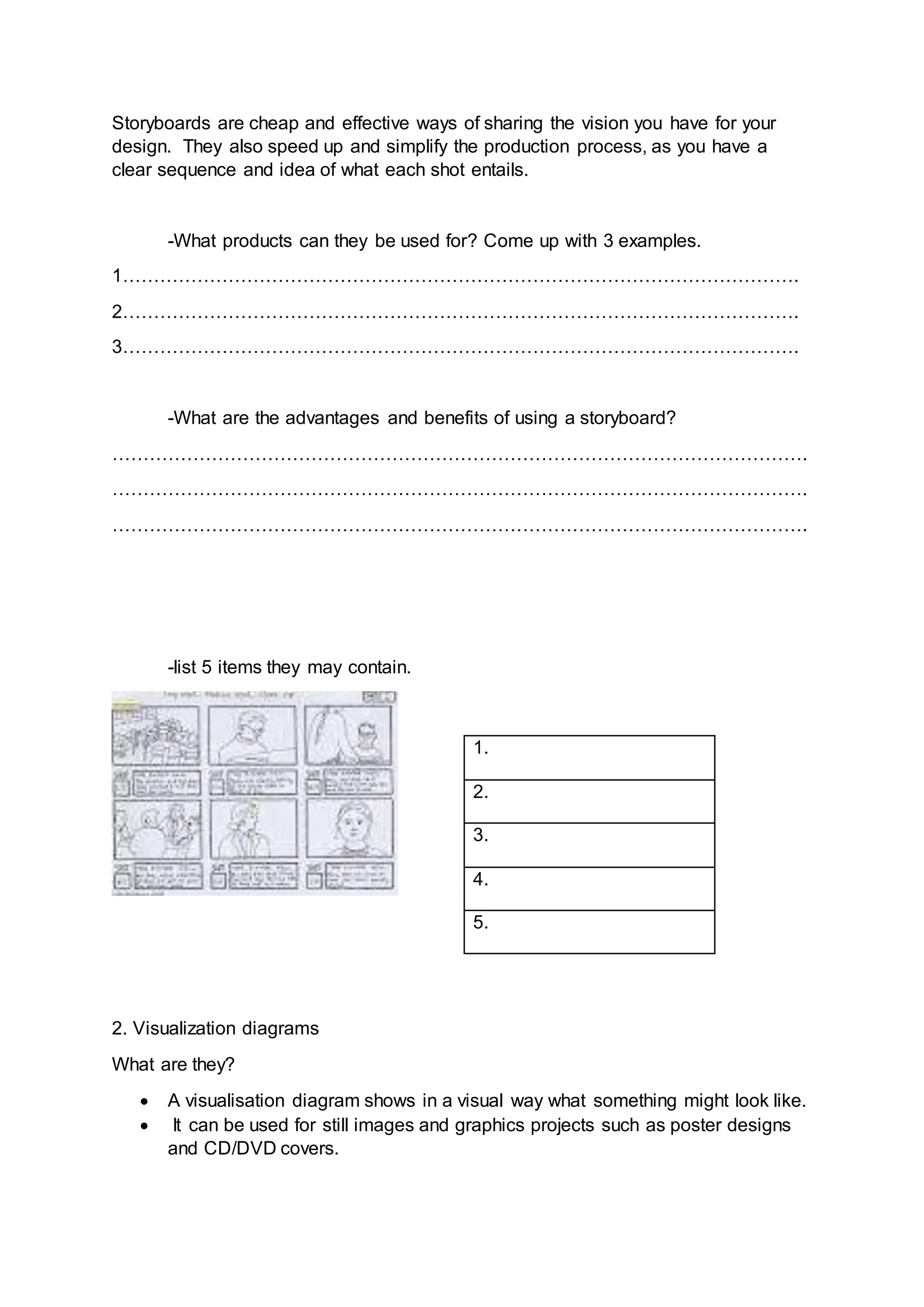
 A storyboard is a graphical representation of how you want your media to
unfold, shot by shot.
 It is made up of a sequence of pictures representing each shot, with notes
about what is going on in the scene.
 It is like a comic book version of a script
What makes up a storyboard?
Storyboards are a combination of:
 Images
 Camera angles
 Lighting
 Sound effects
 Background music
 Motion arrows
 Dialogue
 Scene timings
Storyboards are cheap and effective ways of sharing the vision you have for your
design. They also speed up and simplify the production process, as you have a
clear sequence and idea of what each shot entails.
-What products can they be used for? Come up with 3 examples.
1……………………………………………………………………………………………….
2……………………………………………………………………………………………….
3……………………………………………………………………………………………….
-What are the advantages and benefits of using a storyboard?
………………………………………………………………………………………………….
………………………………………………………………………………………………….
………………………………………………………………………………………………….
-list 5 items they may contain.
2. Visualization diagrams
What are they?
 A visualisation diagram shows in a visual way what something might look like.
 It can be used for still images and graphics projects such as poster designs
and CD/DVD covers.
1.
2.
3.
4.
5.
 A visualisation diagram could also be used to show the layout of a web page,
multimedia display, game scene, character model, comic book layout etc.
The visualisation diagram will show both the content and position of different
elements such as
 Images
 Graphics (Background style, borders)
 Text (Font style, size, and colour)
 Navigation (Location and style of buttons or menus, only on a website or
interactive presentation)
A new CGI animation, blockbuster film is being created. What could
visualisation diagrams be used for in both the production, and advertising of
the film? Think of 5 examples.
1……………………………………………………………………………………………….
2……………………………………………………………………………………………….
3……………………………………………………………………………………………….
4……………………………………………………………………………………………….
5……………………………………………………………………………………………….
For one of your examples, hand draw a visualisation diagram in the box below.
Make sure it includes all of the elements listed above.
3. What is a spider diagram?
A spider diagram is often used for planning or creating ideas. It uses a structured
layout to explore ideas. A spider diagram allows you to think about the main idea and
then how the ideas are seen to be present in many parts. It starts with a central idea
and branches out. Each branch will have a node. It is important that the nodes follow
a logical pattern.
Questions.
Create an example of a spider diagram for a webpage to advertise a musician and a
new album they are releasing
4.Moodboards
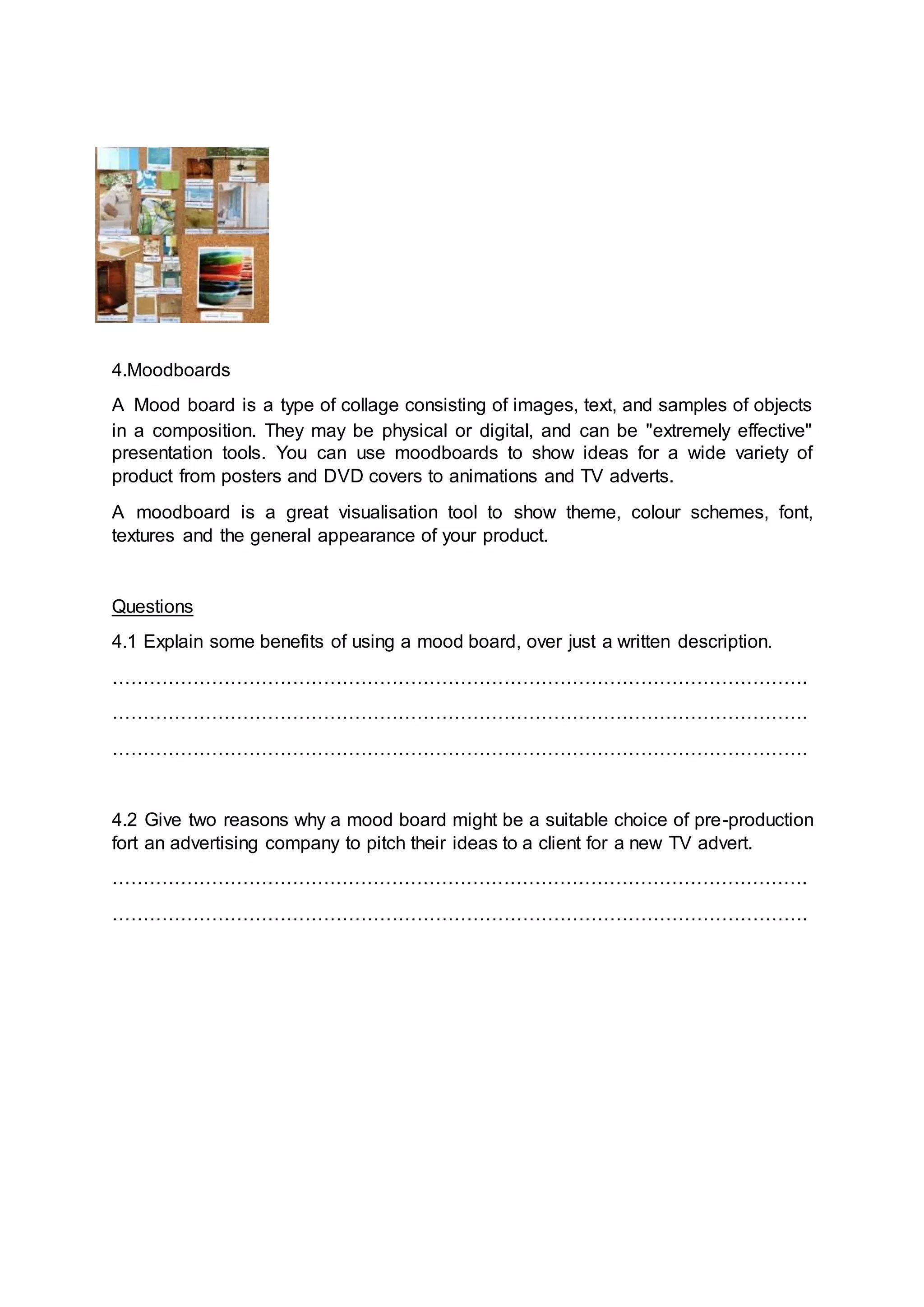
A Mood board is a type of collage consisting of images, text, and samples of objects
in a composition. They may be physical or digital, and can be "extremely effective"
presentation tools. You can use moodboards to show ideas for a wide variety of
product from posters and DVD covers to animations and TV adverts.
A moodboard is a great visualisation tool to show theme, colour schemes, font,
textures and the general appearance of your product.
Questions
4.1 Explain some benefits of using a mood board, over just a written description.
………………………………………………………………………………………………….
………………………………………………………………………………………………….
………………………………………………………………………………………………….
4.2 Give two reasons why a mood board might be a suitable choice of pre-production
fort an advertising company to pitch their ideas to a client for a new TV advert.
………………………………………………………………………………………………….
………………………………………………………………………………………………….
5. Hardware
Understand that hardware can be used to digitalise items, for example a scanner
could be used to make a digital copy of a script which could be saved a PDF.
Hardware Uses File types that can be
created.
Scanner
Camera
Video Recorder
Voice recorder
6. Scripts
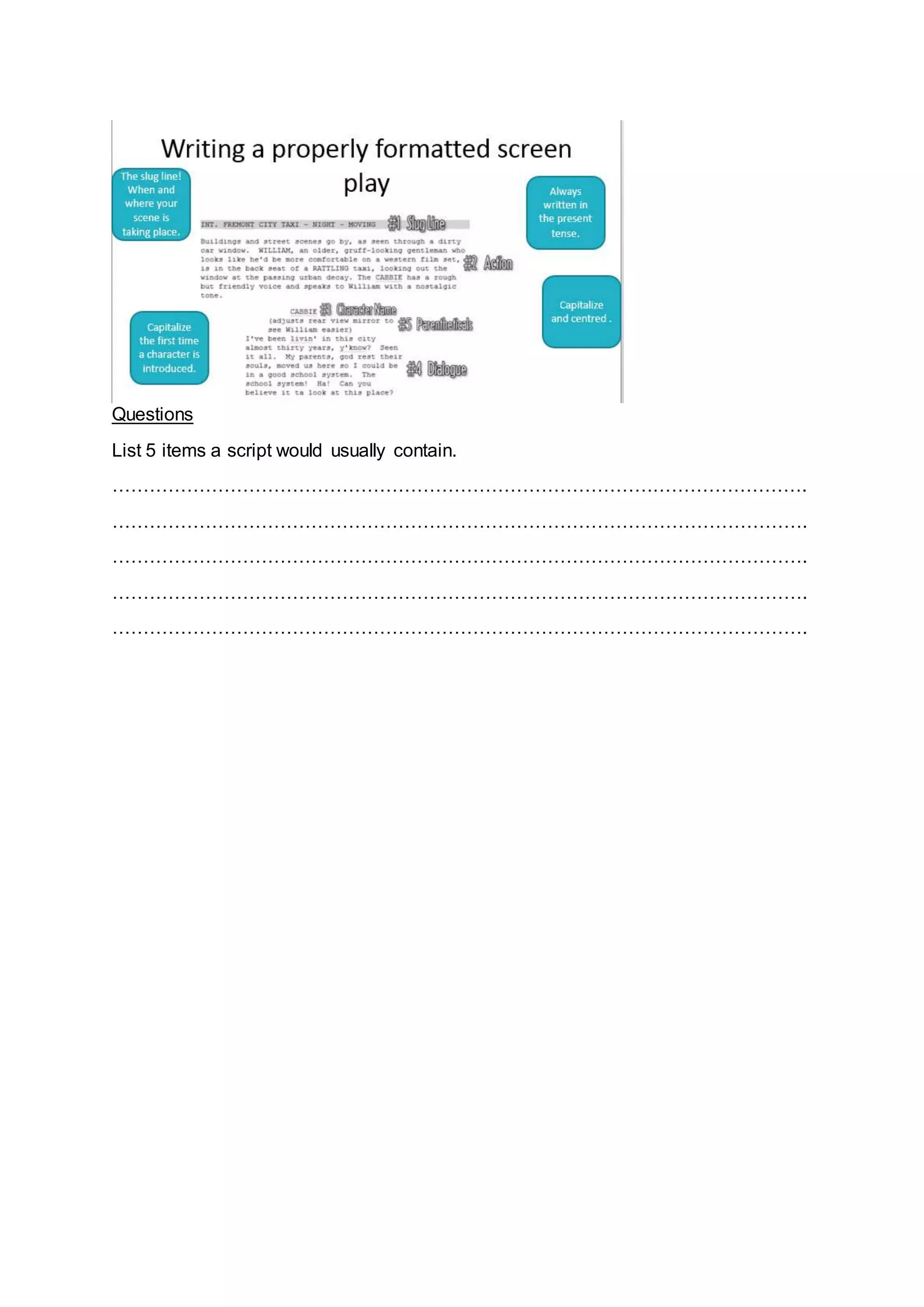
A script is a document that outlines every aural (speaking), visual (what you can see)
behavioural (body language), and lingual element required to tell a story. The script
is only used as an outline as it will be interpreted by many different professions such
as the director, cast, editor, and production crew.
Questions
List 5 items a script would usually contain.
………………………………………………………………………………………………….
………………………………………………………………………………………………….
………………………………………………………………………………………………….
………………………………………………………………………………………………….
………………………………………………………………………………………………….
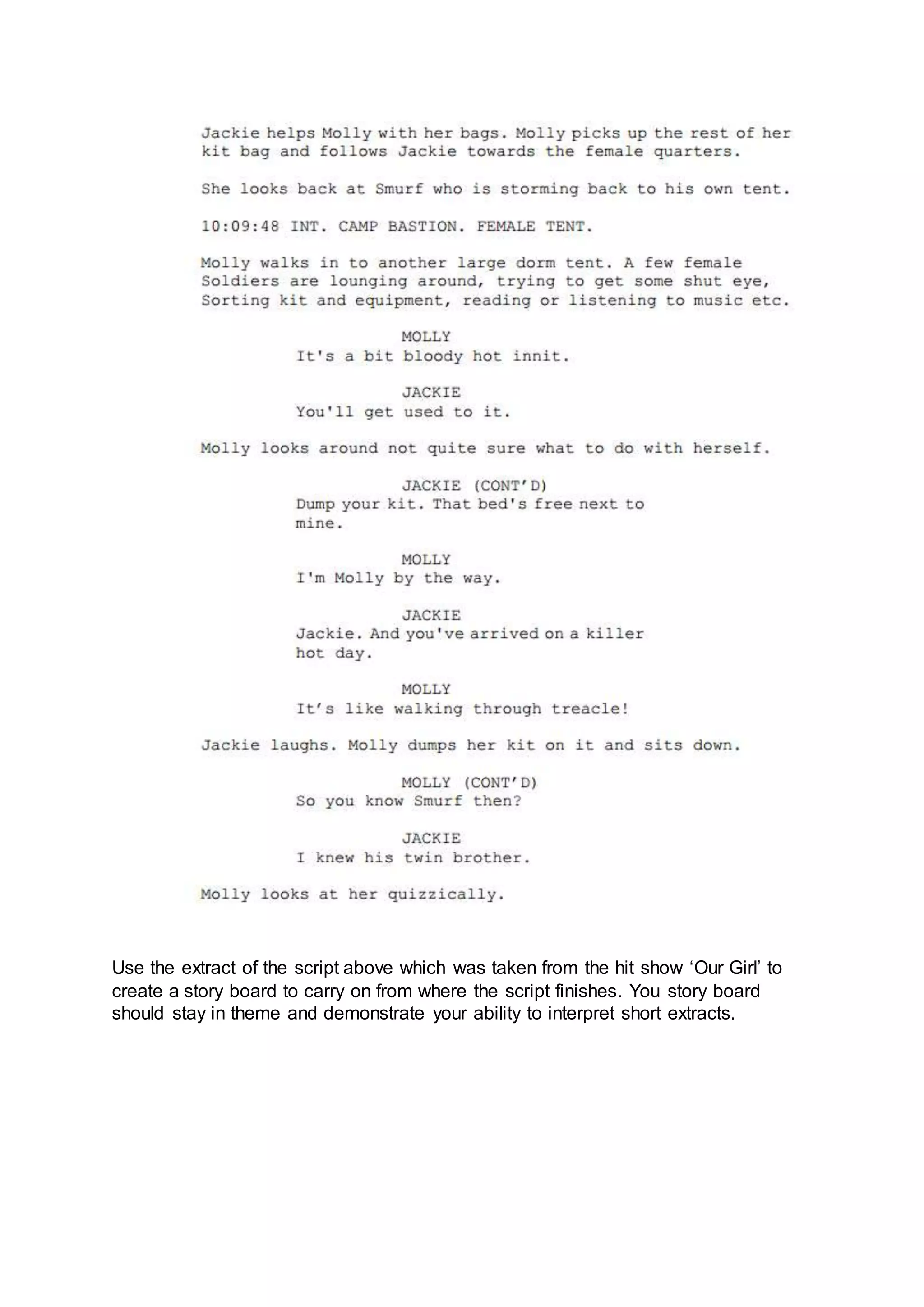
Use the extract of the script above which was taken from the hit show ‘Our Girl’ to
create a story board to carry on from where the script finishes. You story board
should stay in theme and demonstrate your ability to interpret short extracts.
----------------------------------
----------------------------------
----------------------------------
----------------------------------
----------------------------------
----------------------------------
----------------------------------
----------------------------------
----------------------------------
----------------------------------
----------------------------------
----------------------------------
Extension break down a script a selection of which can be found
http://www.bbc.co.uk/writersroom/scripts/ create a storyboard to demonstrate one of
them.
7. Health and safety
RSI is a repetitive strain injury is an "injury to the musculoskeletal and nervous
systems that may be caused by repetitive tasks, forceful exertions, vibrations,
mechanical compression, or sustained or awkward positions.
Eye strain
Many people who use computers complain of eye strain. Looking at a monitor for a
long time can strain your eyes or can make any other problems you are having with
your eyes seem more noticeable. Symptoms include:
Eye discomfort; Headaches; Sore, tired, burning or itchy eyes; Difficulty focusing
Back ache
Sitting for long periods in front of a computer is storing up trouble. No matter how
good your positioning, it is important to get up every so often.
 seating posture
 computer screen position
 chair height
 keyboard position
 mouse position
 desk equipment layout
How to avoid injuries consistent with long periods of computer use.
Make sure equipment is properly positioned.
Use chairs that can be adjusted to suit the height of the person using
it and the desk they are working at.
Avoid glare from windows or lights on computer screens.
Take regular breaks.
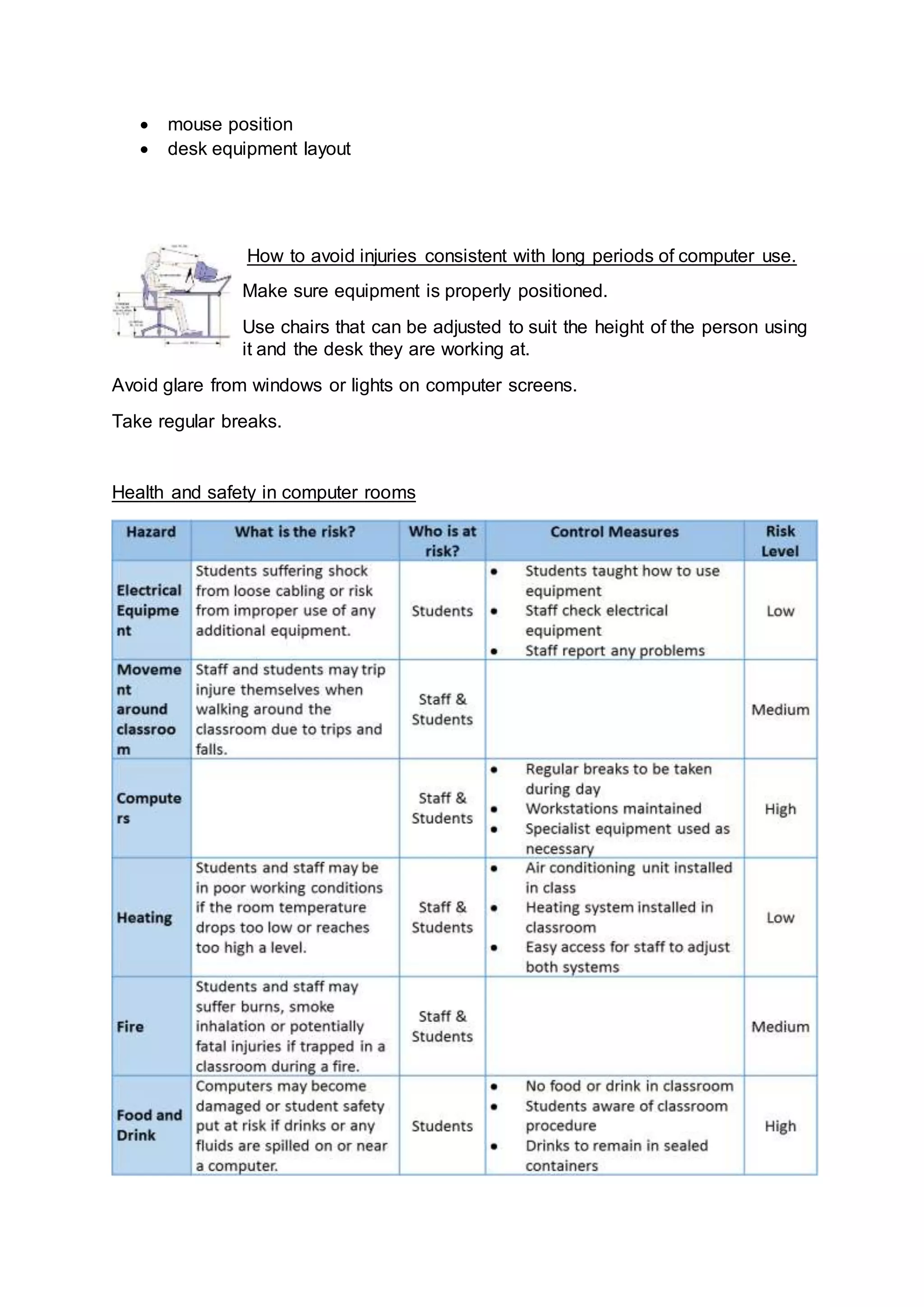
Health and safety in computer rooms
What is a site recce?
………………………………………………………………………………………………….
………………………………………………………………………………………………….
………………………………………………………………………………………………….
Why should the producers of the TV advert complete a site Recce before they make
final plans for the shooting of the advert?
………………………………………………………………………………………………….
………………………………………………………………………………………………….
………………………………………………………………………………………………….
List 3 threats to health and safety a computer user may face?
Hazard How could you avoid?
List three possible hazards of working in a computer room.
Hazard How could you avoid?
8. File types and file compression
You should be able to select appropriate file types for specific products and explain
why you have chosen them.
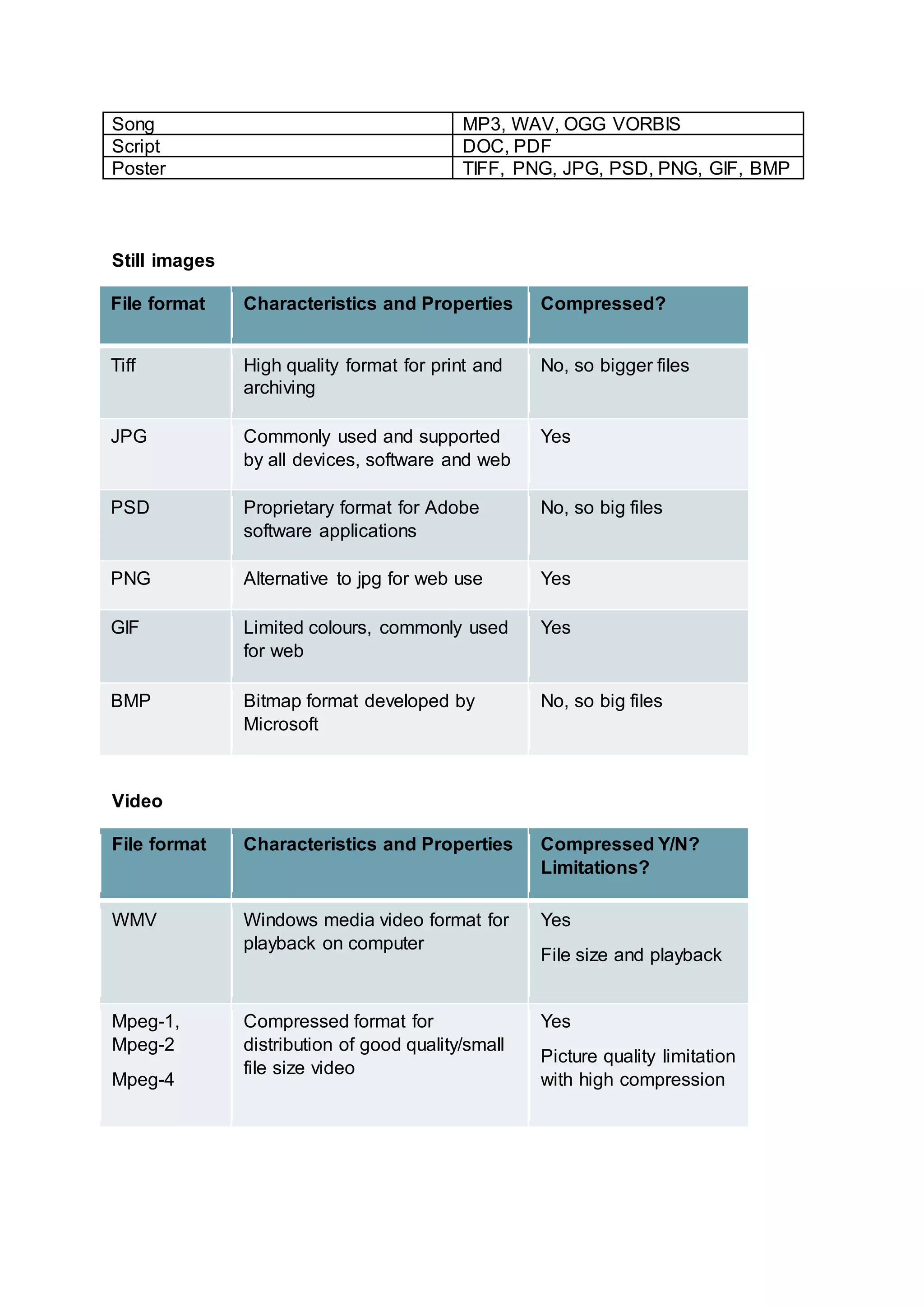
Product File types you could use
Video WMV, MPG, MOV, FLV
Song MP3, WAV, OGG VORBIS
Script DOC, PDF
Poster TIFF, PNG, JPG, PSD, PNG, GIF, BMP
Still images
File format Characteristics and Properties Compressed?
Tiff High quality format for print and
archiving
No, so bigger files
JPG Commonly used and supported
by all devices, software and web
Yes
PSD Proprietary format for Adobe
software applications
No, so big files
PNG Alternative to jpg for web use Yes
GIF Limited colours, commonly used
for web
Yes
BMP Bitmap format developed by
Microsoft
No, so big files
Video
File format Characteristics and Properties Compressed Y/N?
Limitations?
WMV Windows media video format for
playback on computer
Yes
File size and playback
Mpeg-1,
Mpeg-2
Mpeg-4
Compressed format for
distribution of good quality/small
file size video
Yes
Picture quality limitation
with high compression
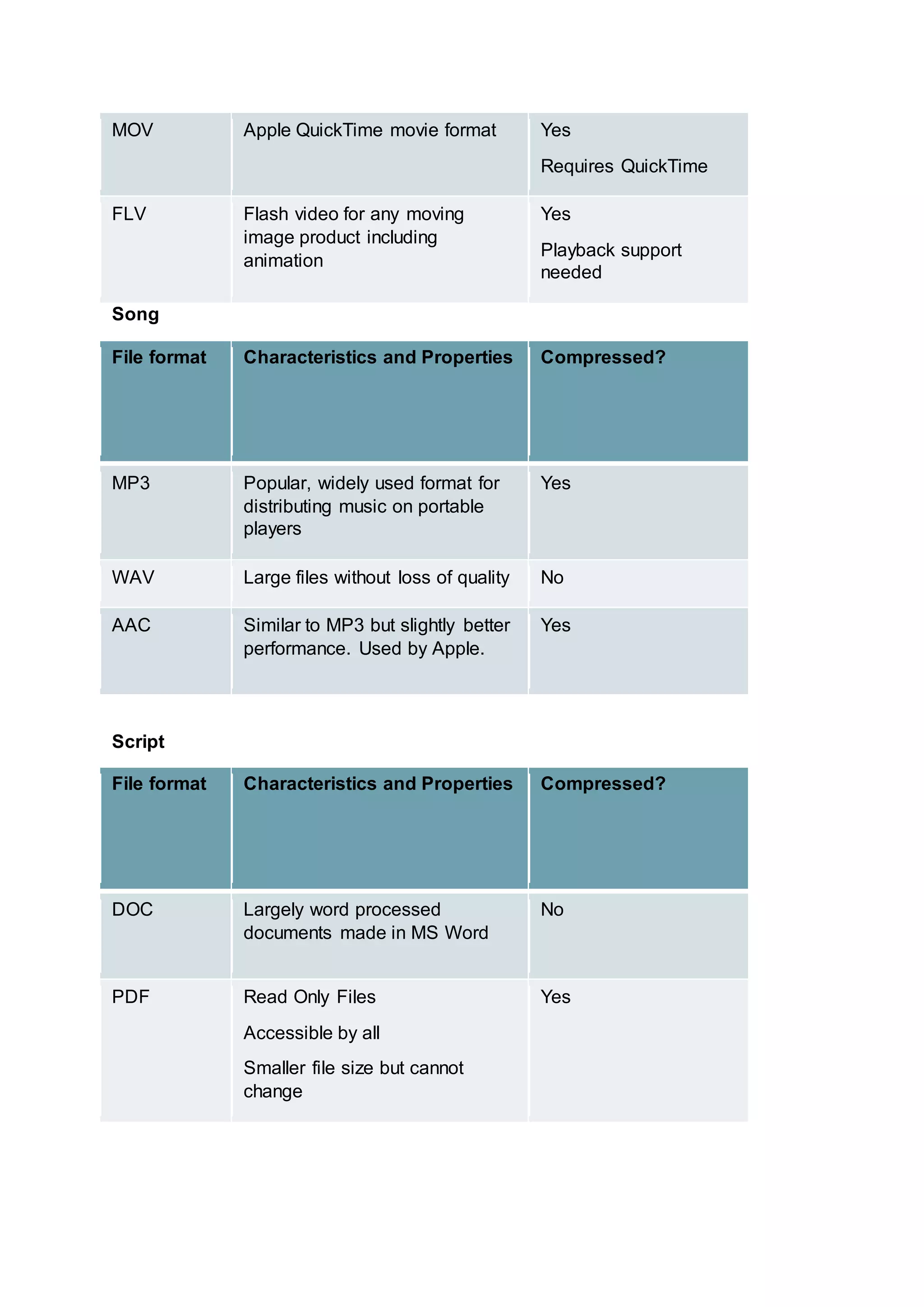
MOV Apple QuickTime movie format Yes
Requires QuickTime
FLV Flash video for any moving
image product including
animation
Yes
Playback support
needed
Song
File format Characteristics and Properties Compressed?
MP3 Popular, widely used format for
distributing music on portable
players
Yes
WAV Large files without loss of quality No
AAC Similar to MP3 but slightly better
performance. Used by Apple.
Yes
Script
File format Characteristics and Properties Compressed?
DOC Largely word processed
documents made in MS Word
No
PDF Read Only Files
Accessible by all
Smaller file size but cannot
change
Yes
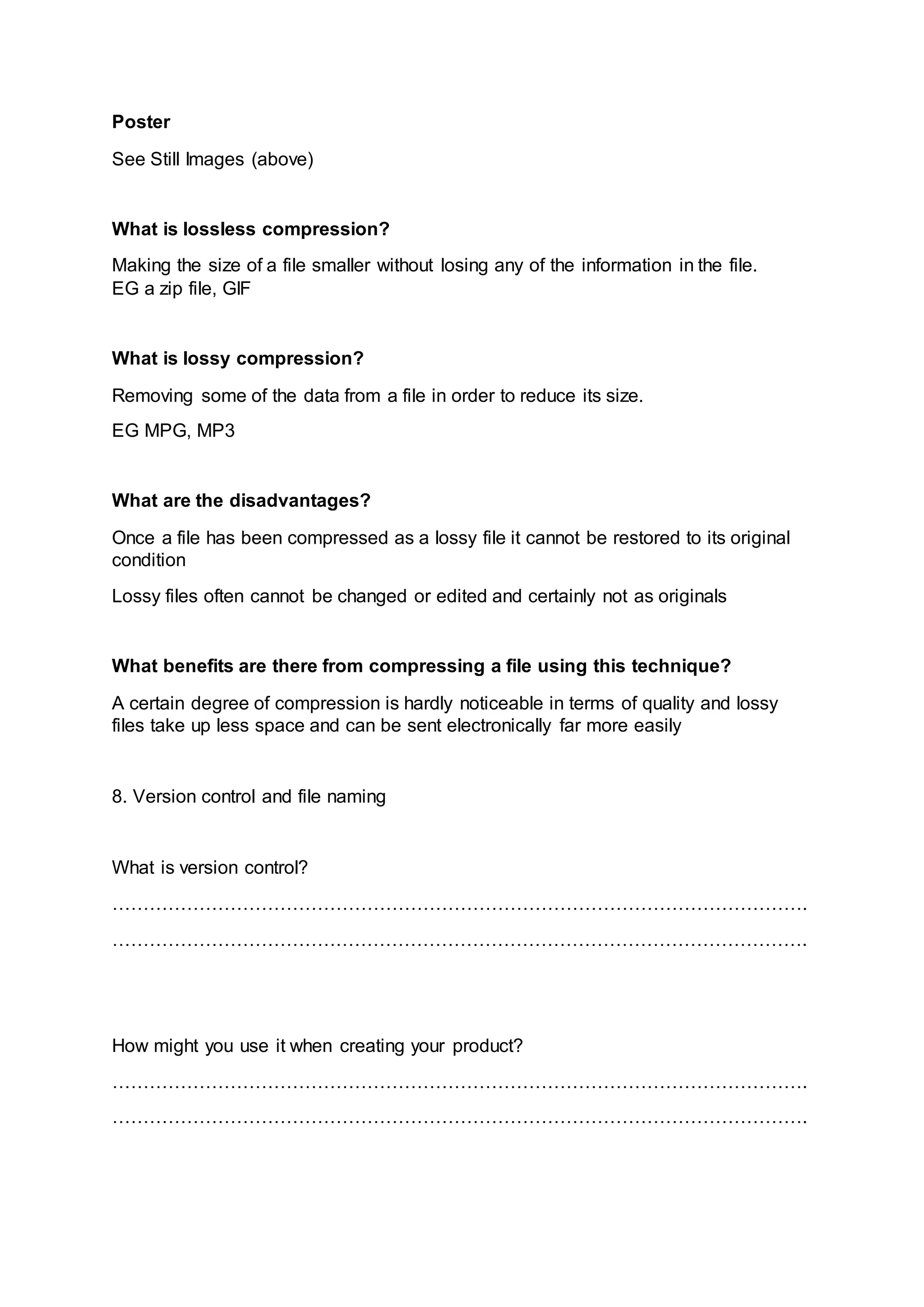
Poster
See Still Images (above)
What is lossless compression?
Making the size of a file smaller without losing any of the information in the file.
EG a zip file, GIF
What is lossy compression?
Removing some of the data from a file in order to reduce its size.
EG MPG, MP3
What are the disadvantages?
Once a file has been compressed as a lossy file it cannot be restored to its original
condition
Lossy files often cannot be changed or edited and certainly not as originals
What benefits are there from compressing a file using this technique?
A certain degree of compression is hardly noticeable in terms of quality and lossy
files take up less space and can be sent electronically far more easily
8. Version control and file naming
What is version control?
………………………………………………………………………………………………….
………………………………………………………………………………………………….
How might you use it when creating your product?
………………………………………………………………………………………………….
………………………………………………………………………………………………….
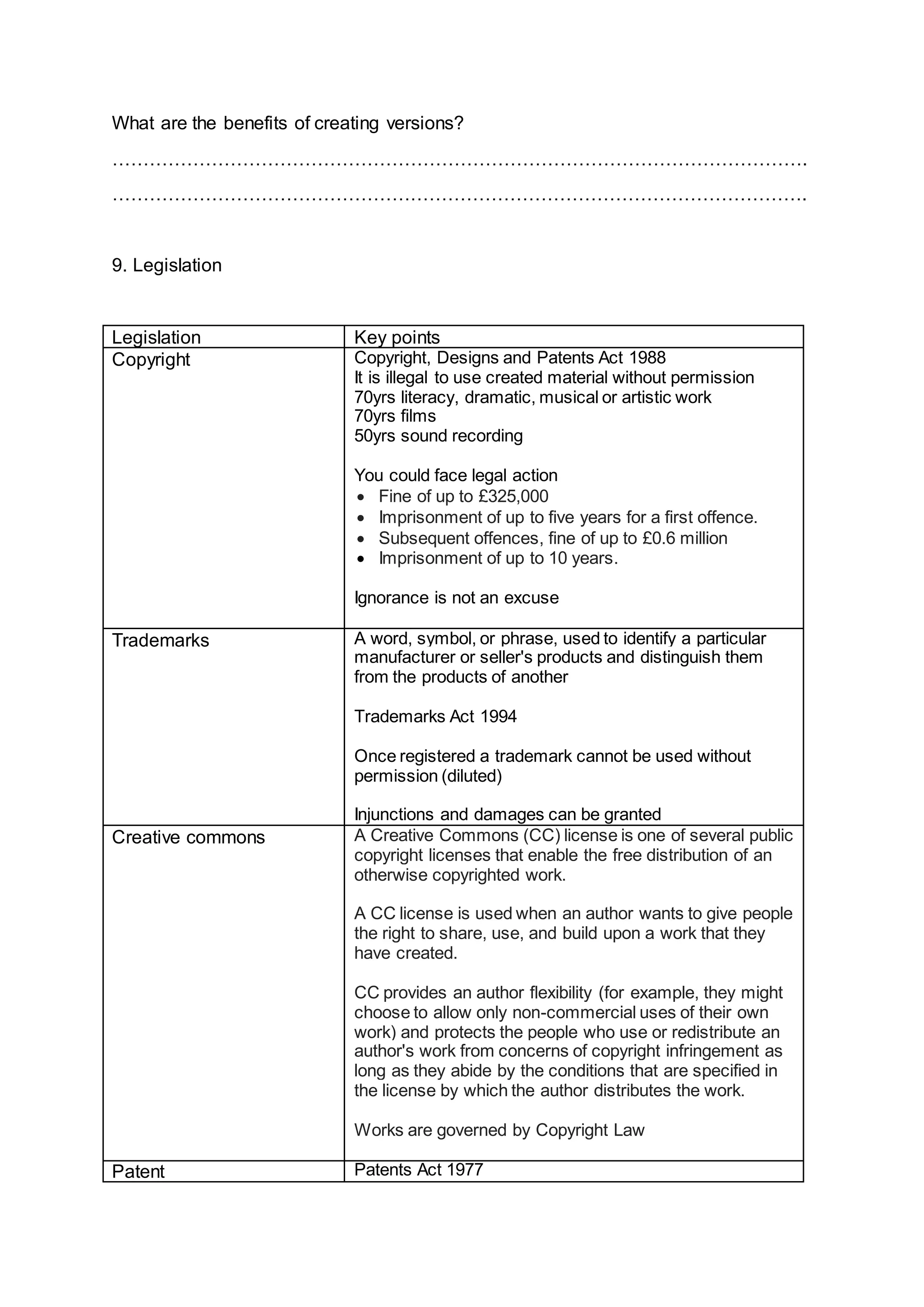
What are the benefits of creating versions?
………………………………………………………………………………………………….
………………………………………………………………………………………………….
9. Legislation
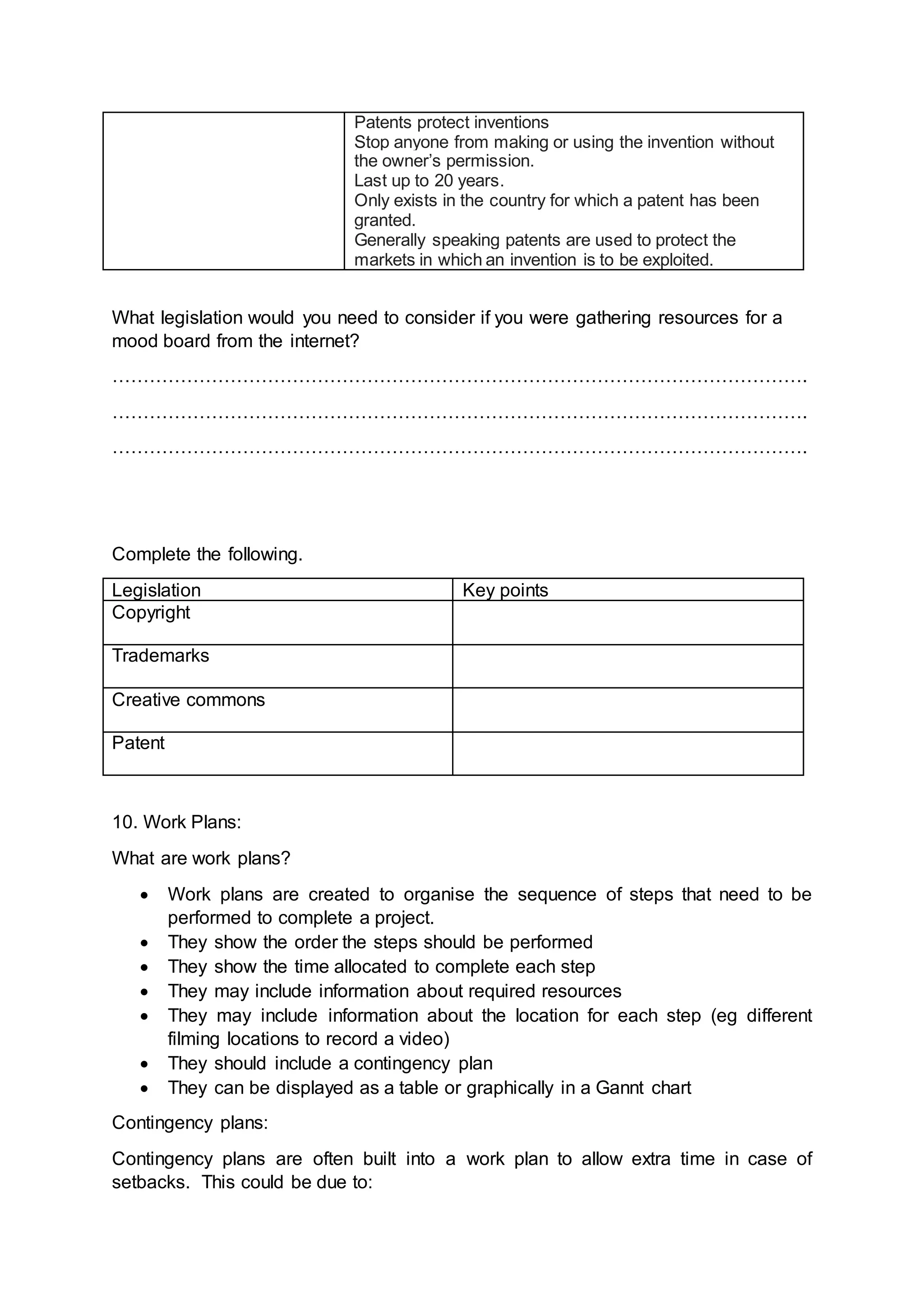
Legislation Key points
Copyright Copyright, Designs and Patents Act 1988
It is illegal to use created material without permission
70yrs literacy, dramatic, musical or artistic work
70yrs films
50yrs sound recording
You could face legal action
 Fine of up to £325,000
 Imprisonment of up to five years for a first offence.
 Subsequent offences, fine of up to £0.6 million
 Imprisonment of up to 10 years.
Ignorance is not an excuse
Trademarks A word, symbol, or phrase, used to identify a particular
manufacturer or seller's products and distinguish them
from the products of another
Trademarks Act 1994
Once registered a trademark cannot be used without
permission (diluted)
Injunctions and damages can be granted
Creative commons A Creative Commons (CC) license is one of several public
copyright licenses that enable the free distribution of an
otherwise copyrighted work.
A CC license is used when an author wants to give people
the right to share, use, and build upon a work that they
have created.
CC provides an author flexibility (for example, they might
choose to allow only non-commercial uses of their own
work) and protects the people who use or redistribute an
author's work from concerns of copyright infringement as
long as they abide by the conditions that are specified in
the license by which the author distributes the work.
Works are governed by Copyright Law
Patent Patents Act 1977
Patents protect inventions
Stop anyone from making or using the invention without
the owner’s permission.
Last up to 20 years.
Only exists in the country for which a patent has been
granted.
Generally speaking patents are used to protect the
markets in which an invention is to be exploited.
What legislation would you need to consider if you were gathering resources for a
mood board from the internet?
………………………………………………………………………………………………….
………………………………………………………………………………………………….
………………………………………………………………………………………………….
Complete the following.
Legislation Key points
Copyright
Trademarks
Creative commons
Patent
10. Work Plans:
What are work plans?
 Work plans are created to organise the sequence of steps that need to be
performed to complete a project.
 They show the order the steps should be performed
 They show the time allocated to complete each step
 They may include information about required resources
 They may include information about the location for each step (eg different
filming locations to record a video)
 They should include a contingency plan
 They can be displayed as a table or graphically in a Gannt chart
Contingency plans:
Contingency plans are often built into a work plan to allow extra time in case of
setbacks. This could be due to:
 Equipment failure
 Workers off sick
 Conditions are not suitable for filming
 Health and safety concerns
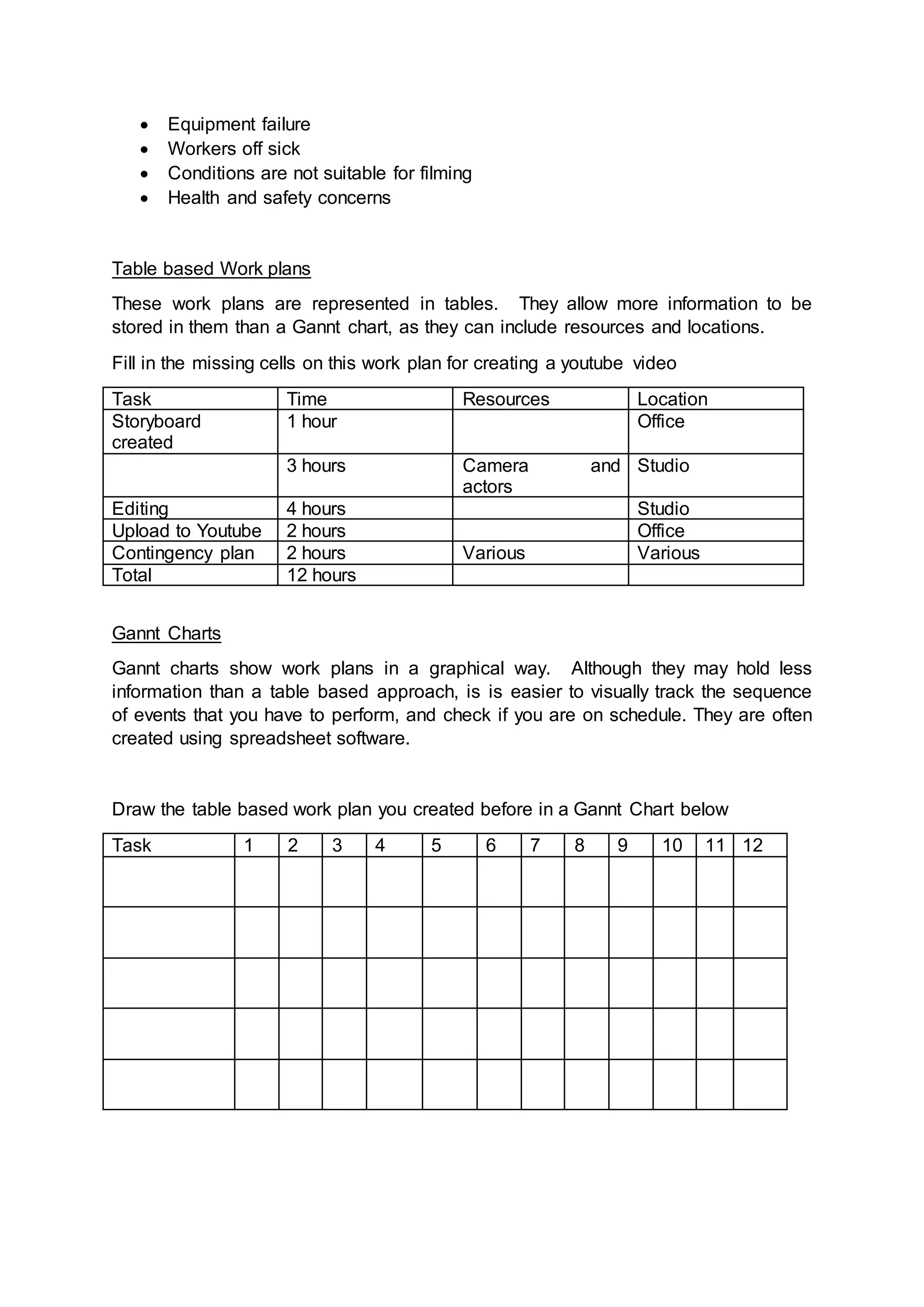
Table based Work plans
These work plans are represented in tables. They allow more information to be
stored in them than a Gannt chart, as they can include resources and locations.
Fill in the missing cells on this work plan for creating a youtube video
Task Time Resources Location
Storyboard
created
1 hour Office
3 hours Camera and
actors
Studio
Editing 4 hours Studio
Upload to Youtube 2 hours Office
Contingency plan 2 hours Various Various
Total 12 hours
Gannt Charts
Gannt charts show work plans in a graphical way. Although they may hold less
information than a table based approach, is is easier to visually track the sequence
of events that you have to perform, and check if you are on schedule. They are often
created using spreadsheet software.
Draw the table based work plan you created before in a Gannt Chart below
Task 1 2 3 4 5 6 7 8 9 10 11 12
What problems could occur that would delay the project, and require use of a
contingency plan?
………………………………………………………………………………………………….
………………………………………………………………………………………………….
………………………………………………………………………………………………….
………………………………………………………………………………………………….
………………………………………………………………………………………………….
Notes
………………………………………………………………………………………………….
………………………………………………………………………………………………….
………………………………………………………………………………………………….
………………………………………………………………………………………………….
………………………………………………………………………………………………….
………………………………………………………………………………………………….
………………………………………………………………………………………………….
………………………………………………………………………………………………….
………………………………………………………………………………………………….
………………………………………………………………………………………………….
………………………………………………………………………………………………….
………………………………………………………………………………………………….
………………………………………………………………………………………………….
………………………………………………………………………………………………….
………………………………………………………………………………………………….
………………………………………………………………………………………………….
………………………………………………………………………………………………….
………………………………………………………………………………………………….
………………………………………………………………………………………………….
………………………………………………………………………………………………….
HACA R081 Revision Guide

HACA R081 Revision Guide

  • 1.
    Crayford Academy Revision Guide Creative Imedia R081 StudentName -----------------------------------------------------------------------------
  • 2.
    Creative R081 revisionGuide Overview of the unit You must be able to describe the process of creating pre-production documents and the role they play in the development of your ideas. You should be able to describe how you would analyse a client’s requirements and how they might provide their requirements to you. I.e. client brief, meetings, scripts. You should be able to analyse your client brief to ascertain your clients target audience and provide examples of how your proposed product will meet their specification. You should be able to show that you can complete primary (questionnaires, sampling, surveys) and secondary (books, internet, television) research to develop your ideas. You will be able to discuss the time scales for a set a project and describe steps you may have to take to plan for the whole project including contingencies. You will be able to create a range of well annotated pre-production documents such as storyboards, spider diagrams, mood boards, work plans and visualisation diagrams. 1. Story boards What is a storyboard?  A storyboard is a graphical representation of how you want your media to unfold, shot by shot.  It is made up of a sequence of pictures representing each shot, with notes about what is going on in the scene.  It is like a comic book version of a script What makes up a storyboard? Storyboards are a combination of:  Images  Camera angles  Lighting  Sound effects  Background music  Motion arrows  Dialogue  Scene timings
  • 3.
    Storyboards are cheapand effective ways of sharing the vision you have for your design. They also speed up and simplify the production process, as you have a clear sequence and idea of what each shot entails. -What products can they be used for? Come up with 3 examples. 1………………………………………………………………………………………………. 2………………………………………………………………………………………………. 3………………………………………………………………………………………………. -What are the advantages and benefits of using a storyboard? …………………………………………………………………………………………………. …………………………………………………………………………………………………. …………………………………………………………………………………………………. -list 5 items they may contain. 2. Visualization diagrams What are they?  A visualisation diagram shows in a visual way what something might look like.  It can be used for still images and graphics projects such as poster designs and CD/DVD covers. 1. 2. 3. 4. 5.
  • 4.
     A visualisationdiagram could also be used to show the layout of a web page, multimedia display, game scene, character model, comic book layout etc. The visualisation diagram will show both the content and position of different elements such as  Images  Graphics (Background style, borders)  Text (Font style, size, and colour)  Navigation (Location and style of buttons or menus, only on a website or interactive presentation) A new CGI animation, blockbuster film is being created. What could visualisation diagrams be used for in both the production, and advertising of the film? Think of 5 examples. 1………………………………………………………………………………………………. 2………………………………………………………………………………………………. 3………………………………………………………………………………………………. 4………………………………………………………………………………………………. 5………………………………………………………………………………………………. For one of your examples, hand draw a visualisation diagram in the box below. Make sure it includes all of the elements listed above.
  • 5.
    3. What isa spider diagram? A spider diagram is often used for planning or creating ideas. It uses a structured layout to explore ideas. A spider diagram allows you to think about the main idea and then how the ideas are seen to be present in many parts. It starts with a central idea and branches out. Each branch will have a node. It is important that the nodes follow a logical pattern. Questions. Create an example of a spider diagram for a webpage to advertise a musician and a new album they are releasing
  • 6.
    4.Moodboards A Mood boardis a type of collage consisting of images, text, and samples of objects in a composition. They may be physical or digital, and can be "extremely effective" presentation tools. You can use moodboards to show ideas for a wide variety of product from posters and DVD covers to animations and TV adverts. A moodboard is a great visualisation tool to show theme, colour schemes, font, textures and the general appearance of your product. Questions 4.1 Explain some benefits of using a mood board, over just a written description. …………………………………………………………………………………………………. …………………………………………………………………………………………………. …………………………………………………………………………………………………. 4.2 Give two reasons why a mood board might be a suitable choice of pre-production fort an advertising company to pitch their ideas to a client for a new TV advert. …………………………………………………………………………………………………. ………………………………………………………………………………………………….
  • 7.
    5. Hardware Understand thathardware can be used to digitalise items, for example a scanner could be used to make a digital copy of a script which could be saved a PDF. Hardware Uses File types that can be created. Scanner Camera Video Recorder Voice recorder 6. Scripts A script is a document that outlines every aural (speaking), visual (what you can see) behavioural (body language), and lingual element required to tell a story. The script is only used as an outline as it will be interpreted by many different professions such as the director, cast, editor, and production crew.
  • 8.
    Questions List 5 itemsa script would usually contain. …………………………………………………………………………………………………. …………………………………………………………………………………………………. …………………………………………………………………………………………………. …………………………………………………………………………………………………. ………………………………………………………………………………………………….
  • 9.
    Use the extractof the script above which was taken from the hit show ‘Our Girl’ to create a story board to carry on from where the script finishes. You story board should stay in theme and demonstrate your ability to interpret short extracts.
  • 10.
    ---------------------------------- ---------------------------------- ---------------------------------- ---------------------------------- ---------------------------------- ---------------------------------- ---------------------------------- ---------------------------------- ---------------------------------- ---------------------------------- ---------------------------------- ---------------------------------- Extension break downa script a selection of which can be found http://www.bbc.co.uk/writersroom/scripts/ create a storyboard to demonstrate one of them. 7. Health and safety RSI is a repetitive strain injury is an "injury to the musculoskeletal and nervous systems that may be caused by repetitive tasks, forceful exertions, vibrations, mechanical compression, or sustained or awkward positions. Eye strain Many people who use computers complain of eye strain. Looking at a monitor for a long time can strain your eyes or can make any other problems you are having with your eyes seem more noticeable. Symptoms include: Eye discomfort; Headaches; Sore, tired, burning or itchy eyes; Difficulty focusing Back ache Sitting for long periods in front of a computer is storing up trouble. No matter how good your positioning, it is important to get up every so often.  seating posture  computer screen position  chair height  keyboard position
  • 11.
     mouse position desk equipment layout How to avoid injuries consistent with long periods of computer use. Make sure equipment is properly positioned. Use chairs that can be adjusted to suit the height of the person using it and the desk they are working at. Avoid glare from windows or lights on computer screens. Take regular breaks. Health and safety in computer rooms
  • 12.
    What is asite recce? …………………………………………………………………………………………………. …………………………………………………………………………………………………. …………………………………………………………………………………………………. Why should the producers of the TV advert complete a site Recce before they make final plans for the shooting of the advert? …………………………………………………………………………………………………. …………………………………………………………………………………………………. …………………………………………………………………………………………………. List 3 threats to health and safety a computer user may face? Hazard How could you avoid? List three possible hazards of working in a computer room. Hazard How could you avoid? 8. File types and file compression You should be able to select appropriate file types for specific products and explain why you have chosen them. Product File types you could use Video WMV, MPG, MOV, FLV
  • 13.
    Song MP3, WAV,OGG VORBIS Script DOC, PDF Poster TIFF, PNG, JPG, PSD, PNG, GIF, BMP Still images File format Characteristics and Properties Compressed? Tiff High quality format for print and archiving No, so bigger files JPG Commonly used and supported by all devices, software and web Yes PSD Proprietary format for Adobe software applications No, so big files PNG Alternative to jpg for web use Yes GIF Limited colours, commonly used for web Yes BMP Bitmap format developed by Microsoft No, so big files Video File format Characteristics and Properties Compressed Y/N? Limitations? WMV Windows media video format for playback on computer Yes File size and playback Mpeg-1, Mpeg-2 Mpeg-4 Compressed format for distribution of good quality/small file size video Yes Picture quality limitation with high compression
  • 14.
    MOV Apple QuickTimemovie format Yes Requires QuickTime FLV Flash video for any moving image product including animation Yes Playback support needed Song File format Characteristics and Properties Compressed? MP3 Popular, widely used format for distributing music on portable players Yes WAV Large files without loss of quality No AAC Similar to MP3 but slightly better performance. Used by Apple. Yes Script File format Characteristics and Properties Compressed? DOC Largely word processed documents made in MS Word No PDF Read Only Files Accessible by all Smaller file size but cannot change Yes
  • 15.
    Poster See Still Images(above) What is lossless compression? Making the size of a file smaller without losing any of the information in the file. EG a zip file, GIF What is lossy compression? Removing some of the data from a file in order to reduce its size. EG MPG, MP3 What are the disadvantages? Once a file has been compressed as a lossy file it cannot be restored to its original condition Lossy files often cannot be changed or edited and certainly not as originals What benefits are there from compressing a file using this technique? A certain degree of compression is hardly noticeable in terms of quality and lossy files take up less space and can be sent electronically far more easily 8. Version control and file naming What is version control? …………………………………………………………………………………………………. …………………………………………………………………………………………………. How might you use it when creating your product? …………………………………………………………………………………………………. ………………………………………………………………………………………………….
  • 16.
    What are thebenefits of creating versions? …………………………………………………………………………………………………. …………………………………………………………………………………………………. 9. Legislation Legislation Key points Copyright Copyright, Designs and Patents Act 1988 It is illegal to use created material without permission 70yrs literacy, dramatic, musical or artistic work 70yrs films 50yrs sound recording You could face legal action  Fine of up to £325,000  Imprisonment of up to five years for a first offence.  Subsequent offences, fine of up to £0.6 million  Imprisonment of up to 10 years. Ignorance is not an excuse Trademarks A word, symbol, or phrase, used to identify a particular manufacturer or seller's products and distinguish them from the products of another Trademarks Act 1994 Once registered a trademark cannot be used without permission (diluted) Injunctions and damages can be granted Creative commons A Creative Commons (CC) license is one of several public copyright licenses that enable the free distribution of an otherwise copyrighted work. A CC license is used when an author wants to give people the right to share, use, and build upon a work that they have created. CC provides an author flexibility (for example, they might choose to allow only non-commercial uses of their own work) and protects the people who use or redistribute an author's work from concerns of copyright infringement as long as they abide by the conditions that are specified in the license by which the author distributes the work. Works are governed by Copyright Law Patent Patents Act 1977
  • 17.
    Patents protect inventions Stopanyone from making or using the invention without the owner’s permission. Last up to 20 years. Only exists in the country for which a patent has been granted. Generally speaking patents are used to protect the markets in which an invention is to be exploited. What legislation would you need to consider if you were gathering resources for a mood board from the internet? …………………………………………………………………………………………………. …………………………………………………………………………………………………. …………………………………………………………………………………………………. Complete the following. Legislation Key points Copyright Trademarks Creative commons Patent 10. Work Plans: What are work plans?  Work plans are created to organise the sequence of steps that need to be performed to complete a project.  They show the order the steps should be performed  They show the time allocated to complete each step  They may include information about required resources  They may include information about the location for each step (eg different filming locations to record a video)  They should include a contingency plan  They can be displayed as a table or graphically in a Gannt chart Contingency plans: Contingency plans are often built into a work plan to allow extra time in case of setbacks. This could be due to:
  • 18.
     Equipment failure Workers off sick  Conditions are not suitable for filming  Health and safety concerns Table based Work plans These work plans are represented in tables. They allow more information to be stored in them than a Gannt chart, as they can include resources and locations. Fill in the missing cells on this work plan for creating a youtube video Task Time Resources Location Storyboard created 1 hour Office 3 hours Camera and actors Studio Editing 4 hours Studio Upload to Youtube 2 hours Office Contingency plan 2 hours Various Various Total 12 hours Gannt Charts Gannt charts show work plans in a graphical way. Although they may hold less information than a table based approach, is is easier to visually track the sequence of events that you have to perform, and check if you are on schedule. They are often created using spreadsheet software. Draw the table based work plan you created before in a Gannt Chart below Task 1 2 3 4 5 6 7 8 9 10 11 12
  • 19.
    What problems couldoccur that would delay the project, and require use of a contingency plan? …………………………………………………………………………………………………. …………………………………………………………………………………………………. …………………………………………………………………………………………………. …………………………………………………………………………………………………. …………………………………………………………………………………………………. Notes …………………………………………………………………………………………………. …………………………………………………………………………………………………. …………………………………………………………………………………………………. …………………………………………………………………………………………………. …………………………………………………………………………………………………. …………………………………………………………………………………………………. …………………………………………………………………………………………………. …………………………………………………………………………………………………. …………………………………………………………………………………………………. …………………………………………………………………………………………………. …………………………………………………………………………………………………. …………………………………………………………………………………………………. …………………………………………………………………………………………………. …………………………………………………………………………………………………. …………………………………………………………………………………………………. …………………………………………………………………………………………………. …………………………………………………………………………………………………. …………………………………………………………………………………………………. …………………………………………………………………………………………………. ………………………………………………………………………………………………….