Pre-Production
Kieran Bradley
Style sheet
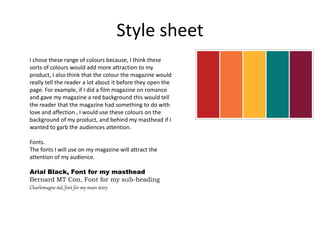
I chose these range of colours because, I think these
sorts of colours would add more attraction to my
product, I also think that the colour the magazine would
really tell the reader a lot about it before they open the
page. For example, if I did a film magazine on romance
and gave my magazine a red background this would tell
the reader that the magazine had something to do with
love and affection , I would use these colours on the
background of my product, and behind my masthead if I
wanted to garb the audiences attention.
Fonts.
The fonts I will use on my magazine will attract the
attention of my audience.
Arial Black, Font for my masthead
Bernard MT Con, Font for my sub-heading
Charlemagne std, font for my main story
Layout 1
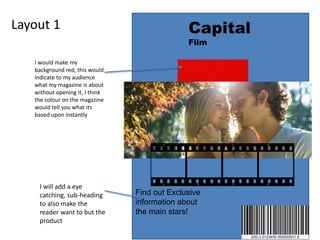
I would make my
background red, this would
indicate to my audience
what my magazine is about
without opening it, I think
the colour on the magazine
would tell you what its
based upon instantly
Capital
Film
Find out Exclusive
information about
the main stars!
I will add a eye
catching, sub-heading
to also make the
reader want to but the
product
Layout 2 Capital
Film
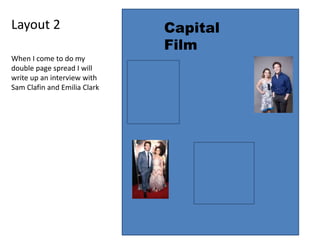
When I come to do my
double page spread I will
write up an interview with
Sam Clafin and Emilia Clark
Props & Locations
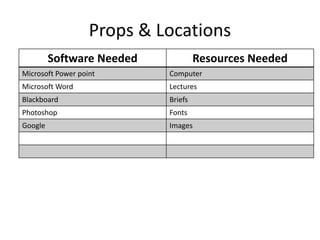
Software Needed Resources Needed
Microsoft Power point Computer
Microsoft Word Lectures
Blackboard Briefs
Photoshop Fonts
Google Images
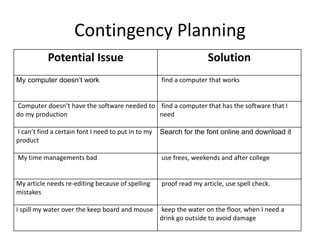
Contingency Planning
Potential Issue Solution
My computer doesn’t work find a computer that works
Computer doesn’t have the software needed to
do my production
find a computer that has the software that I
need
I can’t find a certain font I need to put in to my
product
Search for the font online and download it
My time managements bad use frees, weekends and after college
My article needs re-editing because of spelling
mistakes
proof read my article, use spell check.
I spill my water over the keep board and mouse keep the water on the floor, when I need a
drink go outside to avoid damage
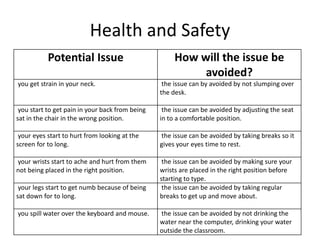
Health and Safety
Potential Issue How will the issue be
avoided?
you get strain in your neck. the issue can by avoided by not slumping over
the desk.
you start to get pain in your back from being
sat in the chair in the wrong position.
the issue can be avoided by adjusting the seat
in to a comfortable position.
your eyes start to hurt from looking at the
screen for to long.
the issue can be avoided by taking breaks so it
gives your eyes time to rest.
your wrists start to ache and hurt from them
not being placed in the right position.
the issue can be avoided by making sure your
wrists are placed in the right position before
starting to type.
your legs start to get numb because of being
sat down for to long.
the issue can be avoided by taking regular
breaks to get up and move about.
you spill water over the keyboard and mouse. the issue can be avoided by not drinking the
water near the computer, drinking your water
outside the classroom.
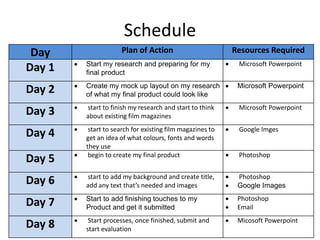
Schedule
Day Plan of Action Resources Required
Day 1  Start my research and preparing for my
final product
 Microsoft Powerpoint
Day 2  Create my mock up layout on my research
of what my final product could look like
 Microsoft Powerpoint
Day 3  start to finish my research and start to think
about existing film magazines
 Microsoft Powerpoint
Day 4  start to search for existing film magazines to
get an idea of what colours, fonts and words
they use
 Google Imges
Day 5  begin to create my final product  Photoshop
Day 6  start to add my background and create title,
add any text that’s needed and images
 Photoshop
 Google Images
Day 7  Start to add finishing touches to my
Product and get it submitted
 Photoshop
 Email
Day 8  Start processes, once finished, submit and
start evaluation
 Micosoft Powerpoint

5. pre production final 1 (1)

  • 1.
  • 2.
    Style sheet I chosethese range of colours because, I think these sorts of colours would add more attraction to my product, I also think that the colour the magazine would really tell the reader a lot about it before they open the page. For example, if I did a film magazine on romance and gave my magazine a red background this would tell the reader that the magazine had something to do with love and affection , I would use these colours on the background of my product, and behind my masthead if I wanted to garb the audiences attention. Fonts. The fonts I will use on my magazine will attract the attention of my audience. Arial Black, Font for my masthead Bernard MT Con, Font for my sub-heading Charlemagne std, font for my main story
  • 3.
    Layout 1 I wouldmake my background red, this would indicate to my audience what my magazine is about without opening it, I think the colour on the magazine would tell you what its based upon instantly Capital Film Find out Exclusive information about the main stars! I will add a eye catching, sub-heading to also make the reader want to but the product
  • 4.
    Layout 2 Capital Film WhenI come to do my double page spread I will write up an interview with Sam Clafin and Emilia Clark
  • 5.
    Props & Locations SoftwareNeeded Resources Needed Microsoft Power point Computer Microsoft Word Lectures Blackboard Briefs Photoshop Fonts Google Images
  • 6.
    Contingency Planning Potential IssueSolution My computer doesn’t work find a computer that works Computer doesn’t have the software needed to do my production find a computer that has the software that I need I can’t find a certain font I need to put in to my product Search for the font online and download it My time managements bad use frees, weekends and after college My article needs re-editing because of spelling mistakes proof read my article, use spell check. I spill my water over the keep board and mouse keep the water on the floor, when I need a drink go outside to avoid damage
  • 7.
    Health and Safety PotentialIssue How will the issue be avoided? you get strain in your neck. the issue can by avoided by not slumping over the desk. you start to get pain in your back from being sat in the chair in the wrong position. the issue can be avoided by adjusting the seat in to a comfortable position. your eyes start to hurt from looking at the screen for to long. the issue can be avoided by taking breaks so it gives your eyes time to rest. your wrists start to ache and hurt from them not being placed in the right position. the issue can be avoided by making sure your wrists are placed in the right position before starting to type. your legs start to get numb because of being sat down for to long. the issue can be avoided by taking regular breaks to get up and move about. you spill water over the keyboard and mouse. the issue can be avoided by not drinking the water near the computer, drinking your water outside the classroom.
  • 8.
    Schedule Day Plan ofAction Resources Required Day 1  Start my research and preparing for my final product  Microsoft Powerpoint Day 2  Create my mock up layout on my research of what my final product could look like  Microsoft Powerpoint Day 3  start to finish my research and start to think about existing film magazines  Microsoft Powerpoint Day 4  start to search for existing film magazines to get an idea of what colours, fonts and words they use  Google Imges Day 5  begin to create my final product  Photoshop Day 6  start to add my background and create title, add any text that’s needed and images  Photoshop  Google Images Day 7  Start to add finishing touches to my Product and get it submitted  Photoshop  Email Day 8  Start processes, once finished, submit and start evaluation  Micosoft Powerpoint

Editor's Notes

  • #3 Explore colours, fonts and image styles similar to what you want to produce. Discuss all three elements in relation to why you chose them and where you may use them in your project. Go over as many pages as you need to
  • #4 Mock up of a potential design using the colours and fonts established in your style sheet and sourced images
  • #5 Mock up of a potential design using the colours and fonts established in your style sheet and sourced images