Guide to Application Performance
Aaron Weikle
CEO@MS3
Mark Huang
System Solutions Architect, Mulesoft
Performance enables outcomes
3
Better user experiences Scalable applications Resource efficiency
Performance a First Class Citizen
4
Part of the design process
• Understand the entire solution
architecture
• You’re only as strong as your
weakest point
• Define what performance
means - Throughput, Latency,
Resource Utilization
Case Study
Case Study - Overview
• Global Digital Transformation Initiative
• Anypoint Platform one of many moving parts
• Approximately 3 Million Transactions per hour
• Average Target response time of < 400ms
• Variable payload size from few hundred bytes to 1.4 MB
6
Large Global Enterprise - NA Deployment
Case Study - Architecture
7
Backend
Data-sources
Traffic
Generator
CloudHub Customer Backend
proxy app VPN GW VPN GW
Complex solution involving many moving part
Case Study - Approach
8
Backend
Data-sources
Traffic
Generator
CloudHub Customer Backend
proxy app VPN GW VPN GW
Analysed and understood traffic pattern:
- Mixed load matters
- Large Payload is a trigger
Case Study - Approach
9
Backend
Data-sources
Traffic
Generator
CloudHub Customer Backend
proxy app VPN GW VPN GW
Analysed time spent at each hop
Case Study - Approach
10
Backend
Data-sources
Traffic
Generator
CloudHub Customer Backend
proxy app VPN GW VPN GW
Setup traffic simulation at each hop
- Isolated the issue to proxy app
- Saw: CPU not scaling
- Conclusion: Likely blocking
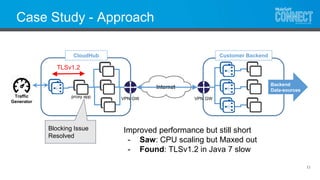
Case Study - Approach
11
Backend
Data-sources
Traffic
Generator
CloudHub Customer Backend
proxy app VPN GW VPN GW
Blocking Issue
Resolved
TLSv1.2
Improved performance but still short
- Saw: CPU scaling but Maxed out
- Found: TLSv1.2 in Java 7 slow
Case Study - Approach
12
Backend
Data-sources
Traffic
Generator
CloudHub Customer Backend
proxy app VPN GW VPN GW
Blocking Issue
Patched
TLSv1.1
Passing Future Production Targets
- Exposed backend bottlenecks
resolved by customer
- Successful Live Deployment
Key Take Aways
• Performance Tuning Best Practices:
- Understand all pieces of the chain
- Systematically isolate potential bottleneck and address them
- Iterate over the approach
• Partnership
- Optimized application + fine grained logging led to key insights
- Collaborative troubleshooting → systematically isolated the issue
Lessons Learned
Performance Engineering
Presented by:
Mountain State Software Solutions
Aaron Weikle, CEO
On-premises vs. CloudHub
• Server clustering
– Several servers working on a collection of jobs
– Hazelcast data synchronization
• Multi-worker
– Several workers working on the same job
– CloudHub Fabric
Traffic Management
• Volumes
– Batch: How much and when?
– Real-time: How much and SLA needs
– Computationally expensive transactions
• Identification and Simulation
– Record and playback
– Synthetic transaction processing
• Planning and Scheduling
Application Design
• Efficient Thoughtful Designs
• Caching
– Application Based vs. Distributed Caching
– 3rd Party Caching Server
• Distributed Processing
– VMs
– Partitioning for load balancing
– Replication for High Availability
Virtual Machine Tuning
• Garbage Collection
– Use Pools of Reusable Objects instead of dynamic
creation of objects
– Make use of local variables not declared in classes
– Avoid using object wrappers under primitive types
• Java Heap / PermGen
– Properly size heap size based on size of live objects
– Set Min and Max Heap Size to the same value
Tools
Testing Tools
MUnit
Monitoring Tools
Conclusion
• Performance engineering is key to
successful API-led connectivity
• Attention to detail will pay dividends
• Think you need more help?
Contact: Aaron Weikle akw@ms3-inc.com
Questions?
Get started with the Anypoint Platform performance whitepaper
✓ Key architectural features of Mule runtime engine
✓ Performance benchmark data
✓ Customer use cases
https://www.mulesoft.com/lp/whitepaper/api/anypoint-platform-
performance

Guide to Application Performance: Planning to Continued Optimization

  • 1.
  • 2.
    Aaron Weikle CEO@MS3 Mark Huang SystemSolutions Architect, Mulesoft
  • 3.
    Performance enables outcomes 3 Betteruser experiences Scalable applications Resource efficiency
  • 4.
    Performance a FirstClass Citizen 4 Part of the design process • Understand the entire solution architecture • You’re only as strong as your weakest point • Define what performance means - Throughput, Latency, Resource Utilization
  • 5.
  • 6.
    Case Study -Overview • Global Digital Transformation Initiative • Anypoint Platform one of many moving parts • Approximately 3 Million Transactions per hour • Average Target response time of < 400ms • Variable payload size from few hundred bytes to 1.4 MB 6 Large Global Enterprise - NA Deployment
  • 7.
    Case Study -Architecture 7 Backend Data-sources Traffic Generator CloudHub Customer Backend proxy app VPN GW VPN GW Complex solution involving many moving part
  • 8.
    Case Study -Approach 8 Backend Data-sources Traffic Generator CloudHub Customer Backend proxy app VPN GW VPN GW Analysed and understood traffic pattern: - Mixed load matters - Large Payload is a trigger
  • 9.
    Case Study -Approach 9 Backend Data-sources Traffic Generator CloudHub Customer Backend proxy app VPN GW VPN GW Analysed time spent at each hop
  • 10.
    Case Study -Approach 10 Backend Data-sources Traffic Generator CloudHub Customer Backend proxy app VPN GW VPN GW Setup traffic simulation at each hop - Isolated the issue to proxy app - Saw: CPU not scaling - Conclusion: Likely blocking
  • 11.
    Case Study -Approach 11 Backend Data-sources Traffic Generator CloudHub Customer Backend proxy app VPN GW VPN GW Blocking Issue Resolved TLSv1.2 Improved performance but still short - Saw: CPU scaling but Maxed out - Found: TLSv1.2 in Java 7 slow
  • 12.
    Case Study -Approach 12 Backend Data-sources Traffic Generator CloudHub Customer Backend proxy app VPN GW VPN GW Blocking Issue Patched TLSv1.1 Passing Future Production Targets - Exposed backend bottlenecks resolved by customer - Successful Live Deployment
  • 13.
    Key Take Aways •Performance Tuning Best Practices: - Understand all pieces of the chain - Systematically isolate potential bottleneck and address them - Iterate over the approach • Partnership - Optimized application + fine grained logging led to key insights - Collaborative troubleshooting → systematically isolated the issue Lessons Learned
  • 14.
    Performance Engineering Presented by: MountainState Software Solutions Aaron Weikle, CEO
  • 16.
    On-premises vs. CloudHub •Server clustering – Several servers working on a collection of jobs – Hazelcast data synchronization • Multi-worker – Several workers working on the same job – CloudHub Fabric
  • 18.
    Traffic Management • Volumes –Batch: How much and when? – Real-time: How much and SLA needs – Computationally expensive transactions • Identification and Simulation – Record and playback – Synthetic transaction processing • Planning and Scheduling
  • 20.
    Application Design • EfficientThoughtful Designs • Caching – Application Based vs. Distributed Caching – 3rd Party Caching Server • Distributed Processing – VMs – Partitioning for load balancing – Replication for High Availability
  • 21.
    Virtual Machine Tuning •Garbage Collection – Use Pools of Reusable Objects instead of dynamic creation of objects – Make use of local variables not declared in classes – Avoid using object wrappers under primitive types • Java Heap / PermGen – Properly size heap size based on size of live objects – Set Min and Max Heap Size to the same value
  • 22.
  • 23.
  • 24.
  • 25.
    Conclusion • Performance engineeringis key to successful API-led connectivity • Attention to detail will pay dividends • Think you need more help? Contact: Aaron Weikle akw@ms3-inc.com
  • 26.
    Questions? Get started withthe Anypoint Platform performance whitepaper ✓ Key architectural features of Mule runtime engine ✓ Performance benchmark data ✓ Customer use cases https://www.mulesoft.com/lp/whitepaper/api/anypoint-platform- performance