Data System Transition
Flowcharts of Procedures
Data System Components/Setup
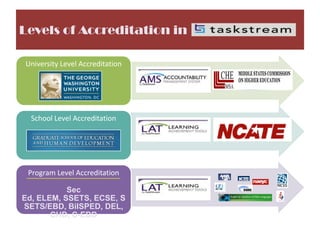
Levels of Accreditation in
University Level Accreditation
School Level Accreditation
Program Level Accreditation
Sec
Ed, ELEM, SSETS, ECSE, S
SETS/EBD, BilSPED, DEL,
CHD, C-EBD
Program TS Set Up Process/ Timeline
INFORMATION
Lead faculty attend TS
presentation, receive rubrics for
confirmation, forms, and
checklists for completing the
process
ORIENTATION
Program faculty attend
presentation to learn more about
the systems
tools, functions, capabilities, and
the process of going live at GSEHD
ACTIVATION
Faculty provide requested
information for TS student and
faculty setup, confirm contents of
folios, schedules training, and
make revisions necessary to ‘Go
Live’
FACULTY TRAINING
Faculty receive training and
decide how students will use the
system, develop policies, and set
up visibility for students
STUDENT TRAINING
Programs will be asked to share
student instructional guides with
all faculty teaching courses with
key assessments or e-
portfolios, to be sent to their class
by email or posted on blackboard.
If further training is
necessary, programs, class, or
individuals can request training
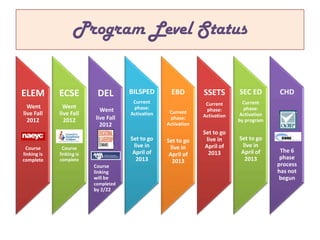
Program Level Status
ELEM
Went
live Fall
2012
Course
linking is
complete
ECSE
Went
live Fall
2012
Course
linking is
complete
DEL
Went
live Fall
2012
Course
linking
will be
completed
by 2/22
BILSPED
Current
phase:
Activation
Set to go
live in
April of
2013
EBD
Current
phase:
Activation
Set to go
live in
April of
2013
SSETS
Current
phase:
Activation
Set to go
live in
April of
2013
SEC ED
Current
phase:
Activation
by program
Set to go
live in
April of
2013
CHD
The 6
phase
process
has not
begun
SE Content area Status
SE
English
Course
linking is
complete
SE
ESL
Course
linking is
complete
SE
FOREIGN
LANG.
Course
linking will
be
completed
by 2/22/13
SE
MATH
Current
phase:
Activation
Set to go
live
SE
SCIENCE
Current
phase:
Activation
Set to go
live
SE
SOCIAL
STUDIES
Current
phase:
Activation
Set to go
live
SEC ED
FOLIO
SPA
organizations
CAPF Data Collection Process
Students
download
fillable adobe
CAPF form
from
the Admissions
page of the
GSEHD website
Students use
their official
transcripts to
complete form
and provide
accurate
application
information
Students submit
the form
through
admissions as
they have
traditionally
Admissions
scans the CAPF
form into GW
Docs data
system and
forwards the
electronic draft
to the program
for review
Faculty Review
CAPF’s make
acceptance
decisions and
forwards
information
back to
Admissions to
be entered into
AY and
generate
program plans
(including
deficiencies)
Data from
fillable pdf
forms for
students that
have accepted
the offer and
plan to
enroll, will be
sent to OPPA
and designated
program staff
by Admissions
Program staff
will use the
spreadsheet of
CAPF data sent
by Admissions
to complete the
CAPF
Worksheet in TS
The program or
SS program rep
will be asked to
upload scanned
the final CAPF
forms to TS (as
an attachment
to the CAPF
worksheet … If
possible).
Faculty will
make email
requests for
CAPF reports at
anytime. DDSA
expects at least
a 48 hour turn
around on such
requests.
IT PROCEDURES FOR SET UP
(BACK END SETUP)
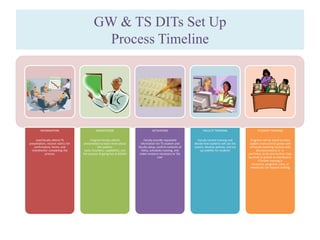
GW & TS DITs Set Up
Process Timeline
INFORMATION
Lead faculty attend TS
presentation, receive rubrics for
confirmation, forms, and
checklistsfor completing the
process
ORIENTATION
Program faculty attend
presentation to learn more about
the systems
tools, functions, capabilities, and
the process of going live at GSEHD
ACTIVATION
Faculty provide requested
information for TS student and
faculty setup, confirm contents of
folios, schedules training, and
make revisions necessary to ‘Go
Live’
FACULTY TRAINING
Faculty receive training and
decide how students will use the
system, develop policies, and set
up visibility for students
STUDENT TRAINING
Programs will be asked to share
student instructional guides with
all faculty teaching courses with
key assessments or e-
portfolios, to be sent to their class
by email or posted on blackboard.
If further training is
necessary, programs, class, or
individuals can request training
DDSA Student Enrollment Process
To be conducted each semester
Program Sets a “Go Live”
Date
•Student training is conducted or
schedule
Students on class lists not in
people tables will be
allocated 1 semester
subscriptions and manually
set up
DDSA will share the list with
program lead faculty to get
confirmation
DDSA will manually link
students to courses tied to
key assessments in TS
Class lists are shared with
faculty for confirmation
during the orientation
phase
DDSA runs class lists for all
courses on key assessment
table offered the given
semester
DDSA will match class lists
against people tables
generated by DIT for TS
upload
Final list with subscription
types (based on degree and
affiliation with GSEHD) is
sent to DIT for SSO set up
DDSA, TS, & DIT will meet to
review set up, investigate
errors, and assure all
students have full accounts
Students will receive email
notification that their
subscriptions have been set
up with directions for
accessing the system.
FACULTY PROCEDURES
(ACCESSING THE SYSTEM & SCORING ASSESSMENTS)
STUDENT PROCEDURES
(ACCESSING THE SYSTEM & UPLOADING ASSESSMENTS)
STUDENT KEY ASSESSMENT PROCESS
Students access TS by
signing on through single
sign on (SSO)
Students complete
demographic survey or
program specific forms
Students receive course
syllabus which details what
assignments are key
assessments and must be
accessed through TS
Students receive
instructional slideshow for
using TS and submitting
assignments
Students open program
folio and assessment they
have been instructed to
complete
Students review
assignment
overview, directions, and
rubric (if made visible by
program)
Students complete
assignment, save file on
their computer, then
upload/submit to TS
Students view comments
and rubric score, once
notified by faculty that
grades have been made
available

Gsehd ts process flow charts updated

  • 1.
  • 2.
  • 4.
    Levels of Accreditationin University Level Accreditation School Level Accreditation Program Level Accreditation Sec Ed, ELEM, SSETS, ECSE, S SETS/EBD, BilSPED, DEL, CHD, C-EBD
  • 5.
    Program TS SetUp Process/ Timeline INFORMATION Lead faculty attend TS presentation, receive rubrics for confirmation, forms, and checklists for completing the process ORIENTATION Program faculty attend presentation to learn more about the systems tools, functions, capabilities, and the process of going live at GSEHD ACTIVATION Faculty provide requested information for TS student and faculty setup, confirm contents of folios, schedules training, and make revisions necessary to ‘Go Live’ FACULTY TRAINING Faculty receive training and decide how students will use the system, develop policies, and set up visibility for students STUDENT TRAINING Programs will be asked to share student instructional guides with all faculty teaching courses with key assessments or e- portfolios, to be sent to their class by email or posted on blackboard. If further training is necessary, programs, class, or individuals can request training
  • 6.
    Program Level Status ELEM Went liveFall 2012 Course linking is complete ECSE Went live Fall 2012 Course linking is complete DEL Went live Fall 2012 Course linking will be completed by 2/22 BILSPED Current phase: Activation Set to go live in April of 2013 EBD Current phase: Activation Set to go live in April of 2013 SSETS Current phase: Activation Set to go live in April of 2013 SEC ED Current phase: Activation by program Set to go live in April of 2013 CHD The 6 phase process has not begun
  • 7.
    SE Content areaStatus SE English Course linking is complete SE ESL Course linking is complete SE FOREIGN LANG. Course linking will be completed by 2/22/13 SE MATH Current phase: Activation Set to go live SE SCIENCE Current phase: Activation Set to go live SE SOCIAL STUDIES Current phase: Activation Set to go live SEC ED FOLIO SPA organizations
  • 8.
    CAPF Data CollectionProcess Students download fillable adobe CAPF form from the Admissions page of the GSEHD website Students use their official transcripts to complete form and provide accurate application information Students submit the form through admissions as they have traditionally Admissions scans the CAPF form into GW Docs data system and forwards the electronic draft to the program for review Faculty Review CAPF’s make acceptance decisions and forwards information back to Admissions to be entered into AY and generate program plans (including deficiencies) Data from fillable pdf forms for students that have accepted the offer and plan to enroll, will be sent to OPPA and designated program staff by Admissions Program staff will use the spreadsheet of CAPF data sent by Admissions to complete the CAPF Worksheet in TS The program or SS program rep will be asked to upload scanned the final CAPF forms to TS (as an attachment to the CAPF worksheet … If possible). Faculty will make email requests for CAPF reports at anytime. DDSA expects at least a 48 hour turn around on such requests.
  • 9.
    IT PROCEDURES FORSET UP (BACK END SETUP)
  • 10.
    GW & TSDITs Set Up Process Timeline INFORMATION Lead faculty attend TS presentation, receive rubrics for confirmation, forms, and checklistsfor completing the process ORIENTATION Program faculty attend presentation to learn more about the systems tools, functions, capabilities, and the process of going live at GSEHD ACTIVATION Faculty provide requested information for TS student and faculty setup, confirm contents of folios, schedules training, and make revisions necessary to ‘Go Live’ FACULTY TRAINING Faculty receive training and decide how students will use the system, develop policies, and set up visibility for students STUDENT TRAINING Programs will be asked to share student instructional guides with all faculty teaching courses with key assessments or e- portfolios, to be sent to their class by email or posted on blackboard. If further training is necessary, programs, class, or individuals can request training
  • 11.
    DDSA Student EnrollmentProcess To be conducted each semester Program Sets a “Go Live” Date •Student training is conducted or schedule Students on class lists not in people tables will be allocated 1 semester subscriptions and manually set up DDSA will share the list with program lead faculty to get confirmation DDSA will manually link students to courses tied to key assessments in TS Class lists are shared with faculty for confirmation during the orientation phase DDSA runs class lists for all courses on key assessment table offered the given semester DDSA will match class lists against people tables generated by DIT for TS upload Final list with subscription types (based on degree and affiliation with GSEHD) is sent to DIT for SSO set up DDSA, TS, & DIT will meet to review set up, investigate errors, and assure all students have full accounts Students will receive email notification that their subscriptions have been set up with directions for accessing the system.
  • 12.
    FACULTY PROCEDURES (ACCESSING THESYSTEM & SCORING ASSESSMENTS)
  • 13.
    STUDENT PROCEDURES (ACCESSING THESYSTEM & UPLOADING ASSESSMENTS)
  • 14.
    STUDENT KEY ASSESSMENTPROCESS Students access TS by signing on through single sign on (SSO) Students complete demographic survey or program specific forms Students receive course syllabus which details what assignments are key assessments and must be accessed through TS Students receive instructional slideshow for using TS and submitting assignments Students open program folio and assessment they have been instructed to complete Students review assignment overview, directions, and rubric (if made visible by program) Students complete assignment, save file on their computer, then upload/submit to TS Students view comments and rubric score, once notified by faculty that grades have been made available