GrEENSTONE DIGITAL
LIBRARY SOFTWARE
AN INTRODUCTION
BACALZO,Sharon
mariano,nenita
 The Greenstone Digital library Software
provides a way of building and distributing digital
library collections, opening up new possibilities
for organizing information and making it
available over the internet or on CD-ROM.
 Developed by the New Zealand Digital Library
Project (www.nzdl.org) at the University of
Waikato.
 Distributed in co-operation with UNESCO and
Humanities Library Project, Romania
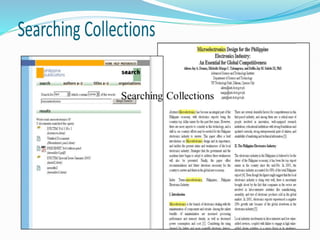
• New Zealand Digital Library Project at the University of Waikato
 Greenstone software grew out of this project, and this
initiative has been endorsed by the Communication Sub-
Commission of the New Zealand National Commission for
UNESCO as part of New Zealand's contribution to
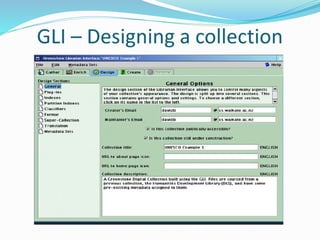
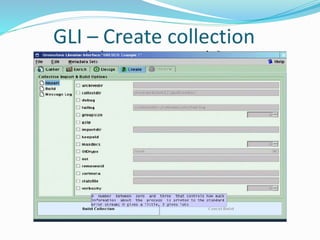
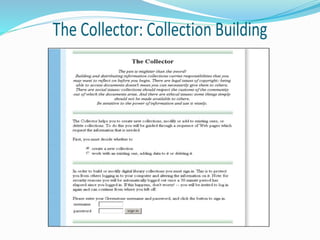
UNESCO's programme.
• The aim of the Greenstone
software is to empower
users, particularly in
universities, libraries, and
other public service
institutions, to build their
own digital libraries
 Digital libraries are radically
reforming how information is
disseminated and acquired in
UNESCO's partner
communities and institutions
in the fields of education,
science and culture around the
world, and particularly in
developing countries.
GDLS:Some Facts
 CURRENT VERSION:
2.82 and 3.03
Available from http://www.greenstone.org
 Software suite for building ,maintaining ,and
distributing digital library collections.
 Comprehensive , open-source
 Distribution and promotion partners;
UNESCO
Human Info NGO ,Belgium
 UnitedNationsEducational, Scientific and Cultural Organization
The dissemination of educational, scientific and
cultural information throughout the world, and
particularly its availability in developing countries,
is central to UNESCO's goals as pursued within its
intergovernmental Information for All Programme,
and appropriate, accessible information and
communication technology is seen as an important
tool in this context.
The Human Info NGO, Belgium
This project works with UN agencies and
other NGOs, and has established a worldwide
reputation for digitizing documentation of
interest to human development and making it
widely available, free of charge to developing
nations and on a cost-recovery basis to others
GDLS:HISTORY
 1995-Digitl Library of Computer Science
Technical Reports. Its established by New
Zealand Digital Library.
 1997-Decision to use GPL(General Public
License);name: Greenstone adopted ;work with
Human Info NGO to produce humanitarian
CD-ROM’s.
 1998 April - First CD-ROM collection released:
Humanity Development Library
 1998 Aug.- Greenstone.org website established
 1999- collection established
 2000 April- Greenstone mailing list started
 2000 Aug.-Formally established cooperative effort with
UNESCO and Human Info NGO
 2000 Nov.- Distribute software on Source Forge
 2002 April- Development of Greenstone3
 2002 March- Official opening of the Niupepa
collection, development of Greenstone Librarian
Interface
 2002 June- First UNESCO Greenstone CD-ROM
 2003-a Java development that became known as the
Greenstone Librarian Interface
• 2005 Nov.-Initial release of Greenstone3
2006 April- Greenstone Support Group
for South Asia launched
 Builds and distributes digital library collections
 Full-text document search and display
 Multi-platform support
 Web-based user interface
 Highly customizable
 Document collections can be exported to CD-
ROMs
 Can be used for archiving
Collections
A typical digital library built with
Greenstone will contain many
collections, individually organized—
though they bear a strong family
resemblance. Easily maintained,
collections can be augmented and
rebuilt automatically.
Overview of Greenstone
 Document Formats
Source documents come in a variety of
formats, and are converted into a
standard XML form for indexing by
“plugins.” Plugins distributed with
Greenstone process plain text, HTML,
WORD and PDF documents, and
Usenet and E-mail messages
 Multimedia documents
Collections can contain text, pictures,
audio and video. Non-textual material is
either linked into the textual documents
or accompanied by textual descriptions
(such as figure captions) to allow full-text
searching and browsing.
Figure 1
 Figure 1 shows a
screenshot of the
“Demo” collection
supplied with the
Greenstone software.
Almost all icons are
clickable. Several
icons appear at the top
of almost every page.
 Figure 2 shows a
document in the demo
collection. Beside the
photograph is a table of
contents: the entry in bold
face marks where you are,
in this case Introduction
and Summary—Section 1
of the chosen book. This
table is expandable: click
on the folders to open them
or close them.
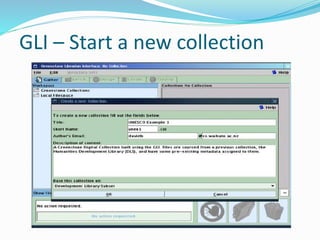
Making Greenstone Collections
The simplest way to build new
collections is to use Greenstone’s
“librarian” interface (GLI). This
allows you to collect sets of
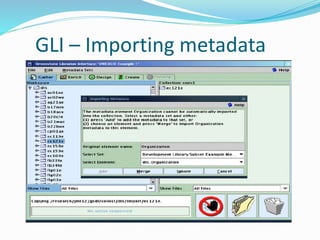
documents, import or assign
metadata, and build them into a
Greenstone collection. It supports
five basic activities, which can be
interleaved but are nominally
undertaken in this order:
Making Greenstone Collections
1. Copy documents from the computer’s
file space, including existing collections,
into the new collection. Any existing
metadata remains “attached” to these
documents. Documents may also be
gathered from the web through a built-in
mirroring facility.
2. Enrich the documents by adding further
metadata to individual documents or
groups of documents.
Making Greenstone Collections
3. Design the collection by determining its
appearance and the access facilities
that it will support.
4. Build the collection using Greenstone.
5. Preview the newly created collections,
which will have been installed on your
Greenstone home page as one of the
regular collections.
GLI – Start a new collection
GLI – Importing metadata
Greenstone report
Greenstone report
Greenstone report
Greenstone report
Greenstone report
Greenstone report
Greenstone report
Greenstone report
Greenstone report
Greenstone report
Greenstone report

Greenstone report

  • 1.
    GrEENSTONE DIGITAL LIBRARY SOFTWARE ANINTRODUCTION BACALZO,Sharon mariano,nenita
  • 2.
     The GreenstoneDigital library Software provides a way of building and distributing digital library collections, opening up new possibilities for organizing information and making it available over the internet or on CD-ROM.  Developed by the New Zealand Digital Library Project (www.nzdl.org) at the University of Waikato.  Distributed in co-operation with UNESCO and Humanities Library Project, Romania
  • 3.
    • New ZealandDigital Library Project at the University of Waikato  Greenstone software grew out of this project, and this initiative has been endorsed by the Communication Sub- Commission of the New Zealand National Commission for UNESCO as part of New Zealand's contribution to UNESCO's programme.
  • 4.
    • The aimof the Greenstone software is to empower users, particularly in universities, libraries, and other public service institutions, to build their own digital libraries
  • 5.
     Digital librariesare radically reforming how information is disseminated and acquired in UNESCO's partner communities and institutions in the fields of education, science and culture around the world, and particularly in developing countries.
  • 6.
    GDLS:Some Facts  CURRENTVERSION: 2.82 and 3.03 Available from http://www.greenstone.org  Software suite for building ,maintaining ,and distributing digital library collections.  Comprehensive , open-source  Distribution and promotion partners; UNESCO Human Info NGO ,Belgium
  • 7.
     UnitedNationsEducational, Scientificand Cultural Organization The dissemination of educational, scientific and cultural information throughout the world, and particularly its availability in developing countries, is central to UNESCO's goals as pursued within its intergovernmental Information for All Programme, and appropriate, accessible information and communication technology is seen as an important tool in this context.
  • 8.
    The Human InfoNGO, Belgium This project works with UN agencies and other NGOs, and has established a worldwide reputation for digitizing documentation of interest to human development and making it widely available, free of charge to developing nations and on a cost-recovery basis to others
  • 9.
    GDLS:HISTORY  1995-Digitl Libraryof Computer Science Technical Reports. Its established by New Zealand Digital Library.  1997-Decision to use GPL(General Public License);name: Greenstone adopted ;work with Human Info NGO to produce humanitarian CD-ROM’s.  1998 April - First CD-ROM collection released: Humanity Development Library  1998 Aug.- Greenstone.org website established
  • 10.
     1999- collectionestablished  2000 April- Greenstone mailing list started  2000 Aug.-Formally established cooperative effort with UNESCO and Human Info NGO  2000 Nov.- Distribute software on Source Forge  2002 April- Development of Greenstone3  2002 March- Official opening of the Niupepa collection, development of Greenstone Librarian Interface  2002 June- First UNESCO Greenstone CD-ROM  2003-a Java development that became known as the Greenstone Librarian Interface
  • 11.
    • 2005 Nov.-Initialrelease of Greenstone3 2006 April- Greenstone Support Group for South Asia launched
  • 12.
     Builds anddistributes digital library collections  Full-text document search and display  Multi-platform support  Web-based user interface  Highly customizable  Document collections can be exported to CD- ROMs  Can be used for archiving
  • 13.
    Collections A typical digitallibrary built with Greenstone will contain many collections, individually organized— though they bear a strong family resemblance. Easily maintained, collections can be augmented and rebuilt automatically.
  • 14.
    Overview of Greenstone Document Formats Source documents come in a variety of formats, and are converted into a standard XML form for indexing by “plugins.” Plugins distributed with Greenstone process plain text, HTML, WORD and PDF documents, and Usenet and E-mail messages
  • 15.
     Multimedia documents Collectionscan contain text, pictures, audio and video. Non-textual material is either linked into the textual documents or accompanied by textual descriptions (such as figure captions) to allow full-text searching and browsing.
  • 16.
    Figure 1  Figure1 shows a screenshot of the “Demo” collection supplied with the Greenstone software. Almost all icons are clickable. Several icons appear at the top of almost every page.
  • 18.
     Figure 2shows a document in the demo collection. Beside the photograph is a table of contents: the entry in bold face marks where you are, in this case Introduction and Summary—Section 1 of the chosen book. This table is expandable: click on the folders to open them or close them.
  • 20.
    Making Greenstone Collections Thesimplest way to build new collections is to use Greenstone’s “librarian” interface (GLI). This allows you to collect sets of documents, import or assign metadata, and build them into a Greenstone collection. It supports five basic activities, which can be interleaved but are nominally undertaken in this order:
  • 21.
    Making Greenstone Collections 1.Copy documents from the computer’s file space, including existing collections, into the new collection. Any existing metadata remains “attached” to these documents. Documents may also be gathered from the web through a built-in mirroring facility. 2. Enrich the documents by adding further metadata to individual documents or groups of documents.
  • 22.
    Making Greenstone Collections 3.Design the collection by determining its appearance and the access facilities that it will support. 4. Build the collection using Greenstone. 5. Preview the newly created collections, which will have been installed on your Greenstone home page as one of the regular collections.
  • 23.
    GLI – Starta new collection
  • 25.