GPUDigitalLab
Project Manager
Gubanov Oleg Igorevich
GPUDigitalLab
Aim of The Project:
To provide access to parallel
computations for scientists and lab
workers at a reasonable cost.
Подпись к изображению
Поясняющая
Россия, гор. Екатеринбург, ул. Мира, 32
GPUDigitalLab
Solution
We, the members of the Axioma Software team, would like to purpose a cluster solution
for parallel computations on the GPU. This product will consist of a GPU oriented server
that will contain NVIDIA Tesla Graphics Processor at its core. The software would be built
upon Microsoft DirectCompute engine. It will be built as a set of client applications that
use the power of the GPU core for the computtations. Each application would be oriented
to either a problem or a set of problems in modern science and computer graphics.User
starts by logging into the server and download the relevant client application. After that
the user fills in an input form and sends the data to the server through a secured
channel. This architercture allows users to use the power of modern gpu despite the fact
they have relatively cheap hardware.
Россия, гор. Екатеринбург, ул. Мира, 32
• This project consists of a gpu processing core engine that has a set of
connected client applications working in allocated domains
• This project has a scalable architecture that makes it easy to install
new products.
• The aim of the project is to provide the scientific community with a
powerful computational platform at a reasonable price.
• The website of the project includes a dedicated control panel for each
user where he can see the current account balance as well as the list of
the latest operations.
Project Overview
GPUDigitalLab
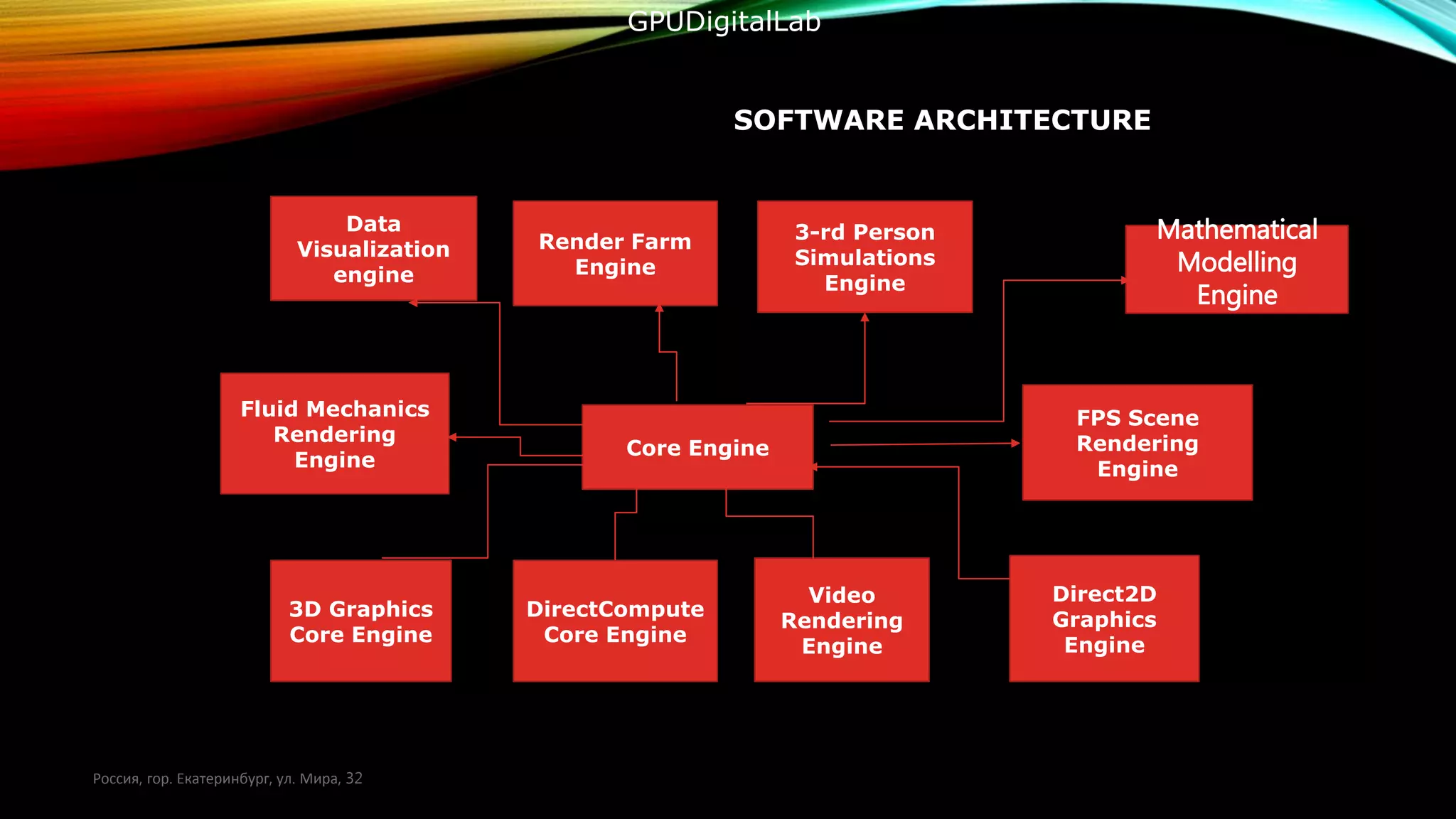
SOFTWARE ARCHITECTURE
Россия, гор. Екатеринбург, ул. Мира, 32
3D Graphics
Core Engine
DirectCompute
Core Engine
Video
Rendering
Engine
Direct2D
Graphics
Engine
Core Engine
Fluid Mechanics
Rendering
Engine
Data
Visualization
engine
FPS Scene
Rendering
Engine
Render Farm
Engine
3-rd Person
Simulations
Engine
Mathematical
Modelling
Engine
GPUDigitalLab
SOFTWARE CONCEPT
• At the core of the system there is module that can execute compute shader programs and
analyze results
• There are 3 types of data that we frequently need for our purposes
• Structured Buffers(used to store numerical data)
• Shader Resources(used to store texture data
• Unordered Access View(used to send the collected data to the computational pipeline
• Compute Shader(a module that collects the data stored in buffers and performs
computations based upon a certain algorithm
PROGRAM STARTUP
• On startup the program open a login dialog
Login
Password
PROGRAM RUNTIME
• After Logging in the system creates a user session and sets it a unique id. Using the
locking mechanism of compute shaders we create a set of writable buffers, shader
resources and UAVs(unordered access views).
• The system loops through the .config file and creates the execution domains for
every core module.
PROGRAM RUNTIME
• In order to run client applications within our core we need the following objects for
each application
• Application Manager(responsible for launching and shutting down apps).
• Application Instance(responsible for controlling the app execution thread. It must collect
the data produced by the apps).
• Event Processor(responsible for handling the messages produced by the client apps and
processing possible errors)
PROGRAM STARTUP
Create main
window
• Program
Startup
Launch
Direct3D11
Engine
• Direct3
D11
Initialize
DirectCompute
Manager
Create GPU
Core Object
• ]
Initialize
Rendering Engine
DIRECT3D INITIALIZATION
Create the
Rendering Device
Create a Render
target
Create a back
buffer
Create a depth
stencil
Create a viewport
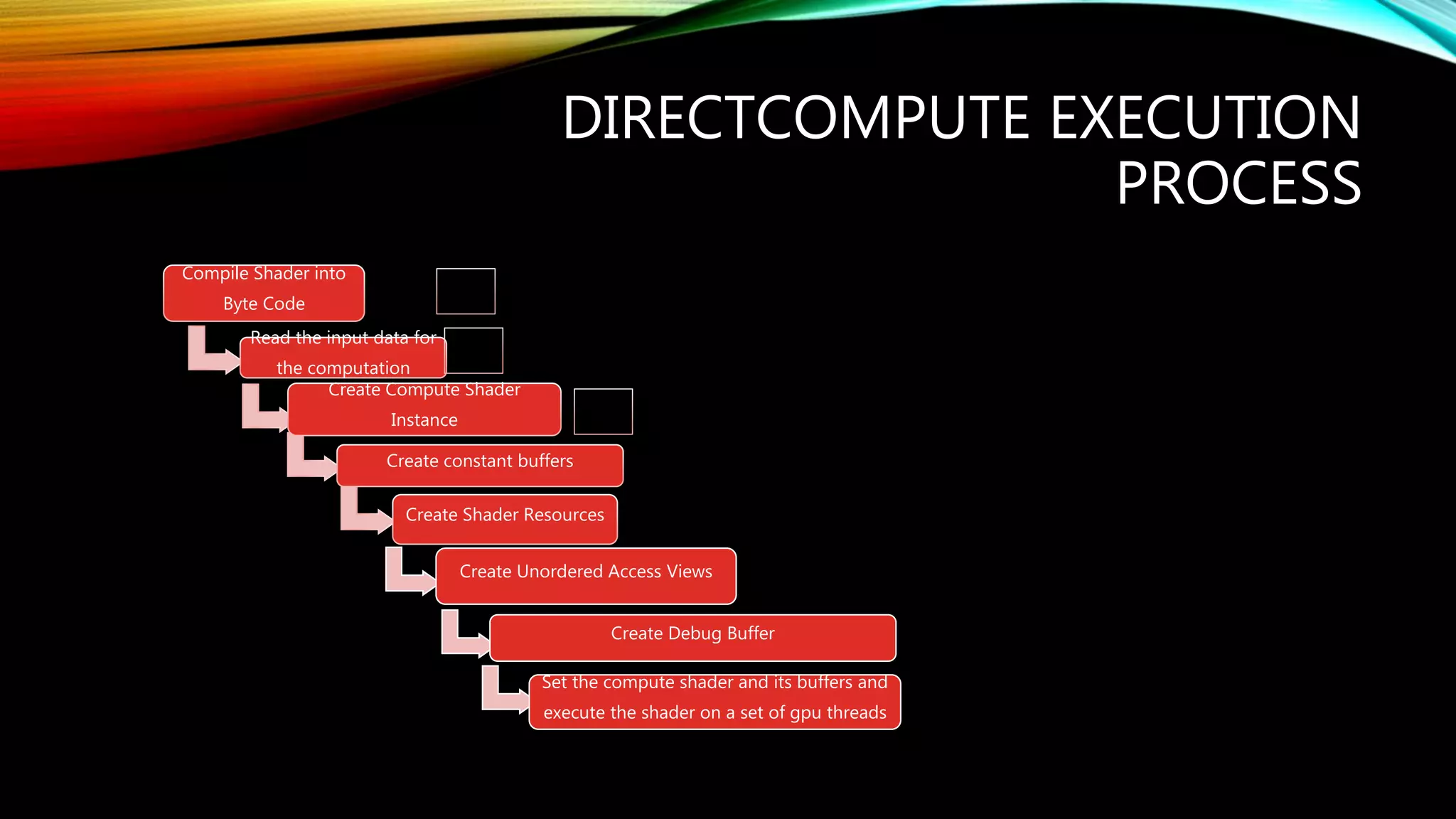
DIRECTCOMPUTE EXECUTION
PROCESS
Compile Shader into
Byte Code
Read the input data for
the computation
Create Compute Shader
Instance
Create constant buffers
Create Shader Resources
Create Unordered Access Views
Create Debug Buffer
Set the compute shader and its buffers and
execute the shader on a set of gpu threads
APPLICATION DOMAIN HAS
• An initialized 3D Rendering Loop
• An initialized DirectCompute processing loop
• A set of buffers for data storage
• A set of shader resources for texturing
• A set of compute shader instances
• An allocated DirectCompute manager class for operations such as data creation
• An allocated Data archiving module for compressing and decompressing data.
APPLICATION DOMAIN MANAGER
• Creates and destroys Domains
• Collects the data from event processors
• Keeps the diary of the operations.
• Controls the threads that are used by the domain
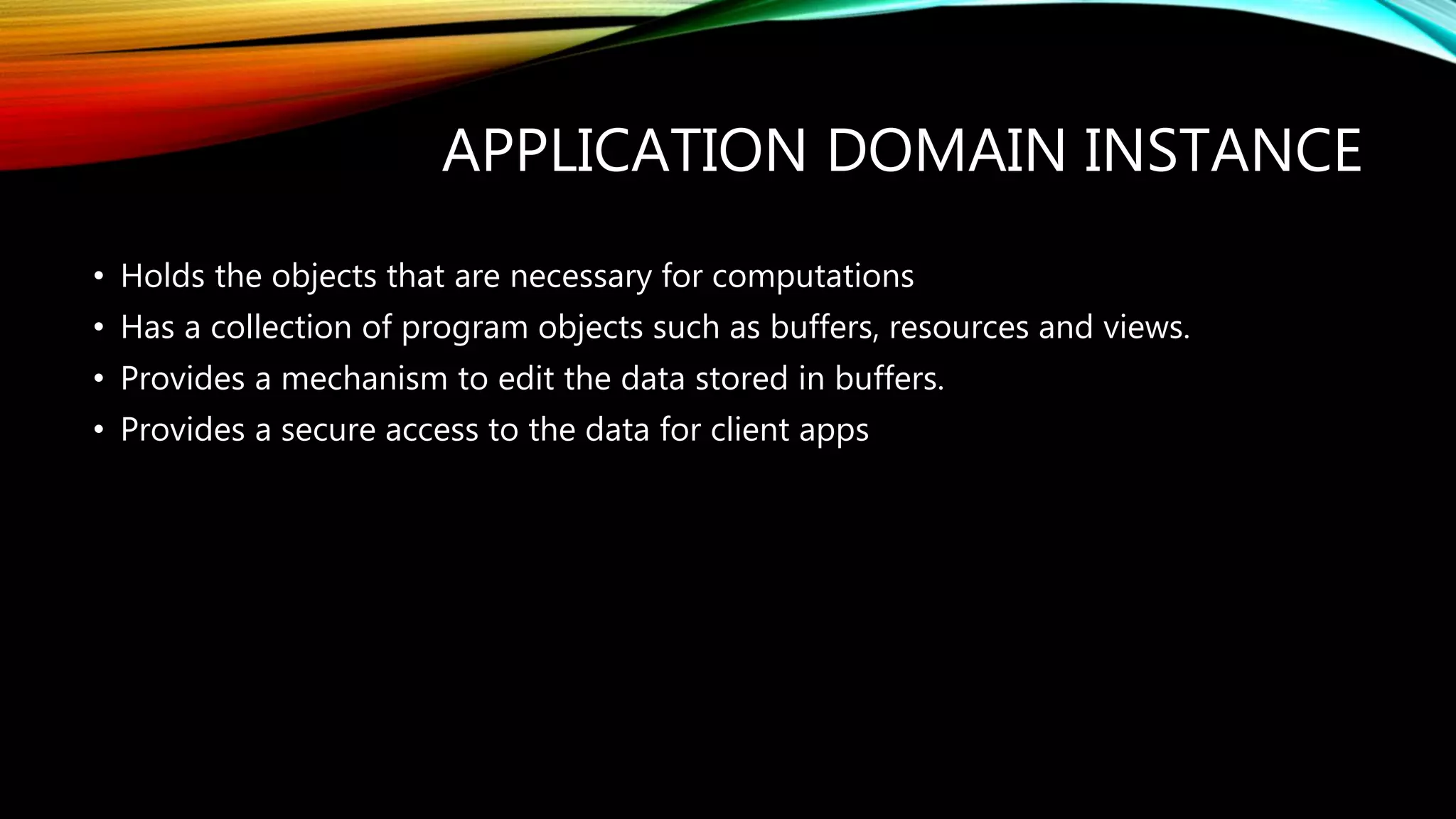
APPLICATION DOMAIN INSTANCE
• Holds the objects that are necessary for computations
• Has a collection of program objects such as buffers, resources and views.
• Provides a mechanism to edit the data stored in buffers.
• Provides a secure access to the data for client apps
APPLICATION DOMAIN INSTANCE
• An allocated memory pool for application execution
• Contains a set of predefined objects, buffers and resources.
• Allows to transfer data securely between different processes.
• Allows to load program utilities into its threads and control the operation
USER SESSION CONTROLLER
• Provides the user with a secure access to system resources
• Creates a session with a unique session id and stored its in a data archive
• Starts a thread that processes the actions of the user and sends the results to the
system modules
APPLICATION MANAGER
• Has an id of a running software process
• Controls the data that is produces by the process
• Responsible for starting and terminating systemic widgets
• Responsible for transferring the data between widget.
APPLICATION EVENT PROCESSOR
• Controls the event produced by the application through a named pipe and an
allocated reading thread
• Used the received data to determine the state of the executed applications.
• Sends the received info about an application to application state manager
APPLICATION STATE MANGER
• Responsible for collecting the data from application processors about the state of a
module
• Responsible for informing the other participating modules about a state change for
a given module.
• Responsible for sending the data about the application errors to the main
processing loop.
PROGRAM TYPICAL EXECUTION
THREAD
Login
• User logs
into the
system
Session
• User is
allocated a
session
Domains
• System
creates a set
of domains
Applications
Applications
are loaded
into domains
Application
Selection
User selects
an application
from the
panel
Data
User enters
the input
parameters
into the fields
of the dialog
and selects
the output
format
Computation
Data is sent to
a
computationa
l engine
through a
secured
channel and
processed
using a set of
predefined
algorithms
Output
User is
presented
with an
output that
can be saved
to a file
CLUSTER PRODUCTS OF GPUDIGITALLAB
GPUDigitalLab
Core Engine
Industrial
Simulations
Engine
Fluid Mechanics
Engine
Video Encoding and
Analysis Engine
Physics and Chemistry
processes Simulation Engine
Crowd
visualization
Engine
Image
Processing
Engine
Render-
Farm
Engine
Data-
visualization
Engine
Россия, гор. Екатеринбург, ул. Мира, 32
GPUDigitalLab
7 STEPS TO USE GPUDIGITALLAB
Россия, гор. Екатеринбург, ул. Мира, 32
Go to
www.omenart.ru/
gpu
Log into the
system or
register an
account
Select the
necessary software
module from the
control panel
Input the
relevant
parameters
Calculate or
simulate a
temporary result
Pay for the
transaction
Output and save
the final result to
a file
GPUDigitalLab
THE EXAMPLES OF GPUDIGITALLAB PROJECTS
Fluid Mechanics
Россия, гор. Екатеринбург, ул. Мира, 32
GPUDigitalLab
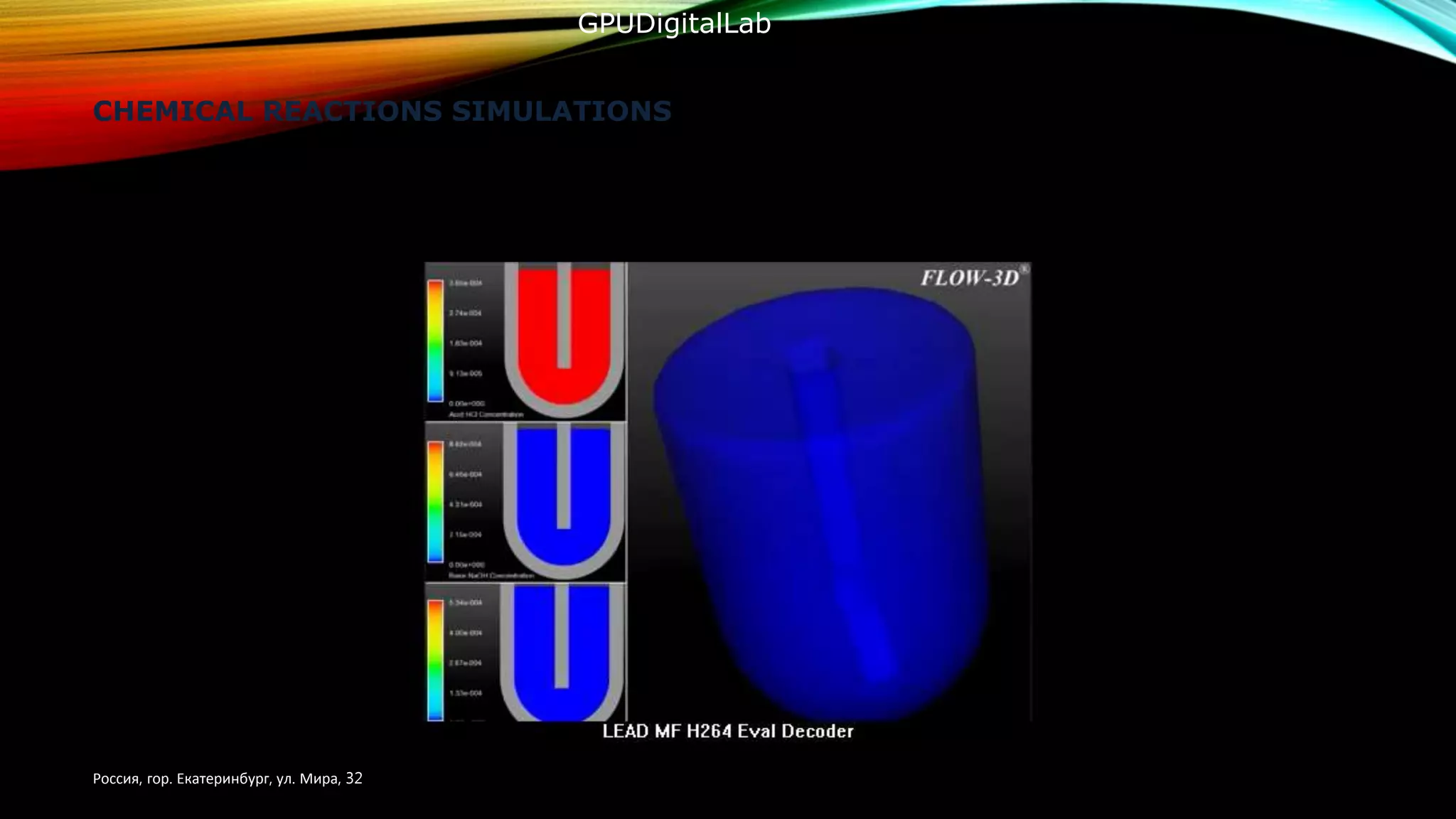
CHEMICAL REACTIONS SIMULATIONS
Россия, гор. Екатеринбург, ул. Мира, 32
GPUDigitalLab
BLOOD CIRCULATION SIMULATOR
Россия, гор. Екатеринбург, ул. Мира, 32
GPUDigitalLab
CROWD RENDERING SIMULATOR
Россия, гор. Екатеринбург, ул. Мира, 32
GPUDigitalLab
RAY-TRACING RENDERING SYSTEM
Россия, гор. Екатеринбург, ул. Мира, 32
GPUDigitalLab
COMPUTATIONAL FLUID
MECHANICS
MORE FLUID MECHANICS
FRACTALS ENGINE
UPCOMING PRODUCTS
• GPUSmartCrowdEngine – software to visualize and classify crowds of people for statistical analysis
• GPUProcessAccelerator – system utility that allows to transfer processing threads of data from cpu to GPU
• GPUVideoInspector – software to seek relevant text and numerical information inside a video file
• GPUDMOLSimulationEngine – software products for molecular configurations computation and dispertion of the
elextron density.
• GPUSkinInfectionDetector – software product that uses image analysis for detecting skin diseases
• GPUConvectionVisualizer – software to visualize air streams within an apartment building
• GPUFireExtinguishingPlanner – training tool for a fire brigade or the workers of a factory where you can
configure the interior of the apartment, set random fire sources and create a training scenario. A group of students
should eliminate the fire during a limited amount of time.
• GPUConstructionDemolitionEngine – building destruction simulation engine.
Россия, гор. Екатеринбург, ул. Мира, 32
UPCOMING PRODUCTS
• GPUChemicalReactionsSimulator – a learning game where students have to construct a chemical reaction
equation using an interactive periodic table.
• GPUBloodSimulationEngine – blood circulation engine.
• GPUCavitiesSimulationEngine – dental diseases simulation engine.
• GPUFlueAndColdSimulationEngine – cold and flue dispersion simulator.
• GPUCrudeOilFlowSimulationEngine – oil pipe traffic simulation engine
Россия, гор. Екатеринбург, ул. Мира, 32
Essential Hardware
Server
Model: GPX XT10-2260-6GPU
CPU: 2 x Six-Core Intel® Xeon® Processor E5-2630 v2 2.60GHz 15MB Cache (80W)
RAM: 8 x 4GB PC3-14900 1866MHz DDR3 ECC Registered DIMM
HDD: 250GB SATA 6.0Gb/s 7200RPM - 2.5" - Seagate Constellation.2™
4 x 800GB Micron M500DC 2.5" SATA 6.0Gb/s Solid State Drive
2 x 1.6TB Intel® DC S3500 Series 2.5" SATA 6.0Gb/s Solid State Drive
2 x 800GB Intel® DC S3700 Series 2.5" SATA 6.0Gb/s Solid State Drive
GPU: NVIDIA® Tesla™ K40M GPU Computing Accelerator - 12GB GDDR5 - 2880 CUDA
Cores
Network Card: Intel® 10-Gigabit Ethernet Converged Network Adapter X540-T1 (1x RJ-
45)
UPS: APC Smart-UPS 1000VA LCD 120V - 2U Rackmount
Operating System: Microsoft Windows Server 2012
Россия, гор. Екатеринбург, ул. Мира, 32
Лаборатория параллельных вычислений на GPU
Essential Hardware
Designer’s PC 5
CPU Core i7-4790 (3.6GHz)
RAM 32 GB
HDD 3 TB
GPU NVIDIA GeForce GTX 760 (2GB)
Keyboard Genius GK 110001
Mouse Gigabyte GM-M6800
Operating System Windows 8.1
Programmer’s PC 2
CPU Core i7-4790 (3.6GHz)
RAM 16 GB
HDD 2 TB
GPU NVIDIA GeForce GTX 760 (2GB)
Keyboard Genius GK 110001
Mouse Gigabyte GM-M6800
Operating System Windows 8.1
Название темы презентации
Essential Hardware
Oculus Rift (Augmented reality glasses) 1
Black Magic Cinema Camera 1
Россия, гор. Екатеринбург, ул. Мира, 32
POTENTIAL CUSTOMERS
• Oil and Gas industries
• Medical institutions
• Educational and Research institutions
• Construction Companies
• Administration of Yekaterinburg
• Public event organizers
• Information technology companies.
CURRENT PROJECT STAGE
OUR OFFER FOR AN INVESTOR
• Our current requirements – 1-st investment round – 350 000$
• Development of the cloud scientific utilities;
• Development and sale of software solutions for the Russian Industry and scientce;
• Creation of a Data-Center for scientific computing;
• Deployment of the cloud server applications ;
• 2-nd Investment Round – 1 100 000$.
• Development of the digital scientific environments for science
• Business scaling and improvement;

Gpu digital lab investors presentation

  • 1.
  • 2.
    GPUDigitalLab Aim of TheProject: To provide access to parallel computations for scientists and lab workers at a reasonable cost. Подпись к изображению Поясняющая Россия, гор. Екатеринбург, ул. Мира, 32
  • 3.
    GPUDigitalLab Solution We, the membersof the Axioma Software team, would like to purpose a cluster solution for parallel computations on the GPU. This product will consist of a GPU oriented server that will contain NVIDIA Tesla Graphics Processor at its core. The software would be built upon Microsoft DirectCompute engine. It will be built as a set of client applications that use the power of the GPU core for the computtations. Each application would be oriented to either a problem or a set of problems in modern science and computer graphics.User starts by logging into the server and download the relevant client application. After that the user fills in an input form and sends the data to the server through a secured channel. This architercture allows users to use the power of modern gpu despite the fact they have relatively cheap hardware. Россия, гор. Екатеринбург, ул. Мира, 32
  • 4.
    • This projectconsists of a gpu processing core engine that has a set of connected client applications working in allocated domains • This project has a scalable architecture that makes it easy to install new products. • The aim of the project is to provide the scientific community with a powerful computational platform at a reasonable price. • The website of the project includes a dedicated control panel for each user where he can see the current account balance as well as the list of the latest operations. Project Overview GPUDigitalLab
  • 5.
    SOFTWARE ARCHITECTURE Россия, гор.Екатеринбург, ул. Мира, 32 3D Graphics Core Engine DirectCompute Core Engine Video Rendering Engine Direct2D Graphics Engine Core Engine Fluid Mechanics Rendering Engine Data Visualization engine FPS Scene Rendering Engine Render Farm Engine 3-rd Person Simulations Engine Mathematical Modelling Engine GPUDigitalLab
  • 6.
    SOFTWARE CONCEPT • Atthe core of the system there is module that can execute compute shader programs and analyze results • There are 3 types of data that we frequently need for our purposes • Structured Buffers(used to store numerical data) • Shader Resources(used to store texture data • Unordered Access View(used to send the collected data to the computational pipeline • Compute Shader(a module that collects the data stored in buffers and performs computations based upon a certain algorithm
  • 7.
    PROGRAM STARTUP • Onstartup the program open a login dialog Login Password
  • 8.
    PROGRAM RUNTIME • AfterLogging in the system creates a user session and sets it a unique id. Using the locking mechanism of compute shaders we create a set of writable buffers, shader resources and UAVs(unordered access views). • The system loops through the .config file and creates the execution domains for every core module.
  • 9.
    PROGRAM RUNTIME • Inorder to run client applications within our core we need the following objects for each application • Application Manager(responsible for launching and shutting down apps). • Application Instance(responsible for controlling the app execution thread. It must collect the data produced by the apps). • Event Processor(responsible for handling the messages produced by the client apps and processing possible errors)
  • 10.
    PROGRAM STARTUP Create main window •Program Startup Launch Direct3D11 Engine • Direct3 D11 Initialize DirectCompute Manager Create GPU Core Object • ] Initialize Rendering Engine
  • 11.
    DIRECT3D INITIALIZATION Create the RenderingDevice Create a Render target Create a back buffer Create a depth stencil Create a viewport
  • 12.
    DIRECTCOMPUTE EXECUTION PROCESS Compile Shaderinto Byte Code Read the input data for the computation Create Compute Shader Instance Create constant buffers Create Shader Resources Create Unordered Access Views Create Debug Buffer Set the compute shader and its buffers and execute the shader on a set of gpu threads
  • 13.
    APPLICATION DOMAIN HAS •An initialized 3D Rendering Loop • An initialized DirectCompute processing loop • A set of buffers for data storage • A set of shader resources for texturing • A set of compute shader instances • An allocated DirectCompute manager class for operations such as data creation • An allocated Data archiving module for compressing and decompressing data.
  • 14.
    APPLICATION DOMAIN MANAGER •Creates and destroys Domains • Collects the data from event processors • Keeps the diary of the operations. • Controls the threads that are used by the domain
  • 15.
    APPLICATION DOMAIN INSTANCE •Holds the objects that are necessary for computations • Has a collection of program objects such as buffers, resources and views. • Provides a mechanism to edit the data stored in buffers. • Provides a secure access to the data for client apps
  • 16.
    APPLICATION DOMAIN INSTANCE •An allocated memory pool for application execution • Contains a set of predefined objects, buffers and resources. • Allows to transfer data securely between different processes. • Allows to load program utilities into its threads and control the operation
  • 17.
    USER SESSION CONTROLLER •Provides the user with a secure access to system resources • Creates a session with a unique session id and stored its in a data archive • Starts a thread that processes the actions of the user and sends the results to the system modules
  • 18.
    APPLICATION MANAGER • Hasan id of a running software process • Controls the data that is produces by the process • Responsible for starting and terminating systemic widgets • Responsible for transferring the data between widget.
  • 19.
    APPLICATION EVENT PROCESSOR •Controls the event produced by the application through a named pipe and an allocated reading thread • Used the received data to determine the state of the executed applications. • Sends the received info about an application to application state manager
  • 20.
    APPLICATION STATE MANGER •Responsible for collecting the data from application processors about the state of a module • Responsible for informing the other participating modules about a state change for a given module. • Responsible for sending the data about the application errors to the main processing loop.
  • 21.
    PROGRAM TYPICAL EXECUTION THREAD Login •User logs into the system Session • User is allocated a session Domains • System creates a set of domains Applications Applications are loaded into domains Application Selection User selects an application from the panel Data User enters the input parameters into the fields of the dialog and selects the output format Computation Data is sent to a computationa l engine through a secured channel and processed using a set of predefined algorithms Output User is presented with an output that can be saved to a file
  • 22.
    CLUSTER PRODUCTS OFGPUDIGITALLAB GPUDigitalLab Core Engine Industrial Simulations Engine Fluid Mechanics Engine Video Encoding and Analysis Engine Physics and Chemistry processes Simulation Engine Crowd visualization Engine Image Processing Engine Render- Farm Engine Data- visualization Engine Россия, гор. Екатеринбург, ул. Мира, 32 GPUDigitalLab
  • 23.
    7 STEPS TOUSE GPUDIGITALLAB Россия, гор. Екатеринбург, ул. Мира, 32 Go to www.omenart.ru/ gpu Log into the system or register an account Select the necessary software module from the control panel Input the relevant parameters Calculate or simulate a temporary result Pay for the transaction Output and save the final result to a file GPUDigitalLab
  • 24.
    THE EXAMPLES OFGPUDIGITALLAB PROJECTS Fluid Mechanics Россия, гор. Екатеринбург, ул. Мира, 32 GPUDigitalLab
  • 25.
    CHEMICAL REACTIONS SIMULATIONS Россия,гор. Екатеринбург, ул. Мира, 32 GPUDigitalLab
  • 26.
    BLOOD CIRCULATION SIMULATOR Россия,гор. Екатеринбург, ул. Мира, 32 GPUDigitalLab
  • 27.
    CROWD RENDERING SIMULATOR Россия,гор. Екатеринбург, ул. Мира, 32 GPUDigitalLab
  • 28.
    RAY-TRACING RENDERING SYSTEM Россия,гор. Екатеринбург, ул. Мира, 32 GPUDigitalLab
  • 29.
  • 30.
  • 31.
  • 32.
    UPCOMING PRODUCTS • GPUSmartCrowdEngine– software to visualize and classify crowds of people for statistical analysis • GPUProcessAccelerator – system utility that allows to transfer processing threads of data from cpu to GPU • GPUVideoInspector – software to seek relevant text and numerical information inside a video file • GPUDMOLSimulationEngine – software products for molecular configurations computation and dispertion of the elextron density. • GPUSkinInfectionDetector – software product that uses image analysis for detecting skin diseases • GPUConvectionVisualizer – software to visualize air streams within an apartment building • GPUFireExtinguishingPlanner – training tool for a fire brigade or the workers of a factory where you can configure the interior of the apartment, set random fire sources and create a training scenario. A group of students should eliminate the fire during a limited amount of time. • GPUConstructionDemolitionEngine – building destruction simulation engine. Россия, гор. Екатеринбург, ул. Мира, 32
  • 33.
    UPCOMING PRODUCTS • GPUChemicalReactionsSimulator– a learning game where students have to construct a chemical reaction equation using an interactive periodic table. • GPUBloodSimulationEngine – blood circulation engine. • GPUCavitiesSimulationEngine – dental diseases simulation engine. • GPUFlueAndColdSimulationEngine – cold and flue dispersion simulator. • GPUCrudeOilFlowSimulationEngine – oil pipe traffic simulation engine Россия, гор. Екатеринбург, ул. Мира, 32
  • 34.
    Essential Hardware Server Model: GPXXT10-2260-6GPU CPU: 2 x Six-Core Intel® Xeon® Processor E5-2630 v2 2.60GHz 15MB Cache (80W) RAM: 8 x 4GB PC3-14900 1866MHz DDR3 ECC Registered DIMM HDD: 250GB SATA 6.0Gb/s 7200RPM - 2.5" - Seagate Constellation.2™ 4 x 800GB Micron M500DC 2.5" SATA 6.0Gb/s Solid State Drive 2 x 1.6TB Intel® DC S3500 Series 2.5" SATA 6.0Gb/s Solid State Drive 2 x 800GB Intel® DC S3700 Series 2.5" SATA 6.0Gb/s Solid State Drive GPU: NVIDIA® Tesla™ K40M GPU Computing Accelerator - 12GB GDDR5 - 2880 CUDA Cores Network Card: Intel® 10-Gigabit Ethernet Converged Network Adapter X540-T1 (1x RJ- 45) UPS: APC Smart-UPS 1000VA LCD 120V - 2U Rackmount Operating System: Microsoft Windows Server 2012 Россия, гор. Екатеринбург, ул. Мира, 32 Лаборатория параллельных вычислений на GPU
  • 35.
    Essential Hardware Designer’s PC5 CPU Core i7-4790 (3.6GHz) RAM 32 GB HDD 3 TB GPU NVIDIA GeForce GTX 760 (2GB) Keyboard Genius GK 110001 Mouse Gigabyte GM-M6800 Operating System Windows 8.1 Programmer’s PC 2 CPU Core i7-4790 (3.6GHz) RAM 16 GB HDD 2 TB GPU NVIDIA GeForce GTX 760 (2GB) Keyboard Genius GK 110001 Mouse Gigabyte GM-M6800 Operating System Windows 8.1
  • 36.
    Название темы презентации EssentialHardware Oculus Rift (Augmented reality glasses) 1 Black Magic Cinema Camera 1 Россия, гор. Екатеринбург, ул. Мира, 32
  • 37.
    POTENTIAL CUSTOMERS • Oiland Gas industries • Medical institutions • Educational and Research institutions • Construction Companies • Administration of Yekaterinburg • Public event organizers • Information technology companies.
  • 38.
  • 39.
    OUR OFFER FORAN INVESTOR • Our current requirements – 1-st investment round – 350 000$ • Development of the cloud scientific utilities; • Development and sale of software solutions for the Russian Industry and scientce; • Creation of a Data-Center for scientific computing; • Deployment of the cloud server applications ; • 2-nd Investment Round – 1 100 000$. • Development of the digital scientific environments for science • Business scaling and improvement;