GPS Tracker FAQ
Section 1 Sim Card
1. 1 What type of Sim I need to buy?
Re: The device supports all 2G GMS Sim, and 3G/4G Sim which supports also the 2G net
works. We recommend the M2M (Machine to Machine data Sim) because it is lower cost t
han the normal voice Sims, but it does not support any voice function. So if you don't requi
re the audio monitoring function, M2M data sim is a good choice. Please check with your S
im provider before buying it.
1.2 What service I need to enable the Sim?
Re: You need to make sure GPRS and Caller’s ID display service are enabled.
1.3 I see a green light keep flashing, and it does not turns to steady for 30 sec
onds and then turns off as the manual says, what should I do?
Re: The green indicating light keep flashing means system does not able to detect a GSM
network, please make sure the Sim you uses support 2G network. Then please make sure
the device is placed somewhere able to get GSM signal. If they are confirmed, then please
contact with the support team for help, it might be a hardware issue.
1.4 My tracker is an installation model, there is no indicating light, after I inser
ted the Sim, I called the device and it did not get through, SMS was not replie
d either, what should I do?
Re: Please make sure the battery power is connected correctly. If yes, please take the Sim
out and put it in an unlock phone, to see if it works fine in the phone. If yes, then please co
ntact our support team for help.
1.5 What is APN? I see in the user manual mentions it is very important to set.
Re: APN is Access Point Name. You have to set the correct APN to enable device sending
data to the server. Different Sim has different APN, you can usually find it on the Sim provi
der’s website, and it would be better to call to make sure the APN information they provide
is for 2G network, but not 3G or 4G.
APN Setting Command should be in the following format
*apn* plus *APN name* plus *Username* plus *Password*
Some APN goes with Username and Password, others are not. For the ones without usern
ame and password, just leave them as blank.
e.g. Orange France APN: orange.fr Username: orange Password: orange
Correct Command *apn*orange.fr* orang
e*orange*
e.g. China Union APN : uninet
Correct Command Format *apn*uninet*
1.6 After I inserted the Sim into the device, how can I tell if it works or not?
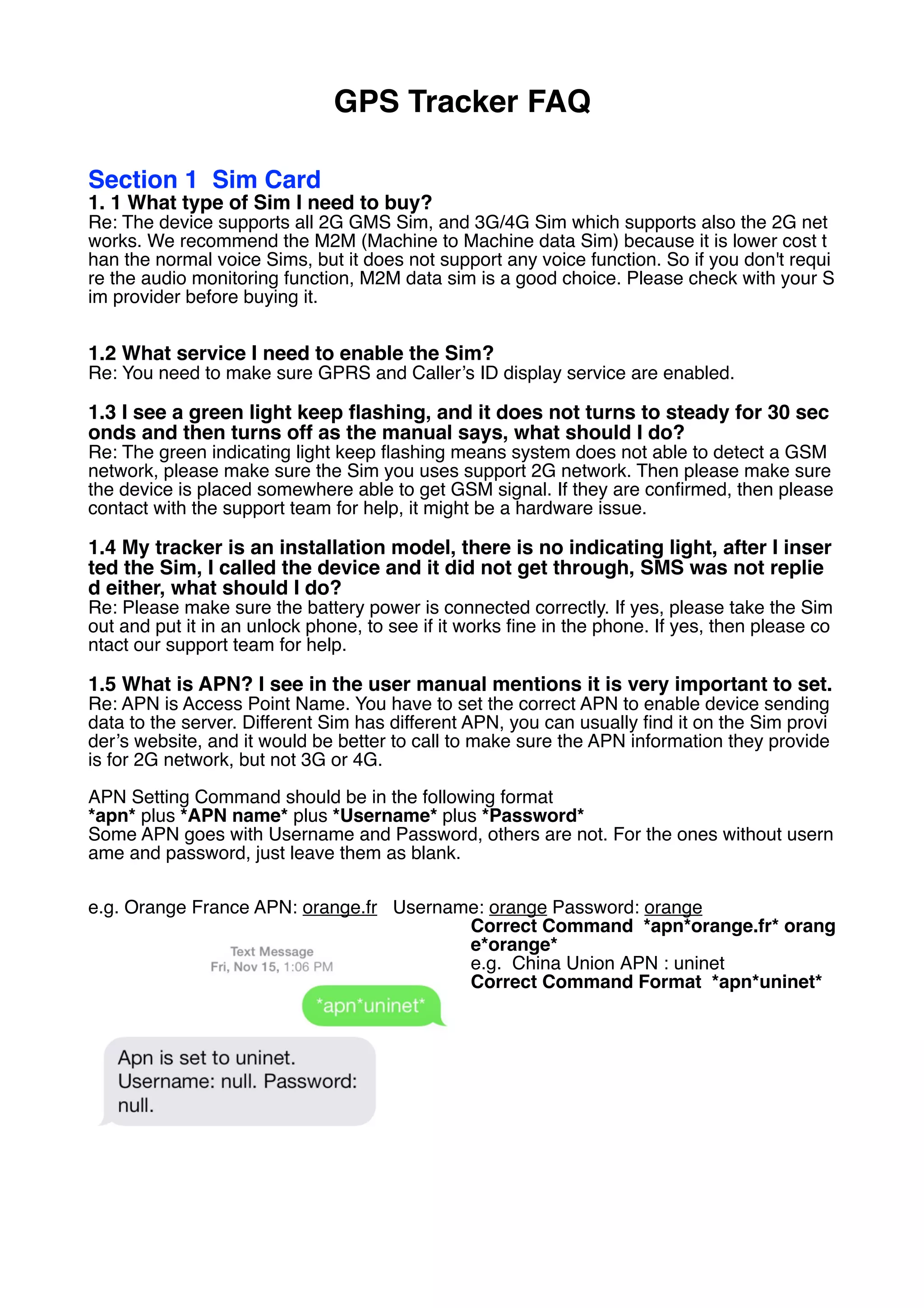
A. Mak
e sure Sim with metal face top, clipped icon to the right as below. Or follow the Sim di-
rection sticker on the device to insert the Sim card.
A. For
Portable Trackers, once Sim card is inserted, you will see GREEN light flashes once,
and then turns steady for 30 seconds, and then turns off. If you are using a installation
model which is without a indicating light, you can ignore this point.
A. Call
Device’s Sim number, if it gets through without answer, means this Sim is working with
the device. If you are using a Data Sim which does not support incoming calls, you ca
n ignore this point and set APN directly to see if it replies.
1.7 My device have been working well for 2 months, and it suddenly stop uplo
ading data, nor reply SMS. But when I call the Sim number, it gets through wit
hout problem
A. Ple
ase make sure the Sim balance is in normal status. Secondly please make sure if the
SMS amount has reached to limits in the Sim. You can take the Sim out and put it in a u
nlock cellphone to delete the SMS.
B. Plea
se check battery status. Send *status* and check the battery status. Data upload functio
n will be turned off if battery is lower than 20%. And it will resume the upload once devic
e is charged.
C. Plea
se make sure device is placed somewhere able to get GSM and GPS signal
Section 2 Registration
1. I h
ave set APN and it replied OK, but I can not register master, it replies “Regis
tration failed, please make sure GPRS is connected.”
Note: Not matter what APN you send to the device, system will reply confirmation as what
you set, because device is not able to detect what APN the Sim is using. So APN is set d
oesn't mean the device has connected GPRS successfully. You have to finish the master n
umber setting to verify APN is correct. So if you receive registration failed reply, please dou
ble confirm the APN you used is correct.
If you have confirmed APN is correct, but still not able to register master, please check the
following points.
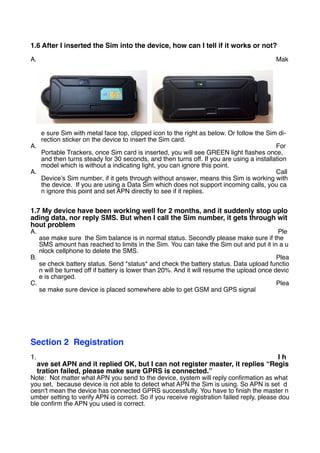
The correct command format of master number setting is
*master*123456*+ country code plus master phone number*
A. Make sure you add + plus country code befor
e the master cellphone number.
eg. US +1 , UK +44, China +86, Italy
+39
B. Make sure the symbol * is under English k
eyboard, * under other input keyboard will be considered as invalid.
C. Make sure device is placed somewhere able to get stable GSM signal, if you are using
an international roaming data Sim, it would be better to change to a normal voice Sim and
run this test again, so that you can tell if it is a device issue or a sim issue.
Section 3 Location by SMS
3.1 I sent *locateaddress* command to the device and it replied a LBS locatio
n address instead of GPS address. Why?
Re: Device replies LBS (Cell Tower) location means it is not able to detect GPS signal. Pl
ease check the follow points
A. Plea
se make sure device is placed outdoor
B. Plea
se make sure Sim has enabled GPRS service
C. Plea
se make sure device is not surround by metals, tall buildings, or under very cloudy weat
her. These are the reasons keep devices from getting the GPS signal.
Section 4 Location Online
4.1 How can I check location on-line
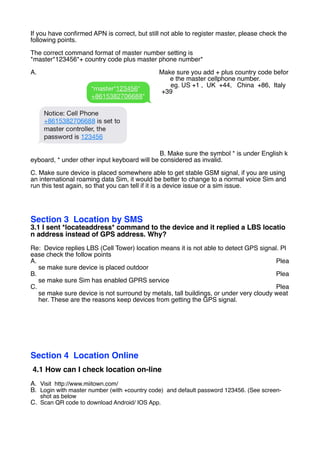
A. Visit http://www.miitown.com/
B. Login with master number (with +country code) and default password 123456. (See screen-
shot as below
C. Scan QR code to download Android/ IOS App.
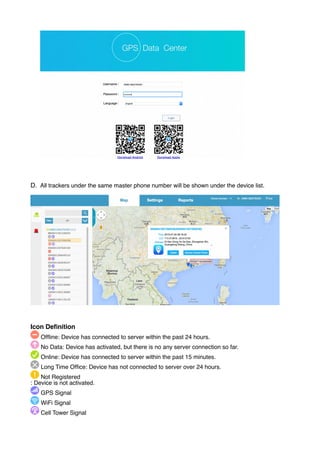
D. All trackers under the same master phone number will be shown under the device list.
Icon Definition
Offline: Device has connected to server within the past 24 hours.
No Data: Device has activated, but there is no any server connection so far.
Online: Device has connected to server within the past 15 minutes.
Long Time Office: Device has not connected to server over 24 hours.
Not Registered
: Device is not activated.
GPS Signal
WiFi Signal
Cell Tower Signal
Power Level
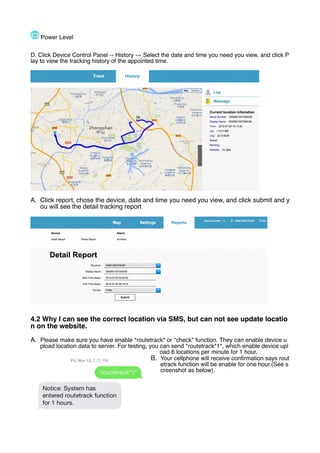
D. Click Device Control Panel -- History --- Select the date and time you need you view, and click P
lay to view the tracking history of the appointed time.
A. Click report, chose the device, date and time you need you view, and click submit and y
ou will see the detail tracking report
4.2 Why I can see the correct location via SMS, but can not see update locatio
n on the website.
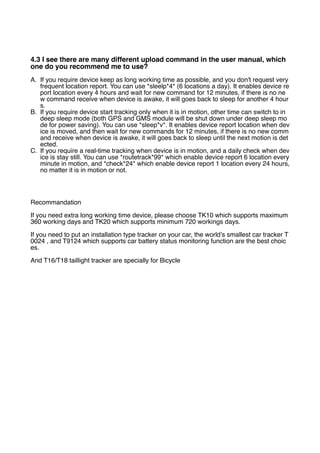
A. Please make sure you have enable *routetrack* or *check* function. They can enable device u
pload location data to server. For testing, you can send *routetrack*1*, which enable device upl
oad 6 locations per minute for 1 hour.
B. Your cellphone will receive confirmation says rout
etrack function will be enable for one hour.(See s
creenshot as below).
4.3 I see there are many different upload command in the user manual, which
one do you recommend me to use?
A. If you require device keep as long working time as possible, and you don't request very
frequent location report. You can use *sleelp*4* (6 locations a day). It enables device re
port location every 4 hours and wait for new command for 12 minutes, if there is no ne
w command receive when device is awake, it will goes back to sleep for another 4 hour
s.
B. If you require device start tracking only when it is in motion, other time can switch to in
deep sleep mode (both GPS and GMS module will be shut down under deep sleep mo
de for power saving). You can use *sleep*v*. It enables device report location when dev
ice is moved, and then wait for new commands for 12 minutes, if there is no new comm
and receive when device is awake, it will goes back to sleep until the next motion is det
ected.
C. If you require a real-time tracking when device is in motion, and a daily check when dev
ice is stay still. You can use *routetrack*99* which enable device report 6 location every
minute in motion, and *check*24* which enable device report 1 location every 24 hours,
no matter it is in motion or not.
Recommandation
If you need extra long working time device, please choose TK10 which supports maximum
360 working days and TK20 which supports minimum 720 workings days.
If you need to put an installation type tracker on your car, the world’s smallest car tracker T
0024 , and T9124 which supports car battery status monitoring function are the best choic
es.
And T16/T18 taillight tracker are specially for Bicycle

Gps tracker FAQ

  • 1.
    GPS Tracker FAQ Section1 Sim Card 1. 1 What type of Sim I need to buy? Re: The device supports all 2G GMS Sim, and 3G/4G Sim which supports also the 2G net works. We recommend the M2M (Machine to Machine data Sim) because it is lower cost t han the normal voice Sims, but it does not support any voice function. So if you don't requi re the audio monitoring function, M2M data sim is a good choice. Please check with your S im provider before buying it. 1.2 What service I need to enable the Sim? Re: You need to make sure GPRS and Caller’s ID display service are enabled. 1.3 I see a green light keep flashing, and it does not turns to steady for 30 sec onds and then turns off as the manual says, what should I do? Re: The green indicating light keep flashing means system does not able to detect a GSM network, please make sure the Sim you uses support 2G network. Then please make sure the device is placed somewhere able to get GSM signal. If they are confirmed, then please contact with the support team for help, it might be a hardware issue. 1.4 My tracker is an installation model, there is no indicating light, after I inser ted the Sim, I called the device and it did not get through, SMS was not replie d either, what should I do? Re: Please make sure the battery power is connected correctly. If yes, please take the Sim out and put it in an unlock phone, to see if it works fine in the phone. If yes, then please co ntact our support team for help. 1.5 What is APN? I see in the user manual mentions it is very important to set. Re: APN is Access Point Name. You have to set the correct APN to enable device sending data to the server. Different Sim has different APN, you can usually find it on the Sim provi der’s website, and it would be better to call to make sure the APN information they provide is for 2G network, but not 3G or 4G. APN Setting Command should be in the following format *apn* plus *APN name* plus *Username* plus *Password* Some APN goes with Username and Password, others are not. For the ones without usern ame and password, just leave them as blank. e.g. Orange France APN: orange.fr Username: orange Password: orange Correct Command *apn*orange.fr* orang e*orange* e.g. China Union APN : uninet Correct Command Format *apn*uninet*
  • 2.
    1.6 After Iinserted the Sim into the device, how can I tell if it works or not? A. Mak e sure Sim with metal face top, clipped icon to the right as below. Or follow the Sim di- rection sticker on the device to insert the Sim card. A. For Portable Trackers, once Sim card is inserted, you will see GREEN light flashes once, and then turns steady for 30 seconds, and then turns off. If you are using a installation model which is without a indicating light, you can ignore this point. A. Call Device’s Sim number, if it gets through without answer, means this Sim is working with the device. If you are using a Data Sim which does not support incoming calls, you ca n ignore this point and set APN directly to see if it replies. 1.7 My device have been working well for 2 months, and it suddenly stop uplo ading data, nor reply SMS. But when I call the Sim number, it gets through wit hout problem A. Ple ase make sure the Sim balance is in normal status. Secondly please make sure if the SMS amount has reached to limits in the Sim. You can take the Sim out and put it in a u nlock cellphone to delete the SMS. B. Plea se check battery status. Send *status* and check the battery status. Data upload functio n will be turned off if battery is lower than 20%. And it will resume the upload once devic e is charged. C. Plea se make sure device is placed somewhere able to get GSM and GPS signal Section 2 Registration 1. I h ave set APN and it replied OK, but I can not register master, it replies “Regis tration failed, please make sure GPRS is connected.” Note: Not matter what APN you send to the device, system will reply confirmation as what you set, because device is not able to detect what APN the Sim is using. So APN is set d oesn't mean the device has connected GPRS successfully. You have to finish the master n umber setting to verify APN is correct. So if you receive registration failed reply, please dou ble confirm the APN you used is correct.
  • 3.
    If you haveconfirmed APN is correct, but still not able to register master, please check the following points. The correct command format of master number setting is *master*123456*+ country code plus master phone number* A. Make sure you add + plus country code befor e the master cellphone number. eg. US +1 , UK +44, China +86, Italy +39 B. Make sure the symbol * is under English k eyboard, * under other input keyboard will be considered as invalid. C. Make sure device is placed somewhere able to get stable GSM signal, if you are using an international roaming data Sim, it would be better to change to a normal voice Sim and run this test again, so that you can tell if it is a device issue or a sim issue. Section 3 Location by SMS 3.1 I sent *locateaddress* command to the device and it replied a LBS locatio n address instead of GPS address. Why? Re: Device replies LBS (Cell Tower) location means it is not able to detect GPS signal. Pl ease check the follow points A. Plea se make sure device is placed outdoor B. Plea se make sure Sim has enabled GPRS service C. Plea se make sure device is not surround by metals, tall buildings, or under very cloudy weat her. These are the reasons keep devices from getting the GPS signal. Section 4 Location Online 4.1 How can I check location on-line A. Visit http://www.miitown.com/ B. Login with master number (with +country code) and default password 123456. (See screen- shot as below C. Scan QR code to download Android/ IOS App.
  • 4.
    D. All trackersunder the same master phone number will be shown under the device list. Icon Definition Offline: Device has connected to server within the past 24 hours. No Data: Device has activated, but there is no any server connection so far. Online: Device has connected to server within the past 15 minutes. Long Time Office: Device has not connected to server over 24 hours. Not Registered : Device is not activated. GPS Signal WiFi Signal Cell Tower Signal
  • 5.
    Power Level D. ClickDevice Control Panel -- History --- Select the date and time you need you view, and click P lay to view the tracking history of the appointed time. A. Click report, chose the device, date and time you need you view, and click submit and y ou will see the detail tracking report 4.2 Why I can see the correct location via SMS, but can not see update locatio n on the website. A. Please make sure you have enable *routetrack* or *check* function. They can enable device u pload location data to server. For testing, you can send *routetrack*1*, which enable device upl oad 6 locations per minute for 1 hour. B. Your cellphone will receive confirmation says rout etrack function will be enable for one hour.(See s creenshot as below).
  • 6.
    4.3 I seethere are many different upload command in the user manual, which one do you recommend me to use? A. If you require device keep as long working time as possible, and you don't request very frequent location report. You can use *sleelp*4* (6 locations a day). It enables device re port location every 4 hours and wait for new command for 12 minutes, if there is no ne w command receive when device is awake, it will goes back to sleep for another 4 hour s. B. If you require device start tracking only when it is in motion, other time can switch to in deep sleep mode (both GPS and GMS module will be shut down under deep sleep mo de for power saving). You can use *sleep*v*. It enables device report location when dev ice is moved, and then wait for new commands for 12 minutes, if there is no new comm and receive when device is awake, it will goes back to sleep until the next motion is det ected. C. If you require a real-time tracking when device is in motion, and a daily check when dev ice is stay still. You can use *routetrack*99* which enable device report 6 location every minute in motion, and *check*24* which enable device report 1 location every 24 hours, no matter it is in motion or not. Recommandation If you need extra long working time device, please choose TK10 which supports maximum 360 working days and TK20 which supports minimum 720 workings days. If you need to put an installation type tracker on your car, the world’s smallest car tracker T 0024 , and T9124 which supports car battery status monitoring function are the best choic es. And T16/T18 taillight tracker are specially for Bicycle