Google Web Toolkit Greece -GTUG  Athens, 2011/03/22 Christos Stathis
What is it? A tool for developing AJAX-enabled, rich UI, browser based applications written in Java So, is it a tool for creating Java applets? Nooooooooo!!!
How does it work The big secret: Java code is cross-compiled to Javascript that runs in the browser The whole development cycle is purely in Java  Why ? Hide everything under Java  Why not Javascript? No IDE, No debugging, easy to create a mess
Features Widget library Component Widgets Event-driven UI Internationalization Browser history  Client-server communication Integrating with existing web apps  Google AppEngine support
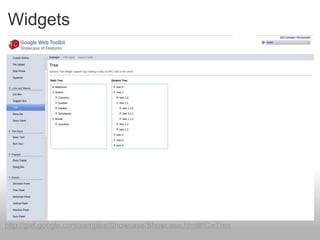
Widgets http://gwt.google.com/samples/Showcase/Showcase.html#!CwTree
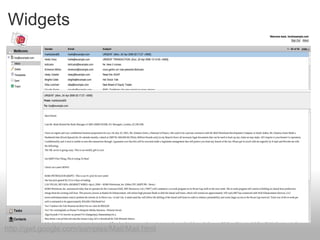
Widgets http://gwt.google.com/samples/Mail/Mail.html
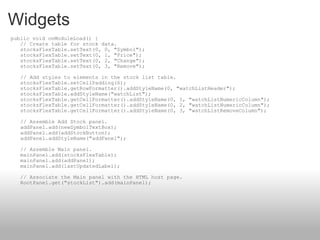
Widgets    public void onModuleLoad() {     // Create table for stock data.     stocksFlexTable.setText(0, 0, "Symbol");     stocksFlexTable.setText(0, 1, "Price");     stocksFlexTable.setText(0, 2, "Change");     stocksFlexTable.setText(0, 3, "Remove");     // Add styles to elements in the stock list table.     stocksFlexTable.setCellPadding(6);     stocksFlexTable.getRowFormatter().addStyleName(0, "watchListHeader");     stocksFlexTable.addStyleName("watchList");     stocksFlexTable.getCellFormatter().addStyleName(0, 1, "watchListNumericColumn");     stocksFlexTable.getCellFormatter().addStyleName(0, 2, "watchListNumericColumn");     stocksFlexTable.getCellFormatter().addStyleName(0, 3, "watchListRemoveColumn");     // Assemble Add Stock panel.     addPanel.add(newSymbolTextBox);     addPanel.add(addStockButton);     addPanel.addStyleName("addPanel");     // Assemble Main panel.     mainPanel.add(stocksFlexTable);     mainPanel.add(addPanel);     mainPanel.add(lastUpdatedLabel);     // Associate the Main panel with the HTML host page.     RootPanel.get("stockList").add(mainPanel);
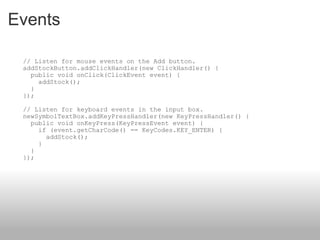
Events      // Listen for mouse events on the Add button.     addStockButton.addClickHandler(new ClickHandler() {       public void onClick(ClickEvent event) {         addStock();       }     });     // Listen for keyboard events in the input box.     newSymbolTextBox.addKeyPressHandler(new KeyPressHandler() {       public void onKeyPress(KeyPressEvent event) {         if (event.getCharCode() == KeyCodes.KEY_ENTER) {           addStock();         }       }     });
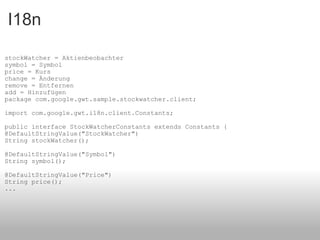
I18n stockWatcher = Aktienbeobachter symbol = Symbol price = Kurs change = Änderung remove = Entfernen add = Hinzufügen  package com.google.gwt.sample.stockwatcher.client; import com.google.gwt.i18n.client.Constants; public interface StockWatcherConstants extends Constants { @DefaultStringValue("StockWatcher") String stockWatcher(); @DefaultStringValue("Symbol") String symbol(); @DefaultStringValue("Price") String price(); ...
Internationalization Static string internationalization .properties file for each language Access through the Constants interface Faster but needs recompilation for every change   Dynamic string internationalization String in the host html page Access through the Dictionary class Dynamic, slower but no need for recompilation Localizable interface  Advanced method, localizable classes, rarely
Client-server communication Never forget that the calls are asynchronous  GWT-RPC Full java, pass java objects between client and server   JSON When server is not java-based
Client-server support @RemoteServiceRelativePath("stockPrices") public interface StockPriceService extends RemoteService { StockPrice[] getPrices(String[] symbols); }   The client-side
Client-server support public class StockPriceServiceImpl extends RemoteServiceServlet implements StockPriceService { public StockPrice[] getPrices(String[] symbols) { // TODO Auto-generated method stub return null; } }  The server-side
public interface StockPriceServiceAsync {     void getPrices(String[] symbols,             AsyncCallback<StockPrice[]> callback); }  Client-server support The mysterious Async interface
Client-server support stockPriceSvc.getPrices(stocks.toArray(new String[0]), new       AsyncCallback<StockPrice[]> () {        public void onFailure(Throwable caught) {        // TODO: Do something with errors.         }        public void onSuccess(StockPrice[] result) {         updateTable(result);        }     }); }     The RPC call
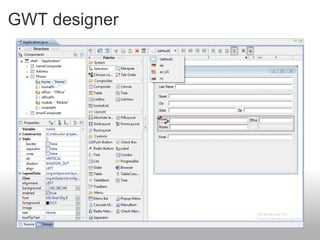
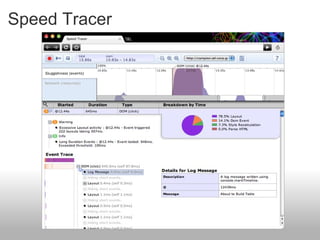
Tools GWT SDK GWT Designer GWT plugin for Eclipse Speed Tracer
Project structure The module xml file The CSS The Host page The java code
Advanced topics UI binder GWT designer Speed Tracer
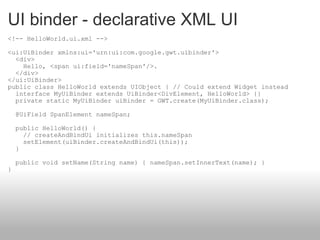
UI binder - declarative XML UI <!-- HelloWorld.ui.xml --> <ui:UiBinder xmlns:ui='urn:ui:com.google.gwt.uibinder'>   <div>     Hello, <span ui:field='nameSpan'/>.   </div> </ui:UiBinder>  public class HelloWorld extends UIObject { // Could extend Widget instead   interface MyUiBinder extends UiBinder<DivElement, HelloWorld> {}   private static MyUiBinder uiBinder = GWT.create(MyUiBinder.class);   @UiField SpanElement nameSpan;   public HelloWorld() {     // createAndBindUi initializes this.nameSpan     setElement(uiBinder.createAndBindUi(this));   }   public void setName(String name) { nameSpan.setInnerText(name); } }
GWT designer
Speed Tracer
What 's new Cell widgets Logging (Client and Remote) Security (SafeHtml) GWT Designer RequestFactory - RpcService

Google Web Toolkit

  • 1.
    Google Web ToolkitGreece -GTUG Athens, 2011/03/22 Christos Stathis
  • 2.
    What is it?A tool for developing AJAX-enabled, rich UI, browser based applications written in Java So, is it a tool for creating Java applets? Nooooooooo!!!
  • 3.
    How does itwork The big secret: Java code is cross-compiled to Javascript that runs in the browser The whole development cycle is purely in Java  Why ? Hide everything under Java Why not Javascript? No IDE, No debugging, easy to create a mess
  • 4.
    Features Widget libraryComponent Widgets Event-driven UI Internationalization Browser history Client-server communication Integrating with existing web apps Google AppEngine support
  • 5.
  • 6.
  • 7.
    Widgets   public void onModuleLoad() {     // Create table for stock data.     stocksFlexTable.setText(0, 0, &quot;Symbol&quot;);     stocksFlexTable.setText(0, 1, &quot;Price&quot;);     stocksFlexTable.setText(0, 2, &quot;Change&quot;);     stocksFlexTable.setText(0, 3, &quot;Remove&quot;);     // Add styles to elements in the stock list table.     stocksFlexTable.setCellPadding(6);     stocksFlexTable.getRowFormatter().addStyleName(0, &quot;watchListHeader&quot;);     stocksFlexTable.addStyleName(&quot;watchList&quot;);     stocksFlexTable.getCellFormatter().addStyleName(0, 1, &quot;watchListNumericColumn&quot;);     stocksFlexTable.getCellFormatter().addStyleName(0, 2, &quot;watchListNumericColumn&quot;);     stocksFlexTable.getCellFormatter().addStyleName(0, 3, &quot;watchListRemoveColumn&quot;);     // Assemble Add Stock panel.     addPanel.add(newSymbolTextBox);     addPanel.add(addStockButton);     addPanel.addStyleName(&quot;addPanel&quot;);     // Assemble Main panel.     mainPanel.add(stocksFlexTable);     mainPanel.add(addPanel);     mainPanel.add(lastUpdatedLabel);     // Associate the Main panel with the HTML host page.     RootPanel.get(&quot;stockList&quot;).add(mainPanel);
  • 8.
    Events     // Listen for mouse events on the Add button.     addStockButton.addClickHandler(new ClickHandler() {       public void onClick(ClickEvent event) {         addStock();       }     });     // Listen for keyboard events in the input box.     newSymbolTextBox.addKeyPressHandler(new KeyPressHandler() {       public void onKeyPress(KeyPressEvent event) {         if (event.getCharCode() == KeyCodes.KEY_ENTER) {           addStock();         }       }     });
  • 9.
    I18n stockWatcher =Aktienbeobachter symbol = Symbol price = Kurs change = Änderung remove = Entfernen add = Hinzufügen package com.google.gwt.sample.stockwatcher.client; import com.google.gwt.i18n.client.Constants; public interface StockWatcherConstants extends Constants { @DefaultStringValue(&quot;StockWatcher&quot;) String stockWatcher(); @DefaultStringValue(&quot;Symbol&quot;) String symbol(); @DefaultStringValue(&quot;Price&quot;) String price(); ...
  • 10.
    Internationalization Static stringinternationalization .properties file for each language Access through the Constants interface Faster but needs recompilation for every change   Dynamic string internationalization String in the host html page Access through the Dictionary class Dynamic, slower but no need for recompilation Localizable interface  Advanced method, localizable classes, rarely
  • 11.
    Client-server communication Neverforget that the calls are asynchronous GWT-RPC Full java, pass java objects between client and server  JSON When server is not java-based
  • 12.
    Client-server support @RemoteServiceRelativePath(&quot;stockPrices&quot;)public interface StockPriceService extends RemoteService { StockPrice[] getPrices(String[] symbols); }   The client-side
  • 13.
    Client-server support publicclass StockPriceServiceImpl extends RemoteServiceServlet implements StockPriceService { public StockPrice[] getPrices(String[] symbols) { // TODO Auto-generated method stub return null; } } The server-side
  • 14.
    public interface StockPriceServiceAsync{     void getPrices(String[] symbols,             AsyncCallback<StockPrice[]> callback); } Client-server support The mysterious Async interface
  • 15.
    Client-server support stockPriceSvc.getPrices(stocks.toArray(newString[0]), new       AsyncCallback<StockPrice[]> () {        public void onFailure(Throwable caught) {        // TODO: Do something with errors.        }        public void onSuccess(StockPrice[] result) {         updateTable(result);        }     }); }    The RPC call
  • 16.
    Tools GWT SDKGWT Designer GWT plugin for Eclipse Speed Tracer
  • 17.
    Project structure Themodule xml file The CSS The Host page The java code
  • 18.
    Advanced topics UIbinder GWT designer Speed Tracer
  • 19.
    UI binder -declarative XML UI <!-- HelloWorld.ui.xml --> <ui:UiBinder xmlns:ui='urn:ui:com.google.gwt.uibinder'>   <div>     Hello, <span ui:field='nameSpan'/>.   </div> </ui:UiBinder> public class HelloWorld extends UIObject { // Could extend Widget instead   interface MyUiBinder extends UiBinder<DivElement, HelloWorld> {}   private static MyUiBinder uiBinder = GWT.create(MyUiBinder.class);   @UiField SpanElement nameSpan;   public HelloWorld() {     // createAndBindUi initializes this.nameSpan     setElement(uiBinder.createAndBindUi(this));   }   public void setName(String name) { nameSpan.setInnerText(name); } }
  • 20.
  • 21.
  • 22.
    What 's newCell widgets Logging (Client and Remote) Security (SafeHtml) GWT Designer RequestFactory - RpcService