
Windows Store app using XAML and
C#: Enterprise Product Development
What beyond POCs ?!

                       Mahmoud Hamed
                       ITWorx

patterns & practices Symposium 2013
Mahmoud   mahmoud.hamed@itworx.com       @mhamedmahmoud


Hamed
                                     http://eg.linkedin.com/in/mah
            dev.mhamed@gmail.com     moudhamedmahmoud
This presentation is based on a presentation
by p&p team at pattern & practices
symposium 2013 with updates to reflect my
own experience
Tips for building a Windows Store app using
XAML and C#: The Kona project


patterns & practices Symposium 2013
Why I need this session can I live
without it ??????!


patterns & practices Symposium 2013
Agenda

         
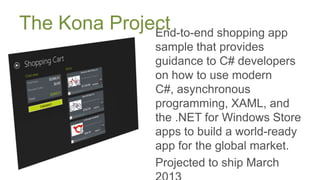
The Kona Project
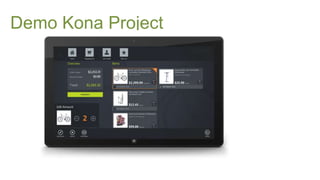
Demo Kona Project
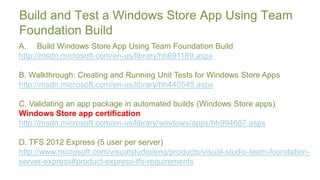
Build and Test a Windows Store App Using Team
Foundation Build
A. Build Windows Store App Using Team Foundation Build
http://msdn.microsoft.com/en-us/library/hh691189.aspx

B. Walkthrough: Creating and Running Unit Tests for Windows Store Apps
http://msdn.microsoft.com/en-us/library/hh440545.aspx

C. Validating an app package in automated builds (Windows Store apps)
Windows Store app certification
http://msdn.microsoft.com/en-us/library/windows/apps/hh994667.aspx

D. TFS 2012 Express (5 user per server)
http://www.microsoft.com/visualstudio/eng/products/visual-studio-team-foundation-
server-express#product-express-tfs-requirements
Demo TFS 2012 and Windows Store
Apps
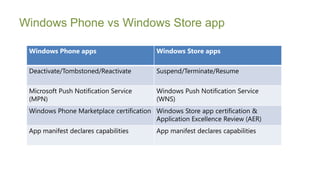
Windows Phone vs Windows Store app

 Windows Phone apps                       Windows Store apps

 Deactivate/Tombstoned/Reactivate         Suspend/Terminate/Resume

 Microsoft Push Notification Service      Windows Push Notification Service
 (MPN)                                    (WNS)
 Windows Phone Marketplace certification Windows Store app certification &
                                         Application Excellence Review (AER)
 App manifest declares capabilities       App manifest declares capabilities
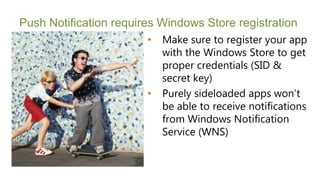
Push Notification requires Windows Store registration
                        •   Make sure to register your app
                            with the Windows Store to get
                            proper credentials (SID &
                            secret key)
                        •   Purely sideloaded apps won’t
                            be able to receive notifications
                            from Windows Notification
                            Service (WNS)
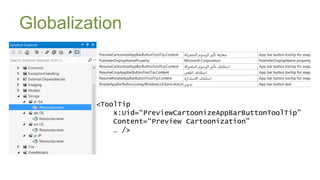
Globalization


         <ToolTip
             x:Uid=“PreviewCartoonizeAppBarButtonToolTip”
             Content=“Preview Cartoonization”
             … />
Globalization
A. Globalizing your app
http://msdn.microsoft.com/en-us/library/windows/apps/hh465006.aspx

B. How to use the Multilingual App Toolkit
http://msdn.microsoft.com/en-us/library/windows/apps/xaml/jj572370.aspx

C. Application resources and localization sample
http://code.msdn.microsoft.com/windowsapps/Application-resources-and-
cd0c6eaa
Demo Windows Store Apps
Globalization
Logging
Logging Sample for Windows Store Apps (ETW Logging in WinRT)
http://code.msdn.microsoft.com/windowsapps/Logging-Sample-for-
Windows-0b9dffd7

MetroLog Overview
MetroLog is a lightweight logging framework designed for Windows Store
and Windows Phone 8 apps
https://github.com/mbrit/MetroLog
Demo Windows Store Apps Logging
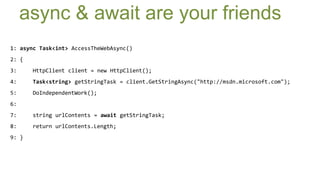
async & await are your friends
1: async Task<int> AccessTheWebAsync()
2: {
3:     HttpClient client = new HttpClient();
4:     Task<string> getStringTask = client.GetStringAsync("http://msdn.microsoft.com");
5:     DoIndependentWork();
6:
7:     string urlContents = await getStringTask;
8:     return urlContents.Length;
9: }
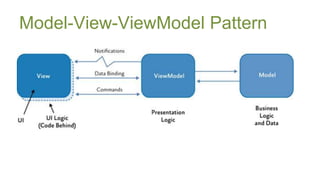
Model-View-ViewModel Pattern
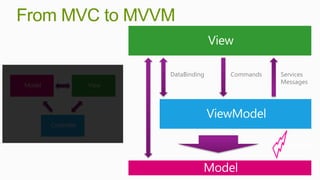
From MVC to MVVM


               DataBinding   Commands   Services
                                        Messages


                                          Events
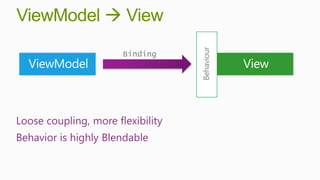
ViewModel  View


                                   Behaviour
                       Binding


Loose coupling, more flexibility
Behavior is highly Blendable
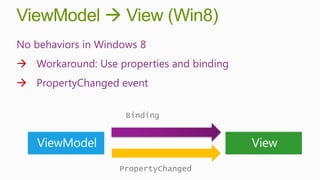
ViewModel  View (Win8)
No behaviors in Windows 8
 Workaround: Use properties and binding
 PropertyChanged event

                     Binding


                   PropertyChanged
Focus on AttachedBehaviors
•   No Blend Behavior<T>
•   No BindingExpressions
•   Break out your
    AttachedBehavior
    experience and
    ROCK ON!
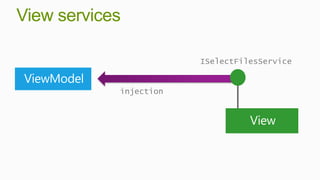
View services

                        ISelectFilesService


            injection
MVVM Light
Use BindableBase class to provide
INPC
public abstract class BindableBase : INotifyPropertyChanged
{
    public event PropertyChangedEventHandler PropertyChanged;

    protected bool SetProperty<T>(ref T storage, T value, [CallerMemberName] String propertyName = null)
    {
        if (object.Equals(storage, value)) return false;
        storage = value;
        this.OnPropertyChanged(propertyName);
        return true;
    }
    protected void OnPropertyChanged([CallerMemberName] string propertyName = null)
    {
        var eventHandler = this.PropertyChanged;
        if (eventHandler != null)
        {
            eventHandler(this, new PropertyChangedEventArgs(propertyName));
        }
    }
}
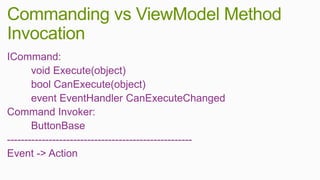
Commanding vs ViewModel Method
Invocation
ICommand:
       void Execute(object)
       bool CanExecute(object)
       event EventHandler CanExecuteChanged
Command Invoker:
       ButtonBase
-----------------------------------------------------
Event -> Action
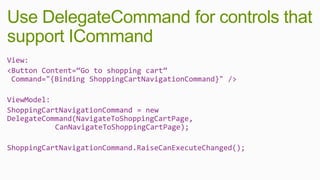
Use DelegateCommand for controls that
support ICommand
View:
<Button Content=“Go to shopping cart”
 Command="{Binding ShoppingCartNavigationCommand}" />

ViewModel:
ShoppingCartNavigationCommand = new
DelegateCommand(NavigateToShoppingCartPage,
           CanNavigateToShoppingCartPage);

ShoppingCartNavigationCommand.RaiseCanExecuteChanged();
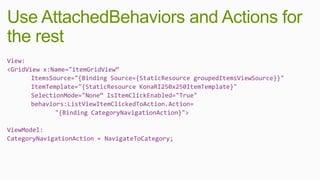
Use AttachedBehaviors and Actions for
the rest
View:
<GridView x:Name="itemGridView“
       ItemsSource="{Binding Source={StaticResource groupedItemsViewSource}}"
       ItemTemplate="{StaticResource KonaRI250x250ItemTemplate}"
       SelectionMode="None“ IsItemClickEnabled="True"
       behaviors:ListViewItemClickedToAction.Action=
              "{Binding CategoryNavigationAction}">

ViewModel:
CategoryNavigationAction = NavigateToCategory;
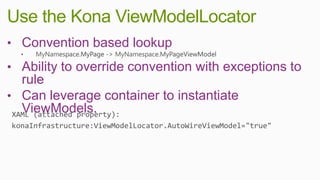
Use the Kona ViewModelLocator
• Convention based lookup
• Ability to override convention with exceptions to
  rule
• Can leverage container to instantiate
  ViewModels.
Decoupled Eventing
            • Hollywood Parent style UI
              Composition (user control)
            • Child control needs to listen
              to events raised by long
              lived services but no way to
              unhook…

            • Ported Prism
              EventAggregator
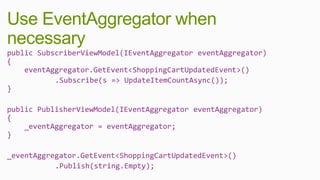
Use EventAggregator when
necessary
public SubscriberViewModel(IEventAggregator eventAggregator)
{
    eventAggregator.GetEvent<ShoppingCartUpdatedEvent>()
           .Subscribe(s => UpdateItemCountAsync());
}

public PublisherViewModel(IEventAggregator eventAggregator)
{
    _eventAggregator = eventAggregator;
}

_eventAggregator.GetEvent<ShoppingCartUpdatedEvent>()
           .Publish(string.Empty);
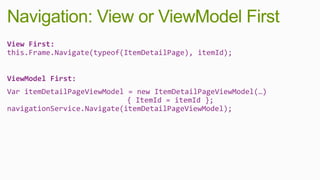
Navigation: View or ViewModel First
View First:
this.Frame.Navigate(typeof(ItemDetailPage), itemId);


ViewModel First:
Var itemDetailPageViewModel = new ItemDetailPageViewModel(…)
                            { ItemId = itemId };
navigationService.Navigate(itemDetailPageViewModel);
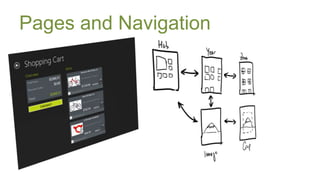
Pages and Navigation
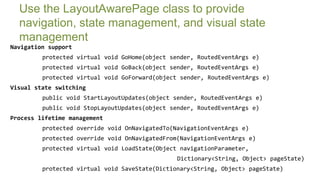
Use the LayoutAwarePage class to provide
  navigation, state management, and visual state
  management
Navigation support
         protected virtual void GoHome(object sender, RoutedEventArgs e)
         protected virtual void GoBack(object sender, RoutedEventArgs e)
         protected virtual void GoForward(object sender, RoutedEventArgs e)
Visual state switching
         public void StartLayoutUpdates(object sender, RoutedEventArgs e)
         public void StopLayoutUpdates(object sender, RoutedEventArgs e)
Process lifetime management
         protected override void OnNavigatedTo(NavigationEventArgs e)
         protected override void OnNavigatedFrom(NavigationEventArgs e)
         protected virtual void LoadState(Object navigationParameter,
                                                Dictionary<String, Object> pageState)
         protected virtual void SaveState(Dictionary<String, Object> pageState)
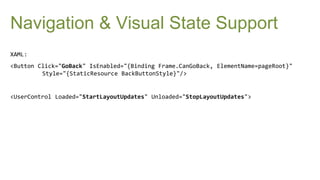
Navigation & Visual State Support
XAML:
<Button Click="GoBack" IsEnabled="{Binding Frame.CanGoBack, ElementName=pageRoot}"
         Style="{StaticResource BackButtonStyle}"/>


<UserControl Loaded="StartLayoutUpdates" Unloaded="StopLayoutUpdates">
LoadState & SaveState: SuspensionManager
protected override void SaveState(System.Collections.Generic.Dictionary<string, object> pageState)
{
    var virtualizingStackPanel =
                      VisualTreeUtilities.GetVisualChild<VirtualizingStackPanel>(itemGridView);
    if (virtualizingStackPanel != null && pageState != null)
    {
        pageState["virtualizingStackPanelHorizontalOffset"] = virtualizingStackPanel.HorizontalOffset;
    }
}


protected override void LoadState(object navigationParameter,
                                       System.Collections.Generic.Dictionary<string, object> pageState)
{
    if (pageState != null && pageState.ContainsKey("virtualizingStackPanelHorizontalOffset"))
    {
        double.TryParse(pageState["virtualizingStackPanelHorizontalOffset"].ToString(),
                        out virtualizingStackPanelHorizontalOffset);
    }
}
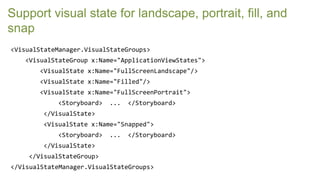
Support visual state for landscape, portrait, fill, and
snap
<VisualStateManager.VisualStateGroups>
   <VisualStateGroup x:Name="ApplicationViewStates">
       <VisualState x:Name="FullScreenLandscape"/>
       <VisualState x:Name="Filled"/>
       <VisualState x:Name="FullScreenPortrait">
            <Storyboard>   ...   </Storyboard>
        </VisualState>
        <VisualState x:Name="Snapped">
            <Storyboard>   ...   </Storyboard>
        </VisualState>
    </VisualStateGroup>
</VisualStateManager.VisualStateGroups>
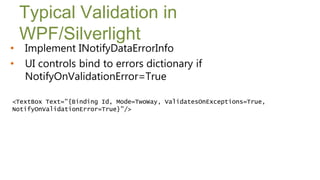
Typical Validation in
    WPF/Silverlight
•   Implement INotifyDataErrorInfo
•   UI controls bind to errors dictionary if
    NotifyOnValidationError=True

<TextBox Text="{Binding Id, Mode=TwoWay, ValidatesOnExceptions=True,
NotifyOnValidationError=True}"/>
Use Kona BindableValidator
View:
<TextBox
       Text="{Binding Address.FirstName, Mode=TwoWay}"
       behaviors:HighlightFormFieldOnErrors.PropertyErrors="{Binding
Errors[FirstName]}" />


ViewModel:
_bindableValidator = new BindableValidator(_address);


public BindableValidator Errors
{
    get { return _bindableValidator; }
}
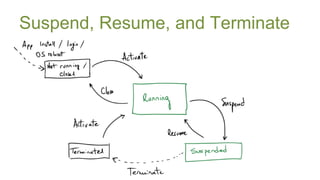
Suspend, Resume, and Terminate
15. Use Kona RestorableStateAttribute and MVVM
framework
public class MyViewModel : ViewModel, INavigationAware
{
        private string _name;

       [RestorableState]
         public string Name
       {
           get { return _name; }
           set { SetProperty(ref _name, value); }
       }
}


       Symposium 2013
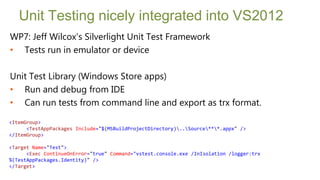
Unit Testing nicely integrated into VS2012
WP7: Jeff Wilcox's Silverlight Unit Test Framework
• Tests run in emulator or device

Unit Test Library (Windows Store apps)
• Run and debug from IDE
• Can run tests from command line and export as trx format.

<ItemGroup>
      <TestAppPackages Include="$(MSBuildProjectDirectory)..Source***.appx" />
</ItemGroup>

<Target Name="Test">
      <Exec ContinueOnError="true" Command="vstest.console.exe /InIsolation /logger:trx
%(TestAppPackages.Identity)" />
</Target>
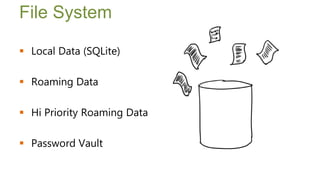
File System

 Local Data (SQLite)

 Roaming Data

 Hi Priority Roaming Data

 Password Vault

       Symposium 2013
Final Tips
 Read Windows 8 SDK
   http://msdn.microsoft.com/library/windows/apps/
 Watch Some videos
   Channel 9: Windows Camps
       http://channel9.msdn.com/Events/Windows-Camp
   Channel 9: Windows tag
       http://channel9.msdn.com/Tags/windows+8
   Pluralsight windows 8 series
       http://www.pluralsight.com/training/Courses#windows-8


      Symposium 2013
Thanks!


 http://konaguidance.codeplex.com


      Symposium 2013

Windows Store app using XAML and C#: Enterprise Product Development

  • 1.
    Windows Store appusing XAML and C#: Enterprise Product Development What beyond POCs ?! Mahmoud Hamed ITWorx patterns & practices Symposium 2013
  • 2.
    Mahmoud mahmoud.hamed@itworx.com @mhamedmahmoud Hamed http://eg.linkedin.com/in/mah dev.mhamed@gmail.com moudhamedmahmoud
  • 3.
    This presentation isbased on a presentation by p&p team at pattern & practices symposium 2013 with updates to reflect my own experience Tips for building a Windows Store app using XAML and C#: The Kona project patterns & practices Symposium 2013
  • 4.
    Why I needthis session can I live without it ??????! patterns & practices Symposium 2013
  • 5.
  • 6.
  • 7.
  • 10.
    Build and Testa Windows Store App Using Team Foundation Build A. Build Windows Store App Using Team Foundation Build http://msdn.microsoft.com/en-us/library/hh691189.aspx B. Walkthrough: Creating and Running Unit Tests for Windows Store Apps http://msdn.microsoft.com/en-us/library/hh440545.aspx C. Validating an app package in automated builds (Windows Store apps) Windows Store app certification http://msdn.microsoft.com/en-us/library/windows/apps/hh994667.aspx D. TFS 2012 Express (5 user per server) http://www.microsoft.com/visualstudio/eng/products/visual-studio-team-foundation- server-express#product-express-tfs-requirements
  • 11.
    Demo TFS 2012and Windows Store Apps
  • 12.
    Windows Phone vsWindows Store app Windows Phone apps Windows Store apps Deactivate/Tombstoned/Reactivate Suspend/Terminate/Resume Microsoft Push Notification Service Windows Push Notification Service (MPN) (WNS) Windows Phone Marketplace certification Windows Store app certification & Application Excellence Review (AER) App manifest declares capabilities App manifest declares capabilities
  • 13.
    Push Notification requiresWindows Store registration • Make sure to register your app with the Windows Store to get proper credentials (SID & secret key) • Purely sideloaded apps won’t be able to receive notifications from Windows Notification Service (WNS)
  • 14.
    Globalization <ToolTip x:Uid=“PreviewCartoonizeAppBarButtonToolTip” Content=“Preview Cartoonization” … />
  • 15.
    Globalization A. Globalizing yourapp http://msdn.microsoft.com/en-us/library/windows/apps/hh465006.aspx B. How to use the Multilingual App Toolkit http://msdn.microsoft.com/en-us/library/windows/apps/xaml/jj572370.aspx C. Application resources and localization sample http://code.msdn.microsoft.com/windowsapps/Application-resources-and- cd0c6eaa
  • 16.
    Demo Windows StoreApps Globalization
  • 17.
    Logging Logging Sample forWindows Store Apps (ETW Logging in WinRT) http://code.msdn.microsoft.com/windowsapps/Logging-Sample-for- Windows-0b9dffd7 MetroLog Overview MetroLog is a lightweight logging framework designed for Windows Store and Windows Phone 8 apps https://github.com/mbrit/MetroLog
  • 18.
    Demo Windows StoreApps Logging
  • 19.
    async & awaitare your friends 1: async Task<int> AccessTheWebAsync() 2: { 3: HttpClient client = new HttpClient(); 4: Task<string> getStringTask = client.GetStringAsync("http://msdn.microsoft.com"); 5: DoIndependentWork(); 6: 7: string urlContents = await getStringTask; 8: return urlContents.Length; 9: }
  • 20.
  • 21.
    From MVC toMVVM DataBinding Commands Services Messages Events
  • 22.
    ViewModel  View Behaviour Binding Loose coupling, more flexibility Behavior is highly Blendable
  • 23.
    ViewModel  View(Win8) No behaviors in Windows 8  Workaround: Use properties and binding  PropertyChanged event Binding PropertyChanged
  • 24.
    Focus on AttachedBehaviors • No Blend Behavior<T> • No BindingExpressions • Break out your AttachedBehavior experience and ROCK ON!
  • 25.
    View services ISelectFilesService injection
  • 26.
  • 28.
    Use BindableBase classto provide INPC public abstract class BindableBase : INotifyPropertyChanged { public event PropertyChangedEventHandler PropertyChanged; protected bool SetProperty<T>(ref T storage, T value, [CallerMemberName] String propertyName = null) { if (object.Equals(storage, value)) return false; storage = value; this.OnPropertyChanged(propertyName); return true; } protected void OnPropertyChanged([CallerMemberName] string propertyName = null) { var eventHandler = this.PropertyChanged; if (eventHandler != null) { eventHandler(this, new PropertyChangedEventArgs(propertyName)); } } }
  • 29.
    Commanding vs ViewModelMethod Invocation ICommand: void Execute(object) bool CanExecute(object) event EventHandler CanExecuteChanged Command Invoker: ButtonBase ----------------------------------------------------- Event -> Action
  • 30.
    Use DelegateCommand forcontrols that support ICommand View: <Button Content=“Go to shopping cart” Command="{Binding ShoppingCartNavigationCommand}" /> ViewModel: ShoppingCartNavigationCommand = new DelegateCommand(NavigateToShoppingCartPage, CanNavigateToShoppingCartPage); ShoppingCartNavigationCommand.RaiseCanExecuteChanged();
  • 31.
    Use AttachedBehaviors andActions for the rest View: <GridView x:Name="itemGridView“ ItemsSource="{Binding Source={StaticResource groupedItemsViewSource}}" ItemTemplate="{StaticResource KonaRI250x250ItemTemplate}" SelectionMode="None“ IsItemClickEnabled="True" behaviors:ListViewItemClickedToAction.Action= "{Binding CategoryNavigationAction}"> ViewModel: CategoryNavigationAction = NavigateToCategory;
  • 32.
    Use the KonaViewModelLocator • Convention based lookup • Ability to override convention with exceptions to rule • Can leverage container to instantiate ViewModels.
  • 33.
    Decoupled Eventing • Hollywood Parent style UI Composition (user control) • Child control needs to listen to events raised by long lived services but no way to unhook… • Ported Prism EventAggregator
  • 34.
    Use EventAggregator when necessary publicSubscriberViewModel(IEventAggregator eventAggregator) { eventAggregator.GetEvent<ShoppingCartUpdatedEvent>() .Subscribe(s => UpdateItemCountAsync()); } public PublisherViewModel(IEventAggregator eventAggregator) { _eventAggregator = eventAggregator; } _eventAggregator.GetEvent<ShoppingCartUpdatedEvent>() .Publish(string.Empty);
  • 35.
    Navigation: View orViewModel First View First: this.Frame.Navigate(typeof(ItemDetailPage), itemId); ViewModel First: Var itemDetailPageViewModel = new ItemDetailPageViewModel(…) { ItemId = itemId }; navigationService.Navigate(itemDetailPageViewModel);
  • 37.
  • 38.
    Use the LayoutAwarePageclass to provide navigation, state management, and visual state management Navigation support protected virtual void GoHome(object sender, RoutedEventArgs e) protected virtual void GoBack(object sender, RoutedEventArgs e) protected virtual void GoForward(object sender, RoutedEventArgs e) Visual state switching public void StartLayoutUpdates(object sender, RoutedEventArgs e) public void StopLayoutUpdates(object sender, RoutedEventArgs e) Process lifetime management protected override void OnNavigatedTo(NavigationEventArgs e) protected override void OnNavigatedFrom(NavigationEventArgs e) protected virtual void LoadState(Object navigationParameter, Dictionary<String, Object> pageState) protected virtual void SaveState(Dictionary<String, Object> pageState)
  • 39.
    Navigation & VisualState Support XAML: <Button Click="GoBack" IsEnabled="{Binding Frame.CanGoBack, ElementName=pageRoot}" Style="{StaticResource BackButtonStyle}"/> <UserControl Loaded="StartLayoutUpdates" Unloaded="StopLayoutUpdates">
  • 40.
    LoadState & SaveState:SuspensionManager protected override void SaveState(System.Collections.Generic.Dictionary<string, object> pageState) { var virtualizingStackPanel = VisualTreeUtilities.GetVisualChild<VirtualizingStackPanel>(itemGridView); if (virtualizingStackPanel != null && pageState != null) { pageState["virtualizingStackPanelHorizontalOffset"] = virtualizingStackPanel.HorizontalOffset; } } protected override void LoadState(object navigationParameter, System.Collections.Generic.Dictionary<string, object> pageState) { if (pageState != null && pageState.ContainsKey("virtualizingStackPanelHorizontalOffset")) { double.TryParse(pageState["virtualizingStackPanelHorizontalOffset"].ToString(), out virtualizingStackPanelHorizontalOffset); } }
  • 41.
    Support visual statefor landscape, portrait, fill, and snap <VisualStateManager.VisualStateGroups> <VisualStateGroup x:Name="ApplicationViewStates"> <VisualState x:Name="FullScreenLandscape"/> <VisualState x:Name="Filled"/> <VisualState x:Name="FullScreenPortrait"> <Storyboard> ... </Storyboard> </VisualState> <VisualState x:Name="Snapped"> <Storyboard> ... </Storyboard> </VisualState> </VisualStateGroup> </VisualStateManager.VisualStateGroups>
  • 42.
    Typical Validation in WPF/Silverlight • Implement INotifyDataErrorInfo • UI controls bind to errors dictionary if NotifyOnValidationError=True <TextBox Text="{Binding Id, Mode=TwoWay, ValidatesOnExceptions=True, NotifyOnValidationError=True}"/>
  • 43.
    Use Kona BindableValidator View: <TextBox Text="{Binding Address.FirstName, Mode=TwoWay}" behaviors:HighlightFormFieldOnErrors.PropertyErrors="{Binding Errors[FirstName]}" /> ViewModel: _bindableValidator = new BindableValidator(_address); public BindableValidator Errors { get { return _bindableValidator; } }
  • 44.
  • 45.
    15. Use KonaRestorableStateAttribute and MVVM framework public class MyViewModel : ViewModel, INavigationAware { private string _name; [RestorableState] public string Name { get { return _name; } set { SetProperty(ref _name, value); } } } Symposium 2013
  • 46.
    Unit Testing nicelyintegrated into VS2012 WP7: Jeff Wilcox's Silverlight Unit Test Framework • Tests run in emulator or device Unit Test Library (Windows Store apps) • Run and debug from IDE • Can run tests from command line and export as trx format. <ItemGroup> <TestAppPackages Include="$(MSBuildProjectDirectory)..Source***.appx" /> </ItemGroup> <Target Name="Test"> <Exec ContinueOnError="true" Command="vstest.console.exe /InIsolation /logger:trx %(TestAppPackages.Identity)" /> </Target>
  • 47.
    File System  LocalData (SQLite)  Roaming Data  Hi Priority Roaming Data  Password Vault Symposium 2013
  • 48.
    Final Tips  ReadWindows 8 SDK  http://msdn.microsoft.com/library/windows/apps/  Watch Some videos  Channel 9: Windows Camps  http://channel9.msdn.com/Events/Windows-Camp  Channel 9: Windows tag  http://channel9.msdn.com/Tags/windows+8  Pluralsight windows 8 series  http://www.pluralsight.com/training/Courses#windows-8 Symposium 2013
  • 49.

Editor's Notes

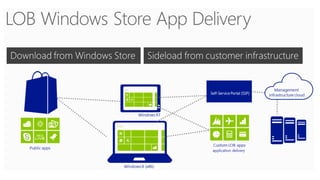
  • #7 Line of Business emphasis…
  • #14 ExplainSideLoaded
  • #32 Don’t need command enablement….