Fun with Jeremy Rasmussen 9/23/05 Part 1: Power searches and reconnaissance
I’m feeling lucky The Google interface Preferences Cool stuff Power searching
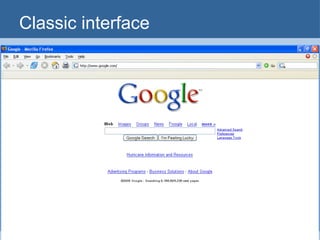
Classic interface
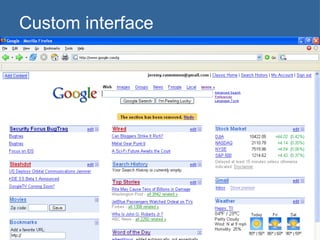
Custom interface
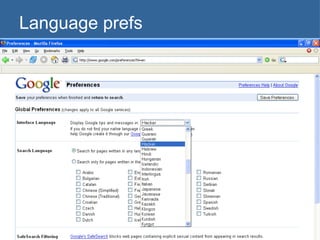
Language prefs
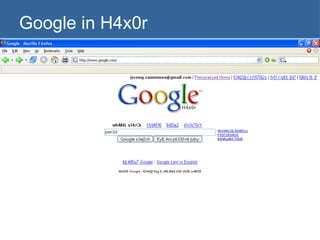
Google in H4x0r
Language Proxy server can be used to hide location and identity while surfing Web Google sets default language to match country where proxy is If your language settings change inexplicably, check proxy settings You can manipulate language manually by fiddling directly with URL
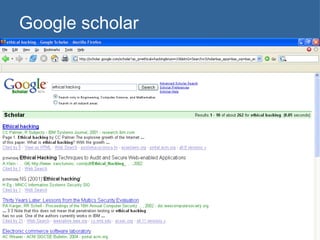
Google scholar
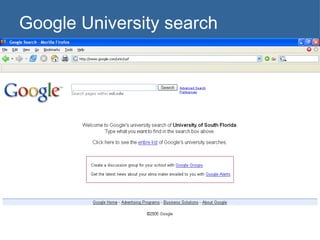
Google University search
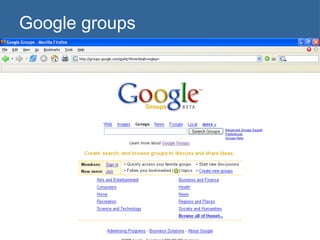
Google groups
Google freeware Web accelerator Google earth Picasa Etc.
Golden rules of searching Google is case-insensitive Except for the Boolean operator OR, which must be written in uppercase Wildcards not handled normally * nothing more than a single word in a search phrase; provides no additional  stemming Google stems automatically Tries to expand or contract words automatically—can’t lead to unpredictable results
Golden rules of searching Google ignores “stop” words Who, where, what, the, a, an Except when you search on them individually Or when you put “quotes” around search phrase Or when you +force +it +to +use +all +terms Largest possible search? Google limits you to a 10-word query Get around this by using wildcards for stop words
Boolean operators Google automatically ANDs all search terms Spice things up with: OR    | NOT    –  Google evaluates these from left to right Search terms don’t even have to be syntactically correct in terms of Boolean logic
Search example What does the following search term do: Intext:password | passcode  intext:username | userid | user filetype:xls Locates all pages that have either password or passcode in their text. Then from these, show only pages that have username, userid, or user. From these, it shows only .XLS files. Google not confused by the lousy syntax or lack of parentheses.
URL queries Everything that can be done through the search box can be done by manually entering a URL The only required parameter is q (query) www.google.com/search?q= foo String together parameters with & www.google.com/search?q= foo &hl= en (Specifies query on foo and language of English)
Some advanced operators intitle  - search text within the title of a page URL: as_occt=title inurl  - search text within a given URL. Alows you to search for specific directories or folders URL: as_occt=url filetype  - search for pages with a particular file extension URL: as_ft=i&as_filetype=<some file extension> site  - search only within the specified sites. Must be valid top-level domain name URL: as_dt=i&as_sitesearch=<some domain>
Some advanced operators link  - search for pages that link to other pages. Must be correct URL syntax; if invalid link syntax provided, Google treats it like a phrase search URL: as_lq daterange  - search for pages published within a certain date range. Uses Julian dates or 3 mo, 6 mo, yr. As_qdr=m6  (searches past six months) numrange - search for numbers within a range from low-high. e.g., numrange:99-101 will find 100.  Alternatively, use 99..101 URL: as_nlo=<low num>&as_nhi=<high num> Note Google ignores $ and , (makes searching easier)
Advanced operators cache  - use Google's cached link of the results page. Passing invalid URL as parameter to cache will submit query as phrase search. URL:  info  - shows summary information for a site and provides links to other Google searches that might pertain to the site. Same as supplying URL as a search query.  related  - shows sites Google thinks are similar. URL: as_rq
Google groups operators author  - find a Usenet author group  - find a Usenet group msgid  - find a Usenet message ID  insubject  - find a Usenet subject lines (similar to intitle:) These are useful for finding people, NNTP servers, etc.
Hacking Google Try to explore how commands work together Try to find out why stuff works the way it does E.g., why does the following return > 0 hits? (filetype:pdf | filetype:xls) -inurl:pdf -inurl:xls
Surfing anonymously People who want to surf anonymously usually use a Web proxy Go to samair.ru/proxy and find a willing, open proxy; then change browser configs E.g., proxy to 195.205.195.131:80 (Poland) Check it via: http://www.all-nettools.com/toolbox,net Resets Google search page to Polish
Google searches for proxies inurl:&quot;nph-proxy.cgi&quot; &quot;Start browsing through this CGI-based proxy“ E.g., http://www.netshaq.com/cgiproxy/nph-proxy.cgi/011100A/ &quot;this proxy is working fine!&quot; &quot;enter *&quot; &quot;URL***&quot; * visit E.g., http://web.archive.org/web/20050922222155/http://davegoorox.c-f-h.com/cgiproxy/nph-proxy.cgi/000100A/http/news.google.com/webhp?hl=en&tab=nw&ned=us&q=
Caching anonymously Caching is a good way to see Web content without leaving an entry in their log, right? Not necessarily—Google still tries to download images, which creates a connection from you to the server. The “cached text only” will allow you to see the page (sans images) anonymously Get there by copying the URL from Google cache and appending  &strip=1  to the end.
Using Google as a proxy Use Google as a transparent proxy server via its translation service Translate English to English: http://www.google.com/translate?u=http%3A%2F%2Fwww.google.com&langpair=en%7Cen&hl=en&ie=Unknown&oe=ASCII Doh! It’s a transparent proxy—Web server can still see your IP address. Oh well.
Finding Web server versions It might be useful to get info on server types and versions E.g., “Microsoft-IIS/6.0” intitle:index.of E.g., “Apache/2.0.52 server at” intitle:index.of E.g., intitle:Test.Page.for.Apache it.worked! Returns list of sites running Apache 1.2.6 with a default home page.
Traversing directories Look for Index directories Intitle:index.of inurl:”/admin/*” Or, Try incremental substitution of URLs (a.k.a. “fuzzing”) /docs/bulletin/1.xls could be modified to /docs/bulletin/2.xls even if Google didn’t return that file in its search
Finding PHP source PHP script executes on the server and presents HTML to your browser.  You can’t do a “View Source” and see the script. However, Web servers aren’t too sure what to do with  foo .php.bak file. They treat it as text. Search for backup copies of Web files: inurl:backup intitle:index.of inurl:admin php
Recon: finding stuff about people Intranets inurl:intranet intitle:human resources inurl:intranet intitle:employee login Help desks inurl:intranet help.desk | helpdesk Email on the Web filetype:mbx intext:Subject filetype:pst inurl:pst (inbox | contacts)
Recon: Finding stuff about people Windows registry files on the Web! filetype:reg reg +intext:|internet account manager“ A million other ways: filetype:xls inurl:”email.xls” inurl:email filetype:mdb (filetype:mail | filetype:eml | filetype:pst | filetype:mbx) intext:password|subject …
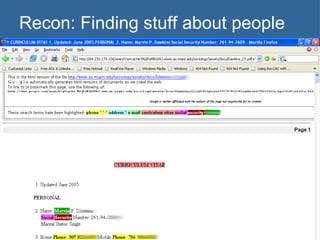
Recon: Finding stuff about people Full emails filetype:eml eml +intext:&quot;Subject&quot; +intext:&quot;From&quot; 2005 Buddy lists filetype:blt buddylist Résumés  &quot;phone  * * *&quot; &quot;address *&quot; &quot;e-mail&quot; intitle:&quot;curriculum vitae“ Including SSN’s? Yes…  
Recon: Finding stuff about people
Site crawling All domain names, different ways site:www.usf.edu returns 10 thousand pages site:usf.edu returns 2.8 million pages site:usf.edu -site:www.usf.edu returns 2.9 million pages site:www.usf.edu -site:usf.edu returns nada
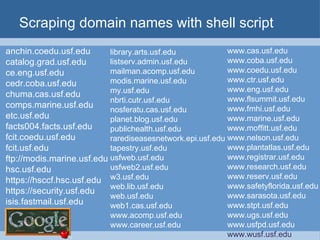
Scraping domain names with shell script trIpl3-H>  trIpl3-H> lynx –dump \ &quot;http://www.google.com/search?q=site:usf.edu+-www.usf.edu&num=100&quot; > sites.txt trIpl3-H>  trIpl3-H> sed -n 's/\. http:\/\/[[:alpha:]]*.usf.edu\//& /p' sitejunk.txt >> sites.out trIpl3-H>  trIpl3-H>  trIpl3-H>
Scraping domain names with shell script anchin.coedu.usf.edu catalog.grad.usf.edu ce.eng.usf.edu cedr.coba.usf.edu chuma.cas.usf.edu comps.marine.usf.edu etc.usf.edu facts004.facts.usf.edu fcit.coedu.usf.edu fcit.usf.edu ftp://modis.marine.usf.edu hsc.usf.edu https://hsccf.hsc.usf.edu https://security.usf.edu isis.fastmail.usf.edu www.cas.usf.edu www.coba.usf.edu www.coedu.usf.edu www.ctr.usf.edu www.eng.usf.edu www.flsummit.usf.edu www.fmhi.usf.edu www.marine.usf.edu www.moffitt.usf.edu www.nelson.usf.edu www.plantatlas.usf.edu www.registrar.usf.edu www.research.usf.edu www.reserv.usf.edu www.safetyflorida.usf.edu www.sarasota.usf.edu www.stpt.usf.edu www.ugs.usf.edu www.usfpd.usf.edu www.wusf.usf.edu library.arts.usf.edu listserv.admin.usf.edu mailman.acomp.usf.edu modis.marine.usf.edu my.usf.edu nbrti.cutr.usf.edu nosferatu.cas.usf.edu planet.blog.usf.edu publichealth.usf.edu rarediseasesnetwork.epi.usf.edu tapestry.usf.edu usfweb.usf.edu usfweb2.usf.edu w3.usf.edu web.lib.usf.edu web.usf.edu web1.cas.usf.edu www.acomp.usf.edu www.career.usf.edu
Using Google API Check out http://www.google.com/apis Google allows up to 1000 API queries per day. Cool Perl script for scraping domain names at www.sensepost.com: dns-mine.pl  By using combos of  site, web, link, about , etc. it kind find a lot more than previous example Perl scripts for “ Bi -Directional  L ink  E xtractor (BiLE)” and “BiLE Weight” also available. BiLE grabs links to sites using Google link query BiLE weight calculates relevance of links
Remote anonymous scanning with NQT Google query: filetype:php inurl:nqt intext:&quot;Network Query Tool“ Network Query Tool allows: Resolve/Reverse Lookup Get DNS Records Whois Check port Ping host Traceroute NQT form also accepts input from XSS, but it is still unpatched at this point! Using a proxy, perform anonymous scan via the Web Even worse, attacker can scan the internal hosts of networks hosting NQT
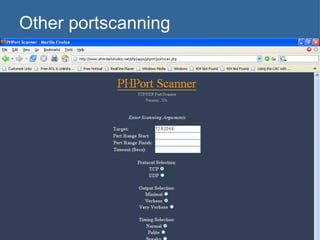
Other portscanning Find PHP port scanner: inurl:portscan.php &quot;from Port&quot;|&quot;Port Range«  Find server status tool: &quot;server status&quot; &quot;enter domain below&quot;
Other portscanning
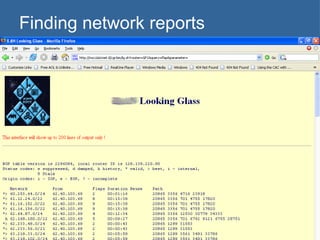
Finding network reports Find Looking Glass router info &quot;Looking Glass&quot; (inurl:&quot;lg/&quot; | inurl:lookingglass) Find Visio network drawings Filetype:vsd vsd network Find CGI bin server info: Inurl:fcgi-bin/echo
Finding network reports
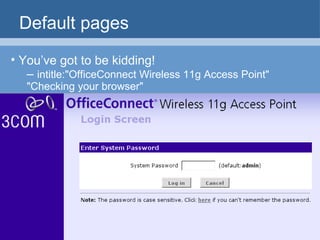
Default pages You’ve got to be kidding! –  intitle:&quot;OfficeConnect Wireless 11g Access Point&quot; &quot;Checking your browser&quot;
Finding exploit code Find latest and greatest: intitle:&quot;index of (hack |sploit | exploit | 0day)&quot; modified 2005 Google says it can’t add date modifier, but I can do it manually with as_qdr=m3 Another way: “ #include <stdio.h>” “Usage” exploit
Finding vulnerable targets Read up on exploits in Bugtraq. They usually tell version number of vulernable product. Then, use Google to search for for “powered by” E.g., “Powered by CubeCart 2.0.1” E.g. “Powered by CuteNews v1.3.1” Etc.
Webcams Blogs and message forums buzzed this week with the discovery that a pair of simple Google searches permits access to well over 1,000 unprotected surveillance cameras around the world -- apparently without their owners' knowledge.  SecurityFocus, Jan. 7, 2005
Webcams Thousands of webcams used for surveillance: inurl:&quot;ViewerFrame?Mode=&quot;  inurl:&quot;MultiCameraFrame?Mode=&quot; inurl:&quot;view/index.shtml&quot; inurl:&quot;axis-cgi/mjpg&quot; intitle:&quot;toshiba network camera - User Login&quot; intitle:&quot;NetCam Live Image&quot; -.edu -.gov camera linksys inurl:main.cgi
More junk Open mail relays (spam, anyone?) inurl:xccdonts.asp Finger inurl:/cgi-bin/finger? &quot;In real life“ Passwords !Host=*.* intext:enc_UserPassword=*  ext:pcf &quot;AutoCreate=TRUE password=*“ …
So much to search, so little time… Check out the Google Hacking Database (GHDB): http://johnny.ihackstuff.com
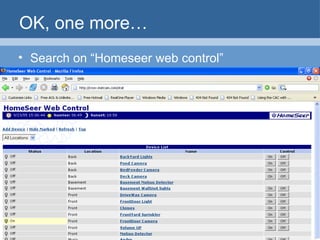
OK, one more… Search on “Homeseer web control”
How not to be a Google “victim” Consider removing your site from Google’s index. “ Please have the webmaster for the page in question contact us with proof that he/she is indeed the webmaster. This proof must be in the form of a root level page on the site in question, requesting removal from Google. Once we receive the URL that corresponds with this root level page, we will remove the offending page from our index.” To remove individual pages from Google’s index See http://www.google.com/remove.html
How not to be a Google “victim” Use a robots.txt file Web crawlers are supposed to follow the robots exclusion standard specified at http://www.robotstxt.org/wc/norobots.html. The quick way to prevent search robots crawling your site is put these two lines into the /robots.txt file on your Web server: User-agent: * Disallow: /
Questions

Google

  • 1.
    Fun with JeremyRasmussen 9/23/05 Part 1: Power searches and reconnaissance
  • 2.
    I’m feeling luckyThe Google interface Preferences Cool stuff Power searching
  • 3.
  • 4.
  • 5.
  • 6.
  • 7.
    Language Proxy servercan be used to hide location and identity while surfing Web Google sets default language to match country where proxy is If your language settings change inexplicably, check proxy settings You can manipulate language manually by fiddling directly with URL
  • 8.
  • 9.
  • 10.
  • 11.
    Google freeware Webaccelerator Google earth Picasa Etc.
  • 12.
    Golden rules ofsearching Google is case-insensitive Except for the Boolean operator OR, which must be written in uppercase Wildcards not handled normally * nothing more than a single word in a search phrase; provides no additional stemming Google stems automatically Tries to expand or contract words automatically—can’t lead to unpredictable results
  • 13.
    Golden rules ofsearching Google ignores “stop” words Who, where, what, the, a, an Except when you search on them individually Or when you put “quotes” around search phrase Or when you +force +it +to +use +all +terms Largest possible search? Google limits you to a 10-word query Get around this by using wildcards for stop words
  • 14.
    Boolean operators Googleautomatically ANDs all search terms Spice things up with: OR  | NOT  – Google evaluates these from left to right Search terms don’t even have to be syntactically correct in terms of Boolean logic
  • 15.
    Search example Whatdoes the following search term do: Intext:password | passcode intext:username | userid | user filetype:xls Locates all pages that have either password or passcode in their text. Then from these, show only pages that have username, userid, or user. From these, it shows only .XLS files. Google not confused by the lousy syntax or lack of parentheses.
  • 16.
    URL queries Everythingthat can be done through the search box can be done by manually entering a URL The only required parameter is q (query) www.google.com/search?q= foo String together parameters with & www.google.com/search?q= foo &hl= en (Specifies query on foo and language of English)
  • 17.
    Some advanced operatorsintitle - search text within the title of a page URL: as_occt=title inurl - search text within a given URL. Alows you to search for specific directories or folders URL: as_occt=url filetype - search for pages with a particular file extension URL: as_ft=i&as_filetype=<some file extension> site - search only within the specified sites. Must be valid top-level domain name URL: as_dt=i&as_sitesearch=<some domain>
  • 18.
    Some advanced operatorslink - search for pages that link to other pages. Must be correct URL syntax; if invalid link syntax provided, Google treats it like a phrase search URL: as_lq daterange - search for pages published within a certain date range. Uses Julian dates or 3 mo, 6 mo, yr. As_qdr=m6 (searches past six months) numrange - search for numbers within a range from low-high. e.g., numrange:99-101 will find 100. Alternatively, use 99..101 URL: as_nlo=<low num>&as_nhi=<high num> Note Google ignores $ and , (makes searching easier)
  • 19.
    Advanced operators cache - use Google's cached link of the results page. Passing invalid URL as parameter to cache will submit query as phrase search. URL: info - shows summary information for a site and provides links to other Google searches that might pertain to the site. Same as supplying URL as a search query. related - shows sites Google thinks are similar. URL: as_rq
  • 20.
    Google groups operatorsauthor - find a Usenet author group - find a Usenet group msgid - find a Usenet message ID insubject - find a Usenet subject lines (similar to intitle:) These are useful for finding people, NNTP servers, etc.
  • 21.
    Hacking Google Tryto explore how commands work together Try to find out why stuff works the way it does E.g., why does the following return > 0 hits? (filetype:pdf | filetype:xls) -inurl:pdf -inurl:xls
  • 22.
    Surfing anonymously Peoplewho want to surf anonymously usually use a Web proxy Go to samair.ru/proxy and find a willing, open proxy; then change browser configs E.g., proxy to 195.205.195.131:80 (Poland) Check it via: http://www.all-nettools.com/toolbox,net Resets Google search page to Polish
  • 23.
    Google searches forproxies inurl:&quot;nph-proxy.cgi&quot; &quot;Start browsing through this CGI-based proxy“ E.g., http://www.netshaq.com/cgiproxy/nph-proxy.cgi/011100A/ &quot;this proxy is working fine!&quot; &quot;enter *&quot; &quot;URL***&quot; * visit E.g., http://web.archive.org/web/20050922222155/http://davegoorox.c-f-h.com/cgiproxy/nph-proxy.cgi/000100A/http/news.google.com/webhp?hl=en&tab=nw&ned=us&q=
  • 24.
    Caching anonymously Cachingis a good way to see Web content without leaving an entry in their log, right? Not necessarily—Google still tries to download images, which creates a connection from you to the server. The “cached text only” will allow you to see the page (sans images) anonymously Get there by copying the URL from Google cache and appending &strip=1 to the end.
  • 25.
    Using Google asa proxy Use Google as a transparent proxy server via its translation service Translate English to English: http://www.google.com/translate?u=http%3A%2F%2Fwww.google.com&langpair=en%7Cen&hl=en&ie=Unknown&oe=ASCII Doh! It’s a transparent proxy—Web server can still see your IP address. Oh well.
  • 26.
    Finding Web serverversions It might be useful to get info on server types and versions E.g., “Microsoft-IIS/6.0” intitle:index.of E.g., “Apache/2.0.52 server at” intitle:index.of E.g., intitle:Test.Page.for.Apache it.worked! Returns list of sites running Apache 1.2.6 with a default home page.
  • 27.
    Traversing directories Lookfor Index directories Intitle:index.of inurl:”/admin/*” Or, Try incremental substitution of URLs (a.k.a. “fuzzing”) /docs/bulletin/1.xls could be modified to /docs/bulletin/2.xls even if Google didn’t return that file in its search
  • 28.
    Finding PHP sourcePHP script executes on the server and presents HTML to your browser. You can’t do a “View Source” and see the script. However, Web servers aren’t too sure what to do with foo .php.bak file. They treat it as text. Search for backup copies of Web files: inurl:backup intitle:index.of inurl:admin php
  • 29.
    Recon: finding stuffabout people Intranets inurl:intranet intitle:human resources inurl:intranet intitle:employee login Help desks inurl:intranet help.desk | helpdesk Email on the Web filetype:mbx intext:Subject filetype:pst inurl:pst (inbox | contacts)
  • 30.
    Recon: Finding stuffabout people Windows registry files on the Web! filetype:reg reg +intext:|internet account manager“ A million other ways: filetype:xls inurl:”email.xls” inurl:email filetype:mdb (filetype:mail | filetype:eml | filetype:pst | filetype:mbx) intext:password|subject …
  • 31.
    Recon: Finding stuffabout people Full emails filetype:eml eml +intext:&quot;Subject&quot; +intext:&quot;From&quot; 2005 Buddy lists filetype:blt buddylist Résumés &quot;phone * * *&quot; &quot;address *&quot; &quot;e-mail&quot; intitle:&quot;curriculum vitae“ Including SSN’s? Yes… 
  • 32.
  • 33.
    Site crawling Alldomain names, different ways site:www.usf.edu returns 10 thousand pages site:usf.edu returns 2.8 million pages site:usf.edu -site:www.usf.edu returns 2.9 million pages site:www.usf.edu -site:usf.edu returns nada
  • 34.
    Scraping domain nameswith shell script trIpl3-H> trIpl3-H> lynx –dump \ &quot;http://www.google.com/search?q=site:usf.edu+-www.usf.edu&num=100&quot; > sites.txt trIpl3-H> trIpl3-H> sed -n 's/\. http:\/\/[[:alpha:]]*.usf.edu\//& /p' sitejunk.txt >> sites.out trIpl3-H> trIpl3-H> trIpl3-H>
  • 35.
    Scraping domain nameswith shell script anchin.coedu.usf.edu catalog.grad.usf.edu ce.eng.usf.edu cedr.coba.usf.edu chuma.cas.usf.edu comps.marine.usf.edu etc.usf.edu facts004.facts.usf.edu fcit.coedu.usf.edu fcit.usf.edu ftp://modis.marine.usf.edu hsc.usf.edu https://hsccf.hsc.usf.edu https://security.usf.edu isis.fastmail.usf.edu www.cas.usf.edu www.coba.usf.edu www.coedu.usf.edu www.ctr.usf.edu www.eng.usf.edu www.flsummit.usf.edu www.fmhi.usf.edu www.marine.usf.edu www.moffitt.usf.edu www.nelson.usf.edu www.plantatlas.usf.edu www.registrar.usf.edu www.research.usf.edu www.reserv.usf.edu www.safetyflorida.usf.edu www.sarasota.usf.edu www.stpt.usf.edu www.ugs.usf.edu www.usfpd.usf.edu www.wusf.usf.edu library.arts.usf.edu listserv.admin.usf.edu mailman.acomp.usf.edu modis.marine.usf.edu my.usf.edu nbrti.cutr.usf.edu nosferatu.cas.usf.edu planet.blog.usf.edu publichealth.usf.edu rarediseasesnetwork.epi.usf.edu tapestry.usf.edu usfweb.usf.edu usfweb2.usf.edu w3.usf.edu web.lib.usf.edu web.usf.edu web1.cas.usf.edu www.acomp.usf.edu www.career.usf.edu
  • 36.
    Using Google APICheck out http://www.google.com/apis Google allows up to 1000 API queries per day. Cool Perl script for scraping domain names at www.sensepost.com: dns-mine.pl By using combos of site, web, link, about , etc. it kind find a lot more than previous example Perl scripts for “ Bi -Directional L ink E xtractor (BiLE)” and “BiLE Weight” also available. BiLE grabs links to sites using Google link query BiLE weight calculates relevance of links
  • 37.
    Remote anonymous scanningwith NQT Google query: filetype:php inurl:nqt intext:&quot;Network Query Tool“ Network Query Tool allows: Resolve/Reverse Lookup Get DNS Records Whois Check port Ping host Traceroute NQT form also accepts input from XSS, but it is still unpatched at this point! Using a proxy, perform anonymous scan via the Web Even worse, attacker can scan the internal hosts of networks hosting NQT
  • 38.
    Other portscanning FindPHP port scanner: inurl:portscan.php &quot;from Port&quot;|&quot;Port Range«  Find server status tool: &quot;server status&quot; &quot;enter domain below&quot;
  • 39.
  • 40.
    Finding network reportsFind Looking Glass router info &quot;Looking Glass&quot; (inurl:&quot;lg/&quot; | inurl:lookingglass) Find Visio network drawings Filetype:vsd vsd network Find CGI bin server info: Inurl:fcgi-bin/echo
  • 41.
  • 42.
    Default pages You’vegot to be kidding! – intitle:&quot;OfficeConnect Wireless 11g Access Point&quot; &quot;Checking your browser&quot;
  • 43.
    Finding exploit codeFind latest and greatest: intitle:&quot;index of (hack |sploit | exploit | 0day)&quot; modified 2005 Google says it can’t add date modifier, but I can do it manually with as_qdr=m3 Another way: “ #include <stdio.h>” “Usage” exploit
  • 44.
    Finding vulnerable targetsRead up on exploits in Bugtraq. They usually tell version number of vulernable product. Then, use Google to search for for “powered by” E.g., “Powered by CubeCart 2.0.1” E.g. “Powered by CuteNews v1.3.1” Etc.
  • 45.
    Webcams Blogs andmessage forums buzzed this week with the discovery that a pair of simple Google searches permits access to well over 1,000 unprotected surveillance cameras around the world -- apparently without their owners' knowledge. SecurityFocus, Jan. 7, 2005
  • 46.
    Webcams Thousands ofwebcams used for surveillance: inurl:&quot;ViewerFrame?Mode=&quot; inurl:&quot;MultiCameraFrame?Mode=&quot; inurl:&quot;view/index.shtml&quot; inurl:&quot;axis-cgi/mjpg&quot; intitle:&quot;toshiba network camera - User Login&quot; intitle:&quot;NetCam Live Image&quot; -.edu -.gov camera linksys inurl:main.cgi
  • 47.
    More junk Openmail relays (spam, anyone?) inurl:xccdonts.asp Finger inurl:/cgi-bin/finger? &quot;In real life“ Passwords !Host=*.* intext:enc_UserPassword=* ext:pcf &quot;AutoCreate=TRUE password=*“ …
  • 48.
    So much tosearch, so little time… Check out the Google Hacking Database (GHDB): http://johnny.ihackstuff.com
  • 49.
    OK, one more…Search on “Homeseer web control”
  • 50.
    How not tobe a Google “victim” Consider removing your site from Google’s index. “ Please have the webmaster for the page in question contact us with proof that he/she is indeed the webmaster. This proof must be in the form of a root level page on the site in question, requesting removal from Google. Once we receive the URL that corresponds with this root level page, we will remove the offending page from our index.” To remove individual pages from Google’s index See http://www.google.com/remove.html
  • 51.
    How not tobe a Google “victim” Use a robots.txt file Web crawlers are supposed to follow the robots exclusion standard specified at http://www.robotstxt.org/wc/norobots.html. The quick way to prevent search robots crawling your site is put these two lines into the /robots.txt file on your Web server: User-agent: * Disallow: /
  • 52.