Google Service Play
Google Maps
Natã Melo
Google Services Play
Google Services
Examples: Google Plus and Maps
Advantages: Updates and Integration
Easy and Fast to Implement
Google Services Play
Standard Authorization
Google Account
OAuth2: Consistent and Safe
Independent Versions: GP and Android
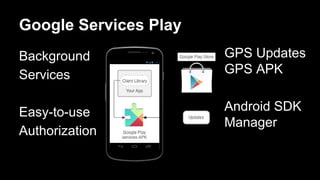
Google Services Play
Background
Services
Easy-to-use
Authorization
GPS Updates
GPS APK
Android SDK
Manager
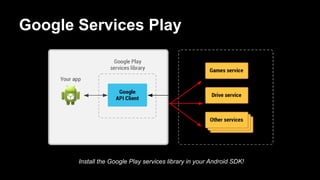
Google Services Play
Install the Google Play services library in your Android SDK!
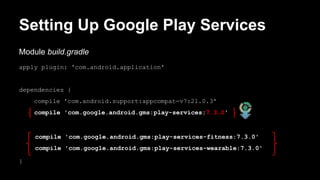
Setting Up Google Play Services
Module build.gradle
apply plugin: 'com.android.application'
dependencies {
compile 'com.android.support:appcompat-v7:21.0.3'
compile 'com.google.android.gms:play-services:7.3.0'
compile 'com.google.android.gms:play-services-fitness:7.3.0'
compile 'com.google.android.gms:play-services-wearable:7.3.0'
}
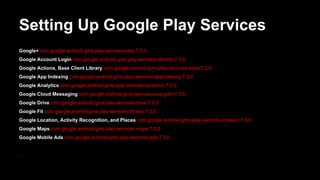
Setting Up Google Play Services
Google+ com.google.android.gms:play-services-plus:7.3.0
Google Account Login com.google.android.gms:play-services-identity:7.3.0
Google Actions, Base Client Library com.google.android.gms:play-services-base:7.3.0
Google App Indexing com.google.android.gms:play-services-appindexing:7.3.0
Google Analytics com.google.android.gms:play-services-analytics:7.3.0
Google Cloud Messaging com.google.android.gms:play-services-gcm:7.3.0
Google Drive com.google.android.gms:play-services-drive:7.3.0
Google Fit com.google.android.gms:play-services-fitness:7.3.0
Google Location, Activity Recognition, and Places com.google.android.gms:play-services-location:7.3.0
Google Maps com.google.android.gms:play-services-maps:7.3.0
Google Mobile Ads com.google.android.gms:play-services-ads:7.3.0
...
Setting Up Google Play Services
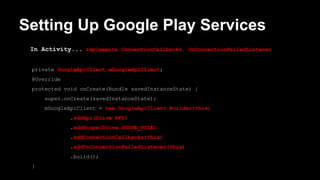
In Activity... implements ConnectionCallbacks, OnConnectionFailedListener
private GoogleApiClient mGoogleApiClient;
@Override
protected void onCreate(Bundle savedInstanceState) {
super.onCreate(savedInstanceState);
mGoogleApiClient = new GoogleApiClient.Builder(this)
.addApi(Drive.API)
.addScope(Drive.SCOPE_FILE)
.addConnectionCallbacks(this)
.addOnConnectionFailedListener(this)
.build();
}
Setting Up Google Play Services
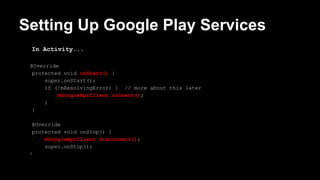
In Activity...
@Override
protected void onStart() {
super.onStart();
if (!mResolvingError) { // more about this later
mGoogleApiClient.connect();
}
}
@Override
protected void onStop() {
mGoogleApiClient.disconnect();
super.onStop();
}
Handle connection failures
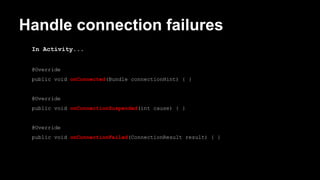
In Activity...
@Override
public void onConnected(Bundle connectionHint) { }
@Override
public void onConnectionSuspended(int cause) { }
@Override
public void onConnectionFailed(ConnectionResult result) { }
Handle Connection Failures
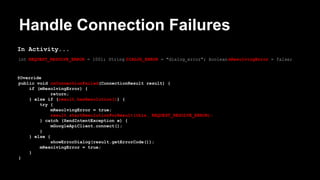
In Activity...
int REQUEST_RESOLVE_ERROR = 1001; String DIALOG_ERROR = "dialog_error"; boolean mResolvingError = false;
@Override
public void onConnectionFailed(ConnectionResult result) {
if (mResolvingError) {
return;
} else if (result.hasResolution()) {
try {
mResolvingError = true;
result.startResolutionForResult(this, REQUEST_RESOLVE_ERROR);
} catch (SendIntentException e) {
mGoogleApiClient.connect();
}
} else {
showErrorDialog(result.getErrorCode());
mResolvingError = true;
}
}
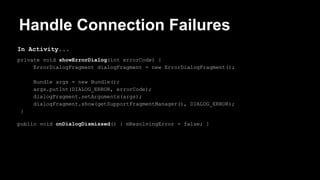
Handle Connection Failures
In Activity...
private void showErrorDialog(int errorCode) {
ErrorDialogFragment dialogFragment = new ErrorDialogFragment();
Bundle args = new Bundle();
args.putInt(DIALOG_ERROR, errorCode);
dialogFragment.setArguments(args);
dialogFragment.show(getSupportFragmentManager(), DIALOG_ERROR);
}
public void onDialogDismissed() { mResolvingError = false; }
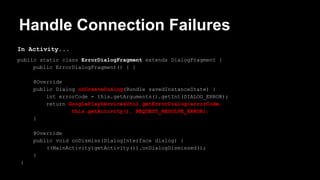
Handle Connection Failures
In Activity...
public static class ErrorDialogFragment extends DialogFragment {
public ErrorDialogFragment() { }
@Override
public Dialog onCreateDialog(Bundle savedInstanceState) {
int errorCode = this.getArguments().getInt(DIALOG_ERROR);
return GooglePlayServicesUtil.getErrorDialog(errorCode,
this.getActivity(), REQUEST_RESOLVE_ERROR);
}
@Override
public void onDismiss(DialogInterface dialog) {
((MainActivity)getActivity()).onDialogDismissed();
}
}
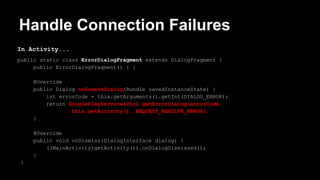
Handle Connection Failures
In Activity...
public static class ErrorDialogFragment extends DialogFragment {
public ErrorDialogFragment() { }
@Override
public Dialog onCreateDialog(Bundle savedInstanceState) {
int errorCode = this.getArguments().getInt(DIALOG_ERROR);
return GooglePlayServicesUtil.getErrorDialog(errorCode,
this.getActivity(), REQUEST_RESOLVE_ERROR);
}
@Override
public void onDismiss(DialogInterface dialog) {
((MainActivity)getActivity()).onDialogDismissed();
}
}
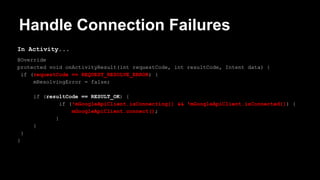
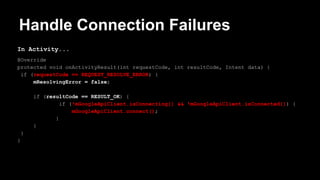
Handle Connection Failures
In Activity...
@Override
protected void onActivityResult(int requestCode, int resultCode, Intent data) {
if (requestCode == REQUEST_RESOLVE_ERROR) {
mResolvingError = false;
if (resultCode == RESULT_OK) {
if (!mGoogleApiClient.isConnecting() && !mGoogleApiClient.isConnected()) {
mGoogleApiClient.connect();
}
}
}
}
Handle Connection Failures
In Activity...
@Override
protected void onActivityResult(int requestCode, int resultCode, Intent data) {
if (requestCode == REQUEST_RESOLVE_ERROR) {
mResolvingError = false;
if (resultCode == RESULT_OK) {
if (!mGoogleApiClient.isConnecting() && !mGoogleApiClient.isConnected()) {
mGoogleApiClient.connect();
}
}
}
}
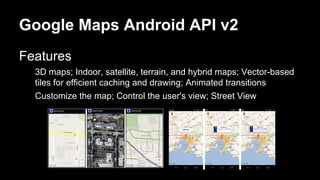
Google Maps Android API v2
Features
3D maps; Indoor, satellite, terrain, and hybrid maps; Vector-based
tiles for efficient caching and drawing; Animated transitions
Customize the map; Control the user's view; Street View
Android Certificate
Sign Your App; Identification
1. keytool -genkey -v -keystore [name_key_store].keystore -alias
[alias_name] -keyalg RSA -keysize 2048 -validity 10000
2. keytool -list -v -keystore [name_key_store].keystore
Result: SHA1: DF:F0:91:5A:DF:AA … 2C:44:98:6A:0D:3D
Android Certificate and API Key
Create Project On: https://console.developers.google.com/project
Activate Google Maps Android API
Create a New Key for Android: [SHAI Key];[Prject Path]
Get the Google Maps API key Generated: AIz … VgHcNL7Sg
Configure Your Manifest
<meta-data
android:name="com.google.android.gms.version"
android:value="@integer/google_play_services_version"
/>
<meta-data
android:name="com.google.android.geo.API_KEY"
android:value="API_KEY"
/>
“Re-build Project”
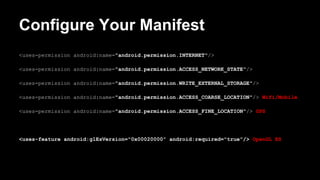
Configure Your Manifest
<uses-permission android:name="android.permission.INTERNET"/>
<uses-permission android:name="android.permission.ACCESS_NETWORK_STATE"/>
<uses-permission android:name="android.permission.WRITE_EXTERNAL_STORAGE"/>
<uses-permission android:name="android.permission.ACCESS_COARSE_LOCATION"/> Wifi/Mobile
<uses-permission android:name="android.permission.ACCESS_FINE_LOCATION"/> GPS
<uses-feature android:glEsVersion="0x00020000" android:required="true"/> OpenGL ES
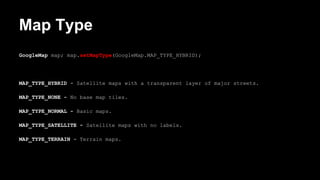
Map Type
GoogleMap map; map.setMapType(GoogleMap.MAP_TYPE_HYBRID);
MAP_TYPE_HYBRID - Satellite maps with a transparent layer of major streets.
MAP_TYPE_NONE - No base map tiles.
MAP_TYPE_NORMAL - Basic maps.
MAP_TYPE_SATELLITE - Satellite maps with no labels.
MAP_TYPE_TERRAIN - Terrain maps.
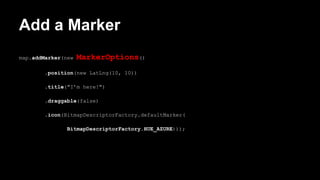
Add a Marker
map.addMarker(new MarkerOptions()
.position(new LatLng(10, 10))
.title("I’m here!")
.draggable(false)
.icon(BitmapDescriptorFactory.defaultMarker(
BitmapDescriptorFactory.HUE_AZURE)));
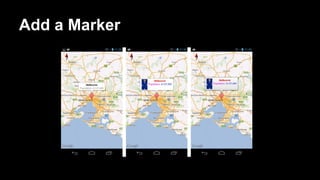
Add a Marker
Let’s Practice!
Use: Google Plus and Goolge Maps!
Get Slides: http://bit.
ly/1P7GyYN

[Android] Google Service Play & Google Maps

  • 1.
  • 2.
    Google Services Play GoogleServices Examples: Google Plus and Maps Advantages: Updates and Integration Easy and Fast to Implement
  • 3.
    Google Services Play StandardAuthorization Google Account OAuth2: Consistent and Safe Independent Versions: GP and Android
  • 4.
  • 5.
    Google Services Play Installthe Google Play services library in your Android SDK!
  • 6.
    Setting Up GooglePlay Services Module build.gradle apply plugin: 'com.android.application' dependencies { compile 'com.android.support:appcompat-v7:21.0.3' compile 'com.google.android.gms:play-services:7.3.0' compile 'com.google.android.gms:play-services-fitness:7.3.0' compile 'com.google.android.gms:play-services-wearable:7.3.0' }
  • 7.
    Setting Up GooglePlay Services Google+ com.google.android.gms:play-services-plus:7.3.0 Google Account Login com.google.android.gms:play-services-identity:7.3.0 Google Actions, Base Client Library com.google.android.gms:play-services-base:7.3.0 Google App Indexing com.google.android.gms:play-services-appindexing:7.3.0 Google Analytics com.google.android.gms:play-services-analytics:7.3.0 Google Cloud Messaging com.google.android.gms:play-services-gcm:7.3.0 Google Drive com.google.android.gms:play-services-drive:7.3.0 Google Fit com.google.android.gms:play-services-fitness:7.3.0 Google Location, Activity Recognition, and Places com.google.android.gms:play-services-location:7.3.0 Google Maps com.google.android.gms:play-services-maps:7.3.0 Google Mobile Ads com.google.android.gms:play-services-ads:7.3.0 ...
  • 8.
    Setting Up GooglePlay Services In Activity... implements ConnectionCallbacks, OnConnectionFailedListener private GoogleApiClient mGoogleApiClient; @Override protected void onCreate(Bundle savedInstanceState) { super.onCreate(savedInstanceState); mGoogleApiClient = new GoogleApiClient.Builder(this) .addApi(Drive.API) .addScope(Drive.SCOPE_FILE) .addConnectionCallbacks(this) .addOnConnectionFailedListener(this) .build(); }
  • 9.
    Setting Up GooglePlay Services In Activity... @Override protected void onStart() { super.onStart(); if (!mResolvingError) { // more about this later mGoogleApiClient.connect(); } } @Override protected void onStop() { mGoogleApiClient.disconnect(); super.onStop(); }
  • 10.
    Handle connection failures InActivity... @Override public void onConnected(Bundle connectionHint) { } @Override public void onConnectionSuspended(int cause) { } @Override public void onConnectionFailed(ConnectionResult result) { }
  • 11.
    Handle Connection Failures InActivity... int REQUEST_RESOLVE_ERROR = 1001; String DIALOG_ERROR = "dialog_error"; boolean mResolvingError = false; @Override public void onConnectionFailed(ConnectionResult result) { if (mResolvingError) { return; } else if (result.hasResolution()) { try { mResolvingError = true; result.startResolutionForResult(this, REQUEST_RESOLVE_ERROR); } catch (SendIntentException e) { mGoogleApiClient.connect(); } } else { showErrorDialog(result.getErrorCode()); mResolvingError = true; } }
  • 12.
    Handle Connection Failures InActivity... private void showErrorDialog(int errorCode) { ErrorDialogFragment dialogFragment = new ErrorDialogFragment(); Bundle args = new Bundle(); args.putInt(DIALOG_ERROR, errorCode); dialogFragment.setArguments(args); dialogFragment.show(getSupportFragmentManager(), DIALOG_ERROR); } public void onDialogDismissed() { mResolvingError = false; }
  • 13.
    Handle Connection Failures InActivity... public static class ErrorDialogFragment extends DialogFragment { public ErrorDialogFragment() { } @Override public Dialog onCreateDialog(Bundle savedInstanceState) { int errorCode = this.getArguments().getInt(DIALOG_ERROR); return GooglePlayServicesUtil.getErrorDialog(errorCode, this.getActivity(), REQUEST_RESOLVE_ERROR); } @Override public void onDismiss(DialogInterface dialog) { ((MainActivity)getActivity()).onDialogDismissed(); } }
  • 14.
    Handle Connection Failures InActivity... public static class ErrorDialogFragment extends DialogFragment { public ErrorDialogFragment() { } @Override public Dialog onCreateDialog(Bundle savedInstanceState) { int errorCode = this.getArguments().getInt(DIALOG_ERROR); return GooglePlayServicesUtil.getErrorDialog(errorCode, this.getActivity(), REQUEST_RESOLVE_ERROR); } @Override public void onDismiss(DialogInterface dialog) { ((MainActivity)getActivity()).onDialogDismissed(); } }
  • 15.
    Handle Connection Failures InActivity... @Override protected void onActivityResult(int requestCode, int resultCode, Intent data) { if (requestCode == REQUEST_RESOLVE_ERROR) { mResolvingError = false; if (resultCode == RESULT_OK) { if (!mGoogleApiClient.isConnecting() && !mGoogleApiClient.isConnected()) { mGoogleApiClient.connect(); } } } }
  • 16.
    Handle Connection Failures InActivity... @Override protected void onActivityResult(int requestCode, int resultCode, Intent data) { if (requestCode == REQUEST_RESOLVE_ERROR) { mResolvingError = false; if (resultCode == RESULT_OK) { if (!mGoogleApiClient.isConnecting() && !mGoogleApiClient.isConnected()) { mGoogleApiClient.connect(); } } } }
  • 17.
    Google Maps AndroidAPI v2 Features 3D maps; Indoor, satellite, terrain, and hybrid maps; Vector-based tiles for efficient caching and drawing; Animated transitions Customize the map; Control the user's view; Street View
  • 18.
    Android Certificate Sign YourApp; Identification 1. keytool -genkey -v -keystore [name_key_store].keystore -alias [alias_name] -keyalg RSA -keysize 2048 -validity 10000 2. keytool -list -v -keystore [name_key_store].keystore Result: SHA1: DF:F0:91:5A:DF:AA … 2C:44:98:6A:0D:3D
  • 19.
    Android Certificate andAPI Key Create Project On: https://console.developers.google.com/project Activate Google Maps Android API Create a New Key for Android: [SHAI Key];[Prject Path] Get the Google Maps API key Generated: AIz … VgHcNL7Sg
  • 20.
  • 21.
    Configure Your Manifest <uses-permissionandroid:name="android.permission.INTERNET"/> <uses-permission android:name="android.permission.ACCESS_NETWORK_STATE"/> <uses-permission android:name="android.permission.WRITE_EXTERNAL_STORAGE"/> <uses-permission android:name="android.permission.ACCESS_COARSE_LOCATION"/> Wifi/Mobile <uses-permission android:name="android.permission.ACCESS_FINE_LOCATION"/> GPS <uses-feature android:glEsVersion="0x00020000" android:required="true"/> OpenGL ES
  • 22.
    Map Type GoogleMap map;map.setMapType(GoogleMap.MAP_TYPE_HYBRID); MAP_TYPE_HYBRID - Satellite maps with a transparent layer of major streets. MAP_TYPE_NONE - No base map tiles. MAP_TYPE_NORMAL - Basic maps. MAP_TYPE_SATELLITE - Satellite maps with no labels. MAP_TYPE_TERRAIN - Terrain maps.
  • 23.
    Add a Marker map.addMarker(newMarkerOptions() .position(new LatLng(10, 10)) .title("I’m here!") .draggable(false) .icon(BitmapDescriptorFactory.defaultMarker( BitmapDescriptorFactory.HUE_AZURE)));
  • 24.
  • 25.
    Let’s Practice! Use: GooglePlus and Goolge Maps!
  • 26.