2014 Android I/O Overview
Bin Yang
Kaisa_zju@Hotmail.com
Agenda
• Outline
• Hot topics
• Update in L preview
• Google play services update
• Others
2
Outline
Outline(1/5)
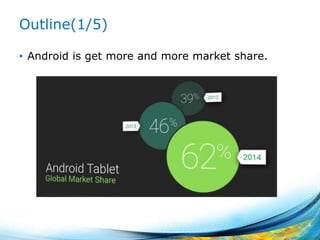
• Android is get more and more market share.
4
Outline(2/5)
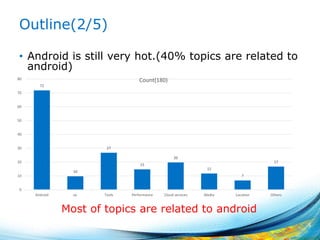
• Android is still very hot.(40% topics are related to
android)
5
72
10
27
15
20
12
7
17
0
10
20
30
40
50
60
70
80
Android ux Tools Performance Cloud services Media Location Others
Count(180)
Most of topics are related to android
Outline(3/5)
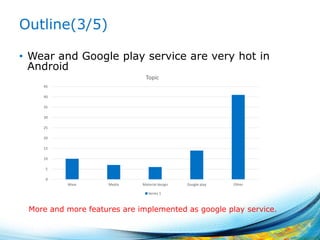
• Wear and Google play service are very hot in
Android
6
0
5
10
15
20
25
30
35
40
45
Wear Media Material design Google play Other
Topic
Series 1
More and more features are implemented as google play service.
Outline(4/5)
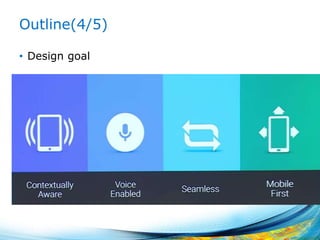
• Design goal
7
Outline(5/5)
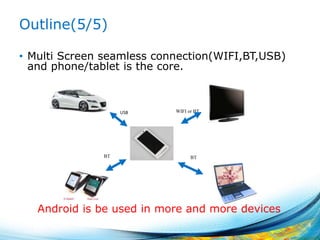
• Multi Screen seamless connection(WIFI,BT,USB)
and phone/tablet is the core.
8
WIFI or BTUSB
BT BT
Android is be used in more and more devices
Hot topics - Wear
What is Android Wear
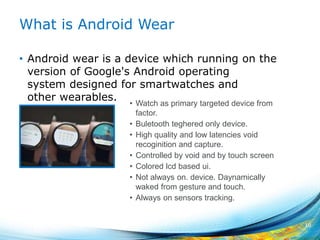
• Android wear is a device which running on the
version of Google's Android operating
system designed for smartwatches and
other wearables.
10
• Watch as primary targeted device from
factor.
• Buletooth teghered only device.
• High quality and low latencies void
recoginition and capture.
• Controlled by void and by touch screen
• Colored lcd based ui.
• Not always on. device. Daynamically
waked from gesture and touch.
• Always on sensors tracking.
Use cases
Must
• Google now cards displayed on the weareable device.
• Host smartphone notifications displayed on the wearable
device.
• Support Google voice search to the host.
Maybe
• Continious sensors tracking
• Context awarness
• Pairing with external sensors
• Pairing with extenral bluetooth headset
• Local music playback
11
Less than 10s interaction between user and
device.
Architecture
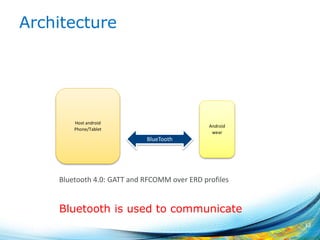
12
Host android
Phone/Tablet
Android
wear
BlueTooth
Bluetooth is used to communicate
Bluetooth 4.0: GATT and RFCOMM over ERD profiles
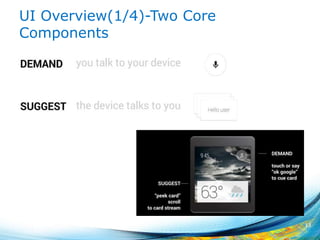
UI Overview(1/4)-Two Core
Components
13
UI Overview(2/4)-Suggest: The
Context Stream
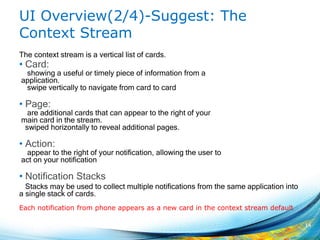
The context stream is a vertical list of cards.
• Card:
showing a useful or timely piece of information from a
application.
swipe vertically to navigate from card to card
• Page:
are additional cards that can appear to the right of your
main card in the stream.
swiped horizontally to reveal additional pages.
• Action:
appear to the right of your notification, allowing the user to
act on your notification
• Notification Stacks
Stacks may be used to collect multiple notifications from the same application into
a single stack of cards.
14
Each notification from phone appears as a new card in the context stream default
UI Overview(3/4)- Demand: The Cue
Card
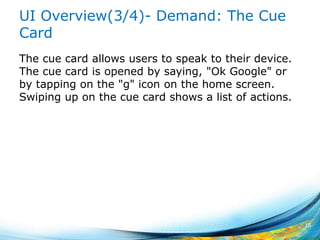
The cue card allows users to speak to their device.
The cue card is opened by saying, "Ok Google" or
by tapping on the "g" icon on the home screen.
Swiping up on the cue card shows a list of actions.
15
UI Overview(4/4)- Two Modes
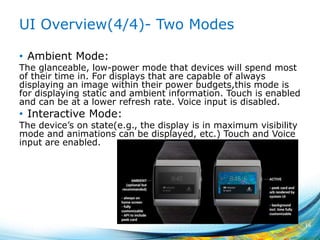
• Ambient Mode:
The glanceable, low-power mode that devices will spend most
of their time in. For displays that are capable of always
displaying an image within their power budgets,this mode is
for displaying static and ambient information. Touch is enabled
and can be at a lower refresh rate. Voice input is disabled.
• Interactive Mode:
The device’s on state(e.g., the display is in maximum visibility
mode and animations can be displayed, etc.) Touch and Voice
input are enabled.
16
Hot topics - TV
Android TV-Features
• Handle a wide variety of traditional TV inputs,
including HDMI, conventional TV tuners, and IPTV
receivers.
• Chromecast support.
• Full access to Google Play’s existing media content
• Integrated with Google’s existing Play Games
Service
• Will be coming to a variety of form factors,
including TVs, set-top boxes, and streaming
boxes.
18
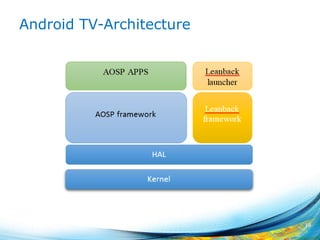
Android TV-Architecture
19
Android TV - Hardware requirement
• Aggressive CPU+GPU performance specs
• Minimum of 1G RAM & 8G Flash
• Wi-Fi and/or Ethernet for connectivity
• Bluetooth v4 w/BTLE
• Widevine Level 1& Playready DRM
• Targeting TVs, Media Streamers, Set Top Boxes
and Micro Consoles.
20
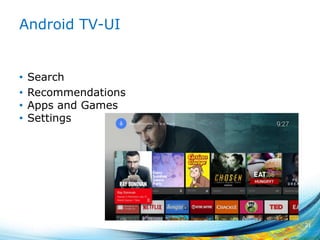
Android TV-UI
• Search
• Recommendations
• Apps and Games
• Settings
21
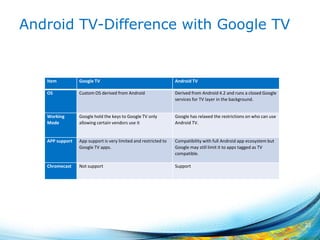
Android TV-Difference with Google TV
22
Item Google TV Android TV
OS Custom OS derived from Android Derived from Android 4.2 and runs a closed Google
services for TV layer in the background.
Working
Mode
Google hold the keys to Google TV only
allowing certain vendors use it
Google has relaxed the restrictions on who can use
Android TV.
APP support App support is very limited and restricted to
Google TV apps.
Compatibility with full Android app ecosystem but
Google may still limit it to apps tagged as TV
compatible.
Chromecast Not support Support
Hot topics - Auto
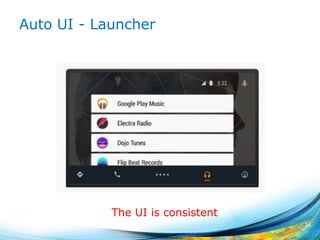
Auto UI - Launcher
24
The UI is consistent
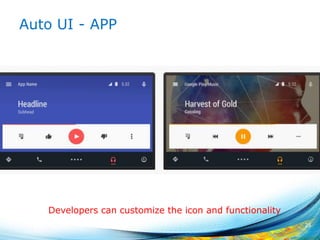
Auto UI - APP
25
Developers can customize the icon and functionality
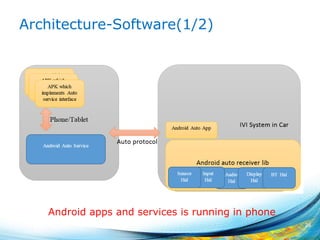
Architecture-Software(1/2)
26
Android apps and services is running in phone
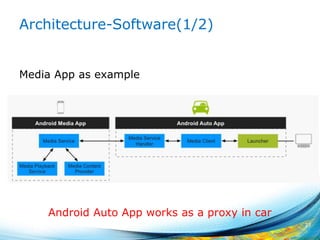
Architecture-Software(1/2)
Media App as example
27
Android Auto App works as a proxy in car
Architecture – Hardware in car
• Audio device in the car
• Display in the car
• USB/other connectivity device in the car
• Bluetooth device in the car
• Input devices(buttons and sticks, etc.) in the
• car
• Sensor networks in the car
28
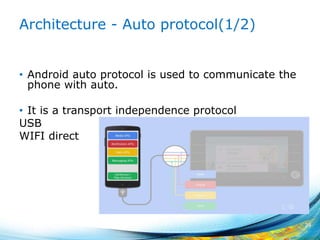
Architecture - Auto protocol(1/2)
• Android auto protocol is used to communicate the
phone with auto.
• It is a transport independence protocol
USB
WIFI direct
29
Architecture - Auto protocol(2/2)
Portable C++ library runs on Android/Linux/QNX.
Different channel is opened for different aspect of
car which phone needs to communicate with
• Input data
• sensor data
• audio
• Display data.
Protocol buffer is used to format data.
30
Mux all channels with priority
Hot topics - Glass
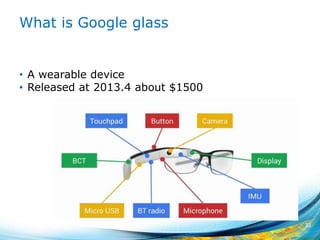
What is Google glass
• A wearable device
• Released at 2013.4 about $1500
32
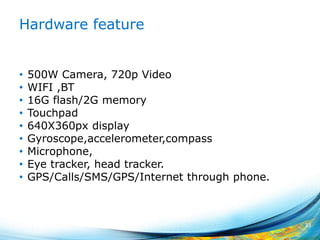
Hardware feature
• 500W Camera, 720p Video
• WIFI ,BT
• 16G flash/2G memory
• Touchpad
• 640X360px display
• Gyroscope,accelerometer,compass
• Microphone,
• Eye tracker, head tracker.
• GPS/Calls/SMS/GPS/Internet through phone.
33
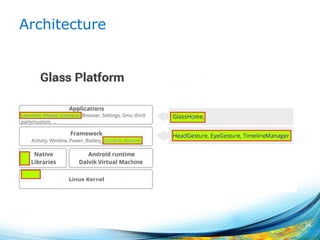
Architecture
34
Architecture(2) – Modification in AOSP
• Account service
Glass does authentication using My Glass website. So
many task can be executed in server side.
• Location service
GPS information is piped through your companion
phone for better accuracy.
• Notification bridged from companion phone
• Head Gesture services:
Monitor your head when you are moving your head, so
that it can turn on/off the screen.
• Eye Gesture:
Monitor the movement of your eyes so that it can take
pictures.
• Timeline Manager
35
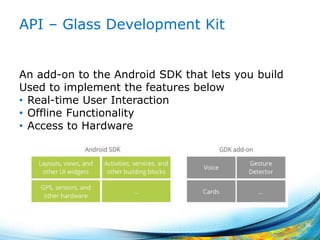
API – Glass Development Kit
An add-on to the Android SDK that lets you build
Used to implement the features below
• Real-time User Interaction
• Offline Functionality
• Access to Hardware
36
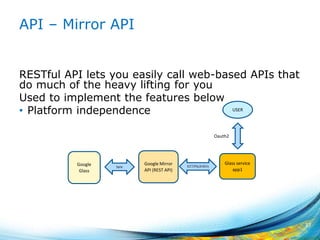
API – Mirror API
RESTful API lets you easily call web-based APIs that
do much of the heavy lifting for you
Used to implement the features below
• Platform independence
37
Google Mirror
API (REST API)
Glass service
app1
Google
Glass
Sync HTTPS(JOSN)
USER
Oauth2
UI
38
Hot topics - Android work
Advantage
• Make user to have a single device for personal use
and work.
• Unified view of personal and work apps.
• Data isolation and security.
• No modification for existing apps needed
• App for ICS and above can be used.
40
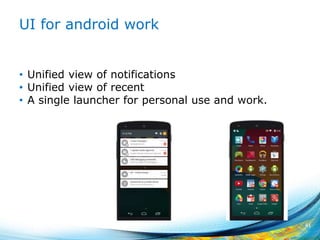
UI for android work
• Unified view of notifications
• Unified view of recent
• A single launcher for personal use and work.
41
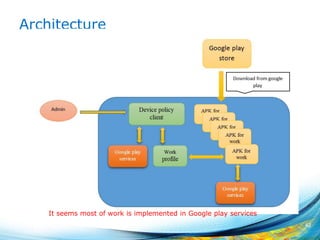
Architecture
42
It seems most of work is implemented in Google play services
Update In L preview
Update In L preview
• Material design
• ART
• Notification
• Recents screen
• Task locking
• Power Efficiency
• BT
• Graphics
• Multi-networking
• Multimedia
• Webview
44
Material Design - New Widgets
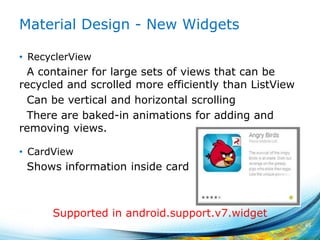
• RecyclerView
A container for large sets of views that can be
recycled and scrolled more efficiently than ListView
Can be vertical and horizontal scrolling
There are baked-in animations for adding and
removing views.
• CardView
Shows information inside card
45
Supported in android.support.v7.widget
Material design - Shadows
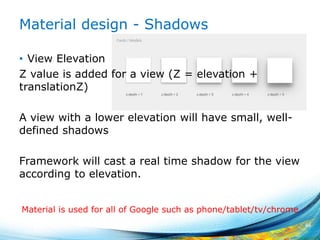
• View Elevation
Z value is added for a view (Z = elevation +
translationZ)
A view with a lower elevation will have small, well-
defined shadows
Framework will cast a real time shadow for the view
according to elevation.
46
Material is used for all of Google such as phone/tablet/tv/chrome
Material design - Animations
• Touch feedback -- ripple animation
• Reveal effect – reveal animation
• Activity transitions
Enter transition
Exit transition
Shared elements transition(Multiple shared elements)
• Curved motion
Provides new APIs that enable you to define custom timing
curves and curved motion patterns for animations.
• View state changes
Animators that run when the state of a view changes.
47
Material design - Others
• Drawable Tinting
Enables you to define bitmaps or nine-patches as alpha
masks and to tint them using a color resource or a theme
attribute that resolves to a color resource
• A new theme
@android:style/Theme.Material
• Compatibility
For Theme and layout, use dedicated directory such as
res/values-v21/styles.xml
For Animation APIs, check the system version at
runtime before calling them.
48
ART
• Ahead-of-Time (AOT) compilation
Less battery consumption.
Less memory.
More storage/More installation time.
• Improved garbage collection (GC)
One GC pause instead of two
Parallelized processing during the remaining GC pause
Collector with lower pause time for the special case of
cleaning up recently-allocated, short-lived objects
Improved garbage collection ergonomics, making
concurrent garbage collections more timely, which makes
GC_FOR_ALLOC events extremely rare in typical use cases
• Improved debugging support
49
Notification(1/2)
• heads-up notification
Show the notification when app is running as full screen.
• Lockscreen notifications
VISIBILITY_PRIVATE/ VISIBILITY_PUBLIC/ VISIBILITY_SECRET
Notification will be displayed in Lock scrren according to its prioerty.
• Notifications metadata
Metadata is used to sort the notifications more intelligently.
setCategory/setPriority/addPerson
50
Notification(2/2)
• Notifications to support android wear and auto
Can specify the notification only is displayed in wear or android.
• Synced notifications
Act on a notification on your Android tablet and it is also dismissed
on your phone.
51
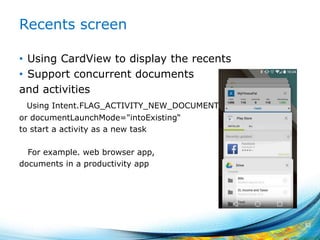
Recents screen
• Using CardView to display the recents
• Support concurrent documents
and activities
Using Intent.FLAG_ACTIVITY_NEW_DOCUMENT
or documentLaunchMode="intoExisting“
to start a activity as a new task
For example. web browser app,
documents in a productivity app
52
Task locking
Temporarily restrict users from leaving your app or
being interrupted by notifications.
For example: Using an education app
How to: Call startLockTask() in activity.
If the task is locking
• The status bar is blank, and user notifications and
status information is hidden.
• The Home and Recent Apps buttons are hidden.
• Other apps may not launch new activities.
• The current app may start new activities, as long
as doing so does not create new tasks.
53
BT
Peripheral mode
Android device in L version can work as in
peripheral mode which can send advertisement.
Improved scanning.
Offload scanning into background.
Add API to filter the advertisement which you has
interest to reduce the number of advertisement.
(Service UID, service data, manufacture data)
Reduce the scanning frequency.
54
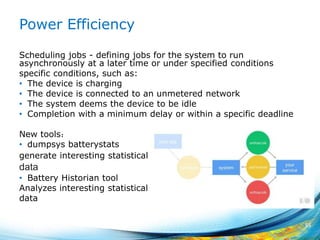
Power Efficiency
Scheduling jobs - defining jobs for the system to run
asynchronously at a later time or under specified conditions
specific conditions, such as:
• The device is charging
• The device is connected to an unmetered network
• The system deems the device to be idle
• Completion with a minimum delay or within a specific deadline
New tools:
• dumpsys batterystats
generate interesting statistical data
data
• Battery Historian tool
Analyzes interesting statistical data
data
55
Graphics
• Support for OpenGL ES 3.1
• Android Extension Pack
Does Intel’s GPU support it ?
• Render Thread
Split the work doing UI thread into two threads to improve
performance.
UI thread create display list
reader thread: process display list with GPU.
56
Multi-networking
• Support app dynamically scan for available
networks with specific capabilities, and establish a
connection to them
For example:
SUPL, MMS
57
WebView
Chromium36
WebAudio
WebGL
WebRTC
58
Google Play Services
Update
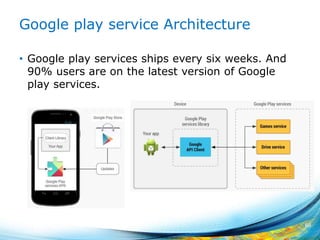
Google play service Architecture
• Google play services ships every six weeks. And
90% users are on the latest version of Google
play services.
60
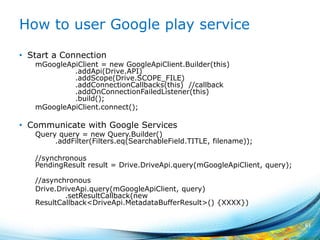
How to user Google play service
• Start a Connection
mGoogleApiClient = new GoogleApiClient.Builder(this)
.addApi(Drive.API)
.addScope(Drive.SCOPE_FILE)
.addConnectionCallbacks(this) //callback
.addOnConnectionFailedListener(this)
.build();
mGoogleApiClient.connect();
• Communicate with Google Services
Query query = new Query.Builder()
.addFilter(Filters.eq(SearchableField.TITLE, filename));
//synchronous
PendingResult result = Drive.DriveApi.query(mGoogleApiClient, query);
//asynchronous
Drive.DriveApi.query(mGoogleApiClient, query)
.setResultCallback(new
ResultCallback<DriveApi.MetadataBufferResult>() {XXXX})
61
Update(1/4)
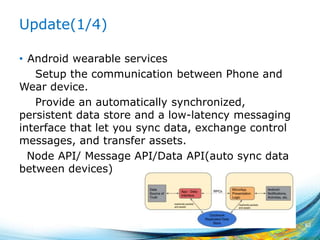
• Android wearable services
Setup the communication between Phone and
Wear device.
Provide an automatically synchronized,
persistent data store and a low-latency messaging
interface that let you sync data, exchange control
messages, and transfer assets.
Node API/ Message API/Data API(auto sync data
between devices)
62
Update(2/4)
• App Indexing API
Provides a way for developers to notify Google about
deep links in their native apps and allows the Google
Search App, to drive re-engagement through Google
Search query auto completions, providing fast and easy
access to inner pages in apps.
• Google Cast API
Enables multi-screen experiences and lets user send
and control content like video from a small computing
device to a large display device like a television.
New: Includes media tracks that introduce closed
caption support for Chromecast.
63
Update(3/4)
• Google Wallet API
Increase conversions by streamlining your purchase
flow on mobile apps and websites.
Engage your customers with offers, loyalty programs,
and other objects stored in Google Wallet.
New: providing split tender support.
• Drive Android API
API to access the Drive service on mobile devices.
New: Adds the ability to sort query results, create
folders offline, and select any mime type in the file
picker by default.
64
Update(4/4)
• Dynamic security provider
Provides an API that apps can use to easily install a
dynamic security provider.
The dynamic security provider includes a replacement
for the platform's secure networking APIs, which can be
updated frequently for rapid delivery of security patches.
• Play Games services
Provides cross-platform Games services that lets you
easily integrate popular gaming features such as
achievements, leaderboards, Cloud Save, and real-time
multiplayer (on Android) in your tablet and mobile
games.
65
Others
Topic
Cloud compute platform
Android Studio
Personal unlocking
Nest API
Google Glass
….
67
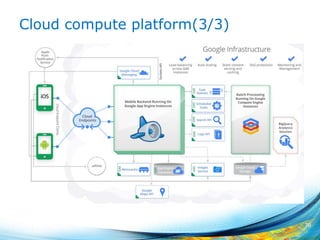
Cloud compute platform(1/3)
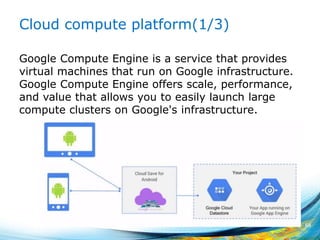
Google Compute Engine is a service that provides
virtual machines that run on Google infrastructure.
Google Compute Engine offers scale, performance,
and value that allows you to easily launch large
compute clusters on Google's infrastructure.
68
Cloud compute platform(2/3)
Benefits
• Automatic scaling and load balancing
• Data storage
• Push notifications
• Data processing
69
Cloud compute platform(3/3)
70
Android Studio
• More quickly
• Integrate Gradle
• Integrate Google Cloud Platform
• More edit functionality
• Support development in all android devices
includes android auto,android tv, android wear
71
Personal unlocking
Fingerprint
Voice identification
Trusted connection(WIFI,BT)
Trusted places.
Maybe you can unlock your car through your
android wear?
72
Using the authenticated device to authenticate another devices
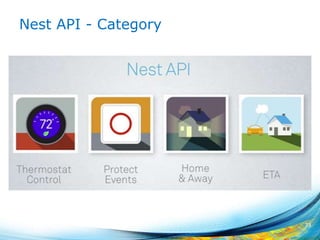
Nest API - Category
73
Reference
• https://www.google.com/events/io
• http://developer.android.com/preview/index.html
74

Google IO 2014 overview

  • 1.
    2014 Android I/OOverview Bin Yang Kaisa_zju@Hotmail.com
  • 2.
    Agenda • Outline • Hottopics • Update in L preview • Google play services update • Others 2
  • 3.
  • 4.
    Outline(1/5) • Android isget more and more market share. 4
  • 5.
    Outline(2/5) • Android isstill very hot.(40% topics are related to android) 5 72 10 27 15 20 12 7 17 0 10 20 30 40 50 60 70 80 Android ux Tools Performance Cloud services Media Location Others Count(180) Most of topics are related to android
  • 6.
    Outline(3/5) • Wear andGoogle play service are very hot in Android 6 0 5 10 15 20 25 30 35 40 45 Wear Media Material design Google play Other Topic Series 1 More and more features are implemented as google play service.
  • 7.
  • 8.
    Outline(5/5) • Multi Screenseamless connection(WIFI,BT,USB) and phone/tablet is the core. 8 WIFI or BTUSB BT BT Android is be used in more and more devices
  • 9.
  • 10.
    What is AndroidWear • Android wear is a device which running on the version of Google's Android operating system designed for smartwatches and other wearables. 10 • Watch as primary targeted device from factor. • Buletooth teghered only device. • High quality and low latencies void recoginition and capture. • Controlled by void and by touch screen • Colored lcd based ui. • Not always on. device. Daynamically waked from gesture and touch. • Always on sensors tracking.
  • 11.
    Use cases Must • Googlenow cards displayed on the weareable device. • Host smartphone notifications displayed on the wearable device. • Support Google voice search to the host. Maybe • Continious sensors tracking • Context awarness • Pairing with external sensors • Pairing with extenral bluetooth headset • Local music playback 11 Less than 10s interaction between user and device.
  • 12.
    Architecture 12 Host android Phone/Tablet Android wear BlueTooth Bluetooth isused to communicate Bluetooth 4.0: GATT and RFCOMM over ERD profiles
  • 13.
  • 14.
    UI Overview(2/4)-Suggest: The ContextStream The context stream is a vertical list of cards. • Card: showing a useful or timely piece of information from a application. swipe vertically to navigate from card to card • Page: are additional cards that can appear to the right of your main card in the stream. swiped horizontally to reveal additional pages. • Action: appear to the right of your notification, allowing the user to act on your notification • Notification Stacks Stacks may be used to collect multiple notifications from the same application into a single stack of cards. 14 Each notification from phone appears as a new card in the context stream default
  • 15.
    UI Overview(3/4)- Demand:The Cue Card The cue card allows users to speak to their device. The cue card is opened by saying, "Ok Google" or by tapping on the "g" icon on the home screen. Swiping up on the cue card shows a list of actions. 15
  • 16.
    UI Overview(4/4)- TwoModes • Ambient Mode: The glanceable, low-power mode that devices will spend most of their time in. For displays that are capable of always displaying an image within their power budgets,this mode is for displaying static and ambient information. Touch is enabled and can be at a lower refresh rate. Voice input is disabled. • Interactive Mode: The device’s on state(e.g., the display is in maximum visibility mode and animations can be displayed, etc.) Touch and Voice input are enabled. 16
  • 17.
  • 18.
    Android TV-Features • Handlea wide variety of traditional TV inputs, including HDMI, conventional TV tuners, and IPTV receivers. • Chromecast support. • Full access to Google Play’s existing media content • Integrated with Google’s existing Play Games Service • Will be coming to a variety of form factors, including TVs, set-top boxes, and streaming boxes. 18
  • 19.
  • 20.
    Android TV -Hardware requirement • Aggressive CPU+GPU performance specs • Minimum of 1G RAM & 8G Flash • Wi-Fi and/or Ethernet for connectivity • Bluetooth v4 w/BTLE • Widevine Level 1& Playready DRM • Targeting TVs, Media Streamers, Set Top Boxes and Micro Consoles. 20
  • 21.
    Android TV-UI • Search •Recommendations • Apps and Games • Settings 21
  • 22.
    Android TV-Difference withGoogle TV 22 Item Google TV Android TV OS Custom OS derived from Android Derived from Android 4.2 and runs a closed Google services for TV layer in the background. Working Mode Google hold the keys to Google TV only allowing certain vendors use it Google has relaxed the restrictions on who can use Android TV. APP support App support is very limited and restricted to Google TV apps. Compatibility with full Android app ecosystem but Google may still limit it to apps tagged as TV compatible. Chromecast Not support Support
  • 23.
  • 24.
    Auto UI -Launcher 24 The UI is consistent
  • 25.
    Auto UI -APP 25 Developers can customize the icon and functionality
  • 26.
  • 27.
    Architecture-Software(1/2) Media App asexample 27 Android Auto App works as a proxy in car
  • 28.
    Architecture – Hardwarein car • Audio device in the car • Display in the car • USB/other connectivity device in the car • Bluetooth device in the car • Input devices(buttons and sticks, etc.) in the • car • Sensor networks in the car 28
  • 29.
    Architecture - Autoprotocol(1/2) • Android auto protocol is used to communicate the phone with auto. • It is a transport independence protocol USB WIFI direct 29
  • 30.
    Architecture - Autoprotocol(2/2) Portable C++ library runs on Android/Linux/QNX. Different channel is opened for different aspect of car which phone needs to communicate with • Input data • sensor data • audio • Display data. Protocol buffer is used to format data. 30 Mux all channels with priority
  • 31.
  • 32.
    What is Googleglass • A wearable device • Released at 2013.4 about $1500 32
  • 33.
    Hardware feature • 500WCamera, 720p Video • WIFI ,BT • 16G flash/2G memory • Touchpad • 640X360px display • Gyroscope,accelerometer,compass • Microphone, • Eye tracker, head tracker. • GPS/Calls/SMS/GPS/Internet through phone. 33
  • 34.
  • 35.
    Architecture(2) – Modificationin AOSP • Account service Glass does authentication using My Glass website. So many task can be executed in server side. • Location service GPS information is piped through your companion phone for better accuracy. • Notification bridged from companion phone • Head Gesture services: Monitor your head when you are moving your head, so that it can turn on/off the screen. • Eye Gesture: Monitor the movement of your eyes so that it can take pictures. • Timeline Manager 35
  • 36.
    API – GlassDevelopment Kit An add-on to the Android SDK that lets you build Used to implement the features below • Real-time User Interaction • Offline Functionality • Access to Hardware 36
  • 37.
    API – MirrorAPI RESTful API lets you easily call web-based APIs that do much of the heavy lifting for you Used to implement the features below • Platform independence 37 Google Mirror API (REST API) Glass service app1 Google Glass Sync HTTPS(JOSN) USER Oauth2
  • 38.
  • 39.
    Hot topics -Android work
  • 40.
    Advantage • Make userto have a single device for personal use and work. • Unified view of personal and work apps. • Data isolation and security. • No modification for existing apps needed • App for ICS and above can be used. 40
  • 41.
    UI for androidwork • Unified view of notifications • Unified view of recent • A single launcher for personal use and work. 41
  • 42.
    Architecture 42 It seems mostof work is implemented in Google play services
  • 43.
    Update In Lpreview
  • 44.
    Update In Lpreview • Material design • ART • Notification • Recents screen • Task locking • Power Efficiency • BT • Graphics • Multi-networking • Multimedia • Webview 44
  • 45.
    Material Design -New Widgets • RecyclerView A container for large sets of views that can be recycled and scrolled more efficiently than ListView Can be vertical and horizontal scrolling There are baked-in animations for adding and removing views. • CardView Shows information inside card 45 Supported in android.support.v7.widget
  • 46.
    Material design -Shadows • View Elevation Z value is added for a view (Z = elevation + translationZ) A view with a lower elevation will have small, well- defined shadows Framework will cast a real time shadow for the view according to elevation. 46 Material is used for all of Google such as phone/tablet/tv/chrome
  • 47.
    Material design -Animations • Touch feedback -- ripple animation • Reveal effect – reveal animation • Activity transitions Enter transition Exit transition Shared elements transition(Multiple shared elements) • Curved motion Provides new APIs that enable you to define custom timing curves and curved motion patterns for animations. • View state changes Animators that run when the state of a view changes. 47
  • 48.
    Material design -Others • Drawable Tinting Enables you to define bitmaps or nine-patches as alpha masks and to tint them using a color resource or a theme attribute that resolves to a color resource • A new theme @android:style/Theme.Material • Compatibility For Theme and layout, use dedicated directory such as res/values-v21/styles.xml For Animation APIs, check the system version at runtime before calling them. 48
  • 49.
    ART • Ahead-of-Time (AOT)compilation Less battery consumption. Less memory. More storage/More installation time. • Improved garbage collection (GC) One GC pause instead of two Parallelized processing during the remaining GC pause Collector with lower pause time for the special case of cleaning up recently-allocated, short-lived objects Improved garbage collection ergonomics, making concurrent garbage collections more timely, which makes GC_FOR_ALLOC events extremely rare in typical use cases • Improved debugging support 49
  • 50.
    Notification(1/2) • heads-up notification Showthe notification when app is running as full screen. • Lockscreen notifications VISIBILITY_PRIVATE/ VISIBILITY_PUBLIC/ VISIBILITY_SECRET Notification will be displayed in Lock scrren according to its prioerty. • Notifications metadata Metadata is used to sort the notifications more intelligently. setCategory/setPriority/addPerson 50
  • 51.
    Notification(2/2) • Notifications tosupport android wear and auto Can specify the notification only is displayed in wear or android. • Synced notifications Act on a notification on your Android tablet and it is also dismissed on your phone. 51
  • 52.
    Recents screen • UsingCardView to display the recents • Support concurrent documents and activities Using Intent.FLAG_ACTIVITY_NEW_DOCUMENT or documentLaunchMode="intoExisting“ to start a activity as a new task For example. web browser app, documents in a productivity app 52
  • 53.
    Task locking Temporarily restrictusers from leaving your app or being interrupted by notifications. For example: Using an education app How to: Call startLockTask() in activity. If the task is locking • The status bar is blank, and user notifications and status information is hidden. • The Home and Recent Apps buttons are hidden. • Other apps may not launch new activities. • The current app may start new activities, as long as doing so does not create new tasks. 53
  • 54.
    BT Peripheral mode Android devicein L version can work as in peripheral mode which can send advertisement. Improved scanning. Offload scanning into background. Add API to filter the advertisement which you has interest to reduce the number of advertisement. (Service UID, service data, manufacture data) Reduce the scanning frequency. 54
  • 55.
    Power Efficiency Scheduling jobs- defining jobs for the system to run asynchronously at a later time or under specified conditions specific conditions, such as: • The device is charging • The device is connected to an unmetered network • The system deems the device to be idle • Completion with a minimum delay or within a specific deadline New tools: • dumpsys batterystats generate interesting statistical data data • Battery Historian tool Analyzes interesting statistical data data 55
  • 56.
    Graphics • Support forOpenGL ES 3.1 • Android Extension Pack Does Intel’s GPU support it ? • Render Thread Split the work doing UI thread into two threads to improve performance. UI thread create display list reader thread: process display list with GPU. 56
  • 57.
    Multi-networking • Support appdynamically scan for available networks with specific capabilities, and establish a connection to them For example: SUPL, MMS 57
  • 58.
  • 59.
  • 60.
    Google play serviceArchitecture • Google play services ships every six weeks. And 90% users are on the latest version of Google play services. 60
  • 61.
    How to userGoogle play service • Start a Connection mGoogleApiClient = new GoogleApiClient.Builder(this) .addApi(Drive.API) .addScope(Drive.SCOPE_FILE) .addConnectionCallbacks(this) //callback .addOnConnectionFailedListener(this) .build(); mGoogleApiClient.connect(); • Communicate with Google Services Query query = new Query.Builder() .addFilter(Filters.eq(SearchableField.TITLE, filename)); //synchronous PendingResult result = Drive.DriveApi.query(mGoogleApiClient, query); //asynchronous Drive.DriveApi.query(mGoogleApiClient, query) .setResultCallback(new ResultCallback<DriveApi.MetadataBufferResult>() {XXXX}) 61
  • 62.
    Update(1/4) • Android wearableservices Setup the communication between Phone and Wear device. Provide an automatically synchronized, persistent data store and a low-latency messaging interface that let you sync data, exchange control messages, and transfer assets. Node API/ Message API/Data API(auto sync data between devices) 62
  • 63.
    Update(2/4) • App IndexingAPI Provides a way for developers to notify Google about deep links in their native apps and allows the Google Search App, to drive re-engagement through Google Search query auto completions, providing fast and easy access to inner pages in apps. • Google Cast API Enables multi-screen experiences and lets user send and control content like video from a small computing device to a large display device like a television. New: Includes media tracks that introduce closed caption support for Chromecast. 63
  • 64.
    Update(3/4) • Google WalletAPI Increase conversions by streamlining your purchase flow on mobile apps and websites. Engage your customers with offers, loyalty programs, and other objects stored in Google Wallet. New: providing split tender support. • Drive Android API API to access the Drive service on mobile devices. New: Adds the ability to sort query results, create folders offline, and select any mime type in the file picker by default. 64
  • 65.
    Update(4/4) • Dynamic securityprovider Provides an API that apps can use to easily install a dynamic security provider. The dynamic security provider includes a replacement for the platform's secure networking APIs, which can be updated frequently for rapid delivery of security patches. • Play Games services Provides cross-platform Games services that lets you easily integrate popular gaming features such as achievements, leaderboards, Cloud Save, and real-time multiplayer (on Android) in your tablet and mobile games. 65
  • 66.
  • 67.
    Topic Cloud compute platform AndroidStudio Personal unlocking Nest API Google Glass …. 67
  • 68.
    Cloud compute platform(1/3) GoogleCompute Engine is a service that provides virtual machines that run on Google infrastructure. Google Compute Engine offers scale, performance, and value that allows you to easily launch large compute clusters on Google's infrastructure. 68
  • 69.
    Cloud compute platform(2/3) Benefits •Automatic scaling and load balancing • Data storage • Push notifications • Data processing 69
  • 70.
  • 71.
    Android Studio • Morequickly • Integrate Gradle • Integrate Google Cloud Platform • More edit functionality • Support development in all android devices includes android auto,android tv, android wear 71
  • 72.
    Personal unlocking Fingerprint Voice identification Trustedconnection(WIFI,BT) Trusted places. Maybe you can unlock your car through your android wear? 72 Using the authenticated device to authenticate another devices
  • 73.
    Nest API -Category 73
  • 74.

Editor's Notes