I N V A S I O N O F T H E
A N D R O I D S
S U B M I T T E D BY : -
N I K H I L K A LYA N
CONTENTS
• Overview
• History
• Features
• Architecture
• Developing applications using android
• Creating Hello World application
• How to publish an Android application
• Drawbacks
WHAT IS ANDROID ?
Android is a software stack for mobile devices
that includes an operating system, middleware
and key applications.
INTRODUCTION
• Is a mobile operating system currently developed by Google, based on
the Linux kernel.
• Android's source code is released by Google under an open source
license.
• Android's user interface is mainly based on direct manipulation, using
touch gestures that loosely correspond to real-world actions(swiping,
tapping and pinching) to manipulate on-screen objects.
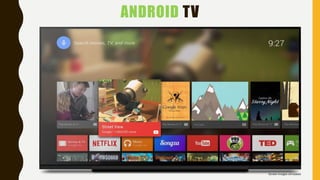
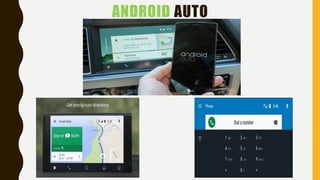
• Google has further developed Android TV for televisions, Android
Auto for cars, and Android Wear for wrist watches, each with a
specialized user interface.
• Android has the largest installed base of all operating systems (OS) of
any kind.
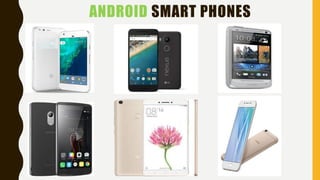
ANDROID SMART PHONES
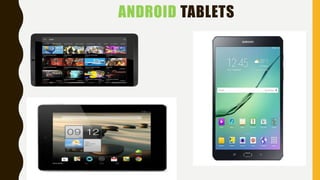
ANDROID TABLETS
ANDROID TV
ANDROID AUTO
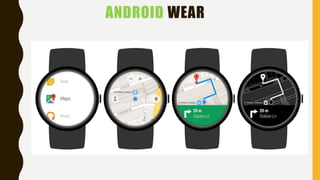
ANDROID WEAR
HISTORY• Android, Inc. was founded in Palo Alto, California in October
2003 by Andy Rubin(co-founder of Danger), Rich Miner(co-
founder of Wildfire Communications, Inc.), Nick Sears (once VP
at T-Mobile), and Chris White (headed design and interface
development at WebTV).
• In July 2005, Google acquired Android Inc. for at least $50
million.
• On November 5, 2007, the Open Handset Alliance,
a consortium of technology including device manufacturers
such as Google, HTC, Sony and Samsung, wireless
carriers(Sprint Nextel and T-Mobile) and chipset
makers(Qualcomm and Texas Instruments) unveiled itself, with
a goal to develop open standards for mobile devices.
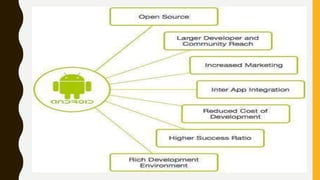
• Since 2008, Android has seen numerous updates which have
incrementally improved the operating system, adding new
features and fixing bugs in previous releases.

FEATURES OF ANDROID
GENERAL FEATURES
• Messaging(SMS,MMS)
• Web browser
• Voice-based features(Android
4.1)
• Multi-touch
• Multitasking
• Screen capture
• Video calling
• Multiple language support
• Accessibility
• Own app store(Google Play
Store)
CONNECTIVITY
• Cellular calling(2G,3G,4G)
• Bluetooth
• Tethering (Wi-Fi Hotspot)
Media
• Streaming media support(Flash plugin, RTP/RTSP
streaming etc)
• Media support(MP3, MPEG-4,MIDI,WAV,JPG,PNG
etc)
• External storage
Other
• Java support
• Handset layouts
• Storage
• Native Apps
• Instant Apps
ANDROID VERSIONS
Pre-commercial release versions
• The November 5, 2007 date is popularly celebrated as
Android's "birthday".
Android 1.0(API 1) SEP 28, 2008
• Android Market allowed application downloads and
updates through the Market application
• Access to web email servers, supporting POP3, IMAP4,
and SMTP.
• Google Search, allowing users to search the Internet and
phone applications, contacts, calendar, etc.
• Instant messaging, text messaging, and MMS.
• YouTube video player.
Android 1.1(API 2) FEB 9, 2009
• Longer in-call screen timeout default when using the
speakerphone, plus ability to show/hide dial pad.
• Ability to save attachments in messages.
• Details and reviews available when a user searches for
businesses on Maps.
• Support added for marquee in system layouts.
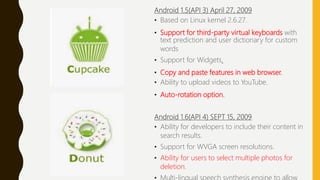
Android 1.5(API 3) April 27, 2009
• Based on Linux kernel 2.6.27.
• Support for third-party virtual keyboards with
text prediction and user dictionary for custom
words
• Support for Widgets.
• Copy and paste features in web browser.
• Ability to upload videos to YouTube.
• Auto-rotation option.
Android 1.6(API 4) SEPT 15, 2009
• Ability for developers to include their content in
search results.
• Support for WVGA screen resolutions.
• Ability for users to select multiple photos for
deletion.
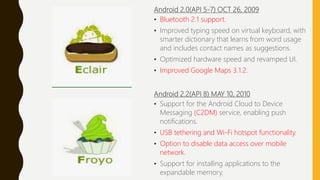
Android 2.0(API 5-7) OCT 26, 2009
• Bluetooth 2.1 support.
• Improved typing speed on virtual keyboard, with
smarter dictionary that learns from word usage
and includes contact names as suggestions.
• Optimized hardware speed and revamped UI.
• Improved Google Maps 3.1.2.
Android 2.2(API 8) MAY 10, 2010
• Support for the Android Cloud to Device
Messaging (C2DM) service, enabling push
notifications.
• USB tethering and Wi-Fi hotspot functionality.
• Option to disable data access over mobile
network.
• Support for installing applications to the
expandable memory.
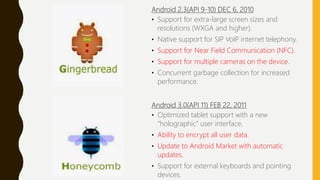
Android 2.3(API 9-10) DEC 6, 2010
• Support for extra-large screen sizes and
resolutions (WXGA and higher).
• Native support for SIP VoIP internet telephony.
• Support for Near Field Communication (NFC).
• Support for multiple cameras on the device.
• Concurrent garbage collection for increased
performance.
Android 3.0(API 11) FEB 22, 2011
• Optimized tablet support with a new
“holographic” user interface.
• Ability to encrypt all user data.
• Update to Android Market with automatic
updates.
• Support for external keyboards and pointing
devices.
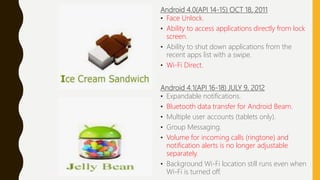
Android 4.0(API 14-15) OCT 18, 2011
• Face Unlock.
• Ability to access applications directly from lock
screen.
• Ability to shut down applications from the
recent apps list with a swipe.
• Wi-Fi Direct.
Android 4.1(API 16-18) JULY 9, 2012
• Expandable notifications.
• Bluetooth data transfer for Android Beam.
• Multiple user accounts (tablets only).
• Group Messaging.
• Volume for incoming calls (ringtone) and
notification alerts is no longer adjustable
separately.
• Background Wi-Fi location still runs even when
Wi-Fi is turned off.
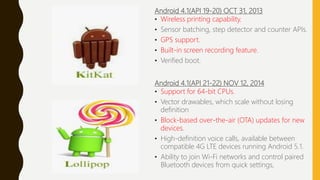
Android 4.1(API 19-20) OCT 31, 2013
• Wireless printing capability.
• Sensor batching, step detector and counter APIs.
• GPS support.
• Built-in screen recording feature.
• Verified boot.
Android 4.1(API 21-22) NOV 12, 2014
• Support for 64-bit CPUs.
• Vector drawables, which scale without losing
definition
• Block-based over-the-air (OTA) updates for new
devices.
• High-definition voice calls, available between
compatible 4G LTE devices running Android 5.1.
• Ability to join Wi-Fi networks and control paired
Bluetooth devices from quick settings,
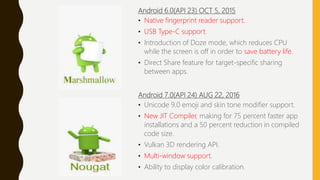
Android 6.0(API 23) OCT 5, 2015
• Native fingerprint reader support.
• USB Type-C support.
• Introduction of Doze mode, which reduces CPU
while the screen is off in order to save battery life.
• Direct Share feature for target-specific sharing
between apps.
Android 7.0(API 24) AUG 22, 2016
• Unicode 9.0 emoji and skin tone modifier support.
• New JIT Compiler, making for 75 percent faster app
installations and a 50 percent reduction in compiled
code size.
• Vulkan 3D rendering API.
• Multi-window support.
• Ability to display color calibration.
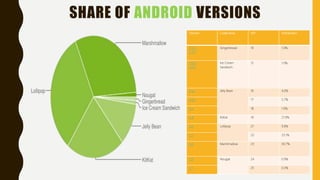
SHARE OF ANDROID VERSIONS
Version Codename API Distribution
2.3.3 -
2.3.7
Gingerbread 10 1.0%
4.0.3 -
4.0.4
Ice Cream
Sandwich
15 1.0%
4.1.x Jelly Bean 16 4.0%
4.2.x 17 5.7%
4.3 18 1.6%
4.4 KitKat 19 21.9%
5.0 Lollipop 21 9.8%
5.1 22 23.1%
6.0 Marshmallow 23 30.7%
7.0 Nougat 24 0.9%
7.1 25 0.3%
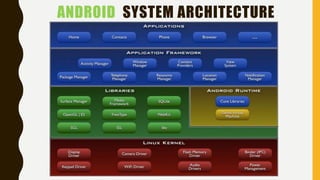
ANDROID SYSTEM ARCHITECTURE
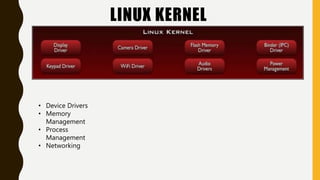
LINUX KERNEL
• Device Drivers
• Memory
Management
• Process
Management
• Networking
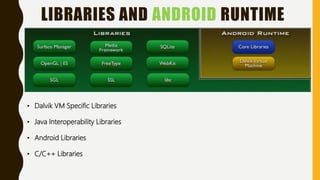
LIBRARIES AND ANDROID RUNTIME
• Dalvik VM Specific Libraries
• Java Interoperability Libraries
• Android Libraries
• C/C++ Libraries
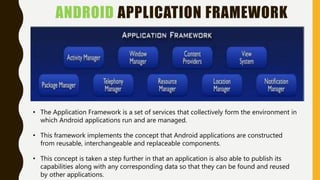
ANDROID APPLICATION FRAMEWORK
• The Application Framework is a set of services that collectively form the environment in
which Android applications run and are managed.
• This framework implements the concept that Android applications are constructed
from reusable, interchangeable and replaceable components.
• This concept is taken a step further in that an application is also able to publish its
capabilities along with any corresponding data so that they can be found and reused
by other applications.
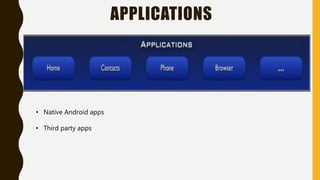
APPLICATIONS
• Native Android apps
• Third party apps
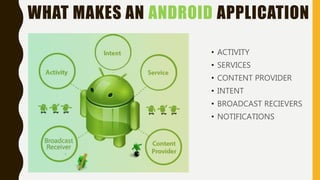
WHAT MAKES AN ANDROID APPLICATION
• ACTIVITY
• SERVICES
• CONTENT PROVIDER
• INTENT
• BROADCAST RECIEVERS
• NOTIFICATIONS
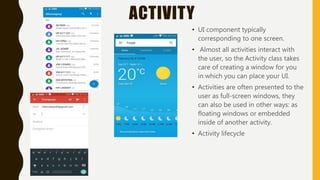
ACTIVITY
• UI component typically
corresponding to one screen.
• Almost all activities interact with
the user, so the Activity class takes
care of creating a window for you
in which you can place your UI.
• Activities are often presented to the
user as full-screen windows, they
can also be used in other ways: as
floating windows or embedded
inside of another activity.
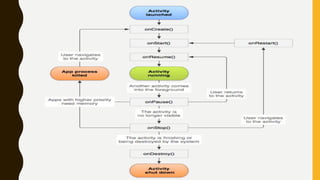
• Activity lifecycle
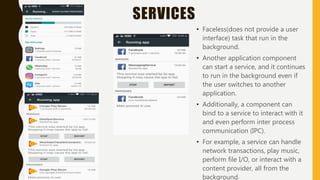
SERVICES
• Faceless(does not provide a user
interface) task that run in the
background.
• Another application component
can start a service, and it continues
to run in the background even if
the user switches to another
application.
• Additionally, a component can
bind to a service to interact with it
and even perform inter process
communication (IPC).
• For example, a service can handle
network transactions, play music,
perform file I/O, or interact with a
content provider, all from the
background.
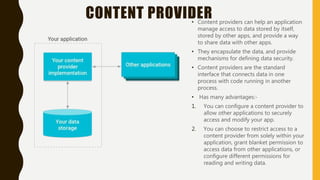
CONTENT PROVIDER• Content providers can help an application
manage access to data stored by itself,
stored by other apps, and provide a way
to share data with other apps.
• They encapsulate the data, and provide
mechanisms for defining data security.
• Content providers are the standard
interface that connects data in one
process with code running in another
process.
• Has many advantages:-
1. You can configure a content provider to
allow other applications to securely
access and modify your app.
2. You can choose to restrict access to a
content provider from solely within your
application, grant blanket permission to
access data from other applications, or
configure different permissions for
reading and writing data.
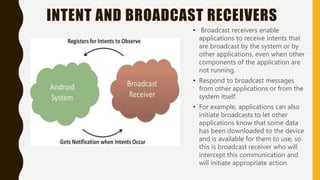
INTENT AND BROADCAST RECEIVERS
• Broadcast receivers enable
applications to receive intents that
are broadcast by the system or by
other applications, even when other
components of the application are
not running.
• Respond to broadcast messages
from other applications or from the
system itself.
• For example, applications can also
initiate broadcasts to let other
applications know that some data
has been downloaded to the device
and is available for them to use, so
this is broadcast receiver who will
intercept this communication and
will initiate appropriate action.
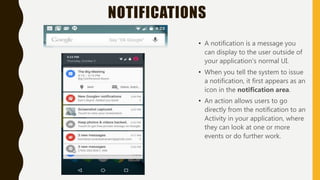
NOTIFICATIONS
• A notification is a message you
can display to the user outside of
your application's normal UI.
• When you tell the system to issue
a notification, it first appears as an
icon in the notification area.
• An action allows users to go
directly from the notification to an
Activity in your application, where
they can look at one or more
events or do further work.
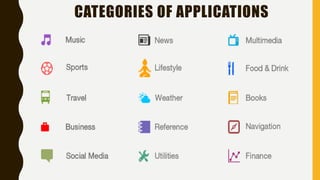
CATEGORIES OF APPLICATIONS
DEVELOPING ANDROID APPLICATIONS
• Android Studio (the Official IDE for
Android).
REQUIRMENTS
Windows
• Microsoft® Windows® 8/7/Vista/2003 (32
or 64-bit).
• 2 GB RAM minimum, 4 GB RAM
recommended.
• 400 MB hard disk space + at least 1 G for
Android SDK, emulator system images, and
caches.
• 1280 x 800 minimum screen resolution.
• Java Development Kit (JDK) 7.
• Optional for accelerated emulator: Intel®
processor with support for Intel® VT-x,
Intel® EM64T (Intel® 64), and Execute
Disable (XD) Bit functionality.
Mac OS X
• Mac® OS X® 10.8.5 or higher, up to 10.9
(Mavericks).
• 2 GB RAM minimum, 4 GB RAM
recommended.
• 400 MB hard disk space At least 1 GB for
Android SDK, emulator system images,
and caches.
• 1280 x 800 minimum screen resolution.
• Java Runtime Environment (JRE) 6.
• Java Development Kit (JDK) 7.
Linux
• GNOME or KDE desktop.
• GNU C Library (glibc) 2.11 or later
• 2 GB RAM minimum, 4 GB RAM
recommended.
• 400 MB hard disk space at least 1 GB for
Android SDK, emulator system images, and
caches.
• 1280 x 800 minimum screen resolution.
• Oracle® Java Development Kit (JDK) 7.
CREATING A HELLO WORLD APPLICATION
HOW TO PUBLISH AN ANDROID APPLICATION
Start publishing on Google Play in minutes by:
• Registering for a Google Play publisher account.
• Setting up a Google payments merchant account, if you will sell
apps or in-app products.
• Exploring the Google Play Developer Console and publishing
tools.
DRAWBACKS OF ANDROID
• Little Memory for Storage.
• Force Close on Large App/Games.
• Data Connection.
• Battery Problem.
• Box of Malware Google play store.
REFRENCES
• https://developer.android.com/index.html
• https://en.wikipedia.org/wiki/Android_(operating_system)
• http://www.techotopia.com/index.php/An_Overview_of_the_Android_Architecture
• https://www.tutorialspoint.com/android/android_overview.htm
• https://www.slideshare.net/deepakkumargoyal/slideshare-android
• http://www.drawbacksof.com/disadvantages-of-android-5-major-drawbacks/
Android

Android

  • 1.
    I N VA S I O N O F T H E A N D R O I D S S U B M I T T E D BY : - N I K H I L K A LYA N
  • 2.
    CONTENTS • Overview • History •Features • Architecture • Developing applications using android • Creating Hello World application • How to publish an Android application • Drawbacks
  • 3.
    WHAT IS ANDROID? Android is a software stack for mobile devices that includes an operating system, middleware and key applications.
  • 4.
    INTRODUCTION • Is amobile operating system currently developed by Google, based on the Linux kernel. • Android's source code is released by Google under an open source license. • Android's user interface is mainly based on direct manipulation, using touch gestures that loosely correspond to real-world actions(swiping, tapping and pinching) to manipulate on-screen objects. • Google has further developed Android TV for televisions, Android Auto for cars, and Android Wear for wrist watches, each with a specialized user interface. • Android has the largest installed base of all operating systems (OS) of any kind.
  • 5.
  • 6.
  • 7.
  • 8.
  • 9.
  • 10.
    HISTORY• Android, Inc.was founded in Palo Alto, California in October 2003 by Andy Rubin(co-founder of Danger), Rich Miner(co- founder of Wildfire Communications, Inc.), Nick Sears (once VP at T-Mobile), and Chris White (headed design and interface development at WebTV). • In July 2005, Google acquired Android Inc. for at least $50 million. • On November 5, 2007, the Open Handset Alliance, a consortium of technology including device manufacturers such as Google, HTC, Sony and Samsung, wireless carriers(Sprint Nextel and T-Mobile) and chipset makers(Qualcomm and Texas Instruments) unveiled itself, with a goal to develop open standards for mobile devices. • Since 2008, Android has seen numerous updates which have incrementally improved the operating system, adding new features and fixing bugs in previous releases.
  • 11.
    FEATURES OF ANDROID GENERALFEATURES • Messaging(SMS,MMS) • Web browser • Voice-based features(Android 4.1) • Multi-touch • Multitasking • Screen capture • Video calling • Multiple language support • Accessibility • Own app store(Google Play Store) CONNECTIVITY • Cellular calling(2G,3G,4G) • Bluetooth • Tethering (Wi-Fi Hotspot) Media • Streaming media support(Flash plugin, RTP/RTSP streaming etc) • Media support(MP3, MPEG-4,MIDI,WAV,JPG,PNG etc) • External storage Other • Java support • Handset layouts • Storage • Native Apps • Instant Apps
  • 12.
    ANDROID VERSIONS Pre-commercial releaseversions • The November 5, 2007 date is popularly celebrated as Android's "birthday". Android 1.0(API 1) SEP 28, 2008 • Android Market allowed application downloads and updates through the Market application • Access to web email servers, supporting POP3, IMAP4, and SMTP. • Google Search, allowing users to search the Internet and phone applications, contacts, calendar, etc. • Instant messaging, text messaging, and MMS. • YouTube video player. Android 1.1(API 2) FEB 9, 2009 • Longer in-call screen timeout default when using the speakerphone, plus ability to show/hide dial pad. • Ability to save attachments in messages. • Details and reviews available when a user searches for businesses on Maps. • Support added for marquee in system layouts.
  • 13.
    Android 1.5(API 3)April 27, 2009 • Based on Linux kernel 2.6.27. • Support for third-party virtual keyboards with text prediction and user dictionary for custom words • Support for Widgets. • Copy and paste features in web browser. • Ability to upload videos to YouTube. • Auto-rotation option. Android 1.6(API 4) SEPT 15, 2009 • Ability for developers to include their content in search results. • Support for WVGA screen resolutions. • Ability for users to select multiple photos for deletion.
  • 14.
    Android 2.0(API 5-7)OCT 26, 2009 • Bluetooth 2.1 support. • Improved typing speed on virtual keyboard, with smarter dictionary that learns from word usage and includes contact names as suggestions. • Optimized hardware speed and revamped UI. • Improved Google Maps 3.1.2. Android 2.2(API 8) MAY 10, 2010 • Support for the Android Cloud to Device Messaging (C2DM) service, enabling push notifications. • USB tethering and Wi-Fi hotspot functionality. • Option to disable data access over mobile network. • Support for installing applications to the expandable memory.
  • 15.
    Android 2.3(API 9-10)DEC 6, 2010 • Support for extra-large screen sizes and resolutions (WXGA and higher). • Native support for SIP VoIP internet telephony. • Support for Near Field Communication (NFC). • Support for multiple cameras on the device. • Concurrent garbage collection for increased performance. Android 3.0(API 11) FEB 22, 2011 • Optimized tablet support with a new “holographic” user interface. • Ability to encrypt all user data. • Update to Android Market with automatic updates. • Support for external keyboards and pointing devices.
  • 16.
    Android 4.0(API 14-15)OCT 18, 2011 • Face Unlock. • Ability to access applications directly from lock screen. • Ability to shut down applications from the recent apps list with a swipe. • Wi-Fi Direct. Android 4.1(API 16-18) JULY 9, 2012 • Expandable notifications. • Bluetooth data transfer for Android Beam. • Multiple user accounts (tablets only). • Group Messaging. • Volume for incoming calls (ringtone) and notification alerts is no longer adjustable separately. • Background Wi-Fi location still runs even when Wi-Fi is turned off.
  • 17.
    Android 4.1(API 19-20)OCT 31, 2013 • Wireless printing capability. • Sensor batching, step detector and counter APIs. • GPS support. • Built-in screen recording feature. • Verified boot. Android 4.1(API 21-22) NOV 12, 2014 • Support for 64-bit CPUs. • Vector drawables, which scale without losing definition • Block-based over-the-air (OTA) updates for new devices. • High-definition voice calls, available between compatible 4G LTE devices running Android 5.1. • Ability to join Wi-Fi networks and control paired Bluetooth devices from quick settings,
  • 18.
    Android 6.0(API 23)OCT 5, 2015 • Native fingerprint reader support. • USB Type-C support. • Introduction of Doze mode, which reduces CPU while the screen is off in order to save battery life. • Direct Share feature for target-specific sharing between apps. Android 7.0(API 24) AUG 22, 2016 • Unicode 9.0 emoji and skin tone modifier support. • New JIT Compiler, making for 75 percent faster app installations and a 50 percent reduction in compiled code size. • Vulkan 3D rendering API. • Multi-window support. • Ability to display color calibration.
  • 19.
    SHARE OF ANDROIDVERSIONS Version Codename API Distribution 2.3.3 - 2.3.7 Gingerbread 10 1.0% 4.0.3 - 4.0.4 Ice Cream Sandwich 15 1.0% 4.1.x Jelly Bean 16 4.0% 4.2.x 17 5.7% 4.3 18 1.6% 4.4 KitKat 19 21.9% 5.0 Lollipop 21 9.8% 5.1 22 23.1% 6.0 Marshmallow 23 30.7% 7.0 Nougat 24 0.9% 7.1 25 0.3%
  • 20.
  • 21.
    LINUX KERNEL • DeviceDrivers • Memory Management • Process Management • Networking
  • 22.
    LIBRARIES AND ANDROIDRUNTIME • Dalvik VM Specific Libraries • Java Interoperability Libraries • Android Libraries • C/C++ Libraries
  • 23.
    ANDROID APPLICATION FRAMEWORK •The Application Framework is a set of services that collectively form the environment in which Android applications run and are managed. • This framework implements the concept that Android applications are constructed from reusable, interchangeable and replaceable components. • This concept is taken a step further in that an application is also able to publish its capabilities along with any corresponding data so that they can be found and reused by other applications.
  • 24.
    APPLICATIONS • Native Androidapps • Third party apps
  • 25.
    WHAT MAKES ANANDROID APPLICATION • ACTIVITY • SERVICES • CONTENT PROVIDER • INTENT • BROADCAST RECIEVERS • NOTIFICATIONS
  • 26.
    ACTIVITY • UI componenttypically corresponding to one screen. • Almost all activities interact with the user, so the Activity class takes care of creating a window for you in which you can place your UI. • Activities are often presented to the user as full-screen windows, they can also be used in other ways: as floating windows or embedded inside of another activity. • Activity lifecycle
  • 28.
    SERVICES • Faceless(does notprovide a user interface) task that run in the background. • Another application component can start a service, and it continues to run in the background even if the user switches to another application. • Additionally, a component can bind to a service to interact with it and even perform inter process communication (IPC). • For example, a service can handle network transactions, play music, perform file I/O, or interact with a content provider, all from the background.
  • 29.
    CONTENT PROVIDER• Contentproviders can help an application manage access to data stored by itself, stored by other apps, and provide a way to share data with other apps. • They encapsulate the data, and provide mechanisms for defining data security. • Content providers are the standard interface that connects data in one process with code running in another process. • Has many advantages:- 1. You can configure a content provider to allow other applications to securely access and modify your app. 2. You can choose to restrict access to a content provider from solely within your application, grant blanket permission to access data from other applications, or configure different permissions for reading and writing data.
  • 30.
    INTENT AND BROADCASTRECEIVERS • Broadcast receivers enable applications to receive intents that are broadcast by the system or by other applications, even when other components of the application are not running. • Respond to broadcast messages from other applications or from the system itself. • For example, applications can also initiate broadcasts to let other applications know that some data has been downloaded to the device and is available for them to use, so this is broadcast receiver who will intercept this communication and will initiate appropriate action.
  • 31.
    NOTIFICATIONS • A notificationis a message you can display to the user outside of your application's normal UI. • When you tell the system to issue a notification, it first appears as an icon in the notification area. • An action allows users to go directly from the notification to an Activity in your application, where they can look at one or more events or do further work.
  • 32.
  • 33.
    DEVELOPING ANDROID APPLICATIONS •Android Studio (the Official IDE for Android). REQUIRMENTS Windows • Microsoft® Windows® 8/7/Vista/2003 (32 or 64-bit). • 2 GB RAM minimum, 4 GB RAM recommended. • 400 MB hard disk space + at least 1 G for Android SDK, emulator system images, and caches. • 1280 x 800 minimum screen resolution. • Java Development Kit (JDK) 7. • Optional for accelerated emulator: Intel® processor with support for Intel® VT-x, Intel® EM64T (Intel® 64), and Execute Disable (XD) Bit functionality. Mac OS X • Mac® OS X® 10.8.5 or higher, up to 10.9 (Mavericks). • 2 GB RAM minimum, 4 GB RAM recommended. • 400 MB hard disk space At least 1 GB for Android SDK, emulator system images, and caches. • 1280 x 800 minimum screen resolution. • Java Runtime Environment (JRE) 6. • Java Development Kit (JDK) 7. Linux • GNOME or KDE desktop. • GNU C Library (glibc) 2.11 or later • 2 GB RAM minimum, 4 GB RAM recommended. • 400 MB hard disk space at least 1 GB for Android SDK, emulator system images, and caches. • 1280 x 800 minimum screen resolution. • Oracle® Java Development Kit (JDK) 7.
  • 34.
    CREATING A HELLOWORLD APPLICATION
  • 35.
    HOW TO PUBLISHAN ANDROID APPLICATION Start publishing on Google Play in minutes by: • Registering for a Google Play publisher account. • Setting up a Google payments merchant account, if you will sell apps or in-app products. • Exploring the Google Play Developer Console and publishing tools.
  • 36.
    DRAWBACKS OF ANDROID •Little Memory for Storage. • Force Close on Large App/Games. • Data Connection. • Battery Problem. • Box of Malware Google play store.
  • 39.
    REFRENCES • https://developer.android.com/index.html • https://en.wikipedia.org/wiki/Android_(operating_system) •http://www.techotopia.com/index.php/An_Overview_of_the_Android_Architecture • https://www.tutorialspoint.com/android/android_overview.htm • https://www.slideshare.net/deepakkumargoyal/slideshare-android • http://www.drawbacksof.com/disadvantages-of-android-5-major-drawbacks/