Networked Learninghttp://thenetworkedlearner.wikispaces.comGoogle Earth Tutorials:Part I – Getting to Know EarthHosts: Thomas Cooper, Alice BarrNetworked Learning 2009
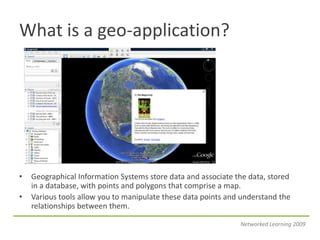
What is a geo-application?Geographical Information Systems store data and associate the data, stored in a database, with points and polygons that comprise a map.Various tools allow you to manipulate these data points and understand the relationships between them.Networked Learning 2009
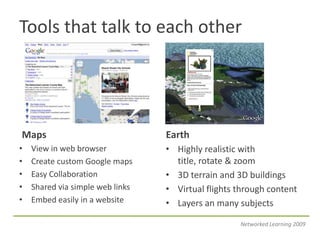
Tools that talk to each otherMapsEarthView in web browserCreate custom Google mapsEasy CollaborationShared via simple web linksEmbed easily in a websiteHighly realistic with title, rotate & zoom3D terrain and 3D buildingsVirtual flights through contentLayers an many subjectsNetworked Learning 2009
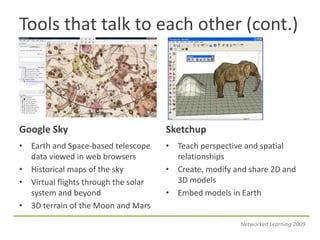
Tools that talk to each other (cont.)Google SkySketchupEarth and Space-based telescope data viewed in web browsersHistorical maps of the skyVirtual flights through the solar system and beyond3D terrain of the Moon and MarsTeach perspective and spatial relationshipsCreate, modify and share 2D and 3D modelsEmbed models in EarthNetworked Learning 2009
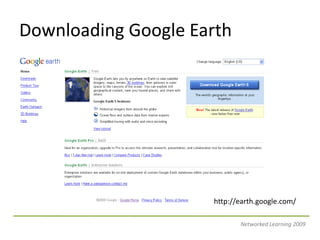
Downloading Google Earthhttp://earth.google.com/Networked Learning 2009
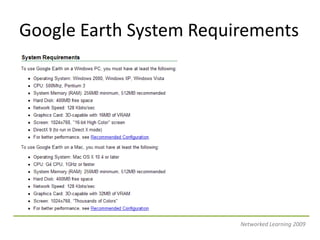
Google Earth System RequirementsNetworked Learning 2009
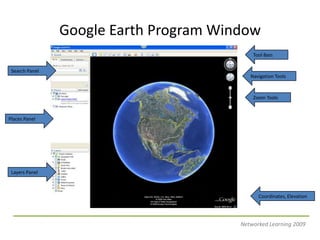
Google Earth Program WindowTool BarsSearch PanelNavigation ToolsZoom ToolsPlaces PanelLayers PanelCoordinates, ElevationNetworked Learning 2009
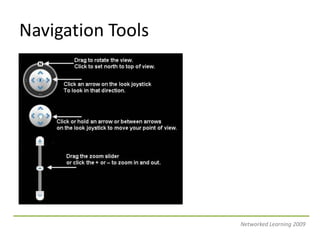
Navigation ToolsNetworked Learning 2009
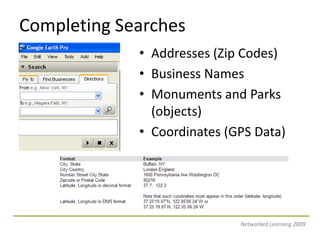
Completing SearchesAddresses (Zip Codes)Business NamesMonuments and Parks (objects)Coordinates (GPS Data)Networked Learning 2009
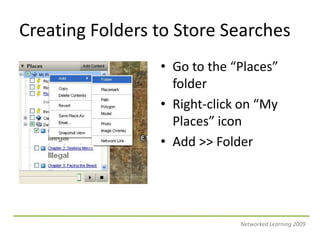
Creating Folders to Store SearchesGo to the “Places” folderRight-click on “My Places” iconAdd >> FolderNetworked Learning 2009
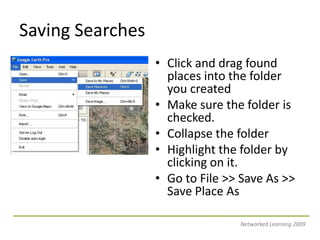
Saving SearchesClick and drag found places into the folder you createdMake sure the folder is checked.Collapse the folderHighlight the folder by clicking on it.Go to File >> Save As >> Save Place AsNetworked Learning 2009
Working with LayersOver 206 layers in the primary data baseMajor ones: roads, traffic, weather, Wikipedia, National Geographic, and global awareness.More on the Earth Outreach CommunityNetworked Learning 2009
Basic Trouble ShootingReinstating Your PanelsLoosing Terrain DataReinstating Navigation ToolsReinstating the Status BarSaving ContentNetworked Learning 2009
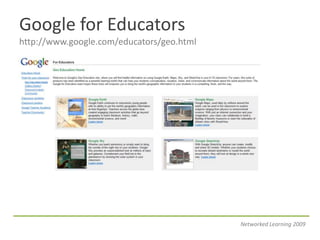
Google for Educatorshttp://www.google.com/educators/geo.htmlNetworked Learning 2009
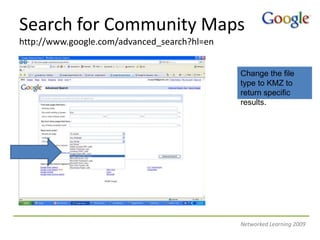
Search for Community Mapshttp://www.google.com/advanced_search?hl=en Change the file type to KMZ to return specific results.Networked Learning 2009
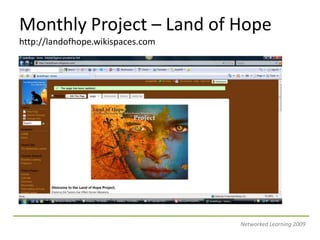
Monthly Project – Land of Hopehttp://landofhope.wikispaces.comNetworked Learning 2009
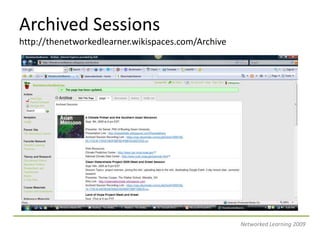
Archived Sessionshttp://thenetworkedlearner.wikispaces.com/ArchiveNetworked Learning 2009
Next Month’s SessionMonday Oct. 26, 2009Creating Basic Placemarks and Adding ContentTopics: Adding Text and Images, Embedding Video, and Project PlanningProject of the Month: Expedition Lit Trips – http://expeditionlittrips.wikispaces.comNetworked Learning 2009

Google Earth Tutorials - Part I

  • 1.
    Networked Learninghttp://thenetworkedlearner.wikispaces.comGoogle EarthTutorials:Part I – Getting to Know EarthHosts: Thomas Cooper, Alice BarrNetworked Learning 2009
  • 3.
    What is ageo-application?Geographical Information Systems store data and associate the data, stored in a database, with points and polygons that comprise a map.Various tools allow you to manipulate these data points and understand the relationships between them.Networked Learning 2009
  • 4.
    Tools that talkto each otherMapsEarthView in web browserCreate custom Google mapsEasy CollaborationShared via simple web linksEmbed easily in a websiteHighly realistic with title, rotate & zoom3D terrain and 3D buildingsVirtual flights through contentLayers an many subjectsNetworked Learning 2009
  • 5.
    Tools that talkto each other (cont.)Google SkySketchupEarth and Space-based telescope data viewed in web browsersHistorical maps of the skyVirtual flights through the solar system and beyond3D terrain of the Moon and MarsTeach perspective and spatial relationshipsCreate, modify and share 2D and 3D modelsEmbed models in EarthNetworked Learning 2009
  • 6.
  • 7.
    Google Earth SystemRequirementsNetworked Learning 2009
  • 8.
    Google Earth ProgramWindowTool BarsSearch PanelNavigation ToolsZoom ToolsPlaces PanelLayers PanelCoordinates, ElevationNetworked Learning 2009
  • 9.
  • 10.
    Completing SearchesAddresses (ZipCodes)Business NamesMonuments and Parks (objects)Coordinates (GPS Data)Networked Learning 2009
  • 11.
    Creating Folders toStore SearchesGo to the “Places” folderRight-click on “My Places” iconAdd >> FolderNetworked Learning 2009
  • 12.
    Saving SearchesClick anddrag found places into the folder you createdMake sure the folder is checked.Collapse the folderHighlight the folder by clicking on it.Go to File >> Save As >> Save Place AsNetworked Learning 2009
  • 13.
    Working with LayersOver206 layers in the primary data baseMajor ones: roads, traffic, weather, Wikipedia, National Geographic, and global awareness.More on the Earth Outreach CommunityNetworked Learning 2009
  • 14.
    Basic Trouble ShootingReinstatingYour PanelsLoosing Terrain DataReinstating Navigation ToolsReinstating the Status BarSaving ContentNetworked Learning 2009
  • 15.
  • 16.
    Search for CommunityMapshttp://www.google.com/advanced_search?hl=en Change the file type to KMZ to return specific results.Networked Learning 2009
  • 17.
    Monthly Project –Land of Hopehttp://landofhope.wikispaces.comNetworked Learning 2009
  • 18.
  • 19.
    Next Month’s SessionMondayOct. 26, 2009Creating Basic Placemarks and Adding ContentTopics: Adding Text and Images, Embedding Video, and Project PlanningProject of the Month: Expedition Lit Trips – http://expeditionlittrips.wikispaces.comNetworked Learning 2009