Google Analytics: What’s New?
Find Actionable Business Insights
Using Newly Available Reports
Working Around Keyword ‘Not Provided’
Conversion Tracking & Funnel Data
Leveraging Advanced Segments

By Kate Hamilton-Miller
Search Smart Marketing
• Mission
▫ Deliver superior client service and results by effectively integrating
strategy, project management, client service and technology.
• Search Engine Optimization (SEO)
• Paid Search Advertising
• Local Search Optimization
• Social Media Marketing
• Review Monitoring & Management
• Mobile Advertising & SEO
• Video Optimization
• Display/Banner Planning & Placement
Kate Hamilton-Miller
• Graphic Design, PR Writing Background
• Started Digital Marketing, 2004
• Joined Search Smart in 2008
• Certifications

▫ Google
▫ Bing
▫ Social Media

• Memberships

▫ SEMPO
▫ National Association of Professional
Women (NAPW)
▫ Women Centric
Analytics Lingo
• Tracking Code

▫ JavaScript placed on each page of your site

• Tracking URL

▫ Web Address of the page on your site you want to
direct visitors to + relevant marketing info

• Campaign

▫ Marketing initiative; Email Blast; Paid Search Ads

• Traffic Source

▫ A website or external link sending visitors to your site
Analytics Lingo
• Channel
▫ A group of traffic sources Google feels share similar attributes









Direct to Site
Organic Search
Referral
Email
Paid Search
Other Advertising
Social
Display

• Conversion
▫ Specific action on your website that you would like a visitor to take. This
action has transactional or informational value.
 Filling out a Contact Us form
 Signing up for a Newsletter
 Completing a purchase
What Can Analytics Track?
• Visitors to your site
▫
▫
▫
▫

Where did they come from?
What do they do once they reach your site?
Are they converting?
Has the visitor been to your site more than once?

• Marketing Initiatives
▫
▫
▫
▫

Pay-per-click (Google, Bing, LinkedIn)
Display
Email
Social Media (Facebook, Twitter)
New Analytics Dashboards & Names

Formerly
Traffic Sources
Formerly
Content
Google Hummingbird Algorithm Update

Image: Relevance.com
Google Moves to Secure Search
‘Not Provided’ Organic Search Data
• October 2011: ‘Not Provided’ begins to appear
▫ Withholds data associated with secure search

• March 2012: Searchers on Google properties (not
Google.com) are routed through secure search
• July 2012: Firefox 14 launches with Google secure
search for all searches
• September 2012: Safari in iOS6 begins using Google
secure search.
• January 2013: Chrome moves to secure search
• September 2013: All Google searchers routed
through secure search
‘Not Provided’ Organic Search Data
• % of traffic reported as ‘not provided’ varies by
industry and target audience
• An August report found on average 49% of
traffic was reported as ‘not provided’
• Since Google’s move to secure search in
September, ‘not provided’ covers 75%+ of traffic
Organic Search Keyword Insight
• Webmaster Tools
‘Not Set’ Paid Search Keyword Data

Acquisition > Keywords > Paid
‘Not Set’ Paid Search Keyword Data
• Click into (Not Set) and select Source from the
Secondary Dimension dropdown

Acquisition > Keywords > Paid
‘Not Set’ Paid Search Keyword Data
• Update tracking URLs so that Medium=cpc
• Must be lower case

• http://www.yoursite.com?

▫ utm_source=Find+Gift
▫ utm_medium=cpc
▫ utm_term=gift+club
▫ utm_campaign=Christmas
Conversion Tracking
• Online Purchase
▫ ecommerce
transaction

• Micro-Conversion
▫ Visits to Contact Us

• Downloads
▫ White Paper
▫ Brochure

• Site Engagement
▫ Pages per visits
▫ Time on site

• Contact Actions
▫ Form Submission
▫ Newsletter Sign-up

• Social Engagement
▫ Blog comment
Creating A Conversion Funnel
•
•
•
•

Log into Analytics & click admin button
Select your profile (www.website.com)
Goals tab
Click Create A Goal button
▫ Or select a goal you wish to edit

•
•
•
•

Enter Goal Description
Add URL of conversion page under Goal Details
Turn Funnel button on
Enter each step of the conversion process you
wish to track
• Note whether a step is required
Creating A Conversion Funnel

Click Admin Button

Select Website Profile
Creating A Conversion Funnel

Select One to Begin Funnel
Creating A Conversion Funnel
Assisted Conversions
Top Conversion Paths
Advanced Segments
Advanced Segments
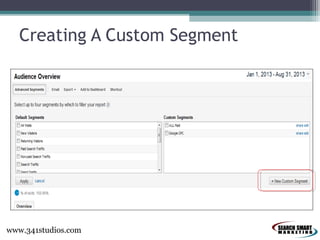
Creating A Custom Segment

www.341studios.com
Creating A Custom Segment

www.341studios.com
Creating A Custom Segment
•
•
•
•
•

Log into Analytics & click into your profile
Select Advanced Segments
Select New Custom Segment
Name your segment (Be specific)
Define what you are looking for using
dropdown menus with and/or statements
• Test to make sure all data is pulling
appropriately
• Save segment
New Report: Acquisition Overview
New Report: Acquisition Channels
Thank You!
Kate Hamilton-Miller
khamilton@isearchsmart.com
@KateHMiller
Questions or Suggest A Topic: Use #SSMGA
Search Smart Marketing
www.isearchsmart.com
@iSearchSmart

Facebook.com/SearchSmartMarketing
Google Analytics Setup
• Free account
▫ www.google.com/analytics

• Link to AdWords
▫ Adwords.Google.com

USE THE
SAME
LOGIN
ACROSS
ALL
GOOGLE
PRODUCTS

• Webmaster Tools Integration
▫ www.google.com/webmasters/tools

• Define Goals and Conversion Funnels
Analytics Tracking – Tag Everything!
• What
▫
▫
▫
▫

Pay-Per-Click (CPC)
Email
Social Buttons, Posts
Display

• How

▫ AdWords Auto-Tagging
▫ Tracking URL Generator

 SEARCH: Google Analytics Tracking URL Builder
 http://support.google.com/analytics/answer/1033867?hl=e
n
AdWords Auto-Tagging
•
•
•
•

Login to AdWords
My Account > Preferences
Edit, Check Destination URL Auto-Tagging
Save Changes
AdWords Auto-Tagging

Google Analytics: Actionable Business Insights & Custom Reporting

  • 1.
    Google Analytics: What’sNew? Find Actionable Business Insights Using Newly Available Reports Working Around Keyword ‘Not Provided’ Conversion Tracking & Funnel Data Leveraging Advanced Segments By Kate Hamilton-Miller
  • 2.
    Search Smart Marketing •Mission ▫ Deliver superior client service and results by effectively integrating strategy, project management, client service and technology. • Search Engine Optimization (SEO) • Paid Search Advertising • Local Search Optimization • Social Media Marketing • Review Monitoring & Management • Mobile Advertising & SEO • Video Optimization • Display/Banner Planning & Placement
  • 3.
    Kate Hamilton-Miller • GraphicDesign, PR Writing Background • Started Digital Marketing, 2004 • Joined Search Smart in 2008 • Certifications ▫ Google ▫ Bing ▫ Social Media • Memberships ▫ SEMPO ▫ National Association of Professional Women (NAPW) ▫ Women Centric
  • 5.
    Analytics Lingo • TrackingCode ▫ JavaScript placed on each page of your site • Tracking URL ▫ Web Address of the page on your site you want to direct visitors to + relevant marketing info • Campaign ▫ Marketing initiative; Email Blast; Paid Search Ads • Traffic Source ▫ A website or external link sending visitors to your site
  • 6.
    Analytics Lingo • Channel ▫A group of traffic sources Google feels share similar attributes         Direct to Site Organic Search Referral Email Paid Search Other Advertising Social Display • Conversion ▫ Specific action on your website that you would like a visitor to take. This action has transactional or informational value.  Filling out a Contact Us form  Signing up for a Newsletter  Completing a purchase
  • 7.
    What Can AnalyticsTrack? • Visitors to your site ▫ ▫ ▫ ▫ Where did they come from? What do they do once they reach your site? Are they converting? Has the visitor been to your site more than once? • Marketing Initiatives ▫ ▫ ▫ ▫ Pay-per-click (Google, Bing, LinkedIn) Display Email Social Media (Facebook, Twitter)
  • 9.
    New Analytics Dashboards& Names Formerly Traffic Sources Formerly Content
  • 10.
    Google Hummingbird AlgorithmUpdate Image: Relevance.com
  • 11.
    Google Moves toSecure Search
  • 12.
    ‘Not Provided’ OrganicSearch Data • October 2011: ‘Not Provided’ begins to appear ▫ Withholds data associated with secure search • March 2012: Searchers on Google properties (not Google.com) are routed through secure search • July 2012: Firefox 14 launches with Google secure search for all searches • September 2012: Safari in iOS6 begins using Google secure search. • January 2013: Chrome moves to secure search • September 2013: All Google searchers routed through secure search
  • 13.
  • 14.
    ‘Not Provided’ OrganicSearch Data • % of traffic reported as ‘not provided’ varies by industry and target audience • An August report found on average 49% of traffic was reported as ‘not provided’ • Since Google’s move to secure search in September, ‘not provided’ covers 75%+ of traffic
  • 15.
    Organic Search KeywordInsight • Webmaster Tools
  • 16.
    ‘Not Set’ PaidSearch Keyword Data Acquisition > Keywords > Paid
  • 17.
    ‘Not Set’ PaidSearch Keyword Data • Click into (Not Set) and select Source from the Secondary Dimension dropdown Acquisition > Keywords > Paid
  • 18.
    ‘Not Set’ PaidSearch Keyword Data • Update tracking URLs so that Medium=cpc • Must be lower case • http://www.yoursite.com? ▫ utm_source=Find+Gift ▫ utm_medium=cpc ▫ utm_term=gift+club ▫ utm_campaign=Christmas
  • 19.
    Conversion Tracking • OnlinePurchase ▫ ecommerce transaction • Micro-Conversion ▫ Visits to Contact Us • Downloads ▫ White Paper ▫ Brochure • Site Engagement ▫ Pages per visits ▫ Time on site • Contact Actions ▫ Form Submission ▫ Newsletter Sign-up • Social Engagement ▫ Blog comment
  • 20.
    Creating A ConversionFunnel • • • • Log into Analytics & click admin button Select your profile (www.website.com) Goals tab Click Create A Goal button ▫ Or select a goal you wish to edit • • • • Enter Goal Description Add URL of conversion page under Goal Details Turn Funnel button on Enter each step of the conversion process you wish to track • Note whether a step is required
  • 21.
    Creating A ConversionFunnel Click Admin Button Select Website Profile
  • 22.
    Creating A ConversionFunnel Select One to Begin Funnel
  • 23.
  • 24.
  • 25.
  • 26.
  • 27.
  • 28.
    Creating A CustomSegment www.341studios.com
  • 29.
    Creating A CustomSegment www.341studios.com
  • 30.
    Creating A CustomSegment • • • • • Log into Analytics & click into your profile Select Advanced Segments Select New Custom Segment Name your segment (Be specific) Define what you are looking for using dropdown menus with and/or statements • Test to make sure all data is pulling appropriately • Save segment
  • 31.
  • 32.
  • 33.
    Thank You! Kate Hamilton-Miller khamilton@isearchsmart.com @KateHMiller Questionsor Suggest A Topic: Use #SSMGA Search Smart Marketing www.isearchsmart.com @iSearchSmart Facebook.com/SearchSmartMarketing
  • 35.
    Google Analytics Setup •Free account ▫ www.google.com/analytics • Link to AdWords ▫ Adwords.Google.com USE THE SAME LOGIN ACROSS ALL GOOGLE PRODUCTS • Webmaster Tools Integration ▫ www.google.com/webmasters/tools • Define Goals and Conversion Funnels
  • 36.
    Analytics Tracking –Tag Everything! • What ▫ ▫ ▫ ▫ Pay-Per-Click (CPC) Email Social Buttons, Posts Display • How ▫ AdWords Auto-Tagging ▫ Tracking URL Generator  SEARCH: Google Analytics Tracking URL Builder  http://support.google.com/analytics/answer/1033867?hl=e n
  • 37.
    AdWords Auto-Tagging • • • • Login toAdWords My Account > Preferences Edit, Check Destination URL Auto-Tagging Save Changes
  • 38.