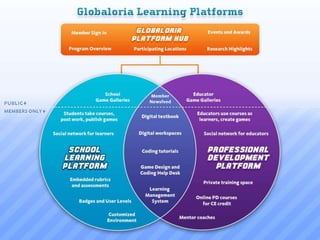
Platform & Curriculum
Virtual Tour
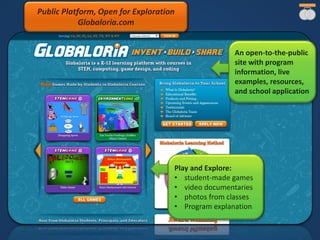
An open-to-the-public
site with program
information, live
examples, resources,
and school application
Play and Explore:
• student-made games
• video documentaries
• photos from classes
• Program explanation
Public Platform, Open for Exploration
Globaloria.com
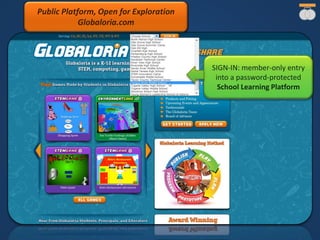
SIGN-IN: member-only entry
into a password-protected
School Learning Platform
Public Platform, Open for Exploration
Globaloria.com
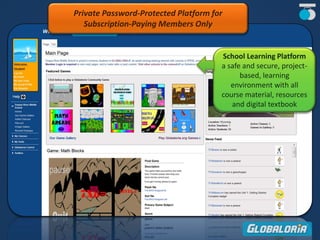
School Learning Platform
a safe and secure, project-
based, learning
environment with all
course material, resources
and digital textbook
Private Password-Protected Platform for
Subscription-Paying Members Only
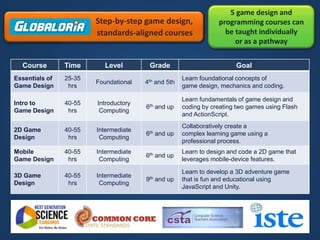
Course Time Level Grade Goal
Essentials of
Game Design
25-35
hrs
Foundational 4th and 5th
Learn foundational concepts of
game design, mechanics and coding.
Intro to
Game Design
40-55
hrs
Introductory
Computing
6th and up
Learn fundamentals of game design and
coding by creating two games using Flash
and ActionScript.
2D Game
Design
40-55
hrs
Intermediate
Computing
6th and up
Collaboratively create a
complex learning game using a
professional process.
Mobile
Game Design
40-55
hrs
Intermediate
Computing
6th and up
Learn to design and code a 2D game that
leverages mobile-device features.
3D Game
Design
40-55
hrs
Intermediate
Computing
9th and up
Learn to develop a 3D adventure game
that is fun and educational using
JavaScript and Unity.
5 game design and
programming courses can
be taught individually
or as a pathway
Step-by-step game design,
standards-aligned courses
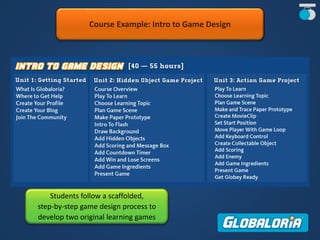
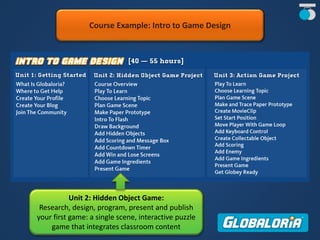
Course Example: Intro to Game Design
Students follow a scaffolded,
step-by-step game design process to
develop two original learning games
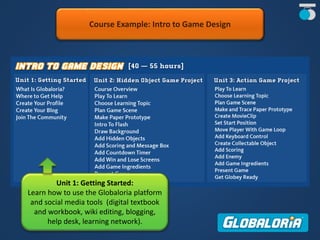
Course Example: Intro to Game Design
Unit 1: Getting Started:
Learn how to use the Globaloria platform
and social media tools (digital textbook
and workbook, wiki editing, blogging,
help desk, learning network).
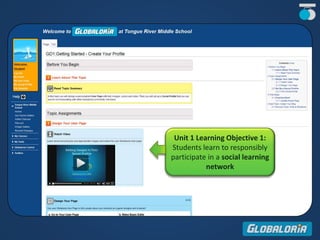
Unit 1 Learning Objective 1:
Students learn to responsibly
participate in a social learning
network
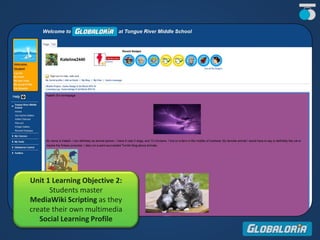
Unit 1 Learning Objective 2:
Students master
MediaWiki Scripting as they
create their own multimedia
Social Learning Profile
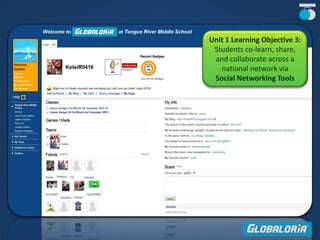
Unit 1 Learning Objective 3:
Students co-learn, share,
and collaborate across a
national network via
Social Networking Tools
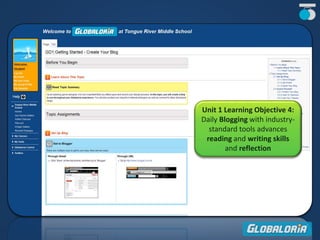
Unit 1 Learning Objective 4:
Daily Blogging with industry-
standard tools advances
reading and writing skills
and reflection
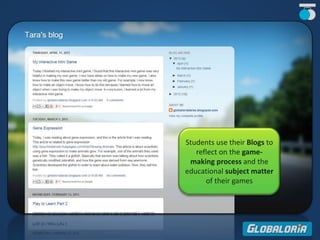
Students use their Blogs to
reflect on the game-
making process and the
educational subject matter
of their games
Course Example: Intro to Game Design
Unit 2: Hidden Object Game:
Research, design, program, present and publish
your first game: a single scene, interactive puzzle
game that integrates classroom content
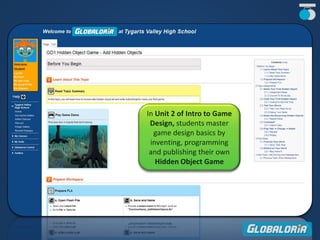
In Unit 2 of Intro to Game
Design, students master
game design basics by
inventing, programming
and publishing their own
Hidden Object Game
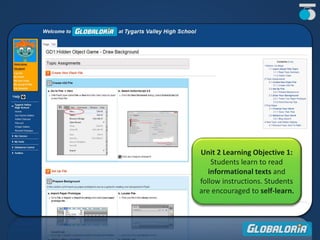
Unit 2 Learning Objective 1:
Students learn to read
informational texts and
follow instructions. Students
are encouraged to self-learn.
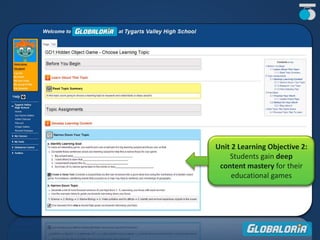
Unit 2 Learning Objective 2:
Students gain deep
content mastery for their
educational games
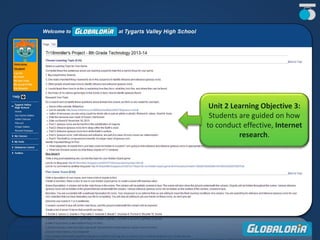
Unit 2 Learning Objective 3:
Students are guided on how
to conduct effective, Internet
research.
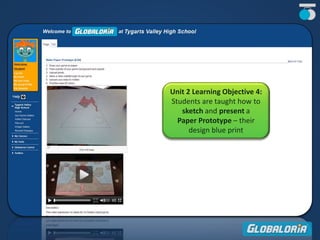
Unit 2 Learning Objective 4:
Students are taught how to
sketch and present a
Paper Prototype – their
design blue print
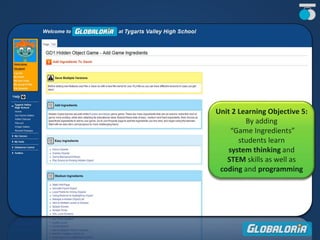
Unit 2 Learning Objective 5:
By adding
“Game Ingredients”
students learn
system thinking and
STEM skills as well as
coding and programming
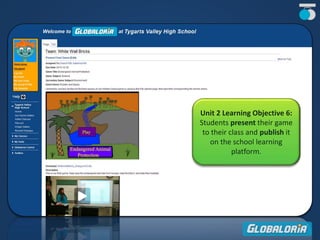
Unit 2 Learning Objective 6:
Students present their game
to their class and publish it
on the school learning
platform.
START
Course Example: Intro to Game Design
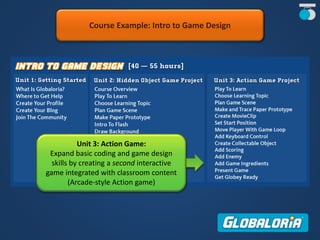
Unit 3: Action Game:
Expand basic coding and game design
skills by creating a second interactive
game integrated with classroom content
(Arcade-style Action game)
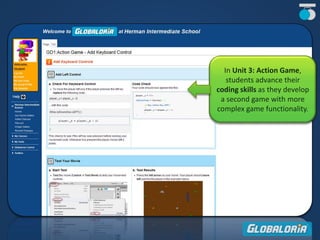
In Unit 3: Action Game,
students advance their
coding skills as they develop
a second game with more
complex game functionality.
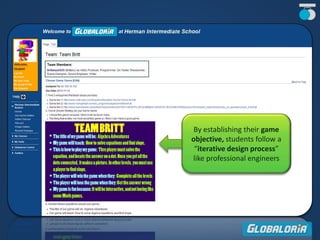
By establishing their game
objective, students follow a
“iterative design process”
like professional engineers
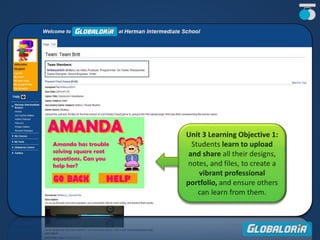
Unit 3 Learning Objective 1:
Students learn to upload
and share all their designs,
notes, and files, to create a
vibrant professional
portfolio, and ensure others
can learn from them.
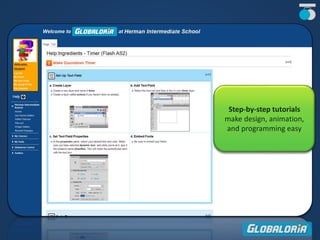
Step-by-step tutorials
make design, animation,
and programming easy
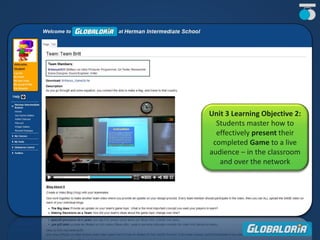
Unit 3 Learning Objective 2:
Students master how to
effectively present their
completed Game to a live
audience – in the classroom
and over the network
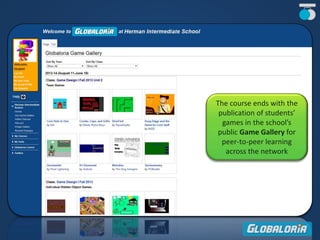
The course ends with the
publication of students’
games in the school’s
public Game Gallery for
peer-to-peer learning
across the network
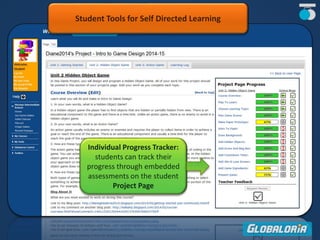
Individual Progress Tracker:
students can track their
progress through embedded
assessments on the student
Project Page
Student Tools for Self Directed Learning
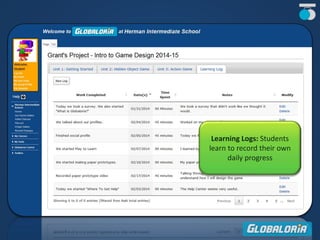
Learning Logs: Students
learn to record their own
daily progress
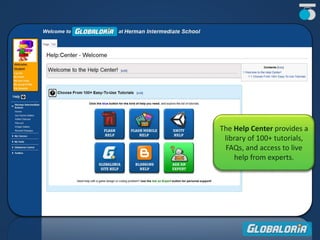
The Help Center provides a
library of 100+ tutorials,
FAQs, and access to live
help from experts.
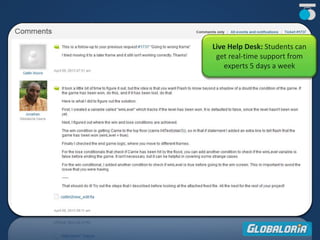
Live Help Desk: Students can
get real-time support from
experts 5 days a week
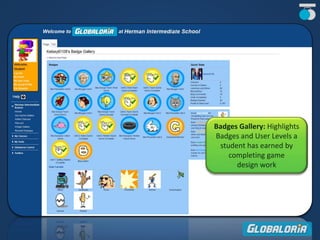
Badges Gallery: Highlights
Badges and User Levels a
student has earned by
completing game
design work
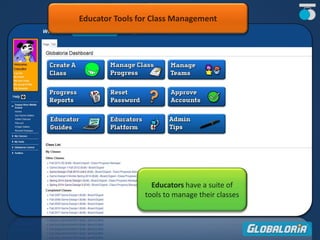
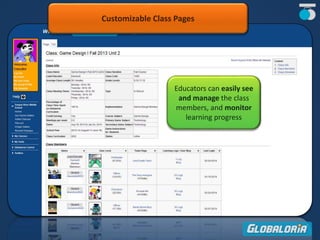
Educators have a suite of
tools to manage their classes
Educator Tools for Class Management
Educators can easily see
and manage the class
members, and monitor
learning progress
Customizable Class Pages
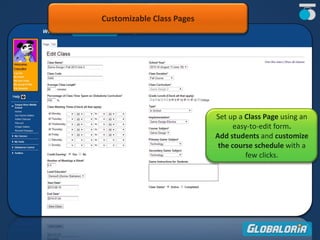
Set up a Class Page using an
easy-to-edit form.
Add students and customize
the course schedule with a
few clicks.
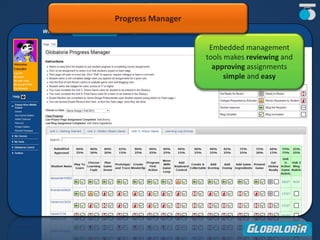
Embedded management
tools makes reviewing and
approving assignments
simple and easy
Progress Manager
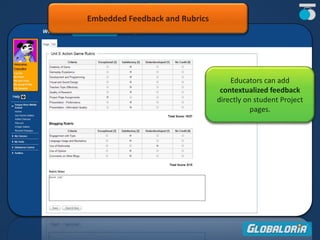
Embedded Feedback and Rubrics
Educators can add
contextualized feedback
directly on student Project
pages.
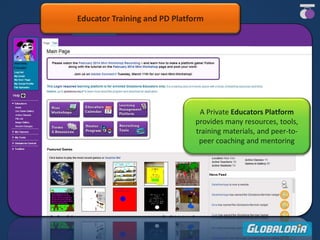
A Private Educators Platform
provides many resources, tools,
training materials, and peer-to-
peer coaching and mentoring
Educator Training and PD Platform
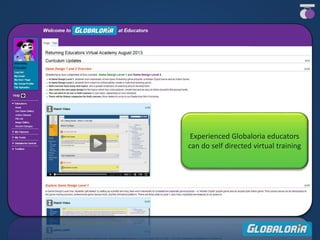
Experienced Globaloria educators
can do self directed virtual training
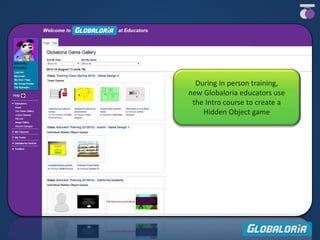
During in person training,
new Globaloria educators use
the Intro course to create a
Hidden Object game
Thank you
for taking our Platform & Curriculum Virtual Tour
To dig deeper, please contact info@globaloria.com or
Take a Test Drive (30-day trial)
Apply Today

Globaloria Platform & Curriculum Virtual Tour

  • 1.
  • 3.
    An open-to-the-public site withprogram information, live examples, resources, and school application Play and Explore: • student-made games • video documentaries • photos from classes • Program explanation Public Platform, Open for Exploration Globaloria.com
  • 4.
    SIGN-IN: member-only entry intoa password-protected School Learning Platform Public Platform, Open for Exploration Globaloria.com
  • 5.
    School Learning Platform asafe and secure, project- based, learning environment with all course material, resources and digital textbook Private Password-Protected Platform for Subscription-Paying Members Only
  • 6.
    Course Time LevelGrade Goal Essentials of Game Design 25-35 hrs Foundational 4th and 5th Learn foundational concepts of game design, mechanics and coding. Intro to Game Design 40-55 hrs Introductory Computing 6th and up Learn fundamentals of game design and coding by creating two games using Flash and ActionScript. 2D Game Design 40-55 hrs Intermediate Computing 6th and up Collaboratively create a complex learning game using a professional process. Mobile Game Design 40-55 hrs Intermediate Computing 6th and up Learn to design and code a 2D game that leverages mobile-device features. 3D Game Design 40-55 hrs Intermediate Computing 9th and up Learn to develop a 3D adventure game that is fun and educational using JavaScript and Unity. 5 game design and programming courses can be taught individually or as a pathway Step-by-step game design, standards-aligned courses
  • 7.
    Course Example: Introto Game Design Students follow a scaffolded, step-by-step game design process to develop two original learning games
  • 8.
    Course Example: Introto Game Design Unit 1: Getting Started: Learn how to use the Globaloria platform and social media tools (digital textbook and workbook, wiki editing, blogging, help desk, learning network).
  • 9.
    Unit 1 LearningObjective 1: Students learn to responsibly participate in a social learning network
  • 10.
    Unit 1 LearningObjective 2: Students master MediaWiki Scripting as they create their own multimedia Social Learning Profile
  • 11.
    Unit 1 LearningObjective 3: Students co-learn, share, and collaborate across a national network via Social Networking Tools
  • 12.
    Unit 1 LearningObjective 4: Daily Blogging with industry- standard tools advances reading and writing skills and reflection
  • 13.
    Students use theirBlogs to reflect on the game- making process and the educational subject matter of their games
  • 14.
    Course Example: Introto Game Design Unit 2: Hidden Object Game: Research, design, program, present and publish your first game: a single scene, interactive puzzle game that integrates classroom content
  • 15.
    In Unit 2of Intro to Game Design, students master game design basics by inventing, programming and publishing their own Hidden Object Game
  • 16.
    Unit 2 LearningObjective 1: Students learn to read informational texts and follow instructions. Students are encouraged to self-learn.
  • 17.
    Unit 2 LearningObjective 2: Students gain deep content mastery for their educational games
  • 18.
    Unit 2 LearningObjective 3: Students are guided on how to conduct effective, Internet research.
  • 19.
    Unit 2 LearningObjective 4: Students are taught how to sketch and present a Paper Prototype – their design blue print
  • 20.
    Unit 2 LearningObjective 5: By adding “Game Ingredients” students learn system thinking and STEM skills as well as coding and programming
  • 21.
    Unit 2 LearningObjective 6: Students present their game to their class and publish it on the school learning platform. START
  • 22.
    Course Example: Introto Game Design Unit 3: Action Game: Expand basic coding and game design skills by creating a second interactive game integrated with classroom content (Arcade-style Action game)
  • 23.
    In Unit 3:Action Game, students advance their coding skills as they develop a second game with more complex game functionality.
  • 24.
    By establishing theirgame objective, students follow a “iterative design process” like professional engineers
  • 25.
    Unit 3 LearningObjective 1: Students learn to upload and share all their designs, notes, and files, to create a vibrant professional portfolio, and ensure others can learn from them.
  • 26.
    Step-by-step tutorials make design,animation, and programming easy
  • 27.
    Unit 3 LearningObjective 2: Students master how to effectively present their completed Game to a live audience – in the classroom and over the network
  • 28.
    The course endswith the publication of students’ games in the school’s public Game Gallery for peer-to-peer learning across the network
  • 29.
    Individual Progress Tracker: studentscan track their progress through embedded assessments on the student Project Page Student Tools for Self Directed Learning
  • 30.
    Learning Logs: Students learnto record their own daily progress
  • 31.
    The Help Centerprovides a library of 100+ tutorials, FAQs, and access to live help from experts.
  • 32.
    Live Help Desk:Students can get real-time support from experts 5 days a week
  • 33.
    Badges Gallery: Highlights Badgesand User Levels a student has earned by completing game design work
  • 34.
    Educators have asuite of tools to manage their classes Educator Tools for Class Management
  • 35.
    Educators can easilysee and manage the class members, and monitor learning progress Customizable Class Pages
  • 36.
    Customizable Class Pages Setup a Class Page using an easy-to-edit form. Add students and customize the course schedule with a few clicks.
  • 37.
    Embedded management tools makesreviewing and approving assignments simple and easy Progress Manager
  • 38.
    Embedded Feedback andRubrics Educators can add contextualized feedback directly on student Project pages.
  • 39.
    A Private EducatorsPlatform provides many resources, tools, training materials, and peer-to- peer coaching and mentoring Educator Training and PD Platform
  • 40.
    Experienced Globaloria educators cando self directed virtual training
  • 41.
    During in persontraining, new Globaloria educators use the Intro course to create a Hidden Object game
  • 42.
    Thank you for takingour Platform & Curriculum Virtual Tour To dig deeper, please contact info@globaloria.com or Take a Test Drive (30-day trial) Apply Today