Git Rebase vs Merge
a deep dive into the mysteries of revision control
Merge
Merge
a new commit on top of both branches that
should be merged - known as merge commit
Merge
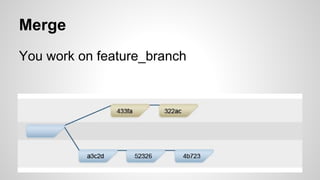
You work on feature_branch
Merge
Before pushing you update your branch with master’s
changes - git pull origin master
Merge
git pull = git fetch + git merge
git fetch - copies origin master into origin/master
git merge - merges origin/master into master
Merge history graph
Merge - Pros & Cons
Pros:
● Simple to use and understand.
● Keeps information about the historical existence of branches.
● Existing commits on the source branch are unchanged and remain valid.
Cons:
● History can become intensively polluted by lots of merge commits.
● Visual charts of your repository can have non-informative branch lines.
Rebase
a different approach
Rebase
a way to cut of a set of commits from a branch
and apply those commits on another branch
Rebase
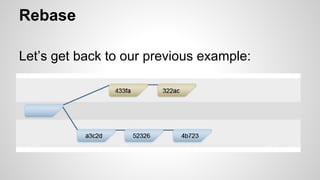
Let’s get back to our previous example:
Rebase
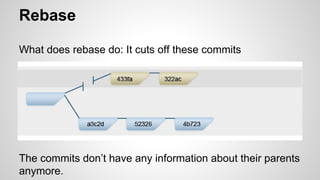
What does rebase do: It cuts off these commits
The commits don’t have any information about their parents
anymore.
Rebase
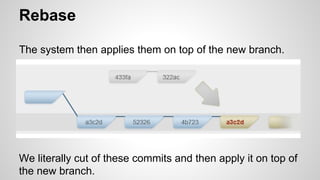
The system then applies them on top of the new branch.
We literally cut of these commits and then apply it on top of
the new branch.
Rebase
Why does merge even exists if we found such a nice way
to handle our history?
Our commit IDs changed!
Why?
Rebase
...because we have a new parent.
Git thinks of our commits as patches and applies them on
top of the new branch.
Therefore Git processes our commits as new commits.
And again, NEW COMMITS!
Rebase
git rebase [branch]
Rebase - Golden Rule
● Never rebase commits that you have pushed
to a public repository. Only rebase local
branches.
Why?
Rebase - Golden Rule
● When you rebase pushed branch, you’re
abandoning existing commits and creating
new ones that are similar but different.
So you will rewrite the history...
Rebase history graph
Rebase - Pros & Cons
Pros:
● Clean and flat history.
● Concise commits covering a logical change (can squash series of commits
into one)
● Reduction of merge commits
● Manipulating single commit is easy (e.g. reverting a commit)
Cons:
● More complex
● Rebasing can be dangerous! Can cause history rewrite if done incorrectly
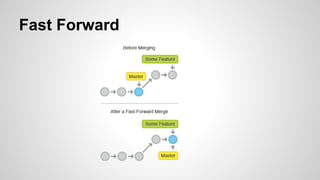
The key of having a clean history
… is to have a “fast forward” effect
Fast Forward
Rebase - Best Practice
$ git checkout -b security_hole_fix
...fix...fix...fix
$ git commit
$ git rebase master
$ git checkout master
$ git merge security_hole_fix
then you get fast-forward effect
Who uses what?
Merge
➔ Atlassian (with GitHub pull requests for code reviews)
➔ Git
Rebase
➔ Guava
Rebase
If you are not sure you fully understand rebase
-
Don’t do it…
BUT
If you like it, try out !!!

Git Rebase vs Merge

  • 1.
    Git Rebase vsMerge a deep dive into the mysteries of revision control
  • 2.
  • 3.
    Merge a new commiton top of both branches that should be merged - known as merge commit
  • 4.
    Merge You work onfeature_branch
  • 5.
    Merge Before pushing youupdate your branch with master’s changes - git pull origin master
  • 6.
    Merge git pull =git fetch + git merge git fetch - copies origin master into origin/master git merge - merges origin/master into master
  • 7.
  • 8.
    Merge - Pros& Cons Pros: ● Simple to use and understand. ● Keeps information about the historical existence of branches. ● Existing commits on the source branch are unchanged and remain valid. Cons: ● History can become intensively polluted by lots of merge commits. ● Visual charts of your repository can have non-informative branch lines.
  • 9.
  • 10.
    Rebase a way tocut of a set of commits from a branch and apply those commits on another branch
  • 11.
    Rebase Let’s get backto our previous example:
  • 12.
    Rebase What does rebasedo: It cuts off these commits The commits don’t have any information about their parents anymore.
  • 13.
    Rebase The system thenapplies them on top of the new branch. We literally cut of these commits and then apply it on top of the new branch.
  • 14.
    Rebase Why does mergeeven exists if we found such a nice way to handle our history? Our commit IDs changed! Why?
  • 15.
    Rebase ...because we havea new parent. Git thinks of our commits as patches and applies them on top of the new branch. Therefore Git processes our commits as new commits. And again, NEW COMMITS!
  • 16.
  • 17.
    Rebase - GoldenRule ● Never rebase commits that you have pushed to a public repository. Only rebase local branches. Why?
  • 18.
    Rebase - GoldenRule ● When you rebase pushed branch, you’re abandoning existing commits and creating new ones that are similar but different. So you will rewrite the history...
  • 19.
  • 20.
    Rebase - Pros& Cons Pros: ● Clean and flat history. ● Concise commits covering a logical change (can squash series of commits into one) ● Reduction of merge commits ● Manipulating single commit is easy (e.g. reverting a commit) Cons: ● More complex ● Rebasing can be dangerous! Can cause history rewrite if done incorrectly
  • 21.
    The key ofhaving a clean history … is to have a “fast forward” effect
  • 22.
  • 23.
    Rebase - BestPractice $ git checkout -b security_hole_fix ...fix...fix...fix $ git commit $ git rebase master $ git checkout master $ git merge security_hole_fix then you get fast-forward effect
  • 24.
    Who uses what? Merge ➔Atlassian (with GitHub pull requests for code reviews) ➔ Git Rebase ➔ Guava
  • 25.
    Rebase If you arenot sure you fully understand rebase - Don’t do it… BUT
  • 26.
    If you likeit, try out !!!