Git Best Branching strategy & Best
Practices
Git Merge & Git-Rebase
Git Merge
Git Merge
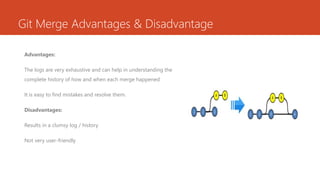
Git merge is one of the merging techniques in git, in which
the logs of commits on branches are intact. Let us take an
example if we have a project with 3 commits on the master
branch as commit 1,2,3 and feature branch commit as
commit A and B. If we perform a git merge operation, then
commits A and B will be merged as commit 4 onto the
master branch.
Git Merge Advantages & Disadvantage
Advantages:
The logs are very exhaustive and can help in understanding the
complete history of how and when each merge happened
It is easy to find mistakes and resolve them.
Disadvantages:
Results in a clumsy log / history
Not very user-friendly
Git Rebase
Git-Rebase
Git Rebase is like git merge, but the logs are modified after
merge in this technique. Git rebase was introduced to overcome
the limitation of merging, i.e., to make logs of repository history
look linear.
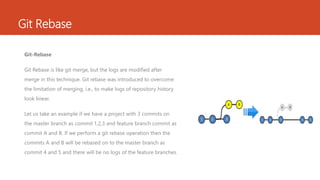
Let us take an example if we have a project with 3 commits on
the master branch as commit 1,2,3 and feature branch commit as
commit A and B. If we perform a git rebase operation then the
commits A and B will be rebased on to the master branch as
commit 4 and 5 and there will be no logs of the feature branches.
Git Rebase Advantages & Disadvantage
Advantages:
The logs are linear.
It’s easy to move through the project.
Disadvantages:
We cannot track, when and how the commits were merged on the
target branch.
Git Merge Vs Git Rebase
When do we use Git Merge vs Git Rebase?
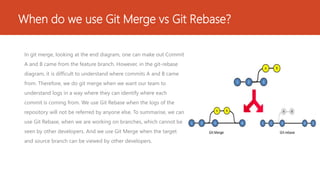
In git merge, looking at the end diagram, one can make out Commit
A and B came from the feature branch. However, in the git-rebase
diagram, it is difficult to understand where commits A and B came
from. Therefore, we do git merge when we want our team to
understand logs in a way where they can identify where each
commit is coming from. We use Git Rebase when the logs of the
repository will not be referred by anyone else. To summarise, we can
use Git Rebase, when we are working on branches, which cannot be
seen by other developers. And we use Git Merge when the target
and source branch can be viewed by other developers.
How can Git Rebase and Git Merge be used together?
Let us take an example if we have a project which consists of a master
branch with 3 commits as 1,2,3, and 2 feature branches with commits A, B
on feature branch 1 and commits C, D on feature branch 2
Let us assume that Developer A is working on feature branch 1. To
experiment with the code, he creates another branch Feature branch 2,
does some changes in it, and finalizes it with Commits C and D.
He does not want anyone to know about his private branch, because it’s
unnecessary. So, he can rebase Feature 2 on Feature 1.
How can Git Rebase and Git Merge be used together?
Now he can finally, merge feature 1 branch on master
resulting in the below diagram.
The Diagram is how the final log will look like to other
developers. They can only see commits being made on
feature branch 1, which was then finally merged on the
master branch, with commit 4.
Approach for normal feature realease
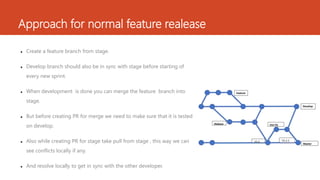
 Create a feature branch from stage.
 Develop branch should also be in sync with stage before starting of
every new sprint.
 When development is done you can merge the feature branch into
stage.
 But before creating PR for merge we need to make sure that it is tested
on develop.
 Also while creating PR for stage take pull from stage , this way we can
see conflicts locally if any.
 And resolve locally to get in sync with the other developer.
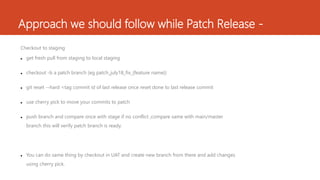
Approach we should follow while Patch Release -
Checkout to staging
 get fresh pull from staging to local staging
 checkout -b a patch branch (eg patch_july18_fix_{feature name})
 git reset --hard <tag commit id of last release once reset done to last release commit
 use cherry pick to move your commits to patch
 push branch and compare once with stage if no conflict ,compare same with main/master
branch this will verify patch branch is ready.
 You can do same thing by checkout in UAT and create new branch from there and add changes
using cherry pick.
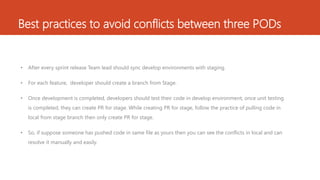
Best practices to avoid conflicts between three PODs
• After every sprint release Team lead should sync develop environments with staging.
• For each feature, developer should create a branch from Stage.
• Once development is completed, developers should test their code in develop environment, once unit testing
is completed, they can create PR for stage. While creating PR for stage, follow the practice of pulling code in
local from stage branch then only create PR for stage.
• So, if suppose someone has pushed code in same file as yours then you can see the conflicts in local and can
resolve it manually and easily.
Thank YOU
Find out more at the PowerPoint Getting Started Center

Git Best Practices.pptx

  • 1.
    Git Best Branchingstrategy & Best Practices Git Merge & Git-Rebase
  • 2.
    Git Merge Git Merge Gitmerge is one of the merging techniques in git, in which the logs of commits on branches are intact. Let us take an example if we have a project with 3 commits on the master branch as commit 1,2,3 and feature branch commit as commit A and B. If we perform a git merge operation, then commits A and B will be merged as commit 4 onto the master branch.
  • 3.
    Git Merge Advantages& Disadvantage Advantages: The logs are very exhaustive and can help in understanding the complete history of how and when each merge happened It is easy to find mistakes and resolve them. Disadvantages: Results in a clumsy log / history Not very user-friendly
  • 4.
    Git Rebase Git-Rebase Git Rebaseis like git merge, but the logs are modified after merge in this technique. Git rebase was introduced to overcome the limitation of merging, i.e., to make logs of repository history look linear. Let us take an example if we have a project with 3 commits on the master branch as commit 1,2,3 and feature branch commit as commit A and B. If we perform a git rebase operation then the commits A and B will be rebased on to the master branch as commit 4 and 5 and there will be no logs of the feature branches.
  • 5.
    Git Rebase Advantages& Disadvantage Advantages: The logs are linear. It’s easy to move through the project. Disadvantages: We cannot track, when and how the commits were merged on the target branch.
  • 6.
    Git Merge VsGit Rebase
  • 7.
    When do weuse Git Merge vs Git Rebase? In git merge, looking at the end diagram, one can make out Commit A and B came from the feature branch. However, in the git-rebase diagram, it is difficult to understand where commits A and B came from. Therefore, we do git merge when we want our team to understand logs in a way where they can identify where each commit is coming from. We use Git Rebase when the logs of the repository will not be referred by anyone else. To summarise, we can use Git Rebase, when we are working on branches, which cannot be seen by other developers. And we use Git Merge when the target and source branch can be viewed by other developers.
  • 8.
    How can GitRebase and Git Merge be used together? Let us take an example if we have a project which consists of a master branch with 3 commits as 1,2,3, and 2 feature branches with commits A, B on feature branch 1 and commits C, D on feature branch 2 Let us assume that Developer A is working on feature branch 1. To experiment with the code, he creates another branch Feature branch 2, does some changes in it, and finalizes it with Commits C and D. He does not want anyone to know about his private branch, because it’s unnecessary. So, he can rebase Feature 2 on Feature 1.
  • 9.
    How can GitRebase and Git Merge be used together? Now he can finally, merge feature 1 branch on master resulting in the below diagram. The Diagram is how the final log will look like to other developers. They can only see commits being made on feature branch 1, which was then finally merged on the master branch, with commit 4.
  • 10.
    Approach for normalfeature realease  Create a feature branch from stage.  Develop branch should also be in sync with stage before starting of every new sprint.  When development is done you can merge the feature branch into stage.  But before creating PR for merge we need to make sure that it is tested on develop.  Also while creating PR for stage take pull from stage , this way we can see conflicts locally if any.  And resolve locally to get in sync with the other developer.
  • 11.
    Approach we shouldfollow while Patch Release - Checkout to staging  get fresh pull from staging to local staging  checkout -b a patch branch (eg patch_july18_fix_{feature name})  git reset --hard <tag commit id of last release once reset done to last release commit  use cherry pick to move your commits to patch  push branch and compare once with stage if no conflict ,compare same with main/master branch this will verify patch branch is ready.  You can do same thing by checkout in UAT and create new branch from there and add changes using cherry pick.
  • 12.
    Best practices toavoid conflicts between three PODs • After every sprint release Team lead should sync develop environments with staging. • For each feature, developer should create a branch from Stage. • Once development is completed, developers should test their code in develop environment, once unit testing is completed, they can create PR for stage. While creating PR for stage, follow the practice of pulling code in local from stage branch then only create PR for stage. • So, if suppose someone has pushed code in same file as yours then you can see the conflicts in local and can resolve it manually and easily.
  • 13.
    Thank YOU Find outmore at the PowerPoint Getting Started Center

Editor's Notes

  • #14 In Slide Show mode, click the arrow to enter the PowerPoint Getting Started Center.