Ondrej Sika
ondrej@sika.io
@ondrejsika
Gitlab CI
Introduction
Agenda
- DevOps
- What is CI/CD
- Setup Gitlab CI
- Configure CI Pipeline
- Live Demo
DevOps
DevOps is a set of software
development practices that combine
software development (Dev) and
information-technology operations
(Ops) to shorten the
systems-development life cycle
while delivering features, fixes, and
updates frequently in close
alignment with business objectives.
DevOps Lifecycle
CI
Continuous Integration
Continuous Integration works to
integrate code from your team in a
shared repository. Developers share
their new code in a Merge (Pull)
Request, which triggers a pipeline to
build, test, and validate the new code
before merging the changes in your
repository.
CD
Continuous Deployment
Continuous Delivery delivers CI
validated code to your application.
Together, CI and CD accelerate how
quickly your team can deliver results
for your customers and
stakeholders. CI helps you catch and
reduce bugs early in the
development cycle, and CD moves
verified to your applications faster.
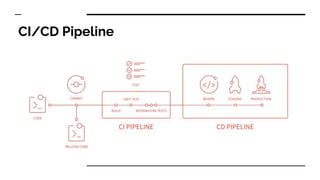
CI/CD Pipeline
Gitlab CI
Why Gitlab CI
- Integrated: GitLab CI/CD is part of GitLab
- Open source: CI/CD is a part of both the open source GitLab
- Seamless: Part of the single GitLab application
- Scalable: Tests run distributed on separate machines
- Faster results: Each build can be split in multiple jobs that run in parallel on
multiple machines
- Optimized for delivery: multiple stages, manual deploy gates, environments,
and variables
- Easy to learn
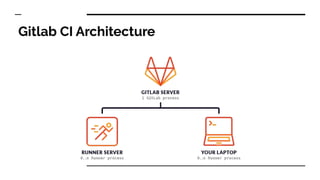
Gitlab CI Architecture
Gitlab Runner
- To perform the actual build, you need to install GitLab Runner which is
written in Go.
- It can run on any platform for which you can build Go binaries, including
Linux, OSX, Windows, FreeBSD and Docker.
- It can test any programming language including .Net, Java, Python, C, PHP
and others.
- GitLab Runner has many features, including autoscaling, great Docker
support, and the ability to run multiple jobs concurrently.
Setup Gitlab CI
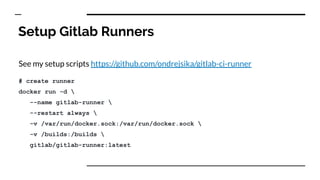
Setup Gitlab Runners
See my setup scripts https://github.com/ondrejsika/gitlab-ci-runner
# create runner
docker run -d 
--name gitlab-runner 
--restart always 
-v /var/run/docker.sock:/var/run/docker.sock 
-v /builds:/builds 
gitlab/gitlab-runner:latest
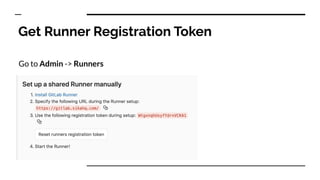
Get Runner Registration Token
Go to Admin -> Runners
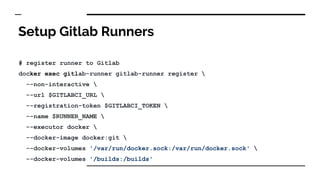
Setup Gitlab Runners
# register runner to Gitlab
docker exec gitlab-runner gitlab-runner register 
--non-interactive 
--url $GITLABCI_URL 
--registration-token $GITLABCI_TOKEN 
--name $RUNNER_NAME 
--executor docker 
--docker-image docker:git 
--docker-volumes '/var/run/docker.sock:/var/run/docker.sock' 
--docker-volumes '/builds:/builds'
We are ready to use CI
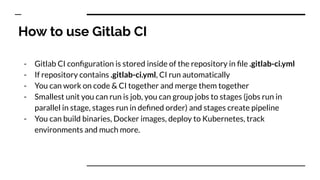
How to use Gitlab CI
- Gitlab CI configuration is stored inside of the repository in file .gitlab-ci.yml
- If repository contains .gitlab-ci.yml, CI run automatically
- You can work on code & CI together and merge them together
- Smallest unit you can run is job, you can group jobs to stages (jobs run in
parallel in stage, stages run in defined order) and stages create pipeline
- You can build binaries, Docker images, deploy to Kubernetes, track
environments and much more.
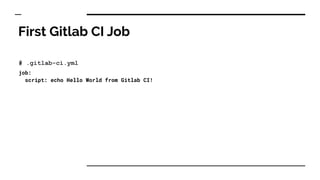
First Gitlab CI Job
# .gitlab-ci.yml
job:
script: echo Hello World from Gitlab CI!
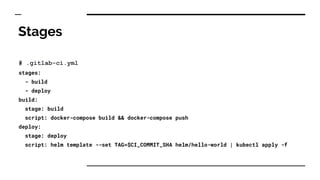
Stages
# .gitlab-ci.yml
stages:
- build
- deploy
build:
stage: build
script: docker-compose build && docker-compose push
deploy:
stage: deploy
script: helm template --set TAG=$CI_COMMIT_SHA helm/hello-world | kubectl apply -f
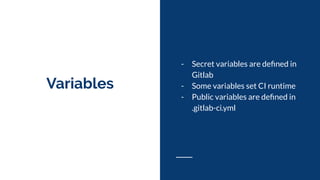
Variables
- Secret variables are defined in
Gitlab
- Some variables set CI runtime
- Public variables are defined in
.gitlab-ci.yml
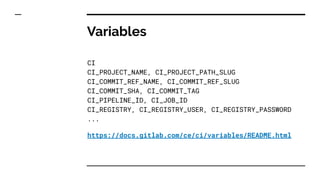
Variables
CI
CI_PROJECT_NAME, CI_PROJECT_PATH_SLUG
CI_COMMIT_REF_NAME, CI_COMMIT_REF_SLUG
CI_COMMIT_SHA, CI_COMMIT_TAG
CI_PIPELINE_ID, CI_JOB_ID
CI_REGISTRY, CI_REGISTRY_USER, CI_REGISTRY_PASSWORD
...
https://docs.gitlab.com/ce/ci/variables/README.html
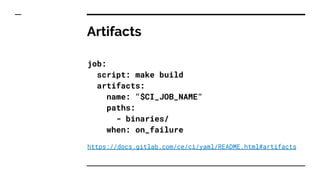
Artifacts
Artifacts is a list of files and
directories which are attached to a job
after it completes successfully.
Artifacts
job:
script: make build
artifacts:
name: "$CI_JOB_NAME"
paths:
- binaries/
when: on_failure
https://docs.gitlab.com/ce/ci/yaml/README.html#artifacts
Docker
- Fully supported
- Easiest way how to create build
environment
- Easiest way how to run and
distribute your software
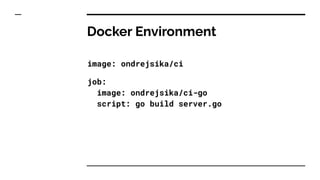
Docker Environment
image: ondrejsika/ci
job:
image: ondrejsika/ci-go
script: go build server.go
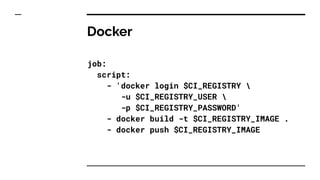
Docker
job:
script:
- 'docker login $CI_REGISTRY 
-u $CI_REGISTRY_USER 
-p $CI_REGISTRY_PASSWORD'
- docker build -t $CI_REGISTRY_IMAGE .
- docker push $CI_REGISTRY_IMAGE
Environments
Environment is used to define that a
job deploys to a specific environment.
If environment is specified and no
environment under that name exists, a
new one will be created automatically.
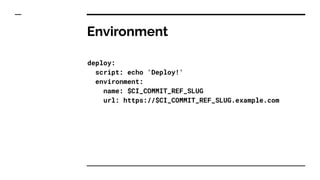
Environment
deploy:
script: echo 'Deploy!'
environment:
name: $CI_COMMIT_REF_SLUG
url: https://$CI_COMMIT_REF_SLUG.example.com
Deployments - Automatic
- Manual
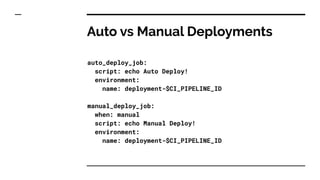
Auto vs Manual Deployments
auto_deploy_job:
script: echo Auto Deploy!
environment:
name: deployment-$CI_PIPELINE_ID
manual_deploy_job:
when: manual
script: echo Manual Deploy!
environment:
name: deployment-$CI_PIPELINE_ID
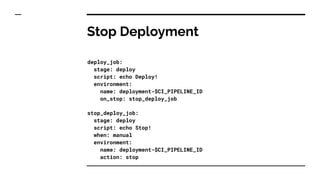
Stop Deployment
deploy_job:
stage: deploy
script: echo Deploy!
environment:
name: deployment-$CI_PIPELINE_ID
on_stop: stop_deploy_job
stop_deploy_job:
stage: deploy
script: echo Stop!
when: manual
environment:
name: deployment-$CI_PIPELINE_ID
action: stop
Demo Time!
https://github.com/ondrejsika/go-server-example
Resources
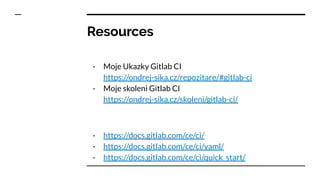
- Moje Ukazky Gitlab CI
https://ondrej-sika.cz/repozitare/#gitlab-ci
- Moje skoleni Gitlab CI
https://ondrej-sika.cz/skoleni/gitlab-ci/
- https://docs.gitlab.com/ce/ci/
- https://docs.gitlab.com/ce/ci/yaml/
- https://docs.gitlab.com/ce/ci/quick_start/
Thank you & Questions
Ondrej Sika
email: ondrej@sika.io
web: https://ondrej-sika.cz
twitter: @ondrejsika
linkedin: /in/ondrejsika/
Slides: https://sika.link/cncf-sk-ci

Gitlab ci, cncf.sk

  • 1.
  • 2.
    Agenda - DevOps - Whatis CI/CD - Setup Gitlab CI - Configure CI Pipeline - Live Demo
  • 3.
    DevOps DevOps is aset of software development practices that combine software development (Dev) and information-technology operations (Ops) to shorten the systems-development life cycle while delivering features, fixes, and updates frequently in close alignment with business objectives.
  • 4.
  • 5.
    CI Continuous Integration Continuous Integrationworks to integrate code from your team in a shared repository. Developers share their new code in a Merge (Pull) Request, which triggers a pipeline to build, test, and validate the new code before merging the changes in your repository.
  • 6.
    CD Continuous Deployment Continuous Deliverydelivers CI validated code to your application. Together, CI and CD accelerate how quickly your team can deliver results for your customers and stakeholders. CI helps you catch and reduce bugs early in the development cycle, and CD moves verified to your applications faster.
  • 7.
  • 8.
  • 9.
    Why Gitlab CI -Integrated: GitLab CI/CD is part of GitLab - Open source: CI/CD is a part of both the open source GitLab - Seamless: Part of the single GitLab application - Scalable: Tests run distributed on separate machines - Faster results: Each build can be split in multiple jobs that run in parallel on multiple machines - Optimized for delivery: multiple stages, manual deploy gates, environments, and variables - Easy to learn
  • 10.
  • 11.
    Gitlab Runner - Toperform the actual build, you need to install GitLab Runner which is written in Go. - It can run on any platform for which you can build Go binaries, including Linux, OSX, Windows, FreeBSD and Docker. - It can test any programming language including .Net, Java, Python, C, PHP and others. - GitLab Runner has many features, including autoscaling, great Docker support, and the ability to run multiple jobs concurrently.
  • 12.
  • 13.
    Setup Gitlab Runners Seemy setup scripts https://github.com/ondrejsika/gitlab-ci-runner # create runner docker run -d --name gitlab-runner --restart always -v /var/run/docker.sock:/var/run/docker.sock -v /builds:/builds gitlab/gitlab-runner:latest
  • 14.
    Get Runner RegistrationToken Go to Admin -> Runners
  • 15.
    Setup Gitlab Runners #register runner to Gitlab docker exec gitlab-runner gitlab-runner register --non-interactive --url $GITLABCI_URL --registration-token $GITLABCI_TOKEN --name $RUNNER_NAME --executor docker --docker-image docker:git --docker-volumes '/var/run/docker.sock:/var/run/docker.sock' --docker-volumes '/builds:/builds'
  • 16.
    We are readyto use CI
  • 17.
    How to useGitlab CI - Gitlab CI configuration is stored inside of the repository in file .gitlab-ci.yml - If repository contains .gitlab-ci.yml, CI run automatically - You can work on code & CI together and merge them together - Smallest unit you can run is job, you can group jobs to stages (jobs run in parallel in stage, stages run in defined order) and stages create pipeline - You can build binaries, Docker images, deploy to Kubernetes, track environments and much more.
  • 18.
    First Gitlab CIJob # .gitlab-ci.yml job: script: echo Hello World from Gitlab CI!
  • 19.
    Stages # .gitlab-ci.yml stages: - build -deploy build: stage: build script: docker-compose build && docker-compose push deploy: stage: deploy script: helm template --set TAG=$CI_COMMIT_SHA helm/hello-world | kubectl apply -f
  • 20.
    Variables - Secret variablesare defined in Gitlab - Some variables set CI runtime - Public variables are defined in .gitlab-ci.yml
  • 21.
    Variables CI CI_PROJECT_NAME, CI_PROJECT_PATH_SLUG CI_COMMIT_REF_NAME, CI_COMMIT_REF_SLUG CI_COMMIT_SHA,CI_COMMIT_TAG CI_PIPELINE_ID, CI_JOB_ID CI_REGISTRY, CI_REGISTRY_USER, CI_REGISTRY_PASSWORD ... https://docs.gitlab.com/ce/ci/variables/README.html
  • 22.
    Artifacts Artifacts is alist of files and directories which are attached to a job after it completes successfully.
  • 23.
    Artifacts job: script: make build artifacts: name:"$CI_JOB_NAME" paths: - binaries/ when: on_failure https://docs.gitlab.com/ce/ci/yaml/README.html#artifacts
  • 24.
    Docker - Fully supported -Easiest way how to create build environment - Easiest way how to run and distribute your software
  • 25.
    Docker Environment image: ondrejsika/ci job: image:ondrejsika/ci-go script: go build server.go
  • 26.
    Docker job: script: - 'docker login$CI_REGISTRY -u $CI_REGISTRY_USER -p $CI_REGISTRY_PASSWORD' - docker build -t $CI_REGISTRY_IMAGE . - docker push $CI_REGISTRY_IMAGE
  • 27.
    Environments Environment is usedto define that a job deploys to a specific environment. If environment is specified and no environment under that name exists, a new one will be created automatically.
  • 28.
    Environment deploy: script: echo 'Deploy!' environment: name:$CI_COMMIT_REF_SLUG url: https://$CI_COMMIT_REF_SLUG.example.com
  • 29.
  • 30.
    Auto vs ManualDeployments auto_deploy_job: script: echo Auto Deploy! environment: name: deployment-$CI_PIPELINE_ID manual_deploy_job: when: manual script: echo Manual Deploy! environment: name: deployment-$CI_PIPELINE_ID
  • 31.
    Stop Deployment deploy_job: stage: deploy script:echo Deploy! environment: name: deployment-$CI_PIPELINE_ID on_stop: stop_deploy_job stop_deploy_job: stage: deploy script: echo Stop! when: manual environment: name: deployment-$CI_PIPELINE_ID action: stop
  • 32.
  • 33.
  • 34.
    Resources - Moje UkazkyGitlab CI https://ondrej-sika.cz/repozitare/#gitlab-ci - Moje skoleni Gitlab CI https://ondrej-sika.cz/skoleni/gitlab-ci/ - https://docs.gitlab.com/ce/ci/ - https://docs.gitlab.com/ce/ci/yaml/ - https://docs.gitlab.com/ce/ci/quick_start/
  • 35.
    Thank you &Questions Ondrej Sika email: ondrej@sika.io web: https://ondrej-sika.cz twitter: @ondrejsika linkedin: /in/ondrejsika/ Slides: https://sika.link/cncf-sk-ci