knowledge sharing
Prepared by Hieu Tran
Pho team/DEK-VN
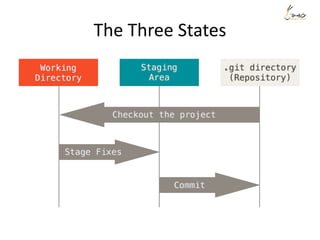
The Three States
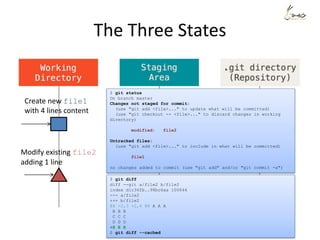
The Three States
$ git status
On branch master
Changes not staged for commit:
(use "git add <file>..." to update what will be committed)
(use "git checkout -- <file>..." to discard changes in working
directory)
modified: file2
Untracked files:
(use "git add <file>..." to include in what will be committed)
file1
no changes added to commit (use "git add" and/or "git commit -a")
$ git diff
diff --git a/file2 b/file2
index d1c36fb..98bc6aa 100644
--- a/file2
+++ b/file2
@@ -2,3 +2,4 @@ A A A
B B B
C C C
D D D
+E E E
$ git diff --cached
Create new file1
with 4 lines content
Modify existing file2
adding 1 line
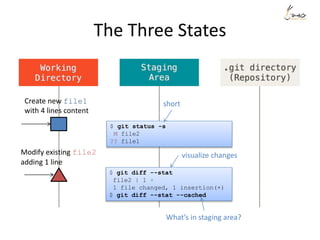
The Three States
Create new file1
with 4 lines content
Modify existing file2
adding 1 line
$ git status -s
M file2
?? file1
$ git diff --stat
file2 | 1 +
1 file changed, 1 insertion(+)
$ git diff --stat --cached
short
visualize changes
What’s in staging area?
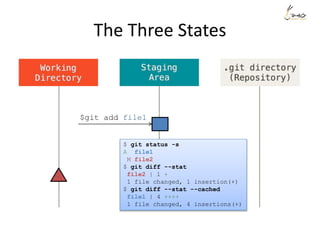
The Three States
$git add file1
$ git status -s
A file1
M file2
$ git diff --stat
file2 | 1 +
1 file changed, 1 insertion(+)
$ git diff --stat --cached
file1 | 4 ++++
1 file changed, 4 insertions(+)
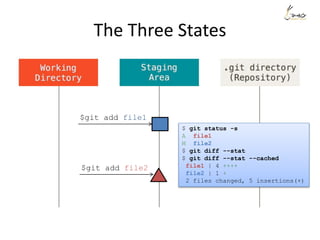
The Three States
$git add file1
$ git status -s
A file1
M file2
$ git diff --stat
$ git diff --stat --cached
file1 | 4 ++++
file2 | 1 +
2 files changed, 5 insertions(+)
$git add file2
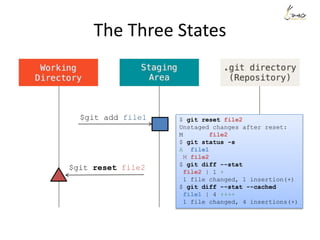
The Three States
$git add file1 $ git reset file2
Unstaged changes after reset:
M file2
$ git status -s
A file1
M file2
$ git diff --stat
file2 | 1 +
1 file changed, 1 insertion(+)
$ git diff --stat --cached
file1 | 4 ++++
1 file changed, 4 insertions(+)
$git reset file2
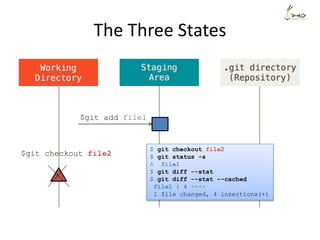
The Three States
$git add file1
$ git checkout file2
$ git status -s
A file1
$ git diff --stat
$ git diff --stat --cached
file1 | 4 ++++
1 file changed, 4 insertions(+)
$git checkout file2
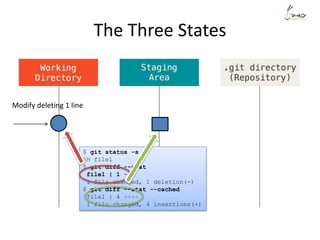
The Three States
$ git status -s
AM file1
$ git diff --stat
file1 | 1 -
1 file changed, 1 deletion(-)
$ git diff --stat --cached
file1 | 4 ++++
1 file changed, 4 insertions(+)
Modify deleting 1 line
The Three States
Modify deleting 1 line
$git commit -m
”My message”
$ git commit -m"My message"
[master 11e6b70] My message
1 file changed, 4 insertions(+)
create mode 100644 file1
$ git status -s
M file1
$ git diff --stat
file1 | 1 -
1 file changed, 1 deletion(-)
$ git diff --stat --cached
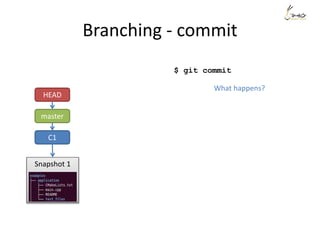
Branching - commit
C1
Snapshot 1
master
HEAD
What happens?
$ git commit
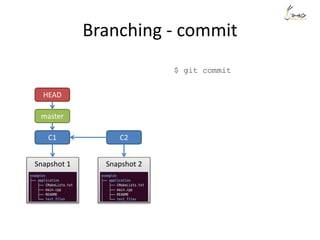
Branching - commit
C1 C2
Snapshot 1 Snapshot 2
master
HEAD
$ git commit
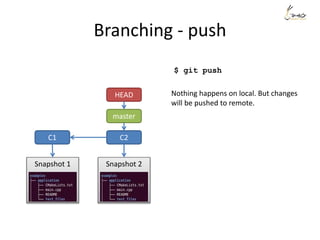
Branching - push
C1 C2
Snapshot 1 Snapshot 2
master
HEAD
$ git push
Nothing happens on local. But changes
will be pushed to remote.
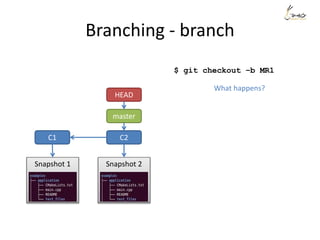
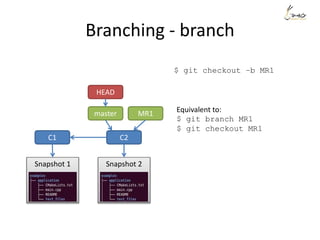
Branching - branch
C1 C2
Snapshot 1 Snapshot 2
master
HEAD
$ git checkout –b MR1
What happens?
Branching - branch
C1 C2
Snapshot 1 Snapshot 2
master
HEAD
$ git checkout –b MR1
MR1 Equivalent to:
$ git branch MR1
$ git checkout MR1
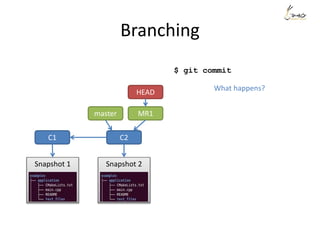
Branching
C1 C2
Snapshot 1 Snapshot 2
master
HEAD
$ git commit
MR1
What happens?
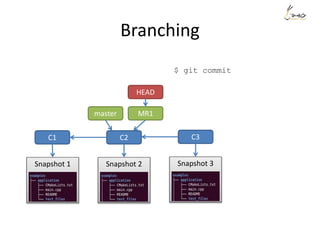
Branching
C1 C2
Snapshot 1 Snapshot 2
master
$ git commit
HEAD
MR1
C3
Snapshot 3
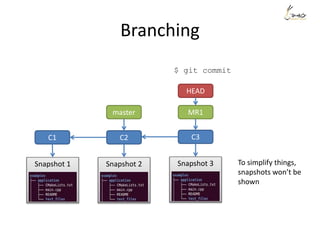
Branching
C1 C2
Snapshot 1 Snapshot 2
master
$ git commit
HEAD
MR1
C3
Snapshot 3 To simplify things,
snapshots won’t be
shown
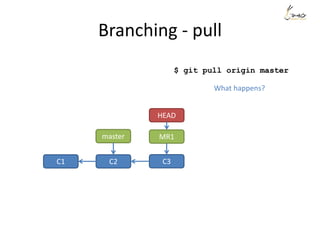
Branching - pull
C1 C2
master
$ git pull origin master
HEAD
MR1
C3
What happens?
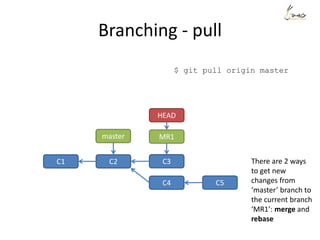
Branching - pull
$ git pull origin master
C1 C2
master
HEAD
MR1
C3
C4 C5
There are 2 ways
to get new
changes from
‘master’ branch to
the current branch
‘MR1’: merge and
rebase
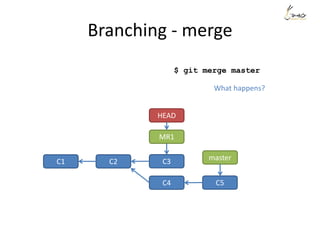
Branching - merge
$ git merge master
C1 C2 master
HEAD
MR1
C3
C4 C5
What happens?
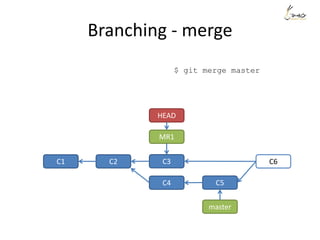
Branching - merge
$ git merge master
C1 C2
master
HEAD
MR1
C3
C4 C5
C6
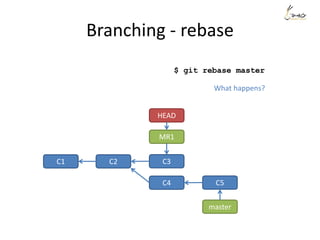
Branching - rebase
$ git rebase master
C1 C2
master
HEAD
MR1
C3
C4 C5
What happens?
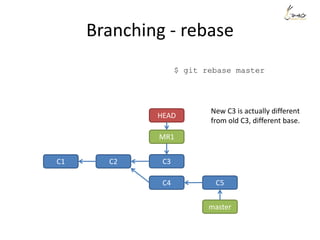
Branching - rebase
$ git rebase master
C1 C2
master
HEAD
MR1
C3
C4 C5
New C3 is actually different
from old C3, different base.
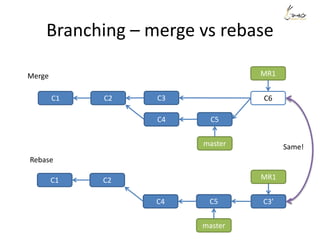
Branching – merge vs rebase
C1 C2
master
MR1
C3’C4 C5
C1 C2
master
MR1
C3
C4 C5
C6
Merge
Rebase
Same!
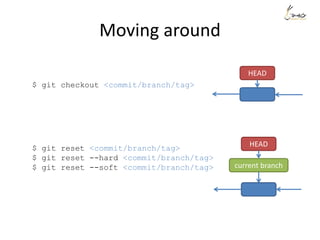
Moving around
$ git checkout <commit/branch/tag>
$ git reset <commit/branch/tag>
$ git reset --hard <commit/branch/tag>
$ git reset --soft <commit/branch/tag>
HEAD
current branch
HEAD
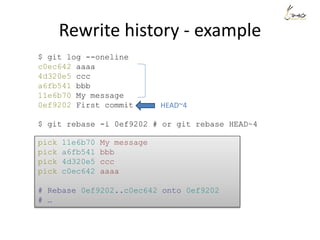
Rewrite history
• N.B. you can only rewrite history on local. You should
not rewrite history of commits that you have pushed.
• Using rebase interactive
• $ git rebase -i
• You can:
– Squash commits into one
– Amend a commit
– Re-order commits
– Edit a commit message
– Drop a commit
– Etc.
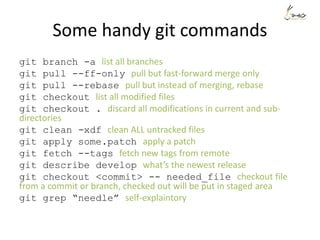
Rewrite history - example
$ git log --oneline
c0ec642 aaaa
4d320e5 ccc
a6fb541 bbb
11e6b70 My message
0ef9202 First commit
$ git rebase -i 0ef9202 # or git rebase HEAD~4
pick 11e6b70 My message
pick a6fb541 bbb
pick 4d320e5 ccc
pick c0ec642 aaaa
# Rebase 0ef9202..c0ec642 onto 0ef9202
# …
HEAD~4
Rewrite history - example
Suppose we want to re-order the commits, and also meld the commit ‘aaaa’
and commit ‘My message’ into one.
pick 11e6b70 My message
squash c0ec642 aaaa
pick a6fb541 bbb
pick 4d320e5 ccc
# Edit new message for the combined commit
[detached HEAD ae5869b] My message + aaaa
1 file changed, 6 insertions(+)
create mode 100644 file1
Successfully rebased and updated refs/heads/MR1.
$ git log --oneline
8abba8a ccc
cb566cd bbb
ae5869b My message + aaaa
0ef9202 First commit
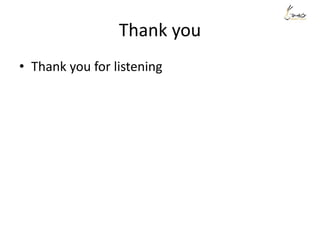
Some handy git commands
git branch -a list all branches
git pull --ff-only pull but fast-forward merge only
git pull --rebase pull but instead of merging, rebase
git checkout list all modified files
git checkout . discard all modifications in current and sub-
directories
git clean -xdf clean ALL untracked files
git apply some.patch apply a patch
git fetch --tags fetch new tags from remote
git describe develop what’s the newest release
git checkout <commit> -- needed_file checkout file
from a commit or branch, checked out will be put in staged area
git grep “needle” self-explaintory
Q&A
Thank you
• Thank you for listening

Git for beginner

  • 1.
    knowledge sharing Prepared byHieu Tran Pho team/DEK-VN
  • 2.
  • 3.
    The Three States $git status On branch master Changes not staged for commit: (use "git add <file>..." to update what will be committed) (use "git checkout -- <file>..." to discard changes in working directory) modified: file2 Untracked files: (use "git add <file>..." to include in what will be committed) file1 no changes added to commit (use "git add" and/or "git commit -a") $ git diff diff --git a/file2 b/file2 index d1c36fb..98bc6aa 100644 --- a/file2 +++ b/file2 @@ -2,3 +2,4 @@ A A A B B B C C C D D D +E E E $ git diff --cached Create new file1 with 4 lines content Modify existing file2 adding 1 line
  • 4.
    The Three States Createnew file1 with 4 lines content Modify existing file2 adding 1 line $ git status -s M file2 ?? file1 $ git diff --stat file2 | 1 + 1 file changed, 1 insertion(+) $ git diff --stat --cached short visualize changes What’s in staging area?
  • 5.
    The Three States $gitadd file1 $ git status -s A file1 M file2 $ git diff --stat file2 | 1 + 1 file changed, 1 insertion(+) $ git diff --stat --cached file1 | 4 ++++ 1 file changed, 4 insertions(+)
  • 6.
    The Three States $gitadd file1 $ git status -s A file1 M file2 $ git diff --stat $ git diff --stat --cached file1 | 4 ++++ file2 | 1 + 2 files changed, 5 insertions(+) $git add file2
  • 7.
    The Three States $gitadd file1 $ git reset file2 Unstaged changes after reset: M file2 $ git status -s A file1 M file2 $ git diff --stat file2 | 1 + 1 file changed, 1 insertion(+) $ git diff --stat --cached file1 | 4 ++++ 1 file changed, 4 insertions(+) $git reset file2
  • 8.
    The Three States $gitadd file1 $ git checkout file2 $ git status -s A file1 $ git diff --stat $ git diff --stat --cached file1 | 4 ++++ 1 file changed, 4 insertions(+) $git checkout file2
  • 9.
    The Three States $git status -s AM file1 $ git diff --stat file1 | 1 - 1 file changed, 1 deletion(-) $ git diff --stat --cached file1 | 4 ++++ 1 file changed, 4 insertions(+) Modify deleting 1 line
  • 10.
    The Three States Modifydeleting 1 line $git commit -m ”My message” $ git commit -m"My message" [master 11e6b70] My message 1 file changed, 4 insertions(+) create mode 100644 file1 $ git status -s M file1 $ git diff --stat file1 | 1 - 1 file changed, 1 deletion(-) $ git diff --stat --cached
  • 11.
    Branching - commit C1 Snapshot1 master HEAD What happens? $ git commit
  • 12.
    Branching - commit C1C2 Snapshot 1 Snapshot 2 master HEAD $ git commit
  • 13.
    Branching - push C1C2 Snapshot 1 Snapshot 2 master HEAD $ git push Nothing happens on local. But changes will be pushed to remote.
  • 14.
    Branching - branch C1C2 Snapshot 1 Snapshot 2 master HEAD $ git checkout –b MR1 What happens?
  • 15.
    Branching - branch C1C2 Snapshot 1 Snapshot 2 master HEAD $ git checkout –b MR1 MR1 Equivalent to: $ git branch MR1 $ git checkout MR1
  • 16.
    Branching C1 C2 Snapshot 1Snapshot 2 master HEAD $ git commit MR1 What happens?
  • 17.
    Branching C1 C2 Snapshot 1Snapshot 2 master $ git commit HEAD MR1 C3 Snapshot 3
  • 18.
    Branching C1 C2 Snapshot 1Snapshot 2 master $ git commit HEAD MR1 C3 Snapshot 3 To simplify things, snapshots won’t be shown
  • 19.
    Branching - pull C1C2 master $ git pull origin master HEAD MR1 C3 What happens?
  • 20.
    Branching - pull $git pull origin master C1 C2 master HEAD MR1 C3 C4 C5 There are 2 ways to get new changes from ‘master’ branch to the current branch ‘MR1’: merge and rebase
  • 21.
    Branching - merge $git merge master C1 C2 master HEAD MR1 C3 C4 C5 What happens?
  • 22.
    Branching - merge $git merge master C1 C2 master HEAD MR1 C3 C4 C5 C6
  • 23.
    Branching - rebase $git rebase master C1 C2 master HEAD MR1 C3 C4 C5 What happens?
  • 24.
    Branching - rebase $git rebase master C1 C2 master HEAD MR1 C3 C4 C5 New C3 is actually different from old C3, different base.
  • 25.
    Branching – mergevs rebase C1 C2 master MR1 C3’C4 C5 C1 C2 master MR1 C3 C4 C5 C6 Merge Rebase Same!
  • 26.
    Moving around $ gitcheckout <commit/branch/tag> $ git reset <commit/branch/tag> $ git reset --hard <commit/branch/tag> $ git reset --soft <commit/branch/tag> HEAD current branch HEAD
  • 27.
    Rewrite history • N.B.you can only rewrite history on local. You should not rewrite history of commits that you have pushed. • Using rebase interactive • $ git rebase -i • You can: – Squash commits into one – Amend a commit – Re-order commits – Edit a commit message – Drop a commit – Etc.
  • 28.
    Rewrite history -example $ git log --oneline c0ec642 aaaa 4d320e5 ccc a6fb541 bbb 11e6b70 My message 0ef9202 First commit $ git rebase -i 0ef9202 # or git rebase HEAD~4 pick 11e6b70 My message pick a6fb541 bbb pick 4d320e5 ccc pick c0ec642 aaaa # Rebase 0ef9202..c0ec642 onto 0ef9202 # … HEAD~4
  • 29.
    Rewrite history -example Suppose we want to re-order the commits, and also meld the commit ‘aaaa’ and commit ‘My message’ into one. pick 11e6b70 My message squash c0ec642 aaaa pick a6fb541 bbb pick 4d320e5 ccc # Edit new message for the combined commit [detached HEAD ae5869b] My message + aaaa 1 file changed, 6 insertions(+) create mode 100644 file1 Successfully rebased and updated refs/heads/MR1. $ git log --oneline 8abba8a ccc cb566cd bbb ae5869b My message + aaaa 0ef9202 First commit
  • 30.
    Some handy gitcommands git branch -a list all branches git pull --ff-only pull but fast-forward merge only git pull --rebase pull but instead of merging, rebase git checkout list all modified files git checkout . discard all modifications in current and sub- directories git clean -xdf clean ALL untracked files git apply some.patch apply a patch git fetch --tags fetch new tags from remote git describe develop what’s the newest release git checkout <commit> -- needed_file checkout file from a commit or branch, checked out will be put in staged area git grep “needle” self-explaintory
  • 31.
  • 32.
    Thank you • Thankyou for listening