Building Applications  for the Cloud -  Challenges & Best Practices Jeroen Remmerswaal Tricode Business Integrators
Timing is Everything - Why Now? Credit crunch means:  No large upfront investments Need to do more with the same resources Maturity of virtualization technologies Faster CPUs, memory, disks Better internet
The Challenges: Deploying on the cloud introduces new challenges: On demand scalability  Reliability  Data security Deployment, monitoring & management
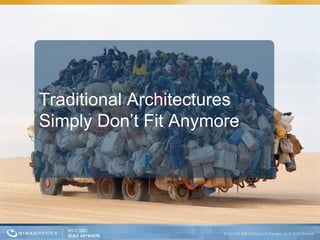
Traditional Architectures Simply Don’t Fit Anymore
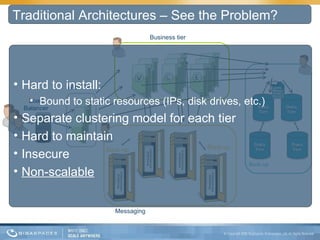
Business tier Back-up Back-up Back-up Load Balancer Web Tier Messaging Traditional Architectures – See the Problem? Hard to install:  Bound to static resources (IPs, disk drives, etc.) Separate clustering model for each tier Hard to maintain Insecure Non-scalable
There's a missing link
To take full advantage of the cloud,  your application’s architecture needs to  change
It needs to be  elastic : Grow (and shrink) as needed, based on an SLA (such as work load) But with no downtime, self-heal on failure, without data- and transaction-loss And with a corresponding (predictable) performance improvement
It needs to be  memory-based : No permanent off-premise storage Not bound to static resources Bonus: extreme performance Reliability achieved through memory replication Optionally offload data to on/off site persistent store
It needs to be  easy to operate : Deploying & monitoring on the cloud as simple and the same as doing it on-premises Process should be repeatable Application should be modular –  update on the fly with no downtime
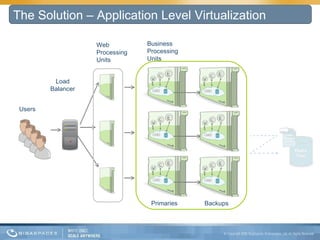
The Solution – Application Level Virtualization Users Load Balancer Web Processing Units Business Processing  Units Primaries Backups
GigaSpaces XAP Value Proposition: Linearly scalable and elastic via virtualization of the processing, messaging and data tiers  Secure and ultra fast via in-memory infrastructure Comprehensive cloud support for the simplest provisioning, deployment & monitoring Non-intrusive: Adopts existing programming models Cross platform & language
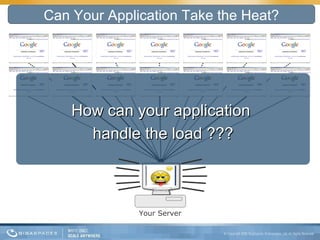
Can Your Application Take the Heat? How can your application  handle the load ??? Your Server
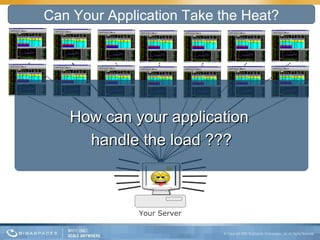
Can Your Application Take the Heat? Your Server How can your application  handle the load ???
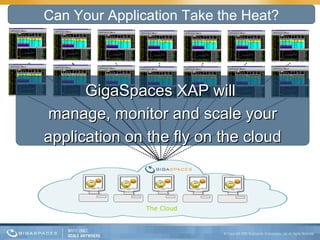
Can Your Application Take the Heat? The Cloud GigaSpaces XAP will  manage, monitor and scale your application on the fly on the cloud
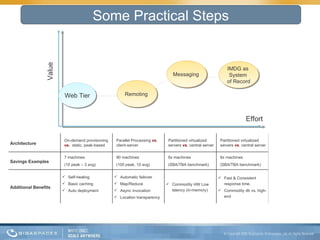
Some Practical Steps Value Effort Web Tier Remoting  Messaging  IMDG as  System  of Record Architecture On-demand provisioning  vs.   static, peak-based Parallel Processing  vs . client-server Partitioned virtualized servers  vs . central server Partitioned virtualized servers  vs . central server Savings Examples  7 machines (10 peak – 3 avg) 90 machines (100 peak, 10 avg) 6x machines (SBA/TBA benchmark) 6x machines (SBA/TBA benchmark) Additional Benefits Self-healing Basic caching Auto deployment Automatic failover Map/Reduce Async invocation Location transparency  Commodity HW Low latency (in-memory) Fast & Consistent response time.  Commodity db vs. high-end
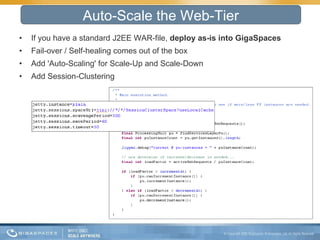
If you have a standard J2EE WAR-file,  deploy as-is into GigaSpaces Fail-over / Self-healing comes out of the box Add 'Auto-Scaling' for Scale-Up and Scale-Down Add Session-Clustering Auto-Scale the Web-Tier
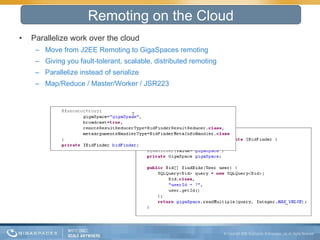
Parallelize work over the cloud  Move from J2EE Remoting to GigaSpaces remoting Giving you fault-tolerant, scalable, distributed remoting Parallelize instead of serialize Map/Reduce / Master/Worker / JSR223 Remoting on the Cloud
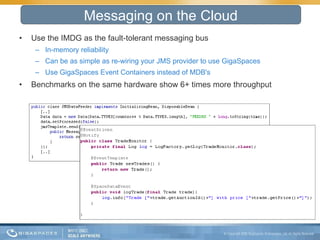
Use the IMDG as the fault-tolerant messaging bus In-memory reliability Can be as simple as re-wiring your JMS provider to use GigaSpaces Use GigaSpaces Event Containers instead of MDB's Benchmarks on the same hardware show 6+ times more throughput Messaging on the Cloud
Fulfill your business transactions in memory Have (most of) the data available in memory Use the database because  you want to , not because  you have to Use the database  asynchronously but reliable Benchmarks on the same hardware show 6-100 times more throughput IMDG over the Cloud
Large UK Telco Company Deploying discrete stand alone services in the Cloud More cost effective; easier to outsource; enabled by secure service interface Large Global Telco Company Deploying carrier grade VOIP service to the Cloud New SaaS business model; New revenue stream Global Media Company Using the Cloud to process events for innovative new TV programme Cloud makes concept cost effective Financial Services Start-up Using the Cloud for a trading exchange Cloud lowers barrier to entry and makes proposition possible Online Gaming Company Using the Cloud for testing and scaling Able to test large scale user support early / easy on cloud, hard otherwise Some of GigaSpaces Cloud Users
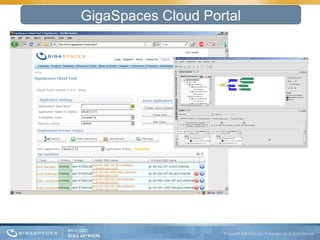
GigaSpaces Cloud Portal
Enterprise applications can run on the cloud today: No need to re-write your application  Preventing lock-in to specific cloud provider  Enabling seamless portability between your local environment to cloud environment  Choose simple applications first  Avoid dealing with complex security issues Application with Clear path to ROI (Fluctuating load, large scale testing, DR,..) Some Take-aways
GigaSpaces Home Page: http://www.gigaspaces.com/ GigaSpaces XAP Product Overview: http://www.gigaspaces.com/wiki/display/XAP7/Concepts  GigaSpaces XAP for the Cloud:  http://www.gigaspaces.com/cloud

Giga spaces value prop - afas - cloud practices

  • 1.
    Building Applications for the Cloud - Challenges & Best Practices Jeroen Remmerswaal Tricode Business Integrators
  • 2.
    Timing is Everything- Why Now? Credit crunch means: No large upfront investments Need to do more with the same resources Maturity of virtualization technologies Faster CPUs, memory, disks Better internet
  • 3.
    The Challenges: Deployingon the cloud introduces new challenges: On demand scalability Reliability Data security Deployment, monitoring & management
  • 4.
  • 5.
    Business tier Back-upBack-up Back-up Load Balancer Web Tier Messaging Traditional Architectures – See the Problem? Hard to install: Bound to static resources (IPs, disk drives, etc.) Separate clustering model for each tier Hard to maintain Insecure Non-scalable
  • 6.
  • 7.
    To take fulladvantage of the cloud, your application’s architecture needs to change
  • 8.
    It needs tobe elastic : Grow (and shrink) as needed, based on an SLA (such as work load) But with no downtime, self-heal on failure, without data- and transaction-loss And with a corresponding (predictable) performance improvement
  • 9.
    It needs tobe memory-based : No permanent off-premise storage Not bound to static resources Bonus: extreme performance Reliability achieved through memory replication Optionally offload data to on/off site persistent store
  • 10.
    It needs tobe easy to operate : Deploying & monitoring on the cloud as simple and the same as doing it on-premises Process should be repeatable Application should be modular – update on the fly with no downtime
  • 11.
    The Solution –Application Level Virtualization Users Load Balancer Web Processing Units Business Processing Units Primaries Backups
  • 12.
    GigaSpaces XAP ValueProposition: Linearly scalable and elastic via virtualization of the processing, messaging and data tiers Secure and ultra fast via in-memory infrastructure Comprehensive cloud support for the simplest provisioning, deployment & monitoring Non-intrusive: Adopts existing programming models Cross platform & language
  • 13.
    Can Your ApplicationTake the Heat? How can your application handle the load ??? Your Server
  • 14.
    Can Your ApplicationTake the Heat? Your Server How can your application handle the load ???
  • 15.
    Can Your ApplicationTake the Heat? The Cloud GigaSpaces XAP will manage, monitor and scale your application on the fly on the cloud
  • 16.
    Some Practical StepsValue Effort Web Tier Remoting Messaging IMDG as System of Record Architecture On-demand provisioning vs. static, peak-based Parallel Processing vs . client-server Partitioned virtualized servers vs . central server Partitioned virtualized servers vs . central server Savings Examples 7 machines (10 peak – 3 avg) 90 machines (100 peak, 10 avg) 6x machines (SBA/TBA benchmark) 6x machines (SBA/TBA benchmark) Additional Benefits Self-healing Basic caching Auto deployment Automatic failover Map/Reduce Async invocation Location transparency Commodity HW Low latency (in-memory) Fast & Consistent response time. Commodity db vs. high-end
  • 17.
    If you havea standard J2EE WAR-file, deploy as-is into GigaSpaces Fail-over / Self-healing comes out of the box Add 'Auto-Scaling' for Scale-Up and Scale-Down Add Session-Clustering Auto-Scale the Web-Tier
  • 18.
    Parallelize work overthe cloud Move from J2EE Remoting to GigaSpaces remoting Giving you fault-tolerant, scalable, distributed remoting Parallelize instead of serialize Map/Reduce / Master/Worker / JSR223 Remoting on the Cloud
  • 19.
    Use the IMDGas the fault-tolerant messaging bus In-memory reliability Can be as simple as re-wiring your JMS provider to use GigaSpaces Use GigaSpaces Event Containers instead of MDB's Benchmarks on the same hardware show 6+ times more throughput Messaging on the Cloud
  • 20.
    Fulfill your businesstransactions in memory Have (most of) the data available in memory Use the database because you want to , not because you have to Use the database asynchronously but reliable Benchmarks on the same hardware show 6-100 times more throughput IMDG over the Cloud
  • 21.
    Large UK TelcoCompany Deploying discrete stand alone services in the Cloud More cost effective; easier to outsource; enabled by secure service interface Large Global Telco Company Deploying carrier grade VOIP service to the Cloud New SaaS business model; New revenue stream Global Media Company Using the Cloud to process events for innovative new TV programme Cloud makes concept cost effective Financial Services Start-up Using the Cloud for a trading exchange Cloud lowers barrier to entry and makes proposition possible Online Gaming Company Using the Cloud for testing and scaling Able to test large scale user support early / easy on cloud, hard otherwise Some of GigaSpaces Cloud Users
  • 22.
  • 23.
    Enterprise applications canrun on the cloud today: No need to re-write your application Preventing lock-in to specific cloud provider Enabling seamless portability between your local environment to cloud environment  Choose simple applications first Avoid dealing with complex security issues Application with Clear path to ROI (Fluctuating load, large scale testing, DR,..) Some Take-aways
  • 24.
    GigaSpaces Home Page:http://www.gigaspaces.com/ GigaSpaces XAP Product Overview: http://www.gigaspaces.com/wiki/display/XAP7/Concepts GigaSpaces XAP for the Cloud: http://www.gigaspaces.com/cloud

Editor's Notes

  • #3 Lots of proof – CouchDB ElasticGrid Every week 3 to 4 new GigaSpaces clients on Amazon EC2 Maturity shows in the SLA's too: Unmanaged 50,000 90 1 Managed 5,000 99 2 Well-managed 500 99.9 3 Fault-tolerant 50 99.99 4 High Availability 5 99.999 5 Very High Availability 0.5 99.9999 6 Ultra Availability 0.05 99.99999 7 99.95 -> 250 minuten downtime per jaar
  • #8 Doesn't mean you have to fully rewrite your application You need to undergo a paradigm shift and change your application accordingly
  • #10 Transactional / Operational data Writes to disk mean contention, system performance will degrade when adding more capacity or when needing more throughput Caching Numbers everyone should know: http://highscalability.com/numbers-everyone-should-know Writes are expensive! Datastore is transactional: writes require disk access Disk access means disk seeks Rule of thumb: 10ms for a disk seek Simple math: 1s / 10ms = 100 seeks/sec maximum Depends on: * The size and shape of your data * Doing work in batches (batch puts and gets) Reads are cheap! Reads do not need to be transactional, just consistent Data is read from disk once, then it's easily cached All subsequent reads come straight from memory Rule of thumb: 250usec for 1MB of data from memory Simple math: 1s / 250usec = 4GB/sec maximum * For a 1MB entity, that's 4000 fetches/sec L1 cache reference 0.5 ns Branch mispredict 5 ns L2 cache reference 7 ns Mutex lock/unlock 100 ns Main memory reference 100 ns Compress 1K bytes with Zippy 10,000 ns Send 2K bytes over 1 Gbps network 20,000 ns Round trip within same datacenter 500,000 ns Disk seek 10,000,000 ns Read 1 MB sequentially from memory 250,000 ns Read 1 MB sequentially from network 10,000,000 ns Read 1 MB sequentially from disk 30,000,000 ns Send packet CA->Netherlands->CA 150,000,000 ns ------------- Writes are 40 times more expensive than reads. Global shared data is expensive. This is a fundamental limitation of distributed systems. The lock contention in shared heavily written objects kills performance as transactions become serialized and slow. Architect for scaling writes. Optimize for low write contention. Optimize wide. Make writes as parallel as you can.
  • #13 Decouples the application from the deployment environment Since deployment and application virtualization is there you can: Outsource testing, disaster recovery, etc. to public cloud Scale out to public cloud at peak times
  • #17 Time to value: the amount of time it takes you to achieve/show value Take quote from ROI presentation Savings calculations: Web tier -> 10 at peak, av. 3 => saving=7 Business Logic -> using commodity instead of high-end machines +100 peak, av.10=>savings=90 Messaging -> cost of non-linear scaling=> 6x throughput Data tier -> cost of non-linear scaling=> 6x throughput
  • #18 Dynamic load-balancing
  • #20 GigaSpaces XAP proved far superior to the traditional JEE-based implementation, in terms of throughput and latency. The results on the same hardware (quad-core AMD machines with RH Linux) were 6 times more throughput, with up to 10 times less latency in favor of the GigaSpaces implementation => with at least 6x less machines . The effect of latency in number of reduced machines is harder to measure, but it is expected to reduce number of machines even further.