CLOUD COMPUTING
AGENDA
 Overview
 Popular Definitions

 Deployment Models

 Delivery Models – IaaS, PaaS, SaaS

 NoSQL

 Vendor Lock-in

 Security Concerns
WHAT IS CLOUD COMPUTING?
CLOUD COMPUTING OVERVIEW
 Sharing Resources
 Abstraction of Software Development Details

 Scalability

 High Processing Power

 Reliability / Availability

 Pay – as – you – use

 Peak load performance

 Simplified maintenance:
CLOUD COMPUTING DEFINITIONS
 OSSM
 5-3-4
DEFINITION : OSSM
 On-demand: the server is already setup and ready
  to be deployed
 Self-service: customer chooses what they want,
  when they want it
 Scalable: customer can choose how much they
  want and ramp up if necessary
 Measureable: there's metering/reporting so you
  know you are getting what you pay for
DEFINITION : 5 – 3 – 4
   5 Basic Characteristics
       On-Demand
       Ubiquity – (irrespective of location, app should be accessible)
       Location Independent Resource Pooling
       Elasticity
       Pay per Use

   3 Delivery Models
     IaaS
     PaaS
     SaaS
   4 Deployment Models
     Public Cloud
     Private Cloud
     Hybrid Cloud
     Community Cloud
DEPLOYMENT MODELS
PUBLIC CLOUD
 Most standard Cloud Computing Model
 Same infrastructure/resources are to be used by
  other tenants/businesses
 Vendor makes Hardware/Software available as
  services over internet
 Pay per use pricing model

 No CAPEX, Only OPEX

 No wasted resources, pay only for what you use

 Examples : Amazon EC2, IBM Blue Cloud, GAE,
  Azure
PRIVATE CLOUD
 Not truly a cloud
 High CAPEX

 Rather, cloud like on-premise infrastructure with
  horizontal scalability,availability,etc
 Or off-shore infrastructure behind a corporate
  firewall
 Maintenance can still be outsourced

 Concerns of Security are minimized

 More control over data

 Examples : Amazon EC2 &S3(Simple Storage
  Service)
HYBRID CLOUD
 Composition of atleast one Private Cloud and
  atleast one Public Cloud
 All the involved clouds maybe provided by the
  same or different vendors
 Allows scalability of Public Cloud, without exposing
  sensitive data
 Use Case :
        Archived Data on Public Cloud, Operational Data on Private
         Cloud
DELIVERY MODELS
IaaS   PaaS   SaaS
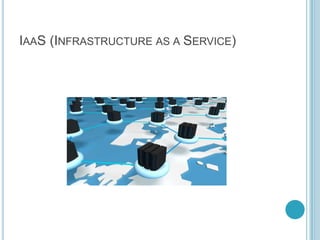
IAAS (INFRASTRUCTURE AS A SERVICE)
 On Demand Storage & Processing - Computing as
  a Service
 Hardware, its
  Software, Electricity, Cooling, Connectivity all
  managed by Vendor
 Pay-as-you-go

 Difference between Shared Hosting v/s Cloud
  Infrastructure
 Flexible
IAAS… (CONTD…)
 Provides infrastructure management tools.
 Vendors : Amazon EC2, Rackspace, etc

 Tools are available to monitor performance, peak
  load conditions, etc
 Scaling, Monitoring , etc are still a responsibility of
  the Service Buyer
HOW TO CHOOSE AN IAAS VENDOR?
 Support – Email, Phone, 24 x 7?
 Hardware, its configuration and Performance

 Partnership with Middleware Vendors
       Eg: Amazon EC2 has partnered with
        IBM,Microsoft,RedHat, Oracle,etc.
   Licensing
     Windows Licences cannot be migrated from local data
      center to Cloud
     IBM Websphere not available with EC2
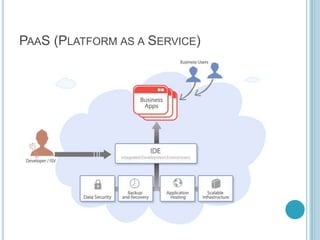
PAAS (PLATFORM AS A SERVICE)
 A platform to develop applications that can be
  deployed on the cloud
 Framework / Platform is hosted on the Cloud
 Development language and platform is vendor
  decided
 Infrastructure management by Vendor
 Scalability and management is provided by the
  Vendor
 No Licensing hassles
 Vendors: Force.com, Google App Engine, Microsoft
  Azure, Heroku
 Drawback : Vendor Lock in
FORCE.COM :

    Very easy to use Web Interface to create a web
     application
    Code generation, compilation, deployment, etc happens
     on Force.com servers
    Also has Eclipse Plugin based development
    Asks for Force.com credentials
    Code compilation and deployment happens on
     Force.com servers, seamlessly
    Development in Apex(Dev) and VisualForce (UI)
    Supports Agile
HEROKU
 Development, deployment, scaling
 Heroku’s Ruby Platform lies on AWS

 Used by Facebook for scaling and application
  development
 Dev Languages : Ruby on Rails, Java

 Now acquired by Force.com
GOOGLE APP ENGINE (GAE)
 SDK for Java and Python
 Provides Eclipse Plugin

 Big Table DataStore

 Simple App Configuration

 Automatic Scaling, No performance Tuning is
  required
   Quotas - request count, bandwidth usage, CPU
    usage, datastore call count, disk space used, emails
    sent, even errors!
WINDOWS AZURE
 Windows Azure Tools for Visual Studio
 Technology Stack and Tools :
       Azure tools for Visual Studio
       Azure SDK
       Visual Web Developer (replacement for Visual Studio)
       ASP.NET MVC3 (framework)
       IIS
WINDOWS AZURE STACK
 Windows Azure – Cloud OS as a Service
 5 Services – Live Services, SQL
  Azure, AppFabric, Sharepoint, Dynamic CRM
 SQL Azure – Cloud based SQL Server

 Azure AppFabric – Collection of Services
  (Caching,Service Bus,Integration)
 Azure Platform Alliance (non-MS Datacenters)
AZURE DEVELOPMENT PLATFORM
 ASP.NET Framework
 PHP

 SDKs for Java and Ruby help integrate with
  AppFabric Services
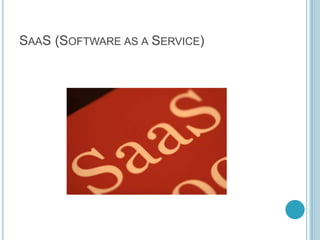
SAAS (SOFTWARE AS A SERVICE)
 Enterprise Application without installation overhead
 Applications that are available to be used over the
  internet
 Pay per user Account

 Scalable to multiple users and tenants

 Applications like SalesForce.com, Gmail,Google
  Apps,etc
DATABASE FOR THE CLOUD
PROBLEMS WITH TRADITIONAL DATABASES
FOR CLOUD

 Big Data - Big data are datasets that grow so large
  that they become awkward to work with using on-
  hand database management tools
 Difficulties include capture, storage, search,
  sharing, analytics, and visualizing of vast data
NOSQL

 Can service heavy read/write workloads
 Usually Avoid Join Operations

 Scale Horizontally

 Works well even with cheap commodity servers

 Flexible – Schema changes are easy to make

 Examples : Big Table, Mongo
  DB, Hadoop, Cassandra, Amazon SimpleDB
NOSQL - CHALLENGES
   Quota limits
     Max 1000 records per query
     Query times out in 5 seconds


 Maturity – Nascent compared to RDBMS
 Support – Mostly Open Source. Support driven by
  startups with no true global reach
 Administration – Installation & Maintenance skill is
  not easily available
 Expertise – Not easily unavailable, which is
  unacceptable to businesses
VENDOR LOCK-IN
 Definition – Stuck with 1 vendor because of
  complexity to move to another vendor
 Scenarios to move out of a Cloud Vendor:
        Cost
        Shut Down of Services

        New choice of Services offered by another Vendor


   How to avoid/minimize vendor lock-in chances?
        While architecting your app, ensure vendor-specific services
         are judiciously used
        Evaluate Options

        Check ROI

        Read about upcoming features/services
VENDOR LOCK-IN
   IaaS
     Less lock-in
     Data Migration is of moderate difficulty

   PaaS
     Tightly coupled to vendor
     Migration to another vendor may require re-engineering
      the application
SECURITY IN CLOUD COMPUTING
   Issues:
        Data Integrity
        Recovery

        Network security

        Access and Authentication procedures

        Data encryption techniques

        Tenant isolation


 Most issues are now controlled or resolved
 Still considered unsafe for Financial data
USE CASES
UNCERTAINTY OF LOAD
 Zynga has both Private and Public Cloud services
  at disposal
 New Game launches on Public Cloud

 When usage is stabilized, then migrated to Private
  Cloud
SHORT-TERM USAGE
 Seasonal Apps
 Event Websites

 OCR to Doc Conversion
NETFLIX
 Completely out of Cloud
 Highly fluctuating usage of large multimedia data

 Across different geographical locations

 Speedy Access
LIMITATIONS
LIMITATIONS OF CLOUD COMPUTING
 Connectivity is mandatory
 Security

 Skills – Development and Administration

 Network Bandwidth

 Not suitable for all businesses

Cloud computing

  • 1.
  • 2.
    AGENDA  Overview  PopularDefinitions  Deployment Models  Delivery Models – IaaS, PaaS, SaaS  NoSQL  Vendor Lock-in  Security Concerns
  • 3.
    WHAT IS CLOUDCOMPUTING?
  • 4.
    CLOUD COMPUTING OVERVIEW Sharing Resources  Abstraction of Software Development Details  Scalability  High Processing Power  Reliability / Availability  Pay – as – you – use  Peak load performance  Simplified maintenance:
  • 5.
  • 6.
    DEFINITION : OSSM On-demand: the server is already setup and ready to be deployed  Self-service: customer chooses what they want, when they want it  Scalable: customer can choose how much they want and ramp up if necessary  Measureable: there's metering/reporting so you know you are getting what you pay for
  • 7.
    DEFINITION : 5– 3 – 4  5 Basic Characteristics  On-Demand  Ubiquity – (irrespective of location, app should be accessible)  Location Independent Resource Pooling  Elasticity  Pay per Use  3 Delivery Models  IaaS  PaaS  SaaS  4 Deployment Models  Public Cloud  Private Cloud  Hybrid Cloud  Community Cloud
  • 8.
  • 9.
    PUBLIC CLOUD  Moststandard Cloud Computing Model  Same infrastructure/resources are to be used by other tenants/businesses  Vendor makes Hardware/Software available as services over internet  Pay per use pricing model  No CAPEX, Only OPEX  No wasted resources, pay only for what you use  Examples : Amazon EC2, IBM Blue Cloud, GAE, Azure
  • 10.
    PRIVATE CLOUD  Nottruly a cloud  High CAPEX  Rather, cloud like on-premise infrastructure with horizontal scalability,availability,etc  Or off-shore infrastructure behind a corporate firewall  Maintenance can still be outsourced  Concerns of Security are minimized  More control over data  Examples : Amazon EC2 &S3(Simple Storage Service)
  • 11.
    HYBRID CLOUD  Compositionof atleast one Private Cloud and atleast one Public Cloud  All the involved clouds maybe provided by the same or different vendors  Allows scalability of Public Cloud, without exposing sensitive data  Use Case :  Archived Data on Public Cloud, Operational Data on Private Cloud
  • 12.
  • 13.
  • 14.
    IAAS (INFRASTRUCTURE ASA SERVICE)  On Demand Storage & Processing - Computing as a Service  Hardware, its Software, Electricity, Cooling, Connectivity all managed by Vendor  Pay-as-you-go  Difference between Shared Hosting v/s Cloud Infrastructure  Flexible
  • 15.
    IAAS… (CONTD…)  Providesinfrastructure management tools.  Vendors : Amazon EC2, Rackspace, etc  Tools are available to monitor performance, peak load conditions, etc  Scaling, Monitoring , etc are still a responsibility of the Service Buyer
  • 16.
    HOW TO CHOOSEAN IAAS VENDOR?  Support – Email, Phone, 24 x 7?  Hardware, its configuration and Performance  Partnership with Middleware Vendors  Eg: Amazon EC2 has partnered with IBM,Microsoft,RedHat, Oracle,etc.  Licensing  Windows Licences cannot be migrated from local data center to Cloud  IBM Websphere not available with EC2
  • 17.
  • 18.
    PAAS (PLATFORM ASA SERVICE)  A platform to develop applications that can be deployed on the cloud  Framework / Platform is hosted on the Cloud  Development language and platform is vendor decided  Infrastructure management by Vendor  Scalability and management is provided by the Vendor  No Licensing hassles  Vendors: Force.com, Google App Engine, Microsoft Azure, Heroku  Drawback : Vendor Lock in
  • 19.
    FORCE.COM :  Very easy to use Web Interface to create a web application  Code generation, compilation, deployment, etc happens on Force.com servers  Also has Eclipse Plugin based development  Asks for Force.com credentials  Code compilation and deployment happens on Force.com servers, seamlessly  Development in Apex(Dev) and VisualForce (UI)  Supports Agile
  • 20.
    HEROKU  Development, deployment,scaling  Heroku’s Ruby Platform lies on AWS  Used by Facebook for scaling and application development  Dev Languages : Ruby on Rails, Java  Now acquired by Force.com
  • 21.
    GOOGLE APP ENGINE(GAE)  SDK for Java and Python  Provides Eclipse Plugin  Big Table DataStore  Simple App Configuration  Automatic Scaling, No performance Tuning is required  Quotas - request count, bandwidth usage, CPU usage, datastore call count, disk space used, emails sent, even errors!
  • 22.
    WINDOWS AZURE  WindowsAzure Tools for Visual Studio  Technology Stack and Tools :  Azure tools for Visual Studio  Azure SDK  Visual Web Developer (replacement for Visual Studio)  ASP.NET MVC3 (framework)  IIS
  • 23.
    WINDOWS AZURE STACK Windows Azure – Cloud OS as a Service  5 Services – Live Services, SQL Azure, AppFabric, Sharepoint, Dynamic CRM  SQL Azure – Cloud based SQL Server  Azure AppFabric – Collection of Services (Caching,Service Bus,Integration)  Azure Platform Alliance (non-MS Datacenters)
  • 24.
    AZURE DEVELOPMENT PLATFORM ASP.NET Framework  PHP  SDKs for Java and Ruby help integrate with AppFabric Services
  • 25.
  • 26.
    SAAS (SOFTWARE ASA SERVICE)  Enterprise Application without installation overhead  Applications that are available to be used over the internet  Pay per user Account  Scalable to multiple users and tenants  Applications like SalesForce.com, Gmail,Google Apps,etc
  • 27.
  • 28.
    PROBLEMS WITH TRADITIONALDATABASES FOR CLOUD  Big Data - Big data are datasets that grow so large that they become awkward to work with using on- hand database management tools  Difficulties include capture, storage, search, sharing, analytics, and visualizing of vast data
  • 29.
    NOSQL  Can serviceheavy read/write workloads  Usually Avoid Join Operations  Scale Horizontally  Works well even with cheap commodity servers  Flexible – Schema changes are easy to make  Examples : Big Table, Mongo DB, Hadoop, Cassandra, Amazon SimpleDB
  • 30.
    NOSQL - CHALLENGES  Quota limits  Max 1000 records per query  Query times out in 5 seconds  Maturity – Nascent compared to RDBMS  Support – Mostly Open Source. Support driven by startups with no true global reach  Administration – Installation & Maintenance skill is not easily available  Expertise – Not easily unavailable, which is unacceptable to businesses
  • 31.
    VENDOR LOCK-IN  Definition– Stuck with 1 vendor because of complexity to move to another vendor  Scenarios to move out of a Cloud Vendor:  Cost  Shut Down of Services  New choice of Services offered by another Vendor  How to avoid/minimize vendor lock-in chances?  While architecting your app, ensure vendor-specific services are judiciously used  Evaluate Options  Check ROI  Read about upcoming features/services
  • 32.
    VENDOR LOCK-IN  IaaS  Less lock-in  Data Migration is of moderate difficulty  PaaS  Tightly coupled to vendor  Migration to another vendor may require re-engineering the application
  • 33.
    SECURITY IN CLOUDCOMPUTING  Issues:  Data Integrity  Recovery  Network security  Access and Authentication procedures  Data encryption techniques  Tenant isolation  Most issues are now controlled or resolved  Still considered unsafe for Financial data
  • 34.
  • 35.
    UNCERTAINTY OF LOAD Zynga has both Private and Public Cloud services at disposal  New Game launches on Public Cloud  When usage is stabilized, then migrated to Private Cloud
  • 36.
    SHORT-TERM USAGE  SeasonalApps  Event Websites  OCR to Doc Conversion
  • 37.
    NETFLIX  Completely outof Cloud  Highly fluctuating usage of large multimedia data  Across different geographical locations  Speedy Access
  • 38.
  • 39.
    LIMITATIONS OF CLOUDCOMPUTING  Connectivity is mandatory  Security  Skills – Development and Administration  Network Bandwidth  Not suitable for all businesses