Avoiding risk when
moving legacy apps to
the cloud
Kevin Scott, CloverDX
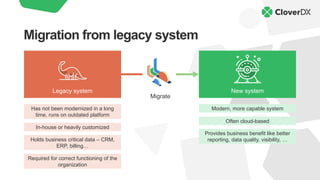
Migration from legacy system
Legacy system New system
Required for correct functioning of the
organization
Migrate
Has not been modernized in a long
time, runs on outdated platform
In-house or heavily customized
Holds business critical data – CRM,
ERP, billing…
Modern, more capable system
Often cloud-based
Provides business benefit like better
reporting, data quality, visibility, …
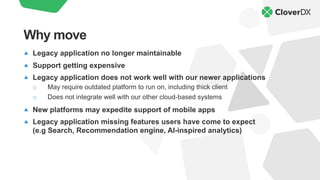
Legacy application no longer maintainable
Support getting expensive
Legacy application does not work well with our newer applications
o May require outdated platform to run on, including thick client
o Does not integrate well with our other cloud-based systems
New platforms may expedite support of mobile apps
Legacy application missing features users have come to expect
(e.g Search, Recommendation engine, AI-inspired analytics)
Why move
On-prem infrastructure is expensive: time, people, money
Cloud availability is higher than most on-prem solutions
o On-prem “data centre” might have power outages, networking issues
On-prem security is hard
o Especially if you host something (applications, APIs, file downloads)
You want to use or provide a shared service
o SaaS applications, APIs, etc.
OK, move but why to the cloud?
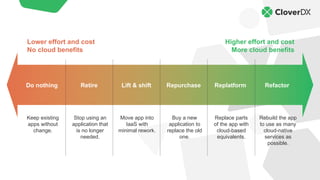
Higher effort and cost
More cloud benefits
Lower effort and cost
No cloud benefits
Retire Lift & shift Replatform
Repurchase
Do nothing Refactor
Keep existing
apps without
change.
Stop using an
application that
is no longer
needed.
Move app into
IaaS with
minimal rework.
Buy a new
application to
replace the old
one.
Replace parts
of the app with
cloud-based
equivalents.
Rebuild the app
to use as many
cloud-native
services as
possible.
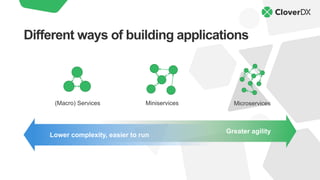
Different ways of building applications
Greater agility
Lower complexity, easier to run
Miniservices Microservices
(Macro) Services
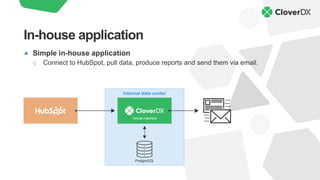
Simple in-house application
o Connect to HubSpot, pull data, produce reports and send them via email.
In-house application
Virtual machine
Internal data center
PostgreSQL
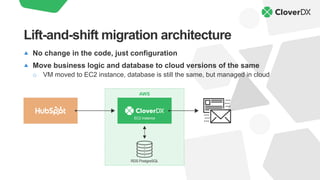
No change in the code, just configuration
Move business logic and database to cloud versions of the same
o VM moved to EC2 instance, database is still the same, but managed in cloud
Lift-and-shift migration architecture
EC2 instance
AWS
RDS PostgreSQL
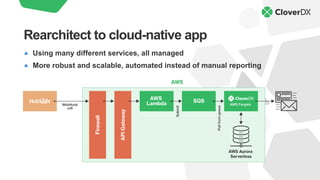
Using many different services, all managed
More robust and scalable, automated instead of manual reporting
Rearchitect to cloud-native app
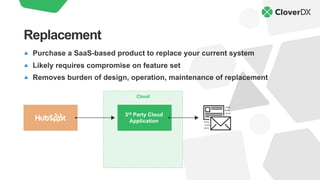
Purchase a SaaS-based product to replace your current system
Likely requires compromise on feature set
Removes burden of design, operation, maintenance of replacement
Replacement
Cloud
3rd Party Cloud
Application
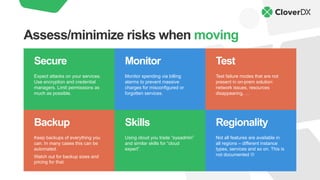
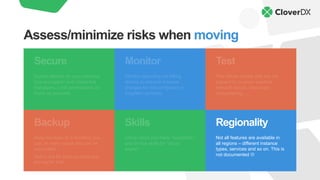
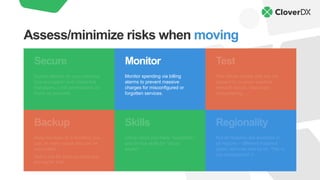
Backup
Keep backups of everything you
can. In many cases this can be
automated.
Watch out for backup sizes and
pricing for that.
Skills
Using cloud you trade “sysadmin”
and similar skills for “cloud
expert”.
Regionality
Not all features are available in
all regions – different instance
types, services and so on. This is
not documented L
Monitor
Monitor spending via billing
alarms to prevent massive
charges for misconfigured or
forgotten services.
Secure
Expect attacks on your services.
Use encryption and credential
managers. Limit permissions as
much as possible.
Test
Test failure modes that are not
present in on-prem solution:
network issues, resources
disappearing, …
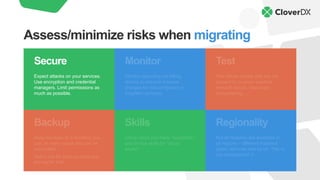
Assess/minimize risks when moving
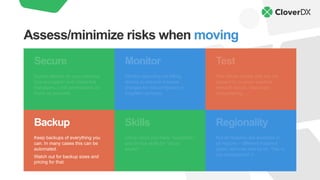
Backup
Keep backups of everything you
can. In many cases this can be
automated.
Watch out for backup sizes and
pricing for that.
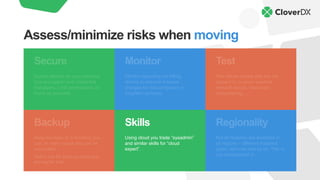
Skills
Using cloud you trade “sysadmin”
and similar skills for “cloud
expert”.
Regionality
Not all features are available in
all regions – different instance
types, services and so on. This is
not documented L
Monitor
Monitor spending via billing
alarms to prevent massive
charges for misconfigured or
forgotten services.
Secure
Expect attacks on your services.
Use encryption and credential
managers. Limit permissions as
much as possible.
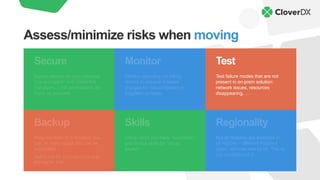
Test
Test failure modes that are not
present in on-prem solution:
network issues, resources
disappearing, …
Assess/minimize risks when migrating
Backup
Keep backups of everything you
can. In many cases this can be
automated.
Watch out for backup sizes and
pricing for that.
Skills
Using cloud you trade “sysadmin”
and similar skills for “cloud
expert”.
Regionality
Not all features are available in
all regions – different instance
types, services and so on. This is
not documented L
Monitor
Monitor spending via billing
alarms to prevent massive
charges for misconfigured or
forgotten services.
Secure
Expect attacks on your services.
Use encryption and credential
managers. Limit permissions as
much as possible.
Test
Test failure modes that are not
present in on-prem solution:
network issues, resources
disappearing, …
Assess/minimize risks when moving
Backup
Keep backups of everything you
can. In many cases this can be
automated.
Watch out for backup sizes and
pricing for that.
Skills
Using cloud you trade “sysadmin”
and similar skills for “cloud
expert”.
Regionality
Not all features are available in
all regions – different instance
types, services and so on. This is
not documented L
Monitor
Monitor spending via billing
alarms to prevent massive
charges for misconfigured or
forgotten services.
Secure
Expect attacks on your services.
Use encryption and credential
managers. Limit permissions as
much as possible.
Test
Test failure modes that are not
present in on-prem solution:
network issues, resources
disappearing, …
Assess/minimize risks when moving
Backup
Keep backups of everything you
can. In many cases this can be
automated.
Watch out for backup sizes and
pricing for that.
Skills
Using cloud you trade “sysadmin”
and similar skills for “cloud
expert”.
Regionality
Not all features are available in
all regions – different instance
types, services and so on. This is
not documented L
Monitor
Monitor spending via billing
alarms to prevent massive
charges for misconfigured or
forgotten services.
Secure
Expect attacks on your services.
Use encryption and credential
managers. Limit permissions as
much as possible.
Test
Test failure modes that are not
present in on-prem solution:
network issues, resources
disappearing, …
Assess/minimize risks when moving
Backup
Keep backups of everything you
can. In many cases this can be
automated.
Watch out for backup sizes and
pricing for that.
Skills
Using cloud you trade “sysadmin”
and similar skills for “cloud
expert”.
Regionality
Not all features are available in
all regions – different instance
types, services and so on. This is
not documented L
Monitor
Monitor spending via billing
alarms to prevent massive
charges for misconfigured or
forgotten services.
Secure
Expect attacks on your services.
Use encryption and credential
managers. Limit permissions as
much as possible.
Test
Test failure modes that are not
present in on-prem solution:
network issues, resources
disappearing, …
Assess/minimize risks when moving
Backup
Keep backups of everything you
can. In many cases this can be
automated.
Watch out for backup sizes and
pricing for that.
Skills
Using cloud you trade “sysadmin”
and similar skills for “cloud
expert”.
Regionality
Not all features are available in
all regions – different instance
types, services and so on. This is
not documented L
Monitor
Monitor spending via billing
alarms to prevent massive
charges for misconfigured or
forgotten services.
Secure
Expect attacks on your services.
Use encryption and credential
managers. Limit permissions as
much as possible.
Test
Test failure modes that are not
present in on-prem solution:
network issues, resources
disappearing, …
Assess/minimize risks when moving
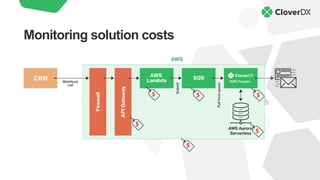
Monitoring solution costs
CRM
Help!
Solutions
delivery &
customer
enablement
team
Mature data
management
platform
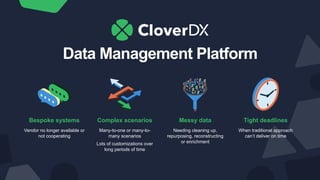
Data Management Platform
Bespoke systems
Vendor no longer available or
not cooperating
Complex scenarios
Many-to-one or many-to-
many scenarios
Lots of customizations over
long periods of time
Messy data
Needing cleaning up,
repurposing, reconstructing
or enrichment
Tight deadlines
When traditional approach
can’t deliver on time
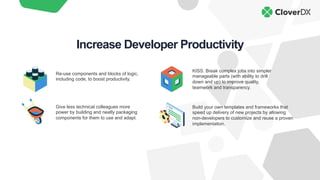
Re-use components and blocks of logic,
including code, to boost productivity.
KISS. Break complex jobs into simpler
manageable parts (with ability to drill
down and up) to improve quality,
teamwork and transparency.
Give less technical colleagues more
power by building and neatly packaging
components for them to use and adapt.
Build your own templates and frameworks that
speed up delivery of new projects by allowing
non-developers to customize and reuse a proven
implementation.
Increase Developer Productivity
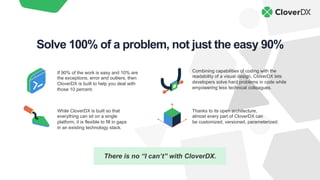
There is no “I can’t” with CloverDX.
Combining capabilities of coding with the
readability of a visual design, CloverDX lets
developers solve hard problems in code while
empowering less technical colleagues.
While CloverDX is built so that
everything can sit on a single
platform, it is flexible to fill in gaps
in an existing technology stack.
Thanks to its open architecture,
almost every part of CloverDX can
be customized, versioned, parameterized.
If 90% of the work is easy and 10% are
the exceptions, error and outliers, then
CloverDX is built to help you deal with
those 10 percent.
Solve 100% of a problem, not just the easy 90%

Moving Legacy Apps to Cloud: How to Avoid Risk

  • 1.
    Avoiding risk when movinglegacy apps to the cloud Kevin Scott, CloverDX
  • 2.
    Migration from legacysystem Legacy system New system Required for correct functioning of the organization Migrate Has not been modernized in a long time, runs on outdated platform In-house or heavily customized Holds business critical data – CRM, ERP, billing… Modern, more capable system Often cloud-based Provides business benefit like better reporting, data quality, visibility, …
  • 3.
    Legacy application nolonger maintainable Support getting expensive Legacy application does not work well with our newer applications o May require outdated platform to run on, including thick client o Does not integrate well with our other cloud-based systems New platforms may expedite support of mobile apps Legacy application missing features users have come to expect (e.g Search, Recommendation engine, AI-inspired analytics) Why move
  • 4.
    On-prem infrastructure isexpensive: time, people, money Cloud availability is higher than most on-prem solutions o On-prem “data centre” might have power outages, networking issues On-prem security is hard o Especially if you host something (applications, APIs, file downloads) You want to use or provide a shared service o SaaS applications, APIs, etc. OK, move but why to the cloud?
  • 5.
    Higher effort andcost More cloud benefits Lower effort and cost No cloud benefits Retire Lift & shift Replatform Repurchase Do nothing Refactor Keep existing apps without change. Stop using an application that is no longer needed. Move app into IaaS with minimal rework. Buy a new application to replace the old one. Replace parts of the app with cloud-based equivalents. Rebuild the app to use as many cloud-native services as possible.
  • 6.
    Different ways ofbuilding applications Greater agility Lower complexity, easier to run Miniservices Microservices (Macro) Services
  • 7.
    Simple in-house application oConnect to HubSpot, pull data, produce reports and send them via email. In-house application Virtual machine Internal data center PostgreSQL
  • 8.
    No change inthe code, just configuration Move business logic and database to cloud versions of the same o VM moved to EC2 instance, database is still the same, but managed in cloud Lift-and-shift migration architecture EC2 instance AWS RDS PostgreSQL
  • 9.
    Using many differentservices, all managed More robust and scalable, automated instead of manual reporting Rearchitect to cloud-native app
  • 10.
    Purchase a SaaS-basedproduct to replace your current system Likely requires compromise on feature set Removes burden of design, operation, maintenance of replacement Replacement Cloud 3rd Party Cloud Application
  • 11.
    Backup Keep backups ofeverything you can. In many cases this can be automated. Watch out for backup sizes and pricing for that. Skills Using cloud you trade “sysadmin” and similar skills for “cloud expert”. Regionality Not all features are available in all regions – different instance types, services and so on. This is not documented L Monitor Monitor spending via billing alarms to prevent massive charges for misconfigured or forgotten services. Secure Expect attacks on your services. Use encryption and credential managers. Limit permissions as much as possible. Test Test failure modes that are not present in on-prem solution: network issues, resources disappearing, … Assess/minimize risks when moving
  • 12.
    Backup Keep backups ofeverything you can. In many cases this can be automated. Watch out for backup sizes and pricing for that. Skills Using cloud you trade “sysadmin” and similar skills for “cloud expert”. Regionality Not all features are available in all regions – different instance types, services and so on. This is not documented L Monitor Monitor spending via billing alarms to prevent massive charges for misconfigured or forgotten services. Secure Expect attacks on your services. Use encryption and credential managers. Limit permissions as much as possible. Test Test failure modes that are not present in on-prem solution: network issues, resources disappearing, … Assess/minimize risks when migrating
  • 13.
    Backup Keep backups ofeverything you can. In many cases this can be automated. Watch out for backup sizes and pricing for that. Skills Using cloud you trade “sysadmin” and similar skills for “cloud expert”. Regionality Not all features are available in all regions – different instance types, services and so on. This is not documented L Monitor Monitor spending via billing alarms to prevent massive charges for misconfigured or forgotten services. Secure Expect attacks on your services. Use encryption and credential managers. Limit permissions as much as possible. Test Test failure modes that are not present in on-prem solution: network issues, resources disappearing, … Assess/minimize risks when moving
  • 14.
    Backup Keep backups ofeverything you can. In many cases this can be automated. Watch out for backup sizes and pricing for that. Skills Using cloud you trade “sysadmin” and similar skills for “cloud expert”. Regionality Not all features are available in all regions – different instance types, services and so on. This is not documented L Monitor Monitor spending via billing alarms to prevent massive charges for misconfigured or forgotten services. Secure Expect attacks on your services. Use encryption and credential managers. Limit permissions as much as possible. Test Test failure modes that are not present in on-prem solution: network issues, resources disappearing, … Assess/minimize risks when moving
  • 15.
    Backup Keep backups ofeverything you can. In many cases this can be automated. Watch out for backup sizes and pricing for that. Skills Using cloud you trade “sysadmin” and similar skills for “cloud expert”. Regionality Not all features are available in all regions – different instance types, services and so on. This is not documented L Monitor Monitor spending via billing alarms to prevent massive charges for misconfigured or forgotten services. Secure Expect attacks on your services. Use encryption and credential managers. Limit permissions as much as possible. Test Test failure modes that are not present in on-prem solution: network issues, resources disappearing, … Assess/minimize risks when moving
  • 16.
    Backup Keep backups ofeverything you can. In many cases this can be automated. Watch out for backup sizes and pricing for that. Skills Using cloud you trade “sysadmin” and similar skills for “cloud expert”. Regionality Not all features are available in all regions – different instance types, services and so on. This is not documented L Monitor Monitor spending via billing alarms to prevent massive charges for misconfigured or forgotten services. Secure Expect attacks on your services. Use encryption and credential managers. Limit permissions as much as possible. Test Test failure modes that are not present in on-prem solution: network issues, resources disappearing, … Assess/minimize risks when moving
  • 17.
    Backup Keep backups ofeverything you can. In many cases this can be automated. Watch out for backup sizes and pricing for that. Skills Using cloud you trade “sysadmin” and similar skills for “cloud expert”. Regionality Not all features are available in all regions – different instance types, services and so on. This is not documented L Monitor Monitor spending via billing alarms to prevent massive charges for misconfigured or forgotten services. Secure Expect attacks on your services. Use encryption and credential managers. Limit permissions as much as possible. Test Test failure modes that are not present in on-prem solution: network issues, resources disappearing, … Assess/minimize risks when moving
  • 18.
  • 19.
  • 20.
  • 21.
    Data Management Platform Bespokesystems Vendor no longer available or not cooperating Complex scenarios Many-to-one or many-to- many scenarios Lots of customizations over long periods of time Messy data Needing cleaning up, repurposing, reconstructing or enrichment Tight deadlines When traditional approach can’t deliver on time
  • 22.
    Re-use components andblocks of logic, including code, to boost productivity. KISS. Break complex jobs into simpler manageable parts (with ability to drill down and up) to improve quality, teamwork and transparency. Give less technical colleagues more power by building and neatly packaging components for them to use and adapt. Build your own templates and frameworks that speed up delivery of new projects by allowing non-developers to customize and reuse a proven implementation. Increase Developer Productivity
  • 23.
    There is no“I can’t” with CloverDX. Combining capabilities of coding with the readability of a visual design, CloverDX lets developers solve hard problems in code while empowering less technical colleagues. While CloverDX is built so that everything can sit on a single platform, it is flexible to fill in gaps in an existing technology stack. Thanks to its open architecture, almost every part of CloverDX can be customized, versioned, parameterized. If 90% of the work is easy and 10% are the exceptions, error and outliers, then CloverDX is built to help you deal with those 10 percent. Solve 100% of a problem, not just the easy 90%