GETTING STARTED WITH DOCKER
(for developers)
BY: CURT GRATZ
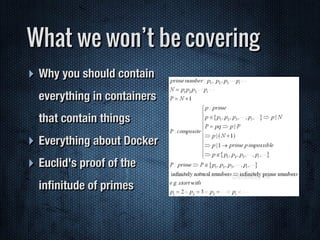
‣ Why you should contain
everything in containers
that contain things
‣ Everything about Docker
‣ Euclid's proof of the
infinitude of primes
What we won’t be covering
‣ Learn about Docker from a developers
perspective
‣ Learn how to get started with Docker
‣ Learn the basic Docker commands you will use
every day as a developer
‣ Get Docker installed and running on your machine
What we will be covering
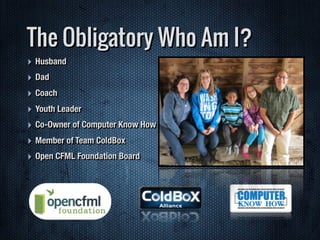
‣ Husband
‣ Dad
‣ Coach
‣ Youth Leader
‣ Co-Owner of Computer Know How
‣ Member of Team ColdBox
‣ Open CFML Foundation Board
The Obligatory Who Am I?
‣ Tried Docker
‣ Deployed Docker
‣ Installed Docker locally
‣ Written a Dockerfile
‣ An image on Docker Hub
Little about you
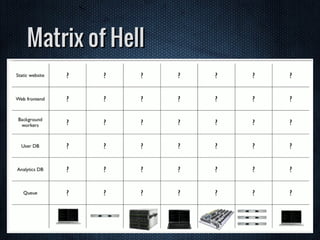
Matrix of Hell
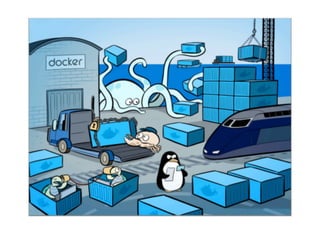
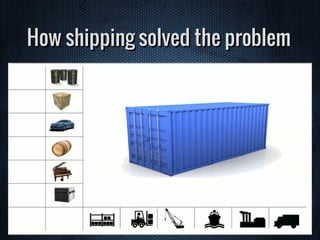
How shipping solved the problem
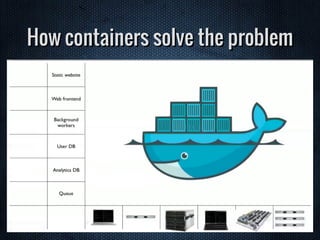
How containers solve the problem
Docker is Open Source
Written in Go
Its not Ruby, so the Python
people are happy
Its not Python, so the Ruby
people are happy
Its not Node.JS, so most people
are happy
Its not Java, so everyone is happy
Its not CFML, so no one is happy
A contract between Dev and Ops
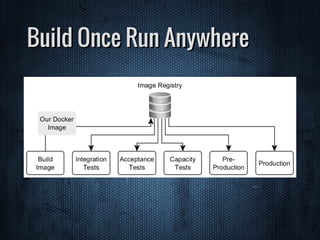
Build Once Run Anywhere
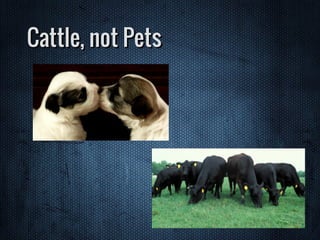
Cattle, not Pets
Install Party
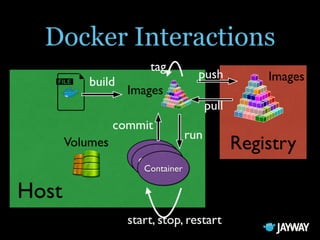
Image
Image, a hierarchy of files, with meta-data for how
to run a container.
Container
Container, a contained running process, started
from an image.
Registry
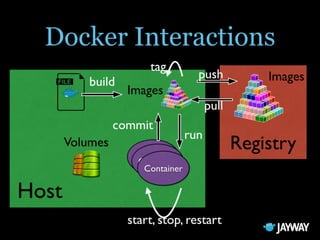
Registry, a repository of images. - Public or Private
Dockerfile
Dockerfile, a script for creating images.
Volume
Storage outside the container.
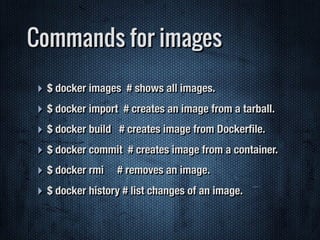
Commands for images
‣ $ docker images # shows all images.
‣ $ docker import # creates an image from a tarball.
‣ $ docker build # creates image from Dockerfile.
‣ $ docker commit # creates image from a container.
‣ $ docker rmi # removes an image.
‣ $ docker history # list changes of an image.
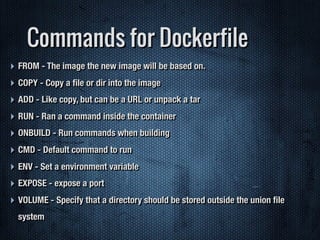
Commands for Dockerfile
‣ FROM - The image the new image will be based on.
‣ COPY - Copy a file or dir into the image
‣ ADD - Like copy, but can be a URL or unpack a tar
‣ RUN - Ran a command inside the container
‣ ONBUILD - Run commands when building
‣ CMD - Default command to run
‣ ENV - Set a environment variable
‣ EXPOSE - expose a port
‣ VOLUME - Specify that a directory should be stored outside the union file
system
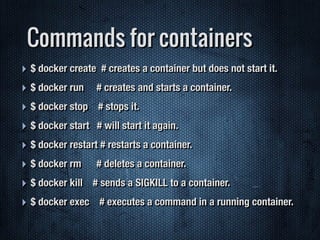
Commands for containers
‣ $ docker create # creates a container but does not start it.
‣ $ docker run # creates and starts a container.
‣ $ docker stop # stops it.
‣ $ docker start # will start it again.
‣ $ docker restart # restarts a container.
‣ $ docker rm # deletes a container.
‣ $ docker kill # sends a SIGKILL to a container.
‣ $ docker exec # executes a command in a running container.
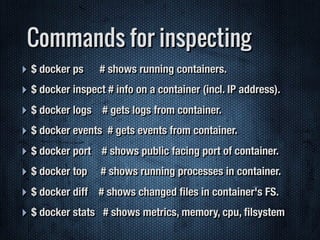
Commands for inspecting
‣ $ docker ps # shows running containers.
‣ $ docker inspect # info on a container (incl. IP address).
‣ $ docker logs # gets logs from container.
‣ $ docker events # gets events from container.
‣ $ docker port # shows public facing port of container.
‣ $ docker top # shows running processes in container.
‣ $ docker diff # shows changed files in container's FS.
‣ $ docker stats # shows metrics, memory, cpu, filsystem
Demo time
“Thank you.”
–hold up applause sign here
‣ Email - gratzc@compknowhow.com
‣ Blog - http://www.compknowhow.com/blog/
‣ Twitter - gratzc
‣ Skype - gratzc
‣ Snapchat - gratzc
‣ League of Legends - gratzc
Contact Info

Getting Started with Docker (For Developers)

  • 1.
    GETTING STARTED WITHDOCKER (for developers) BY: CURT GRATZ
  • 8.
    ‣ Why youshould contain everything in containers that contain things ‣ Everything about Docker ‣ Euclid's proof of the infinitude of primes What we won’t be covering
  • 9.
    ‣ Learn aboutDocker from a developers perspective ‣ Learn how to get started with Docker ‣ Learn the basic Docker commands you will use every day as a developer ‣ Get Docker installed and running on your machine What we will be covering
  • 10.
    ‣ Husband ‣ Dad ‣Coach ‣ Youth Leader ‣ Co-Owner of Computer Know How ‣ Member of Team ColdBox ‣ Open CFML Foundation Board The Obligatory Who Am I?
  • 11.
    ‣ Tried Docker ‣Deployed Docker ‣ Installed Docker locally ‣ Written a Dockerfile ‣ An image on Docker Hub Little about you
  • 12.
  • 13.
  • 14.
  • 15.
  • 16.
  • 17.
    Its not Ruby,so the Python people are happy
  • 18.
    Its not Python,so the Ruby people are happy
  • 19.
    Its not Node.JS,so most people are happy
  • 20.
    Its not Java,so everyone is happy
  • 21.
    Its not CFML,so no one is happy
  • 22.
    A contract betweenDev and Ops
  • 23.
  • 24.
  • 25.
  • 27.
    Image Image, a hierarchyof files, with meta-data for how to run a container.
  • 28.
    Container Container, a containedrunning process, started from an image.
  • 29.
    Registry Registry, a repositoryof images. - Public or Private
  • 30.
  • 31.
  • 33.
    Commands for images ‣$ docker images # shows all images. ‣ $ docker import # creates an image from a tarball. ‣ $ docker build # creates image from Dockerfile. ‣ $ docker commit # creates image from a container. ‣ $ docker rmi # removes an image. ‣ $ docker history # list changes of an image.
  • 34.
    Commands for Dockerfile ‣FROM - The image the new image will be based on. ‣ COPY - Copy a file or dir into the image ‣ ADD - Like copy, but can be a URL or unpack a tar ‣ RUN - Ran a command inside the container ‣ ONBUILD - Run commands when building ‣ CMD - Default command to run ‣ ENV - Set a environment variable ‣ EXPOSE - expose a port ‣ VOLUME - Specify that a directory should be stored outside the union file system
  • 35.
    Commands for containers ‣$ docker create # creates a container but does not start it. ‣ $ docker run # creates and starts a container. ‣ $ docker stop # stops it. ‣ $ docker start # will start it again. ‣ $ docker restart # restarts a container. ‣ $ docker rm # deletes a container. ‣ $ docker kill # sends a SIGKILL to a container. ‣ $ docker exec # executes a command in a running container.
  • 36.
    Commands for inspecting ‣$ docker ps # shows running containers. ‣ $ docker inspect # info on a container (incl. IP address). ‣ $ docker logs # gets logs from container. ‣ $ docker events # gets events from container. ‣ $ docker port # shows public facing port of container. ‣ $ docker top # shows running processes in container. ‣ $ docker diff # shows changed files in container's FS. ‣ $ docker stats # shows metrics, memory, cpu, filsystem
  • 37.
  • 38.
    “Thank you.” –hold upapplause sign here
  • 39.
    ‣ Email -gratzc@compknowhow.com ‣ Blog - http://www.compknowhow.com/blog/ ‣ Twitter - gratzc ‣ Skype - gratzc ‣ Snapchat - gratzc ‣ League of Legends - gratzc Contact Info