Docker 101
Mirza Nafis Faysal
Software Engineer, Furqan Software
github.com/NafisFaysal
twitter.com/NafisFaysalMir
Motivation
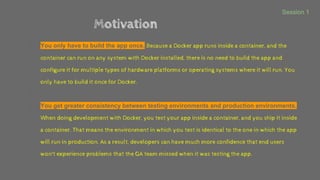
● You only have to build the app once. Because a Docker app runs inside a container, and the
container can run on any system with Docker installed, there is no need to build the app and
configure it for multiple types of hardware platforms or operating systems where it will run. You
only have to build it once for Docker.
●
● You get greater consistency between testing environments and production environments.
When doing development with Docker, you test your app inside a container, and you ship it inside
a container. That means the environment in which you test is identical to the one in which the app
will run in production. As a result, developers can have much more confidence that end users
won't experience problems that the QA team missed when it was testing the app.
Session 1
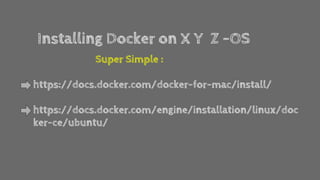
Installing Docker on X Y Z -OS
Super Simple :
https://docs.docker.com/docker-for-mac/install/
https://docs.docker.com/engine/installation/linux/doc
ker-ce/ubuntu/
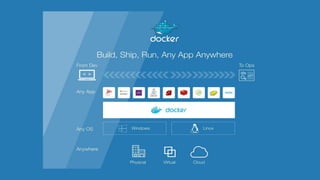
Docker.com Says
Docker is an open platform for developers and sysadmins
to build, ship, and run distributed applications.
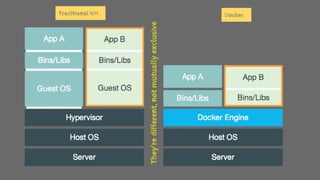
Traditional VM Docker
They’redifferent,notmutuallyexclusive
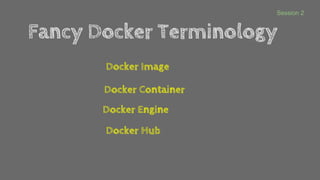
Fancy Docker Terminology
Docker Image
Docker Container
Docker Engine
Docker Hub
Session 2
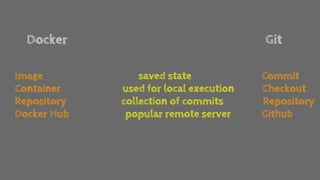
Docker Git
Image saved state Commit
Container used for local execution Checkout
Repository collection of commits Repository
Docker Hub popular remote server Github
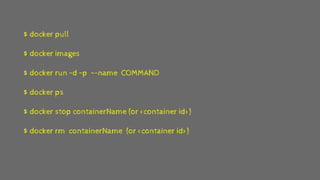
Basic Docker Commands
$ docker pull
$ docker images
$ docker run –d –p –-name COMMAND
$ docker ps
$ docker stop containerName (or <container id>)
$ docker rm containerName (or <container id>)
Dockerfile
Series of commands to build an image
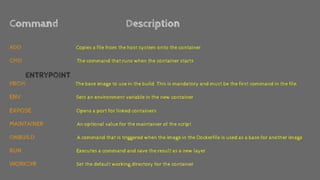
Command Description
ADD Copies a file from the host system onto the container
CMD The command that runs when the container starts
ENTRYPOINT
FROM The base image to use in the build. This is mandatory and must be the first command in the file.
ENV Sets an environment variable in the new container
EXPOSE Opens a port for linked containers
MAINTAINER An optional value for the maintainer of the script
ONBUILD A command that is triggered when the image in the Dockerfile is used as a base for another image
RUN Executes a command and save the result as a new layer
WORKDIR Set the default working directory for the container
Docker Compose : Get an app running in one command.
Session 3
‘’Compose is a tool for defining and running complex
applications with Docker. With Compose, you define
a multi-container application in a single file, then
spin your application up in a single command which
does everything that needs to be done to get it
running.’’
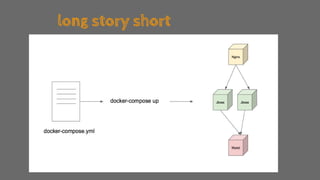
long story short
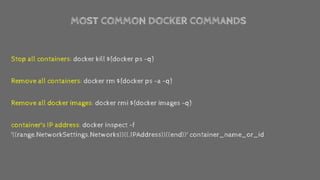
MOST COMMON DOCKER COMMANDS
Stop all containers: docker kill $(docker ps -q)
Remove all containers: docker rm $(docker ps -a -q)
Remove all docker images: docker rmi $(docker images -q)
container's IP address: docker inspect -f
'{{range.NetworkSettings.Networks}}{{.IPAddress}}{{end}}' container_name_or_id
Question ?
Happy Weekend

Docker 101

  • 1.
  • 2.
    Mirza Nafis Faysal SoftwareEngineer, Furqan Software github.com/NafisFaysal twitter.com/NafisFaysalMir
  • 3.
    Motivation ● You onlyhave to build the app once. Because a Docker app runs inside a container, and the container can run on any system with Docker installed, there is no need to build the app and configure it for multiple types of hardware platforms or operating systems where it will run. You only have to build it once for Docker. ● ● You get greater consistency between testing environments and production environments. When doing development with Docker, you test your app inside a container, and you ship it inside a container. That means the environment in which you test is identical to the one in which the app will run in production. As a result, developers can have much more confidence that end users won't experience problems that the QA team missed when it was testing the app. Session 1
  • 4.
    Installing Docker onX Y Z -OS Super Simple : https://docs.docker.com/docker-for-mac/install/ https://docs.docker.com/engine/installation/linux/doc ker-ce/ubuntu/
  • 6.
    Docker.com Says Docker isan open platform for developers and sysadmins to build, ship, and run distributed applications.
  • 7.
  • 9.
    Fancy Docker Terminology DockerImage Docker Container Docker Engine Docker Hub Session 2
  • 10.
    Docker Git Image savedstate Commit Container used for local execution Checkout Repository collection of commits Repository Docker Hub popular remote server Github
  • 11.
  • 12.
    $ docker pull $docker images $ docker run –d –p –-name COMMAND $ docker ps $ docker stop containerName (or <container id>) $ docker rm containerName (or <container id>)
  • 13.
  • 14.
    Command Description ADD Copiesa file from the host system onto the container CMD The command that runs when the container starts ENTRYPOINT FROM The base image to use in the build. This is mandatory and must be the first command in the file. ENV Sets an environment variable in the new container EXPOSE Opens a port for linked containers MAINTAINER An optional value for the maintainer of the script ONBUILD A command that is triggered when the image in the Dockerfile is used as a base for another image RUN Executes a command and save the result as a new layer WORKDIR Set the default working directory for the container
  • 15.
    Docker Compose :Get an app running in one command. Session 3
  • 16.
    ‘’Compose is atool for defining and running complex applications with Docker. With Compose, you define a multi-container application in a single file, then spin your application up in a single command which does everything that needs to be done to get it running.’’
  • 17.
  • 18.
    MOST COMMON DOCKERCOMMANDS Stop all containers: docker kill $(docker ps -q) Remove all containers: docker rm $(docker ps -a -q) Remove all docker images: docker rmi $(docker images -q) container's IP address: docker inspect -f '{{range.NetworkSettings.Networks}}{{.IPAddress}}{{end}}' container_name_or_id
  • 19.
  • 20.