Getting into your Google Apps Account: For StudentsBy M. Peters, High School Technology Integration
Basics…All high school students have been issued a Colegio Americano Google Apps AccountIncludes access to Gmail, Google Docs, Google Calendar, Google Groups, Google Sites Your login and email address match the number you use to log into the school network.Your advisor will tell you your temporary password. CHANGE IT ASAP!
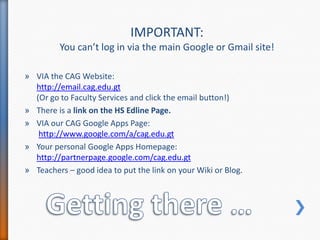
Getting there …IMPORTANT: You can’t log in via the main Google or Gmail site!VIA the CAG Website: http://email.cag.edu.gt(Or go to Faculty Services and click the email button!)There is a link on the HS Edline Page.VIA our CAG Google Apps Page:http://www.google.com/a/cag.edu.gtYour personal Google Apps Homepage:http://partnerpage.google.com/cag.edu.gtTeachers – good idea to put the link on your Wiki or Blog.
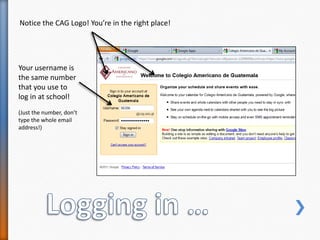
Logging in …Notice the CAG Logo! You’re in the right place!Your username is the same number that you use to log in at school!(Just the number, don’t type the whole email address!)
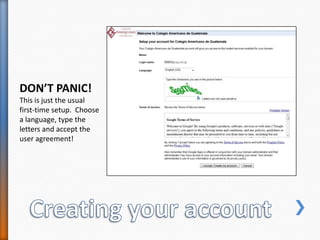
DON’T PANIC!This is just the usual first-time setup.  Choose a language, type the letters and accept the user agreement!Creating your account
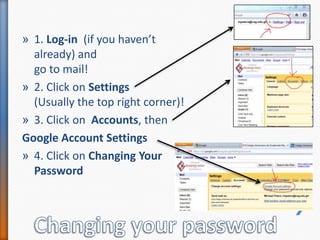
1. Log-in  (if you haven’t already) and go to mail!2. Click on Settings (Usually the top right corner)!3. Click on  Accounts, then Google Account Settings 4. Click on Changing Your PasswordChanging your password
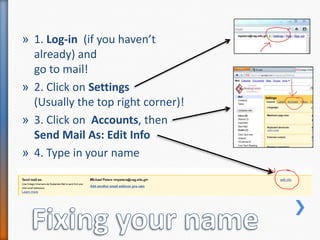
1. Log-in  (if you haven’t already) and go to mail!2. Click on Settings (Usually the top right corner)!3. Click on  Accounts, then Send Mail As: Edit Info4. Type in your nameFixing your name
Need to KnowUse this account for ALL school activities – especially signing up for WIKIs!This is a school-run, school-administered email account. There is no privacy.Use of this account (and all other online activities) are covered by the Acceptable Use Agreement, which you all have signed (or will sign shortly!)

Getting Into Google Apps: For Students

  • 1.
    Getting into yourGoogle Apps Account: For StudentsBy M. Peters, High School Technology Integration
  • 2.
    Basics…All high schoolstudents have been issued a Colegio Americano Google Apps AccountIncludes access to Gmail, Google Docs, Google Calendar, Google Groups, Google Sites Your login and email address match the number you use to log into the school network.Your advisor will tell you your temporary password. CHANGE IT ASAP!
  • 3.
    Getting there …IMPORTANT:You can’t log in via the main Google or Gmail site!VIA the CAG Website: http://email.cag.edu.gt(Or go to Faculty Services and click the email button!)There is a link on the HS Edline Page.VIA our CAG Google Apps Page:http://www.google.com/a/cag.edu.gtYour personal Google Apps Homepage:http://partnerpage.google.com/cag.edu.gtTeachers – good idea to put the link on your Wiki or Blog.
  • 4.
    Logging in …Noticethe CAG Logo! You’re in the right place!Your username is the same number that you use to log in at school!(Just the number, don’t type the whole email address!)
  • 5.
    DON’T PANIC!This isjust the usual first-time setup. Choose a language, type the letters and accept the user agreement!Creating your account
  • 6.
    1. Log-in (if you haven’t already) and go to mail!2. Click on Settings (Usually the top right corner)!3. Click on Accounts, then Google Account Settings 4. Click on Changing Your PasswordChanging your password
  • 7.
    1. Log-in (if you haven’t already) and go to mail!2. Click on Settings (Usually the top right corner)!3. Click on Accounts, then Send Mail As: Edit Info4. Type in your nameFixing your name
  • 8.
    Need to KnowUsethis account for ALL school activities – especially signing up for WIKIs!This is a school-run, school-administered email account. There is no privacy.Use of this account (and all other online activities) are covered by the Acceptable Use Agreement, which you all have signed (or will sign shortly!)