


Copyright © 2011 GeoEnable Ltd. All Rights Reserved
Geo-Enabling Asset Management
Steven Eglinton
30 November 2011
The Asset Management Conference 2011
IET, London
Copyright © 2011 GeoEnable Ltd. All Rights Reserved
Outcomes
• My involvement with GIS and Asset Management
• Geospatial at Tube Lines
• Lesson Learnt / Challenges
• Steps to Achieve Geo-Enablement
• From Project to Process Focus
• Opportunities
• Conclusions
Copyright © 2011 GeoEnable Ltd. All Rights Reserved
My Involvement in Asset Management/GIS
• 12+ years in Geospatial Information Industry:
• 10 years - land/environment assets management
• 4 years Corporate Geospatial Information
Manager, Tube Lines (London Underground)
Now
• Director, GeoEnable
• Council Member/Director, AGI -
The UK Geospatial Membership Body
Copyright © 2011 GeoEnable Ltd. All Rights Reserved
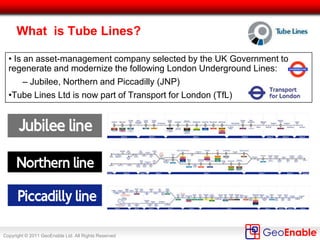
What is Tube Lines?
• Is an asset-management company selected by the UK Government to
regenerate and modernize the following London Underground Lines:
– Jubilee, Northern and Piccadilly (JNP)
•Tube Lines Ltd is now part of Transport for London (TfL)
Copyright © 2011 GeoEnable Ltd. All Rights Reserved
Approximately 2,100 employees
Assets and Network
227 escalators
71 lifts
2,395 buildings and structures
207 miles of track
251 trains
100 stations
1.75 Million Passengers each
Weekday
Copyright © 2011 GeoEnable Ltd. All Rights Reserved
Contract
• Performance Contract between Tube Lines and London
Underground.
• Tube Lines is contracted to improve the assets and the
service.
• Pain/gain based on five measurement criteria:
– Capability - Journey time minutes,
– Availability - Lost customer hours,
– Service points - Number of system faults,
– Ambience - Mystery Shopper Surveys,
– Stations delivery - Delivery of projects against set dates.
Copyright © 2011 GeoEnable Ltd. All Rights Reserved
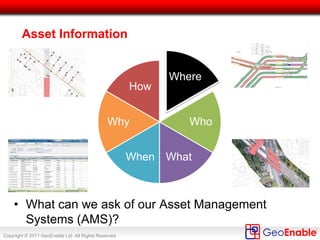
Key Asset Information – Location (‘Where’)
Where
Who
WhatWhen
Why
How
• ‘Where’ is the key for context – but, this is granular enough in your
Asset Management System (AMS)?
Copyright © 2011 GeoEnable Ltd. All Rights Reserved
Location (‘Where’) Applies to All Asset Groups
Civils
•Bridges & Structures
•Pumps & Drainage
•Deep Tunnels
•Earth Structures
Track Signals Rolling Stock
Premises Power
Mechanical
Services
Lifts & Escalators
Fire Protection Electrical Depot/Plant Communications
• All assets can be visualised in the GIS / mapping tools, when
encoded with the correct location codes (linear and non-linear)
Copyright © 2011 GeoEnable Ltd. All Rights Reserved
Example: Civils and Track
In this example
Geographic View of:
• Civils
• Bridges &
Structures
• Earth Structures
• P-Way
• Plain line track
• P & C (switches)
SOURCES
GEOMETRY
Generated using geometry
(‘shapes’) take from CAD, survey
data and digitized in GIS (using
aerial imagery and LiDAR).
ATTRIBUTES
Held and mastered in Maximo
EAMS
Copyright © 2011 GeoEnable Ltd. All Rights Reserved
Example: Signals and Track
In this example
Schematic View of:
• Signals
• P-Way
• Plain line track
• P & C (switches)
SOURCES
GEOMETRY
Generated using ‘Dynamic
Segmentation’ i.e. taking linear
reference from Maximo and
‘plotting’ location using track
centre line
ATTRIBUTES
Held and mastered in Maximo
EAMS
Copyright © 2011 GeoEnable Ltd. All Rights Reserved
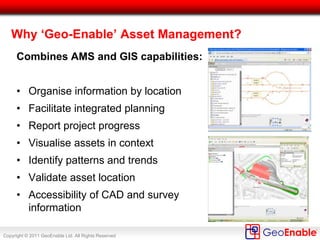
Why ‘Geo-Enable’ Asset Management?
Combines AMS and GIS capabilities:
• Organise information by location
• Facilitate integrated planning
• Report project progress
• Visualise assets in context
• Identify patterns and trends
• Validate asset location
• Accessibility of CAD and survey
information
Copyright © 2011 GeoEnable Ltd. All Rights Reserved
Example: Track Model
Construction & Verification
Overview - all Tube Lines
tracks, centre lines drawn out
to grid full size
Detail - all tracks and points given
LCS coding.
All Points & Crossings (switches)
represented as discrete area assets
in the track model and the Maximo
database
Copyright © 2011 GeoEnable Ltd. All Rights Reserved
We do more than GIS –
We use and manage all types of Geospatial data:
• Geographic Information Systems (GIS)
• Computer-Aided Design (CAD)
• Survey Activities (Laser Scanning & ‘Geomatics’)
• Building Information Modelling (BIM)
• Remote Sensing (Satellite, Aerial, LiDAR)
• Global Navigation Satellite Systems (GNSS/GPS)
• Location Information (e.g. addresses, coordinates)
• Web Maps & Web GIS
Copyright © 2011 GeoEnable Ltd. All Rights Reserved
What is Location Intelligence?
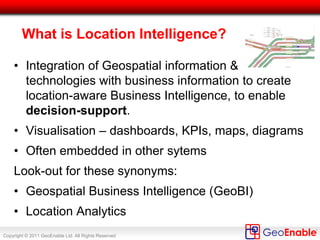
• Integration of Geospatial information &
technologies with business information to create
location-aware Business Intelligence, to enable
decision-support.
• Visualisation – dashboards, KPIs, maps, diagrams
• Often embedded in other sytems
Look-out for these synonyms:
• Geospatial Business Intelligence (GeoBI)
• Location Analytics
Copyright © 2011 GeoEnable Ltd. All Rights Reserved
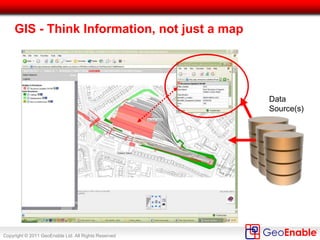
GIS - Think Information, not just a map
Data
Source(s)
Copyright © 2011 GeoEnable Ltd. All Rights Reserved
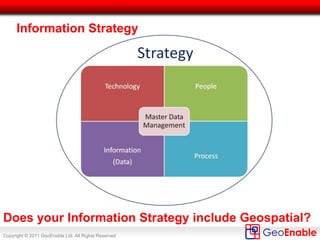
Information Strategy
Does your Information Strategy include Geospatial?
Copyright © 2011 GeoEnable Ltd. All Rights Reserved
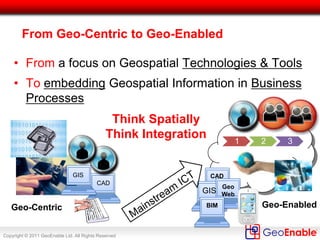
From Geo-Centric to Geo-Enabled
• From a focus on Geospatial Technologies & Tools
• To embedding Geospatial Information in Business
Processes
Geo-Centric Geo-Enabled
CAD
GIS
1 2 3
CAD
GIS
Geo
Web
Think Spatially
Think Integration
BIM
Copyright © 2011 GeoEnable Ltd. All Rights Reserved
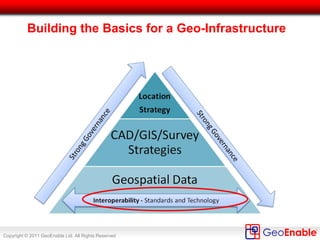
Building the Basics for a Geo-Infrastructure
Copyright © 2011 GeoEnable Ltd. All Rights Reserved
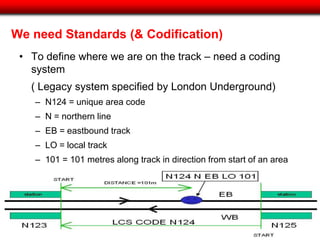
• To define where we are on the track – need a coding
system
( Legacy system specified by London Underground)
– N124 = unique area code
– N = northern line
– EB = eastbound track
– LO = local track
– 101 = 101 metres along track in direction from start of an area
We need Standards (& Codification)
Copyright © 2011 GeoEnable Ltd. All Rights Reserved
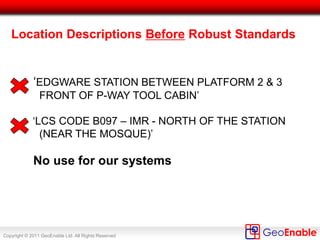
Location Descriptions Before Robust Standards
‘EDGWARE STATION BETWEEN PLATFORM 2 & 3
FRONT OF P-WAY TOOL CABIN’
‘LCS CODE B097 – IMR - NORTH OF THE STATION
(NEAR THE MOSQUE)’
No use for our systems
Copyright © 2011 GeoEnable Ltd. All Rights Reserved
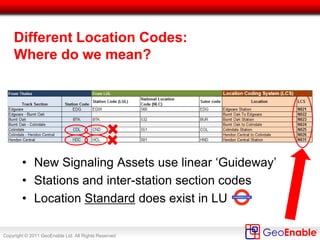
Different Location Codes:
Where do we mean?
• New Signaling Assets use linear ‘Guideway’
• Stations and inter-station section codes
• Location Standard does exist in LU
Copyright © 2011 GeoEnable Ltd. All Rights Reserved
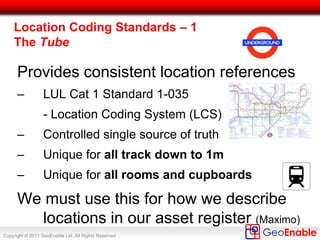
Provides consistent location references
– LUL Cat 1 Standard 1-035
- Location Coding System (LCS)
– Controlled single source of truth
– Unique for all track down to 1m
– Unique for all rooms and cupboards
We must use this for how we describe
locations in our asset register (Maximo)
Location Coding Standards – 1
The Tube
Copyright © 2011 GeoEnable Ltd. All Rights Reserved
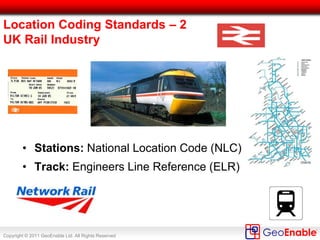
Location Coding Standards – 2
UK Rail Industry
• Stations: National Location Code (NLC)
• Routes: Engineers Line Reference (ELR)
• P-Way (track): Track IDs
• Civils: Railway ID (= ELR and ‘chainage’)
Copyright © 2011 GeoEnable Ltd. All Rights Reserved
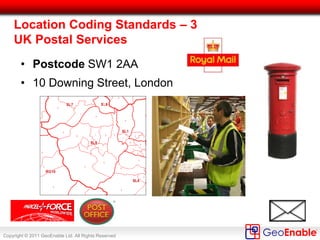
• Postcode SW1 2AA
• 10 Downing Street, London
Location Coding Standards – 3
UK Postal Services
Copyright © 2011 GeoEnable Ltd. All Rights Reserved
Who’s information is it anyway?
• Metadata, Metadata, Metadata
what is it?
what is it about?
what can I use it for?
who created it?
• Needed for interoperability
CAD, Survey, GIS, Locations
Copyright © 2011 GeoEnable Ltd. All Rights Reserved
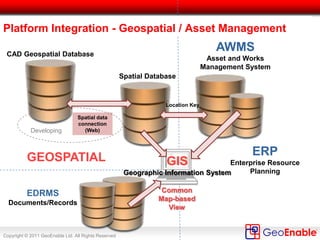
Spatial data
connection
(Web)
EDRMS
Documents/Records
AWMS
Asset and Works
Management System
GEOSPATIAL
Developing
Platform Integration - Geospatial / Asset Management
ERP
Enterprise Resource
Planning
Location Key
GIS
Geographic Information System
CAD Geospatial Database
Spatial Database
Common
Map-based
View
Copyright © 2011 GeoEnable Ltd. All Rights Reserved
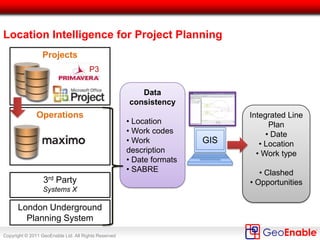
Location Intelligence for Project Planning
GIS
Integrated Line
Plan
• Date
• Location
• Work type
• Clashed
• Opportunities
Operations
Projects
3rd Party
Systems X
London Underground
Planning System
Data
consistency
• Location
• Work codes
• Work
description
• Date formats
• SABRE
Copyright © 2011 GeoEnable Ltd. All Rights Reserved
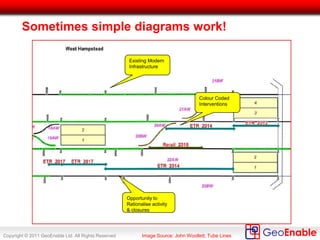
Sometimes simple diagrams work!
Existing Modern
Infrastructure
Colour Coded
Interventions
Opportunity to
Rationalise activity
& closures
Image Source: John Woollett, Tube Lines
Copyright © 2011 GeoEnable Ltd. All Rights Reserved
Benefits of Location Intelligence
1. Improved communication and interpretation
2. Adds context to data
3. Patterns and clusters become clear
4. Clashes/Opportunities for integrated works
5. Display trends and changes over time
Copyright © 2011 GeoEnable Ltd. All Rights Reserved
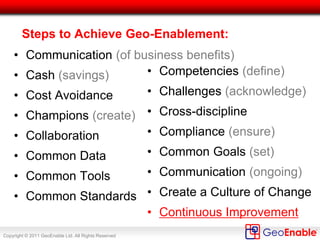
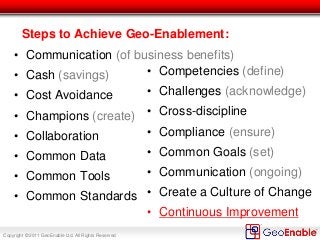
Steps to Achieve Geo-Enablement:
• Communication (of business benefits)
• Cash (savings)
• Cost Avoidance
• Champions (create)
• Collaboration
• Common Data
• Common Tools
• Common Standards
• Competencies (define)
• Challenges (acknowledge)
• Cross-discipline
• Compliance (ensure)
• Common Goals (set)
• Communication (ongoing)
• Create a Culture of Change
• Continuous Improvement
Copyright © 2011 GeoEnable Ltd. All Rights Reserved
SharedInformation
Shared Information
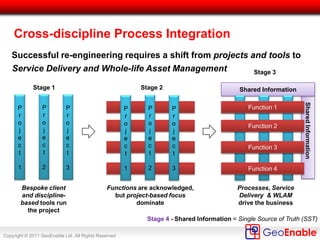
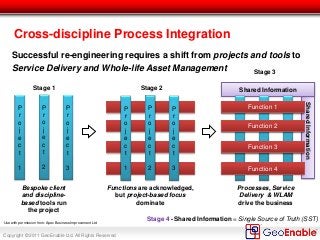
Cross-discipline Process Integration
Successful re-engineering requires a shift from projects and tools to
Service Delivery and Whole-life Asset Management
Bespoke client
and discipline-
based tools run
the project
Functions are acknowledged,
but project-based focus
dominate
Processes, Service
Delivery & WLAM
drive the business
Stage 1 Stage 2
Stage 3
P
r
o
j
e
c
t
1
P
r
o
j
e
c
t
2
P
r
o
j
e
c
t
3
P
r
o
j
e
c
t
1
P
r
o
j
e
c
t
2
P
r
o
j
e
c
t
3
Shared Information = Single Source of Truth (SST)
Function 2
Function 3
Function 4
Function 1
Stage 4 -
Function 2
Function 3
Function 1
Use with permission from: Apex Business Improvement Ltd
Copyright © 2011 GeoEnable Ltd. All Rights Reserved
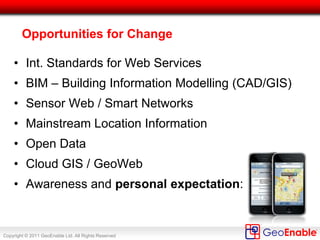
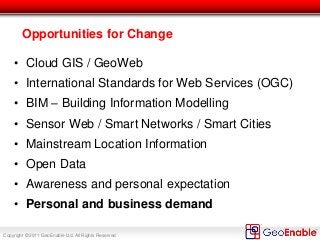
Opportunities for Change
• Cloud GIS / GeoWeb
• International Standards for Web Services (OGC)
• BIM – Building Information Modelling
• Sensor Web / Smart Networks / Smart Cities
• Mainstream Location Information
• Open Data
• Awareness and personal expectation
• Personal and business demand
Copyright © 2011 GeoEnable Ltd. All Rights Reserved
Thank you – Questions?
Contacts:
• www.GeoEnable.com

Geo-Enabling Asset Management

  • 1.
    Copyright © 2011GeoEnable Ltd. All Rights Reserved Geo-Enabling Asset Management Steven Eglinton 30 November 2011 The Asset Management Conference 2011 IET, London
  • 2.
    Copyright © 2011GeoEnable Ltd. All Rights Reserved Outcomes • My involvement with GIS and Asset Management • Geospatial at Tube Lines • Lesson Learnt / Challenges • Steps to Achieve Geo-Enablement • From Project to Process Focus • Opportunities • Conclusions
  • 3.
    Copyright © 2011GeoEnable Ltd. All Rights Reserved My Involvement in Asset Management/GIS • 12+ years in Geospatial Information Industry: • 10 years - land/environment assets management • 4 years Corporate Geospatial Information Manager, Tube Lines (London Underground) Now • Director, GeoEnable • Council Member/Director, AGI - The UK Geospatial Membership Body
  • 4.
    Copyright © 2011GeoEnable Ltd. All Rights Reserved What is Tube Lines? • Is an asset-management company selected by the UK Government to regenerate and modernize the following London Underground Lines: – Jubilee, Northern and Piccadilly (JNP) •Tube Lines Ltd is now part of Transport for London (TfL)
  • 5.
    Copyright © 2011GeoEnable Ltd. All Rights Reserved Approximately 2,100 employees Assets and Network 227 escalators 71 lifts 2,395 buildings and structures 207 miles of track 251 trains 100 stations 1.75 Million Passengers each Weekday
  • 6.
    Copyright © 2011GeoEnable Ltd. All Rights Reserved Contract • Performance Contract between Tube Lines and London Underground. • Tube Lines is contracted to improve the assets and the service. • Pain/gain based on five measurement criteria: – Capability - Journey time minutes, – Availability - Lost customer hours, – Service points - Number of system faults, – Ambience - Mystery Shopper Surveys, – Stations delivery - Delivery of projects against set dates.
  • 7.
    Copyright © 2011GeoEnable Ltd. All Rights Reserved Key Asset Information – Location (‘Where’) Where Who WhatWhen Why How • ‘Where’ is the key for context – but, this is granular enough in your Asset Management System (AMS)?
  • 8.
    Copyright © 2011GeoEnable Ltd. All Rights Reserved Location (‘Where’) Applies to All Asset Groups Civils •Bridges & Structures •Pumps & Drainage •Deep Tunnels •Earth Structures Track Signals Rolling Stock Premises Power Mechanical Services Lifts & Escalators Fire Protection Electrical Depot/Plant Communications • All assets can be visualised in the GIS / mapping tools, when encoded with the correct location codes (linear and non-linear)
  • 9.
    Copyright © 2011GeoEnable Ltd. All Rights Reserved Example: Civils and Track In this example Geographic View of: • Civils • Bridges & Structures • Earth Structures • P-Way • Plain line track • P & C (switches) SOURCES GEOMETRY Generated using geometry (‘shapes’) take from CAD, survey data and digitized in GIS (using aerial imagery and LiDAR). ATTRIBUTES Held and mastered in Maximo EAMS
  • 10.
    Copyright © 2011GeoEnable Ltd. All Rights Reserved Example: Signals and Track In this example Schematic View of: • Signals • P-Way • Plain line track • P & C (switches) SOURCES GEOMETRY Generated using ‘Dynamic Segmentation’ i.e. taking linear reference from Maximo and ‘plotting’ location using track centre line ATTRIBUTES Held and mastered in Maximo EAMS
  • 11.
    Copyright © 2011GeoEnable Ltd. All Rights Reserved Why ‘Geo-Enable’ Asset Management? Combines AMS and GIS capabilities: • Organise information by location • Facilitate integrated planning • Report project progress • Visualise assets in context • Identify patterns and trends • Validate asset location • Accessibility of CAD and survey information
  • 12.
    Copyright © 2011GeoEnable Ltd. All Rights Reserved Example: Track Model Construction & Verification Overview - all Tube Lines tracks, centre lines drawn out to grid full size Detail - all tracks and points given LCS coding. All Points & Crossings (switches) represented as discrete area assets in the track model and the Maximo database
  • 13.
    Copyright © 2011GeoEnable Ltd. All Rights Reserved We do more than GIS – We use and manage all types of Geospatial data: • Geographic Information Systems (GIS) • Computer-Aided Design (CAD) • Survey Activities (Laser Scanning & ‘Geomatics’) • Building Information Modelling (BIM) • Remote Sensing (Satellite, Aerial, LiDAR) • Global Navigation Satellite Systems (GNSS/GPS) • Location Information (e.g. addresses, coordinates) • Web Maps & Web GIS
  • 14.
    Copyright © 2011GeoEnable Ltd. All Rights Reserved What is Location Intelligence? • Integration of Geospatial information & technologies with business information to create location-aware Business Intelligence, to enable decision-support. • Visualisation – dashboards, KPIs, maps, diagrams • Often embedded in other sytems Look-out for these synonyms: • Geospatial Business Intelligence (GeoBI) • Location Analytics
  • 15.
    Copyright © 2011GeoEnable Ltd. All Rights Reserved GIS - Think Information, not just a map Data Source(s)
  • 16.
    Copyright © 2011GeoEnable Ltd. All Rights Reserved Information Strategy Does your Information Strategy include Geospatial?
  • 17.
    Copyright © 2011GeoEnable Ltd. All Rights Reserved From Geo-Centric to Geo-Enabled • From a focus on Geospatial Technologies & Tools • To embedding Geospatial Information in Business Processes Geo-Centric Geo-Enabled CAD GIS 1 2 3 CAD GIS Geo Web Think Spatially Think Integration BIM
  • 18.
    Copyright © 2011GeoEnable Ltd. All Rights Reserved Building the Basics for a Geo-Infrastructure
  • 19.
    Copyright © 2011GeoEnable Ltd. All Rights Reserved • To define where we are on the track – need a coding system ( Legacy system specified by London Underground) – N124 = unique area code – N = northern line – EB = eastbound track – LO = local track – 101 = 101 metres along track in direction from start of an area We need Standards (& Codification)
  • 20.
    Copyright © 2011GeoEnable Ltd. All Rights Reserved Location Descriptions Before Robust Standards ‘EDGWARE STATION BETWEEN PLATFORM 2 & 3 FRONT OF P-WAY TOOL CABIN’ ‘LCS CODE B097 – IMR - NORTH OF THE STATION (NEAR THE MOSQUE)’ No use for our systems
  • 21.
    Copyright © 2011GeoEnable Ltd. All Rights Reserved Different Location Codes: Where do we mean? • New Signaling Assets use linear ‘Guideway’ • Stations and inter-station section codes • Location Standard does exist in LU
  • 22.
    Copyright © 2011GeoEnable Ltd. All Rights Reserved Provides consistent location references – LUL Cat 1 Standard 1-035 - Location Coding System (LCS) – Controlled single source of truth – Unique for all track down to 1m – Unique for all rooms and cupboards We must use this for how we describe locations in our asset register (Maximo) Location Coding Standards – 1 The Tube
  • 23.
    Copyright © 2011GeoEnable Ltd. All Rights Reserved Location Coding Standards – 2 UK Rail Industry • Stations: National Location Code (NLC) • Routes: Engineers Line Reference (ELR) • P-Way (track): Track IDs • Civils: Railway ID (= ELR and ‘chainage’)
  • 24.
    Copyright © 2011GeoEnable Ltd. All Rights Reserved • Postcode SW1 2AA • 10 Downing Street, London Location Coding Standards – 3 UK Postal Services
  • 25.
    Copyright © 2011GeoEnable Ltd. All Rights Reserved Who’s information is it anyway? • Metadata, Metadata, Metadata what is it? what is it about? what can I use it for? who created it? • Needed for interoperability CAD, Survey, GIS, Locations
  • 26.
    Copyright © 2011GeoEnable Ltd. All Rights Reserved Spatial data connection (Web) EDRMS Documents/Records AWMS Asset and Works Management System GEOSPATIAL Developing Platform Integration - Geospatial / Asset Management ERP Enterprise Resource Planning Location Key GIS Geographic Information System CAD Geospatial Database Spatial Database Common Map-based View
  • 27.
    Copyright © 2011GeoEnable Ltd. All Rights Reserved Location Intelligence for Project Planning GIS Integrated Line Plan • Date • Location • Work type • Clashed • Opportunities Operations Projects 3rd Party Systems X London Underground Planning System Data consistency • Location • Work codes • Work description • Date formats • SABRE
  • 28.
    Copyright © 2011GeoEnable Ltd. All Rights Reserved Sometimes simple diagrams work! Existing Modern Infrastructure Colour Coded Interventions Opportunity to Rationalise activity & closures Image Source: John Woollett, Tube Lines
  • 29.
    Copyright © 2011GeoEnable Ltd. All Rights Reserved Benefits of Location Intelligence 1. Improved communication and interpretation 2. Adds context to data 3. Patterns and clusters become clear 4. Clashes/Opportunities for integrated works 5. Display trends and changes over time
  • 30.
    Copyright © 2011GeoEnable Ltd. All Rights Reserved Steps to Achieve Geo-Enablement: • Communication (of business benefits) • Cash (savings) • Cost Avoidance • Champions (create) • Collaboration • Common Data • Common Tools • Common Standards • Competencies (define) • Challenges (acknowledge) • Cross-discipline • Compliance (ensure) • Common Goals (set) • Communication (ongoing) • Create a Culture of Change • Continuous Improvement
  • 31.
    Copyright © 2011GeoEnable Ltd. All Rights Reserved SharedInformation Shared Information Cross-discipline Process Integration Successful re-engineering requires a shift from projects and tools to Service Delivery and Whole-life Asset Management Bespoke client and discipline- based tools run the project Functions are acknowledged, but project-based focus dominate Processes, Service Delivery & WLAM drive the business Stage 1 Stage 2 Stage 3 P r o j e c t 1 P r o j e c t 2 P r o j e c t 3 P r o j e c t 1 P r o j e c t 2 P r o j e c t 3 Shared Information = Single Source of Truth (SST) Function 2 Function 3 Function 4 Function 1 Stage 4 - Function 2 Function 3 Function 1 Use with permission from: Apex Business Improvement Ltd
  • 32.
    Copyright © 2011GeoEnable Ltd. All Rights Reserved Opportunities for Change • Cloud GIS / GeoWeb • International Standards for Web Services (OGC) • BIM – Building Information Modelling • Sensor Web / Smart Networks / Smart Cities • Mainstream Location Information • Open Data • Awareness and personal expectation • Personal and business demand
  • 33.
    Copyright © 2011GeoEnable Ltd. All Rights Reserved Thank you – Questions? Contacts: • www.GeoEnable.com